1
Detector unit: ȸ111.5 x 70mm (See FIG.1-C)
1 PACKAGE CONTENTS
3.2.4 Staircase timer switch control (Timer should be set to
1s , See FIG.7).
ȸ111.5
Pattern
OUT IN
70
Power box
30
55
USER MANUAL
Presence Detector
Item
Detector
User Manual
Protection Cap
Quantity
1
1
1
ȫ
L
USER MANUAL
Flush/Surface Mount Single-Load
360º PIR Motion Sensor
FIG.1-C
Item
Non-dropping
screw
ȸ3 x 18mm
Wood Screw
ȸ4 x 25.4mm
Junction Box
4
2
1
Quantity
Load(LŹ) for Lighting: ɇ
Incandescent Lamp: max. 2000W
AC Halogen Lamp : max. 1000W
LV Halogen Lamp : max. 1000VA
Fluorescent Lamp : max. 900VA / 100ɇF
Auto off time
adjustment
From 5secs to 20mins, Test & 1s
Lux
Adjustment
From 10Lux to 2000Lux
Detection
Range
360 o circular, up to ȸ7m at height of 2.5m
Operating
Temperature
0 oC to+45 oC (Indoor usage)
-20oC to +45oC (Outdoor usage)
Environmental
Protection
ClassǛ
IP44 (Surface mount with junction box)
High performance relay for connecting all types of lights,
e.g. Compensated / uncompensated fluorescent lamp,
halogen lamp, incandescent lamp etc.
Flexible and wide mounting methods: Flush mount with
spring clip or European standard junction box, surface
mount with junction box is also available.
High sensitivity is provided by a unique lens with "no
dead spot" zones in its 360o high intensity of detection.
A built-in red LED is used as an indicator for easy test
operation and different operation modes clear
identification.
Manually switch on the loads by wire connected to an
external N.C. type push button switch when the ambient
light level exceeds the pre-set Lux value.
FIG.7
3.3 Installation Procedure
3.3.1 Flush mount
Top view
o
ȸ1m
2.5m
ȸ3m
ȸ7m
NOTE
3.2 W iring
3.2.1 Push button function
The load can be manually switched ON by using an external
p ush button switch (N.C. 10A type, See FIG.5 - FIG.6).
When the load is off, it can be switched on by a short press
( 1sec) on push button switch and Lux is disabled. After
the load is switched on manually, the load can be automatically switched off if no movement is detected and the
delay time has expired.
3.2.2
.
SAE-UE-MS-CSAWE for standard application (See FIG.5).
3.5m 1.5 0.5 0 0.5 1.5 3.5m
FIG.10-C
To install detector, please drill a hole with diameter of 65mm
on ceiling board and keep the power cable outside. Please
strip off 6 - 8mm of cable sheathing for wiring (See FIG.8).
6 - 8mm
3.1.2 Pay attention to the walking direction during the test.
SAE-UE-MS-CSAWE is more sensitive to movement
across the detector and less sensitive to movement
directly towards to detector which will reduce the
detection coverage (See FIG.3).
Mor e sen si tive to move ment
acr oss the pat ter n
Les s sen si tive to move ment
di rect ly towar ds det ect or
Dri ll a hole with
ȸ=65mm on th e
ceiling
Power box
L
L
Refer to wiring diagrams for correct cables connection
(FIG.5 - FIG.7), then put protection cap back and screw it
tightly (See FIG.9).
Push button
(N.C. Type)
N
30 - 35mm
FIG.8
N N
Load
Non-dropping
screw
L
59
FIG.11
Restore power supply.
3.3.2 Flush mount with European standard junction box
NOTE
FIG.5
The protection cap of terminals and spring clip are not
needed to be used when the detector is flush mounted
with European standard junction box.
Protection cap
Take off detector’s two spring clips with tool before
installation.
Power box
FIG.3
L
3.1.3 Helpful tips for installation
Push button
(N.C. Type)
ȸ111.5
The detector aiming toward the objects which may be swayed
in the wind, such as curtain, tall plants, miniature garden, etc.
The detector aiming toward the objects whose surface are
highly reflective, such as mirror, monitor, etc.
Mounting the detector near heat sources, such as heating
vents, air conditioning, vents as dryers, lights, etc.
L
Power box
N N
L
L
N N
Cables entry
Since the detector is responding to temperature change, please
avoid the following conditions (See FIG.4-A & FIG.4-B).
35
ȸ=65
Power cable
3.2.3 One load is controlled by two detectors to enlarge
detection area (See FIG.6).
FIG.1-A
Close up detector's two spring clips and insert
detector into the drilled hole on ceiling (See FIG.11).
ȸ=65
SAE-UE-MS-CSAWE : ȸ111.5 x 59mm (See FIG.1-A)
Junction Box : ȸ111.5 x 35mm (See FIG.1-B)
Section area for cable entry:
ȸ12.5mm
When detector is flush mounted with spring clip, protection
cap of terminals must be used.
Spring clips
FIG.2
2.2 Dimension
IP40 (Flush mount with spring clip or
European standard junction box)
All procedures indicated in this manual must be
carried out by a professional installer
Big knock-outs are used: Ȝ12.5mm (See FIG.10-C);
FIG.4-B
360
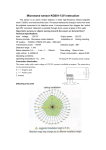
SAE-UE-MS-CSAWE is a ceiling flush mount or surface mount
both applicable for indoor or outdoor application which is ideal for
use in office, conference room, hotel, home, etc. With its knobs,
the time and Lux value can be adjusted as user desired to match
different requirements for switching light on and off.
FIG.10-B
Push button
(N.C. Type)
L
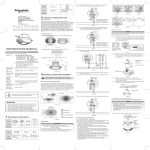
3.1 Proper Location
Side view
2.1 Features
Load
Section area for cable entry:
ȸ8mm
N N
N
Please disconnect power completely and read the
entire instruction manual carefully before installation.
3.1.1 It is recommended to install at the height of 2.5m to
gain the optimal detection pattern. The detection range
can reach up to 7m diameter with a 360º detection angle
(See FIG.2).
2 PRODUCT DESCRIPTION
230V~ŗ10% 50/60Hz
L
N
Push button
(N.O. Type)
3 INSTALLATION AND WIRING
Rubber
washer
CAT. NO.
SAE-UE-MS-CSAWE
Rated Voltage
L
FIG.4-A
Load
Pattern
TECHNICAL SPECIFICATIONS
Small knock-outs are used: Ȝ8mm (See FIG.10-B);
Staircase timer switch
W
ȸ55
Load
Push button
(N.C. Type)
FIG.9
Knock-outs on protection cap of terminals are for cables
entry. Please refer to following illustration for application.
N
L
FIG.6
No knock-outs are used: Ȝ2mm (See FIG.10-A);
FIG.12
ȸ111.5
FIG.1-B
Section area for cable entry:
ȸ2 mm
FIG.10-A
Pull out cables from European standard junction box
(See FIG.13), then strip off 6 - 8mm of cable sheathing
for wiring (See FIG.5 - FIG.7).
To feed cables through the side of junction box, please use the
cutting pliers to break the cable entry knock-outs on the side of
junction box, then insert cables into junction box and feed through
it. Strip off 6 - 8mm of cable sheathing for wiring (See FIG.16).
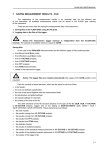
4 OPERATION
Test procedure
4.1 Lux, Time knob
Follow the marked values to adjust Lux & Time knobs
according to user's requirement (See FIG.20).
6 - 8mm
6 - 8mm
Lux
Time
300
5min
100
FIG.13
Turn the decorative frame of detector anti-clockwise
with proper strength, then insert two screws into the
knock-outs on top cover and screw the detector on
European standard junction box (See FIG.14).
5sec
10
Cable entry
knock-out
Choose proper knock-outs to fix the junction box on the surface
of ceiling board with two wood screws attached with rubber
washer (See FIG.17).
Rubber
washer
80
70
63
60
53
Test
2000
41
4.3 Usage of Lens Shield
4.1.1 Lux knob setting
Lux value is adjustable from approx. 10Lux to
2000Lux.
Set Lux knob at the position of 10Lux, detector can
work at dark status only.
Set Lux knob at the position of 2000Lux, detector can
be triggered almost at any light level.
4.3.1 SAE-UE-MS-CSAWE has provided 2 lens shields for
masking the undesired detection area. Each lens shield has
2 layers, each layer includes 6 small pieces shield and
each small piece shield can cover 30º detection area. For
example, to install the detector at the height of 2.5m, the
detection range can reach up to 1m diameter if the
complete lens shields has been used; and up to 3m
diameter if only the A layer of lens shield has been used
(See FIG.23-A & FIG.23-B).
4.1.2 Time knob setting
Time: Adjustable from 5secs to 20mins.
Test : walk test operation (2secs on / 2secs off).
: Short impulse for staircase timer switch control (1sec on,
1s
9secs off).
41
53
80
60
70
85
FIG.17
A
B
Cover up the decorative frame and restore power supply.
3.3.3 Surface mount
NOTE
The protection cap of terminals and spring clip are not
needed to be used when the detector is surface mounted.
Take off detector's two spring clips (See FIG.12), turn he
decorative frame of detector anti-clockwise with proper strength,
then insert the 4 non-dropping screw to the corresponding screw
holes on detector's front cover. Afterwards, those 4 screws will
not drop off to provide conveniences to the subsequent
installations (See FIG.18).
Non-dropping
screw
Non-dropping
screw
Time
5m
5s
10m
Test
20m
There are 7 pairs of knock-outs with various distances from
41mm to 85mm on the bottom cover of the combined junction
box off step these pairs of knock-outs can be selected for
different mounting applications (See FIG.15-A). Select the two
same figures (41,53,60,,,) on both sides (A and B).
30
85
70
60
85
80
70
60
80
B
63
53
41
63
53
41
41
53
41
63
60
70
53
63
85
80
80
60
70
85
4.2.1 LED function & reaction
B
The distance
between A and B
1
41
41
41mm
2
53
53
53mm
3
60
60
60mm
4
5
63
70
63
70
63mm
6
80
80
80mm
7
85
85
85mm
FIG.15-B
o
ȸ3m
ȸ7m
FIG.23-B
4.3.2 After user choosing the desired detection area, the
redundant lens shield should be eliminated.
4.3.3 Fixing lens shield: There is a circular groove on the back
of the decorative frame and the lens shield is designed
with a circular hook. The lens shield can be fitted by
inserting the hook of lens shield into its correspondent
groove on the decorative frame (See FIG.24 & FIG.25).
4.Malfunctioned
load.
Lighting
device
does not
turn off
The red LED of SAE-UE-MS-CSAWE is behind the lens
(See FIG.21) for test mode indication. In walk test, LED will
turn on for 2secs once the detector is triggered. If detector
is continuously triggered, the red LED will require an
interval time of 2secs to turn on again. With the above said
LED function, the load doesn’t need to be connected while
conducting walk test.
2 LED functions is an indicator only in warming up period
and test mode.
1.Auto off time is set
too long.
2. Detector is
nuisance
triggered.
ȸ1m
A layer of the lens shield is used.
3. Wired incorrectly.
Circular
groove
FIG.24
LED does 1. Time knob is not
not turn
set to "Test".
on
LED
FIG.18
Refer to wiring diagrams for correct wiring connection See FIG.5
- FIG.7).
There is a "ȋ" symbol on the side of the surface of junction box,
the housing of SAE-UE-MS-CSAWE and the decorative frame
respectively for position verified convenience. Keep the "ȋ"
symbol on the junction box and detector's front cover in line to
assemble them with the attached 4 non-dropping screws, then
cover up the detector's decorative frame (See FIG.19) and turn it
to be tight.
FIG.15-A
A
1.Switch on the power.
2.No power supplied.
3.Wired incorrectly.
Knock-outs
NO.
SUGGESTED SOLUTION
1.Power does not
turn on.
2.Wired incorrectly.
3. The ambient light
level is too high.
ȸ3m
Knock-outs
A
POSSIBLE CAUSE
Lighting
device
does not
turn on
Circular
hook
4.2 Test mode (Uncontrolled by Lux)
FIG.14
PROBLEM
1s
The whole lens shield is used.
63
When SAE-UE-MS-CSAWE works abnormally, please check
assumptive problems and suggested solutions in following table
that will hopefully to solve your problems.
20min
FIG. 20
FIG.16
85
10min
5 TROU BLE SHO OTING
Part of the lens shield is used.
1.Tester must be within the detector coverage.
2.Switch power on.
3.Detector takes approx. 60secs to warm up with load
and LED on, then turn off after warm up time.
4.Walk from outside across to the detection pattern
until LED turns on for approx. 2secs indicating the
movement has been detected (See FIG.22).
5.Repeat step 4 to conduct walk test until the detection
pattern meets user's demands.
Part of the lens shield is used.
4.2.2 Walk test
FIG.25
The purpose of conducting walk test is to check and adjust
detection coverage. Set Time knob to "Test", then conduct a walk
test. Lux control is disabled during the walk test.
NOTE
It takes approx. 60secs for detector to warm up after power is
supplied for the first time or re-supplied after shut off, then
enters into normal operation mode to carry out a walk test.
ȸ1m
30 o
Assembly completed
FIG.23-A
70mm
FIG.22
FIG.19
Nuisance
triggering
FIG.21
ȸ3m
ȸ7m
There are heat
sources, highly
reflective objects or
any objects which
may be swayed in the
wind within the
detection coverage.
2.Refer to wiring
diagrams (FIG.5 FIG.7) and check if
the load is malfunctioned.
3. Set Lux value above
the ambient light
level then trigger the
detector and check
the load is switched
on or not.
4.Replace the disabled
load with a new one.
1.Set auto off time to a
shorter time and
check the load is
switched off or not
according to the preset off time.
2.Keep away from
detection coverage
to avoid activating
detector while doing
the test.
3.Make sure load and
wires are connected
correctly.
1.Set Time knob to
"Test", LED acts as
an indicator only in
warming up period
and test mode.
2.Switch on the power.
3.Refer to wiring
diagrams (FIG.5 FIG.7).
Avoid aiming the
detector toward any
heat sources, such as
air conditioners,
electric fans, heaters
or any highly reflective
surfaces. Make sure
there are no swaying
objects within the
detection coverage.