1
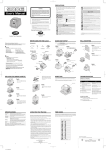
SETTING THE PRINT METHOD
Example: Change the print direction to "Left" and the print activation to "Manual".
Print
direction
Print
activation
PRINT DIRECTION
PRINT ACTIVATION
SELECT
CHANGE
SET
Step 1
Press the SELECT button and position the
" " mark at the "PRINT DIRECTION;
PRINT ACTIVATION".
At that moment, the flashing digit at the
left indicates "Order Options" of the print
direction. (The flashing means it can be
changed.)
Change the "Print Direction".
Order Options
1.
Right
2.
Left
PRINT DIRECTION
PRINT ACTIVATION
SELECT
14
CHANGE
SET
In case of the example, press the
CHANGE button to set at "2". And then
press the SET button.
At that moment, the flashing changes
from the "Print Direction" to the "Print
Activation".