1
VT1040_IFU_EN.book
5.3
Page 18
Tuesday, October 19, 2010
11:37 AM
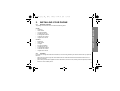
View a Phonebook Entry
In idle:
O to access the phonebook.
+/- to select the desired phonebook entry.
Press M and +/- to select VIEW.
Press M and +/- to review the name, number and melody of the selected phonebook entry.
1. Press
2. Press
3.
4.
5.4
Private phonebook
Note:
If number is more than 12 digits, press
M or C to view the remaining digits.
Edit a Phonebook Entry
In idle:
O to access the phonebook.
+/- to select the desired phonebook entry.
Press M and +/- to select EDIT.
Press M and the current contents of the selected phonebook entry displays.
Edit the name and press M.
Edit the number and press M.
Press +/- to select the melody and press M to confirm.
1. Press
2. Press
3.
4.
5.
6.
7.
5.5
Delete a Phonebook Entry
In idle:
O to access the phonebook.
+/- to select the desired phonebook entry.
Press M and +/- to select DELETE.
Press M to confirm.
1. Press
2. Press
3.
4.
18