1
Series 260A User's Manual
Process Current Loop-Powered
Alarm
___________________________________________________________________________________________
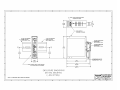
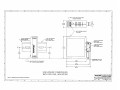
NEMA 4 & 12 Enclosure Mounting: Secure the enclosure
assembly to the designated mounting surface using appropriate
hardware. The alarm is secured within this enclosure using two
screws. Note: It is recommended that the alarm be removed
from the enclosure during the process of drilling holes, installing
fittings and mounting the enclosure.
Instrument Housing Mounting: Secure the enclosure
assembly to the designated mounting position using
appropriate hardware. Note: It is recommended that the alarm
be removed from the enclosure during the process of mounting
the enclosure. To remove the unit from the enclosure, remove
two screws securing it to the bottom of the enclosure. After the
enclosure is installed, reinstall the alarm into the enclosure.
Position the unit at an angle that permits all wiring to be routed
unobstructed through both ports. Secure the alarm assembly to
the enclosure using two screws.
Alarm - DIP Switch Configuration Procedure:
The Loop-Alarm is quite universal in that it can be configured as
a High (HI) or Low (LO) failsafe alarm, for six values of deadband
(hysteresis), and for latching or auto-reset operation. Before the
adjustment procedure can proceed, the DIP switches must be
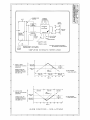
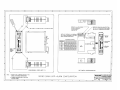
configured to the requirements of the application (refer to Drawing
4501-115 for details). To gain access to the DIP switches, first
remove the alarm from the installation. Second, open the plastic
case to get access to the DIP switches. Third, configure the DIP
switches as described in the DIP switch Configuration procedure
below. Fourth, install the circuit board into the plastic enclosure as
described in the Assembly Procedure.
Disassembly Procedure for the 260A Plastic Housing:
The plastic housing has no screws, it "snaps" together. A flathead screwdriver (Acromag 5021-216 or equivalent) is needed to
pry the housing apart as described in the following steps.
Electrical Connections:
The wire size used to connect the unit to the control system is
not critical. All terminal strips can accommodate wire from 14-26
AWG. Strip back wire insulation 1/4-inch on each lead before
installing into the terminal block. Input wiring may be shielded or
unshielded twisted pair. Since common mode voltages can exist on
signal wiring, adequate wire insulation should be used and proper
wiring practices followed. It is recommended that input wiring be
separated from alarm contact wiring for safety, as well as for low
noise pickup.
CAUTION: Do not push the screwdriver blade into the housing
more than approximately 0.1 inches while prying it apart. Handling
of the printed circuit board should only be done at a static-free
workstation, otherwise damage to the electronics could result.
1. To begin disassembly (refer to Drawing 4501-115) place the
screwdriver at point A (left side of the alarm). While pressing
the blade into the seam, use a twisting motion to separate the
sides slightly. Repeat this operation at point B.
2. Now that the two pieces have been partially separated, use the
screwdriver blade to work the left side of the package loose by
working around the alarm and carefully prying the sides further
apart. Repeat this action until it is easy to remove the left side
from the plastic pins holding the pieces together.
3. Repeat this operation for the right side starting at points C
and D.
1. Input: Connect input per connection diagram, observe proper
polarity. Note: Input/Output circuits are isolated from each other
allowing the output circuit to operate with common mode
voltages up to 250V AC, or 354V DC, off ground on a
continuous basis. Power to operate the unit is derived from the
input signal current--no external power supply is required. The
alarm has an input voltage drop of 4.5V DC at 20mA. When a
signal alarm is installed, it is always important to consider the
voltage drop or additional line resistance that will be placed in
the system. Any additional load tends to reduce the line or drive
potential and may exceed the source rating. The effect of
voltage drop within the system must be calculated to ensure that
drive capability is not exceeded.
2. Output: Wire contacts as shown in Connection Drawing
4501-113 (see label on unit for relay type and contact rating).
3. Grounding: The alarm is packaged in a General Purpose
plastic housing and does not require an earth ground
connection. If the alarm is mounted in a metal housing, a
ground wire connection is required. In this case, connect the
ground terminal (Green Screw) to earth ground using suitable
wire per applicable codes.
DIP Switch Configuration:
1. High (HI) or Low (LO) Alarm action: DIP Switch S2. Set S2 to
C1 for Low alarm, or set S2 to C2 for High alarm. Refer to
Drawing 4501-115 for a graphical representation of each.
Refer to table of Drawing 4501-115 for proper switch positions.
2. Deadband (Hysteresis): DIP Switch S1, positions 2-6. The
deadband can be set to 0.5, 1, 2, 4, 8, or 16 percent of input
span and must be configured when the alarm is going to be
used in the Auto-Reset Mode (non-latching). Deadband is
0.5% with all switches OFF. DIP Switch S1, positions 2 through
6 individually select 1, 2, 4, 8, or 16 percent deadband. If the
alarm is configured for the Latching Mode, configure the
deadband for 0.5%. Refer to table of Drawing 4501-115 for
proper switch positions.
IMPORTANT: Noise and/or jitter on the input signal has the
effect of reducing (narrowing) the instrument's deadband and
may produce contact chatter. To reduce this undesired effect,
increase the deadband setting.
3. Alarm Latch Enable: DIP Switch - S1, position 1. Set to OFF for
Automatic Reset (Non-Latching), or ON for Latching. Refer to
table of Drawing 4501-115 for proper switch positions.
Note: The push button on the front of the module can also
lockout the latch action by pushing down and turning this button
to lock it in its depressed state.
CALIBRATION:
This section provides information for unit configuration and
calibration. If the unit was factory calibrated, the DIP switches have
already been placed in their proper positions and verification of the
calibration can be made per the Adjustment Procedure. If the
calibration of the unit is to be changed, first go to the "DIP Switch
Configuration Procedure" below, before proceeding with the Alarm
Adjustment Procedure.
-4-