1
Getting Connected
2.4. Disconnect Your LaCie USB Key
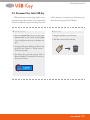
USB external devices feature “plug & play” connectivity, which means that your drive can be connected and
disconnected while the computer is running. To prevent
failures, however, it is important you follow these steps
when disconnecting your LaCie USB Key.
■ Windows Users
■ Mac Users
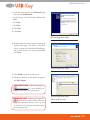
1. From the System Tray (located in the lower
right-hand side of your screen), click the Eject
icon (a small green arrow over a hardware image).
1. Drag the hard drive icon to the trash.
2. The drive can now be disconnected.
2. A message will appear, detailing the devices that
the Eject icon controls, i.e. “Safely remove...”.
Click on this prompt.
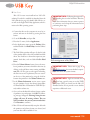
3. You will be then given this message: “Safe to
Remove Hardware” (or similar). It is now safe to
disconnect the device.
user manual | 10