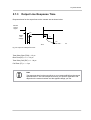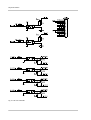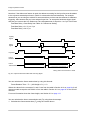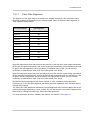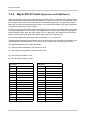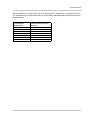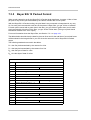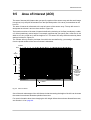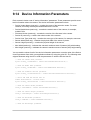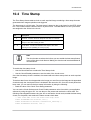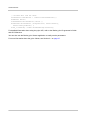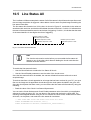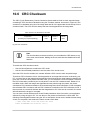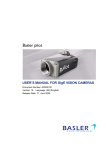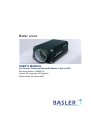
1
Basler scout USER’S MANUAL (for Scout-f Cameras Used with Basler’s Pylon API) Document Number: AW000125 Version: 09 Language: 000 (English) Release Date: 22 August 2008 For customers in the U.S.A. This equipment has been tested and found to comply with the limits for a Class A digital device, pursuant to Part 15 of the FCC Rules. These limits are designed to provide reasonable protection against harmful interference when the equipment is operated in a commercial environment. This equipment generates, uses, and can radiate radio frequency energy and, if not installed and used in accordance with the instruction manual, may cause harmful interference to radio communications. Operation of this equipment in a residential area is likely to cause harmful interference in which case the user will be required to correct the interference at his own expense. You are cautioned that any changes or modifications not expressly approved in this manual could void your authority to operate this equipment. The shielded interface cable recommended in this manual must be used with this equipment in order to comply with the limits for a computing device pursuant to Subpart J of Part 15 of FCC Rules. For customers in Canada This apparatus complies with the Class A limits for radio noise emissions set out in Radio Interference Regulations. Pour utilisateurs au Canada Cet appareil est conforme aux normes Classe A pour bruits radioélectriques, spécifiées dans le Règlement sur le brouillage radioélectrique. Life Support Applications These products are not designed for use in life support appliances, devices, or systems where malfunction of these products can reasonably be expected to result in personal injury. Basler customers using or selling these products for use in such applications do so at their own risk and agree to fully indemnify Basler for any damages resulting from such improper use or sale. Warranty Note Do not open the housing of the camera. The warranty becomes void if the housing is opened. All material in this publication is subject to change without notice and is copyright Basler Vision Technologies. Contacting Basler Support Worldwide Europe: Basler AG An der Strusbek 60 - 62 22926 Ahrensburg Germany Tel.: +49-4102-463-500 Fax.: +49-4102-463-599 [email protected] Americas: Basler, Inc. 855 Springdale Drive, Suite 160 Exton, PA 19341 U.S.A. Tel.: +1-877-934-8472 Fax.: +1-610-280-7608 [email protected] Asia: Basler Asia Pte. Ltd 8 Boon Lay Way # 03 - 03 Tradehub 21 Singapore 609964 Tel.: +65-6425-0472 Fax.: +65-6425-0473 [email protected] www.baslerweb.com Table of Contents Table of Contents 1 Specifications, Requirements, and Precautions . . . . . . . . . . . . . . . . . . . . . . . 1 1.1 Models . . . . . . . . . . . . . . . . . . . . . . . . . . . . . . . . . . . . . . . . . . . . . . . . . . . . . . . . . . . . . . 1 1.2 General Specifications . . . . . . . . . . . . . . . . . . . . . . . . . . . . . . . . . . . . . . . . . . . . . . . . . . 2 1.3 Spectral Response for Mono Cameras. . . . . . . . . . . . . . . . . . . . . . . . . . . . . . . . . . . . . 10 1.4 Spectral Response for Color Cameras . . . . . . . . . . . . . . . . . . . . . . . . . . . . . . . . . . . . . 15 1.5 Mechanical Specifications . . . . . . . . . . . . . . . . . . . . . . . . . . . . . . . . . . . . . . . . . . . . . . 1.5.1 Standard Housing . . . . . . . . . . . . . . . . . . . . . . . . . . . . . . . . . . . . . . . . . . . . . . 1.5.1.1 Camera Dimensions and Mounting Points . . . . . . . . . . . . . . . . . . . 1.5.1.2 Sensor Positioning Accuracy . . . . . . . . . . . . . . . . . . . . . . . . . . . . . . 1.5.2 90° Head Housing . . . . . . . . . . . . . . . . . . . . . . . . . . . . . . . . . . . . . . . . . . . . . . 1.5.2.1 Camera Dimensions and Mounting Points . . . . . . . . . . . . . . . . . . . 1.5.2.2 Sensor Positioning Accuracy . . . . . . . . . . . . . . . . . . . . . . . . . . . . . . 1.5.3 Maximum Thread Length on Color Cameras . . . . . . . . . . . . . . . . . . . . . . . . . . 1.5.4 Mechanical Stress Test Results . . . . . . . . . . . . . . . . . . . . . . . . . . . . . . . . . . . 1.6 Software Licensing Information . . . . . . . . . . . . . . . . . . . . . . . . . . . . . . . . . . . . . . . . . . 30 1.7 Avoiding EMI and ESD Problems . . . . . . . . . . . . . . . . . . . . . . . . . . . . . . . . . . . . . . . . . 31 1.8 Environmental Requirements . . . . . . . . . . . . . . . . . . . . . . . . . . . . . . . . . . . . . . . . . . . . 32 1.8.1 Temperature and Humidity. . . . . . . . . . . . . . . . . . . . . . . . . . . . . . . . . . . . . . . . 32 1.8.2 Ventilation . . . . . . . . . . . . . . . . . . . . . . . . . . . . . . . . . . . . . . . . . . . . . . . . . . . . 32 1.9 Precautions. . . . . . . . . . . . . . . . . . . . . . . . . . . . . . . . . . . . . . . . . . . . . . . . . . . . . . . . . . 33 20 20 20 23 25 25 27 28 29 2 Software and Hardware Installation . . . . . . . . . . . . . . . . . . . . . . . . . . . . . . . . 35 3 Tools for Changing Camera Parameters . . . . . . . . . . . . . . . . . . . . . . . . . . . . 37 3.1 The pylon Viewer . . . . . . . . . . . . . . . . . . . . . . . . . . . . . . . . . . . . . . . . . . . . . . . . . . . . . 37 3.2 The pylon API . . . . . . . . . . . . . . . . . . . . . . . . . . . . . . . . . . . . . . . . . . . . . . . . . . . . . . . . 37 4 Functional Description . . . . . . . . . . . . . . . . . . . . . . . . . . . . . . . . . . . . . . . . . . . 39 4.1 Overview (All Models Except scA750-60). . . . . . . . . . . . . . . . . . . . . . . . . . . . . . . . . . . 39 4.2 Overview (scA750-60 Only) . . . . . . . . . . . . . . . . . . . . . . . . . . . . . . . . . . . . . . . . . . . . . 41 5 Physical Interface . . . . . . . . . . . . . . . . . . . . . . . . . . . . . . . . . . . . . . . . . . . . . . . 43 5.1 General Description of the Connections . . . . . . . . . . . . . . . . . . . . . . . . . . . . . . . . . . . . 43 5.2 Connector Pin Assignments and Numbering . . . . . . . . . . . . . . . . . . . . . . . . . . . . . . . . 5.2.1 IEEE 1394b Socket Pin Assignments . . . . . . . . . . . . . . . . . . . . . . . . . . . . . . . 5.2.2 12-pin Receptacle Pin Assignments . . . . . . . . . . . . . . . . . . . . . . . . . . . . . . . . 5.2.3 Pin Numbering . . . . . . . . . . . . . . . . . . . . . . . . . . . . . . . . . . . . . . . . . . . . . . . . . 5.3 Connector Types . . . . . . . . . . . . . . . . . . . . . . . . . . . . . . . . . . . . . . . . . . . . . . . . . . . . . 46 5.3.1 IEEE 1394b Connector . . . . . . . . . . . . . . . . . . . . . . . . . . . . . . . . . . . . . . . . . . 46 5.3.2 12-pin Connector . . . . . . . . . . . . . . . . . . . . . . . . . . . . . . . . . . . . . . . . . . . . . . . 46 Basler scout 44 44 45 45 i Table of Contents 5.4 Cabling Requirements . . . . . . . . . . . . . . . . . . . . . . . . . . . . . . . . . . . . . . . . . . . . . . . . . 5.4.1 IEEE 1394b Cable . . . . . . . . . . . . . . . . . . . . . . . . . . . . . . . . . . . . . . . . . . . . . . 5.4.2 Standard I/O Cable . . . . . . . . . . . . . . . . . . . . . . . . . . . . . . . . . . . . . . . . . . . . . 5.4.3 PLC I/O Cable . . . . . . . . . . . . . . . . . . . . . . . . . . . . . . . . . . . . . . . . . . . . . . . . . 47 47 47 49 5.5 IEEE 1394b Device Information . . . . . . . . . . . . . . . . . . . . . . . . . . . . . . . . . . . . . . . . . . 49 5.6 Camera Power . . . . . . . . . . . . . . . . . . . . . . . . . . . . . . . . . . . . . . . . . . . . . . . . . . . . . . . 50 5.7 Input and Output Lines . . . . . . . . . . . . . . . . . . . . . . . . . . . . . . . . . . . . . . . . . . . . . . . . . 5.7.1 Input Lines . . . . . . . . . . . . . . . . . . . . . . . . . . . . . . . . . . . . . . . . . . . . . . . . . . . . 5.7.1.1 Voltage Requirements. . . . . . . . . . . . . . . . . . . . . . . . . . . . . . . . . . . 5.7.1.2 Line Schematic . . . . . . . . . . . . . . . . . . . . . . . . . . . . . . . . . . . . . . . . 5.7.2 Output Lines. . . . . . . . . . . . . . . . . . . . . . . . . . . . . . . . . . . . . . . . . . . . . . . . . . . 5.7.2.1 Voltage Requirements. . . . . . . . . . . . . . . . . . . . . . . . . . . . . . . . . . . 5.7.2.2 Line Schematic . . . . . . . . . . . . . . . . . . . . . . . . . . . . . . . . . . . . . . . . 5.7.3 Output Line Response Time . . . . . . . . . . . . . . . . . . . . . . . . . . . . . . . . . . . . . . 51 51 51 53 54 54 54 57 6 Image Acquisition Control . . . . . . . . . . . . . . . . . . . . . . . . . . . . . . . . . . . . . . . . 59 6.1 Controlling Image Acquisition with Parameters Only (No Triggering) . . . . . . . . . . . . . 6.1.1 Switching Off Triggering. . . . . . . . . . . . . . . . . . . . . . . . . . . . . . . . . . . . . . . . . . 6.1.2 Acquiring One Image at a Time . . . . . . . . . . . . . . . . . . . . . . . . . . . . . . . . . . . . 6.1.3 Acquiring Images Continuously (Free-run) . . . . . . . . . . . . . . . . . . . . . . . . . . . 59 59 60 60 6.2 Controlling Image Acquisition with a Software Trigger . . . . . . . . . . . . . . . . . . . . . . . . . 6.2.1 Enabling the Software Trigger Feature . . . . . . . . . . . . . . . . . . . . . . . . . . . . . . 6.2.2 Acquiring a Single Image by Applying One Software Trigger . . . . . . . . . . . . . 6.2.3 Acquiring Images by Applying a Series of Software Triggers . . . . . . . . . . . . . 62 62 63 64 6.3 Controlling Image Acquisition with a Hardware Trigger . . . . . . . . . . . . . . . . . . . . . . . . 6.3.1 Exposure Modes . . . . . . . . . . . . . . . . . . . . . . . . . . . . . . . . . . . . . . . . . . . . . . . 6.3.2 Setting the Camera for Hardware Triggering . . . . . . . . . . . . . . . . . . . . . . . . . . 6.3.3 Acquiring a Single Image by Applying One Hardware Trigger Transition . . . . 6.3.4 Acquiring Images by Applying a Series of Hardware Trigger Transitions . . . . 66 67 69 70 71 6.4 Exposure Time Parameters . . . . . . . . . . . . . . . . . . . . . . . . . . . . . . . . . . . . . . . . . . . . . 73 6.4.1 Setting the Exposure Time Using "Raw" Settings . . . . . . . . . . . . . . . . . . . . . . 74 6.4.2 Setting the Exposure Time Using "Absolute" Settings. . . . . . . . . . . . . . . . . . . 76 6.5 Overlapping Exposure and Sensor Readout (All Models Except scA750-60) . . . . . . . 77 6.5.1 Guidelines for Overlapped Operation . . . . . . . . . . . . . . . . . . . . . . . . . . . . . . . 78 6.6 Exposure Must Not Overlap Sensor Readout (scA750-60 Only) . . . . . . . . . . . . . . . . . 79 6.7 Trigger Ready Signal . . . . . . . . . . . . . . . . . . . . . . . . . . . . . . . . . . . . . . . . . . . . . . . . . . 80 6.7.1 Trigger Ready Signal (All Models Except scA750-60) . . . . . . . . . . . . . . . . . . . 80 6.7.2 Trigger Ready Signal (scA750-60 Only) . . . . . . . . . . . . . . . . . . . . . . . . . . . . . 82 6.8 Exposure Active Signal. . . . . . . . . . . . . . . . . . . . . . . . . . . . . . . . . . . . . . . . . . . . . . . . . 84 6.9 Acquisition Timing Chart. . . . . . . . . . . . . . . . . . . . . . . . . . . . . . . . . . . . . . . . . . . . . . . . 85 6.10 Maximum Allowed Acquisition Frame Rate (All Models Except scA750-60) . . . . . . . . 88 6.10.1 Effect of the Packet Size Setting on the Maximum Allowed Frame Rate . . . . 91 6.11 Maximum Allowed Acquisition Frame Rate (scA750-60 Only) . . . . . . . . . . . . . . . . . . . 93 6.11.1 Effect of the Packet Size Setting on the Maximum Allowed Frame Rate . . . . 96 ii Basler scout Table of Contents 7 Pixel Data Formats . . . . . . . . . . . . . . . . . . . . . . . . . . . . . . . . . . . . . . . . . . . . . . 97 7.1 Setting the Pixel Data Format. . . . . . . . . . . . . . . . . . . . . . . . . . . . . . . . . . . . . . . . . . . . 97 7.2 Pixel Data Formats for Mono Cameras . . . . . . . . . . . . . . . . . . . . . . . . . . . . . . . . . . . . 99 7.2.1 Mono 8 Format (Equivalent to DCAM Mono 8) . . . . . . . . . . . . . . . . . . . . . . . . 99 7.2.2 Mono 16 Format (Equivalent to DCAM Mono 16) . . . . . . . . . . . . . . . . . . . . . 101 7.2.3 Mono 12 Packed Format . . . . . . . . . . . . . . . . . . . . . . . . . . . . . . . . . . . . . . . . 103 7.2.4 YUV 4:2:2 Packed Format (Equivalent to DCAM YUV 4:2:2) . . . . . . . . . . . . 105 7.2.5 YUV 4:2:2 (YUYV) Packed Format . . . . . . . . . . . . . . . . . . . . . . . . . . . . . . . . 105 7.3 Pixel Data Output Formats for Color Cameras . . . . . . . . . . . . . . . . . . . . . . . . . . . . . . 7.3.1 The Bayer Color Filter . . . . . . . . . . . . . . . . . . . . . . . . . . . . . . . . . . . . . . . . . . 7.3.1.1 Color Filter Alignment . . . . . . . . . . . . . . . . . . . . . . . . . . . . . . . . . . 7.3.2 Bayer BG 8 Format (Equivalent to DCAM Raw 8) . . . . . . . . . . . . . . . . . . . . . 7.3.3 Bayer RG 8 Format (Equivalent to DCAM Raw 8) . . . . . . . . . . . . . . . . . . . . . 7.3.4 Bayer BG 16 Format (Equivalent to DCAM Raw 16) . . . . . . . . . . . . . . . . . . . 7.3.5 Bayer BG 12 Packed Format . . . . . . . . . . . . . . . . . . . . . . . . . . . . . . . . . . . . . 7.3.6 YUV 4:2:2 Packed Format (Equivalent to DCAM YUV 4:2:2) . . . . . . . . . . . . 7.3.7 YUV 4:2:2 (YUYV) Packed Format . . . . . . . . . . . . . . . . . . . . . . . . . . . . . . . . 7.3.8 Mono 8 Format (Equivalent to DCAM Mono 8) . . . . . . . . . . . . . . . . . . . . . . . 7.4 Pixel Transmission Sequence . . . . . . . . . . . . . . . . . . . . . . . . . . . . . . . . . . . . . . . . . . 123 106 106 107 108 110 112 114 116 119 121 8 I/O Control . . . . . . . . . . . . . . . . . . . . . . . . . . . . . . . . . . . . . . . . . . . . . . . . . . . . 125 8.1 Configuring Input Lines. . . . . . . . . . . . . . . . . . . . . . . . . . . . . . . . . . . . . . . . . . . . . . . . 125 8.1.1 Assigning an Input Line to Receive a Hardware Trigger Signal. . . . . . . . . . . 125 8.1.2 Using an Unassigned Input Line to Receive a User Input Signal. . . . . . . . . . 126 8.2 Configuring Output Lines . . . . . . . . . . . . . . . . . . . . . . . . . . . . . . . . . . . . . . . . . . . . . . 8.2.1 Assigning a Camera Output Signal to a Physical Output Line . . . . . . . . . . . . 8.2.2 Setting the State of User Settable Output Lines . . . . . . . . . . . . . . . . . . . . . . 8.2.3 Setting an Output Line for Invert . . . . . . . . . . . . . . . . . . . . . . . . . . . . . . . . . . 8.2.4 Working with Timers. . . . . . . . . . . . . . . . . . . . . . . . . . . . . . . . . . . . . . . . . . . . 8.2.4.1 Setting the Trigger Source for a Timer . . . . . . . . . . . . . . . . . . . . . 8.2.4.2 Setting a Timer Delay Time . . . . . . . . . . . . . . . . . . . . . . . . . . . . . . 8.2.4.3 Setting a Timer Duration Time. . . . . . . . . . . . . . . . . . . . . . . . . . . . 8.3 Checking the State of the I/O Lines . . . . . . . . . . . . . . . . . . . . . . . . . . . . . . . . . . . . . . 135 8.3.1 Checking the State of a Single Output Line . . . . . . . . . . . . . . . . . . . . . . . . . . 135 8.3.2 Checking the State of All Lines . . . . . . . . . . . . . . . . . . . . . . . . . . . . . . . . . . . 135 127 127 128 129 130 130 131 133 9 Standard Features . . . . . . . . . . . . . . . . . . . . . . . . . . . . . . . . . . . . . . . . . . . . . 137 9.1 Gain . . . . . . . . . . . . . . . . . . . . . . . . . . . . . . . . . . . . . . . . . . . . . . . . . . . . . . . . . . . . . . 137 9.2 Black Level . . . . . . . . . . . . . . . . . . . . . . . . . . . . . . . . . . . . . . . . . . . . . . . . . . . . . . . . . 143 9.3 White Balance (on Color Models) . . . . . . . . . . . . . . . . . . . . . . . . . . . . . . . . . . . . . . . . 145 9.4 Integrated IR Cut Filter (on Color Models) . . . . . . . . . . . . . . . . . . . . . . . . . . . . . . . . . 146 9.5 Area of Interest (AOI) . . . . . . . . . . . . . . . . . . . . . . . . . . . . . . . . . . . . . . . . . . . . . . . . . 147 9.5.1 Changing AOI Parameters "On-the-Fly" . . . . . . . . . . . . . . . . . . . . . . . . . . . . 149 9.6 Binning (All Models Except scA750-60) . . . . . . . . . . . . . . . . . . . . . . . . . . . . . . . . . . . 150 9.6.1 Considerations When Using Binning . . . . . . . . . . . . . . . . . . . . . . . . . . . . . . . 152 Basler scout iii Table of Contents 9.7 Luminance Lookup Table . . . . . . . . . . . . . . . . . . . . . . . . . . . . . . . . . . . . . . . . . . . . . . 154 9.7.1 Lookup Table (All Models Except scA750-60) . . . . . . . . . . . . . . . . . . . . . . . . 154 9.7.2 Lookup Table (scA750-60 Only) . . . . . . . . . . . . . . . . . . . . . . . . . . . . . . . . . . 157 9.8 Gamma. . . . . . . . . . . . . . . . . . . . . . . . . . . . . . . . . . . . . . . . . . . . . . . . . . . . . . . . . . . . 160 9.9 Auto Functions . . . . . . . . . . . . . . . . . . . . . . . . . . . . . . . . . . . . . . . . . . . . . . . . . . . . . . 9.9.1 Common Characteristics . . . . . . . . . . . . . . . . . . . . . . . . . . . . . . . . . . . . . . . . 9.9.1.1 Modes of Operation. . . . . . . . . . . . . . . . . . . . . . . . . . . . . . . . . . . . 9.9.1.2 Auto Function AOI . . . . . . . . . . . . . . . . . . . . . . . . . . . . . . . . . . . . . 9.9.1.3 Using an Auto Function . . . . . . . . . . . . . . . . . . . . . . . . . . . . . . . . . 9.9.2 Gain Auto . . . . . . . . . . . . . . . . . . . . . . . . . . . . . . . . . . . . . . . . . . . . . . . . . . . . 9.9.3 Exposure Auto . . . . . . . . . . . . . . . . . . . . . . . . . . . . . . . . . . . . . . . . . . . . . . . . 9.9.4 Balance White Auto . . . . . . . . . . . . . . . . . . . . . . . . . . . . . . . . . . . . . . . . . . . . 161 161 162 163 167 168 170 172 9.10 Disable Parameter Limits . . . . . . . . . . . . . . . . . . . . . . . . . . . . . . . . . . . . . . . . . . . . . . 174 9.11 Debouncer . . . . . . . . . . . . . . . . . . . . . . . . . . . . . . . . . . . . . . . . . . . . . . . . . . . . . . . . . 175 9.12 Event Reporting . . . . . . . . . . . . . . . . . . . . . . . . . . . . . . . . . . . . . . . . . . . . . . . . . . . . . 177 9.13 Test Images . . . . . . . . . . . . . . . . . . . . . . . . . . . . . . . . . . . . . . . . . . . . . . . . . . . . . . . . 179 9.14 Device Information Parameters . . . . . . . . . . . . . . . . . . . . . . . . . . . . . . . . . . . . . . . . . 183 9.15 Configuration Sets . . . . . . . . . . . . . . . . . . . . . . . . . . . . . . . . . . . . . . . . . . . . . . . . . . . 9.15.1 Saving Configuration Sets . . . . . . . . . . . . . . . . . . . . . . . . . . . . . . . . . . . . . . . 9.15.2 Loading a Saved Set or the Default Set into the Active Set. . . . . . . . . . . . . . 9.15.3 Selecting the Default Startup Set. . . . . . . . . . . . . . . . . . . . . . . . . . . . . . . . . . 185 186 187 187 10 Chunk Features . . . . . . . . . . . . . . . . . . . . . . . . . . . . . . . . . . . . . . . . . . . . . . . . 189 10.1 What are Chunk Features? . . . . . . . . . . . . . . . . . . . . . . . . . . . . . . . . . . . . . . . . . . . . 189 10.2 Making the "Chunk Mode" Active . . . . . . . . . . . . . . . . . . . . . . . . . . . . . . . . . . . . . . . . 190 10.3 Frame Counter . . . . . . . . . . . . . . . . . . . . . . . . . . . . . . . . . . . . . . . . . . . . . . . . . . . . . . 191 10.4 Time Stamp . . . . . . . . . . . . . . . . . . . . . . . . . . . . . . . . . . . . . . . . . . . . . . . . . . . . . . . . 193 10.5 Line Status All. . . . . . . . . . . . . . . . . . . . . . . . . . . . . . . . . . . . . . . . . . . . . . . . . . . . . . . 195 10.6 CRC Checksum . . . . . . . . . . . . . . . . . . . . . . . . . . . . . . . . . . . . . . . . . . . . . . . . . . . . . 197 11 Using Multiple Cameras on a Single Bus and Managing Bandwidth . . . . . 199 11.1 Using Multiple Cameras Where All Devices are 1394b . . . . . . . . . . . . . . . . . . . . . . . 200 11.2 Using Multiple Cameras Where 1394a and 1394b Devices are Mixed . . . . . . . . . . . 202 11.2.1 Recommended Packet Size. . . . . . . . . . . . . . . . . . . . . . . . . . . . . . . . . . . . . . 205 12 Troubleshooting and Support . . . . . . . . . . . . . . . . . . . . . . . . . . . . . . . . . . . . 207 12.1 Tech Support Resources . . . . . . . . . . . . . . . . . . . . . . . . . . . . . . . . . . . . . . . . . . . . . . 207 12.2 Troubleshooting with the Camera LED. . . . . . . . . . . . . . . . . . . . . . . . . . . . . . . . . . . . 208 12.3 Troubleshooting Charts . . . . . . . . . . . . . . . . . . . . . . . . . . . . . . . . . . . . . . . . . . . . . . . 12.3.1 My Camera Is Not Being Recognized . . . . . . . . . . . . . . . . . . . . . . . . . . . . . . 12.3.2 I Do Not Get an Image . . . . . . . . . . . . . . . . . . . . . . . . . . . . . . . . . . . . . . . . . . 12.3.3 I Can’t Get the Full Frame Rate . . . . . . . . . . . . . . . . . . . . . . . . . . . . . . . . . . . 12.3.4 I Get Poor Image Quality . . . . . . . . . . . . . . . . . . . . . . . . . . . . . . . . . . . . . . . . 209 210 211 212 214 12.4 Before Contacting Basler Technical Support . . . . . . . . . . . . . . . . . . . . . . . . . . . . . . . 216 iv Basler scout Table of Contents Revision History . . . . . . . . . . . . . . . . . . . . . . . . . . . . . . . . . . . . . . . . . . . . . . . . . . . . . . . . . . 219 Feedback . . . . . . . . . . . . . . . . . . . . . . . . . . . . . . . . . . . . . . . . . . . . . . . . . . . . . . . . . . . . . . . . 223 Index. . . . . . . . . . . . . . . . . . . . . . . . . . . . . . . . . . . . . . . . . . . . . . . . . . . . . . . . . . . . . . . . . . . . . 225 Basler scout v Table of Contents vi Basler scout Specifications, Requirements, and Precautions 1 Specifications, Requirements, and Precautions This section lists the camera models covered by the manual. It provides the general specifications for those models and the basic requirements for using them. This section also includes specific precautions that you should keep in mind when using the cameras. We strongly recommend that you read and follow the precautions. 1.1 Models The current Basler scout GigE Vision camera models are listed in the top row of the specification tables on the next pages of this manual. The camera models are differentiated by their sensor size, their maximum frame rate at full resolution, and whether the camera’s sensor is mono or color. The scout GigE Vision camera models are available in the following housing variants: standard housing 90° head housing The housing variants other than the standard housing are appended to the camera’s name, e.g. scA640-70gm/gc 90° head. Unless otherwise noted, the material in this manual applies to all of the camera models listed in the tables. Material that only applies to a particular camera model or to a subset of models, such as to color cameras or a specific housing variant only, will be so designated. Basler scout 1 Specifications, Requirements, and Precautions 1.2 General Specifications Specification scA640-70fm/fc scA640-74fm/fc scA750-60fm/fc Sensor Size (H x V pixels) fm: 659 x 494 fm: 659 x 494 fm: 752 x 480 fc: 658 x 492 fc: 658 x 492 fc: 750 x 480 Sensor Type Sony ICX424 AL/AQ Sony ICX414 AL/AQ Micron MT9V022 Progressive scan CCD Progressive Scan CMOS Optical Size 1/3" 1/2" 1/3" Pixel Size 7.4 µm x 7.4 µm 9.9 µm x 9.9 µm 6.0 µm x 6.0 µm Max. Frame Rate (at full resolution 71 fps 74 fps 64.9 fps Mono/Color All models available in mono or color Data Output Type IEEE 1394b Pixel Data Formats Mono Models: Mono 8 ( = DCAM Mono 8) Mono 8 ( = DCAM Mono 8) Mono 16 ( = DCAM Mono 16) Mono 12 Packed YUV 4:2:2 Packed ( = DCAM YUV 4:2:2) YUV 4:2:2 Packed ( = DCAM YUV 4:2:2) YUV 4:2:2 (YUYV) Packed YUV 4:2:2 (YUYV) Packed Color Models Mono 8 ( = DCAM Mono 8) Mono 8 ( = DCAM Mono 8) Bayer BG 8 ( = DCAM Raw 8) Bayer RG 8 ( = DCAM Raw 8) Bayer BG 16 ( = DCAM Raw 16) Bayer BG 12 Packed YUV 4:2:2 Packed ( = DCAM YUV 4:2:2) YUV 4:2:2 Packed ( = DCAM YUV 4:2:2) YUV 4:2:2 (YUYV) Packed YUV 4:2:2 (YUYV) Packed ADC Bit Depth 12 bits Synchronization Via external trigger signal or via software Exposure Control Programmable via the camera API Camera Power Requirements + 8 to + 36 VDC supplied via the IEEE 1394 cable < 1% ripple I/O Ports 2 opto-isolated input ports and 4 opto-isolated output ports Lens Adapter C-mount (CS-mount optional) 2 2.5 W @ 12 V 10 bits 1.7 W @ 12 V Basler scout Specifications, Requirements, and Precautions Specification scA640-70fm/fc scA640-74fm/fc scA750-60fm/fc Size (L x W x H) (standard housing) 73.7 mm x 44 mm x 29 mm (without lens adapter or connectors) 85.5 mm x 44 mm x 29 mm (with lens adapter and connectors) (90° head housing) 91.65 mm x 44 mm x 29 mm (without connectors and front module) 97 mm x 44 mm x 41.8 mm (with connectors and front module) Weight (standard housing) 160 g (typical) (90° head housing) 180 g (typical) Conformity CE, FCC, GenICam, IP30 Table 1: General Specifications Basler scout 3 Specifications, Requirements, and Precautions Specification scA780-54fm/fc scA1000-20fm/fc scA1000-30fm/fc Sensor Size (H x V pixels) fm: 782 x 582 fm: 1034 x 779 fm: 1034 x 779 fc: fc: fc: 1032 x 778 Sensor Type Sony ICX415 AL/AQ 780 x 580 1032 x 778 Sony ICX204 AL/AK Sony ICX204 AL/AK Progressive scan CCD Optical Size 1/2" 1/3" 1/3" Pixel Size 8.3 µm x 8.3 µm 4.65 µm x 4.65 µm 4.65 µm x 4.65 µm Max. Frame Rate (at full resolution 58 fps 21 fps 30 fps Mono/Color All models available in mono or color Data Output Type IEEE 1394b Pixel Data Formats Mono Models: Mono 8 ( = DCAM Mono 8) Mono 16 ( = DCAM Mono 16) Mono 12 Packed YUV 4:2:2 Packed ( = DCAM YUV 4:2:2) YUV 4:2:2 (YUYV) Packed Color Models: Mono 8 ( = DCAM Mono 8) Bayer BG 8 ( = DCAM Raw 8) Bayer BG 16 ( = DCAM Raw 16) Bayer BG 12 Packed YUV 4:2:2 Packed ( = DCAM YUV 4:2:2) YUV 4:2:2 (YUYV) Packed ADC Bit Depth 12 bits Synchronization Via external trigger signal or via software Exposure Control Programmable via the camera API Camera Power Requirements + 8 to + 36 VDC supplied via the IEEE 1394 cable < 1% ripple I/O Ports 2 opto-isolated input ports and 4 opto-isolated output ports Lens Adapter C-mount (CS-mount optional) 4 2.5 W @ 12 V Basler scout Specifications, Requirements, and Precautions Specification scA780-54fm/fc scA1000-20fm/fc scA1000-30fm/fc Size (L x W x H) (standard housing) 73.7 mm x 44 mm x 29 mm (without lens adapter or connectors) 85.5 mm x 44 mm x 29 mm (with lens adapter and connectors) (90° head housing) 91.65 mm x 44 mm x 29 mm (without connectors and front module) 97 mm x 44 mm x 41.8 mm (with connectors and front module) Weight (standard housing) 160 g (typical) (90° head housing) 180 g (typical) Conformity CE, FCC, GenICam, IP30 Table 2: General Specifications Basler scout 5 Specifications, Requirements, and Precautions Specification scA1300-32fm/fc scA1390-17fm/fc scA1400-17fm/fc Sensor Size (H x V pixels) fm: 1296 x 966 fm: 1392 x 1040 fm: 1392 x 1040 fc: 1294 x 964 fc: 1390 x 1038 fc: Sensor Type Sony ICX445 ALA/AQA Sony ICX267 AL/AK Sony ICX285 AL/AQ 1390 x 1038 Progressive scan CCD Optical Size 1/3" 1/2" 2/3" Pixel Size 3.75 µm x 3.75 µm 4.65 µm x 4.65 µm 6.45 µm x 6.45 µm Max. Frame Rate (at full resolution) 33 fps 17 fps 17 fps Mono/Color All models available in mono or color Data Output Type IEEE 1394b Pixel Data Formats Mono Models: Mono 8 ( = DCAM Mono 8) Mono 16 ( = DCAM Mono 16) Mono 12 Packed YUV 4:2:2 Packed ( = DCAM YUV 4:2:2) YUV 4:2:2 (YUYV) Packed Color Models: Mono 8 ( = DCAM Mono 8) Bayer BG 8 ( = DCAM Raw 8) Bayer BG 16 ( = DCAM Raw 16) Bayer BG 12 Packed YUV 4:2:2 Packed ( = DCAM YUV 4:2:2) YUV 4:2:2 (YUYV) Packed ADC Bit Depth 12 bits Synchronization Via external trigger signal or via software Exposure Control Programmable via the camera API Camera Power Requirements + 8 to + 36 VDC supplied via the IEEE 1394 cable < 1% ripple I/O Ports 2 opto-isolated input ports and 4 opto-isolated output ports Lens Adapter C-mount (CS-mount optional) 3.0 W @ 12 V 2.75 W @ 12 V 3.0 W @ 12 V * The information for the scA1300-32fm/fc camera is preliminary. 6 Basler scout Specifications, Requirements, and Precautions Specification scA1300-32fm/fc scA1390-17fm/fc scA1400-17fm/fc Size (L x W x H) (standard housing) 73.7 mm x 44 mm x 29 mm (without lens adapter or connectors) 85.5 mm x 44 mm x 29 mm (with lens adapter and connectors) (90° head housing) Not applicable 91.65 mm x 44 mm x 29 mm (without connectors and front module) 97 mm x 44 mm x 41.8 mm (with connectors and front module) Weight (standard housing) 160 g (typical) 160 g (typical) 170 g (typical) (90° head housing) Not applicable 180 g (typical) 190 g (typical) Conformity CE, FCC, GenICam, IP30 Table 3: General Specifications * The information for the scA1300-32fm/fc camera is preliminary. Basler scout 7 Specifications, Requirements, and Precautions Specification scA1400-30fm/fc scA1600-14fm/fc Sensor Size (H x V pixels) fm: 1392 x 1040 fm: 1626 x 1236 fc: 1390 x 1038 fc: 1624 x 1234 Sensor Type Sony ICX285 AL/AQ Sony ICX274 AL/AQ Progressive scan CCD Optical Size 2/3" 1/1.8" Pixel Size 6.45 µm x 6.45 µm 4.4 µm x 4.4 µm Max. Frame Rate (at full resolution) 30 fps 14 fps Mono/Color All models available in mono or color Data Output Type IEEE 1394b Pixel Data Formats Mono Models: Mono 8 ( = DCAM Mono 8) Mono 16 ( = DCAM Mono 16) Mono 12 Packed YUV 4:2:2 Packed ( = DCAM YUV 4:2:2) YUV 4:2:2 (YUYV) Packed Color Models: Mono 8 ( = DCAM Mono 8) Bayer BG 8 ( = DCAM Raw 8) Bayer BG 16 ( = DCAM Raw 16) Bayer BG 12 Packed YUV 4:2:2 Packed ( = DCAM YUV 4:2:2) YUV 4:2:2 (YUYV) Packed ADC Bit Depth 12 bits Synchronization Via external trigger signal or via software Exposure Control Programmable via the camera API Camera Power Requirements + 8 to + 36 VDC supplied via the IEEE 1394 cable < 1% ripple I/O Ports 2 opto-isolated input ports and 4 opto-isolated output ports Lens Adapter C-mount (CS-mount optional) 8 3.7 W @ 12 V 2.75 W @ 12 V Basler scout Specifications, Requirements, and Precautions Specification scA1400-30fm/fc scA1600-14fm/fc Size (L x W x H) (standard housing) 73.7 mm x 44 mm x 29 mm (without lens adapter or connectors) 85.5 mm x 44 mm x 29 mm (with lens adapter and connectors) (90° head housing) 91.65 mm x 44 mm x 29 mm (without connectors and front module) 97 mm x 44 mm x 41.8 mm (with connectors and front module) Weight (standard housing) 170 g (typical) 160 g (typical) (90° head housing) 190 g (typical) 180 g (typical) Conformity CE, FCC, GenICam, IP30 Table 4: General Specifications Basler scout 9 Specifications, Requirements, and Precautions 1.3 Spectral Response for Mono Cameras The following graphs show the spectral response for each available monochrome camera model. Note Relative Response The spectral response curves excludes lens characteristics and light source characteristics. Wave Length (nm) Fig. 1: scA640-70fm Spectral Response 10 Basler scout Relative Response Specifications, Requirements, and Precautions Wave Length (nm) Quantum Efficiency (%) Fig. 2: scA640-74fm Spectral Response Wave Length (nm) Fig. 3: scA750-60fm Spectral Response Basler scout 11 Relative Response Specifications, Requirements, and Precautions Wave Length (nm) Relative Response Fig. 4: scA780-54fm Spectral Response Wave Length (nm) Fig. 5: scA1000-20fm and scA1000-30fm Spectral Response 12 Basler scout Specifications, Requirements, and Precautions 1.0 0.9 Relative Response 0.8 0.7 0.6 0.5 0.4 0.3 0.2 0.1 0.0 400 500 600 700 800 900 1000 Wave Length (nm) Relative Response Fig. 6: scA1300-32fm Spectral Response Wave Length (nm) Fig. 7: scA1390-17fm Spectral Response Basler scout 13 Relative Response Specifications, Requirements, and Precautions Wave Length (nm) Relative Response Fig. 8: scA1400-17fm and scA1400-30fm Spectral Response Wave Length (nm) Fig. 9: scA1600-14fm Spectral Response 14 Basler scout Specifications, Requirements, and Precautions 1.4 Spectral Response for Color Cameras The following graphs show the spectral response for each available color camera model. Note The spectral response curves exclude lens characteristics, light source characteristics, and IR cut filter characteristics. To obtain best performance from color models of the camera, use of a dielectric IR cut filter is recommended. The filter should transmit in a range from 400 nm to 700 ... 720 nm, and it should cut off from 700 ... 720 nm to 1100 nm. Relative Response A suitable IR cut filter is included in the standard C-mount lens adapter on color models of the camera. (An IR cut filter is not included in the optional CSmount adapter.) Blue Green Red Wave Length (nm) Fig. 10: scA640-70fc Spectral Response Basler scout 15 Relative Response Specifications, Requirements, and Precautions Blue Green Red Wave Length (nm) Fig. 11: scA640-74fc Spectral Response Quantum Efficiency (%) Blue Green (B) Green (R) Red Wave Length (nm) Fig. 12: scA750-60fc Spectral Response 16 Basler scout Relative Response Specifications, Requirements, and Precautions Blue Green Red Wave Length (nm) Relative Response Fig. 13: scA780-54fc Spectral Response Blue Green Red Wave Length (nm) Fig. 14: scA1000-20fc and scA1000-30fc Spectral Response Basler scout 17 Specifications, Requirements, and Precautions 1.0 0.9 Relative Response 0.8 0.7 0.6 Blue 0.5 Green Red 0.4 0.3 0.2 0.1 0.0 4 00 450 5 00 550 60 0 650 700 Wave Length (nm) Relative Response Fig. 15: scA1300-32fc Spectral Response Blue Green Red Wave Length (nm) Fig. 16: scA1390-17fc Spectral Response 18 Basler scout Relative Response Specifications, Requirements, and Precautions Blue Green Red Wave Length (nm) Relative Response Fig. 17: scA1400-17fc and scA1400-30fc Spectral Response Blue Green Red Wave Length (nm) Fig. 18: scA1600-14fc Spectral Response Basler scout 19 Specifications, Requirements, and Precautions 1.5 Mechanical Specifications 1.5.1 Standard Housing The camera housing conforms to protection class IP30 provided the lens mount is covered by a lens or by the cap that is shipped with the camera. 1.5.1.1 Camera Dimensions and Mounting Points The cameras are manufactured with high precision. Planar, parallel, and angular sides guarantee precise mounting with high repeatability. The dimensions in millimeters for cameras equipped with a standard C-mount lens adapter are as shown in Figure 19. The dimensions for cameras equipped with an optional CS-mount lens adapter are shown in Figure 20 on page 22. Camera housings are equipped with four mounting holes on the top and four mounting holes on the bottom as shown in the drawings. 20 Basler scout Specifications, Requirements, and Precautions 2 x M3; 4.5 deep Bottom 9.7 67.2 2 x M3; 4 deep 80.15 4.5 6.45 72.3 44 73.7 16 2x M3; 4.5 deep 12.5 32 85.5 Photosensitive surface of the sensor 17.5 2 x M3; 3.5 deep Top 2 x M3; 4.5 deep 9.7 67.2 Fig. 19: Mechanical Dimensions (in mm) for Cameras with the Standard C-mount Lens Adapter Basler scout 21 Specifications, Requirements, and Precautions 2x M3; 4.5 deep Bottom 4.7 67.2 2x M3; 4 deep 4.5 1.45 16 72.3 44 73.7 2x M3; 4.5 deep 12.5 32 80.5 12.5 2x M3; 3.5 deep Photosensitive surface of the sensor Top 2x M3; 4.5 deep 4.7 67.2 Fig. 20: Mechanical Dimensions (in mm) for Cameras with an Option CS-mount Lens Adapter 22 Basler scout Specifications, Requirements, and Precautions 1.5.1.2 Sensor Positioning Accuracy The sensor positioning accuracy for cameras equipped with a standard C-mount lens adapter is as shown in Figure 21. The sensor positioning accuracy for cameras equipped with an optional CSmount lens adapter is as shown in Figure 22 on page 24. ± 0.25 * ± 0.4 ** = reference plane to the center of the * = tolerance lens mount (optical axis) ** = tolerance to the reference planes ± 0.02 (This is the sensor tilt tolerance. It applies to every point on the photosensitive surface and is relative to the center of the die.) Photosensitive surface of the sensor 17.5 +0 - 0.06 (This tolerance is for the distance between the front of the lens mount and the sensor’s photosensitive surface. Note that this tolerance and the sensor tilt tolerance (see above) must be combined to obtain the total tolerance for every point on the photosensitive surface.) Maximum Sensor Tilt Angle (Degrees) Camera Tilt X Tilt Y Camera Tilt X Tilt Y scA640-70fm/fc 0.47 0.63 scA1300-32fm/fc 0.47 0.63 scA640-74fm/fc 0.35 0.47 scA1390-17fm/fc 0.31 0.42 scA750-60fm/fc 0.51 0.80 scA1400-17fm/fc 0.25 0.34 scA780-54fm/fc 0.35 0.47 scA1400-30fm/fc 0.25 0.34 scA1000-20fm/fc 0.46 0.63 scA1600-14fm/fc 0.34 0.52 scA1000-30fm/fc 0.46 0.63 Fig. 21: Sensor Positioning Accuracy for Cameras with the Standard C-mount Lens Adapter (in mm unless otherwise noted) Basler scout 23 Specifications, Requirements, and Precautions ± 0.25 * ± 0.4 ** = reference plane * = tolerance to the center of the lens mount (optical axis) ± 0.02 ** = tolerance to the reference planes (This is the sensor tilt tolerance. It applies to every point on the photosensitive surface and is relative to the center of the die.) Photosensitive surface of the sensor 12.5 +0 - 0.06 (This tolerance is for the distance between the front of the lens mount and the sensor’s photosensitive surface. Note that this tolerance and the sensor tilt tolerance (see above) must be combined to obtain the total tolerance for every point on the photosensitive surface.) Maximum Sensor Tilt Angle (Degrees) Camera Tilt X Tilt Y Camera Tilt X Tilt Y scA640-70fm/fc 0.47 scA640-74fm/fc 0.35 0.63 scA1300-32m/fc 0.47 0.63 0.47 scA1390-17fm/fc 0.31 0.42 scA750-60fm/fc 0.51 0.80 scA1400-17fm/fc 0.25 0.34 scA780-54fm/fc 0.35 0.47 scA1400-30fm/fc 0.25 0.34 scA1000-20fm/fc 0.46 0.63 scA1600-14fm/fc 0.34 0.52 scA1000-30fm/fc 0.46 0.63 Fig. 22: Sensor Positioning Accuracy for Cameras with an Optional CS-mount Lens Adapter (in mm unless otherwise noted) 24 Basler scout Specifications, Requirements, and Precautions 1.5.2 90° Head Housing The camera housing conforms to protection class IP30 provided the lens mount is covered by a lens or by the cap that is shipped with the camera. 1.5.2.1 Camera Dimensions and Mounting Points In scout cameras with the 90° head housing the camera’s direction of view is at right angle to the direction of view of standard scout cameras. The cameras are manufactured with high precision. Planar, parallel, and angular sides guarantee precise mounting with high repeatability. The dimensions in millimeters for cameras equipped with a standard C-mount lens adapter are as shown in Figure 23. Camera housings are equipped with four mounting holes on the top and four mounting holes on the bottom as shown in the drawings. In addition, there are four mounting holes in the front module (4x M3; 4.5 mm deep). Note For optimum accuracy in the positioning of the camera's optical axis, we recommend using the front module reference plane (see the figure in the Sensor Positioning Accuracy section) as mounting surface. Basler scout 25 Specifications, Requirements, and Precautions 2 x M3; 4.5 Deep 32.1 3.75 3.25 2 x M3; 4.8 Deep 32.1 15.6 51.15 3.1 Bottom 12.9 2 x M3; 4 Deep 12.85 97 91.65 2 x M3; 4.5 Deep 2 x M3; 4.5 Deep 72.65 Ø 28.5 29 3.25 86.3 Photosensitive surface of the sensor 2 x M3; 4.5 Deep Top 2 x M3; 3.5 Deep Fig. 23: Mechanical Dimensions (in mm) for Cameras (90° Head) with the Standard C-mount Lens Adapter 26 Basler scout Specifications, Requirements, and Precautions 1.5.2.2 Sensor Positioning Accuracy The sensor positioning accuracy for cameras equipped with a standard C-mount lens adapter is as shown in Figure 24. X ± 0.4 ** center lines of the thread ± 0.25 * // 0.4 A A to the length of the housing center lines of the sensor * = tolerance to the center of the = reference plane lens mount (optical axis) = front module reference plane Photosensitive surface of the sensor ** = tolerance to the reference planes ± 0.02 (This is the sensor tilt tolerance. It applies to every point on the photosensitive surface and is relative to the center of the die) Maximum Sensor Tilt Angle (Degrees) ( 2 : 1) 17.5 +0 - 0.06 Camera Tilt X Tilt Y Camera Tilt X Tilt Y scA640-70fm/fc 0.47 0.63 scA1000-30fm/fc 0.46 0.63 scA640-74fm/fc 0.35 0.47 scA1390-17fm/fc 0.31 0.42 scA750-60fm/fc 0.51 0.80 scA1400-17fm/fc 0.25 0.34 scA780-54fm/fc 0.35 0.47 scA1400-30fm/fc 0.25 0.34 scA1000-20fm/fc 0.46 0.63 scA1600-14fm/fc 0.34 0.52 (This tolerance is for the distance between the front of the lens mount and the sensor’s photosensitive surface. Note that this tolerance and the sensor tilt tolerance (see above) must be combined to obtain the total tolerance for every point on the photosensitive surface.) Fig. 24: Sensor Positioning Accuracy for Cameras (90° Head) with the Standard C-mount Lens Adapter (in mm unless otherwise noted) Basler scout 27 Specifications, Requirements, and Precautions 1.5.3 Maximum Thread Length on Color Cameras The C-mount lens adapter on color models of the camera is normally equipped with an internal IR cut filter. As shown below, the length of the threads on any lens you use with a color camera must be less than 8.0 mm. If a lens with a longer thread length is used, the IR cut filter will be damaged or destroyed and the camera will no longer operate. < 8.0 mm Not to Scale C-mount Lens Lens Adapter IR Cut Filter Fig. 25: Maximum Lens Thread Length on Color Cameras Note An internal IR cut filter is not included on color cameras equipped with the optional CS-mount adapter. C-mount color cameras that do not include an internal IR cut filter are available on request. Monochrome cameras are not normally equipped with an internal IR cut filter, however, they can be equipped with an internal filter on request. 28 Basler scout Specifications, Requirements, and Precautions 1.5.4 Mechanical Stress Test Results Scout cameras were submitted to an independent mechanical testing laboratory and subjected to the stress tests listed below. The mechanical stress tests were performed on selected camera models with standard housing. After mechanical testing, the cameras exhibited no detectable physical damage and produced normal images during standard operational testing. Test Standard Conditions Vibration (sinusoidal, each axis) DIN EN 60068-2-6 10-58 Hz / 1.5 mm_58-500 Hz / 20 g_1 Octave/Minute Shock (each axis) DIN EN 60068-2-27 10 repetitions 20 g / 11 ms / 10 shocks positive 20 g / 11 ms / 10 shocks negative Bump (each axis) DIN EN 60068-2-29 20 g / 11 ms / 100 shocks positive 20 g / 11 ms / 100 shocks negative Vibration (broad-band random, digital control, each axis) DIN EN 60068-2-64 15-500 Hz / 0.05 PSD (ESS standard profile) / 00:30 h Table 5: Mechanical Stress Tests The mechanical stress tests were performed with a dummy lens connected to a C-mount. The dummy lens was 35 mm long and had a mass of 66 g. Using a heavier or longer lens requires an additional support for the lens. Basler scout 29 Specifications, Requirements, and Precautions 1.6 Software Licensing Information The software in the camera includes the LWIP TCP/IP implementation. The copyright information for this implementation is as follows: Copyright (c) 2001, 2002 Swedish Institute of Computer Science. All rights reserved. Redistribution and use in source and binary forms, with or without modification, are permitted provided that the following conditions are met: 1. Redistributions of source code must retain the above copyright notice, this list of conditions and the following disclaimer. 2. Redistributions in binary form must reproduce the above copyright notice, this list of conditions and the following disclaimer in the documentation and/or other materials provided with the distribution. 3. The name of the author may not be used to endorse or promote products derived from this software without specific prior written permission. THIS SOFTWARE IS PROVIDED BY THE AUTHOR ``AS IS'' AND ANY EXPRESS OR IMPLIED WARRANTIES, INCLUDING, BUT NOT LIMITED TO, THE IMPLIED WARRANTIES OF MERCHANTABILITY AND FITNESS FOR A PARTICULAR PURPOSE ARE DISCLAIMED. IN NO EVENT SHALL THE AUTHOR BE LIABLE FOR ANY DIRECT, INDIRECT, INCIDENTAL, SPECIAL, EXEMPLARY, OR CONSEQUENTIAL DAMAGES (INCLUDING, BUT NOT LIMITED TO, PROCUREMENT OF SUBSTITUTE GOODS OR SERVICES; LOSS OF USE, DATA, OR PROFITS; OR BUSINESS INTERRUPTION) HOWEVER CAUSED AND ON ANY THEORY OF LIABILITY, WHETHER IN CONTRACT, STRICT LIABILITY, OR TORT (INCLUDING NEGLIGENCE OR OTHERWISE) ARISING IN ANY WAY OUT OF THE USE OF THIS SOFTWARE, EVEN IF ADVISED OF THE POSSIBILITY OF SUCH DAMAGE. 30 Basler scout Specifications, Requirements, and Precautions 1.7 Avoiding EMI and ESD Problems The cameras are frequently installed in industrial environments. These environments often include devices that generate electromagnetic interference (EMI) and they are prone to electrostatic discharge (ESD). Excessive EMI and ESD can cause problems with your camera such as false triggering or can cause the camera to suddenly stop capturing images. EMI and ESD can also have a negative impact on the quality of the image data transmitted by the camera. To avoid problems with EMI and ESD, you should follow these general guidelines: Always use high quality shielded cables. The use of high quality cables is one of the best defenses against EMI and ESD. Try to use camera cables that are the correct length and try to run the camera cables and power cables parallel to each other. Avoid coiling camera cables. If the cables are too long, use a meandering path rather then coiling the cables. Avoid placing camera cables parallel to wires carrying high-current, switching voltages such as wires supplying stepper motors or electrical devices that employ switching technology. Placing camera cables near to these types of devices may cause problems with the camera. Attempt to connect all grounds to a single point, e.g., use a single power outlet for the entire system and connect all grounds to the single outlet. This will help to avoid large ground loops. (Large ground loops can be a primary cause of EMI problems.) Use a line filter on the main power supply. Install the camera and camera cables as far as possible from devices generating sparks. If necessary, use additional shielding. Decrease the risk of electrostatic discharge by taking the following measures: Use conductive materials at the point of installation (e.g., floor, workplace). Use suitable clothing (cotton) and shoes. Control the humidity in your environment. Low humidity can cause ESD problems. Basler scout 31 Specifications, Requirements, and Precautions 1.8 Environmental Requirements 1.8.1 Temperature and Humidity Housing temperature during operation: 0 °C ... +50 °C (+32 °F ... +122 °F) Humidity during operation: 20 % ... 80 %, relative, non-condensing Storage temperature: -20 °C ... +80 °C (-4 °F ... +176 °F) Storage humidity: 20 % ... 80 %, relative, non-condensing 1.8.2 Ventilation Allow sufficient air circulation around the camera to prevent internal heat build-up in your system and to keep the camera’s housing temperature below 50 °C. Additional cooling devices such as fans or heat sinks are not normally required, but should be provided if necessary. 32 Basler scout Specifications, Requirements, and Precautions 1.9 Precautions Avoid Dust on the Sensor CAUTION The camera is shipped with a cap on the lens mount. To avoid collecting dust on the camera’s IR cut filter (color cameras) or sensor (mono cameras), make sure that you always put the cap in place when there is no lens mounted on the camera. To further enhance dust protection, the internal space in the camera that contains the imaging sensor is sealed off from the camera’s other internal spaces. Lens Thread Length is Limited CAUTION Color models of the camera with a C-mount lens adapter are equipped with an IR cut filter mounted inside of the adapter. The location of this filter limits the length of the threads on any lens you use with the camera. If a lens with a very long thread length is used, the IR cut filter will be damaged or destroyed and the camera will no longer operate. For more specific information about the lens thread length, see Section 1.5.3 on page 28. Incorrect Power Can Cause Damage CAUTION The polarity of the power on the camera’s IEEE 1394b socket must be as shown in the pin assignment table. Do not reverse the power polarity. Reversing the polarity will damage the camera. If the voltage to the camera is greater than +36 VDC, damage to the camera can result. If the voltage is less than +8 VDC, the camera may operate erratically. Inappropriate Code May Cause Unexpected Camera Behavior CAUTION Basler scout The code snippets provided in this manual are included as sample code only. Inappropriate code may cause your camera to function differently than expected and may compromise your application. To ensure that the snippets will work properly in your application, you must adjust them to meet your specific needs and must test them thoroughly prior to use. 33 Specifications, Requirements, and Precautions Warranty Precautions To ensure that your warranty remains in force: Do not remove the camera’s serial number label If the label is removed and the serial number can’t be read from the camera’s registers, the warranty is void. Do not open the camera housing Do not open the housing. Touching internal components may damage them. Keep foreign matter outside of the camera Be careful not to allow liquid, flammable, or metallic material inside of the camera housing. If operated with any foreign matter inside, the camera may fail or cause a fire. Avoid Electromagnetic fields Do not operate the camera in the vicinity of strong electromagnetic fields. Avoid electrostatic charging. Transport Properly Transport the camera in its original packaging only. Do not discard the packaging. Clean Properly Avoid cleaning the surface of the camera’s sensor if possible. If you must clean it, use a soft, lint free cloth dampened with a small quantity of high quality window cleaner. Because electrostatic discharge can damage the sensor, you must use a cloth that will not generate static during cleaning (cotton is a good choice). To clean the surface of the camera housing, use a soft, dry cloth. To remove severe stains, use a soft cloth dampened with a small quantity of neutral detergent, then wipe dry. Do not use solvents or thinners to clean the housing; they can damage the surface finish. Read the manual Read the manual carefully before using the camera! 34 Basler scout Software and Hardware Installation 2 Software and Hardware Installation The information you will need to install and operate the camera is included in the Installation and Setup Guide for Cameras Used with Basler’s pylon API, (AW000611xx000). You can obtain the Installation and Setup Guide for Cameras Used with Basler’s pylon API from the Basler pylon SDK installation CD, or free of charge as a download from the Basler website: www.baslerweb.com. The guide includes the information you will need to install both hardware and software and to begin capturing images. Basler scout 35 Software and Hardware Installation 36 Basler scout Tools for Changing Camera Parameters 3 Tools for Changing Camera Parameters This section explains the options available for changing the camera’s parameters. The available options let you change parameters either by using standalone tools that access the camera via a GUI or by accessing the camera from within your software application. 3.1 The pylon Viewer The Basler pylon Viewer is a standalone application that lets you view and change most of the camera’s parameter settings via a GUI based interface. The viewer also lets you acquire images, display them, and save them. Using the pylon Viewer software is a very convenient way to get your camera up and running quickly when you are doing your initial camera evaluation or doing a camera design-in for a new project. The pylon Viewer is included in the pylon Software Development Kit and is also included in the freely available pylon runtime software package. For more information about using the viewer, see the Installation and Setup Guide for Cameras Used with Basler’s pylon API, (AW000611xx000). 3.2 The pylon API You can access all of the camera’s parameters and can control the camera’s full functionality from within your application software by using Basler’s pylon API. The Basler pylon Programmer’s Guide and API Reference contains an introduction to the API and includes information about all of the methods and objects included in the API. The Basler pylon Software Development Kit (SDK) includes a set of sample programs that illustrate how to use the pylon API to parameterize and operate the camera. These samples include Microsoft® Visual Studio® solution and project files demonstrating how to set up the build environment to build applications based on the API. Basler scout 37 Tools for Changing Camera Parameters 38 Basler scout Functional Description 4 Functional Description This section provides an overview of the camera’s functionality from a system perspective. The overview will aid your understanding when you read the more detailed information included in the next sections of the user’s manual. 4.1 Overview (All Models Except scA750-60) Note The information in this section applies to all camera models except the scA750-60 fm/fc. For information about scA750-60 cameras, see Section 4.2 on page 41. Each camera provides features such as a full frame shutter and electronic exposure time control. Exposure start, exposure time, and charge readout can be controlled by parameters transmitted to the camera via the Basler pylon API and the IEEE 1394b interface. There are also parameters available to set the camera for single frame acquisition or continuous frame acquisition. Exposure start can also be controlled via an externally generated hardware trigger (ExTrig) signal. The ExTrig signal facilitates periodic or non-periodic acquisition start. Modes are available that allow the length of exposure time to be directly controlled by the ExTrig signal or to be set for a preprogrammed period of time. Accumulated charges are read out of the sensor when exposure ends. At readout, accumulated charges are transported from the sensor’s light-sensitive elements (pixels) to the vertical shift registers (see Figure 26 on page 40). The charges from the bottom line of pixels in the array are then moved into a horizontal shift register. Next, the charges are shifted out of the horizontal register. As the charges move out of the horizontal shift register, they are converted to voltages proportional to the size of each charge. Each voltage is then amplified by a Variable Gain Control (VGC) and digitized by an Analog-to-Digital converter (ADC). After each voltage has been amplified and digitized, it passes through an FPGA and into an image buffer. All shifting is clocked according to the camera’s internal data rate. Shifting continues in a linewise fashion until all image data has been read out of the sensor. The pixel data leaves the image buffer and passes back through the FPGA to an IEEE1394b link layer controller where it is assembled into data packets. The packets are passed to a 1394b physical layer controller which transmits them isochronously to an interface board in the host PC. The physical and link layer controllers also handle transmission and receipt of asynchronous control data such as changes to the camera’s parameters. The image buffer between the sensor and the link layer controller allows data to be read out of the sensor at a rate that is independent of the data transmission rate between the camera and the host computer. This ensures that the data transmission rate has no influence on image quality. Basler scout 39 Functional Description CCD Sensor Vert. Shift Reg. ADC Pixels Vert. Shift Reg. Pixels Vert. Shift Reg. Pixels Vert. Shift Reg. Pixels VGC Horizontal Shift Register Fig. 26: CCD Sensor Architecture ExTrig 24 MB Image Buffer I/O ExpActive TrigRdy Image Data Sensor VGC ADC Image Data FPGA Image Data Link Layer Controller Isochronous and Asynchronous Data Physical Layer Controller Isochronous and Asynchronous Data IEEE 1394b Bus Control Control: AOI, Gain, Black Level MicroController Asynchronous Data Fig. 27: Camera Block Diagram 40 Basler scout Functional Description 4.2 Overview (scA750-60 Only) Note The information in this section only applies to scA750-60 fm/fc cameras. For information about the other camera models, see Section 4.1 on page 39. Each camera provides features such as a full frame shutter and electronic exposure time control. The sensor chip includes gain controls, ADCs, and other digital devices. Exposure start, exposure time, and charge readout can be controlled by parameters transmitted to the camera via the Basler pylon API and the GigE interface. There are also parameters available to set the camera for single frame acquisition or continuous frame acquisition. Exposure start can also be controlled via an externally generated hardware trigger (ExTrig) signal. The ExTrig signal facilitates periodic or non-periodic acquisition start. Exposure can be set for a preprogrammed period of time. Accumulated charges are read out when the programmed exposure time ends. At readout, the accumulated charges are transported from the sensor’s light-sensitive elements (pixels) to the sensor’s column buses (see Figure 26 on page 40). The charges from the bottom line of pixels in the array are then moved into the analog processing section of the sensor. As the charges move from the pixels to the analog processing section, they are converted to voltages proportional to the size of each charge. The voltages from the analog processing section are next passed to a bank of Analog-to-Digital converters (ADCs). Finally, the voltages pass through a section of the sensor where they receive additional digital processing and then they are moved out of the sensor. As each voltage leaves the sensor, it passes through an FPGA and into an image buffer. All shifting is clocked according to the camera’s internal data rate. Shifting continues in a linewise fashion until all image data has been read out of the sensor. The pixel data leaves the image buffer and passes back through the FPGA to an IEEE1394b link layer controller where it is assembled into data packets. The packets are passed to a 1394b physical layer controller which transmits them isochronously to an interface board in the host PC. The physical and link layer controllers also handle transmission and receipt of asynchronous control data such as changes to the camera’s parameters. The image buffer between the sensor and the link layer controller allows data to be read out of the sensor at a rate that is independent of the data transmission rate between the camera and the host computer. This ensures that the data transmission rate has no influence on image quality. Basler scout 41 Functional Description CMOS Sensor Pixel Array Analog Processing Digital Processing ADCs Digitized Pixel Data Fig. 28: CMOS Sensor Architecture ExTrig 24 MB Image Buffer I/O ExpActive TrigRdy Image Data Sensor Image Data FPGA Image Data Control: AOI Gain Black Level Link Layer Controller Isochronous and Asynchronous Data Physical Layer Controller Isochronous and Asynchronous Data IEEE 1394b Bus Control MicroController Control Data Fig. 29: Camera Block Diagram 42 Basler scout Physical Interface 5 Physical Interface This section provides detailed information, such as pinouts and voltage requirements, for the physical interface on the camera. This information will be especially useful during your initial designin process. 5.1 General Description of the Connections The camera is interfaced to external circuity via connectors located on the back of the housing: an IEEE 1394b socket used to provide power and a bus connection to the camera. a 12-pin receptacle used to provide access to the camera’s I/O ports. There is also an LED indicator on the back. The drawing below shows the location of the two connectors and the LED. 12-pin Receptacle IEEE 1394b Socket LED Fig. 30: Camera Connectors and LED Basler scout 43 Physical Interface 5.2 Connector Pin Assignments and Numbering 5.2.1 IEEE 1394b Socket Pin Assignments The IEEE 1394b socket is used to supply power to the camera and to interface video data and control signals. The pin assignments for the socket are as shown in Table 6. Note that these are the standard pin assignments for IEEE 1394b sockets. Pin Signal 1 TPB - (twisted pair B minus) 2 TPB + (twisted pair B plus) 3 TPA - (twisted pair A minus) 4 TPA + (twisted pair A plus) 5 TPA R (twisted pair A ground) 6 VG (power ground) 7 Not connected 8 VP (+8 to +36 VDC power) 9 TPB R (twisted pair B ground) Table 6: Pin Assignments for the IEEE 1394b Socket Pin numbering for the IEEE 1394b socket is as shown in Section 5.2.3 on page 45. 44 Basler scout Physical Interface 5.2.2 12-pin Receptacle Pin Assignments The 12 pin receptacle is used to access the two physical input lines and four physical output lines on the camera. The pin assignments for the receptacle are shown in Table 7. Pin Designation 1 Not connected 2 Not connected 3 I/O Input 1 4 I/O Input 2 5 I/O Input Gnd 6 I/O Output 1 7 I/O Output 2 8 Not connected 9 Not connected 10 I/O Output VCC 11 I/O Output 3 12 I/O Output 4 Table 7: Pin Assignments for the 12-pin Receptacle Pin numbering for the 12-pin receptacle is as shown in Section 5.2.3 on page 45. 5.2.3 Pin Numbering 12 5 6 9 8 7 6 5 4 7 3 8 2 9 1 2 3 4 11 1 10 Fig. 31: Pin Numbering for the IEEE 1394b Socket and the 12-pin Receptacle Basler scout 45 Physical Interface 5.3 Connector Types 5.3.1 IEEE 1394b Connector The 1394b socket on the camera is a standard, 9-pin IEEE 1394b bilingual socket. The recommended mating connector is any standard, 9-pin IEEE 1394b plug. 5.3.2 12-pin Connector The 12-pin connector on the camera is a Hirose micro receptacle (part number HR10A-10R-12P) or the equivalent. The recommended mating connector is the Hirose micro plug (part number HR10A-10P-12S) or the equivalent. 46 Basler scout Physical Interface 5.4 Cabling Requirements 5.4.1 IEEE 1394b Cable The maximum length of the IEEE 1394b cable used between the camera and the adapter in your PC or between the camera and a 1394b hub is 4.5 meters as specified in the IEEE 1394 standard. Standard, 9-pin, shielded 1394b to 1394b cables should be used. Note The camera is backward compatible with IEEE 1394a devices. If you will be connecting the camera to an IEEE 1394a device, you must use a conversion cable. The cable should have a 9-pin IEEE 1394b plug on the end that connects to the camera and a 6-pin IEEE 1394a plug on the end that connects to the device. 5.4.2 Standard I/O Cable Note The standard I/O cable is intended for use if the camera is not connected to a PLC device. If the camera is connected to a PLC device, we recommend using a PLC I/O cable rather than the standard I/O cable. You can use a PLC I/O cable when the camera is not connected to a PLC device, if power for the I/O input is supplied with 24 VDC. See the following section for more information on PLC I/O cables. The end of the standard I/O cable that connects to the camera must be terminated with a Hirose micro plug (part number HR10A-10P-12S) or the equivalent. The cable must be wired as shown in Figure 32. The maximum length of the standard I/O cable is at least 10 meters. The cable must be shielded and must be constructed with twisted pair wire. Use of twisted pair wire is essential to ensure that input signals are correctly received. Close proximity to strong magnetic fields should be avoided. Basler scout 47 Physical Interface The required 12-pin Hirose plug is available from Basler. Basler also offers a standard I/O cable assembly that is terminated with a 12-pin Hirose plug on one end and unterminated on the other. Contact your Basler sales representative to order connectors or standard I/O cables. An Incorrect Plug Can Damage the 12-pin Connector CAUTION The plug on the cable that you attach to the camera’s 12-pin connector must have 12 pins. Use of a smaller plug, such as one with 10 pins or 8 pins, can damage the pins in the camera’s 12-pin connector. Hirose HR10A-10P-12S 12-pin Plug Not Connected Not Connected I/O In 1 I/O In 2 I/O In Gnd I/O Out 1 I/O Out 2 Not Connected Not Connected I/O Out VCC I/O Out 3 I/O Out 4 Standard I/O Cable Fig. 32: Standard I/O Cable 48 Basler scout Physical Interface 5.4.3 PLC I/O Cable As with the standard I/O cable described in the previous section, the PLC I/O cable is a single cable that connects to the camera’s I/O lines. The PLC I/O cable adjusts the voltage levels of PLC devices to the voltage levels required by the camera, and it protects the camera against negative voltage and reverse polarity. Close proximity to strong magnetic fields should be avoided. Note We recommend using a PLC I/O cable if the camera is connected to a PLC device. You can use a PLC power and I/O cable when the camera is not connected to a PLC device, if power for the I/O input is supplied with 24 VDC. Basler offers PLC I/O cables with 3 m and 10 m lengths. Each cable is terminated with a 12-pin Hirose plug (HR10A-10P-12S) on the end that connects to the camera. The other end is unterminated. Contact your Basler sales representative to order the cables. For information about the applicable voltage levels, see Section 5.7.1.1 on page 51. 5.5 IEEE 1394b Device Information The camera uses an IEEE1394b - 2002 compliant physical layer device that can transmit at speeds up to 800 Mbit/s (S800). The device is backward compatible with IEEE 1394a - 2000 devices. Detailed spec sheets for IEEE 1394b - 2002 compliant physical layer devices of the type used in the camera are available at the Texas Instruments website: www.ti.com. Basler scout 49 Physical Interface 5.6 Camera Power Camera power must be supplied to the camera via the IEEE 1394b cable. Power consumption is as shown in the specification tables in Section 1 of this manual. If your camera is connected to an IEEE 1394b adapter in a desktop computer, consult the instructions for the adapter and make sure that the adapter is properly configured to supply power to the camera. If your camera is connected to a powered hub, consult the instructions for the hub and make sure that it is properly configured to supply power to the camera. Many laptop computers have a connector for an IEEE 1394 device. In most cases, laptops do not supply power to the connected IEEE 1394 device. In this situation, you must use a powered hub between the laptop and the camera or you must install a PCMCIA IEEE 1394 adapter card that connects to an external power supply. Incorrect Power Can Cause Damage CAUTION The polarity of the power on the camera’s IEEE 1394b socket must be as shown in the pin assignment table. Do not reverse the power polarity. Reversing the polarity will damage the camera. If the voltage supplied to the camera is greater than +36 VDC, damage to the camera can result. If the voltage is less than +8 VDC, the camera may operate erratically. The following voltage requirements apply to the camera power (supplied via the IEEE 1394b cable): Voltage Significance < +8 VDC The camera may operate erratically. +12 VDC Recommended operating voltage; < 1 % ripple required. +36 VDC Absolute maximum; the camera may be damaged when the absolute maximum is exceeded. Table 8: Voltage Requirements for the Camera Power 50 Basler scout Physical Interface 5.7 Input and Output Lines 5.7.1 Input Lines 5.7.1.1 Voltage Requirements : Note Different voltage levels apply, depending on whether the standard I/O cable or a PLC I/O cable is used (see below).. Voltage Levels When the Standard I/O Cable is Used The following voltage requirements apply to the camera’s I/O input (pins 3 and 4 of the 12-pin receptacle): Voltage Significance +0 to +24 VDC Recommended operating voltage. +0 to +1.4 VDC The voltage indicates a logical 0. > +1.4 to +2.2 VDC Region where the transition threshold occurs; the logical state is not defined in this region. > +2.2 VDC The voltage indicates a logical 1. +30.0 VDC Absolute maximum; the camera may be damaged when the absolute maximum is exceeded. Table 9: Voltage Requirements for the I/O Input When Using the Standard Power and I/O Cable Basler scout 51 Physical Interface Voltage Levels When a PLC I/O Cable is Used The following voltage requirements apply to the input to the PLC I/O cable. The PLC I/O cable will adjust the voltages to the levels required at the camera’s I/O input (see the previous table). Voltage Significance +0 to +24 VDC Recommended operating voltage. +0 to +8.4 VDC The voltage indicates a logical 0. > +8.4 to +10.4 VDC > +10.4 VDC +30.0 VDC Region where the transition threshold occurs; the logical state is not defined in this region. The voltage indicates a logical 1. Absolute maximum; the camera may be damaged when the absolute maximum is exceeded. Table 10: Voltage Requirements for the I/O Input When Using a PLC I/O Cable 52 Basler scout Physical Interface 5.7.1.2 Line Schematic The camera is equipped with two physical input lines designated as Input Line 1 and Input Line 2. The input lines are accessed via the 12-pin receptacle on the back of the camera. As shown in the I/O line schematic, each input line is opto-isolated. See the previous section for input voltages and their significances. The absolute maximum input voltage is +30.0 VDC. The current draw for each input line is between 5 and 15 mA. Figure 33 shows an example of a typical circuit you can use to input a signal into the camera. By default, Input Line 1 is assigned to receive an external hardware trigger (ExTrig) signal that can be used to control the start of image acquisition. 12-Pin Receptacle Camera Q BF545C 3.3 V 3.3 V 180 Ω 5.1k In_1_Ctrl 1 I/O_In_1 2 3 I/O_In_Gnd 4 5 6 7 8 9 10 11 12 Your Gnd Input Voltage +30 VDC Absolute Max. Your Gnd Gnd Fig. 33: Typical Input Circuit For more information on input line pin assignments and pin numbering, see Section 5.2 on page 44. For more information about how to use an ExTrig signal to control acquisition start, see Section 6.3 on page 66. For more information about configuring the input lines, see Section 8.1 on page 125. Basler scout 53 Physical Interface 5.7.2 Output Lines 5.7.2.1 Voltage Requirements The following voltage requirements apply to the I/O output VCC (pin 10 of the 12-pin receptacle): Voltage Significance < +3.3 VDC +3.3 to +24 VDC +30.0 VDC The I/O output may operate erratically. Recommended operating voltage. Absolute maximum; the camera may be damaged when the absolute maximum is exceeded. Table 11: Voltage Requirements for the I/O Output VCC 5.7.2.2 Line Schematic The camera is equipped with four physical output lines designated as Output Line 1, Output Line 2, Output Line 3, and Output Line 4. The output lines are accessed via the 12-pin receptacle on the back of the camera. As shown in the I/O schematic, each output line is opto-isolated. See the previous section for the recommended operating voltage. The absolute maximum voltage is +30.0 VDC. The maximum current allowed through an output circuit is 100 mA. A conducting transistor means a logical one and a non-conducting transistor means a logical zero. Figure 34 shows a typical circuit you can use to monitor an output line with a voltage signal. The circuit in Figure 34 is monitoring output line 1. 54 Basler scout Physical Interface Out_1_Ctrl Q BC847BS 220 Ω Gnd D BAS16 Camera 1 2 3 4 I/O_Out_1 5 6 7 8 I/O_Out_VCC 9 10 11 12 12-Pin Receptacle Your Gnd 270 Ω Voltage Output Signal to You +3.3 to +24 VDC Your Gnd Fig. 34: Typical Voltage Output Circuit Figure 35 shows a typical circuit you can use to monitor an output line with an LED or an optocoupler. In this example, the voltage for the external circuit is +24 VDC. Current in the circuit is limited by an external resistor. The circuit in Figure 35 is monitoring output line 1. Out_1_Ctrl Q BC847BS 220 Ω Gnd D BAS16 I/O_Out_1 I/O_Out_VCC Camera 1 2 3 4 5 6 7 8 9 10 11 12 12-Pin Receptacle LED Output to You Your Gnd 2.2k Ω +24 VDC Your Gnd Fig. 35: Typical LED Output Signal at +24 VDC for the External Circuit (Example) By default, the camera’s exposure active (ExpAc) signal is assigned to Output Line 1. The exposure active signal indicates when exposure is taking place. By default, the camera’s trigger ready (TrigRdy) is assigned to Output Line 2. The trigger ready signal goes high to indicate the earliest point at which exposure start for the next frame can be triggered. The assignment of camera output signals to physical output lines can be changed by the user. Basler scout 55 Physical Interface For more information about output line pin assignments and pin numbering, see Section 5.2 on page 44. For more information about the exposure active signal, see Section 6.8 on page 84. For more information about the trigger ready signal, see Section 6.7 on page 80. For more information about assigning camera output signals to physical output ports, see Section 8.2 on page 127. 56 Basler scout Physical Interface 5.7.3 Output Line Response Time Response times for the output lines on the camera are as shown below. Camera Output Signal TDR 90% Output Line Voltage TDF FT RT 90% Time Fig. 36: Output Line Response Times Time Delay Rise (TDR) = 1.5 µs Rise Time (RT) = 1.3 - 5.0 µs Time Delay Fall (TDF) = 1 - 20 µs Fall Time (FT) = 1 - 5 µs Note The response times for the output lines on your camera will fall into the ranges specified above. The exact response time for your specific application will depend on the external resistor and the applied voltage you use. Basler scout 57 Physical Interface Fig. 37: I/O Line Schematic 58 Basler scout Image Acquisition Control 6 Image Acquisition Control This section provides detailed information about controlling image acquisition. You will find details about setting the exposure time for each acquired image and about how the camera’s maximum allowed acquisition frame rate can vary depending on the current camera settings. 6.1 Controlling Image Acquisition with Parameters Only (No Triggering) You can configure the camera so that image acquisition will be controlled by simply setting the value of several parameters via the camera’s API. When the camera is configured to acquire images based on parameter values only, a software trigger or an external hardware trigger (ExTrig) signal is not required. You can set the camera so that it will acquire images one at a time or so that it will acquire images continuously. 6.1.1 Switching Off Triggering If you want to control image acquisition based on parameter settings alone, you must make sure that the camera’s acquisition start trigger is set to off. Setting the acquisition start trigger is a two step process: First use the camera’s Trigger Selector parameter to select the Acquisition Start trigger. Second use the camera’s Trigger Mode parameter to set the selected trigger to Off. You can set the Trigger Selector and the Trigger Mode parameter value from within your application software by using the pylon API. The following code snippet illustrates using the API to set the selector and the parameter value: Camera.TriggerSelector.SetValue( TriggerSelector_AcquisitionStart ); Camera.TriggerMode.SetValue( TriggerMode_Off ); For detailed information about using the pylon API, refer to the Basler pylon Programmer’s Guide and API Reference. You can also use the Basler pylon Viewer application to easily set the parameters. For more information about the pylon Viewer, see Section 3.1 on page 37. Basler scout 59 Image Acquisition Control 6.1.2 Acquiring One Image at a Time In “single frame” operation, the camera acquires and transmits a single image. To select single frame operation, the camera’s Acquisition Mode parameter must be set to Single Frame. To begin image acquisition, execute an Acquisition Start command. Exposure time is determined by the value of the camera’s exposure time parameter. When using the single frame method to acquire images, you must not begin acquiring a new image until the previously captured image has been completely transmitted to the host PC. You can set the Acquisition Mode parameter value from within your application software by using the pylon API. The following code snippet illustrates using the API to set the parameter value: Camera.AcquisitionMode.SetValue( AcquisitionMode_SingleFrame ); You can also execute the Acquisition Start command by using the API. For detailed information about using the pylon API, refer to the Basler pylon Programmer’s Guide and API Reference. You can also use the Basler pylon Viewer application to easily set the parameters. For more information about the pylon Viewer, see Section 3.1 on page 37. For more information about the camera’s exposure time parameter, see Section 6.4 on page 73. 6.1.3 Acquiring Images Continuously (Free-run) In “continuous frame” operation, the camera continuously acquires and transmits images. To select continuous frame operation, the camera’s Acquisition Mode parameter must be set to Continuous. (Note that operating the camera in continuous frame mode without the use of a trigger is also commonly called "free run".) To begin acquiring images, issue an Acquisition Start command. The exposure time for each image is determined by the value of the camera’s exposure time parameter. Acquisition start for the second and subsequent images is automatically controlled by the camera. Image acquisition and transmission will stop when you execute an Acquisition Stop command. When the camera is operating in continuous frame mode without triggering, the acquisition frame rate is determined by the Acquisition Frame Rate Abs parameter: If the parameter is enabled and set to a value less than the maximum allowed acquisition frame rate, the camera will acquire images at rate specified by the parameter setting. If the parameter is disabled or is set to a value greater than the maximum allowed acquisition frame rate, the camera will acquire images at the maximum allowed. Note that before you can use the Acquisition Frame Rate Abs parameter to control the frame rate, the parameter must be enabled. You can set the Acquisition Mode parameter value and you can enable and set the Acquisition Frame Rate Abs parameter from within your application software by using the pylon API. The following code snippets illustrate using the API to set the parameter values: 60 Basler scout Image Acquisition Control // set camera in continous mode Camera.AcquisitionMode.SetValue( AcquisitionMode_Continuous ); // set a frame rate and getting the resulting frame rate Camera.AcquisitionFrameRateEnable.SetValue( true ); Camera.AcquisitionFrameRateAbs.SetValue( 20.5 ); double resultingFrameRate = Camera.ResultingFrameRateAbs.GetValue(); You can also execute the Acquisition Start and Stop commands by using the API. For detailed information about using the pylon API, refer to the Basler pylon Programmer’s Guide and API Reference. You can also use the Basler pylon Viewer application to easily set the parameters. For more information about the pylon Viewer, see Section 3.1 on page 37. For more information about the camera’s exposure time parameter, see Section 6.4 on page 73. For more information about determining the maximum allowed acquisition frame rate, see Section 6.10 on page 88. Note The explanations in Section 6.1.2 and Section 6.1.3 are intended to give you a basic idea of how parameters alone can be used to control image acquisition. For a more complete description, refer to the Basler pylon Programmer’s Guide and to the sample programs included in the Basler pylon Software Development Kit (SDK). Basler scout 61 Image Acquisition Control 6.2 Controlling Image Acquisition with a Software Trigger You can configure the camera so that image acquisition will be controlled by issuing a software trigger. The software trigger is issued by executing a Trigger Software command. Image acquisition starts when the Trigger Software command is executed. The exposure time for each image is determined by the value of the camera’s exposure time parameter. Figure 38 illustrates image acquisition with a software trigger. Software Trigger Issued Image Acquisition Exposure (duration determined by the exposure time parameters) Fig. 38: Image Acquisition with a Software Trigger When controlling image acquisition with a software trigger, you can set the camera so that it will react to a single software trigger or so that it will react to a continuous series of software triggers. 6.2.1 Enabling the Software Trigger Feature To enable the software trigger feature: Use the camera’s Trigger Selector parameter to select the Acquisition Start trigger. Use the camera’s Trigger Mode parameter to set the mode to On. Use the camera’s Trigger Source parameter to set the trigger source to Software. Use the Exposure Mode parameter to set the exposure mode to timed. You can set these parameter values from within your application software by using the pylon API. The following code snippet illustrates using the API to set the parameter values: Camera.TriggerSelector.SetValue(TriggerSelector_AcquisitionStart); Camera.TriggerMode.SetValue( TriggerMode_On ); Camera.TriggerSource.SetValue( TriggerSource_Software ); Camera.ExposureMode.SetValue( ExposureMode_Timed ); For detailed information about using the pylon API, refer to the Basler pylon Programmer’s Guide and API Reference. 62 Basler scout Image Acquisition Control You can also use the Basler pylon Viewer application to easily set the parameters. For more information about the pylon Viewer, see Section 3.1 on page 37. 6.2.2 Acquiring a Single Image by Applying One Software Trigger You can set the camera to react to a single software trigger and then issue a software trigger to begin image acquisition. To do so, follow this sequence: 1. Access the camera’s API and set the exposure time parameter for your desired exposure time. 2. Set the value of the camera’s Acquisition Mode parameter to Single Frame. 3. Execute an Acquisition Start command. This prepares the camera to react to a software trigger. 4. When you are ready to begin an image acquisition, execute a Trigger Software command. 5. Image acquisition will start and exposure will continue for the length of time you specified in step 1. 6. At the end of the specified exposure time, readout and transmission of the acquired image will take place. 7. At this point, the camera would ignore any additional software triggers. To acquire another image, you must: a. Repeat step 3 to prepare the camera to react to a software trigger. b. Repeat step 4 to issue a software trigger. If you use the single image acquisition process repeatedly, you must not begin acquisition of a new image until transmission of the previously acquired image is complete. You can set the exposure time and the Acquisition Mode parameter values from within your application software by using the pylon API. You can also execute the Acquisition Start and Trigger Software commands. The following code snippets illustrate using the API to set the parameter values and execute the commands: Camera.ExposureTimeRaw.SetValue( 200 ); Camera.AcquisitionMode.SetValue( AcquisitionMode_SingleFrame ); // prepare for image capture Camera.AcquisitionStart.Execute( ); Camera.TriggerSoftware.Execute( ); // retrieve the captured image For detailed information about using the pylon API, refer to the Basler pylon Programmer’s Guide and API Reference. You can also use the Basler pylon Viewer application to easily set the parameters. For more information about the pylon Viewer, see Section 3.1 on page 37. For more information about the camera’s exposure time parameter, see Section 6.4 on page 73. Basler scout 63 Image Acquisition Control 6.2.3 Acquiring Images by Applying a Series of Software Triggers You can set the camera to react to multiple applications of the software trigger and then apply a series of software triggers to acquire images. To do so, follow this sequence: 1. Access the camera’s API and set the exposure time parameter for your desired exposure time. 2. Set the value of the camera’s Acquisition Mode parameter to Continuous. 3. Execute an Acquisition Start command. This prepares the camera to react to software triggers. 4. When you are ready to begin an image acquisition, execute a Trigger Software command. 5. Image acquisition will start and exposure will continue for the length of time you specified in step 1. 6. At the end of the specified exposure time, readout and transmission of the acquired image will take place. 7. To acquire another image, go to step 4. 8. Execute an Acquisition Stop command. The camera will no longer react to software triggers. If you are acquiring images using a series of software triggers, you must avoid acquiring images at a rate that exceeds the maximum allowed with the current camera settings. You should also be aware that if the Acquisition Frame Rate Abs parameter is enabled, it will influence the rate at which the Trigger Software command can be applied: If the Acquisition Frame Rate Abs parameter is set to a value less than the maximum allowed, you can trigger acquisition at any rate up to the set value. If the Acquisition Frame Rate Abs parameter is set to a value greater than the maximum allowed, you can trigger acquisition at any rate up to the maximum allowed image acquisition rate with the current camera settings. You can set the exposure time and the Acquisition Mode parameter values from within your application software by using the pylon API. You can also execute the Acquisition Start and Trigger Software commands. The following code snippets illustrate using the API to set the parameter values and execute the commands: // issuing software trigger commands Camera.ExposureTimeRaw.SetValue( 200 ); Camera.AcquisitionMode.SetValue( AcquisitionMode_Continuous ); // prepare for image acquisition here Camera.AcquisitionStart.Execute( ); while ( ! finished ) { Camera.TriggerSoftware.Execute( ); // retrieve acquired image here } Camera.AcquisitionStop.Execute( ); // how to set and test the Acquisition Frame Rate Camera.AcquisitionFrameRateAbs.SetValue( 60.0 ); 64 Basler scout Image Acquisition Control double resultingFrameRate = Camera.ResultingFrameRateAbs.GetValue( ); // how to disable the FrameRateAbs parameter Camera.AcquisitionFrameRateEnable.SetValue( false ); For detailed information about using the pylon API, refer to the Basler pylon Programmer’s Guide and API Reference. You can also use the Basler pylon Viewer application to easily set the parameters. For more information about the pylon Viewer, see Section 3.1 on page 37. For more information about the camera’s exposure time parameter, see Section 6.4 on page 73. For more information about determining the maximum allowed acquisition frame rate, see Section 6.10 on page 88. Note The explanations in Section 6.2.2 and Section 6.2.3 are intended to give you a basic idea of how the use of a software trigger works. For a more complete description, refer to the Basler pylon Programmer’s Guide and to the sample programs included in the Basler pylon Software Development Kit (SDK). Basler scout 65 Image Acquisition Control 6.3 Controlling Image Acquisition with a Hardware Trigger You can configure the camera so that an external hardware trigger (ExTrig) signal applied to one of the input lines will control image acquisition. A rising edge or a falling edge of the ExTrig signal can be used to trigger image acquisition. The ExTrig signal can be periodic or non-periodic. When the camera is operating under control of an ExTrig signal, the period of the ExTrig signal will determine the rate at which the camera is acquiring images: 1 ------------------------------------------------------------------ = Acquisition Frame Rate ExTrig period in seconds For example, if you are operating a camera with an ExTrig signal period of 20 ms (0.020 s): 1 --------------- = 50 fps 0.020 So in this case, the acquisition frame rate is 50 fps. The minimum high time for a rising edge trigger (or low time for a falling edge trigger) is 100 nanoseconds. By default, input line 1 is assigned to receive an ExTrig signal. When you are triggering image acquisition with an ExTrig signal, you must not acquire images at a rate that exceeds the maximum allowed for the current camera settings. For more information about setting the camera for hardware triggering and selecting the input line to receive the ExTrig signal, see Section 6.3.2 on page 69. For more information about determining the maximum allowed acquisition frame rate, see Section 6.10 on page 88. 66 Basler scout Image Acquisition Control 6.3.1 Exposure Modes If you are triggering exposure start with an ExTrig signal, two exposure modes are available, "timed" and "trigger width." Timed Exposure Mode When timed mode is selected, the exposure time for each image is determined by the value of the camera’s exposure time parameter. If the camera is set for rising edge triggering, the exposure time starts when the ExTrig signal rises. If the camera is set for falling edge triggering, the exposure time starts when the ExTrig signal falls. Figure 39 illustrates timed exposure with the camera set for rising edge triggering. ExTrig Signal Period ExTrig Signal Exposure (duration determined by the exposure time parameter) Fig. 39: Timed Exposure with Rising Edge Triggering Trigger Width Exposure Mode When trigger width exposure mode is selected, the length of the exposure will be directly controlled by the ExTrig signal. If the camera is set for rising edge triggering, the exposure time begins when the ExTrig signal rises and continues until the ExTrig signal falls. If the camera is set for falling edge triggering, the exposure time begins when the ExTrig signal falls and continues until the ExTrig signal rises. Figure 40 illustrates trigger width exposure with the camera set for rising edge triggering. Trigger width exposure is especially useful if you intend to vary the length of the exposure time for each captured image. ExTrig Signal Period Exposure ExTrig Signal Fig. 40: Trigger Width Exposure with Rising Edge Triggering Basler scout 67 Image Acquisition Control Note The trigger width exposure mode is not available on scA750-60 cameras. The trigger width exposure mode is available on all other camera models. When you operate the camera in trigger width exposure mode, you must use the camera’s exposure setting to set an exposure time. The exposure time setting will be used by the camera to operate the trigger ready signal. You should adjust the exposure setting to represent the shortest exposure time you intend to use. For example, assume that you will be using trigger width exposure and that you intend to use the ExTrig signal to vary the exposure time in a range from 3000 µs to 5500 µs. In this case you would use the exposure setting to set the exposure time to 3000 µs. If you are using the trigger width exposure mode and the camera is operating with overlapped exposures, there is something you must keep in mind. If the action of the ExTrig signal would end the current exposure while readout of the previously acquired image is still taking place, the camera will automatically continue the exposure until readout of the previous image is complete. This situation is illustrated Figure 39 for rising edge operation. On the first cycle of the ExTrig signal shown in the figure, the signal rises and falls while readout is taking place. Normally you would expect exposure to take place only when the ExTrig signal is high. But since the signal falls while the previous frame is still reading out, the camera automatically extends exposure until the readout is complete. On the second cycle of the ExTrig signal shown in the figure, the signal rises during previous frame readout, but falls after the readout is complete. This is a normal situation and exposure would be determined by the high time of the ExTrig signal as you would expect. TrigRdy Signal Exposure Exposure ExTrig Signal Frame Readout Frame N-1 Frame N Fig. 41: Trigger Width Exposure Mode with Overlapped Exposure Selecting an Exposure Mode You can set the exposure time parameter value and select an exposure mode from within your application software by using the pylon API. The following code snippets illustrate using the API to set the exposure time parameter and select the exposure mode: // set for the timed exposure mode, set exposure time to 3000 µs Camera.ExposureMode.SetValue( ExposureMode_Timed ); 68 Basler scout Image Acquisition Control Camera.ExposureTimeAbs.SetValue( 3000 ); // set for the width exposure mode, set minimum exposure time to 3000 µs Camera.ExposureMode.SetValue( ExposureMode_TriggerWidth ); Camera.ExposureTimeAbs.SetValue( 3000 ); For detailed information about using the pylon API, refer to the Basler pylon Programmer’s Guide and API Reference. You can also use the Basler pylon Viewer application to easily set the parameters. For more information about the pylon viewer, see Section 3.1 on page 37. For more information about the camera’s exposure time parameter, see Section 6.4 on page 73. For more information about overlapped exposure, see Section 6.5 on page 77. For more detailed information about using the trigger width exposure mode with overlapped exposure, refer to the application notes called "Using a Specific External Trigger Signal with Overlapped Exposure" (AW000565xx000). The application notes are available in the downloads section of the Basler website: www.baslerweb.com. 6.3.2 Setting the Camera for Hardware Triggering To set the camera for hardware triggering: Use the Trigger Selector parameter to select the Acquisition Start trigger. Use the Trigger Mode parameter to set the trigger mode to On. Use the Trigger Source parameter to set the camera to accept the hardware trigger signal on input line 1 or on input line 2. Use the Trigger Activation parameter to set the camera for rising edge triggering or for falling edge triggering. You can set these parameter values from within your application software by using the pylon API. The following code snippet illustrates using the API to set the parameter values: Camera.TriggerSelector.SetValue( TriggerSelector_AcquisitionStart ); Camera.TriggerMode.SetValue( TriggerMode_On ); Camera.TriggerSource.SetValue ( TriggerSource_Line1 ); Camera.TriggerActivation.SetValue( TriggerActivation_RisingEdge ); For detailed information about using the pylon API, refer to the Basler pylon Programmer’s Guide and API Reference. You can also use the Basler pylon Viewer application to easily set the parameters. For more information about the pylon Viewer, see Section 3.1 on page 37. Basler scout 69 Image Acquisition Control 6.3.3 Acquiring a Single Image by Applying One Hardware Trigger Transition You can set the camera to react to a single transition of an external hardware trigger (ExTrig) signal and then you can transition the ExTrig signal to begin image acquisition. When you are using an ExTrig signal to start image acquisition, you should monitor the camera’s trigger ready (TrigRdy) output signal and you should base the use of your ExTrig signal on the state of the trigger ready signal. To set the camera to react to a single ExTrig signal transition, follow the sequence below. The sequence assumes that you have set the camera for rising edge triggering and for the timed exposure mode. 1. Access the camera’s API and set the exposure time parameter for your desired exposure time. 2. Set the value of the camera’s Acquisition Mode parameter to Single Frame. 3. Execute an Acquisition Start command. This prepares the camera to react to a single trigger. (In single frame mode, executing the start command prepares the camera to react to a single trigger.) 4. Check the state of the camera’s Trigger Ready signal: a. If the TrigRdy signal is high, you can transition the ExTrig signal when desired. b. If the TrigRdy signal is low, wait until TrigRdy goes high and then transition the ExTrig signal when desired. 5. When the ExTrig signal transitions from low to high, image acquisition will start. Exposure will continue for the length of time you specified in step 1. 6. At the end of the specified exposure time, readout and transmission of the acquired image will take place. 7. At this point, the camera would ignore any additional ExTrig signal transitions. To acquire another image, you must: a. Repeat step 3 to prepare the camera to react to a hardware trigger transition. b. Repeat step 4 to check if the camera is ready to acquire an image. c. Repeat step 5 to begin image acquisition You can set the exposure time and the Acquisition Mode parameter values from within your application software by using the pylon API. You can also execute the Acquisition Start command. The following code snippet illustrates using the API to set the parameter values and execute the command: Camera.TriggerSelector.SetValue( TriggerSelector_AcquisitionStart ); Camera.ExposureMode.SetValue( ExposureMode_Timed ); Camera.ExposureTimeAbs.SetValue( 3000 ); Camera.TriggerActivation.SetValue( TriggerActivation_RisingEdge ); Camera.AcquisitionMode.SetValue( AcquisitionMode_SingleFrame ); Camera.AcquisitionStart.Execute( ); For detailed information about using the pylon API, refer to the Basler pylon Programmer’s Guide and API Reference. You can also use the Basler pylon Viewer application to easily set the parameters. 70 Basler scout Image Acquisition Control For more information about the pylon Viewer, see Section 3.1 on page 37. For more information about the Trigger Ready signal, see Section 6.7 on page 80. For more information about the camera’s exposure time parameter, see Section 6.4 on page 73. 6.3.4 Acquiring Images by Applying a Series of Hardware Trigger Transitions You can set the camera so that it will react to a continuous series of external hardware trigger (ExTrig) transitions and then you can cycle the ExTrig signal as desired to begin image acquisition. When you are using an ExTrig signal to start image acquisition, you should monitor the camera’s trigger ready (TrigRdy) output signal and you should base the use of your ExTrig signal on the state of the trigger ready signal. To set the camera to react continuously to ExTrig signal transitions, follow the sequence below. The sequence assumes that you have set the camera for rising edge triggering and for the timed exposure mode. 1. Access the camera’s API and set the exposure time parameters for your desired exposure time. 2. Set the value of the camera’s Acquisition Mode parameter to Continuous. 3. Execute an Acquisition Start command. This prepares the camera to react to the trigger signals. 4. Check the state of the camera’s Trigger Ready signal: a. If the TrigRdy signal is high, you can transition the ExTrig signal when desired. b. If the TrigRdy signal is low, wait until TrigRdy goes high and then transition the ExTrig signal when desired. 5. When the ExTrig signal transitions from low to high, image acquisition will start. Exposure will continue for the length of time you specified in step 1. 6. At the end of the specified exposure time, readout and transmission of the acquired image will take place. 7. Repeat steps 4 and 5 each time you want to start another image acquisition. 8. Execute an Acquisition Stop command. The camera will no longer react to hardware triggers. If you are acquiring images using a series of hardware trigger transitions, you must avoid acquiring images at a rate that exceeds the maximum allowed with the current camera settings. You can avoid triggering image acquistion at too high a rate by using the trigger ready signal as described above. You should also be aware that if the Acquisition Frame Rate Abs parameter is enabled, it will influence the rate at which images can be acquired: If the Acquisition Frame Rate Abs parameter is set to a value less than the maximum allowed, you can trigger acquisition at any rate up to the set value. If the Acquisition Frame Rate Abs parameter is set to a value greater than the maximum allowed, you can trigger acquisition at any rate up to the maximum allowed image acquisition rate with the current camera settings. Basler scout 71 Image Acquisition Control You can set the exposure time and the Acquisition Mode parameter values from within your application software by using the pylon API. You can also execute the Acquisition Start and Stop commands. The following code snippet illustrates using the API to set the parameter values and execute the commands: Camera.TriggerSelector.SetValue( TriggerSelector_AcquisitionStart ); Camera.ExposureMode.SetValue( ExposureMode_Timed ); Camera.ExposureTimeAbs.SetValue( 3000 ); Camera.TriggerActivation.SetValue( TriggerActivation_RisingEdge ); Camera.AcquisitionMode.SetValue( AcquisitionMode_Continuous ); Camera.AcquisitionStart.Execute( ); Camera.AcquisitionStop.Execute( ); For detailed information about using the pylon API, refer to the Basler pylon Programmer’s Guide and API Reference. You can also use the Basler pylon Viewer application to easily set the parameters. For more information about the pylon Viewer, see Section 3.1 on page 37. For more information about the Trigger Ready signal, see Section 6.7 on page 80. For more information about the camera’s exposure time parameter, see Section 6.4 on page 73. Note The explanations in Section 6.3.3 and Section 6.3.4 are intended to give you a basic idea of how the use of a hardware trigger works. For a more complete description, refer to the Basler pylon Programmer’s Guide and to the sample programs included in the Basler pylon Software Development Kit (SDK). 72 Basler scout Image Acquisition Control 6.4 Exposure Time Parameters Many of the camera’s image acquisition modes require you to specify an exposure time. There are two ways to set exposure time: by setting "raw" values or by setting an "absolute value". The two methods are described below. You can use whichever method you prefer to set the exposure time. The exposure time must not be set below a minimum specified value. The minimum exposure time varies by camera model as shown in Table 12. The maximum exposure time that can be set also varies by camera model as shown in Table 12. Camera Model Minimum Allowed Exposure Time Maximum Possible Exposure Time scA640-70fm/fc 80 µs 10000000 µs scA640-74fm/fc 80 µs 10000000 µs scA750-60fm/fc 124 µs 126976 µs scA780-54fm/fc 80 µs 10000000 µs scA1000-20fm/fc 120 µs 10000000 µs scA1000-30fm/fc 100 µs 10000000 µs scA1300-32fm/fc 60 µs 10000000 µs scA1390-17fm/fc 100 µs 10000000 µs scA1400-17fm/fc 100 µs 10000000 µs scA1400-30fm/fc 100 µs 10000000 µs scA1600-14fm/fc 100 µs 10000000 µs Table 12: Minimum Allowed Exposure Time and Maximum Possible Exposure Time Note Exposure time can not only be manually set (see below), but can also be automatically adjusted. Exposure Auto is an auto function and the "automatic" counterpart to manually setting an "absolute" exposure time. The exposure auto function automatically adjusts the Auto Exposure Time Abs parameter value. In contrast to the manually set "absolute" exposure time, the automatically adjusted "absolute" exposure time is not restricted to multiples of the current exposure time base. The automatic adjustment is not available when trigger width exposure mode is selected. For more information about auto functions, see Section 9.9.1 on page 161. For more information about the Exposure Auto function, see Section 9.9.3 on page 170. Basler scout 73 Image Acquisition Control For information on parameter settings for obtaining the maximum possible exposure time, see Section 6.4.1 on page 74. 6.4.1 Setting the Exposure Time Using "Raw" Settings When exposure time is set using "raw" values, the exposure time will be determined by a combination of two elements. The first element is the value of the Exposure Time Raw parameter, and the second element is the Exposure Time Base. The exposure time is determined by the product of these two elements: Exposure Time = (Exposure Time Raw Parameter Value) x (Exposure Time Base) By default, the Exposure Time Base is fixed at 20 µs on all camera models except the scA750-60. On scA750-60 cameras, the default Exposure Time Base is 31 µs. Typically, the exposure time is adjusted by setting only the Exposure Time Raw parameter. The Exposure Time Raw parameter value can range from 1 to 4095. So if the parameter value was set to 100 on an scA640-70 camera, for example, the exposure time will be 100 x 20 µs or 2000 µs. Settings for Obtaining the Maximum Possible Exposure Time On all camera models except the scA750-60, you can obtain the maximum possible exposure time (10000000 µs) by setting the Exposure Time Raw parameter value to 1 and the Exposure Time Base Abs value to 10000000 µs. On scA750-60 cameras, you can obtain the maximum possible exposure time (126976 µs) by e.g. setting the exposure time raw parameter value to 2048 and the Exposure Time Base Abs value to 62 µs. Changing the Exposure Time Base Normally, the exposure time is adjusted by setting the value of the Exposure Time Raw parameter as explained above. However, if you require an exposure time that is longer than what you can achieve by changing the value of the Exposure Time Raw parameter alone, the Exposure Time Base Abs parameter can be used to change the exposure time base. The Exposure Time Base Abs parameter value sets the exposure time base in µs and this parameter can be used to change the exposure time base. On all camera models except the scA750-60, the default exposure time base is 20 µs and the time base can be changed in increments of 1 µs. On scA750-60 cameras, the default exposure time base is 31 µs and the time base can be changed in increments of 31 µs. You can set the Exposure Time Raw and Exposure Time Base Abs parameter values from within your application software by using the pylon API. The following code snippet illustrates using the API to set the parameter values: 74 Basler scout Image Acquisition Control Camera.ExposureMode.SetValue( ExposureMode_Timed ); Camera.ExposureTimeRaw.SetValue( 100 ); Camera.ExposureTimeBaseAbs.SetValue( 186 ); For detailed information about using the pylon API, refer to the Basler pylon Programmer’s Guide and API Reference. You can also use the Basler pylon Viewer application to easily set the parameters. For more information about the pylon Viewer, see Section 3.1 on page 37. Basler scout 75 Image Acquisition Control 6.4.2 Setting the Exposure Time Using "Absolute" Settings You can also set the exposure time by using an "absolute" value. This is accomplished by setting the Exposure Time Abs parameter. The units for setting this parameter are µs and the value can be set in increments of 1 µs. When you use the Exposure Time Abs parameter to set the exposure time, the camera accomplishes the setting change by automatically changing the Exposure Time Raw parameter to achieve the value specified by your Exposure Time Abs setting. This leads to a limitation that you must keep in mind if you use Exposure Time Abs parameter to set the exposure time. That is, you must set the Exposure Time Abs parameter to a value that is equivalent to a setting you could achieve by using the Exposure Time Raw parameter with the current Exposure Time Base parameter. For example, if the time base was currently set to 62 µs, you could use the Exposure Time Base Abs parameter to set the exposure to 62 µs, 124 µs, 186 µs, etc. Note that if you set the Exposure Time Abs parameter to a value that you could not achieve by using the Exposure Time Raw and Exposure Time Base parameters, the camera will automatically change the setting for the Exposure Time Abs parameter to the nearest achieveable value. You should also be aware that if you change the exposure time using the raw settings, the Exposure Time Abs parameter will automatically be updated to reflect the new exposure time. Setting the Absolute Exposure Time Parameter You can set the Exposure Time Abs parameter value from within your application software by using the pylon API. The following code snippet illustrates using the API to set the parameter value: Camera.ExposureTimeAbs.SetValue( 124 ); double resultingExpTime = Camera.ExposureTimeAbs.GetValue( ); For detailed information about using the pylon API, refer to the Basler pylon Programmer’s Guide and API Reference. You can also use the Basler pylon Viewer application to easily set the parameters. For more information about the pylon Viewer, see Section 3.1 on page 37. 76 Basler scout Image Acquisition Control 6.5 Overlapping Exposure and Sensor Readout (All Models Except scA750-60) Note The information in this section applies to all camera models except the scA750-60 fm/fc. For information about scA750-60 cameras, see Section 6.6 on page 79. The image acquisition process on the camera includes two distinct parts. The first part is the exposure of the pixels in the imaging sensor. Once exposure is complete, the second part of the process – readout of the pixel values from the sensor – takes place. In regard to this image acquisition process, there are two common ways for the camera to operate: with “non-overlapped” exposure and with “overlapped” exposure. In the non-overlapped mode of operation, each time an image is acquired, the camera completes the entire exposure/readout process before acquisition of the next image is started. This situation is illustrated in Figure 42. Image Acquisition N Exposure Readout Image Acquisition N+1 Exposure Readout Image Acquisition N+2 Exposure Readout Time Fig. 42: Non-overlapped Exposure While operating in a non-overlapped fashion is perfectly normal and is appropriate for many situations, it is not the most efficient way to operate the camera in terms of acquisition frame rate. On this camera, however, it is allowable to begin exposing a new image while a previously acquired image is being read out. This situation is illustrated in Figure 43 and is known as operating the camera with “overlapped” exposure. As you can see, running the camera with readout and exposure overlapped can allow higher acquisition frame rates because the camera is performing two processes at once. Basler scout 77 Image Acquisition Control Image Acquisition N Exposure Readout Image Acquisition N+1 Exposure Readout Image Acquisition N+2 Exposure Readout Image Acquisition N+3 Exposure Readout Time Fig. 43: Overlapped Exposure Determining whether your camera is operating with overlapped or non-overlapped exposures is not a matter of issuing a command or switching a setting on or off. Rather the way that you operate the camera will determine whether the exposures are overlapped or not overlapped. If we define the “frame period” as the time from the start of exposure for one image acquisition to the start of exposure for the next image acquisition, then: Exposure will overlap when: Frame Period ≤ Exposure Time + Readout Time Exposure will not overlap when: Frame Period > Exposure Time + Readout Time You can calculate the readout time for a captured image by using the formula on page 85. 6.5.1 Guidelines for Overlapped Operation If you will be operating the camera with overlapped exposure, there are two important guidelines to keep in mind: You must not begin the exposure time for a new image acquisition while the exposure time of the previous acquisition is in progress. You must not end the exposure time of the current image acquisition until readout of the previously acquired image is complete. The camera will ignore any trigger signals that violate these guidelines. When you are operating a camera with overlapped exposure and using a hardware trigger signal to trigger image acquisition, you could use the camera’s exposure time parameter settings and timing formulas to calculate when it is safe to begin each new acquisition. However, there is a much more convenient way to know when it safe to begin each acquisition. The camera supplies a “trigger ready” signal that is specifically designed to let you trigger overlapped exposure safely and efficiently. For more information about using the Trigger Ready signal with all camera models except the scA750-60 gm/gc, see Section 6.7.1 on page 80. 78 Basler scout Image Acquisition Control For more detailed guidelines about using an external trigger signal with the trigger width exposure mode and overlapped exposure, refer to the application notes called "Using a Specific External Trigger Signal with Overlapped Exposure" (AW000565xx000). The application notes are available in the downloads section of the Basler website: www.baslerweb.com. 6.6 Exposure Must Not Overlap Sensor Readout (scA750-60 Only) Note The information in this section only applies to scA750-60 fm/fc cameras. For information about the other camera models, see Section 6.5 on page 77. The image acquisition process on the camera includes two distinct parts. The first part is the exposure of the pixels in the imaging sensor. Once exposure is complete, the second part of the process – readout of the pixel values from the sensor – takes place. On these cameras, exposure for a new acquisition must not begin until readout of the previously acquired image is complete. This situation is illustrated in Figure 42. Image Acquisition N Exposure Readout Image Acquisition N+1 Exposure Readout Image Acquisition N+2 Exposure Readout Time Fig. 44: Non-overlapped Readout and Exposure A result of this characteristic is that the exposure time setting on the camera will have a direct effect on the camera’s maximum allowed frame rate. At longer exposure times, the maximum allowed frame rate will be lower. When you are operating a camera and using a hardware trigger to trigger image acquisition, you could use the camera’s exposure time parameter settings and the timing formulas to calculate when it is safe to begin each new acquisition. However, there is a more convenient way to know when it safe to begin each acquisition. The camera supplies a “trigger ready” signal that is specifically designed to let you trigger acquisitions safely and efficiently. For more information about using the Trigger Ready signal with scA750-60 gm/gc cameras, see Section 6.7.2 on page 82. Basler scout 79 Image Acquisition Control 6.7 Trigger Ready Signal 6.7.1 Trigger Ready Signal (All Models Except scA750-60) Note The information in this section applies to all camera models except the scA750-60 fm/fc. For information about scA750-60 cameras, see Section 6.7.2 on page 82. As described in the previous section, the cameras can operate in an “overlapped” acquisition fashion. When the camera is operated in this manner, it is especially important that: the exposure time of a new image acquisition not start until exposure of the previously acquired image is complete, and the exposure time of a new image acquisition not end until readout of the previously acquired image is complete. The camera supplies a “Trigger Ready” (TrigRdy) output signal you can use to ensure that these conditions are met when you are using a hardware trigger signal to trigger image acquisition. When you are acquiring images, the camera automatically calculates the earliest moment that it is safe to trigger each new acquisition. The trigger ready signal will go high when it is safe to trigger an acquisition, will go low when the acquisition has started, and will go high again when it is safe to trigger the next acquisition (see Figure 45). The camera calculates the rise of the trigger ready signal based on the current exposure time parameter setting, the current size of the area of interest, and the time it will take to readout the captured pixel values from the sensor. The trigger ready signal is especially useful if you want to run the camera at the maximum acquisition frame capture rate for the current conditions. If you monitor the trigger ready signal and you trigger acquisition of each new image immediately after the signal goes high, you will be sure that the camera is operating at the maximum acquisition frame rate for the current conditions. 80 Basler scout Image Acquisition Control Signal goes high at earliest safe moment to trigger acquisition N+1 Signal goes low when exposure for acquisition N+1 begins Signal goes high at earliest safe moment to trigger acquisition N+2 Signal goes low when exposure for acquisition N+2 begins TrigRdy Signal Image Acquisition N Exposure Readout Image Acquisition N+1 Exposure Readout Image Acquisition N+2 Exposure Readout Time Fig. 45: Trigger Ready Signal You should be aware that if the Acquisition Frame Rate Abs parameter is enabled, the operation of the trigger ready signal will be influenced by the value of the parameter: If the value of the parameter is greater than zero but less than the maximum allowed, the trigger ready will go high at the rate specified by the parameter value. For example, if the parameter is set to 10, the trigger ready signal will go high 10 times per second. If the value of the parameter is greater than the maximum allowed acquisition frame rate with the current camera settings, the trigger ready signal will work as described above and will go high at a point that represents the maximum acquisition frame rate allowed. Note If you attempt to start an image acquisition when the trigger ready signal is low, the camera will simply ignore the attempt. The trigger ready signal will only be available when hardware triggering is enabled. By default, the trigger ready signal is assigned to physical output line 2 on the camera. However, the assignment of the trigger signal to a physical output line can be changed. For more information about changing the assignment of camera output signals to physical output lines, see Section 8.2 on page 127. For more information about the electrical characteristics of the camera’s output lines, see Section 5.7.2 on page 54. Basler scout 81 Image Acquisition Control 6.7.2 Trigger Ready Signal (scA750-60 Only) Note The information in this section only applies to scA750-60 fm/fc cameras. For information about the other camera models, see Section 6.7.1 on page 80. As described in an earlier section, on these cameras the exposure for an image acquisition must not begin until readout of the previously acquired image has ended. The camera supplies a “Trigger Ready” (TrigRdy) output signal you can use to ensure that these conditions are met when you are using a hardware trigger signal to trigger image acquisition. When you are acquiring images, the camera automatically calculates the earliest moment that it is safe to trigger each new acquisition. The trigger ready signal will go high when it is safe to trigger an acquisition, will go low when the acquisition has started, and will go high again when it is safe to trigger the next acquisition (see Figure 45). The camera calculates the rise of the trigger ready signal based on the current exposure time parameter setting, the current size of the area of interest, and the time it will take to readout the captured pixel values from the sensor. The trigger ready signal is especially useful if you want to run the camera at the maximum acquisition frame capture rate for the current conditions. If you monitor the trigger ready signal and you begin acquisition of each new image immediately after the signal goes high, you will be sure that the camera is operating at the maximum acquisition frame rate for the current conditions. Signal goes high at earliest safe moment to trigger acquisition N+1 Signal goes low when exposure for acquisition N+1 begins Signal goes high at earliest safe moment to trigger acquisition N+2 Signal goes low when exposure for acquisition N+2 begins TrigRdy Signal Image Acquisition N Exposure Readout Image Acquisition N+1 Exposure Readout Image Acquisition N+2 Exposure Readout Time Fig. 46: Trigger Ready Signal 82 Basler scout Image Acquisition Control You should be aware that if the Acquisition Frame Rate Abs parameter is enabled, the operation of the trigger ready signal will be influenced by the value of the parameter: If the value of the parameter is greater than zero but less than the maximum allowed, the trigger ready will go high at the rate specified by the parameter value. For example, if the parameter is set to 10, the trigger ready signal will go high 10 times per second. If the value of the parameter is greater than the maximum allowed acquisition frame rate with the current camera settings, the trigger ready signal will work as described above and will go high at a point that represents the maximum acquisition frame rate allowed. Note If you attempt to start an image acquisition when the trigger ready signal is low, the camera will simply ignore the attempt. The trigger ready signal will only be available when hardware triggering is enabled. By default, the trigger ready signal is assigned to physical output line 2 on the camera. However, the assignment of the trigger signal to a physical output line can be changed. For more information about changing the assignment of camera output signals to physical output lines, see Section 8.2 on page 127. For more information about the electrical characteristics of the camera’s output lines, see Section 5.7.2 on page 54. Basler scout 83 Image Acquisition Control 6.8 Exposure Active Signal The camera’s “exposure active” (ExpAc) signal goes high when the exposure time for each image acquisition begins and goes low when the exposure time ends as shown in Figure 47. This signal can be used as a flash trigger and is also useful when you are operating a system where either the camera or the object being imaged is movable. For example, assume that the camera is mounted on an arm mechanism and that the mechanism can move the camera to view different portions of a product assembly. Typically, you do not want the camera to move during exposure. In this case, you can monitor the ExpAc signal to know when exposure is taking place and thus know when to avoid moving the camera. Exposure Exposure Frame N Exposure Frame N+1 2 - 3.5 µs 2 - 3.5 µs 10 - 26 µs ExpAc Signal Exposure Frame N+2 10 - 26 µs Timing charts are not drawn to scale Times stated are typical Fig. 47: Exposure Active Signal Note When you use the exposure active signal, be aware that there is a delay in the rise and the fall of the signal in relation to the start and the end of exposure. See Figure 47 for details. By default, the ExpAc signal is assigned to physical output line 1 on the camera. However, the assignment of the ExpAc signal to a physical output line can be changed. For more information about changing the assignment of camera output signals to physical output lines, see Section 8.2 on page 127. For more information about the electrical characteristics of the camera’s output lines, see Section 5.7.2 on page 54. 84 Basler scout Image Acquisition Control 6.9 Acquisition Timing Chart Figure 48 shows a timing chart for image acquisition and transmission. The chart assumes that exposure is triggered with an ExTrig signal with rising edge activation and that the camera is set for programmable exposure mode. As Figure 48 shows, there is a slight delay between the rise of the ExTrig signal and the start of exposure. After the exposure time for an image capture is complete, the camera begins reading out the captured image data from the CCD sensor into a buffer in the camera. When the camera has determined that a sufficient amount of image data has accumulated in the buffer, it will begin transmitting the data from the camera to the host PC. This buffering technique avoids the need to exactly synchronize the clock used for sensor readout with the clock used for data transmission over the IEEE 1394b bus. The camera will begin transmitting data when it has determined that it can safely do so without over-running or underrunning the buffer. This buffering technique is also an important element in achieving the highest possible frame rate with the best image quality. The exposure start delay is the amount of time between the point where the trigger signal transitions to the point where exposure actually begins. The frame readout time is the amount of time it takes to read out the data for a captured image from the CCD sensor into the image buffer. The time to transmission end is the amount of time between the point where the camera begins reading out the captured image data from the sensor to the point where it finishes transmitting the data for the captured image from the buffer to the host PC. The exposure start delay varies from camera model to camera model. The table below shows the exposure start delay for each camera model: Camera Model Exposure Start Delay scA640-70fm/fc 31.37 µs scA640-74fm/fc 29.87 µs scA750-60fm/fc 180.0 µs scA780-54fm/fc 31.89 µs scA1000-20fm/fc 64.91 µs scA1000-30fm/fc 45.33 µs scA1300-32fm/fc 32.17 µs scA1390-17fm/fc 58.90 µs scA1400-17fm/fc 57.71 µs scA1400-30fm/fc 33.40 µs scA1600-14fm/fc 60.52 µs Table 13: Exposure Start Delays Basler scout 85 Image Acquisition Control Note that, if the debouncer feature is used, the debouncer setting for the input line must be added to the exposure start delays shown in Table 13 to determine the total start delay. For example, assume that you are using an scA640-70 camera and that you have set the cameras for hardware triggering. Also assume that you have selected input line 1 to accept the hardware trigger signal and that you have set the Line Debouncer Time Abs parameter for input line 1 to 5 µs. In this case: Total Start Delay = Start Delay from Table 13+ Debouncer Setting Total Start Delay = 31.37 µs+ 5 µs Total Start Delay = 36.37 µs TrigRdy Signal ExTrig Signal Exposure Start Delay Exposure Frame Readout Frame Transmission Exposure Start Delay Exposure Frame N+1 Exposure Frame N Exposure Frame N+2 Frame N Readout to the Image Buffer Frame N+1 Readout to the Image Buffer Frame N Transmission to Host PC Frame N+1 Transmission to Host PC Frame N Time to Transmission End Frame N+1 Time to Transmission End Timing charts are not drawn to scale Fig. 48: Exposure Start Controlled with an ExTrig Signal You can calculate the frame readout time by using this formula: Frame Readout Time = Tr = ( AOI Height x C1) + C2 Where the values for the constants C1 and C2 are from the table in Section 6.10 on page 88 for all camera models except the scA750-60 or from the table in Section 6.11 on page 93 for scA750-60 cameras. For more information about the frame height, see Section 9.5 on page 147. You can calculate the time to transmission end (Te) using these three steps: 1. Calculate the frame readout time (Tr) using the formula above. 86 Basler scout Image Acquisition Control 2. Calculate the base transmission time (Tb) using these formulas: Value of the Payload Size Parameter Packets per frame = -------------------------------------------------------------------------------------------------Value of the Packet Size Parameter (round the result up to the nearest integer) Tb = Packets per frame x 125 µs 3. Compare the results: If Tb ≤ Tr, then Te = Tr + 250 µs If Tb > Tr, then Te = Tb + 250 µs You can determine the value of the Payload Size and Packet Size parameters from within your application software by using the pylon API. The following code snippet illustrates using the API to work with the parameter values: // Get payload size int64_t payloadSize = Camera.PayloadSize.GetValue(); // Set packet size Camera.PacketSizeSize.SetValue( 4096 ); For detailed information about using the pylon API, refer to the Basler pylon Programmer’s Guide and API Reference. You can also use the Basler pylon Viewer application to easily set the parameters. For more information about the pylon Viewer, see Section 3.1 on page 37. Basler scout 87 Image Acquisition Control 6.10 Maximum Allowed Acquisition Frame Rate (All Models Except scA750-60) Note The information in this section applies to all camera models except the scA750-60 fm/fc. For information about scA750-60 cameras, see Section 6.11 on page 93. In general, the maximum allowed acquisition frame rate can be limited by three factors: The amount of time it takes to read an acquired image out of the imaging sensor and into the camera’s frame buffer (an acquired image is also known as a frame). This time varies depending on the height of the frame. Shorter frames take less time to read out of the sensor. The frame height is determined by the camera’s AOI settings. The exposure time for acquired frames. If you use very long exposure times, you can acquire fewer frames per second. The number of packets needed to transfer an acquired frame from the camera to your PC. To determine the maximum allowed acquisition frame rate with your current camera settings, you can read the value of the camera’s Resulting Frame Rate parameter. This parameter indicates the camera’s current maximum allowed frame rate taking the AOI, exposure time, and packet size settings into account. You can read the current value of the Resulting Frame RateAbs parameter from within your application software by using the pylon API. The following code snippet illustrates using the API to get the parameter values: // Resulting Framerate double resultingFps = Camera.ResultingFrameRateAbs.GetValue(); For detailed information about using the pylon API, refer to the Basler pylon Programmer’s Guide and API Reference. You can also use the Basler pylon Viewer application to easily set the parameters. For more information about the pylon Viewer, see Section 3.1 on page 37. For more information about the AOI settings, see Section 9.5 on page 147. 88 Basler scout Image Acquisition Control Increasing the Maximum Allowed Frame Rate You may find that you would like to acquire frames at a rate higher than the maximum allowed with the camera’s current settings. In this case, you must first use the three formulas described below to determine what factor is restricting the maximum frame rate the most. Next, you must try to make that factor less restrictive: You will often find that the sensor readout time is most restrictive factor. Decreasing the height of the acquired frames will decrease the sensor readout time and will make this factor less restrictive. If you find that the number of packets needed to transmit an image is restricting the frame rate, you may be able to decrease the number of packets needed to transmit a frame. The next section in this manual explains more about the effect of changing the packets per frame. If you are using normal exposure times and you are using the camera at it’s maximum resolution, your exposure time will not normally be the most restrictive factor on the frame rate. However, if you are using long exposure times or small areas of interest, it is quite possible to find that your exposure time is the most restrictive factor on the frame rate. In this case, you should lower your exposure time. (You may need to compensate for a lower exposure time by using a brighter light source or increasing the opening of your lens aperture.) For more information about the AOI settings, see Section 9.5 on page 147. Formula 1: Calculates the maximum frame rate based on the sensor readout time: 1 Max. Frames/s = ----------------------------------------------------------------( AOI Height × C 1 ) + C 2 Where: AOI Height = the height of the acquired frames as determined by the AOI settings. The constants C1 and C2 depend on the camera model as shown in the table below: scA640-70 fm/fc scA640-74 fm/fc scA780-54 fm/fc scA1000-20 fm/fc scA1000-30 fm/fc scA1300-32 fm/fc scA1390-17 fm/fc scA1400-17 fm/fc C1 25.21 µs 24.01 µs 25.70 µs 51.13 µs 36.57 µs 25.21 µs 44.71 µs 44.37 µs C2 1623 µs 1546 µs 2231 µs 7822 µs 4699 µs 5367.03 µs 12215 µs 11465 µs scA1400-30 fm/fc scA1600-14 fm/fc C1 25.80 µs 52.37 µs C2 6450 µs 6896 µs Basler scout 89 Image Acquisition Control Formula 2: Calculates the maximum frame rate based on the exposure time for the acquired frames: 1 Max. Frames/s = -------------------------------------------------------------------Exposure time in µs + C 3 Where the constant C3 depends on the camera model as shown in the table below: C3 scA640-70 fm/fc scA640-74 fm/fc scA780-54 fm/fc scA1000-20 fm/fc scA1000-30 fm/fc scA1300-32 fm/fc scA1390-17 fm/fc scA1400-17 fm/fc 94.56 µs 90.06 µs 95.70 µs 194.82 µs 136.47 µs 96.68 µs 176.76 µs 173.83 µs : scA1400-30 scA1600-14 fm/fc fm/fc C3 100.83 µs 181.64 µs Formula 3: Calculates the maximum frame rate based on the number of packets needed to transmit a captured frame from the camera to your host PC via the IEEE 1394 bus: Value of the Payload Size Parameter Packets per frame = -------------------------------------------------------------------------------------------------Value of the Packet Size Parameter (round the result up to the nearest integer) 1 Max. Frames/s = ------------------------------------------------------------------------Packets per frame × 125 µs Example Assume that you are using a monochrome scA640-70 camera set for an exposure time of 2000 µs and for 600 x 400 resolution. Also assume that you have checked the value of the Payload Size parameter and the Packet Size parameters and found them to be 327100 and 8192 respectively. Formula 1: 1 Max Frames/s = -----------------------------------------------------------------------( 400 × 25.21 µs ) + 1623 µs Max Frames/s = 85.4 frames/s 90 Basler scout Image Acquisition Control Formula 2: 1 Max Frames/s = --------------------------------------------------2000 µs + 94.56 µs Max Frames/s = 477.4 frames/s Formula 3: 327100 Packets per frame = -------------------8192 Packets per frame = 39.9 (Round the result up to 40.) 1 Max. Frames/s = ------------------------------40 × 125 µs Max Frames/s = 200 frames/s Formula one returns the lowest value. So in this case, the limiting factor is the sensor readout time and the maximum allowed acquisition frame rate would be 85.4 frames per second. 6.10.1 Effect of the Packet Size Setting on the Maximum Allowed Frame Rate After a camera acquires a frame, the image data is read out from the sensor into a buffer. Once the frame has been read out to the buffer, the data is packetized and transmitted across the IEEE 1394b bus to your host PC. A parameter called Packet Size determines the number of bytes of data that will be included in each packet transferred across the bus. The minimum value for the Packet Size parameter is 1 and the maximum value is 8192. Normally, the value of the Packet Size parameter is set to the maximum and at maximum, the Packet Size parameter has no noticeable effect on the operation of the camera. If you lower the value of the Packet Size parameter, the amount of image data included in each packet transmitted across the bus will be lower. This means that it will take more packets to transmit each frame and since the cycle time of the IEEE 1394b bus is fixed, it also means that it will take more time to transmit each frame. If you lower the Packet Size parameter enough, the slower data transfer rate can begin to affect the maximum allowed frame capture rate of your camera. If you look at the formulas the previous section, you will notice that one of the factors that can limit the maximum allowed frame rate is the number of packets needed to transmit a frame. The number of packets per frame is directly related to the Packet Size parameter setting. You can see the effect of changing the Packet Size parameter by looking at the read only parameter called Resulting Frame Rate Abs. The Resulting Frame Rate Abs parameter indicates the Basler scout 91 Image Acquisition Control maximum frame rate with the current camera settings. If you gradually decrease the setting for the Packet Size parameter, you will eventually find that the value of the Resulting Frame Rate Abs parameter will also decrease. If you are operating a single camera on your IEEE 1394b bus, you would ordinarily leave the Packet Size parameter set at the maximum. However, if you are operating multiple cameras on a single IEEE 1394b bus, you will probably need to change the Packet Size parameter so that the cameras can effectively share the available bus bandwidth. You can set the value of the Packet Size parameter and read the current value of the resulting Frame Rate parameter from within your application software by using the pylon API. The following code snippet illustrates using the API to work withthe parameter values: // Set packet size Camera.PacketSize.SetValue( 4096 ); // Get resulting framerate double resultingFps = Camera.ResultingFrameRateAbs.GetValue(); For detailed information about using the pylon API, refer to the Basler pylon Programmer’s Guide and API Reference. You can also use the Basler pylon Viewer application to easily set the parameters. For more information about using multiple cameras on a single bus, see Section 11 on page 199. 92 Basler scout Image Acquisition Control 6.11 Maximum Allowed Acquisition Frame Rate (scA750-60 Only) Note The information in this section only applies to scA750-60 fm/fc cameras. For information about the other camera models, see Section 6.10 on page 88. In general, the maximum allowed acquisition frame rate can be limited by two factors: The sum of the exposure time plus the amount of time it takes to read the acquired image out of the imaging sensor and into the camera’s frame buffer. (An acquired image is also known as a frame.) The exposure time is set by the user. If you use very long exposure times, you can acquire fewer frames per second. The readout time varies depending on the height of the frame. Shorter frames take less time to read out of the sensor. The frame height is determined by the camera’s AOI Height settings. The number of packets needed to transfer an acquired frame from the camera to your PC. To determine the maximum allowed acquisition frame rate with your current camera settings, you can read the value of the camera’s Resulting Frame Rate parameter. This parameter indicates the camera’s current maximum allowed frame rate taking the AOI, exposure time, and packet size settings into account. You can read the current value of the Resulting Frame RateAbs parameter from within your application software by using the pylon API. The following code snippet illustrates using the API to get the parameter values: // Resulting Framerate double resultingFps = Camera.ResultingFrameRateAbs.GetValue(); For detailed information about using the pylon API, refer to the Basler pylon Programmer’s Guide and API Reference. You can also use the Basler pylon Viewer application to easily set the parameters. For more information about the pylon Viewer, see Section 3.1 on page 37. For more information about the AOI settings, see Section 9.5 on page 147. Basler scout 93 Image Acquisition Control Increasing the Maximum Allowed Frame Rate You may find that you would like to acquire frames at a rate higher than the maximum allowed with the camera’s current settings. In this case, you must first use the two formulas described below to determine what factor is restricting the maximum frame rate the most. Next, you must try to make that factor less restrictive: You will often find that the sum of the exposure time plus the sensor readout time is the most restrictive factor. Decreasing the AOI height for the acquired frames will decrease the sensor readout time and will make this factor less restrictive. If you are using long exposure times, it is quite possible to find that your exposure time is making this factor the most restrictive. In this case, you should lower your exposure time. (You may need to compensate for a lower exposure time by using a brighter light source or increasing the opening of your lens aperture.) If you find that the number of packets needed to transmit an image is restricting the frame rate, you may be able to decrease the number of packets needed to transmit a frame. The next section in this manual explains more about the effect of changing the packets per frame. For more information about the AOI settings, see Section 9.5 on page 147. Formula 1: Calculates the maximum frame rate based on the sum of the exposure time plus the sensor readout time: 1 Max. Frames/s = --------------------------------------------------------------------------------------------------------------------------Exposure Time in µs + ( AOI Height × C 1 ) + C 2 Where: AOI Height = the height of the acquired frames as determined by the AOI settings. The constants C1 and C2 depend on the camera model as shown in the table below: scA750-60 fm/fc 94 C1 31.0 µs C2 397.0 µs Basler scout Image Acquisition Control Formula 2: Calculates the maximum frame rate based on the number of packets needed to transmit a captured frame from the camera to your host PC via the IEEE 1394 bus: Value of the Payload Size Parameter Packets per frame = -------------------------------------------------------------------------------------------------Value of the Packet Size Parameter (round the result up to the nearest integer) 1 Max. Frames/s = ------------------------------------------------------------------------Packets per frame × 125 µs Example Assume that you are using a monochrome scA750-60 camera set for an exposure time of 2000 µs and for 600 x 400 resolution. Also assume that you have checked the value of the Payload Size parameter and the Packet Size parameters and found them to be 327100 and 8192 respectively. Formula 1: 1 Max. Frames/s = -------------------------------------------------------------------------------------------------2000 µs + ( 400 × 31.0 µs ) + 397.0 µs Max. Frames/s = 67.6 frames/s Formula 2: 327100 Packets per frame = -------------------8192 Packets per frame = 39.9 (Round the result up to 40.) 1 Max. Frames/s = ------------------------------40 × 125 µs Max Frames/s = 200 frames/s Formula one returns the lowest value. So in this case, the limiting factor is the sum of the exposure time plus the sensor readout time and the maximum allowed acquisition frame rate would be 67.6 frames per second. Basler scout 95 Image Acquisition Control 6.11.1 Effect of the Packet Size Setting on the Maximum Allowed Frame Rate After a camera acquires a frame, the image data is read out from the sensor into a buffer. Once the frame has been read out to the buffer, the data is packetized and transmitted across the IEEE 1394b bus to your host PC. A parameter called Packet Size determines the number of bytes of data that will be included in each packet transferred across the bus. The minimum value for the Packet Size parameter is 1 and the maximum value is 8192. Normally, the value of the Packet Size parameter is set to the maximum and at maximum, the Packet Size parameter has no noticeable effect on the operation of the camera. If you lower the value of the Packet Size parameter, the amount of image data included in each packet transmitted across the bus will be lower. This means that it will take more packets to transmit each frame and since the cycle time of the IEEE 1394b bus is fixed, it also means that it will take more time to transmit each frame. If you lower the Packet Size parameter enough, the slower data transfer rate can begin to affect the maximum allowed frame capture rate of your camera. If you look at the formulas the previous section, you will notice that one of the factors that can limit the maximum allowed frame rate is the number of packets needed to transmit a frame. The number of packets per frame is directly related to the Packet Size parameter setting. You can see the effect of changing the Packet Size parameter by looking at the read only parameter called Resulting Frame Rate Abs. The Resulting Frame Rate Abs parameter indicates the maximum frame rate with the current camera settings. If you gradually decrease the setting for the Packet Size parameter, you will eventually find that the value of the Resulting Frame Rate Abs parameter will also decrease. If you are operating a single camera on your IEEE 1394b bus, you would ordinarily leave the Packet Size parameter set at the maximum. However, if you are operating multiple cameras on a single IEEE 1394b bus, you will probably need to change the Packet Size parameter so that the cameras can effectively share the available bus bandwidth. You can set the value of the Packet Size parameter and read the current value of the resulting Frame Rate parameter from within your application software by using the pylon API. The following code snippet illustrates using the API to work withthe parameter values: // Set packet size Camera.PacketSize.SetValue( 4096 ); // Get resulting framerate double resultingFps = Camera.ResultingFrameRateAbs.GetValue(); For detailed information about using the pylon API, refer to the Basler pylon Programmer’s Guide and API Reference. You can also use the Basler pylon Viewer application to easily set the parameters. For more information about using multiple cameras on a single bus, see Section 11 on page 199. 96 Basler scout Pixel Data Formats 7 Pixel Data Formats By selecting a pixel data format, you determine the format (layout) of the image data transmitted by the camera. This section provides detailed information about the available pixel data formats. 7.1 Setting the Pixel Data Format The setting for the camera’s Pixel Format parameter determines the format of the pixel data that will be output from the camera. The available pixel formats depend on the camera model and whether the camera is monochrome or color. Table 14 lists the pixel formats available on each monochrome camera model and Table 15 lists the pixel formats available on each color camera model. Mono Camera Model Mono 8 Mono 16 Mono 12 Packed YUV 4:2:2 Packed YUV 4:2:2 (YUYV) Packed scA640-70 • • • • • scA640-74 • • • • • scA750-60 • • • scA780-54 • • • • • scA1000-20 • • • • • scA1000-30 • • • • • scA1300-32 • • • • • scA1390-17 • • • • • scA1400-17 • • • • • scA1400-30 • • • • • scA1600-14 • • • • • Table 14: Pixel Formats Available on Monochrome Cameras ( • = format available) Basler scout 97 Pixel Data Formats Color Camera Model Mono 8 Bayer RG 8 Bayer BG 8 Bayer BG 16 Bayer BG 12 Packed YUV 4:2:2 Packed YUV 4:2:2 (YUYV) Packed scA640-70 • • • • • • scA640-74 • • • • • • scA750-60 • • • scA780-54 • • • • • • scA1000-20 • • • • • • scA1000-30 • • • • • • scA1300-32 • • • • • • scA1390-17 • • • • • • scA1400-17 • • • • • • scA1400-30 • • • • • • scA1600-14 • • • • • • • Table 15: Pixel Formats Available on Color Cameras ( • = format available) Details of the monochrome formats are described in Section 7.2 on page 99 and details of the color formats are described in Section 7.3 on page 106. You can set the Pixel Format parameter value from within your application software by using the pylon API. The following code snippet illustrates using the API to set the parameter value: Camera.PixelFormat.SetValue( PixelFormat_Mono8 ); Camera.PixelFormat.SetValue( PixelFormat_Mono12Packed ); Camera.PixelFormat.SetValue( PixelFormat_Mono16 ); Camera.PixelFormat.SetValue( PixelFormat_YUV422Packed ); Camera.PixelFormat.SetValue( PixelFormat_YUV422_YUYV_Packed ); Camera.PixelFormat.SetValue( PixelFormat_BayerBG8 ); Camera.PixelFormat.SetValue( PixelFormat_BayerBG16 ); For detailed information about using the pylon API, refer to the Basler pylon Programmer’s Guide and API Reference. You can also use the Basler pylon Viewer application to easily set the parameters. For more information about the pylon Viewer, see Section 3.1 on page 37. 98 Basler scout Pixel Data Formats 7.2 Pixel Data Formats for Mono Cameras 7.2.1 Mono 8 Format (Equivalent to DCAM Mono 8) When a monochrome camera is set for the Mono 8 pixel data format, it outputs 8 bits of brightness data per pixel. The table below describes how the pixel data for a received frame will be ordered in the image buffer in your PC when the camera is set for Mono8 output. The following standards are used in the table: P0 = the first pixel transmitted by the camera Pn = the last pixel transmitted by the camera B0 = the first byte in the buffer Bm = the last byte in the buffer Byte Data B0 Brightness value for P0 B1 Brightness value for P1 B2 Brightness value for P2 B3 Brightness value for P3 B4 Brightness value for P4 B5 Brightness value for P5 B6 Brightness value for P6 B7 Brightness value for P7 • • • • • • Bm-3 Brightness value for Pn-3 Bm-2 Brightness value for Pn-2 Bm-1 Brightness value for Pn-1 Bm Brightness value for Pn Basler scout 99 Pixel Data Formats With the camera set for Mono8, the pixel data output is 8 bit data of the “unsigned char” type. The available range of data values and the corresponding indicated signal levels are as shown in the table below. This Data Value (Hexadecimal) Indicates This Signal Level (Decimal) 0xFF 255 0xFE 254 • • • • • • 0x01 1 0x00 0 100 Basler scout Pixel Data Formats 7.2.2 Mono 16 Format (Equivalent to DCAM Mono 16) When a monochrome camera is set for the Mono16 pixel data format, it outputs 16 bits of brightness data per pixel with 12 bits effective. The 12 bits of effective pixel data fill from the least significant bit. The four unused most significant bits are filled with zeros. The table below describes how the pixel data for a received frame will be ordered in the image buffer in your PC when the camera is set for Mono16 output. Note that the data is placed in the image buffer in little endian format. The following standards are used in the table: P0 = the first pixel transmitted by the camera Pn = the last pixel transmitted by the camera B0 = the first byte in the buffer Bm = the last byte in the buffer Byte Data B0 Low byte of brightness value for P0 B1 High byte of brightness value for P0 B2 Low byte of brightness value for P1 B3 High byte of brightness value for P1 B4 Low byte of brightness value for P2 B5 High byte of brightness value for P2 B6 Low byte of brightness value for P3 B7 High byte of brightness value for P3 B8 Low byte of brightness value for P4 B9 High byte of brightness value for P4 • • • • • • Bm-7 Low byte of brightness value for Pn-3 Bm-6 High byte of brightness value for Pn-3 Bm-5 Low byte of brightness value for Pn-2 Bm-4 High byte of brightness value for Pn-2 Bm-3 Low byte of brightness value for Pn-1 Bm-2 High byte of brightness value for Pn-1 Bm-1 Low byte of brightness value for Pn Bm High byte of brightness value for Pn Basler scout 101 Pixel Data Formats When the camera is set for Mono 16, the pixel data output is 16 bit data of the “unsigned short (little endian)” type. The available range of data values and the corresponding indicated signal levels are as shown in the table below. Note that for 16 bit data, you might expect a value range from 0x0000 to 0xFFFF. However, with the camera set for Mono16 only 12 bits of the 16 bits transmitted are effective. Therefore, the highest data value you will see is 0x0FFF indicating a signal level of 4095. This Data Value (Hexadecimal) Indicates This Signal Level (Decimal) 0x0FFF 4095 0x0FFE 4094 • • • • • • 0x0001 1 0x0000 0 Note When a camera that is set for Mono 16 has only 12 bits effective, the leader of transmitted frames will indicate Mono 12 as the pixel format. 102 Basler scout Pixel Data Formats 7.2.3 Mono 12 Packed Format When a monochrome camera is set for the Mono 12 Packed pixel data format, it outputs 12 bits of brightness data per pixel. Every three bytes transmitted by the camera contain data for two pixels. The table below describes how the pixel data for a received frame will be ordered in the image buffer in your PC when the camera is set for Mono 12 Packed output. The following standards are used in the table: P0 = the first pixel transmitted by the camera Pn = the last pixel transmitted by the camera B0 = the first byte in the buffer Bm = the last byte in the buffer Byte Data B0 P0 bits 11 ... 4 B1 P1 bits 3 ... 0 B2 P1 bits 11 ... 4 B3 P2 bits 11 ... 4 B4 P3 bits 3 ... 0 B5 P3 bits 11 ... 4 B6 P4 bits 11 ... 4 B7 P5 bits 3 ... 0 B8 P5 bits 11 ... 4 B9 P6 bits 11 ... 4 B10 P7 bits 3 ... 0 B11 P7 bits 11 ... 4 • • • • • • Bm-5 Pn-3 bits 11 ... 4 Bm-4 Pn-2 bits 3 ... 0 Bm-3 Pn-2 bits 11 ... 4 Bm-2 Pn-1 bits 11 ... 4 Bm-1 Pn bits 3 ... 0 Bm Pn bits 11 ... 4 Basler scout P0 bits 3 ... 0 P2 bits 3 ... 0 P4 bits 3 ... 0 P6 bits 3 ... 0 • Pn-3 bits 3 ... 0 Pn-1 bits 3 ... 0 103 Pixel Data Formats When a monochrome camera is set for Mono 12 Packed, the pixel data output is 12 bit data of the “unsigned” type. The available range of data values and the corresponding indicated signal levels are as shown in the table below. This Data Value (Hexadecimal) Indicates This Signal Level (Decimal) 0x0FFF 4095 0x0FFE 4094 • • • • • • 0x0001 1 0x0000 0 104 Basler scout Pixel Data Formats 7.2.4 YUV 4:2:2 Packed Format (Equivalent to DCAM YUV 4:2:2) When a monochrome camera is set for the YUV 4:2:2 Packed pixel data format, the camera transmits Y, U, and V values in a fashion that mimics the output from a color camera set for YUV 4:2:2 Packed. The Y value transmitted for each pixel is an actual 8 bit brightness value similar to the pixel data transmitted when a monochrome camera is set for Mono 8. The U and V values transmitted will always be zero. With this format, a Y value is transmitted for each pixel, but the U and V values are only transmitted for every second pixel. The order of the pixel data for a received frame in the image buffer in your PC is similar to the order of YUV 4:2:2 Packed output from a color camera. For more information about the YUV 4:2:2 Packed format on color cameras, see Section 7.3.6 on page 116. 7.2.5 YUV 4:2:2 (YUYV) Packed Format When a monochrome camera is set for the YUV 4:2:2 (YUYV) Packed pixel data format, the camera transmits Y, U, and V values in a fashion that mimics the output from a color camera set for YUV 4:2:2 (YUYV) Packed. The Y value transmitted for each pixel is an actual 8 bit brightness value similar to the pixel data transmitted when a monochrome camera is set for Mono 8. The U and V values transmitted will always be zero. With this format, a Y value is transmitted for each pixel, but the U and V values are only transmitted for every second pixel. The order of the pixel data for a received frame in the image buffer in your PC is similar to the order of YUV 4:2:2 (YUYV) Packed output from a color camera. For more information about the YUV 4:2:2 (YUYV) Packed format on color cameras, see Section 7.3.7 on page 119. Basler scout 105 Pixel Data Formats 7.3 Pixel Data Output Formats for Color Cameras 7.3.1 The Bayer Color Filter The sensor used in color models of the camera is equipped with an additive color separation filter known as a Bayer filter. The pixel data output formats available on color cameras are related to the Bayer pattern, so you need a basic knowledge of the Bayer filter to understand the pixel formats. With the Bayer filter, each individual pixel is covered by a micro-lens that allows light of only one color to strike the pixel. The pattern of the Bayer filter used on the camera is as shown in Figure 49 (the alignment of the Bayer filter with repect to the sensor is shown as an example only; the figure shows the "BG" filter alignment). As the figure illustrates, within each square of four pixels, one pixel sees only red light, one sees only blue light, and two pixels see only green light. (This combination mimics the human eye’s sensitivity to color.) B G B G B G B G B G B G B G B G G R G R G R G R G R G R G R G R B G B G B G B G B G B G B G B G G R G R G R G R G R G R G R G R B G B G B G B G B G B G B G B G G R G R G R G R G R G R G R G R B G B G B G B G B G B G B G B G G R G R G R G R G R G R G R G R B G B G B G B G B G B G B G B G G R G R G R G R G R G R G R G R B G B G B G B G B G B G B G B G G R G R G R G R G R G R G R G R B G B G B G B G B G B G B G B G G R G R G R G R G R G R G R G R B G B G B G B G B G B G B G B G G R G R G R G R G R G R G R G R Sensor Pixels Fig. 49: Bayer Filter Pattern 106 Basler scout Pixel Data Formats 7.3.1.1 Color Filter Alignment The alignment of the Bayer filter to the pixels in the images acquired by color cameras is either Bayer BG or Bayer RG depending on the camera model. Table 16 shows the filter alignment for each available camera model. Color Camera Model Filter Alignment scA640-70 BG scA640-74 BG scA750-60 RG scA780-54 BG scA1000-20 BG scA1000-30 BG scA1300-32 BG scA1390-17 BG scA1400-17 BG scA1400-30 BG scA1600-14 BG Table 16: Bayer Filter to Sensor Alignment Bayer BG alignment means that pixel one and pixel two of the first line in each image transmitted will be blue and green respectively. And for the second line transmitted, pixel one and pixel two will be green and red respectively. Since the pattern of the Bayer filter is fixed, you can use this information to determine the color of all of the other pixels in the image. Bayer RG alignment means that pixel one and pixel two of the first line in each image transmitted will be red and green respectively. And for the second line transmitted, pixel one and pixel two will be green and blue respectively. Since the pattern of the Bayer filter is fixed, you can use this information to determine the color of all of the other pixels in the image. Because the size and position of the area of interest on color cameras must be adjusted in increments of 2, the color filter alignment will remain the same regardless of the camera’s area of interest (AOI) settings. The Pixel Color Filter parameter indicates the current alignment of the camera’s Bayer filter to the pixels in the images captured by a color camera. You can tell how the current AOI is aligned to the Bayer filter by reading the value of the Pixel Color Filter parameter. For more information about the camera’s AOI feature, see Section 9.5 on page 147. Basler scout 107 Pixel Data Formats 7.3.2 Bayer BG 8 Format (Equivalent to DCAM Raw 8) When a color camera is set for the Bayer BG 8 pixel data format, it outputs 8 bits of data per pixel and the pixel data is not processed or interpolated in any way. So, for each pixel covered with a red lens, you get 8 bits of red data. For each pixel covered with a green lens, you get 8 bits of green data. And for each pixel covered with a blue lens, you get 8 bits of blue data. (This type of pixel data is sometimes referred to as "raw" output.) The "BG" in the name Bayer BG 8 refers to the alignment of the colors in the Bayer filter to the pixels in the acquired images. For even lines in the images, pixel one will be blue, pixel two will be green, pixel three will be blue, pixel four will be green, etc. For odd lines in the images, pixel one will be green, pixel two will be red, pixel three will be green, pixel four will be red, etc. For more information about the Bayer filter, see Section 7.3.1 on page 106. The tables below describe how the data for the even lines and for the odd lines of a received frame will be ordered in the image buffer in your PC when the camera is set for Bayer BG 8 output. The following standards are used in the tables: P0 = the first pixel transmitted by the camera for a line Pn = the last pixel transmitted by the camera for a line B0 = the first byte of data for a line Bm = the last byte of data for a line Even Lines Odd Lines Byte Data Byte Data B0 Blue value for P0 B0 Green value for P0 B1 Green value for P1 B1 Red value for P1 B2 Blue value for P2 B2 Green value for P2 B3 Green value for P3 B3 Red value for P3 B4 Blue value for P4 B4 Green value for P4 B5 Green value for P5 B5 Red value for P5 ² • ² • ² • ² • ² • ² • Bm-5 Blue value for Pn-5 Bm-5 Green value for Pn-5 Bm-4 Green value for Pn-4 Bm-4 Red value for Pn-4 Bm-3 Blue value for Pn-3 Bm-3 Green value for Pn-3 Bm-2 Green value for Pn-2 Bm-2 Red value for Pn-2 Bm-1 Blue value for Pn-1 Bm-1 Green value for Pn-1 Bm Green value for Pn Bm Red value for Pn 108 Basler scout Pixel Data Formats With the camera set for Bayer BG 8, the pixel data output is 8 bit data of the “unsigned char” type. The available range of data values and the corresponding indicated signal levels are as shown in the table below. This Data Value (Hexadecimal) Indicates This Signal Level (Decimal) 0xFF 255 0xFE 254 • • • • • • 0x01 1 0x00 0 Basler scout 109 Pixel Data Formats 7.3.3 Bayer RG 8 Format (Equivalent to DCAM Raw 8) When a color camera is set for the Bayer RG 8 pixel data format, it outputs 8 bits of data per pixel and the pixel data is not processed or interpolated in any way. So, for each pixel covered with a red lens, you get 8 bits of red data. For each pixel covered with a green lens, you get 8 bits of green data. And for each pixel covered with a blue lens, you get 8 bits of blue data. (This type of pixel data is sometimes referred to as "raw" output.) The "RG" in the name Bayer RG 8 refers to the alignment of the colors in the Bayer filter to the pixels in the acquired images. For even lines in the images, pixel one will be red, pixel two will be green, pixel three will be red, pixel four will be green, etc. For odd lines in the images, pixel one will be green, pixel two will be blue, pixel three will be green, pixel four will be blue, etc. For more information about the Bayer filter, see Section 7.3.1 on page 106. The tables below describe how the data for the even lines and for the odd lines of a received frame will be ordered in the image buffer in your PC when the camera is set for Bayer RG 8 output. The following standards are used in the tables: P0 = the first pixel transmitted by the camera for a line Pn = the last pixel transmitted by the camera a line B0 = the first byte of data for a line Bm = the last byte of data for a line Even Lines Odd Lines Byte Data Byte Data B0 Red value for P0 B0 Green value for P0 B1 Green value for P1 B1 Blue value for P1 B2 Red value for P2 B2 Green value for P2 B3 Green value for P3 B3 Blue value for P3 B4 Red value for P4 B4 Green value for P4 B5 Green value for P5 B5 Blue value for P5 ² • ² • ² • ² • ² • ² • Bm-5 Red value for Pn-5 Bm-5 Green value for Pn-5 Bm-4 Green value for Pn-4 Bm-4 Blue value for Pn-4 Bm-3 Red value for Pn-3 Bm-3 Green value for Pn-3 Bm-2 Green value for Pn-2 Bm-2 Blue value for Pn-2 Bm-1 Red value for Pn-1 Bm-1 Green value for Pn-1 Bm Green value for Pn Bm Blue value for Pn 110 Basler scout Pixel Data Formats With the camera set for Bayer RG8, the pixel data output is 8 bit data of the “unsigned char” type. The available range of data values and the corresponding indicated signal levels are as shown in the table below. This Data Value (Hexadecimal) Indicates This Signal Level (Decimal) 0xFF 255 0xFE 254 • • • • • • 0x01 1 0x00 0 Basler scout 111 Pixel Data Formats 7.3.4 Bayer BG 16 Format (Equivalent to DCAM Raw 16) When a color camera is set for the Bayer BG 16 pixel data format, it outputs 16 bits of data per pixel with 12 bits effective. The 12 bits of effective pixel data fill from the least significant bit. The four unused most significant bits are filled with zeros. With the Bayer BG 16 the pixel data is not processed or interpolated in any way. So, for each pixel covered with a red lens, you get 12 effective bits of red data. For each pixel covered with a green lens, you get 12 effective bits of green data. And for each pixel covered with a blue lens, you get 12 effective bits of blue data. (This type of pixel data is sometimes referred to as "raw" output.) The "BG" in the name Bayer BG 16 refers to the alignment of the colors in the Bayer filter to the pixels in the acquired images. For even lines in the images, pixel one will be blue, pixel two will be green, pixel three will be blue, pixel four will be green, etc. For odd lines in the images, pixel one will be green, pixel two will be red, pixel three will be green, pixel four will be red, etc. For more information about the Bayer filter, see Section 7.3.1 on page 106. The tables below describe how the data for the even lines and for the odd lines of a received frame will be ordered in the image buffer in your PC when the camera is set for Bayer BG 16 output. Note that the data is placed in the image buffer in little endian format. The following standards are used in the tables: P0 = the first pixel transmitted by the camera for a line Pn = the last pixel transmitted by the camera for a line B0 = the first byte of data for a line Bm = the last byte of data for a line Even Lines Odd Lines Byte Data Byte Data B0 Low byte of blue value for P0 B0 Low byte of green value for P0 B1 High byte of blue value for P0 B1 High byte of green value for P0 B2 Low byte of green value for P1 B2 Low byte of red value for P1 B3 High byte of green value for P1 B3 High byte of red value for P1 B4 Low byte of blue value for P2 B4 Low byte of green value for P2 B5 High byte of blue value for P2 B5 High byte of green value for P2 B6 Low byte of green value for P3 B6 Low byte of red value for P3 B7 High byte of green value for P3 B7 High byte of red value for P3 • • • • • • • • • • • • Bm-7 Low byte of blue value for Pn-3 Bm-7 Low byte of green value for Pn-3 Bm-6 High byte of blue value for Pn-3 Bm-6 High byte of green value for Pn-3 112 Basler scout Pixel Data Formats Bm-5 Low byte of green value for Pn-2 Bm-5 Low byte of red value for Pn-2 Bm-4 High byte of green value for Pn-2 Bm-4 High byte of red value for Pn-2 Bm-3 Low byte of blue value for Pn-1 Bm-3 Low byte of green value for Pn-1 Bm-2 High byte of blue value for Pn-1 Bm-2 High byte of green value for Pn-1 Bm-1 Low byte of green value for Pn Bm-1 Low byte of red value for Pn Bm High byte of green value for Pn Bm High byte of red value for Pn When the camera is set for Bayer BG 16, the pixel data output is 16 bit data of the “unsigned short (little endian)” type. The available range of data values and the corresponding indicated signal levels are as shown in the table below. Note that for 16 bit data, you might expect a value range from 0x0000 to 0xFFFF. However, with the camera set for Bayer BG 16 only 12 bits of the 16 bits transmitted are effective. Therefore, the highest data value you will see is 0x0FFF indicating a signal level of 4095. This Data Value (Hexadecimal) Indicates This Signal Level (Decimal) 0x0FFF 4095 0x0FFE 4094 • • • • • • 0x0001 1 0x0000 0 Note When a camera that is set for Bayer BG 16 has only 12 bits effective, the leader of transmitted frames will indicate Bayer BG 12 as the pixel format. Basler scout 113 Pixel Data Formats 7.3.5 Bayer BG 12 Packed Format When a color camera is set for the Bayer BG 12 Packed pixel dataformat, it outputs 12 bits of data per pixel. Every three bytes transmitted by the camera contain data for two pixels. With the Bayer BG 12 Packed coding, the pixel data is not processed or interpolated in any way. So, for each pixel covered with a red lens in the sensor’s Bayer filter, you get 12 bits of red data. For each pixel covered with a green lens in the filter, you get 12 bits of green data. And for each pixel covered with a blue lens in the filter, you get 12 bits of blue data. (This type of pixel data is sometimes referred to as "raw" output.) For more information about the Bayer filter, see Section 7.3.1 on page 106. The tables below describe how the data for the even lines and for the odd lines of a received frame will be ordered in the image buffer in your PC when the camera is set for Bayer BG12 Packed output. The following standards are used in the tables: P0 = the first pixel transmitted by the camera for a line Pn = the last pixel transmitted by the camera for a line B0 = the first byte of data for a line Bm = the last byte of data for a line Even Lines Byte Data B0 Blue value for P0 bits 11 ... 4 B1 Green value for P1 bits 3 ... 0 B2 Green value for P1 bits 11 ... 4 B3 Blue value for P2 bits 11 ... 4 B4 Green value for P3 bits 3 ... 0 B5 Green value for P3 bits 11 ... 4 B6 Blue value for P4 bits 11 ... 4 B7 Green value for P5 bits 3 ... 0 B8 Green value for P5 bits 11 ... 4 • • • • • • Bm-5 Blue value for Pn-3 bits 11 ... 4 Bm-4 Green value for Pn-2 bits 3 ... 0 Bm-3 Green value for Pn-2 bits 11 ... 4 Bm-2 Blue value for Pn-1 bits 11 ... 4 Bm-1 Green value for Pn bits 3 ... 0 Bm Green value for Pn bits 11 ... 4 114 Blue value for P0 bits 3 ... 0 Blue value for P2 bits 3 ... 0 Blue value for P4 bits 3 ... 0 • Blue value for Pn-3 bits 3 ... 0 Blue value for Pn-1 bits 3 ... 0 Basler scout Pixel Data Formats Odd Lines Byte Data B0 Green value for P0 bits 11 ... 4 B1 Red value for P1 bits 3 ... 0 B2 Red value for P1 bits 11 ... 4 B3 Green value for P2 bits 11 ... 4 B4 Red value for P3 bits 3 ... 0 B5 Red value for P3 bits 11 ... 4 B6 Green value for P4 bits 11 ... 4 B7 Red value for P5 bits 3 ... 0 B8 Red value for P5 bits 11 ... 4 • • • • • • • • • • Green value for P0 bits 3 ... 0 Green value for P2 bits 3 ... 0 Green value for P4 bits 3 ... 0 • • • • Bm-5 Green value for Pn-3 bits 11 ... 4 Bm-4 Red value for Pn-2 bits 3 ... 0 Bm-3 Red value for Pn-2 bits 11 ... 4 Bm-2 Green value for Pn-1 bits 11 ... 4 Bm-1 Red value for Pn bits 3 ... 0 Bm Red value for Pn bits 11 ... 4 Green value for Pn-3 bits 3 ... 0 Green value for Pn-1 bits 3 ... 0 When a color camera is set for Bayer BG 12 Packed, the pixel data output is 12 bit data of the “unsigned” type. The available range of data values and the corresponding indicated signal levels are as shown in the table below. This Data Value (Hexadecimal) Indicates This Signal Level (Decimal) 0x0FFF 4095 0x0FFE 4094 • • • • • • 0x0001 1 0x0000 0 Basler scout 115 Pixel Data Formats 7.3.6 YUV 4:2:2 Packed Format (Equivalent to DCAM YUV 4:2:2) When a color camera is set for the YUV 422 Packed pixel data format, each pixel in the captured image goes through a two step conversion process as it exits the sensor and passes through the camera’s electronics. This process yields Y, U, and V color information for each pixel. In the first step of the process, an interpolation algorithm is performed to get full RGB data for each pixel. This is required because color cameras use a Bayer filter on the sensor and each individual pixel gathers information for only one color. For more information on the Bayer filter, see Section 7.3.1 on page 106. The second step of the process is to convert the RGB information to the YUV color model. The conversion algorithm uses the following formulas: Y = 0.30 R + 0.59 G + 0.11 B U = - 0.17 R - 0.33 G + 0.50 B V = 0.50 R - 0.41 G - 0.09 B Once the conversion to a YUV color model is complete, the pixel data is transmitted to the host PC. Note The values for U and for V normally range from -128 to +127. Because the camera transfers U values and V values with unsigned integers, 128 is added to each U value and to each V value before the values are transferred from the camera. This process allows the values to be transferred on a scale that ranges from 0 to 255. 116 Basler scout Pixel Data Formats The table below describes how the pixel data for a received frame will be ordered in the image buffer in your PC when the camera is set for YUV 4:2:2 Packed output. The following standards are used in the table: P0 = the first pixel transmitted by the camera Pn = the last pixel transmitted by the camera B0 = the first byte in the buffer Bm = the last byte in the buffer Byte Data B0 U value for P0 B1 Y value for P0 B2 V Value for P0 B3 Y value for P1 B4 U value for P2 B5 Y value for P2 B6 V Value for P2 B7 Y value for P3 B8 U value for P4 B9 Y value for P4 B10 V Value for P4 B11 Y value for P5 • • • • • • Bm-7 U value for Pn-3 Bm-6 Y value for Pn-3 Bm-5 V Value for Pn-3 Bm-4 Y value for Pn-2 Bm-3 U value for Pn-1 Bm-2 Y value for Pn-1 Bm-1 V Value for Pn-1 Bm Y value for Pn Basler scout 117 Pixel Data Formats When the camera is set for YUV 4:2:2 Packed output, the pixel data output for the Y component is 8 bit data of the “unsigned char” type. The range of data values for the Y component and the corresponding indicated signal levels are shown below. This Data Value (Hexadecimal) Indicates This Signal Level (Decimal) 0xFF 255 0xFE 254 • • • • • • 0x01 1 0x00 0 The pixel data output for the U component or the V component is 8 bit data of the “straight binary” type. The range of data values for a U or a V component and the corresponding indicated signal levels are shown below. This Data Value (Hexadecimal) Indicates This Signal Level (Decimal) 0xFF 127 0xFE 126 • • • • • • 0x81 1 0x80 0 0x7F -1 • • • • • • 0x01 -127 0x00 -128 The signal level of a U component or a V component can range from -128 to +127 (decimal). Notice that the data values have been arranged to represent the full signal level range. 118 Basler scout Pixel Data Formats 7.3.7 YUV 4:2:2 (YUYV) Packed Format On color cameras, the YUV 4:2:2 (YUYV) packed pixel data format is similar to the YUV 4:2:2 pixel format described in the previous section. The only difference is the order of the bytes transmitted to the host PC. With the YUV 4:2:2 format, the bytes are ordered as specified in the DCAM standard issued by the 1394 Trade Association. With the YUV 4:2:2 (YUYV) format, the bytes are ordered to emulate the ordering normally associated with analog frame grabbers and Windows® frame buffers. The table below describes how the pixel data for a received frame will be ordered in the image buffer in your PC when the camera is set for YUV 4:2:2 (YUYV) output. With this format, the Y component is transmitted for each pixel, but the U and V components are only transmitted for every second pixel. The following standards are used in the table: P0 = the first pixel transmitted by the camera Pn = the last pixel transmitted by the camera B0 = the first byte in the buffer Bm = the last byte in the buffer Byte Data B0 Y value for P0 B1 U value for P0 B2 Y value for P1 B3 V value for P0 B4 Y value for P2 B5 U value for P2 B6 Y value for P3 B7 V value for P2 B8 Y value for P4 B9 U value for P4 B10 Y value for P5 B11 V value for P4 • • • • • • Bm-7 Y value for Pn-3 Bm-6 U value for Pn-3 Bm-5 Y value for Pn-2 Bm-4 V value for Pn-3 Bm-3 Y value for Pn-1 Bm-2 U value for Pn-1 Bm-1 Y value for Pn Bm V value for Pn-1 Basler scout 119 Pixel Data Formats When a color camera is set for YUV 4:2:2 (YUYV) output, the pixel data output for the Y component is 8 bit data of the “unsigned char” type. The range of data values for the Y component and the corresponding indicated signal levels are shown below. This Data Value (Hexadecimal) Indicates This Signal Level (Decimal) 0xFF 255 0xFE 254 • • • • • • 0x01 1 0x00 0 The pixel data output for the U component or the V component is 8 bit data of the “straight binary” type. The range of data values for a U or a V component and the corresponding indicated signal levels are shown below. This Data Value (Hexadecimal) Indicates This Signal Level (Decimal) 0xFF 127 0xFE 126 • • • • • • 0x81 1 0x80 0 0x7F -1 • • • • • • 0x01 -127 0x00 -128 The signal level of a U component or a V component can range from -128 to +127 (decimal). Notice that the data values have been arranged to represent the full signal level range. 120 Basler scout Pixel Data Formats 7.3.8 Mono 8 Format (Equivalent to DCAM Mono 8) When a color camera is set for the Mono 8 pixel data format, the pixel values in each captured image are first interpolated and converted to the YUV color model as described for the YUV 4:2:2 Packed format. The camera then transmits the 8 bit Y value for each pixel to the host PC. In the YUV color model, the Y component for each pixel represents a brightness value. This brightness value can be considered as equivalent to the value that would be sent from a pixel in a monochrome camera. So in essence, when a color camera is set for Mono 8, it outputs an 8 bit monochrome image. (This type of output is sometimes referred to as "Y Mono 8".) The table below describes how the pixel data for a received frame will be ordered in the image buffer in your PC when a color camera is set for Mono 8 output. The following standards are used in the table: P0 = the first pixel transmitted by the camera Pn = the last pixel transmitted by the camera B0 = the first byte in the buffer Bm = the last byte in the buffer Byte Data B0 Y value for P0 B1 Y value for P1 B2 Y value for P2 B3 Y value for P3 B4 Y value for P4 B5 Y value for P5 B6 Y value for P6 B7 Y value for P7 • • • • • • Bm-3 Y value for Pn-3 Bm-2 Y value for Pn-2 Bm-1 Y value for Pn-1 Bm Y value for Pn With the camera set for Mono 8, the pixel data output is 8 bit data of the “unsigned char” type. The available range of data values and the corresponding indicated signal levels are as shown in the table below. Basler scout 121 Pixel Data Formats This Data Value (Hexadecimal) Indicates This Signal Level (Decimal) 0xFF 255 0xFE 254 • • • • • • 0x01 1 0x00 0 122 Basler scout Pixel Data Formats 7.4 Pixel Transmission Sequence For each captured image, pixel data is transmitted from the camera in the following sequence: Row 0 Col 0, Row 0 Col 1, Row 0 Col 2 .. .. Row 0 Col m-2, Row 0 Col m-1, Row 0 Col m Row 1 Col 0, Row 1 Col 1, Row 1 Col 2 .. .. Row 1 Col m-2, Row 1 Col m-1, Row 1 Col m Row 2 Col 0, Row 2 Col 1, Row 2 Col 2 .. .. Row 2 Col m-2, Row 2 Col m-1, Row 2 Col m : : : : : : : : : : : : Row n-2 Col 0, Row n-2 Col 1, Row n-2 Col 2 .. .. Row n-2 Col m-2, Row n-2 Col m-1, Row n-2 Col m Row n-1 Col 0, Row n-1 Col 1, Row n-1 Col 2 .. .. Row n-1 Col m-2, Row n-1 Col m-1, Row n-1 Col m Row n Col 0, Row n Col 1, Row n Col 2 .. .. Row n Col m-2, Row n Col m-1, Row n Col m Where Row 0 Col 0 is the upper left corner of the sensor The columns are numbered 0 through m from the left side to the right side of the sensor The rows are numbered 0 through n from the top to the bottom of the sensor The sequence assumes that the camera is set for full resolution. Basler scout 123 Pixel Data Formats 124 Basler scout I/O Control 8 I/O Control This section describes how to configure the camera’s two physical input lines and four physical output lines. It also provides information about monitoring the state of the input and output lines. For more detailed information about the physical and electrical characteristics of the input and output lines, see Section 5.4 on page 47. 8.1 Configuring Input Lines 8.1.1 Assigning an Input Line to Receive a Hardware Trigger Signal You can assign one of the camera’s input lines to receive a external hardware trigger (ExTrig) signal. The incoming ExTrig signal can then be used to control image acquisition. Section 6.3.2 on page 69 explains how to configure the camera to react to a hardware trigger signal and how to assign an input line to receive the hardware trigger signal. Note By default, physical input line 1 is assigned to receive the ExTrig signal. You can assign only one line to receive the ExTrig input signal. Basler scout 125 I/O Control 8.1.2 Using an Unassigned Input Line to Receive a User Input Signal You can use an unassigned input line to receive your own, user-generated input signal. The electrical characteristics of your input signal must meet the requirements shown in the Physical Interface section of this manual. You can use the Line Status or Line Status All parameters to monitor the state of the input line that is receiving the user-defined signal. Note The line assigned to receive the ExTrig input signal can’t be used to receive a user-designed input signal. For more information about using the Line Status and Line Status All parameters, see Section 8.3.1 on page 135 and Section 8.3.2 on page 135. 126 Basler scout I/O Control 8.2 Configuring Output Lines 8.2.1 Assigning a Camera Output Signal to a Physical Output Line You can use the camera’s output signal assignment capability to assign one of the camera’s standard output signals as the source signal for a physical output line. The camera has a variety of standard output signals available including: Exposure Active Trigger Ready Timer 1, Timer 2, Timer 3, Timer 4 You can also designate an output line as "user settable". If an output line is designated as a user settable, you can use the camera’s API to set the state of the line as desired. To assign an output signal to an output line or to designate the line as user settable: Use the Line Selector to select Output Line 1, Output Line 2, Output Line 3, or Output Line 4. Set the value of the Line Source Parameter to one of the available output signals or to user settable. This will set the source signal for the selected line. Note By default, the Exposure Active signal is assigned to Output Line 1 and the Trigger Ready Signal is assigned to Output Line 2. You can set the Line Selector and the Line Source parameter value from within your application software by using the pylon API. The following code snippet illustrates using the API to set the selector and the parameter value: Camera.LineSelector.SetValue( LineSelector_Out1 ); Camera.LineSource.SetValue( LineSource_ExposureActive ); Camera.LineSelector.SetValue( LineSelector_Out2 ); Camera.LineSource.SetValue( LineSource_TriggerReady ); For detailed information about using the pylon API, refer to the Basler pylon Programmer’s Guide and API Reference. You can also use the Basler pylon Viewer application to easily set the parameters. For more information about the pylon Viewer, see Section 3.1 on page 37. For more information about setting the state of user settable output signals, see Section 8.2.2 on page 128. For more information about working with the timer output signals, see Section 8.2.4 on page 130 Basler scout 127 I/O Control For more information about the exposure active signal, see Section 6.8 on page 84. For more information about the trigger ready signal, see Section 6.7 on page 80. 8.2.2 Setting the State of User Settable Output Lines As mentioned in the previous section, you can designate one or more of the user output lines as "user settable". Once you have designated an output line as user settable, you can use camera parameters to set the state of the line. Setting the State of a Single User Settable Output Line To set the state of a single user settable output line: Use the User Output Selector to select the output line you want to set. For example, if you have designated output line 3 as user settable, you would select user settable output 3. Set the value of the User Output Value parameter to true (high) or false (low). This will set the state of the selected line. You can set the Output Selector and the User Output Value parameter from within your application software by using the pylon API. The following code snippet illustrates using the API to designate output line 3 as user settable and setting the state of the output line: Camera.LineSelector.SetValue( LineSelector_Out3 ); Camera.LineSource.SetValue( LineSource_UserOutput ); Camera.UserOutputSelector.SetValue( UserOutputSelector_UserOutput3 ); Camera.UserOutputValue.SetValue( true ); bool currentUserOutput3State = Camera.UserOutputValue.GetValue( ); For detailed information about using the pylon API, refer to the Basler pylon Programmer’s Guide and API Reference. You can also use the Basler pylon Viewer application to easily set the parameters. Setting the State of Multiple User Settable Output Lines The User Output Value All parameter is a 32 bit value. As shown in Figure 50, the lowest four bits of the parameter value will set the state of the user settable outputs. If a bit is 0, it will set the state of the associated output to low. If a bit is high, it will set the state of the associated port to high. Sets user output 4 state Sets user output 3 state Sets user output 2 state Sets user output 1 state Not used LSB Fig. 50: User Output Value All Parameter Bits 128 Basler scout I/O Control To set the state of multiple user settable output lines: Use the User Output Value All parameter to set the state of multiple user settable outputs. You can set the User Output Value All parameter from within your application software by using the pylon API. The following code snippet illustrates using the API to set the parameter: Camera.UserOutputValueAll.SetValue( 0x3 ); int64_t currentOutputState = Camera.UserOutputValueAll.GetValue( ); Note If you have the invert function enabled on an output line that is designated as user settable, the user setting sets the state of the line before the inverter. 8.2.3 Setting an Output Line for Invert You can set each individual output line to invert or not to invert the outgoing signal. To set the invert function on an output line: Use the Line Selector to select an output line. Set the value of the Line Inverter parameter to true to enable inversion on the selected line and to false to disable inversion. You can set the Line Selector and the Line Inverter parameter value from within your application software by using the pylon API. The following code snippet illustrates using the API to set the selector and the parameter value: // Enable the inverter on output line 1 Camera.LineSelector.SetValue( LineSelector_Out1 ); Camera.LineInverter.SetValue( true ); For detailed information about using the pylon API, refer to the Basler pylon Programmer’s Guide and API Reference. You can also use the Basler pylon Viewer application to easily set the parameters. For more information about the pylon Viewer, see Section 3.1 on page 37. Basler scout 129 I/O Control 8.2.4 Working with Timers The camera has four timer output signals available: Timer 1, Timer 2, Timer 3, and Timer 4. As shown in Figure 51, each timer works as follows: A trigger source event occurs that starts the timer. A delay period begins to expire. When the delay expires, the timer signal goes high and a duration period begins to expire. When the duration period expires, the timer signal goes low. Duration Delay Trigger source event occurs Fig. 51: Timer Signal Currently, the only trigger source event available to start the timer is "exposure active". In other words, you can use exposure start to trigger the start of a timer. Timer 1 can only be assigned to output line 1. Timer 2 can only be assigned to output line 2. Timer 3 can only be assigned to output line 3. Timer 4 can only be assigned to output line 4. If you require the timer signal to be high when the timer is triggered and to go low when the delay expires, simply set the output line to invert. 8.2.4.1 Setting the Trigger Source for a Timer To set the trigger source for a timer: Use the Timer Selector to select timer 1 or timer 2. Set the value of the Timer Trigger Source parameter to exposure active. This will set the selected timer to use the start of exposure to begin the timer. You can set the Trigger Selector and the Timer Trigger Source parameter value from within your application software by using the pylon API. The following code snippet illustrates using the API to set the selector and the parameter value: Camera.TimerSelector.SetValue( TimerSelector_Timer1 ); Camera.TimerTriggerSource.SetValue( TimerTriggerSource_ExposureStart ); For detailed information about using the pylon API, refer to the Basler pylon Programmer’s Guide and API Reference. You can also use the Basler pylon Viewer application to easily set the parameters. For more information about the pylon Viewer, see Section 3.1 on page 37. 130 Basler scout I/O Control 8.2.4.2 Setting a Timer Delay Time There are two ways to set the delay time for a timer: by setting "raw" values or by setting an "absolute value". You can use whichever method you prefer to set the delay time. Setting the Delay with Raw Values When the delay time for a timer is set using "raw" values, the delay time will be determined by a combination of two elements. The first element is the value of the Timer Delay Raw parameter, and the second element is the Timer Delay Time Base. The delay time is the product of these two elements: Delay Time = (Timer Delay Raw Parameter Value) x (Timer Delay Time Base) By default, the Timer Delay Time Base is fixed at 1 µs. Typically, the delay time is adjusted by setting the Timer Delay Raw parameter value. The Timer Delay Raw parameter value can range from 0 to 4095. So if the value is set to 100, for example, the timer delay will be 100 x 1 µs or 100 µs. To set the delay for a timer: Use the Timer Selector to select a timer. Set the value of the Timer Delay Raw parameter. You can set the Timer Selector and the Timer Delay Raw parameter value from within your application software by using the pylon API. The following code snippet illustrates using the API to set the selector and the parameter value: Camera.TimerSelector.SetValue( TimerSelector_Timer1 ); Camera.TimerDelayRaw.SetValue( 100 ); For detailed information about using the pylon API, refer to the Basler pylon Programmer’s Guide and API Reference. You can also use the Basler pylon Viewer application to easily set the parameters. Changing the Delay Time Base By default, the Timer Delay Time Base is fixed at 1 µs (minimum value), and the timer delay is normally adjusted by setting the value of the Timer Delay Raw parameter. However, if you require a delay time that is longer than what you can achieve by changing the value of the Timer Delay Raw parameter alone, the Timer Delay Time Base Abs parameter can be used to change the delay time base. The Timer Delay Time Base Abs parameter value sets the delay time base in µs. The default is 1 µs and it can be changed in 1 µs increments. Note that there is only one timer delay time base and it is used by all four of the available timers. You can set the Timer Delay Time Base Abs parameter value from within your application software by using the pylon API. The following code snippet illustrates using the API to set the parameter value: Camera.TimerDelayTimebaseAbs.SetValue( 5 ); Basler scout 131 I/O Control Setting the Delay with an Absolute Value You can also set the Timer delay by using an "absolute" value. This is accomplished by setting the Timer Delay Abs parameter. The units for setting this parameter are µs and the value can be set in increments of 1 µs. To set the delay for a timer using an absolute value: Use the Timer Selector to select a timer. Set the value of the Timer Delay Abs parameter. You can set the Timer Selector and the Timer Delay Abs parameter value from within your application software by using the pylon API. The following code snippet illustrates using the API to set the selector and the parameter value: Camera.TimerSelector.SetValue( TimerSelector_Timer1 ); Camera.TimerDelayAbs.SetValue( 100 ); When you use the Timer Delay Abs parameter to set the delay time, the camera accomplishes the setting change by automatically changing the Timer Delay Raw parameter to achieve the value specified by the Timer Delay Abs setting. This leads to a limitation that you must keep in mind if you use Timer Delay Abs parameter to set the delay time. That is, you must set the Timer Delay Abs parameter to a value that is equivalent to a setting you could achieve by using the Timer Delay Raw and the current Timer Delay Base parameters. For example, if the time base was currently set to 50 µs, you could use the Timer Delay Abs parameter to set the delay to 50 µs, 100 µs, 150 µs, etc. Note that if you set the Timer Delay Abs parameter to a value that you could not achieve by using the Timer Delay Raw and current Timer Delay Time Base parameters, the camera will automatically change the setting for the Timer Delay Abs parameter to the nearest achieveable value. You should also be aware that if you change the delay time using the raw settings, the Timer Delay Abs parameter will automatically be updated to reflect the new delay time. 132 Basler scout I/O Control 8.2.4.3 Setting a Timer Duration Time There are two ways to set the duration time for a timer: by setting "raw" values or by setting an "absolute value". You can use whichever method you prefer to set the duration time. Setting the Duration with Raw Values When the duration time for a timer is set using "raw" values, the duration time will be determined by a combination of two elements. The first element is the value of the Timer Duration Raw parameter, and the second element is the Timer Duration Time Base. The duration time is the product of these two elements: Duration Time = (Timer Duration Raw Parameter Value) x (Timer Duration Time Base) By default, the Timer Duration Time Base is fixed at 1 µs. Typically, the duration time is adjusted by setting only the Timer Duration Raw parameter value. The Timer Duration Raw parameter value can range from 1 to 4095. So if the value is set to 100, for example, the timer duration will be 100 x 1 µs or 100 µs. To set the duration for a timer: Use the Timer Selector to select a timer. Set the value of the Timer Duration Raw parameter. You can set the Timer Selector and the Timer Duration Raw parameter value from within your application software by using the pylon API. The following code snippet illustrates using the API to set the selector and the parameter value: Camera.TimerSelector.SetValue( TimerSelector_Timer1 ); Camera.TimerDurationRaw.SetValue( 100 ); For detailed information about using the pylon API, refer to the Basler pylon Programmer’s Guide and API Reference. You can also use the Basler pylon Viewer application to easily set the parameters. Changing the Duration Time Base By default, the Timer Duration Time Base is fixed at 1 µs, and the timer duration is normally adjusted by setting the value of the Timer Duration Raw parameter. However, if you require a duration time that is longer than what you can achieve by changing the value of the Timer Duration Raw parameter alone, the Timer Duration Time Base Abs parameter can be used to change the duration time base. The Timer Duration Time Base Abs parameter value sets the duration time base in µs. The default is 1 µs and it can be changed in 1 µs increments. Note that there is only one timer duration time base and it is used by all four of the available timers. You can set the Timer Duration Time Base Abs parameter value from within your application software by using the pylon API. The following code snippet illustrates using the API to set the parameter value: Camera.TimerDurationTimebaseAbs.SetValue( 5 ); Basler scout 133 I/O Control Setting the Duration with an Absolute Value You can also set the Timer duration by using an "absolute" value. This is accomplished by setting the Timer Duration Abs parameter. The units for setting this parameter are µs and the value can be set in increments of 1 µs. To set the duration for a timer using an absolute value: Use the Timer Selector to select a timer. Set the value of the Timer Duration Abs parameter. You can set the Timer Selector and the Timer Duration Abs parameter value from within your application software by using the pylon API. The following code snippet illustrates using the API to set the selector and the parameter value: Camera.TimerSelector.SetValue( TimerSelector_Timer1 ); Camera.TimerDurationAbs.SetValue( 100 ); When you use the Timer Duration Abs parameter to set the duration time, the camera accomplishes the setting change by automatically changing the Timer Duration Raw parameter to achieve the value specified by the Timer Duration Abs setting. This leads to a limitation that you must keep in mind if you use Timer Duration Abs parameter to set the duration time. That is, you must set the Timer Duration Abs parameter to a value that is equivalent to a setting you could achieve by using the Timer Duration Raw and the current Timer Duration Base parameters. For example, if the time base was currently set to 50 µs, you could use the Timer Duration Abs parameter to set the duration to 50 µs, 100 µs, 150 µs, etc. If you read the current value of the Timer Duration Abs parameter, the value will indicate the product of the Timer Duration Raw parameter and the Timer Duration Time Base. In other words, the Timer Duration Abs parameter will indicate the current duration time setting. You should also be aware that if you change the duration time using the raw settings, the Timer Duration Abs parameter will automatically be updated to reflect the new duration time. 134 Basler scout I/O Control 8.3 Checking the State of the I/O Lines 8.3.1 Checking the State of a Single Output Line You can determine the current state of an individual output line. To check the state of a line: Use the Line Selector parameter to select an output line. Read the value of the Line Status parameter to determine the current state of the selected line. A value of true means the line’s state is currently high and a value of false means the line’s state is currently low. You can set the Line Selector and read the Line Status parameter value from within your application software by using the pylon API. The following code snippet illustrates using the API to set the selector and read the parameter value: // Select output line 2 and read the state Camera.LineSelector.SetValue( LineSelector_Out2 ); bool outputLine2State = Camera.LineStatus.GetValue( ); For detailed information about using the pylon API, refer to the Basler pylon Programmer’s Guide and API Reference. You can also use the Basler pylon Viewer application to easily set the parameters. For more information about the pylon Viewer, see Section 3.1 on page 37. 8.3.2 Checking the State of All Lines You can determine the current state of all input and output lines with a single operation. To check the state of all lines: Read the value of the Line Status All parameter. You can read the Line Status All parameter value from within your application software by using the pylon API. The following code snippet illustrates using the API to read the parameter value: int64_t lineState = Camera.LineStatusAll.GetValue( ); The Line Status All parameter is a 32 bit value. As shown in Figure 52, certain bits in the value are associated with each line and the bits will indicate the state of the lines. If a bit is 0, it indicates that Basler scout 135 I/O Control the state of the associated line is currently low. If a bit is 1, it indicates that the state of the associated line is current high. Indicates output line 4 state Indicates output line 3 state Indicates output line 2 state Indicates output line 1 state Indicates input line 2 state Indicates input line 1 state Fig. 52: Line Status All Parameter Bits 136 Basler scout Standard Features 9 Standard Features This section provides detailed information about the standard features available on each camera. It also includes an explanation of the operation and the parameters associated with each feature. 9.1 Gain The camera’s gain setting is adjustable. As shown in Figure 53, increasing the gain increases the slope of the response curve for the camera. This results in a higher gray value output from the camera for a given amount of output from the imaging sensor. Decreasing the gain decreases the slope of the response curve and results in a lower gray value for a given amount of sensor output. Gray Values (12-bit) (8-bit) Increasing the gain is useful when at your brightest exposure, a gray value lower than 255 (in modes that output 8 bits per pixel) or 4095 (in modes that output 12 bits per pixels) Sensor Output Signal (%) is reached. For example, if you found that at your brightest exposure the gray values Fig. 53: Gain in dB output by the camera were no higher than 127 (in an 8 bit mode), you could increase the gain to 6 dB (an amplification factor of 2) and thus reach gray values of 254. Basler scout 137 Standard Features Setting the Gain (All Models Except scA750-60) Note The information in this section applies to all camera models except the scA750-60 fm/fc. For information about scA750-60 cameras, see the next section. Note Gain can not only be manually set (see below), but can also be automatically adjusted. The Gain Auto function is the "automatic" counterpart of the gain feature and adjusts the Gain Raw parameter value automatically. For more information about auto fuctions, see Section 9.9.1 on page 161. For more information about the Gain Auto function, see Section 9.9.2 on page 168. The camera’s gain is determined by the value of the Gain Raw parameter. Gain Raw is adjusted on a decimal scale. The minimum decimal setting varies depending on the camera model and on whether vertical binning is enabled (see Table 17). The maximum setting depends on whether the camera is set for a pixel data format that yields 8 bit effective pixel depth (Mono 8, Bayer BG 8, YUV 4:2:2 Packed, YUV 4:2:2 (YUYV) Packed) or yields an effective pixel depth of 12 bits per pixel (Mono 16, Mono 12 Packed, Bayer BG 16, Bayer BG 12 Packed). . Camera Model Min Setting Min Setting with Vertical Binning Max Setting (8 bit depth) Max Setting (16 bit depth) scA640-70 320 260 1023 511 scA640-74 280 200 1023 511 scA780-54 350 280 1023 511 scA1000-20 330 260 1023 511 scA1000-30 360 280 1023 511 scA1300-32 300 200 850 400 scA1390-17 360 280 1023 511 scA1400-17 192 110 1023 511 scA1400-30 150 0 850 400 scA1600-14 350 280 1023 511 Table 17: Minimum and Maximum Allowed Gain Raw Settings 138 Basler scout Standard Features To set the Gain Raw parameter value: Set the Gain Selector to Gain All. Set the Gain Raw parameter to your desired value. You can set the Gain Selector and the Gain Raw parameter value from within your application software by using the pylon API. The following code snippet illustrates using the API to set the selector and the parameter value: Camera.GainSelector.SetValue( GainSelector_All ); Camera.GainRaw.SetValue( 400 ); For detailed information about using the pylon API, refer to the Basler pylon Programmer’s Guide and API Reference. You can also use the Basler pylon Viewer application to easily set the parameters. For more information about the pylon Viewer, see Section 3.1 on page 37. If you know the current decimal setting for the gain raw, you can use the formulas below to calculate the dB of gain that will result from that setting. Calculation for the Models Except scA1400-30: For gain raw settings from 110 to 511: 658 + Gain Raw Setting Gain dB = 20 × log 10 ⎛ ------------------------------------------------------------------⎞ – G c ⎝ 658 – Gain Raw Setting ⎠ For gain raw settings from 512 to 1023: Gain dB = (0.0354 × Gain Raw Setting) – G c Where: 658 + Min Gain Raw Setting G c = 20 × log 10 ⎛ -----------------------------------------------------------------------------⎞ ⎝ 658 – Min Gain RawSetting ⎠ Example: Assume that you are working with a monochrome scA1400-17 camera that is set for the Mono 8 color coding and has a gain raw setting of 500. Calculating the gain is a two step process: Step 1: 658 + 192 G c = 20 × log 10 ⎛ -----------------------------⎞ ⎝ 658 – 192 ⎠ Basler scout 139 Standard Features G c = 5.22 dB Step 2:: 658 + 500 Gain dB = 20 × log 10 ⎛ -----------------------------⎞ – 5.22 db ⎝ 658 – 500 ⎠ Gain dB = 12.1 dB Calculation for the scA1400-30: For the entire range of raw settings: Gain dB = ( 0.0359 × Gain Raw Setting ) – 5.385 dB Table 18 shows the minimum and maximum gain in dB for each camera model. Camera Model dB Gain at Min Setting dB Gain at Max Setting (8 bit depth) dB Gain at Max Setting (16 bit depth) scA640-70 0 27 8.8 scA640-74 0 28.3 10.1 scA780-54 0 25.9 7.7 scA1000-20 0 26.6 8.4 scA1000-30 0 25.5 7.3 scA1300-32 0 25.13 9.0 scA1390-17 0 25.5 7.3 scA1400-17 0 31.0 12.8 scA1400-30 0 25.13 9.0 scA1600-14 0 25.9 7.7 Table 18: Minimum and Maximum db of Gain 140 Basler scout Standard Features Setting the Gain (scA750-60 Only) Note The information in this section only applies to scA750-60 fm/fc cameras. For information about the other camera models, see the previous section. Note Gain can not only be manually set (see below), but can also be automatically adjusted. The Gain Auto function is the "automatic" counterpart of the gain feature and adjusts the Gain Raw parameter value automatically. For more information about auto fuctions, see Section 9.9.1 on page 161. For more information about the Gain Auto function, see Section 9.9.2 on page 168. The camera’s gain is determined by the value of the Gain Raw parameter. Gain Raw is adjusted on a decimal scale. The range for the Gain Raw parameter setting is from 0 to 22. To set the Gain Raw parameter value: Set the Gain Selector to Gain All. Set the Gain Raw parameter to your desired value. You can set the Gain Selector and the Gain Raw parameter value from within your application software by using the pylon API. The following code snippet illustrates using the API to set the selector and the parameter value: Camera.GainSelector.SetValue( GainSelector_All ); Camera.GainRaw.SetValue( 20 ); For detailed information about using the pylon API, refer to the Basler pylon Programmer’s Guide and API Reference. You can also use the Basler pylon Viewer application to easily set the parameters. For more information about the pylon Viewer, see Section 3.1 on page 37. Basler scout 141 Standard Features If you know the current decimal setting for the gain raw, you can use the following formula to calculate the dB of gain that will result from that setting: Gain Raw Setting Gain dB = 20 × log 10 ⎛ 1 + --------------------------------------------------⎞ ⎝ ⎠ 6 Example: Assume that you are working with an scA750-60 camera that has a gain raw setting of 18. The gain is calculated as follows: 18 Gain dB = 20 × log 10 ⎛ 1 + --------⎞ ⎝ 6 ⎠ Gain dB = 12.0 dB Table 19 shows the dB of gain that will be achieved at various Gain Raw settings. Gain Setting dB Gain 0 0 5 5.3 10 8.5 15 10.9 20 12.7 22 13.4 Table 19: dB of Gain at Various Settings 142 Basler scout Standard Features 9.2 Black Level Adjusting the camera’s black level will result in an offset to the pixel values output by the camera. Increasing the black level setting will result in a positive offset in the digital values output for the pixels. Decreasing the black level setting will result in a negative offset in the digital values output for the pixels. Effect on All Camera Models Except the scA750-60, scA1300-32, and scA1400-30 If the camera is set for a pixel data format that yields 8 bit effective pixel depth (Mono 8, Bayer BG 8, Bayer RG 8, YUV 4:2:2 Packed, YUV 4:2:2 (YUYV) Packed), an increase of 16 in the black level parameter setting will result in a positive offset of 1 in the digital values output for the pixels. And a decrease of 16 in the setting will result in a negative offset of 1 in the digital values output for the pixels. If the camera is set for a pixel data format that yields an effective pixel depth of 12 bits per pixel (Mono 16, Mono 12 Packed, Bayer BG 16, Bayer RG 16, Bayer BG 12 Packed), an increase of 1 in the black level parameter setting will result in a positive offset of 1 in the digital values output for the pixels. A decrease of 1 in the setting will result in a negative offset of 1 in the digital values output for the pixels. Effect on scA750-60 Models An increase of 4 in the black level parameter setting will result in a positive offset of 1 in the digital values output for the pixels. And a decrease of 4 in the setting will result in a negative offset of 1 in the digital values output for the pixels. Effect on scA1300-32 and scA1400-30 Models If the camera is set for a pixel data format that yields 8 bit effective pixel depth (Mono 8, Bayer BG 8, Bayer RG 8, YUV 4:2:2 Packed, YUV 4:2:2 (YUYV) Packed), an increase of 64 in the black level parameter setting will result in a positive offset of 1 in the digital values output for the pixels. And a decrease of 64 in the setting will result in a negative offset of 1 in the digital values output for the pixels. If the camera is set for a pixel data format that yields an effective pixel depth of 12 bits per pixel (Mono 16, Mono 12 Packed, Bayer BG 16, Bayer RG 16, Bayer BG 12 Packed), an increase of 4 in the black level parameter setting will result in a positive offset of 1 in the digital values output for the pixels. A decrease of 4 in the setting will result in a negative offset of 1 in the digital values output for the pixels. Setting the Black Level The black level can be adjusted by changing the value of the Black Level Raw parameter. The Black Level Raw parameter value can range from 0 to 255 on all camera models except the scA750-60 gm/gc. On scA750-60 fm/fc cameras, the parameter value can range from 0 to 64. On scA1300-32 fm/fc and scA1400-30 fm/fc cameras, the parameter value can range from 0 to 1023. Basler scout 143 Standard Features To set the Black Level Raw parameter value: Set the Black Level Selector to Black Level All. Set the Black Level Raw parameter to your desired value. You can set the Black Level Selector and the Black Level Raw parameter value from within your application software by using the pylon API. The following code snippet illustrates using the API to set the selector and the parameter value: Camera.BlackLevelSelector.SetValue ( BlackLevelSelector_All ); Camera.BlackLevelRaw.SetValue( 32 ); For detailed information about using the pylon API, refer to the Basler pylon Programmer’s Guide and API Reference. You can also use the Basler pylon Viewer application to easily set the parameters. For more information about the pylon Viewer, see Section 3.1 on page 37. 144 Basler scout Standard Features 9.3 White Balance (on Color Models) White balance capability has been implemented on color models of the camera. White balancing can be used to adjust the color balance of the images transmitted from the camera. Note White balance can not only be manually set (see below), but can also be automatically adjusted. The Balance White Auto function is the "automatic" counterpart of the white balance feature and adjusts the white balance automatically. For more information about auto fuctions, see Section 9.9.1 on page 161. For more information about the Balance White Auto function, see Section 9.9.4 on page 172. Setting the White Balance With the white balancing scheme used on these cameras, the red intensity, green intensity, and blue intensity can each be adjusted. For each color, a Balance Ratio parameter is used to set the intensity of the color. If the Balance Ratio parameter for a color is set to a value of 1, the intensity of the color will be unaffected by the white balance mechanism. If the ratio is set to a value lower than 1, the intensity of the color will be reduced. If the ratio is set to a value greater than 1, the intensity of the color will be increased. The increase or decrease in intensity is proportional. For example, if the balance ratio for a color is set to 1.2, the intensity of that color will be increased by 20%. The balance ratio value can range from 0.00 to 3.98. But you should be aware that if you set the balance ratio for a color to a value lower than 1, this will not only decrease the intensity of that color relative to the other two colors, but will also decrease the maximum intensity that color can achieve. For this reason, we don’t normally recommend setting a balance ratio less than 1 unless you want to correct for the strong predominance of one color. To set the Balance Ratio parameter for a color: Set the Balance Ratio Selector to red, green, or blue. Set the Balance Ratio Abs parameter to the desired value for the selected color. You can set the Balance Ratio Selector and the Balance Ratio Abs parameter value from within your application software by using the pylon API. The following code snippet illustrates using the API to set the selector and the parameter value: Camera.BalanceRatioSelector.SetValue( BalanceRatioSelector_Green ); Camera.BalanceRatioAbs.SetValue( 1.20 ); For detailed information about using the pylon API, refer to the Basler pylon Programmer’s Guide and API Reference. You can also use the Basler pylon Viewer application to easily set the parameters. For more information about the pylon Viewer, see Section 3.1 on page 37. Basler scout 145 Standard Features 9.4 Integrated IR Cut Filter (on Color Models) Color models of the camera that have a C-mount lens adapter are equipped with an IR cut filter as standard equipment. The filter is mounted inside of the lens adapter. Cameras without an IR cut filter are available on request. Color cameras that have the optional CS-mount lens adapter do not include an IR cut filter in the adapter. Monochrome cameras do not include an IR cut filter in the lens adapter. Monochrome cameras with a C-mount lens adapter can be equipped with a filter on request. Lens Thread Length is Limited CAUTION The location of the IR cut filter limits the length of the threads on any lens you use with the camera. If a lens with a very long thread length is used, the IR cut filter will be damaged or destroyed and the camera will no longer operate. For more information about the location of the IR cut filter, see Section 1.5.3 on page 28. 146 Basler scout Standard Features 9.5 Area of Interest (AOI) The area of interest (AOI) feature lets you specify a portion of the sensor array and after each image is acquired, only the pixel information from the specified portion of the array is transmitted to the host PC. The area of interest is referenced to the top left corner of the sensor array. The top left corner is designated as column 0 and row 0 as shown in Figure 54. The location and size of the area of interest is defined by declaring an X offset (coordinate), a width, a Y offset (coordinate), and a height. For example, suppose that you specify the x offset as 10, the width as 16, the y offset as 6, and the height as 10. The area of the array that is bounded by these settings is shown in Figure 54. The camera will only transfer pixel data from within the area defined by your settings. Information from the pixels outside of the area of interest is discarded. Column Row X Offset Height The camera will only transmit the pixel data from this area Y Offset Width Fig. 54: Area of Interest One of the main advantages of the AOI feature is that decreasing the height of the AOI can increase the camera’s maximum allowed acquisition frame rate. For more information about how changing the AOI height affects the maximum allowed frame rate, see Section 6.10 on page 88. Basler scout 147 Standard Features Setting the AOI Except for the scA1300-32 camera, the AOI is set by default to use the full resolution of the camera’s sensor. For the scA1300-32 cameras, the default resolution is set to 1280 x 960 pixels for mono models, and to 1278 x 958 pixels for color models. You can change the size and the position of the AOI by changing the value of the camera’s X Offset, Y Offset, Width, and Height parameters. The value of the X Offset parameter determines the starting column for the area of interest. The value of the Y Offset parameter determines the starting row for the area of interest. The value of the Width parameter determines the width of the area of interest. The value of the Height parameter determines the height of the area of interest. When you are setting the camera’s area of interest, you must follow these guidelines: The sum of the current X Offset setting plus the current Width setting must not exceed the width of the sensor in the camera model you are using. For example, on the monochrome version of the scA640-70, the sum of the current X Offset setting plus the current Width setting must not exceed 659. The sum of the current Y Offset setting plus the current Height setting must not exceed the height of the sensor in the camera model you are using. For example, on the monochrome version of the scA640-70, the sum of the current Y Offset setting plus the current Height setting must not exceed 494. On monochrome cameras: The X Offset, Y Offset, Width, and Height parameters can be set in increments of 1. On color cameras: The X Offset, Y Offset, Width, and Height parameters can be set in increments of 2 and they must be set to an even number. For example, the X Offset parameter can be set to 0, 2, 4, 6, 8, etc. Note Normally, the X Offset, Y Offset, Width, and Height parameter settings refer to the physical columns and lines in the sensor. But if binning is enabled, these parameters are set in terms of "virtual" columns and lines. For more information, see Section 9.6 on page 150. 148 Basler scout Standard Features You can set the X Offset, Y Offset, Width, and Height parameter values from within your application software by using the pylon API. The following code snippets illustrate using the API to get the maximum allowed settings and the increments for the Width and Height parameters. They also illustrate setting the X Offset, Y Offset, Width, and Height parameter values int64_t widthMax = Camera.Width.GetMax( ); int64_t widhInc = Camera.Width.GetInc(); Camera.Width.SetValue( 200 ); Camera.OffsetX.SetValue( 100 ); int64_t heightMax = Camera.Height.GetMax( ); int64_t heightInc = Camera.Height.GetInc(); Camera.Height.SetValue( 200 ); Camera.OffsetY.SetValue( 100 ); For detailed information about using the pylon API, refer to the Basler pylon Programmer’s Guide and API Reference. You can also use the Basler pylon Viewer application to easily set the parameters. For more information about the pylon Viewer, see Section 3.1 on page 37. 9.5.1 Changing AOI Parameters "On-the-Fly" Making AOI parameter changes “on-the-fly” means making the parameter changes while the camera is capturing images continuously. On-the-fly changes are only allowed for the parameters that determine the position of the AOI, i.e., the X Offset and Y Offset parameters. Changes to the AOI size are not allowed on-the-fly. Basler scout 149 Standard Features 9.6 Binning (All Models Except scA750-60) Note The binning feature is only available on the monochrome cameras. The binning feature is not available on scA750-60 cameras. Binning increases the camera’s response to light by summing the charges from adjacent pixels into one pixel. Two types of binning are available: vertical binning and horizontal binning. With vertical binning, adjacent pixels from 2 lines, 3 lines, or a maximum of 4 lines in the imaging sensor array are summed and are reported out of the camera as a single pixel. Figure 55 illustrates vertical binning. Vertical Binning by 2 Vertical Binning by 3 Vertical Binning by 4 Fig. 55: Vertical Binning With horizontal binning, adjacent pixels from 2 columns, 3 columns, or a maximum of 4 columns are summed and are reported out of the camera as a single pixel. Figure 56 illustrates horizontal binning. 150 Basler scout Standard Features Horizontal Binning by 2 Horizontal Binning by 3 Horizontal Binning by 4 Fig. 56: Horizontal Binning You can combine vertical and horizontal binning. This, however, may cause objects to appear distorted in the image. For more information on possible image distortion due to combined vertical and horizontal binning, see below. Setting Binning You can enable vertical binning by setting the Binning Vertical parameter. Setting the parameter’s value to 2, 3, or 4 enables vertical binning by 2, vertical binning by 3, or vertical binning by 4 respectively. Setting the parameter’s value to 1 disables vertical binning. You can enable horizontal binning by setting the Binning Horizontal parameter. Setting the parameter’s value to 2, 3, or 4 enables horizontal binning by 2, horizontal binning by 3, or horizontal binning by 4 respectively. Setting the parameter’s value to 1 disables horizontal binning. You can set the Binning Vertical or the Binning Horizontal parameter value from within your application software by using the pylon API. The following code snippet illustrates using the API to set the parameter values: // Enable vertical binning by 2 Camera.BinningVertical.SetValue( 2 ); // Enable horizontal binning by 4 Camera.BinningHorizontal.SetValue( 4 ); // Disable vertical and horizontal binning Camera.BinningVertical.SetValue( 1 ); Camera.BinningHorizontal.SetValue( 1 ); For detailed information about using the pylon API, refer to the Basler pylon Programmer’s Guide and API Reference. You can also use the Basler pylon Viewer application to easily set the parameters. Basler scout 151 Standard Features 9.6.1 Considerations When Using Binning Increased Response to Light Using binning can greatly increase the camera’s response to light. When binning is enabled, acquired images may look overexposed. If this is the case, you can reduce the lens aperture, reduce the intensity of your illumination, reduce the camera’s exposure time setting, or reduce the camera’s gain setting. When using vertical binning, the limits for the minimum gain settings are automatically lowered. This allows you to use lower gain settings than would otherwise be available. For the lowered limits for the minimum gain settings, see Section 9.1 on page 137. Reduced Resolution Using binning effectively reduces the resolution of the camera’s imaging sensor. For example, the sensor in the scA780-54gm camera normally has a resolution of 782 (H) x 582 (V). If you set this camera to use horizontal binning by 3 and vertical binning by 3, the effective resolution of the sensor is reduced to 260 (H) by 194 (V). (Note that the 782 pixel horizontal dimension of the sensor was not evenly divisible by 3, so we rounded down to the nearest whole number.) Possible Image Distortion Objects will only appear undistorted in the image if the numers of binned lines and columns are equal. With all other combinations, the imaged objects will appear distorted. If, for example, vertical binning by 2 is combined with horizontal binning by 4 the widths of the imaged objects will appear shrunk by a factor of 2 compared to the heights. If you want to preserve the aspect ratios of imaged objects when using binning you must use vertical and horizontal binning where equal numbers of lines and columns are binned, e.g. vertical binning by 3 combined with horizontal binning by 3. Binning’s Effect on AOI Settings When you have the camera set to use binning, keep in mind that the settings for your area of interest (AOI) will refer to the binned lines and columns in the sensor and not to the physical lines in the sensor as they normally would. Another way to think of this is by using the concept of a "virtual sensor." For example, assume that you are using a scA780-54gm camera set for 3 by 3 binning as described above. In this case, you would act as if you were actually working with a 260 column by 194 line sensor when setting your AOI parameters. The maximum AOI width would be 260 and the maximum AOI height would be 194. When you set the X Offset and the Width for the AOI, you will be setting these values in terms of virtual sensor columns. And when you set the Y Offset and the Height for the AOI, you will be setting these values in terms of virtual sensor lines. For more information about the area of interest (AOI) feature, see Section 9.5 on page 147. 152 Basler scout Standard Features Binning’s Effect on the Sensor Readout and Frame Rate Formulas In several areas of the manual, formulas appear for sensor readout time and for calculating the maximum frame rate. In several of these formulas, you must enter the current height of the area of interest (AOI). If you are not using binning, you would enter the height of the AOI in physical sensor lines. If binning is enabled, however, you must use the concept of a "virtual" sensor as described above and the height of the AOI that you use in the formulas would be in terms of virtual sensor lines. The affected formulas are on page 86, page 89. Basler scout 153 Standard Features 9.7 Luminance Lookup Table 9.7.1 Lookup Table (All Models Except scA750-60) Note The information in this section applies to all camera models except the scA750-60 fm/fc. For information about scA750-60 cameras, see Section 9.7.2 on page 157. On these cameras, pixel data is acquired at 12 bit depth. When a monochrome camera is set for the Mono 16 or Mono 12 packed pixel format or a color camera is set for the Bayer BG 16 or the Bayer BG 12 packed pixel format, the camera outputs pixel data with 12 effective bits. Normally, the effective 12 bits transmitted out of the camera for each pixel directly represent the 12 bits reported by the camera’s ADC. The luminance lookup table feature lets you use a custom 12 bit to12 bit lookup table to map the 12 bits reported out of the ADC to 12 bits that will be transmitted by the camera. The lookup table is essentially just a list of 4096 values, however, not every value in the table is actually used. If we number the values in the table from 0 through 4095, the table works like this: The number at location 0 in the table represents the effective 12 bits that will be transmitted out of the camera when the sensor reports that a pixel has a value of 0. The numbers at locations 1 through 7 are not used. The number at location 8 in the table represents the effective 12 bits that will be transmitted out of the camera when the sensor reports that a pixel has a value of 8. The numbers at locations 9 through 15 are not used. The number at location 16 in the table represents the effective 12 bits that will be transmitted out of the camera when the sensor reports that a pixel has a value of 16. The numbers at locations 17 through 23 are not used. The number at location 24 in the table represents the effective 12 bits that will be transmitted out of the camera when the sensor reports that a pixel has a value of 24. And so on. As you can see, the table does not include a user defined 12 bit value for every pixel value that the sensor can report. So what does the camera do when the sensor reports a pixel value that is between two values that have a defined 12 bit output? In this case, the camera performs a straight line interpolation to determine the value that it should transmit. For example, assume that the sensor reports a pixel value of 12. In this case, the camera would perform a straight line interpolation between the values at location 8 and location 16 in the table. The result of the interpolation would be reported out of the camera as the 12 bit output. Another thing to keep in mind about the table is that location 4088 is the last location that will have a defined 12 bit value associated with it. (Locations 4089 through 4095 are not used.) If the sensor reports a value above 4088, the camera will not be able to perform an interpolation. In cases where the sensor reports a value above 4088, the camera simply transmits the 12 bit value from location 4088 in the table. 154 Basler scout Standard Features The advantage of the luminance lookup table feature is that it allows a user to customize the response curve of the camera. The graphs below show the effect of two typical lookup tables. The first graph is for a lookup table where the values are arranged so that the output of the camera increases linearly as the sensor output increases. The second graph is for a lookup table where the values are arranged so that the camera output increases quickly as the sensor output moves from 0 through 2048 and increases gradually as the sensor output moves from 2049 through 4096. 4095 12 Bit Camera Output 3072 2048 1024 0 0 1024 2048 3072 4095 12 Bit Sensor Reading Fig. 57: Lookup Table with Values Mapped in a Linear Fashion 4095 12 Bit Camera Output 3072 2048 1024 0 0 1024 2048 3072 4095 12 Bit Sensor Reading Fig. 58: Lookup Table with Values Mapped for Higher Camera Output at Low Sensor Readings Basler scout 155 Standard Features Using the Luminance Lookup Table to Get 8 Bit Output As mentioned above, when the camera is set for a pixel format where it outputs 12 effective bits, the lookup table is used to perform a 12 bit to 12 bit conversion. But the lookup table can also be used in 12 bit to 8 bit fashion. To use the table in 12 bit to 8 bit fashion, you enter 12 bit values into the table and enable the table as you normally would. But instead of setting the camera for a pixel format that results in a camera output with 12 bits effective, you set the camera for a pixel format that results in 8 bit output (such as Mono 8, Bayer BG 8, or YUV 4:2:2 Packed). In this situation, the camera will first use the values in the table to do a 12 bit to 12 bit conversion. It will then drop the 4 least significant bits of the converted value and will transmit the 8 most significant bits. Changing the Values in the Luminance Lookup Table and Enabling the Table You can change the values in the luminance lookup table (LUT) and enable the use of the lookup table by doing the following: Use the LUT Selector to select a lookup table. (Currently there is only one lookup table available, i.e., the "luminance" lookup table described above.) Use the LUT Index parameter to select a value in the lookup table. The LUT Index parameter selects the value in the table to change. The index number for the first value in the table is 0, for the second value in the table is 1, for the third value in the table is 2, and so on. Use the LUT Value parameter to set the selected value in the lookup table. Use the LUT Index parameter and LUT value parameters to set other table values as desired. Use the LUT Enable parameter to enable the table. You can set the LUT Selector, the LUT Index parameter and the LUT Value parameter from within your application software by using the pylon API. The following code snippet illustrates using the API to set the selector and the parameter values: // Select the lookup table Camera.LUTSelector.SetValue( LUTSelector_Luminance ); // Write a lookup table to the device. // The following lookup table causes an inversion of the sensor values // ( bright -> dark, dark -> bright ) for ( int i = 0; i < 4096; i += 8 ) { Camera.LUTIndex.SetValue( i ); Camera.LUTValue.SetValue( 4095 - i ); } // Enable the lookup table Camera.LUTEnable.SetValue( true ); For detailed information about using the pylon API, refer to the Basler pylon Programmer’s Guide and API Reference. You can also use the Basler pylon Viewer application to easily set the parameters. For more information about the pylon Viewer, see Section 3.1 on page 37. 156 Basler scout Standard Features 9.7.2 Lookup Table (scA750-60 Only) Note The information in this section only applies to scA750-60 fm/fc cameras. For information about the other camera models, see Section 9.7.1 on page 154. On these cameras, pixel data is acquired at 10 bit depth. Before the pixel values are transmitted out of the camera, the two least significant bits are dropped and the pixel data is transmitted at 8 bit depth. Normally, the 10 bit pixel data reported by the sensor’s ADCs is directly used to generate the 8 bit output transmitted by the camera. The luminance lookup table feature lets you use a custom 10 bit to 10 bit lookup table to map the 10 bit output reported by the ADCs to 10 bit values of your choice. The mapped 10 bit values will then be truncated and transmitted by the camera as 8 bit values. The lookup table is essentially just a list of 1024 values, however, not every value in the table is actually used. If we number the values in the table from 0 through 1023, the table works like this: The number at location 0 in the table represents the mapped 10 bit value that will be used when the sensor reports that a pixel has a value of 0. The number at location 1 is not used. The number at location 2 in the table represents the mapped 10 bit value that will be used when the sensor reports that a pixel has a value of 2. The number at location 3 is not used. The number at location 4 in the table represents the mapped 10 bit value that will be used when the sensor reports that a pixel has a value of 4. The number at location 5 is not used. The number at location 6 in the table represents the mapped 10 bit value that will be used when the sensor reports that a pixel has a value of 6. And so on. As you can see, the table does not include a mapped 10 bit output value for every pixel value that the sensor can report. So what does the camera do when the sensor reports a pixel value that is between two values that have a mapped 10 bit output? In this case, the camera performs a straight line interpolation between the two nearest neighbors to determine the value that it should use. For example, assume that the sensor reports a pixel value of 5. In this case, the camera would perform an interpolation between the values at location 4 and location 6 in the table. The result of the interpolation would be used as the mapped 10 bit value. Another thing to keep in mind about the table is that location 1022 is the last location that will have a mapped 10 bit value associated with it. If the sensor reports a pixel value of 1023, the camera will not be able to perform an interpolation. In this case, the camera simply uses the mapped 10 bit value from location 1022 in the table. The advantage of the luminance lookup table feature is that it allows a user to customize the response curve of the camera. The graphs on the next page show the effect of two typical lookup tables. The first graph is for a lookup table where the values are arranged so that the output of the Basler scout 157 Standard Features camera increases linearly as the sensor output increases. The second graph is for a lookup table where the values are arranged so that the camera output increases quickly as the sensor output moves from 0 through 512 and increases gradually as the sensor output moves from 513 through 1023. 1023 10 Bit Mapped Value 768 512 256 0 0 256 512 768 1023 10 Bit Sensor Reading Fig. 59: Lookup Table with Values Mapped in a Linear Fashion 1023 10 Bit Mapped Value 768 512 256 0 0 256 512 768 1023 10 Bit Sensor Reading Fig. 60: Lookup Table with Values Mapped for Higher Camera Output at Low Sensor Readings 158 Basler scout Standard Features Changing the Values in the Luminance Lookup Table and Enabling the Table You can change the values in the luminance lookup table (LUT) and enable the use of the lookup table by doing the following: Use the LUT Selector to select a lookup table. (Currently there is only one lookup table available, i.e., the "luminance" lookup table described above.) Use the LUT Index parameter to select a value in the lookup table. The LUT Index parameter selects the value in the table to change. The index number for the first value in the table is 0, for the second value in the table is 1, for the third value in the table is 2, and so on. Use the LUT Value parameter to set the selected value in the lookup table. Use the LUT Index parameter and LUT value parameters to set other table values as desired. Use the LUT Enable parameter to enable the table. You can set the LUT Selector, the LUT Index parameter and the LUT Value parameter from within your application software by using the pylon API. The following code snippet illustrates using the API to set the selector and the parameter values: // Select the lookup table Camera.LUTSelector.SetValue( LUTSelector_Luminance ); // Write a lookup table to the device. // The following lookup table causes an inversion of the sensor values // ( bright -> dark, dark -> bright ) for ( int i = 0; i < 1024; i += 2 ) { Camera.LUTIndex.SetValue( i ); Camera.LUTValue.SetValue( 1023 - i ); } // Enable the lookup table Camera.LUTEnable.SetValue( true ); For detailed information about using the pylon API, refer to the Basler pylon Programmer’s Guide and API Reference. You can also use the Basler pylon Viewer application to easily set the parameters. For more information about the pylon Viewer, see Section 3.1 on page 37. Basler scout 159 Standard Features 9.8 Gamma The gamma correction feature lets you modify the brightness of the pixel values output by the camera’s sensor to account for a non-linearity in the human perception of brightness. To accomplish the correction, a gamma correction factor (γ) is applied to the brightness value (Y) of each pixel according to the following formula: Y uncorrected γ Y corrected = ⎛ ---------------------------⎞ × Y max ⎝ Y max ⎠ The formula uses uncorrected and corrected pixel brightnesses that are normalized by the maximum pixel brightness. The maximum pixel brightness equals 255 for 8 bit output and 4095 for 12 bit output. When the gamma correction factor is set to 1, the output pixel brightness will not be corrected. A gamma correction factor between 0 and 1 will result in increased overall brightness, and a gamma correction factor greater than 1 will result in decreased overall brightness. In all cases, black (output pixel brightness equals 0) and white (output pixel brightness equals 255 at 8 bit output and 4095 at 12 bit output) will not be corrected. Setting the Gamma You can enable or disable the gamma correction feature by setting the value of the Gamma Enable parameter. When gamma correction is enabled, the correction factor is determined by the value of the Gamma parameter. The Gamma parameter can be set in a range from 0 to 3.99902. So if the Gamma parameter is set to 1.2, for example, the gamma correction factor will be 1.2. You can set the Gamma Enable and Gamma parameter values from within your application software by using the pylon API. The following code snippet illustrates using the API to set the parameter values: // Enable the Gamma feature Camera.GammaEnable.SetValue( true ); // Set the Gamma value to 1.2 Camera.Gamma.SetValue( 1.2 ); For detailed information about using the pylon API, refer to the Basler pylon Programmer’s Guide and API Reference. You can also use the Basler pylon Viewer application to easily set the parameters. For more information about the pylon Viewer, see Section 3.1 on page 37. 160 Basler scout Standard Features 9.9 Auto Functions 9.9.1 Common Characteristics Auto functions control image properties and are the "automatic" counterparts of certain features like the gain feature or the white balance feature, which normally require "manual" setting of the related parameter values. Auto functions are particularly useful when an image property must be adjusted quickly to achieve a specific target value and when a specific target value must be kept constant in a series of images. In addition, an Auto Function AOI allows chosing a specific part of the image as the base for adjusting an image property. An auto function automatically adjusts a parameter value until the related image property reaches a target value. Note that the manual setting of the parameter value is not preserved. For example, when the Gain Auto function adjusts the gain parameter value, the manually set gain parameter value is not preserved. For some auto functions, the target value is fixed. For other auto functions, the target value can be set, as can the limits between which the related parameter value will be automatically adjusted. For example, the gain auto function allows setting an average gray value for the image as a target value and setting a lower and an upper limit for the gain parameter value. Each auto function uses the pixel data from an individual Auto Function Area of Interest (Auto Function AOI) for automatically adjusting a parameter value and, accordingly, for controlling the related image property. Some auto functions share a single Auto Function AOI. Generally, the different auto functions can operate at the same time. For exceptions, see the sections below, describing the individual auto functions. Note that auto functions do not affect the camera’s frame rate. A target value for an image property can only be reached if it is in accord with all pertinent camera settings and with the general circumstances used for capturing images. Otherwise, the target value will only be approached. For example, with a short exposure time, insufficient illumination, and a low setting of the upper limit for the gain parameter value, the Gain Auto function may not be able to achieve the set target average gray value for the image. You can use an auto function when also using binning (monochrome cameras only; not available on scA750-60 cameras). An auto function uses the binned pixel data and controls the image property of the binned image. For more information about binning, see Section 9.6 on page 150. Basler scout 161 Standard Features 9.9.1.1 Modes of Operation The following modes of operation are available: All auto functions provide the "once" mode of operation. When the "once" mode of operation is selected, the parameter values are automatically adjusted until the related image property reaches the target value. After the automatic parameter value adjustment is complete, the auto function will automatically be set to "off" and the new parameter value will be applied to the following images. The parameter value can be changed by using the "once" mode of operation again, by using the "continuous" mode of operation, or by manual adjustment. Some auto functions also provide a "continuous" mode of operation where the parameter value is adjusted repeatedly while images are acquired. Depending on the current frame rate, the automatic adjustments will usually be carried out for every or every other image, unless the camera’s micro controller is kept busy by other tasks. The repeated automatic adjustment will proceed until the "once" mode of operation is used or until the auto function is set to "off", in which case the parameter value resulting from the latest automatic adjustment will operate unless it is manually adjusted. When an auto function is set to "off", the parameter value resulting from the automatic adjustment will operate unless it is manually adjusted. You can enable auto functions and change their settings while the camera is capturing images ("on the fly"). After having set an auto function to "once" or "continuous" operation mode, while the camera was continuously capturing images, the auto function will become effective with a short delay and the first few images may not be affected by the auto function. If an auto function is set to "once" operation mode and if the circumstances do not allow reaching a target value for an image property, the auto function will try to reach the target value for a maximum of 30 images and will then be set to "off". 162 Basler scout Standard Features 9.9.1.2 Auto Function AOI An Auto Function AOI must be set separately from the AOI used to define the size of captured images (Image AOI). You can specify a portion of the sensor array and only the pixel data from the specified portion will be used for auto function control. An Auto Function AOI is referenced to the top left corner of the sensor array. The top left corner is designated as column 0 and row 0 as shown in Figure 54. The location and size of an Auto Function AOI is defined by declaring an X offset (coordinate), a width, a Y offset (coordinate), and a height. For example, suppose that you specify the X offset as 14, the width as 5, the Y offset as 7, and the height as 6. The area of the array that is bounded by these settings is shown in Figure 54. Only the pixel data from within the area defined by your settings will be used by the related auto function. Column 0 1 2 3 4 5 6 7 8 9 10 11 12 13 14 15 16 17 18 19 20 21 22 23 24 25 26 27 28 29 30 Row 0 1 2 3 X Offset 4 5 6 7 8 Height Auto Function Area of Interest 9 10 11 12 13 14 Image Area of Interest 15 16 17 18 19 Y Offset Width Fig. 61: Auto Function Area of Interest and Image Area of Interest Basler scout 163 Standard Features Relative Positioning of an Auto Function AOI The size and position of an Auto Function AOI can be, but need not be, identical to the size and position of the Image AOI. Note that the overlap between Auto Function AOI and Image AOI determines whether and to what extent the auto function will control the related image property. Only the pixel data from the areas of overlap will be used by the auto function to control the image property of the entire image. Different degrees of overlap are illustrated in Figure 62. The hatched areas in the figure indicate areas of overlap. If the Auto Function AOI is completely included in the Image AOI (see (a) in Figure 62), the pixel data from the Auto Function AOI will be used to control the image property. If the Image AOI is completely included in the Auto Function AOI (see (b) in Figure 62), only the pixel data from the Image AOI will be used to control the image property. If the Image AOI only partially overlaps the Auto Function AOI (see (c) in Figure 62), only the pixel data from the area of partial overlap will be used to control the image property. If the Auto Function AOI does not overlap the Image AOI (see (d) in Figure 62), the Auto Function will not or only to a limited degree control the image property. For details, see the sections below, describing the individual auto functions. We strongly recommend completely including the Auto Function AOI in the Image AOI, or, depending on your needs, choosing identical positions and sizes for Auto Function AOI and Image AOI. 164 Basler scout Standard Features 0 1 2 3 4 5 6 7 8 9 10 11 12 13 14 15 16 17 18 19 20 21 22 23 24 25 26 27 28 29 30 0 1 2 3 4 5 6 7 8 Auto Function AOI 9 10 11 12 13 14 Image AOI 15 16 17 18 19 (a) 0 1 2 3 4 5 6 7 8 9 10 11 12 13 14 15 16 17 18 19 20 21 22 23 24 25 26 27 28 29 30 0 1 2 3 4 5 6 7 8 Auto Function AOI 9 10 Image AOI 11 12 13 14 15 16 17 18 19 (b) 0 1 2 3 4 5 6 7 8 9 10 11 12 13 14 15 16 17 18 19 20 21 22 23 24 25 26 27 28 29 30 0 1 2 3 4 Auto Function AOI 5 6 7 8 9 10 11 12 13 Image AOI 14 15 16 17 18 19 (c) 0 1 2 3 4 5 6 7 8 9 10 11 12 13 14 15 16 17 18 19 20 21 22 23 24 25 26 27 28 29 30 0 1 2 3 4 5 Auto Function AOI 6 7 8 9 10 11 12 13 Image AOI 14 15 16 17 18 19 (d) Fig. 62: Various Degrees of Overlap Between the Auto Function AOI and the Image AOI Basler scout 165 Standard Features Setting an Auto Function AOI Setting an Auto Function AOI is a two-step process: You must first select the Auto Function AOI related to the auto function that you want to use and then set the size and the position of the Auto Function AOI. By default, an Auto Function AOI is set to the full resolution of the camera’s sensor. You can change the size and the position of an Auto Function AOI by changing the value of the Auto Function AOI’s X Offset, Y Offset, Width, and Height parameters. The value of the X Offset parameter determines the starting column for the Auto Function AOI. The value of the Y Offset parameter determines the starting line for the Auto Function AOI. The value of the Width parameter determines the width of the Auto Function AOI. The value of the Height parameter determines the height of the Auto Function AOI. When you are setting an Auto Function AOI, you must follow these guidelines: The sum of the X Offset setting plus the Width setting must not exceed the width of the camera’s sensor. For example, on the scA640-70, the sum of the X Offset setting plus the Width setting must not exceed 659. The sum of the Y Offset setting plus the Height setting must not exceed the height of the camera’s sensor. For example, on the scA640-70, the sum of the Y Offset setting plus the Height setting must not exceed 494. The X Offset, Y Offset, Width, and Height parameters can be set in increments of 1. On color cameras, we strongly recommend setting the X Offset, Y Offset, Width, and Height parameters for an Auto Function AOI in increments of 2 to make the Auto Function AOI match the Bayer filter pattern of the sensor. For example, you should set the X Offset parameter to 0, 2, 4, 6, 8, etc. Normally, the X Offset, Y Offset, Width, and Height parameter settings for an Auto Function AOI refer to the physical columns and lines in the sensor. But if binning is enabled (monochrome cameras only; not available on scA750-60 cameras), these parameters are set in terms of "virtual" columns and lines, i.e. the settings for an Auto Function AOI will refer to the binned lines and columns in the sensor and not to the physical lines in the sensor as they normally would. For more information about the concept of a "virtual sensor", see Section 9.6.1 on page 152. You can select an Auto Function AOI and set the X Offset, Y Offset, Width, and Height parameter values for the Auto Function AOI from within your application software by using the pylon API. The following code snippets illustrate using the API to select an Auto Function AOI and to get the maximum allowed settings for the Width and Height parameters. The code snippets also illustrate setting the X Offset, Y Offset, Width, and Height parameter values. As an example, Auto Function AOI1 is selected: 166 Basler scout Standard Features // Select the appropriate auto function AOI for luminance statistics // Currently AutoFunctionAOISelector_AOI1 is predefined to gather // luminance statistics // Set position and size of the auto function AOI Camera.AutoFunctionAOISelector.SetValue( AutoFunctionAOISelector_AOI1 ); Camera.AutoFunctionAOIOffsetX.SetValue( 0 ); Camera.AutoFunctionAOIOffsetY.SetValue( 0 ); Camera.AutoFunctionAOIWidth.SetValue( Camera.AutoFunctionAOIWidth.GetMax() ); Camera.AutoFunctionAOIHeight.SetValue( Camera.AutoFunctionAOIHeight.GetMax() ); For detailed information about using the pylon API, refer to the Basler pylon Programmer’s Guide and API Reference. You can also use the Basler pylon Viewer application to easily set the parameters. 9.9.1.3 Using an Auto Function To use an auto function, carry out the following steps: 1. Select the Auto Function AOI that is related to the auto function you want to use. 2. Set the postion and size of the Auto Function AOI. 3. If necessary, set the lower and upper limits for the parameter value. 4. If necessary, set the target value. 5. Enable the auto function by setting it to "once" or "continuous". For more information the individual settings, see the sections below, describing the indvidual auto functions. Basler scout 167 Standard Features 9.9.2 Gain Auto Gain Auto is an auto function and the "automatic" counterpart of the manual gain feature. The gain auto function automatically adjusts the Auto Gain Raw parameter value within set limits, until a target average gray value for the pixel data from Auto Function AOI1 is reached. The gain auto function uses Auto Function AOI1 and can be operated in the "once" and continuous" modes of operation. When the gain auto function is used, the exposure auto function can not be used at the same time. If Auto Function AOI1 does not overlap the Image AOI (see the "Auto Function AOI" section) the pixel data from Auto Function AOI1 will not be used to control the image brightness. Instead, the current manual setting of the Gain Raw parameter value will control the image brightness. For more information about gain, see Section 9.1 on page 137. To use the gain auto function, carry out the following steps: 1. Select Auto Function AOI1. 2. Set the postion and size of Auto Function AOI1. 3. Set the lower and upper limits for the Auto Gain Raw parameter value. 4. Set the target average gray value. 5. Enable the gain auto function by setting it to "once" or "continuous". The currently settable limits for the Auto Gain Raw parameter value depend on the current pixel data format, on the current settings for binning, and on whether or not the Gain Raw parameter limits for the manually set gain feature are disabled. The target average gray value may range from 0 (black) to 255 (white). Note that this range of numbers applies to 8 bit and to 16 bit (12 bit effective) output modes. Accordingly, also for 16 bit output modes, black is represented by 0 and white by 255. You can carry out steps 1 to 5 from within your application software by using the pylon API. The following code snippets illustrate using the API to set the parameter values: Selecting and setting Auto Function AOI1 Setting the limits for the Auto Gain Raw parameter value. The currently accessible minimum and maximum parameter values are chosen as examples Setting the target average gray value. A medium gray value is chosen as an example Enabling the gain auto function and selecting, for example, the "once" mode of operation // Select the appropriate auto function AOI for luminance statistics // Currently AutoFunctionAOISelector_AOI1 is predefined to gather // luminance statistics // Set position and size of the auto function AOI Camera.AutoFunctionAOISelector.SetValue( AutoFunctionAOISelector_AOI1 ); Camera.AutoFunctionAOIOffsetX.SetValue( 0 ); Camera.AutoFunctionAOIOffsetY.SetValue( 0 ); 168 Basler scout Standard Features Camera.AutoFunctionAOIWidth.SetValue( Camera.AutoFunctionAOIWidth.GetMax() ); Camera.AutoFunctionAOIHeight.SetValue( Camera.AutoFunctionAOIHeight.GetMax() ); // Select gain for automatic luminance control. // Set gain limits for luminance control Camera.GainSelector.SetValue( GainSelector_All ); Camera.AutoGainRawLowerLimit.SetValue( Camera.GainRaw.GetMin() ); Camera.AutoGainRawUpperLimit.SetValue( Camera.GainRaw.GetMax() ); // Set target value for luminance control. This is always expressed // by an 8 bit value, regardless of the current pixel format // i.e. 0 -> black, 255 -> white Camera.AutoTargetValue.SetValue( 128 ); // Set mode of operation for gain auto function Camera.GainAuto.SetValue( GainAuto_Once ); For detailed information about using the pylon API, refer to the Basler pylon Programmer’s Guide and API Reference. You can also use the Basler pylon Viewer application to easily set the parameters. For general information about auto functions, see Section 9.9.1 on page 161. For information about Auto Function AOIs and how to set them, see Section 9.9.1.2 on page 163. Basler scout 169 Standard Features 9.9.3 Exposure Auto Exposure Auto is an auto function and the "automatic" counterpart to manually setting an "absolute" exposure time. The exposure auto function automatically adjusts the Auto Exposure Time Abs parameter value within set limits, until a target average gray value for the pixel data of the related Auto Function AOI is reached. In contrast to the manually set "absolute" exposure time, the automatically adjusted "absolute" exposure time and the settable limits for parameter value adjustment are not restricted to multiples of the current exposure time base. The exposure auto function uses Auto Function AOI1 and can be operated in the "once" and continuous" modes of operation. The exposure auto function is not available, when trigger width exposure mode is selected. When the exposure auto function is used, the gain auto function can not be used at the same time. If Auto Function AOI1 does not overlap the Image AOI (see the "Auto Function AOI" section) the pixel data from Auto Function AOI1 will not be used to control the image brightness. Instead, the current manual setting of the Exposure Time Abs parameter value will control the image brightness. For more information about "absolute" exposure time settings and related limitations, see Section 6.4.2 on page 76. For more information about exposure modes and how to select them, see Section 6.2.1 on page 62 and Section 6.3.1 on page 67. To use the exposure auto function, carry out the following steps: 1. Make sure trigger width exposure mode is not selected. 2. Select Auto Function AOI1. 3. Set the postion and size of Auto Function AOI1. 4. Set the lower and upper limits for the Auto Exposure Time Abs parameter value. 5. Set the target average gray value. 6. Enable the exposure auto function by setting it to "once" or "continuous". The settable limits for the Auto Exposure Time Abs parameter value are limited by the minimum allowed and maximum possible exposure time of the camera model. The target average gray value may range from 0 (black) to 255 (white). Note that this range of numbers applies to 8 bit and to 16 bit (12 bit effective) output modes. Accordingly, also for 16 bit output modes, black is represented by 0 and white by 255. 170 Basler scout Standard Features You can carry out steps 1 to 6 from within your application software by using the pylon API. The following code snippets illustrate using the API to set the parameter values: Selecting and setting Auto Function AOI1: See the "Auto Function AOI" section above. Setting the limits for the Auto Exposure Time Abs parameter value (the set parameter values serve as examples): Setting the target average gray value. A medium gray value is selected as an example: Enabling the exposure auto function and selecting, for example, the "continuous" mode of operation: // Select the appropriate auto function AOI for luminance statistics // Currently AutoFunctionAOISelector_AOI1 is predefined to gather // luminance statistics // Set position and size of the auto function AOI Camera.AutoFunctionAOISelector.SetValue( AutoFunctionAOISelector_AOI1 ); Camera.AutoFunctionAOIOffsetX.SetValue( 0 ); Camera.AutoFunctionAOIOffsetY.SetValue( 0 ); Camera.AutoFunctionAOIWidth.SetValue( Camera.AutoFunctionAOIWidth.GetMax() ); Camera.AutoFunctionAOIHeight.SetValue( Camera.AutoFunctionAOIHeight.GetMax() ); // Set exposure time limits for luminance control Camera.AutoExposureTimeAbsLowerLimit.SetValue( 1000 ); Camera.AutoExposureTimeAbsUpperLimit.SetValue( 1.0E6 ); // Set target value for luminance control. This is always expressed // by an 8 bit value, regardless of the current pixel format // i.e. 0 -> black, 255 -> white Camera.AutoTargetValue.SetValue( 128 ); // Set mode of operation for exposure auto function Camera.ExposureAuto.SetValue( ExposureAuto_Continuous ); For detailed information about using the pylon API, refer to the Basler pylon Programmer’s Guide and API Reference. You can also use the Basler pylon Viewer application to easily set the parameters. For general information about auto functions, see Section 9.9.1 on page 161. For information about Auto Function AOIs and how to set them, see Section 9.9.1.2 on page 163. For information about minimum allowed and maximum possible exposure time, see Section Table 12: on page 73 in Section 6.4 on page 73. Basler scout 171 Standard Features 9.9.4 Balance White Auto Balance White Auto is an auto function and the "automatic" counterpart of the manual white balance feature. The balance white auto function is only available on color models. The automatic white balance is a two-step process: First, the Balance Ratio Abs parameter values for red, green, and blue are each set to 1.5. Then, assuming a "grey world" model, the Balance Ratio Abs parameter values are adjusted such that the average gray values for the "red" and "blue" pixels match the average gray value for the "green" pixels. The balance white auto function uses Auto Function AOI2 and can only be operated in the "once" mode of operation. If Auto Function AOI2 does not overlap the Image AOI (see the "Auto Function AOI" section) the pixel data from Auto Function AOI2 will not be used to control the white balance of the image. However, as soon as the Balance White Auto function is set to "once" operation mode, the Balance Ratio Abs parameter values for red, green, and blue are each set to 1.5. These settings will control the white balance of the image. For information on the white balance feature, see Section 9.3 on page 145. To use the balance white auto function, carry out the following steps: 1. Select Auto Function AOI2. 2. Set the postion and size of Auto Function AOI2. 3. Enable the balance white auto function by setting it to "once". You can carry out steps 1 to 3 from within your application software by using the pylon API. The following code snippet illustrates using the API to use the auto function: Selecting and setting Auto Function AOI2: See the "Auto Function AOI" section above. Enabling the balance white auto function and selecting the "once" mode of operation: // Set AOI for white balance statistics // Currently AutoFunctionAOISelector_AOI2 is predefined to gather // white balance statistics // Set position and size of the auto function AOI Camera.AutoFunctionAOISelector.SetValue( AutoFunctionAOISelector_AOI2 ); Camera.AutoFunctionAOIOffsetX.SetValue( 0 ); Camera.AutoFunctionAOIOffsetY.SetValue( 0 ); Camera.AutoFunctionAOIWidth.SetValue( Camera.AutoFunctionAOIWidth.GetMax() ); Camera.AutoFunctionAOIHeight.SetValue( Camera.AutoFunctionAOIHeight.GetMax() ); // Set mode of operation for gain auto function Camera.BalanceWhiteAuto.SetValue( BalanceWhiteAuto_Once ); 172 Basler scout Standard Features For detailed information about using the pylon API, refer to the Basler pylon Programmer’s Guide and API Reference. You can also use the Basler pylon Viewer application to easily set the parameters. For general information about auto functions, see Section 9.9.1 on page 161. For information about Auto Function AOIs and how to set them, see Section 9.9.1.2 on page 163. Basler scout 173 Standard Features 9.10 Disable Parameter Limits For each camera parameter, the allowed range of parameter values normally is limited. The factory limits are designed to ensure optimum camera operation and, in particular, good image quality. For special camera uses, however, it may be helpful to set parameter values outside of the factory limits. The disable parameter limits feature lets you disable the factory parameter limits for certain parameters. When the factory parameter limits are disabled, the parameter values can be set within extended limits. Typically, the range of the extended limits is dictated by the physical restrictions of the camera’s electronic devices, such as the absolute limits of the camera’s variable gain control. The values for the extended limits can be seen using the Basler pylon Viewer or from within your application via the pylon API. Note Currently, the parameter limits can only be disabled on the Gain feature. Disabling Parameter Limits To disable the limits for a parameter: Use the Parameter Selector to select the parameter whose limits you wish to disable. Set the value of the Remove Limits parameter. You can set the Parameter Selector and the value of the Remove Limits parameter from within your application software by using the pylon API. The following code snippet illustrates using the API to set the selector and the parameter value: // Select the feature whose factory limits will be disabled Camera.ParameterSelector.SetValue( ParameterSelector_Gain ); // Disable the limits for the selected feature Camera.RemoveLimits.SetValue( true ); For detailed information about using the pylon API, refer to the Basler pylon Programmer’s Guide and API Reference. You can also use the Basler pylon Viewer application to easily set the parameters. Note that the disable parameter limits feature will only be available at the "guru" viewing level. For more information about the pylon Viewer, see Section 3.1 on page 37. 174 Basler scout Standard Features 9.11 Debouncer The debouncer feature aids in discriminating between valid and invalid input signals and only lets valid signals pass to the camera. The debouncer value specifies the minimum time that an input signal must remain high or remain low in order to be considered a valid input signal. We recommend setting the debouncer value so that it is slightly greater than the longest expected duration of an invalid signal. Setting the debouncer to a value that is too short will result in accepting invalid signals. Setting the debouncer to a value that is too long will result in rejecting valid signals. Note that the debouncer delays a valid signal between its arrival at the camera and its transfer. The duration of the delay will be determined by the debouncer value. The following diagram illustrates how the debouncer filters out invalid input signals, i.e. signals that are shorter than the debouncer value. The diagram also illustrates how the debouncer delays a valid signal. Unfiltered arriving signals Debouncer debouncer value Transferred valid signal delay TIMING CHARTS ARE NOT DRAWN TO SCALE Fig. 63: Filtering of Input Signals by the Debouncer Basler scout 175 Standard Features Setting the Debouncer The debouncer value is determined by the value of the Line Debouncer Time Abs parameter value. The parameter is set in microseconds and can be set in a range from 0 to approximately 1 s. To set a debouncer: Use the Line Selector to select the camera input line for which you want to set the debouncer (input line1 or 2). Set the value of the Line Debouncer Time Abs parameter. You can set the Line Selector and the value of the Line Debouncer Abs parameter from within your application software by using the pylon API. The following code snippet illustrates using the API to set the selector and the parameter value: // Select the input line Camera.LineSelector.SetValue( LineSelector_Line1 ); // Set the parameter value to 100 microseconds Camera.LineDebouncerTimeAbs.SetValue( 100 ); For detailed information about using the pylon API, refer to the Basler pylon Programmer’s Guide and API Reference. You can also use the Basler pylon Viewer application to easily set the parameters. For more information about the pylon Viewer, see Section 3.1 on page 37. 176 Basler scout Standard Features 9.12 Event Reporting Event reporting is available on the camera. With event reporting, the camera can generate an "event" and transmit it to the PC whenever a specific situation has occurred. Currently, the camera can generate and transmit an event for two types of situations: An end of an exposure has occurred An event overrun has occurred An Example of Event Reporting As an example of how event reporting works, assume that "end of exposure" event reporting has been enabled in the camera. Also assume that an end of exposure has just occurred in the camera. In this case: 1. An "end of exposure event" is created. The event contains: An Event Type Identifier. In this case, the identifier would show that an end of exposure type event has occurred. A Stream Channel Identifier. Currently this identifier is always 0. A Frame ID. This number indicates the frame count at the time that the event occurred. A Timestamp. This is a timestamp indicating when the event occurred. * 2. The event is placed in an internal queue in the camera. 3. As soon as bus transmission time is available, the camera will transmit an event message. If only one event is in the queue, the message will contain the single event. If more than one event is in the queue, the message will contain multiple events. * The timestamp is a 32 bit value. The structure of this timestamp is similar to the timestamp described in Section 10.4 on page 193. The Event Queue As mentioned in the example above, the camera has an event queue. The intention of the queue is to handle short term delays in the camera’s ability to access the bus and send event messages. When event reporting is working "smoothly", a single event will be placed in the queue and this event will be sent to the PC in an event message before the next event is placed in queue. If there is an occasional short term delay in event message transmission, the queue can buffer several events and can send them within a single event message as soon as transmission time is available. However if you are operating the camera at high frame rates with a small AOI, the camera may be able to generate and queue events faster than they can be transmitted and acknowledged. In this case: 1. The queue will fill and events will be dropped. 2. An event overrun will occur. 3. Assuming that you have event overrun reporting enabled, the camera will generate an "event overrun event" and place it in the queue. Basler scout 177 Standard Features 4. As soon as transmission time is available, an event message containing the event overrun event will be transmitted to the PC. The event overrun event is simply a warning that events are being dropped. The notification contains no specific information about how many or which events have been dropped. Setting Your System for Event Reporting To use event reporting, two conditions must be met: Event reporting must be enabled in the camera A pylon "event grabber" must be created within your application (assuming that you are using the pylon API) The main purpose of the pylon event grabber is to receive incoming event messages. An event adapter object of the event grabber can be used to parse the information contained within each event message. You can enable event reporting, create a pylon event grabber, and use the event adapter object from within your application software by using the pylon API. The pylon software development kit includes a "Camera Events" code sample that illustrates the entire process. For more detailed information about using the pylon API, refer to the Basler pylon Programmer’s Guide and API Reference. 178 Basler scout Standard Features 9.13 Test Images All cameras include the ability to generate test images. Test images are used to check the camera’s basic functionality and its ability to transmit an image to the host PC. Test images can be used for service purposes and for failure diagnostics. For test images, the image is generated internally by the camera’s logic and does not use the optics, the imaging sensor, or the ADC. Six test images are available. The Effect of Camera Settings on Test Images When any of the test image is active, the camera’s analog features such as gain, black level, and exposure time have no effect on the images transmitted by the camera. For test images 1, 2, 3 and 6, the cameras digital features, such as the luminance lookup table, will also have no effect on the transmitted images. But for test images 4 and 5, the cameras digital features will affect the images transmitted by the camera. This makes test images 4 and 5 as good way to check the effect of using a digital feature such as the luminance lookup table. Enabling a Test Image The Test Image Selector is used to set the camera to output a test image. You can set the value of the Test Image Selector to one of the test images or to "test image off". You can set the Test Image Selector from within your application software by using the pylon API. The following code snippets illustrate using the API to set the selector: // set for no test image Camera.TestImageSelector.SetValue( TestImageSelector_Off ); // set for the first test image Camera.TestImageSelector.SetValue( TestImageSelector_Testimage1 ); For detailed information about using the pylon API, refer to the Basler pylon Programmer’s Guide and API Reference. You can also use the Basler pylon Viewer application to easily set the parameters. For more information about the pylon Viewer, see Section 3.1 on page 37. Basler scout 179 Standard Features Test Image 1 - Fixed Diagonal Gray Gradient (8 bit) The 8 bit fixed diagonal gray gradient test image is best suited for use when the camera is set for monochrome 8 bit output. The test image consists of fixed diagonal gray gradients ranging from 0 to 255. If the camera is set for 8 bit output and is operating at full resolution, test image one will look similar to Figure 64. The mathematical expression for this test image: Gray Value = [column number + row number] MOD 256 Fig. 64: Test Image One Test Image 2 - Moving Diagonal Gray Gradient (8 bit) The 8 bit moving diagonal gray gradient test image is similar to test image 1, but it is not stationary. The image moves by one pixel from right to left whenever a new image acquisition is initiated. The test pattern uses a counter that increments by one for each new image acquisition. The mathematical expression for this test image is: Gray Value = [column number + row number + counter] MOD 256 180 Basler scout Standard Features Test Image 3 - Moving Diagonal Gray Gradient (12 bit) The 12 bit moving diagonal gray gradient test image is similar to test image 2, but it is a 12 bit pattern. The image moves by one pixel from right to left whenever a new image acquisition is initiated. The test pattern uses a counter that increments by one for each new image acquisition. The mathematical expression for this test image is: Gray Value = [column number + row number + counter] MOD 4096 Note On scA750-60 cameras, test image 3 is a 10 bit pattern. Since these cameras do not have a 10 bit output mode available, use of test image 3 on scA750-60 cameras is not recommended. Test Image 4 - Moving Diagonal Gray Gradient Feature Test (8 bit) The basic appearance of test image 4 is similar to test image 2 (the 8 bit moving diagonal gray gradient image). The difference between test image 4 and test image 2 is this: if a camera feature that involves digital processing is enabled, test image 4 will show the effects of the feature while test image 2 will not. This makes test image 4 useful for checking the effects of digital features such as the luminance lookup table. Test Image 5 - Moving Diagonal Gray Gradient Feature Test (12 bit) The basic appearance of test image 5 is similar to test image 3 (the 12 bit moving diagonal gray gradient image). The difference between test image 5 and test image 3 is this: if a camera feature that involves digital processing is enabled, test image 5 will show the effects of the feature while test image 3 will not. This makes test image 5 useful for checking the effects of digital features such as the luminance lookup table. Note On scA750-60 cameras, test image 5 is a 10 bit pattern. Since these cameras do not have a 10 bit output mode available, use of test image 5 on scA750-60 cameras is not normally recommended. However, one situation where test image 5 is useful on scA750-60 cameras is to check the effect of the luminance lookup table. Basler scout 181 Standard Features Test Image 6 - Moving Diagonal Color Gradient The moving diagonal color gradient test image is available on color cameras only and is designed for use when the camera is set for YUV output. As shown in Figure 65, test image six consists of diagonal color gradients. The image moves by one pixel from right to left whenever you signal the camera to capture a new image. To display this test pattern on a monitor, you must convert the YUV output from the camera to 8 bit RGB. Fig. 65: Test Image Six 182 Basler scout Standard Features 9.14 Device Information Parameters Each camera includes a set of "device information" parameters. These parameters provide some basic information about the camera. The device information parameters include: Device Vendor Name (read only) - contains the name of the camera’s vendor. For scout cameras, this string will always indicate Basler as the vendor. Device Model Name (read only) - contains the model name of the camera, for example, scA640-70fm. Firmware Version (read only) - contains the version of the firmware in the camera. Device ID (read only) - contains the serial number of the camera. Device Scan Type (read only) - contains the scan type of the camera, for example, area scan. Sensor Width (read only) - contains the physical width of the sensor in pixels. Sensor Height (read only) - contains the physical height of the sensor. Max Width (read only) - Indicates the camera’s maximum area of interest (AOI) width setting. Max Height (read only) - Indicates the camera’s maximum area of interest (AOI) height setting. You can read the values for all of the device information parameters or set the value of the Device User ID parameter from within your application software by using the pylon API. The following code snippets illustrate using the API to read the parameters or write the Device User ID: // Read the Vendor Name parameter Pylon::String_t vendorName = Camera.DeviceVendorName.GetValue(); // Read the Model Name parameter Pylon::String_t modelName = Camera.DeviceModelName.GetValue(); // Read the Firmware Version parameter Pylon::String_t firmwareVersion = Camera.DeviceFirmwareVersion.GetValue(); // Write and read the Device User ID Camera.DeviceUserID = "custom name"; Pylon::String_t deviceUserID = Camera.DeviceUserID.GetValue(); // Read the Sensor Width parameter int64_t sensorWidth = Camera.SensorWidth.GetValue(); // Read the Sensor Height parameter int64_t sensorHeight = Camera.SensorHeight.GetValue(); // Read the Max Width parameter int64_t maxWidth = Camera.WidthMax.GetValue(); // Read the Max Height parameter Basler scout 183 Standard Features int64_t maxHeight = Camera.HeightMax.GetValue(); For detailed information about using the pylon API, refer to the Basler pylon Programmer’s Guide and API Reference. You can also use the Basler pylon Viewer application to easily read the parameters and to read or write the Device User ID. For more information about the pylon Viewer, see Section 3.1 on page 37. 184 Basler scout Standard Features 9.15 Configuration Sets A configuration set is a group of values that contains all of the parameter settings needed to control the camera. There are three basic types of configuration sets: the active configuration set, the default configuration set, and user configurations sets. Active Configuration Set The active configuration set contains the camera’s current parameter settings and thus determines the camera’s performance, that is, what your image currently looks like. When Fig. 66: Configuration Sets you change parameter settings using the pylon API or the pylon Viewer, you are making changes to the active configuration set. The active configuration set is located in the camera’s volatile memory and the settings are lost if the camera is reset or if power is switched off. The active configuration set is usually called the "active set" for short. Default Configuration Set When a camera is manufactured, a test setup is performed on the camera and an optimized configuration is determined. The default configuration set contains the camera’s factory optimized configuration. The default configuration set is saved in a permanent file in the camera’s non-volatile memory. It is not lost when the camera is reset or switched off and it cannot be changed. The default configuration set is usually just called the "default set" for short. User Configuration Sets As mentioned above, the active configuration set is stored in the camera’s volatile memory and the settings are lost if the camera is reset or if power is switched off. The camera can save most of the settings from the current active set to a reserved area in the camera’s non-volatile memory. A configuration set saved in the non-volatile memory is not lost when the camera is reset or switched off. There are three reserved areas in the camera’s non-volatile memory available for saving configuration sets. A configuration set saved in a reserved area is commonly referred to as a "user configuration set" or "user set" for short. The three available user sets are called User Set 1, User Set 2, and User Set 3. Note The settings for the luminance lookup table are not saved in the user sets and are lost when the camera is reset or switched off. If used, these settings must be set again after each camera reset or restart. Basler scout 185 Standard Features Default Startup Set You can select the default configuration set or one of the user configuration sets stored in the camera’s non-volatile memory to be the "default startup set." The configuration set that you designate as the default startup set will be loaded into the active set whenever the camera starts up at power on or after a reset. Instructions for selecting the default startup set appear on the next page. 9.15.1 Saving Configuration Sets Saving the current active set into the camera’s non-volatile memory is a three step process: Make changes to the camera’s settings until the camera is operating in a manner that you would like to save. Set the User Set Selector to User Set 1, User Set 2, or User Set 3. Execute a User Set Save command to save the active set to the selected user set. Saving an active set to a user set in the camera’s non-volatile memory will overwrite any parameters that were previously saved in that user set. You can set the User Set Selector and execute the User Set Save command from within your application software by using the pylon API. The following code snippet illustrates using the API to set the selector and execute the command: Camera.UserSetSelector.SetValue( UserSetSelector_UserSet1 ); Camera.UserSetSave.Execute( ); For detailed information about using the pylon API, refer to the Basler pylon Programmer’s Guide and API Reference. You can also use the Basler pylon Viewer application to easily set the parameters. For more information about the pylon Viewer, see Section 3.1 on page 37. 186 Basler scout Standard Features 9.15.2 Loading a Saved Set or the Default Set into the Active Set If you have saved a configuration set into the camera’s non-volatile memory, you can load the saved set from the camera’s non-volatile memory into the camera’s active set. When you do this, the loaded set overwrites the parameters in the active set. Since the settings in the active set control the current operation of the camera, the settings from the loaded set will now be controlling the camera. You can also load the default set into the camera’s active set. To load a saved configuration set or the default set from the camera’s non-volatile memory into the active set: Set the User Set Selector to User Set 1, User Set 2, User Set 3, or Default. Execute a User Set Load command to load the selected set into the active set. You can set the User Set Selector and execute the User Set Load command from within your application software by using the pylon API. The following code snippet illustrates using the API to set the selector and execute the command: Camera.UserSetSelector.SetValue( UserSetSelector_UserSet2 ); Camera.UserSetLoad.Execute( ); Note Loading a user set or the default set into the active set is only allowed when the camera is idle, i.e. when it is not acquiring images continuously or does not have a single image acquisition pending. Loading the default set into the active set is a good course of action if you have grossly misadjusted the settings in the camera and you are not sure how to recover. The default settings are optimized for use in typical situations and will provide good camera performance in most cases. 9.15.3 Selecting the Default Startup Set You can select the default configuration set or one of the user configuration sets stored in the camera’s non-volatile memory to be the "default startup set". The configuration set that you designate as the default startup set will be loaded into the active set whenever the camera starts up at power on or after a reset. The User Set Default Selector is used to select the default startup set: Set the User Set Default Selector to User Set 1, User Set 2, User Set 3, or Default. You can set the User Set Default Selector from within your application software by using the pylon API. The following code snippet illustrates using the API to set the selector: Camera.UserSetDefaultSelector.SetValue( UserSetDefaultSelector_Default ); Basler scout 187 Standard Features 188 Basler scout Chunk Features 10 Chunk Features This section provides detailed information about the chunk features available on each camera. 10.1 What are Chunk Features? In most cases, enabling a camera feature will simply change the behavior of the camera. The Test Image feature is a good example of this type of camera feature. When the Test Image feature is enabled, the camera outputs a test image rather than a captured image. This type of feature is referred to as a "standard" feature. When certain camera features are enabled, the camera actually develops some sort of information about each image that it acquires. In these cases, the information is added to each image as a trailing data "chunk" when the image is transferred to the host PC. Examples of this type of camera feature are the Frame Counter feature and the Time Stamp feature. When the Frame Counter feature is enabled, for example, after an image is captured, the camera checks a counter that tracks the number of images acquired and develops a frame counter stamp for the image. And if the Time Stamp feature is enabled, the camera creates a time stamp for the image. The frame counter stamp and the time stamp would be added as "chunks" of trailing data to each image as the image is transferred from the camera. The features that add chunks to the acquired images are referred to as “chunk” features. Before you can use any of the features that add chunks to the image, you must make the chunk mode active. Making the chunk mode active is described in the next section. Basler scout 189 Chunk Features 10.2 Making the "Chunk Mode" Active Before you can use any of the camera’s "chunk" features, the "chunk mode" must be made active. To make the chunk mode active: Set the Chunk Mode Active parameter to true. You can set the Chunk Mode Active parameter value from within your application software by using the pylon API. The following code snippet illustrates using the API to set the parameter value: Camera.ChunkModeActive.SetValue( true ); Note that making the chunk mode inactive switches all chunk features off. Also note that when you enable ChunkModeActive, the PayloadType for the camera changes from "Pylon::PayloadType_Image" to "Pylon::PayloadType_ChunkData". For detailed information about using the pylon API, refer to the Basler pylon Programmer’s Guide and API Reference. You can also use the Basler pylon Viewer application to easily set the parameters. For more information about the pylon Viewer, see Section 3.1 on page 37. 190 Basler scout Chunk Features 10.3 Frame Counter The Frame Counter feature numbers images sequentially as they are acquired. When the feature is enabled, a chunk is added to each image containing the value of the counter. The frame counter is a 32 bit value. The counter starts at 0 and wraps at 4294967296. The counter increments by 1 for each acquired image. Whenever the camera is powered off, the counter will reset to 0. Be aware that if the camera is acquiring images continuously and continuous capture is stopped, several numbers in the counting sequence may be skipped. This happens due to the internal image buffering scheme used in the camera. Note The chunk mode must be active before you can enable the frame counter feature or any of the other chunk feature. Making the chunk mode inactive disables all chunk features. To enable the frame counter chunk: Use the Chunk Selector to select the Frame Counter chunk. Use the Chunk Enable parameter to set the value of the chunk to true. Once the frame counter chunk is enabled, the camera will add a frame counter chunk to each acquired image. To retrieve data from a chunk appended an image that has been received by your PC, you must first run the image and its appended chunks through the chunk parser included in the pylon API. Once the chunk parser has been used, you can retrieve the frame counter information by doing the following: Read the value of the Chunk Frame Counter parameter. You can set the Chunk Selector and Chunk Enable parameter value from within your application software by using the pylon API. You can also run the parser and retrieve the chunk data. The following code snippets illustrate using the API to activate the chunk mode, enable the frame counter chunk, run the parser, and retrieve the frame counter chunk data: // make chunk mode active and enable Frame Counter chunk Camera.ChunkModeActive.SetValue( true ); Camera.ChunkSelector.SetValue( ChunkSelector_Framecounter ); Camera.ChunkEnable.SetValue( true ); // retrieve date from the chunk IChunkParser &ChunkParser = *Camera.CreateChunkParser(); GrabResult Result; StreamGrabber.RetrieveResult( Result ); ChunkParser.AttachBuffer( (unsigned char*) Result.Buffer(), Basler scout 191 Chunk Features Result.GetPayloadSize() ); int64_t frameCounter = Camera.ChunkFramecounter.GetValue(); For detailed information about using the pylon API, refer to the Basler pylon Programmer’s Guide and API Reference. You can also use the Basler pylon Viewer application to easily set the parameters. For more information about the pylon Viewer, see Section 3.1 on page 37. 192 Basler scout Chunk Features 10.4 Time Stamp The Time Stamp feature adds a chunk to each acquired image containing a time stamp that was generated when image acquisition was triggered. The time stamp is a 32 bit value. The time stamp is based on the cycle timers for the IEEE 1394b bus. The counters start at camera reset or at power off/on. The table below how the cycle timers are assigned to the 32 bits in the chunk. Bits Description 0 ... 6 Seconds - counts in seconds. Wraps to zero after 127 seconds. 7 ... 19 Cycle Count - counts the number of 125 µs isochronous bus cycles. Wraps to zero after counting to 7999. 20 ... 31 Cycle Offset - counts at 24.576 MHz and wraps to zero after counting to 3071 (resulting in a 125 µs cycle) Note The chunk mode must be active before you can enable the time stamp feature or any of the other chunk feature. Making the chunk mode inactive disables all chunk features. To enable the time stamp chunk: Use the Chunk Selector to select the Time Stamp chunk. Use the Chunk Enable parameter to set the value of the chunk to true. Once the time stamp chunk is enabled, the camera will add a time stamp chunk to each acquired image. To retrieve data from a chunk appended to the image you must first run the image and its appended chunks through the chunk parser that is included in the camera’s API. Once the chunk parser has been used, you can retrieve the time stamp information by doing the following: Read the value of the Chunk Time Stamp parameter. You can set the Chunk Selector and Chunk Enable parameter value from within your application software by using the pylon API. You can also run the parser and retrieve the chunk data. The following code snippets illustrate using the API to activate the chunk mode, enable the time stamp chunk, run the parser, and retrieve the frame counter chunk data: // make chunk mode active and enable Time Stamp chunk Camera.ChunkModeActive.SetValue( true ); Camera.ChunkSelector.SetValue( ChunkSelector_Timestamp ); Camera.ChunkEnable.SetValue( true ); Basler scout 193 Chunk Features // retrieve data from the chunk IChunkParser &ChunkParser = *Camera.CreateChunkParser(); GrabResult Result; StreamGrabber.RetrieveResult( Result ); ChunkParser.AttachBuffer( (unsigned char*) Result.Buffer(), Result.GetPayloadSize() ); int64_t timeStamp = Camera.ChunkTimestamp.GetValue(); For detailed information about using the pylon API, refer to the Basler pylon Programmer’s Guide and API Reference. You can also use the Basler pylon Viewer application to easily set the parameters. For more information about the pylon Viewer, see Section 3.1 on page 37. 194 Basler scout Chunk Features 10.5 Line Status All The Line Status All feature samples the status of all of the camera’s input lines and output lines each time an image acquisition is triggered. It then adds a chunk to each acquired image containing the line status information. The line status all information is a 32 bit value. As shown in Figure 67, certain bits in the value are associated with each line and the bits will indicate the state of the lines. If a bit is 0, it indicates that the state of the associated line was low at the time of triggering. If a bit is 1, it indicates that the state of the associated line is was high at the time of triggering. Indicates output line 4 state Indicates output line 3 state Indicates output line 2 state Indicates output line 1 state Indicates input line 2 state Indicates input line 1 state Fig. 67: Line Status All Parameter Bits Note The chunk mode must be active before you can enable the line status all feature or any of the other chunk feature. Making the chunk mode inactive disables all chunk features. To enable the line status all chunk: Use the Chunk Selector to select the Line Status All chunk. Use the Chunk Enable parameter to set the value of the chunk to true. Once the line status all chunk is enabled, the camera will add a line status all chunk to each acquired image. To retrieve data from a chunk appended to an image that has been received by your PC, you must first run the image and its appended chunks through the chunk parser included in the pylon API. Once the chunk parser has been used, you can retrieve the line status all information by doing the following: Read the value of the Chunk Line Status All parameter. You can set the Chunk Selector and Chunk Enable parameter value from within your application software by using the pylon API. You can also run the parser and retrieve the chunk data. The following code snippets illustrate using the API to activate the chunk mode, enable the line status all chunk, run the parser, and retrieve the line status all chunk data: // make chunk mode active and enable Line Status All chunk Camera.ChunkModeActive.SetValue( true ); Camera.ChunkSelector.SetValue( ChunkSelector_LineStatusAll ); Basler scout 195 Chunk Features Camera.ChunkEnable.SetValue( true ); // retrieve data from the chunk IChunkParser &ChunkParser = *Camera.CreateChunkParser(); GrabResult Result; StreamGrabber.RetrieveResult( Result ); ChunkParser.AttachBuffer( (unsigned char*) Result.Buffer(), Result.GetPayloadSize() ); int64_t lineStatusAll = Camera.ChunkLineStatusAll.GetValue(); For detailed information about using the pylon API, refer to the Basler pylon Programmer’s Guide and API Reference. You can also use the Basler pylon Viewer application to easily set the parameters. For more information about the pylon Viewer, see Section 3.1 on page 37. 196 Basler scout Chunk Features 10.6 CRC Checksum The CRC (Cyclic Redundancy Check) Checksum feature adds a chunk to each acquired image containing a CRC checksum calculated using the Z-modem method. As shown in Figure 6-2, the checksum is calculated using all of the image data and all of the appended chunks except for the checksum itself. The CRC chunk is always the last chunk appended to the image data. CRC checksum is calculated on this data Image Data (including any required padding) Chunk X Data Chunk Y Data Chunk CRC Fig. 68: CRC Checksum Note The chunk mode must be active before you can enable the CRC feature or any of the other chunk feature. Making the chunk mode inactive disables all chunk features. To enable the CRC checksum chunk: Use the Chunk Selector to select the CRC chunk. Use the Chunk Enable parameter to set the value of the chunk to true. Once the CRC chunk is enabled, the camera will add a CRC chunk to each acquired image. To retrieve CRC information from a chunk appended to an image that has been received by your PC, you must first run the image and its appended chunks through the chunk parser included in the pylon API. Once the chunk parser has been used, you can retrieve the CRC information. Note that the CRC information provided by the chunk parser is not the CRC checksum itself. Rather it is a true/false result. When the image and appended chunks pass through the parser, the parser calculates a CRC checksum based on the received image and chunk information. It then compares the calculated CRC checksum with the CRC checksum contained in the CRC checksum chunk. If the two match, the result will indicate that the image data is OK. If the two do not match, the result will indicate that the image is corrupted. You can set the Chunk Selector and Chunk Enable parameter value from within your application software by using the pylon API. You can also run the parser and retrieve the chunk data. The following code snippets illustrate using the API to activate the chunk mode, enable the time stamp chunk, run the parser, and retrieve the frame counter chunk data: // Make chunk mode active and enable CRC chunk Camera.ChunkModeActive.SetValue( true ); Basler scout 197 Chunk Features Camera.ChunkSelector.SetValue( ChunkSelector_PayloadCRC16 ); Camera.ChunkEnable.SetValue( true ); // Check the CRC checksum of an grabbed image IChunkParser &ChunkParser = *Camera.CreateChunkParser(); GrabResult Result; StreamGrabber.RetrieveResult( Result ); ChunkParser.AttachBuffer( (unsigned char*) Result.Buffer(), Result.GetPayloadSize() ); if ( ChunkParser.HasCRC() && ! ChunkParser.CheckCRC() ) cerr << "Image corrupted!" << endl; For detailed information about using the pylon API, refer to the Basler pylon Programmer’s Guide and API Reference. You can also use the Basler pylon Viewer application to easily set the parameters. For more information about the pylon Viewer, see Section 3.1 on page 37. 198 Basler scout Using Multiple Cameras on a Single Bus and Managing Bandwidth 11 Using Multiple Cameras on a Single Bus and Managing Bandwidth This section includes information about using multiple cameras on a single IEEE 1394 bus. Basler scout 199 Using Multiple Cameras on a Single Bus and Managing Bandwidth 11.1 Using Multiple Cameras Where All Devices are 1394b Most of the information included in this manual assumes that you have a single camera attached to your IEEE 1394b bus. But is it also quite common to attach more than one camera to a single bus. One of the main advantages of the IEEE 1394 bus architecture is that it is designed to handle multiple devices (such as cameras) connected to a single bus. And the connected devices can share the available bandwidth on the bus. One way you can manage two cameras on a single bus is to operate the cameras so that only on camera is transmitting an image at any given time. In this situation, the camera transmitting images can use 100% of the bus bandwidth. In many situations, however, you would like to have two (or more) cameras transmitting images at the same time. In this case, the cameras that are transmitting images simultaneously must share the available bus bandwidth. To understand how bandwidth is shared on an IEEE 1394 bus, we need to look at a few bus architecture basics. The IEEE 1394b bus operates on a 125 microsecond cycle. During each cycle, the bus can carry a single packet from one device with a packet size up to 8192 bytes. As an alternative, the bus can carry several packets from different devices where the sum of the packet sizes is 8192 bytes or less. These two situations are illustrated in Figure 69. In situation 1 shown in the figure, a single camera (camera A) is attached to the bus and we want that camera to use 100% of the bandwidth available during each bus cycle. In this case, we would set the camera so that it would put 8192 bytes into the packet that it sends on each cycle of the bus. In situation 2, we have three cameras (cameras A, B, and C) attached to the bus and all three cameras will transmit image data simultaneously. We want camera A to use 25%, of the available bus bandwidth, camera B to use 25%, and camera 3 to use 50%. In this case, we would set camera A so that it would put 2048 bytes, i.e., 25% of the 8192 byte maximum, into each packet it sends. We would set camera B so that it would put 2048 bytes (25% of 8192) into each packet it sends. And we would set camera C so that it would put 4096 bytes (50% of the 8192) into each packet it sends. As shown in the figure, the bus carries the packets sequentially on each cycle. The total byte load in all of the packets combined is 8192 and is equal to the maximum allowed per cycle. Note that we could have made the packet sizes smaller and thus the total byte load per cycle would be less than the maximum allowed. It is OK to make the total byte load smaller than the maximum, but not larger. 200 Basler scout Using Multiple Cameras on a Single Bus and Managing Bandwidth Situation 1: 125 µs 125 µs 8192 Byte Packet Camera A 8192 Byte Packet Camera A Situation 2: 125 µs 125 µs 2048 Byte Packet Camera A 2048 Byte Packet Camera B 4096 Byte Packet Camera C 2048 Byte Packet Camera A 2048 Byte Packet Camera B 4096 Byte Packet Camera C Fig. 69: Packet Transmission During Bus Cycles A parameter called the Packet Size is used to set the size of the packet that the camera will transmit on each cycle of the bus. For an IEEE 1394b camera attached to an IEEE 1394b bus, the minimum value for this setting is 1 byte and the maximum is 8192 bytes. If you set the packet size to 8192, the camera will use 100% of the available bus bandwidth when it is transmitting images. If you set the bytes per packet to a lower value, the camera will use less of the bandwidth. For example, if you set the value to 5120 (62.5% of 8192), then the camera will send 5120 byte packets when it is transmitting image data and will use 62.5% of the available bus bandwidth. You can set the value of the Packet Size parameter from within your application software by using the pylon API. The following code snippet illustrates using the API to set the parameter value: // Set packet size Camera.PacketSize.SetValue( 4096 ); For detailed information about using the pylon API, refer to the Basler pylon Programmer’s Guide and API Reference. You can also use the Basler pylon Viewer application to easily set the parameter. For more information about the pylon Viewer, see Section 3.1 on page 37. Basler scout 201 Using Multiple Cameras on a Single Bus and Managing Bandwidth 11.2 Using Multiple Cameras Where 1394a and 1394b Devices are Mixed The descriptions in the previous section assume that all of the devices on the bus are IEEE 1394b devices. If the bus has mixed IEEE 1394a devices and IEEE 1394b devices, determining how to share bandwidth between devices is a bit more difficult. As a first step toward understanding the situation, consider the difference between 1394a devices and 1394b devices: A 1394a device can transmit at what is known as S400 speed (400 Mbit/s). During a single bus cycle, a device operating at S400 speed can transmit a single packet of up to 4096 bytes. Alternatively, several devices operating at S400 speed can transmit packets during a single bus cycle as long as the sum of the bytes in the packets is 4096 bytes or less. A 1394b device can transmit at what is known as S800 speed (800 Mbit/s). During a single bus cycle, a device operating at S800 speed can transmit a single packet of up to 8192 bytes. Alternatively, several devices operating at S800 speed can transmit packets during a single bus cycle as long as the sum of the bytes in the packets is 8192 bytes or less. The next thing that we must consider in a bus that has mixed 1394a and 1394b devices is the speed at which each device will transmit: A 1394a device will always be capable of transmitting at S400 speed on a mixed 1394a / 1394b bus. (The 1394a device can transmit at slower speeds, but we are assuming that you always want to transmit at the fastest speed.) A 1394b device will transmit at S800 speed if all of the devices in its path to the host PC, including the adapter card in the PC, are 1394b devices. If the path to the PC passes through any 1394a device, then the 1394b device will transmit at S400 speed. Figure 70 illustrates some situations where 1394a devices and 1394b devices are mixed on a single bus. If you look at the figure, you will notice: Camera 1 will transmit image data at S400 speed. This is simply because the camera itself is a 1394a device and S400 is the maximum speed for 1394a devices. Camera 2 will transmit image data at S400 speed. The camera is a 1394b device, which means that it is capable of S800 speed. But the camera’s path to the host PC passes through a 1394a adapter, so this limits the camera’s actual maximum speed to S400. Camera 3 will transmit image data at S800 speed. This is because the camera is a 1394b device and its path to the host PC passes through only 1394b devices. Camera 4 will transmit image data at S400 speed. This is simply because the camera itself is a 1394a device. Camera 5 will transmit image data at S400 speed. The camera is a 1394b device, but its path to the host PC passes through a 1394a hub, so this limits the camera’s maximum speed to S400. Camera 6 will transmit image data at S400 speed. This is simply because the camera itself is a 1394a device. Camera 7 will transmit image data at S800 speed. This is because the camera is a 1394b device and its path to the host PC passes through only 1394b devices. 202 Basler scout Using Multiple Cameras on a Single Bus and Managing Bandwidth PC PC 1394a Adapter 1394a Adapter 1394b Adapter 1394b Adapter 1394b Adapter S400 S400 S800 S800 S800 1394a Hub 1394b Hub S400 S800 1 2 3 1394a Camera Transmits at S400 1394b Camera Transmits at S400 1394b Camera Transmits at S800 4 5 6 7 1394a Camera Transmits at S400 1394b Camera Transmits at S400 1394a Camera Transmits at S400 1394b Camera Transmits at S800 Fig. 70: Examples of Mixed Device Types Note The BCAM driver will always set each device to operate at the fastest possible speed for the current network configuration. This behavior of the driver can’t be changed by the user. So what does all of this mean when we are trying to share bandwidth between devices operating at different speeds on the same bus? Some examples will provide the best explanation. Example 1: Assume that you have two cameras on the bus and that you want them to capture and transmit images simultaneously. Camera 1 is operating at S400 speed and the camera 2 is operating at S800 speed. Also assume that you want camera one to use 40% of the available bandwidth and camera 2 to use 60%. How would you set the packet size on the cameras so that each one would use the desired portion of the bandwidth available in each bus cycle? For camera 1, the calculation would be: 0.40 x 4096 = 1638.4 bytes per packet (the packet size must be set to a multiple of 4, so we would round the setting down to 1636) For camera 2, the calculation would be: 0.60 x 8192 = 4915.2 bytes per packet (the packet size must be set to a multiple of 4, so we would round the setting down to 4912) So in this case, you would set the packet size for camera 1 to 1636 bytes and for camera 2 to 4912 bytes. Basler scout 203 Using Multiple Cameras on a Single Bus and Managing Bandwidth You may be asking why we multiply the percentage for camera 1 by 4096 and the percentage for camera 2 by 8192. The reason is: During the part of the bus cycle when the packet for camera 1 is transmitted, the bus will operate at S400 speed. At S400, the maximum number of bytes that can be transmitted in a bus cycle is 4096. During the part of the bus cycle when the packet for camera 2 is transmitted, the bus will operate at S800 speed. At S800, the maximum number of bytes that can be transmitted in a bus cycle is 8192. Example 2: Assume that you have three cameras on the bus and that you want these camera to capture and transmit images simultaneously. Camera one is operating at S800 speed and is set for a packet size of 4200 bytes. Camera two is operating at S800 speed and is set for a packet size of 1800 bytes. Camera 3 is operating at S400 speed and is set for a packet size of 1000 bytes. How much of the available bandwidth would each camera use? For camera 1, the calculation would be: 4200 / 8192 = 51.3% For camera 2, the calculation would be: 1800 / 8192 = 22.0% For camera 3, the calculation would be: 1000 / 4096 = 24.4% If you add these three results together, you find that 97.7% of the available bandwidth is being used. Keep in mind that if the sum was greater than 100%, you would need to lower the packet size setting for one or more of the cameras. 204 Basler scout Using Multiple Cameras on a Single Bus and Managing Bandwidth 11.2.1 Recommended Packet Size When you change the value of the packet size setting on a camera, there is something that you must keep in mind. If you lower the packet size setting, the camera takes longer to transmit each acquired image. And if you lower the packet size enough, it will begin to restrict the maximum frame rate that the camera can achieve. A read only parameter called the Recommended Packet Size can help you avoid this problem. The recommended packet size parameter indicates the lowest value you can use for the packet size setting without restricting the camera’s maximum allowed frame rate. Assume, for example, that you checked the packet size parameter value and you found it to be 2400. This would mean that if you set the camera’s packet size to 2400 bytes or more, the camera’s maximum allowed frame rate would not be affected by the packet size setting. And if you set the packet size lower than 2400, the camera’s maximum allowed frame rate would be affected. The farther below 2400 you set the packet size, the more restricted the maximum frame rate would be. You read the value of the Recommended Packet Size parameter from within your application software by using the pylon API. The following code snippet illustrates using the API to get the parameter values: // RecommendedPacketSize int64_t recommendedPacketSize = Camera.RecommendedPacketSize.GetValue(); For detailed information about using the pylon API, refer to the Basler pylon Programmer’s Guide and API Reference. You can also use the Basler pylon Viewer application to easily set the parameters. For more information about the pylon Viewer, see Section 3.1 on page 37. For more information about the camera’s maximum allowed frame rate and how it can be restricted by the packet size setting, see Section 6.10 on page 88. Basler scout 205 Using Multiple Cameras on a Single Bus and Managing Bandwidth 206 Basler scout Troubleshooting and Support 12 Troubleshooting and Support This section outlines the resources available to you if you need help working with your camera. It also provides some basic troubleshooting information that you can use to solve problems. 12.1 Tech Support Resources The troubleshooting resources in this section of the manual will help you to find the cause of many common problems. If you need more assistance, you can contact the Basler technical support team for your area. Basler technical support contact information is located in the front pages of this manual. If you do decide to contact Basler technical support, please take a look at the form that appears on the last two pages of this section before you call. Filling out this form will help make sure that you have all of the information the Basler technical support team needs to help you with your problem. You will also find helpful information such as frequently asked questions, downloads, and technical notes at our website: www.baslerweb.com. Basler scout 207 Troubleshooting and Support 12.2 Troubleshooting with the Camera LED If the camera boots up successfully, the LED on the back of the camera will light and will remain green continuously. If an error condition is detected, the LED will begin to flash. The number of flashes indicates the detected error as shown in Table 20. LED State Status Indication Off No power to the camera Continuous green The camera is OK. Continuous red Internal error. Contact Basler technical support. Table 20: LED Indications 208 Basler scout Troubleshooting and Support 12.3 Troubleshooting Charts The following pages contain several troubleshooting charts that can help you find the cause of problems users sometimes encounter. The charts assume that you are familiar with the camera’s features and settings. If you are not, we suggest that you review the camera manual before you troubleshoot a problem. The charts also assume that you have the pylon Viewer software installed on your host PC and that you are familiar with using the software. For more information about the pylon Viewer, see Section 3.1 on page 37. Basler scout 209 Troubleshooting and Support 12.3.1 My Camera Is Not Being Recognized Use this chart if your camera is connected to a PC, but is not being recognized by the PC. Does your PC have a Windows XP or a Windows 2000 operating system? The cameras will only work with these operating systems No Yes Start the pylon Viewer software. Is your camera listed in the device tree at the left side of the viewer window? Go to the “I Do Not Get an Image” troubleshooting chart. Yes No Open the Windows device manager. Do you see a device listing for “Basler pylon 1394 Digital Cameras”? Yes Make sure that the correct camera driver is associated with the camera. To do this, perform the "Associating the Driver with Additional Cameras" portion of the installation procedure. No Check the camera power source: If the camera is connected to an IEEE 1394 adapter in a desktop computer, consult the instructions for the adapter and make sure that the adapter is properly configured to supply power to the camera. If the camera is connected to a powered hub, make sure that the power supply for the hub is working properly. If the camera is connected to a laptop, you should use a powered hub between the laptop and the camera or you should install a PCMCIA IEEE 1394 adapter card that connects to an external power supply. (The IEEE 1394 connector available on many laptops does not supply power to the camera.) Is your power source correct? Correct the power source No Yes Replace the IEEE 1394 cable(s) that runs between the camera and the PC with a known good cable. Does this correct the problem? Troubleshooting is complete. Exit this chart. Yes No If you are using a desktop PC or a laptop equipped with an IEEE 1394 adapter card, swap the adapter card with a known good card. Does this correct the problem? Yes Troubleshooting is complete. Exit this chart. No Contact Basler technical support. The contact numbers appear on the title page of this manual. 210 Basler scout Troubleshooting and Support 12.3.2 I Do Not Get an Image Use this chart if you get no image at all when you attempt to capture an image. If you get a poor quality image, use the "Poor Image Quality" chart. Start the pylon Viewer software. Is your camera listed in the device tree at the left side of the viewer window? No Go to the “My Camera Is Not Being Recognized” troubleshooting chart. Yes Go to the Image Format Controls parameters group, enable one of the test images, and use the single grab button to capture an image. Do you see a test image in the viewer? Yes No, I just see a uniform gray image in the viewer Go to the Acquisition Controls parameters group and check to see if the trigger mode is set to on. If the trigger mode is set to "on", set it to "off" now. Use the single grab button to capture an image. Do you see a test image in the viewer now? No Yes Disable test images and then use the single grab button to capture a live image. Do you see a captured image in the viewer now? Yes No, I just see a uniform black image in the viewer Triggering was enabled but you were not supplying an external trigger signal. When triggering is enabled, you must supply a trigger signal to start image capture. Exit this chart. First, make sure that the lens cap has been removed. Next, try increasing the brightness of your lighting, decreasing the f/stop setting on your lens, increasing the exposure time setting, increasing the gain setting, or increasing the black level setting. After you make each change, use the single grab button to capture an image. Do you see a captured test image in the viewer now? No Yes The camera was badly misadjusted. Exit this chart. No, I just see a uniform white image in the viewer If the image quality is poor, go to the “Poor Image Quality” troubleshooting chart. If the image quality is acceptable, troubleshooting is complete. Basler scout Try decreasing the brightness of you lighting, increasing the f/stop setting on your lens, decreasing the exposure time setting, decreasing the gain setting, or decreasing the black level setting. After you make each change, use the single grab button to capture an image. Do you see a captured test image in the viewer now? No Yes The camera was badly misadjusted. Exit this chart. Contact Basler technical support. The contact numbers appear on the title page of this manual. 211 Troubleshooting and Support 12.3.3 I Can’t Get the Full Frame Rate Use this troubleshooting chart if you are attempting to run the camera at its maximum stated frame rate and you are not able to do so. Start the pylon Viewer software, enter the Transport Layer group, and check the setting for the Packet Size parameter. Is the packet size set the to the maximum? No Yes Set the packet size to the maximum and then use the continuous grab button to start image capture. Can you achieve the full frame rate now? Yes No When the packet size setting is set low, it increases the number of packets that it takes to transmit an image from the camera to the PC. This means that it takes longer to transmit each image and decreases the maximum possible frame rate. Exit this chart. Go to the Acquisition Controls parameter group and check the exposure time raw setting. Is the exposure time set near to the minimum? No Yes Set the exposure time near to the minimum and then use the continuous grab button to start image capture. Can you achieve the full frame rate now? Yes No If the exposure time is very high, it can be a limiting factor on the maximum frame rate that can be achieved. You will need to run with a lower exposure time. (If this makes your image too dark, try increasing your lighting, decreasing the f/stop on your lens, increasing the gain setting, or increasing the black level setting.) Exit this chart. Are you using an external trigger signal to trigger image capture? No Yes Increase the frequency of the trigger signal. Does this give you an increase in the frame rate? No Yes When you are operating the camera with an external trigger signal, the frequency of the signal determines the frame rate. If the frequency is too low, you will not achieve the maximum allowed frame rate. Exit this chart. 212 Basler scout Troubleshooting and Support Is there more than one camera attached to the IEEE 1394 bus? No Yes Leave one camera attached to the bus and detach all of the others. Can the attached camera now run at a higher frame rate? No Yes The IEEE bus does not have sufficient bandwidth to transmit the data from multiple cameras running at high frame rates. Try attaching each camera to a separate IEEE 1394 adapter card in the PC. Exit this chart. Contact Basler technical support. The contact numbers appear on the title page of this manual. Basler scout 213 Troubleshooting and Support 12.3.4 I Get Poor Image Quality Use this chart if you can capture images, but they are poor quality. (If you can’t capture images at all, use the "I Do Not Get an Image" troubleshooting chart.) Start the pylon Viewer software. Go to the Image Formats Controls parameter group, enable one of the test images, and use the single grab button to capture an image. Do test images look OK? Yes Is the imaging system operating in an environment with strong EMI generators such as stepper motors, switching power supplies, or other high-current AC devices? No Yes No Make sure that you are using high quality cables and that the cables and the system are placed as far as possible from sources of EMI. Did this correct the problem? Suspect the IEEE1394 cables, the adapter card in your PC, or the hub (if you are using one). The best way to troubleshoot these devices is to swap them with known good devices and then see if the problem is corrected. Did this correct the problem? Yes Yes No Exit this chart. No Exit this chart. Contact Basler technical support. The contact numbers appear on the title page of this manual. Disable the test image. Place an object in the field of view of the camera. Using your normal lighting and camera settings, capture several images. Are the images too dark? No 214 Yes Take the following actions. After you complete each action, capture several images to see if the problem has been corrected: Make sure that the lens cap has been removed. Check your light source. Try increasing the intensity of your light source if possible. Check the f/stop (lens aperture) on your lens. Try decreasing the f/stop to let more light into the camera. Check the exposure time setting (in the Acquisition Controls group on the pylon Viewer). Try increasing the exposure time. Check the gain setting. Try increasing the gain setting. Check the black level setting. Try increasing the black level setting. Has the problem been corrected? Yes No Exit this chart. Contact Basler technical support. The contact numbers appear on the title page of this manual. Basler scout Troubleshooting and Support Are the images too light? Yes No Do the images appear “noisy”? No Contact Basler technical support. The contact numbers appear on the title page of this manual. Basler scout Yes Take the following actions. After you complete each action, capture several images to see if the problem has been corrected: Check your light source. Try decreasing the intensity of your light source if possible. Check the f/stop (lens aperture) on your lens. Try increasing the f/stop to let less light into the camera. Check the exposure time setting (in the Acquisition Controls group on the pylon Viewer). Try decreasing the shutter setting. Check the gain setting. Try decreasing the gain setting. Check the brightness setting. Try decreasing the brightness setting. Has the problem been corrected? Yes No Exit this chart. Contact Basler technical support. The contact numbers appear on the title page of this manual. Take the following actions. After you complete each action, capture several images to see if the problem has been corrected: Make sure that you are using a DC light source. Using an AC light source can make images appear noisy due to the inherent intensity variations normally seen with AC light sources. (Note: Some very specialized AC light sources are designed to output a constant light level even though they operate on AC. If you must use an AC light source, check with the manufacturer to make sure that it outputs an absolutely constant light intensity.) Make sure that the camera has proper ventilation. If the camera gets extremely hot, it may produce noisy images. Check the exposure time setting (in the Acquisition Controls group on the pylon Viewer). If the camera is set for a very long exposure time, the images can become noisy. Check the gain setting. Using a very low or a very high gain setting can cause noisy images Examine the objects you are imaging. Objects with characteristics such as changing surface texture or reflectance will produce images that appear noisy. Has the problem been corrected? Yes No Exit this chart. Contact Basler technical support. The contact numbers appear on the title page of this manual. 215 Troubleshooting and Support 12.4 Before Contacting Basler Technical Support To help you as quickly and efficiently as possible when you have a problem with a Basler camera, it is important that you collect several pieces of information before you contact Basler technical support. Copy the form that appears on the next two pages, fill it out, and fax the pages to your local dealer or to your nearest Basler support center. Or, you can send an e-mail listing the requested pieces of information and with the requested files attached. Our Basler technical support contact information is shown in the title section of this manual. 1 The camera’s product ID: 2 The camera’s serial number: 3 1394 adapter that you use with the camera: 4 Describe the problem in as much detail as possible: (If you need more space, use an extra sheet of paper.) 5 If known, what’s the cause of the problem? 6 When did the problem occur? After start. While running. After a certain action (e.g., a change of parameters): 216 Basler scout Troubleshooting and Support 7 How often did/does the problem occur? Once. Every time. Regularly when: Occasionally when: 8 How severe is the problem? Camera can still be used. Camera can be used after I take this action: Camera can no longer be used. 9 10 Did your application ever run without problems? Yes No Parameter set It is very important for Basler technical support to get a copy of the exact camera parameters that you were using when the problem occurred. To make a copy of the parameters, use the dump register tool available from the support section of www.baslerweb.com (the tool is available for XP PCs only). Send the generated file to Basler technical support. Or, you can look up the settings with the pylon Viewer. If you cannot access the camera, please try to state the following parameter settings: Pixel format: Packet size: Exposure time: Frame rate: 11 Live image/test image If you are having an image problem, try to generate and save live images that show the problem. Also generate and save test images. Please save the images in BMP format, zip them, and send them to Basler technical support. Basler scout 217 Troubleshooting and Support 218 Basler scout Revision History Revision History Doc. ID Number Date Changes AW00012501000 10 Jan 2007 Initial release of this document. AW00012502000 20 Mar 2007 Updated the camera weights in the specification table in Section 1.2 on page 2. Added the dimensions for cameras equipped with CS-mount lens adaptors to Section 1.5 on page 20. Added Section 9.12 on page 177 to describe the new configuration sets feature. Corrected the description of the available device information parameters in Section 9.14 on page 183. Added Section 9.12 on page 177 to describe the new event reporting standard feature. Added Section 10.6 on page 197 to descrice the new CRC checksum chunk feature. Added information for the newly released scA750-60gm/gc camera. Updated all affected text and tables as appropriate. AW00012503000 11 Jun 2007 Added information on IP30, Section 1.5.1.1 on page 20 and Section 1.5.2.1 on page 25. Added information (drawings inclusive) on the 90° head housing variant: Section 1.5.2 on page 25. Added information on mechanical stress test results: Section 1.5.4 on page 29. Modified Section 2 for the installation of the Basler pylon software, version 1.0. Added information on the 8 bits effective pixel data: Section 7.2.1 on page 99, Section 7.2.4 on page 105, Section 7.2.5 on page 105, Section 7.3.3 on page 110, Section 7.3.6 on page 116, Section 7.3.7 on page 119 and Section 7.3.8 on page 121. Added minimum gain raw settings with vertical binning in Section 9.1 on page 137. Minor modifications througout the manual: modified frame height to AOI height. Basler scout 219 Revision History Doc. ID Number Date Changes AW00012504000 12 Oct 2007 Modified mechanical drawings in Section 1.5.1.1 on page 20 (dimensions), Section 1.5.2.1 on page 25 (dimensions), Section 1.5.2.2 on page 27 (front module reference planes), and deleted excess receptacle in Figure 20 in Section 1.5.1.1 on page 20. Added note on internal dust seal in Section 1.9 on page 33. Added warning not to remove the serial number in Section Section 1.9 on page 33. Updated times in Section 5.7.3 on page 57. Corrected receptable pin assignments in Fig 36 in Section 5.7.3 on page 57. Removed note on scA750-60 output in Sections 7.2.4, 7.2.5, 7.3.6, 7.3.7, 7.3.8. Corrected sequence of colors for Bayer BG 12 Packed format in Section 7.3.5 on page 114. Minor corrections throughout the manual. AW00012505000 21 Dec 2007 Added guidelines for avoiding EMI and ESD problems in Section 2.1.1 on page 34. Corrected the voltage ranges relating to logic 0 and logic 1in Section 5.7.1 on page 51. Added references to Application Notes AW000565xx000 in Section 6.3.1 on page 67 and Section 6.5.1 on page 78. Added reference to binning in Section 9.5 on page 147. Added the binning feature in Section 9.6 on page 150. Added the Gamma feature in Section 9.8 on page 160. Added the Disable Parameter Limits feature in Section 9.10 on page 174. Added the Debouncer feature in Section 9.11 on page 175. Minor corrections throughout the manual. AW00012506000 15 Feb 2008 Included the "Software Licensing Information" section on page 30. Moved the guidelines for avoiding EMI and ESD problems to Section 1.7 on page 31. Included the warning related to code snippes in Section 1.9 on page 33. Transferred the "Software and Hardware Installation" section to the "Installation and Setup Guide for Cameras Used with Basler’s pylon API", (AW000611xx000). Added the reference to the "Installation and Setup Guide for Cameras Used with Basler’s pylon API" in Section 2 on page 35. Corrected the minimum value for the Timer Delay Raw parameter and indicated the minimum value for the Timer Delay Time Base Abs parameter in Section 8.2.4.2 on page 131. 220 Basler scout Revision History Doc. ID Number Date Changes AW00012507000 5 Mar 2008 Integrated the scA1400-30fm/fc. Corrected the type of interface in the table in Section 1.5.2.2 on page 27. Added information on the lens to which the mechanical shock tests apply in Section 1.5.4 on page 29. Added information on the input line transition threshold in Table 7 on page 45. Added the maximum exposure times and related settings in Section 6.4.1 on page 74. Minor modifications and corrections throughout the manual. AW00012508000 18 Jul 2008 Integrated the scA1300-32fm/fc. Updated the distances and related tolerances between the front of the lens mount and the sensor’s photosensitive area in Section 1.5 on page 20. Indicated the applicability of the mechanical stress test to cameras with standard housing and an extended duration of the broad-band vibration test in Section 1.5.4 on page 29. Removed voltage information from Table 7 in Section 5.2.2 on page 45. Added Section 5.4.3 on page 49 and notes in Section 5.4.2 on page 47, introducing the PLC cable. Included detailed voltage information in Section 5.6 on page 50, Section 5.7.1.1 on page 51, and Section 5.7.2.1 on page 54. Modified the absolute maximum rating to +30 VDC in Section 5.7.1.2 on page 53, and Section 5.7.2.2 on page 54. Added a note relating to the debouncer in Section 6.9 on page 85. Updated the black level feature description and the Black Level Raw parameter range for the scA1400-30 in Section 9.2 on page 143. Corrected the minimum value for the white balance ratio in Section 9.3 on page 145. Corrected the name of the Gamma parameter in Section 9.8 on page 160. (The Gamma parameter was incorrectly referred to as the Gamma Raw parameter.) Included the "Auto Functions" section on page 161 and added related information in other parts of the manual. Extended the description of the debouncer in Section 9.11 on page 175. Minor modifications and corrections throughout the manual. AW00012509000 22 Aug 2008 Updated contact addresses and phone numbers. Official release of the auto functions. Basler scout 221 Revision History 222 Basler scout Feedback Feedback Your feedback will help us improve our documentation. Please click the link below to access an online feedback form. Your input is greatly appreciated. http://www.baslerweb.com/umfrage/survey.html Basler scout 223 Feedback 224 Basler scout Index Index A acquisition frame rate and AOI size ................................88, 93 maximum allowed .......................88, 93 acquisition frame rate abs parameter .................................................... 60, 64, 71 acquisition mode parameter ........................................ 60, 63, 64, 70, 71 acquisition start command ........................... ........................................ 60, 63, 64, 70, 71 AOI see area of interest API ...........................................................37 area of interest auto function AOI ............................161 default resolution .............................148 explained .........................................147 image AOI .......................................163 setting ..............................................148 using with binning ............................152 auto function ..........................................161 mode of operation ...........................162 using with binning ............................161 auto function AOI explained .........................................161 setting ..............................................166 B balance white auto ................................172 bandwidth ................................... 91, 92, 96 sharing with multiple cameras .........200 Basler technical support ........................216 Bayer BG 12 packed pixel format ..........114 Bayer BG 16 pixel format ......................112 Bayer BG 8 pixel format ........................108 Bayer filter .............................................106 Bayer RG 8 pixel format ........................110 binning ...................................................150 AOI settings .....................................152 image distortion ...............................152 reduced resolution ...........................152 response to light ..............................152 setting ..............................................151 bit depth ........................................ 2, 4, 6, 8 Basler scout black level explained ........................................ 143 setting ............................................. 143 black level raw parameter ..................... 144 black level selector ............................... 144 block diagram ................................... 40, 42 C cables IEEE 1394 ........................................ 47 PLC I/O cable ................................... 49 standard I/O cable ............................ 47 camera power requirements ... 2, 4, 6, 8, 50 chunk enable parameter 191, 193, 195, 197 chunk frame counter parameter ............ 191 chunk line status all parameter ............. 195 chunk mode active parameter .............. 190 chunk parser ................. 191, 193, 195, 197 chunk selector ............... 191, 193, 195, 197 chunk time stamp parameter ................ 193 cleaning the camera and sensor ............. 34 code snippets, proper use ...................... 33 color filter .............................................. 106 configuration set loaded at startup ........ 187 configuration sets .......................... 185–187 defined ............................................ 185 conformity ..................................... 3, 5, 7, 9 connector types ...................................... 46 connectors ........................................ 43, 46 CRC checksum chunk .......................... 197 D debouncer and exposure start delay .................. 86 explained ........................................ 175 setting ............................................. 176 signal delay ..................................... 175 default startup set ................................. 187 device firmware version parameter ....... 183 device ID parameter ............................. 183 device model name parameter ............. 183 device scan type parameter .................. 183 device vendor name parameter ............ 183 225 Index dimensions ..............................................25 disable parameter limits explained ........................................174 E electromagnetic interference ...................31 electrostatic discharge ............................31 EMI ..........................................................31 environmental requirements ...................32 ESD .........................................................31 event reporting ......................................177 exposure controlling with an ExTrig signal .......66 overlapped ..................................77, 79 exposure active signal ............................84 exposure auto .......................................170 exposure mode timed ...........................................62, 67 trigger width ......................................67 exposure modes .....................................67 exposure start delay ................................85 exposure time maximum possible ............................73 minimum allowed ..............................73 setting .........................................73, 74 exposure time abs parameter .................76 exposure time base abs parameter ........74 exposure time raw parameter .................74 external trigger signal controlling exposure with ..................66 min high/low time ..............................66 F frame counter chunk .............................191 frame rate controlling with a hardware trigger ....66 controlling with a software trigger .....64 maximum allowed .......................88, 93 setting with a parameter ...................60 frame readout time .................................. 86 frame transmission end time ...................86 free run ....................................................60 front module ............................................25 functional description ..............................39 226 G gain explained ........................................ 137 setting ..................................... 138, 141 gain auto ............................................... 168 gamma correction ................................. 160 H horizontal binning ................................. 150 housing 90° head ....................................... 1, 25 standard ....................................... 1, 20 humidity .................................................. 32 I IEEE 1394b device information .............. 49 image distortion .................................... 152 image property target value ..................................... 161 input lines configuring ...................................... 125 electrical characteristics ................... 53 voltage requirements ........................ 51 installation hardware .......................................... 35 software ............................................ 35 integrate enabled signal ......................... 84 inverter output lines ..................................... 129 IP30 .................................................. 20, 25 IR cut filter ................................ 15, 28, 146 L LED ................................................ 43, 208 lens adapter .................................. 2, 4, 6, 8 lens thread length ................................... 28 line inverter parameter .......................... 129 line selector .......................................... 127 line source parameter ........................... 127 line status all chunk .............................. 195 line status parameter ............................ 135 lookup table .................................. 154, 157 luminance lookup table ................. 154, 157 LUT ............................................... 154, 157 LUT enable parameter .................. 156, 159 LUT index parameter .................... 156, 159 Basler scout Index LUT selector ..................................156, 159 M max height parameter ...........................183 max width parameter .............................183 maximum acquisition frame rate .......88, 93 maximum lens thread length ...................28 mechanical stress tests ...........................29 mode of operation continuous .......................................162 once ................................................162 models .......................................................1 mono 12 packed pixel format ................103 mono 16 pixel format .............................101 mono 8 pixel format .........................99, 121 mounting holes ........................................25 multiple cameras on a bus ............199, 200 O optical size of the sensor .............. 2, 4, 6, 8 output lines configuring .......................................127 electrical characteristics ....................54 inverter ............................................129 response time ....................................57 voltage requirements .........................54 overlapped exposure .........................77, 79 P packet size ............... 91, 96, 200, 203, 205 packet size parameter .......................91, 96 parameter sets ......................................185 parameter sets, saving ..........................186 parameters loaded at startup ................187 pin assignments ................................44, 45 pixel data formats ....................................97 YUV 422 (YUYV) packed ................105 YUV 422 packed .............................105 pixel format parameter ............................98 pixel formats Bayer BG 12 packed .......................114 Bayer BG 16 ....................................112 Bayer BG 8 ......................................108 Bayer RG 8 .....................................110 mono 12 packed ..............................103 mono 16 ..........................................101 mono 8 ......................................99, 121 Basler scout YUV 422 (YUYV) packed ............... 119 YUV 422 packed ............................. 116 pixel size ....................................... 2, 4, 6, 8 pixel transmission sequence ................. 123 PLC I/O cable ......................................... 49 polarity, power ........................................ 50 power consumption ................................. 50 precautions ............................................. 33 programmable exposure mode with an external trigger signal ........... 67 protection class ................................. 20, 25 pylon API ................................................ 37 pylon Viewer ........................................... 37 R recommended packet size parameter .. 205 reduced resolution ................................ 152 response to light ................................... 152 resulting frame rate abs parameter ............................................... 88, 92, 93, 96 S s400 speed ........................................... 202 s800 speed ........................................... 202 saving parameter sets .................. 185, 186 sensor architecture ................................. 40, 42 optical size .............................. 2, 4, 6, 8 pixel size ................................. 2, 4, 6, 8 position accuracy ........................ 23, 27 size ..................................... 1, 2, 4, 6, 8 type ......................................... 2, 4, 6, 8 sensor height parameter ....................... 183 sensor width parameter ........................ 183 serial number .......................................... 34 sets of parameters, saving .................... 186 software development kit ........................ 37 software trigger ....................................... 62 spectral response ............................. 10–19 standard I/O cable .................................. 47 startup parameter set ............................ 187 stress tests .............................................. 29 support .................................................. 216 227 Index T W target value ...........................................161 technical support ...................................216 temperature .............................................32 test image selector ................................ 179 test images ............................................179 time delay time base abs parameter .....131 time stamp ............................................193 timed exposure mode .......................62, 67 timer delay ............................................132 timer delay abs parameter ....................132 timer delay raw parameter ....................131 timer delay time .....................................131 timer delay time base ............................131 timer duration ........................................133 timer duration abs parameter ................134 timer duration raw parameter ................133 timer duration time base .......................133 timer duration time base abs parameter 133 timer selector ................130, 131, 133, 134 timer trigger source parameter ..............130 transition threshold ............................51, 52 transportation ..........................................34 trigger mode parameter ..............59, 62, 69 trigger ready signal .................................80 trigger selector parameter ...........59, 62, 69 trigger software command ................63, 64 trigger source parameter ...................62, 69 trigger width exposure mode ...................67 troubleshooting charts .............................................. 209 with the LED ...................................208 white balance explained ........................................ 145 setting ............................................. 145 white balance auto see balance white auto Y YUV 422 (YUYV) packed pixel data format ............................................................... 105 YUV 422 (YUYV) packed pixel format .. 119 YUV 422 data range ............................. 118 YUV 422 packed pixel data format ....... 105 YUV 422 packed pixel format ............... 116 U user output selector ..............................128 user output value parameter .................128 V ventilation ................................................ 32 vertical binning ......................................150 viewer ......................................................37 voltage, input ...........................................50 228 Basler scout