1
USER SETTINGS
2 PROGRAMMING
2 PROGRAMMING
USER SETTINGS
cont.
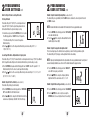
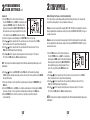
2.4.1 Setting the First and Second Stage Differentials
First Stage Differential
The default setting is 0.5˚ F (0.25˚ C). The room temperature must
change 0.5˚ F (0.25˚ C) from the setpoint temperature before the
thermostat will initiate the system in heating or cooling.
FAN
SYSTEM
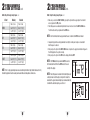
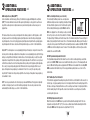
2.4.3 Setting the Extended Hold (Vacation) Mode (see also section 3.5)
The default setting is Long (indefinite) Hold. If the HOLD feature is activated, the current setpoint will be held
until HOLD is released.
NOTE:
Extended Hold Mode is not available if the thermostat is in the non-programmable mode.
7. Press the RETURN button, the display will show “SET LG HOLD”,
where LG is indefinite hold.
8. Press the or button to change the Extended Hold time from
indefinite (LG) to 24 hours (SH).
1. In normal mode, press and hold the RETURN button for 4 seconds.
SET
The LCD display will show “d1 SET X” where “X” equals the
˚F / ˚C differential setting. This is the current temperature
differential setting.
2. Press the or button to set the temperature differential to your desired setting of 0.5˚, 1˚, or
2˚ F (0.25˚, 0.5˚, 1˚ C).
SYSTEM
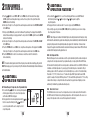
3. Press the RETURN button again and the LCD display will show “d2 SET X” where “X” equals the ˚F / ˚C
differential setting. This is the current second stage differential setting.
4. Press the or button to set the second stage differential to your desired setting of 1˚, 2˚, 3˚, 4˚, 5˚, or 6˚ F
(0.5˚, 1.0˚, 1.5˚, 2.0˚, 2.5˚ or 3.0˚ C).
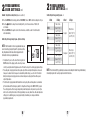
2.4.2 Setting the Filter Check Monitor (see also section 3.6)
The default setting is 0 days (monitor disabled).
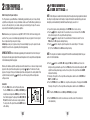
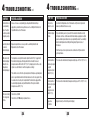
2.4.4 Setting the Temporary Override Adjustment Limit
This sets how many degrees the thermostat can be adjusted up or down from the programmed setpoint.
The default setting is 0˚ F (temporary override adjustment limit are not available).
NOTE:
Temporary Override Adjustment Limit is only available in the non-programmable mode if security level 1
was selected during installation, see section 4.2 of the Installer Guide and the keypad is locked.
9. Press the RETURN button, the display will show “ADJX SET”,
where X is the temporary override limits.
10. Press the or button to change the Temporary Override
Adjustment Limit to the desired value of 0, 1˚, 2˚ or 3˚ F.
SYSTEM
2.4.5 Setting the Multi-Level Keypad Lockout (see also section 3.7)
5. Press the RETURN button and the display will show “FILTER XXX SYSTEM
SET”, where XXX is the Filter Monitor interval.
6. Press the or button to change the Filter Monitor Interval to the
desired value of 0 (disabled), 30, 60, 90, 120, 180 or 365 days.
FAN
FILTER
HOLD FAN
SET
Second Stage Differential – Only Available on 2 Stage Systems
The default setting is 2˚ F (1.0˚ C). This means that the room temperature must change 2˚ F (1.0˚ C) in addition to
the first stage differential setting before the thermostat will initiate the system in heating or cooling.
4
cont.
FAN
SET
11. Press the RETURN button, the display will show “000 LOCKSET”. SYSTEM
12. Press the or button to enter a 3 digit code, using the
RETURN button to store each digit and move to the next digit.
SET
FAN
LOCK SET
5