1
Chapter
1
Chapter 1
Operation
of the
Simulator
NI Instrument
Simulator
as
a SerialSet
or GPIB Device
Command
This chapter describes the different settings and information for using
the simulator as either a GPIB or serial device.
NI Instrument Simulator Overview
The NI Instrument Simulator allows the simulation of either a GPIB
device (G mode) or a serial device (S mode). In either mode, the
simulator emulates typical output from a digitizing oscilloscope or a
digital multimeter. In S mode, GPIB-specific functionality (SRQ and
GPIB addressing) are not supported.
The Instrument Simulator is ideal for debugging or training. Using the
simulator, instead of traditional instruments, to debug systems saves
time and effort. Also, National Instruments uses the simulator in our
customer education courses.
Rear Panel
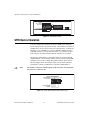
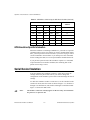
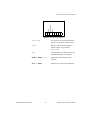
The labeled configuration switches, located on the rear panel, control
the simulator emulation mode (G mode or S mode) as well as settings
specific to each mode. The unmarked DIP switches are reserved for
future development and should remain in the OFF position. Figure 1-1
shows the rear panel.
© National Instruments Corporation
1-1
NI Instrument Simulator User Manual