1
Introduction
Installing Batteries to the Remote
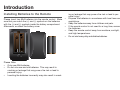
Please insert two AAA batteries into the remote control. Make
sure that you match the (+) and (-) symbols on the batteries
with the (+) and (-) symbols inside the battery compartment.
Afterwards, re-attach the battery cover.
r
r
r
r
r
ing or leakage that may pose a fire risk or lead to personal injury.
Dispose the batteries in accordance with local laws and
regulations.
Keep the batteries away from children and pets.
If the remote control is not used for a long time, remove
the batteries.
Keep the remote control away from moisture, sunlight,
and high temperatures.
Do not mix heavy duty and alkaline batteries.
Please Note:
r Only use AAA batteries.
r Do not mix new and old batteries. This may result in
cracking or leakage that may pose a fire risk or lead to
personal injury.
r Inserting the batteries incorrectly may also result in crack19