1
Tone Projects | Compadre Beatpuncher | VST PC
Users Manual - 13
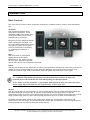
Character Controls
The Character controls gives you access to low-level parameters of the compression circuitry and thereby
allowing you to fine-tune the compression characteristics to your specific purposes. Character controls
consist of Snap, Linearity, and Envelope.
The character controls section is context sensitive. Linearity is only available when operating in Comp.
mode, while Envelope will be available when operating in Shaper mode.
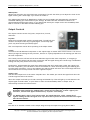
Snap
Sets the “snappy”-ness of the attack. Use this control in conjunction with the Attack setting to precisely
control the compressor’s attack. While the normal Attack parameter is a time based control, the snap
parameter works by increasingly allowing transients to pass through without affecting the timing settings.
Turned right adds more “snap” & punch to the sound. Turned left gives a smoother & more flattening
compression. Note that high snap settings will often override low attack settings, so if you wish to
completely crush the signal with short attack times, you should keep the snap setting low.
Linearity (Comp. mode only)
Adjusts the linearity of the transfer function. This controls whether the compression ratio
is constant linear or partly dependant on audio material and settings.
Turn the knob towards ”Linear” to get a squashed sound, and turn it towards “non-lin” to
allow more air.
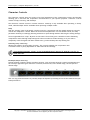
Envelope (Shaper mode only)
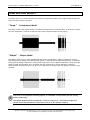
Selects between 7 attack/release envelope contours. Click to browse through a visual representations of
the envelope applied as gain reduction. First half (from the left) is the attack stage, the last part the
release stage.
This is a very powerful feature to precisely shape the dynamic processing to best fit the material and your
sound preference.
Copyright © 2010 Rune Lund-Hermansen | VST is a registered trademark of Steinberg Media Technologies GmbH.
All other trademarks are the property of their respective owners.