1
Tone Projects | Compadre Beatpuncher | VST PC
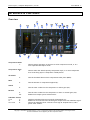
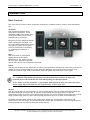
Adjust
10.
Listen
Key in
11.
11b.
Character Section
Snap
12.
Linearity (comp.) 13.
Envelope (shaper) 13.
Users Manual - 8
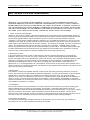
Context sensitive knob allowing adjustment of the bandwidth of the preset
focus, or of cutoff frequency on low- and highpass filters.
Activates monitoring of the sidechain.
Activates external key input to sidechain through input 3+4
(Only available in SC version). * above illustration shows the 2ch version.
Sets the “snappy”-ness of the attack.
Adjusts the linearity of the transfer function (only in comp. mode).
Selects between 7 attack/release envelope contours (only in shaper mode).
* note that this control is not visible on above illustration because Comp. mode is active.
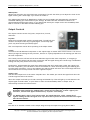
Makeup Gain
Makeup
Auto
14.
15.
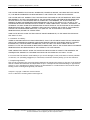
In or decrease the amount of makeup gain.
Enables auto makeup gain.
16.
Mixes the processed (wet) signal with the original (dry) signal.
17.
Activates a second crunchy compressor on the output stage.
18.
Activates a limiter on the output stage to avoid clipping.
19.
Sets the output level (After Crunch, but before Limiter).
20.
Warning led that lights up whenever the output signal exceeds 0 dbFS.
Dry/wet
Crunch
Limit
Output Level
Clip led
* note that the signal is not actually clipped unless the Limiter is activated.
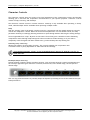
Graphic Display
21.
22.
Processing led lights up whenever the compressor is active, and gain
reduction meter indicates amount of gain reduction applied. (Not including
crunch and limit).
Turns graphic display on and off. Turn off to save CPU.
Controls
To change a knob or slider’s control value hold left mouse button and drag the mouse up and down.
You can do fine adjustments by holding down CTRL while dragging the control.
Switches and buttons are controlled simply by left clicking on them.
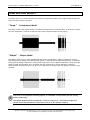
The small knobs feature leds with changing colours to give you a visual
reference of the current setting. The default state for these small knobs have a
clear green light. As you move them towards more extreme settings the lights
gets increasingly yellow and red.
NOTE: Sometimes the interface values, meter etc will not update if your hosts audio engine is not running, or if you
have bypassed the plug-in.
Copyright © 2010 Rune Lund-Hermansen | VST is a registered trademark of Steinberg Media Technologies GmbH.
All other trademarks are the property of their respective owners.