1
Resource Standard Metrics
Baseline Differential Tutorial
RSM Version 6.70+
Date: September 24, 2005
RSM Documentation:
RSM is fully documented in the on-line or local copy of the User's Manual. Use an Internet
browser to open the file "manual.htm" from your RSM directory or access the following links via
the Internet.
RSM User's Manual can be found at:
C:\Program Files\MSquared\M2 RSM\manual.htm or
"http://mSquaredTechnologies.com/m2rsm/docs"
Specific use of RSM switches can be found at:
"http://mSquaredTechnologies.com/m2rsm/docs/reports/switch_menu.htm".
Baseline Differential Scenario:
A new product version (1.2) has just been released and management wants to know the
differences between version 1.1 and 1.2. Because the baseline contains many hundreds of files
spread over many directories, a manual assault on this task is not practical. Resource Standard
Metrics can create these metrics in just a few minutes as compared to hours and days of manual
differentials and assembly of metrics.
Understanding Code Differentials:
A source code file exists between two code baselines in one of three states. The file may be new
to the baseline and contribute “new” metrics. It may be removed from the baseline thus yielding
“removed” metrics or it may exist in both baselines and contribute to the “differential” metrics.
These three states are used by Resource Standard Metrics for processing baseline differential
metrics. Automated tools cannot differentiate "modified" versus "new" lines within a file that
exists in both baselines. This analysis requires a historical modification pattern be maintained
for the entire life time of the file. Some configuration management tools attempt to perform this
analysis but their accuracy is not guaranteed. Consider the following example:
Older File
Newer File
1
2
3
4
5
6
7
8
1
2
3
4
5
6
7
8
void foo(int x)
{
if (x == 10)
{
y = 20;
z = 30;
}
}
void foo(int x)
{
if (x == 10)
{
y = 20;
z = 50;
}
}
Is line 6 new or modified? The file is not new because it exists in both baselines. The line
appears modified but a historical pattern may show it was removed in version 1.1.1 and added
back in version 1.1.2. A configuration management differential tool would then determine that
this change is new based on the historical pattern, but visual analysis would indicate the line is a
modified line of code.
The subjectivity of this type of analysis can undermine the accuracy of baseline differential
metrics. Therefore, Resource Standard Metrics bases its metrics on the state of the file between
the baselines, where new files create "new" metrics, existing files create "dif" or "mod" metrics,
and removed files create "rem" metrics. An RSM metrics differential report is shown in Figure 9
as an example of these states.
Older versions of RSM (pre 6.00) calculated baseline differentials based on the overall size of
the baselines rather than line by line differentials. This size based difference is indicated by the
use of "mod" within RSM metric reports. When the -wd option is used for baseline differentials,
a differential algorithm is used for line by line comparison and the result is indicated by "dif"
within a RSM report. Most users will use the (-wd) option for line by line differential based
metrics.
There are several freely available differential tools which will identify the lines which have
changed within a file. Winmerge is an excellent diff tool for Windows and GNU Diff serves as
the standard for UNIX. Each of these tools can create differentials between files. However
neither tool creates metrics for these differentials.
These diff tools use the Longest Common Sequence (LCS) algorithm for determining the
minimum changes to a file. These diff tools do not differentiate between the types of lines that
differ, although Winmerge will indicate colorized syntax for comments versus code lines. These
tools show a line by line difference where it is up to the user to apply a visual analysis to
determine the meaning of the code difference.
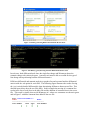
The following example illustrates a problem common with most differential tools. The
following is a screen shot using Winmerge 2.2.2 where one comment line has been moved.
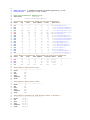
GNU Diff and Winmerge indicate these differentials as shown in 1 and 2.
Figure 1: Winmerge Showing Differential Semantic Metrics Issue.
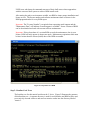
Figure 2: Gnu Diff (Cygwin) Showing Semantic Differential Metrics Issue
In each case, both differential tools show the single line change and Winmerge shows the
semantic change with colorized syntax. A metrics tool must be able to account for the type of
line change when performing baseline differential metrics.
RSM uses differential and semantic analysis to produce fast and accurate baseline differential
metrics with the -wd option for work files. The following figure illustrates the results of using
the (-ws) switch (detailed differentials) when determining differences between two files. This
detailed report shows how the two files differ. In this example the moving of a comment line
results in the loss of code lines in the older file and the addition of comment lines in the newer
file. This result is visually shown with Winmerge in 1 where new comments are shown in green
and in Figure 3 with blue comment lines added to the new file.
File: move1linecomment.c
Older
Newer
-----------------------------------Line Number
Diff Type
Line Number
1
=
C
1
3
=
C
3
4
5
6
7
=
C
4
=
C
5
=
C
6
=
C
7
+
C
9
+
C
10
+
C
11
+
C
12
+
C
13
8
=
C
14
9
L
10
N
11
G
12
G
13
N
15
=
C
15
------------------------------------
Figure 3: RSM Detailed Differential Output using the -ws -wd switches
Figure 3 uses the following notation in RSM baseline differential reports.
Line number
=
+
C
G
N
L
Physical line in the source file
Lines are equal in content and type
Line no longer exists in the newer file
Line did not previously exist in the older file
Comment line type
Logical line of code, ends in semi-colon as a statement
Non-effective line of code, lines of {, }, (, ) or };
Line of Code where it is not logical or non-effective
LOC
eLOC
lLOC
Comments
Lines of Code = (L + N + G)
Effective Lines of Code = (L + G)
Logical Lines of Code = G
=C
RSM established the concept of effective and non-effective lines of code to better represent the
quantity of work performed by the developer, independent of the code style. An effective line of
code or eLOC is any line of code which is not a line of code that contains a standalone brace,
parenthesis or closing brace and semicolon.
Through years of empirical analysis, eLOC has been shown to best represent the intuitive
estimation of experienced developers. RSM reports all three types of metrics LOC, eLOC and
lLOC so that the end user can choose the form which best meets their requirements.
The following table defines which lines of code are non-effective. The following metrics by line
number result.
LOC = {1, 2, 3, 4, 5, 6, 7, 8}
eLOC = {1, 3, 5, 6}
lLOC = {5, 6}
Source File
1 void foo(int x)
2 {
3
if (x == 10)
4
{
5
y = 20;
6
z = 30;
7
}
8 }
Type
1 Line of Code (L)
2 Non-Effective LOC (N)
3 Line of Code (L)
4 Non-Effective LOC (N)
5 Logical Line of Code (G)
6 Logical Line of Code (G)
7 Non-Effective LOC (N)
8 Non-Effective LOC (N)
When looking at the report in Figure 3, what happened to line 8 in the new baseline? RSM can
ignore white space and blank lines when performing baseline differentials, therefore line 8 was a
blank line when the comment terminator "*/" has moved to the bottom of the file, line 14.
Ignoring white space and blank lines creates the most accurate baseline differentials and can be
set in the rsm.cfg or RSM configuration file.
Baseline Metrics Differentials with RSM
RSM (version 6.70+) uses the Longest Common Sequence algorithm for processing differentials
between two files that are less than 10,000 lines in length. The line length restriction is imposed
because of memory and time requirements for the O(n2) LCS algorithm. Each line in the older
file is compared against every line in the newer file. When RSM is set to ignore blank lines this
constraint is hit in very rare instances when a source file is extremely large. When a file exceeds
10,000 line LCS limit, RSM will use an O(n) differential algorithm which performs a linear
look-ahead (LLA) comparison.
The LCS algorithm creates a comparison matrix of the older file versus the newer file. This
matrix is built by comparing and scoring each line in the old file to each line in the new file, thus
O(n2). As this matrix is kept in memory during the processing of the two files, considerable
memory and time is required for processing the differential. The 10,000 line limit is set in the
RSM configuration file and it is to insure that the 32 memory address limit is not exceeded
causing system instability. The comparison matrix is used in conjunction with each work file to
determine the equality of content and type for a line. When these conditions match between the
older and newer file, the line is deemed equivalent. LCS insures the largest common sequence is
determined and the minimum difference is the result.
The LLA algorithm was used by RSM before version 6.70 to perform baseline metrics
differentials. In versions 6.70+ it serves as the O(n) differential algorithm for extremely large
(greater tham10,000 line) files. The LLA algorithm starts at the top of each file and begins a
comparison by line content and type. When these conditions are equivalent, the locations in the
files are incremented. When a difference occurs, a look-ahead into the newer file is performed to
determine if a block of code has moved. If a look-ahead is found and subsequent lines are
sequential, a block move is determined. The lines between the last position and the look-ahead
are determined to be different and the comparison begins at the new look-ahead position. The
look-ahead is set to 100 lines in order to determine localized block moves and to maintain a fine
grained differential between the old and new files.
In general, 99.9% of your source files will fall within the LCS line limit. The RSM
configuration file has a setting to show the type of differential algorithm used. There is also a
configuration setting to force the use of the LLA algorithm if legacy, RSM (pre-version 6.70)
compatibility is required.
Step by Step Process to Baseline Differentials
Although this example is Windows centric, the RSM commands apply to Windows, Linux and
Universal UNIX RSM licensed products. Under Windows you may choose to use the RSM
Wizard.
Step 1: Setup and Test RSM
Set the environment variable RSMHOME to the install directory of RSM. This
simplifies access to RSM from the command line. You can accomplish this through the
command shell as shown below or through the [Control Panel] - [System] - [Advanced] [Environment Variables].
C:\> set RSMHOME=c:\Program Files\MSquared\M2 RSM
Alternatively, you may place the RSM install directory in the system path. When this
approach is used, the RSM directory must precede any Windows directory as Windows
includes an unused utility file named rsm.exe.
C:\> set path=c:\Program Files\MSquared\M2 RSM;%path%
UNIX users who know the command structure of their shell can use these approaches
with the corrected shell syntax to achieve RSM install result.
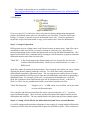
After setting the path or environment variable, test RSM to insure proper installation and
license access. The license number and software maintenance date are shown in the
RSM program header for every RSM report.
Important: The "License Number" is required when requesting email support and the
"Maintenance Date" will indicate if email support is available. Newer versions of RSM
can be downloaded and used with current software maintenance.
Important: If the release date of a version RSM exceeds the maintenance date in your
license, RSM will only operate in shareware mode. Maintenance expirations dates must
be later in time than the release (build) date of the RSM executable.
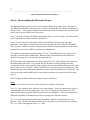
Figure 4: Setup and Test of RSM
Step 2: Baseline Code Trees
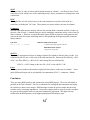
The baseline tree for this tutorial resides on the C: drive. Figure 5 illustrates the structure
of this baseline tree. A separate directory is used for each baseline and RSM will be used
to recursively descend each tree and store our metrics results into the directory labeled
"metrics".
The example code baseline tree is available for download at:
“http://msquaredtechnologies.com/m2rsm/docs/tutorials/command_line_differentials/DiffP
roject.zip”
C:\DiffProject ...
Figure 5: Baseline Trees
If you are using CVS, visual source safe or any other localizing configuration management
product, the baseline source code tree will reside on your local disk. ClearCase will require
setting a "viewspec" to provide access to the baseline source code. ClearCase operation is
beyond the scope of this tutorial and we urge you to consult your ClearCase administrator.
Step 3: Concept of Operation
RSM operates on a set of input source code files and creates an output report. Input files can be
assembled via wild card, file list, or recursive descent of a directory tree. Input files are
processed depending on the switches and options that are used on the RSM command line. This
tutorial will teach the basic command line for creating a work file and how to generate a baseline
differential metrics report from two work files.
"Work File"
A file which captures the characterization of a set of input files for use in the
creation of baseline differentials. Work files are created with the (-w"create ...")
RSM switch.
Work files capture the metrics from the baseline. Once captured, the baseline can evolve without
affecting the metrics captured within the work file. Two work files can be extracted and
differentiated to produce a differential report. This two stage process enables the use of scripts
for capturing baseline work files at given time intervals without the requirement for generating a
differential report. For example: Each week a script captures the baseline into a work file.
Work file extraction to form a differential report can be performed on Week 1 to Week 2 or
Week 1 to Week 4 or any combination of older versus newer baseline work files.
"Work File Extraction"
Using the (-w"x ...") RSM switch, two work files can be processed
to create a differential report.
Two work files and their associated data files can be extracted using the (-w"x...") switch to
create a differential report. There are many switches and options that support baseline metrics
differentials and work files. The user manual details each option and provides example reports.
Step 4: Creating a Work File for the Older (historical) and Newer (current) Baseline
A work file captures and instruments a baseline for the purpose of creating baseline differentials.
Creating a work file from the command line requires several RSM switches. These switches are
presented in individual components so that each may be described in detail. Figure 6 shows the
command line composition and the expected output from RSM.
C:\DiffProject>
"The location of the baseline directories"
rsm
"The Resource Standard Metrics executable accessed via the path or RSMHOME"
-H -O"c:\DiffProject\metrics\workfile_report_baseline_1.1.htm"
"HTML Mode and the specific output file for baseline 1.1"
-w"create c:\DiffProject\ProjectRelease1.1"
"Work file creation with the top of the baseline 1.1 tree directory"
-wd
"Code line differential mode, rather than size differential which is the RSM default mode"
-w"File dat c:\DiffProject\metrics\workfile_baseline_1.1.dat"
"Specifying a work file name and path for baseline 1.1"
-r"c,h,cpp,java c:\DiffProject\ProjectRelease1.1"
"Input mode using specific file extensions and directory tree of baseline 1.1"
Cut and Paste:
rsm -H -O"c:\DiffProject\metrics\workfile_report_baseline_1.1.htm" -w"create
c:\DiffProject\ProjectRelease1.1" -wd -w"File dat
c:\DiffProject\metrics\workfile_baseline_1.1.dat" -r"c,h,cpp,java
c:\DiffProject\ProjectRelease1.1"
Figure 6: Create Work File for the Older (Historical) Baseline
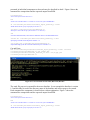
The work file process is repeated for the newer baseline. In our example the baseline is version
1.2 and this label is used in the directory name of the baseline and in the reports to be created.
Each command line component is shown below with an explanation. Figure 7 shows the
command line composition and the expected output from RSM.
C:\DiffProject>
"The location of the baseline directories"
rsm
"The Resource Standard Metrics executable accessed via the path or RSMHOME"
-H -O"c:\DiffProject\metrics\workfile_report_baseline_1.2.htm"
"HTML Mode and the specific output file for baseline 1.2"
-w"create c:\DiffProject\ProjectRelease1.2"
"Work file creation with the top of the baseline 1.2 tree directory"
-wd
"Code line differential mode, rather than size differential which is the RSM default mode"
-w"File dat c:\DiffProject\metrics\workfile_baseline_1.2.dat"
"Specifying a work file name and path for baseline 1.2"
-r"c,h,cpp,java c:\DiffProject\ProjectRelease1.2"
"Input mode using specific file extensions and directory tree of baseline 1.2"
Cut and Paste:
rsm -H -O"c:\DiffProject\metrics\workfile_report_baseline_1.2.htm" -w"create
c:\DiffProject\ProjectRelease1.2" -wd -w"File dat
c:\DiffProject\metrics\workfile_baseline_1.2.dat" -r"c,h,cpp,java
c:\DiffProject\ProjectRelease1.2"
Figure 7: Creating Work File for the Current (newer) Baseline
Step 5: Extracting the Work Files to form a Differential Report
A differential report is created by extracting two different work files where one work file is older
by version and time and one is newer by version and time. When a baseline version is released,
RSM can be run to capture a work file of that baseline. Over time several work files will contain
differential data for several baselines. The time difference between the work files can be used to
extract productivity metrics between the baselines as well as the metric differences between the
baselines.
The RSM switch (-w"x olderWorkFile.dat, newerWorkFile.dat") instructs RSM the older and
path/name of the work files to process. Each command line component is shown below with an
explanation. Figure 8 shows the command line composition and the expected output from RSM.
C:\DiffProject>
"The location of the baseline directories"
rsm
"The Resource Standard Metrics executable accessed via the path or RSMHOME"
-H -O"c:\DiffProject\metrics\diff_report_baseline_1.1_1.2.htm"
"HTML Mode and the specific output file for the differential of baseline 1.1 to baseline 1.2"
-wd
"Code line differential mode, rather than size differential which is the RSM default mode"
-w"x c:\DiffProject\metrics\workfile_baseline_1.1.dat,
c:\DiffProject\metrics\workfile_baseline_1.2.dat"
"Work file extraction to produce the differential report, the older baseline work file precedes the newer baseline work file and
they must be separated by a comma"
Cut and paste:
rsm -H -O"c:\DiffProject\metrics\diff_report_baseline_1.1_1.2.htm" -wd -w"x
c:\DiffProject\metrics\workfile_baseline_1.1.dat,
c:\DiffProject\metrics\workfile_baseline_1.2.dat"
Figure 8: RSM Work File Extraction Creating a Differential Report
The differential report is created in HTML format. An Internet Brower is used to open and read
the report. Extremely large baselines can create extremely long differential reports. RSM has a
totals only mode (-Tw) which can roll up all metrics to a short report format. The following
differential report is produced from the provided tutorial code baselines. This report is line
numbered for the purpose of discussion within this tutorial.
1
2
3
4
5
6
7
8
9
10
11
12
13
14
15
16
17
18
19
20
21
22
23
Resource Standard Metrics™ for C, C++, C# and Java
Version 6.70 - mSquaredTechnologies.com
License Type: Site Multi-Network License - 100 Users
Licensed To : M Squared Technologies LLC
License No. : ST1001
License Date: Thu Mar 31 06:29:35 2005
Build Date : Sep 17 2005
Maintenance Date: Tue May 01 06:40:29 2007
©1996-2005 M Squared Technologies™
Run Date: Sat Sep 17 13:48:15 2005
________________________________________________________________________
RSM Command Line
: -H -Oc:\DiffProject\metrics\diff_report_baseline_1.1
_1.2.htm -wd -wxc:\DiffProject\metrics\workfile_base
line_1.1.dat, c:\DiffProject\metrics\workfile_baseli
ne_1.2.dat
Configuration File: F:\Program Files\Msquared\M2 RSM\rsm.cfg
Diff Config File : F:\Program Files\Msquared\M2 RSM\rsm_workdiff.cfg
~~ Metrics Differential ~~
Based On Code Difference
No Sort Method
Older Work File: c:\DiffProject\metrics\workfile_baseline_1.1.dat
Creation Date : Sat Sep 17 13:48:07 2005
24
25
26
27
28
29
30
31
32
33
34
35
36
37
38
39
40
41
42
43
44
45
46
47
48
49
50
51
52
53
54
55
56
57
58
59
60
61
62
63
64
65
66
67
68
69
70
71
72
73
74
75
76
77
78
79
80
81
82
83
84
85
86
87
Newer Work File: c:\DiffProject\metrics\workfile_baseline_1.2.dat
Creation Date : Sat Sep 17 13:48:13 2005
Work Time Differential Between Files:
Time Delta:
6 Seconds
0:00:00:06 Days:Hrs:Min:Sec
File Metrics Differentials Based on Code Line Differences
State
LOC
eLOC
lLOC Comment
Lines
eLOC% File
-----------------------------------------------------------------------New
15
9
6
23
41
100.00 AddFunction.c
Equ
0
0
0
5
5
0.00 ContextLocComment.c
Dif
0
0
0
7
7
0.00 ContextLocComment.c
Equ
155
121
91
50
205
0.00 HTTPSoapClient.java
New
77
53
36
17
115
100.00 HTTPSoapServer.java
Rem
-15
-9
-6
-23
-41 -100.00 LineSwap.c
Equ
25
15
10
37
62
0.00 LongContextBlock.c
Dif
5
3
2
7
12
20.00 LongContextBlock.c
Equ
5
3
2
8
13
0.00 Remove1LineComment.c
Dif
0
0
0
1
1
0.00 Remove1LineComment.c
Equ
10
6
4
16
26
0.00 RemoveFunction.c
Dif
0
0
0
0
0
0.00 RemoveFunction.c
Equ
5
3
2
8
13
0.00 add1linecomment.c
Dif
0
0
0
1
1
0.00 add1linecomment.c
Equ
13
7
6
21
34
0.00 blockmove.c
Dif
2
2
0
2
4
22.22 blockmove.c
Equ
0
0
0
8
8
0.00 move1linecomment.c
Dif
0
0
0
5
5
0.00 move1linecomment.c
-----------------------------------------------------------------------Source Metrics Differential Profile Based on Code Line Differences
State
LOC
eLOC
lLOC Comment
Lines Av.eLOC%
Files
-----------------------------------------------------------------------New
92
62
42
40
156
100.00
2
Rem
-15
-9
-6
-23
-41 -100.00
1
Dif
7
5
2
23
30
6.03
7
Equ
213
155
115
153
366
0.00
8
Total Metrics Older Source Files
-----------------------------------Files
9
LOC
245
eLOC
175
lLOC
127
Comments
187
Lines
490
Total Metrics Newer Source Files
-----------------------------------Files
10
LOC
312
eLOC
222
lLOC
159
Comments
216
Lines
608
Total Metrics Differential From Historic Basis in Percent %
-----------------------------------Files
11.11 %
LOC
27.35 %
eLOC
26.86 %
lLOC
25.20 %
Comments
15.51 %
Lines
24.08 %
88
89
________________________________________________________________________
Figure 9: RSM Baseline Differential Report
Step 6: Understanding the Differential Report
The differential report shown in Step 5 starts with the RSM report header, lines 1 through 10.
The RSM license number is shown on line 6 and the expiration date for software maintenance is
shown on line 7. Any version of RSM with a build date prior to the maintenance expiration date
can be used with your RSM license file rsm.lic.
Lines 11 through 15 display the RSM command line used to create the report. This information
can be important if the report had to be reproduced.
Lines 15 and 16 show the configuration files used by RSM for the operation and report
generation. These files are in text format and can be opened with a text editor like WordPad.
They may be in UNIX text format so opening them with the Notepad program is not advised as
Notepad does not convert UNIX text format to a readable form.
The report title and format are shown in lines 18 to 20. The differential report can be sorted
using the -k switch at the command line. RSM switches are documented in the RSM users
manual or by using the -hs switch from the command line.
Work file names and creation dates are shown in lines 22 to 26. These files are the sources for
the differential metrics files. The creation date for the older work file should precede the
creation date for the newer work file, thus creating a position time differential between the work
files as shown in line 29 and 30. If the work files were created at the time of completion for the
baselines then this time differential represents the time required to build the newer baseline. This
time can be used with the RSM switch -wp to produce productivity values for the differential
metrics.
Line 32 begins the differential metrics between the two baselines.
State:
The state of the file to the newer baseline is shown in column 1 of the report
The "new" type identifies files which are new to the baseline. New files represent new lines of
code and metrics to the differential report. New lines in existing files are presented as "dif"
metrics because they represent differences between two existing files. There is no method for a
differential algorithm to determine new lines in existing files within the baseline.
The "rem" state represents lines and metrics associated with files removed from the newer
baseline. They existed in the older baseline but they no longer are present in the new baseline.
The "rem" state is the opposite of the "new" state.
The state "equ" signifies that a line is equal by content and type between the two baselines.
Content means the character representation of the line and type represents the line as a comment,
logical code, non effective code or line of code.
The "dif" type is used to indicate those lines which are different between the two baselines.
Figure 3 will show "-" and "+" differentials. When a line is changed between an old and new
baseline file, the line essentially no longer exists in the newer baseline "-" and appears as a
different form "+" in the new baseline. A file with "dif" metrics may have an equal metrics if
equal lines occur within the file. If all lines in the file are equal, no "dif" metrics will be present.
Total baseline differential metrics sum up the "+" metrics from each file. Lines 50 and 51 show
the differential metrics for the file represented in Figure 3. The figure shows 8 equal lines and 5
lines added as comments.
If metrics for both the "-" and "+" changes to the baseline are to be used for the total metric
differentials, then the following option in the rsm configuration file ("rsm.cfg") is set to "Yes".
# Code differential metrics determine lines that are
# different in the current baseline compared to the
# older baseline. This metric can include
# lines that are removed from the current baseline.
Add removed older lines as modified
: Yes
When this setting is used, lines 50 and 51 of the previous report are represented by the following
results.
State
LOC
eLOC
lLOC Comment
Lines
eLOC% File
-----------------------------------------------------------------------Equ
0
0
0
8
8
0.00 move1linecomment.c
Dif
5
3
2
5
10
100.00 move1linecomment.c
5 LOC, lines of code represent the code changed in the older baseline
1 L - Line of Code (Lines which are not comments)
2 N - Non-Effective Lines of Code (Lines of code which are
standalone (, ),
{, }, or };
2 G - Logical Lines of Code (Lines ending in a semicolon)
3 eLOC, Effective lines of code are calculated from:
1 L - Line of Code (Lines which are not comments)
2 G - Logical Lines of Code (Lines ending in a semicolon)
2 lLOC, Logical Lines of Code are calculated from:
2 G - Logical Lines of Code (Lines ending in a semicolon)
5 Comment line come from the 5 comments adder to the newer baseline
10 Lines represent the 5 Loc and 5 Comment lines
LOC
Lines of code are shown which match the state in column 1. A line of code is any line which is
not a standalone comment or blank line.
eLOC
Effective Lines of code are shown which match the state in column 1. An effective line of code
is any line of code which is not a line containing solely a brace, parenthesis or closing brace with
a semicolon.
lLOC
The logical line of code is also known as the code statement or any line which ends in a
semicolon, excluding the "for" loop. These metrics are shown relative the state in column 1.
Comments
In RSM differential metrics analysis, when a line contains both a comment and line of code it is
typed as a line of code. Comment lines are strictly standalone comments as they relate to the file
state in column 1. However, in non-differential reports, RSM accounts for both comments and
code on the same line when calculating metrics, thus producing the highest possible comment
density metrics.
Code Line
int y = 21; // counter
RSM Non-Differential Analysis
1 comment line and 1 logical code line
RSM Differential Analysis
1 Logical or G type line
eLOC%
This metrics represents the degree of change within a file related to effective lines of code. It is
calculated by the dif, new or rem eloc of the older and new file. Removed files differ by -100%
eLOC, new files differ by +100% eLOC and existing files are calculated by:
eLOC% = eLOC change in the new file / eLOC in the old file * 100;
Lines
The lines metrics indicates the number of physical lines relative to the state in column 1. Lines
in the differential report can be calculated by the summation of LOC + comments + blanks.
Conclusion
There are many RSM switches and options that control RSM reports. These are as detailed as
possible in the User's Manual. There is no substitute for reading the documentation and trying
the switches to observe their output. RSM attempts to make the process simple but the many
switches can be a learning impediment. Our product support team is ready to provide examples
for your specific baseline under our software maintenance agreement. We appreciate any
feedback on the RSM product, email [email protected].
M2