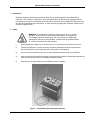
1
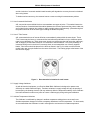
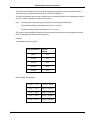
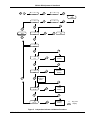
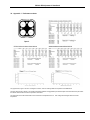
B550 & B700 Operator’s Handbook Table of Contents 1. INTRODUCTION ............................................................................................................................................. 3 2. SAFETY .......................................................................................................................................................... 3 2.2 2.3 3. 3.1 3.2 3.3 3.4 3.5 3.6 3.7 3.8 3.9 4. 4.1 5. 5.1 5.2 5.3 5.4 5.5 5.6 6. 6.1 6.2 7. 7.1 7.2 8. 8.1 8.2 8.3 8.4 8.5 REMOVING THE INSERTS ................................................................................................................................ 4 OVER TEMPERATURE CUT OUT ....................................................................................................................... 4 SETTING UP THE CALIBRATOR .................................................................................................................. 5 GETTING STARTED ........................................................................................................................................ 5 POWER ON/OFF SWITCH .............................................................................................................................. 5 OPERATING MODE ......................................................................................................................................... 5 SETTING THE TEMPERATURE .......................................................................................................................... 6 CONTROLLER SETTINGS................................................................................................................................. 6 PRE-TUNE FACILITY....................................................................................................................................... 7 SELF-TUNE FACILITY ..................................................................................................................................... 7 CHANGING FROM CENTIGRADE TO FAHRENHEIT MODE ..................................................................................... 7 CHANGING TO 0.1°C RESOLUTION .................................................................................................................. 8 THE SERIAL INTERFACE FOR THE CONTROLLER (IF FITTED) .............................................................. 9 FACTORY DEFAULT SETTINGS ........................................................................................................................ 9 ACHIEVING THE BEST RESULTS USING YOUR METAL BLOCK CALIBRATOR ................................... 10 PROBE POSITIONING AND USE OF INSERTS ..................................................................................................... 10 THERMAL CONTACT ..................................................................................................................................... 10 USE OF CUSTOM DRILLED BLOCKS ................................................................................................................ 11 USE OF "TWIN" INSERTS .............................................................................................................................. 11 SUPPLY VOLTAGE VARIATIONS ..................................................................................................................... 11 AMBIENT TEMPERATURE VARIATIONS............................................................................................................ 11 THE INDEPENDENT INDICATOR (IF FITTED) ........................................................................................... 12 FACTORY DEFAULT SETTINGS ...................................................................................................................... 12 LINEARISING THE INDEPENDENT INDICATOR ................................................................................................... 12 SPECIFICATIONS......................................................................................................................................... 16 GENERAL .................................................................................................................................................... 16 ENVIRONMENT ............................................................................................................................................ 16 CLEANING AND MAINTAINANCE ............................................................................................................... 17 CLEANING ................................................................................................................................................... 17 PREVENTATIVE MAINTENANCE ...................................................................................................................... 17 GENERAL SAFETY W ARNING ........................................................................................................................ 17 INTERNAL FUSE REPLACEMENT ..................................................................................................................... 17 PERIODIC MAINTENANCE .............................................................................................................................. 17 B550-14-002 1 Issue 7 B550 & B700 Operator’s Handbook 9. SERVICE AND WARRANTY ........................................................................................................................ 18 9.1 9.2 9.3 9.4 TECHNICAL SUPPORT .................................................................................................................................. 18 RETURNED INSTRUMENTS ............................................................................................................................ 18 DOCUMENTATION ........................................................................................................................................ 18 REPAIR QUOTATIONS................................................................................................................................... 18 10. APPENDIX 1 PERFORMANCE CHARTS .................................................................................................. 19 11. APPENDIX 2 WIRING CONNECTIONS FOR DIN CONNECTOR .............................................................. 20 12. APPENDIX 3 FACTORY SETTINGS ............................................................................................................ 21 B550-14-002 2 Issue 7 B550 & B700 Operator’s Handbook 1. Introduction Automatic Systems Laboratories would like to thank you for purchasing this B series Metal Block Calibrator. The Calibrator is supplied in a fully operational state, but ASL strongly suggest that these brief operating instructions and guidelines be read before starting to use the apparatus. Should you have any difficulty understanding the instructions, or other questions regarding this Calibrator, please call our Customer Support Group. 2. Safety WARNING This apparatus is capable of reaching up to 700 °C in normal operation. Burns to the skin can result through careless or negligent use. The calibrator has been configured at ASL, only change the configuration settings after reference to this handbook. Please follow the guidelines below as a minimum procedure for safe operation. i) Always handle the Calibrator as if the block is hot. Do not touch the top surface of the block. ii) Position the Calibrator in such a way that it cannot be accidentally knocked from the bench. Pay careful attention to the positioning of the mains lead to avoid tripping. iii) Do not cover the Calibrator at any time, or leave flammable material close to the Calibrator. iv) When removing hot probes from the block, always place them away from flammable material and make sure that they will not be accidentally touched by anyone. v) Keep all types of liquids away from the Calibrator when in operation. Figure 1. Model B550 with Independent Indicator B550-14-002 3 Issue 7 B550 & B700 Operator’s Handbook vi) Do not use any liquid in the probe holes of the block. (The use of a few drops of demineralised water to improve probe/block contact when calibrating below 70°C (94°F) is permissible with great care. Do not introduce water into the Calibrator unless the block is cold, and the supply is disconnected. Drain the water by inverting the Calibrator after use. Do not boil off remaining water. Care should be taken to avoid any hot inserts falling out of the inverted block.) vii) The Calibrator may be switched off and disconnected from the supply without harm even when at maximum temperature. However, the cooling of the block will take considerably longer if this is done, and no temperature indication will be present to warn others that the block may still be hot. The block will take several hours to cool to ambient temperature if the fan is left running (approximately 5 hours to cool to ambient temperature from 550°C / 1022°F). viii) If any part of the Calibrator except the block should become hot during use, suspend the operation and disconnect the supply. 2.2 Removing the inserts i) Use the wire tool to lift the insert. Only lift the insert to a level where you can hold it using the pliers. Do not try to completely remove the insert using the wire tool. The wire tool does not provide enough control to allow it to be used to carry the insert. ii) Using the pliers, lift the insert clear of the block and put it in a safe place. 2.3 Over temperature cut out ASL Metal Block Calibrators are fitted two independent over temperature cut outs which are operated by: a) Excessive block temperature b) Fan failure To reset the calibrator press the start switch. If the light does not go out the fault condition still exists. Allow the calibrator to cool before retrying. WARNING DO NOT hold your finger on the start switch for more than a few seconds. Pressing the start switch resets the thermal trip circuit and may apply power to the heater. If the cut out activates repeatedly check the controller settings, if these are correct the calibrator has a fault. DO NOT USE the calibrator until the fault condition has been removed. See Section 8.5 for periodic maintenance. B550-14-002 4 Issue 7 B550 & B700 Operator’s Handbook 3. Setting up the Calibrator The Calibrator is designed to give the best performance when operated in a constant temperature environment without draughts. The calibrator should therefore be positioned away from air conditioners and direct sunlight. Please read Section 5 of this manual to achieve the best results from the Calibrator. 3.1 Getting Started WARNING: Ensure the correct line voltage fuse is fitted before turning on. Plug in the mains lead and turn on the calibrator using the green switch marked supply on the top panel. The cooling fan will start and the controller will start its self check procedure. Voltage Fuse 230V F3.15A 250VAC (3.15 Amp Quick blow) 115V F6.3A 250VAC (6.3 Amp Quick blow) 3.2 Power ON/OFF switch I = Power ON O = Power OFF The power switch itself will be illuminated (green), when the Block Calibrator power is switched ON. Care should be taken not to limit access to the power ON/OFF switch. 3.3 Operating Mode Auto/Manual Key Low Key High Key Function Key Figure 2. The Controller keys B550-14-002 5 Issue 7 B550 & B700 Operator’s Handbook Whilst operating, the controller will show two temperatures on the controller panel, and the supply switch will be illuminated. The temperature shown at the top of the controller display is a block temperature. At start up this can be expected to be close to room temperature unless the calibrator has been used recently. The lower of the two displayed temperatures is the controller set point. For safety, all equipment leaving the factory is set to 20°C (68°F). The last setpoint is retained in the controller memory. 3.4 Setting the Temperature i) Press the "Function" Key as shown above. ii) The lower display will change to SP (set point). iii) Use the up arrow or the down arrow keys to set the desired temperature on the upper display. The calibrator will begin to heat, or cool. Keeping the up or down arrow key depressed will cause the rate of the displayed setpoint to accelerate. Momentary release of the button will bring the rate of change back to a low speed. iv) After entering the new set point, the operator may return to the previous display by pressing the "Function" Key a second time. Note: if this step is omitted, the display will return automatically after some seconds. v) The upper display shows the actual block temperature, the lower display shows the new Set Point temperature. vi) Depending on the ambient temperature and the set point temperature, the controller will take some time to stabilise at the new temperature. The stabilisation process is best watched by reading the reference probe inserted in the block. It is normal for the calibrator controller to indicate an overshoot of some degrees on the first approaching a new setpoint. 3.5 Controller Settings The Calibrator controller has been set to optimise stability over the full operating range of temperatures. Customers who wish to customise these settings to optimise a particular temperature are referred to the WEST 6100 handbook supplied with the unit. ASL cannot accept any responsibility for damage caused by incorrect setting of the controller parameters by our customers. The Controller configuration settings should not be changed under any circumstances as these relate to the range and alarm functions. Customers are advised to note the configuration settings on their unit before making any changes. See appendix 3 for factory settings. The controller can be set to tune its own P.I.D parameters. This is not normally necessary except when a greatly varying load (high thermal loss to the block) occurs and the temperature stability of the block is affected. B550-14-002 6 Issue 7 B550 & B700 Operator’s Handbook There are two methods of tuning. Pre-tuning and self tuning, although the latter is not recommended as it can affect the stability at the resolution we are looking for:3.6 Pre-Tune Facility Pre-Tune may be activated as follows:i) With the Controller showing its normal Operator Mode display, depress and hold down simultaneously the Up and Down keys (whereupon the numeric displays will start to flash) until AT indicator blinks once (after approximately three seconds - numeric displays will become static). ii) Release the Up and Down keys and depress and hold down the "Scroll" key for three seconds (approximately). If the process variable is greater that 5% of input span from the setpoint, the AT indicator will then flash, indicating that the Pre-Tune facility is engaged and operating. If the process variable is within 5% of input span from the setpoint, or if an erroneous key sequence is used, the Pre-Tune facility will not be engaged. To disengage the Pre-Tune facility:iii) Depress and hold down simultaneously the Up and Down keys (whereupon the numeric displays will start to flash) until the AT indicator blinks once (after approximately three seconds - numeric displays will become static). iv) Release the Up and Down keys and depress and hold down the "Scroll" Key for three seconds (approximately). The AT indicator will then be continuously OFF, indicating that the Pre-Tune facility is disengaged. Note: Since the Pre-Tune facility is a single-shot operation, it will automatically disengage itself once the operation is complete. 3.7 Self-Tune Facility The self tune facility as opposed to the pre-tune method can be set on at anytime and will attempt to modify the terms whilst controlling. We don't recommend that this feature is left on permanently because it can affect the stability at the resolution we are looking for. The self tune facility is invoked by pressing and holding both up and down keys simultaneously until the AT light blinks once. Then release the keys and press the "hand" symbol key. The AT light will then illuminate permanently to show that self tuning is in progress. To cancel, the same procedure is employed. Note: The Self-Tune facility will not engage if the setpoint is currently ramping. 3.8 Changing from Centigrade to Fahrenheit mode The Calibrator can operate in Centigrade or Fahrenheit mode. Firstly the controller parameters need to be noted if they are different to the default ASL settings (for example where different P.I.D terms are used). To do this enter the "LOC" code (default 8 set by ASL)by pressing the "scroll" button and the up arrow together, the display will show "ULOC" in the lower section. Enter the LOC code using the up and down arrows and press "scroll" to accept. B550-14-002 7 Issue 7 B550 & B700 Operator’s Handbook The controller will now display the operating parameters which can be scrolled through to note the values. Do this by repeatedly pressing the "scroll" key, when back at the start press "scroll" and up together to exit, and the set LED will extinguish. To Alter the range from °C to °F, the input range code has to be changed, a list of these codes can be found in Appendix A of the West Instruments Site Manual. The relevant range codes are listed under the title "For RTD Inputs". The default codes for units leaving the factory are given in Appendix 3 of this manual. To enter the new range the configuration mode has to be accessed. To do this turn the power off. Turn the power back on and within 30 seconds of power-up, hold down the up and "scroll" keys simultaneously for five seconds. The controller will then show the current input code selected. This can be changed with the up and down arrow keys. As soon as the value is changed the upper display will flash indicating that the new value has yet to be confirmed, when the value is as required it may be confirmed by pressing the "hand" key, whereupon the display will become static. Next return from the configuration mode by pressing "scroll" and up together. Having returned the display will show the temperature, but with all the decimal points showing, indicating that the controller parameters need resetting. Note: If the input code is changed the values in the set-up mode will return to the default values. WARNING The setpoint maximum (SPhi) will default to the upper limit of range, as will the high alarm, this would be 800°C or 1472°F with the 1° range. To enter the set-up mode use the "LOC" code as above and re-enter the values noted down except the values in °C or °F which will need changing to the new scale. This is very important for safety. The alarm values will need particular care. The default values can be found for °C or °F in Appendix 3 of this manual. Another precaution would be to indicate on the front panel that the units are now set to Fahrenheit in case someone assumes Centigrade and sets the temperature dangerously high. The block calibrator is further protected by an independent thermal cut out circuit. 3.9 Changing to 0.1°C Resolution Operation to Change from 1°C resolution (700°C maximum temperature) to 0.1°C resolution (537°C maximum temperature). This is an operation virtually identical to changing from Centigrade to Fahrenheit where a new range of temperature measurement is chosen. See Appendix 3 for the 4 ranges suitable for the Calibrator. The controller parameters are cleared when the range is changed, so if one range can be fixed upon all the better. The code number for the Ambient to 537°C (0.1°C) range is 7222, the 1°C resolution range code is 7220. Now follow the procedure in section 4.9 to set in the new range code. Note: The range code 7220 invokes a range with the controller of 0 to 800°C. It is for this reason the P.I.D terms will change with this increased input range. B550-14-002 8 Issue 7 B550 & B700 Operator’s Handbook 4. The Serial Interface for the controller (if fitted) The controller may be optionally fitted with an RS232 or an RS485 interface. Refer to the WEST 6100 controller manual for instructions on using the RS232/RS485. Connections for the interfaces are: 25 Way ‘D’ type socket Pin 2 Pin 15 RS485 “A” or XMT + terminal “B” or XMT - terminal 25 Way ‘D’ type socket Pin 5 Pin 3 Pin 2 Pin 20 Pin 7 Pin 6 RS232 CTS RxD TxD DTR GND DSR 4.1 Factory Default Settings RS232: Factory set to 4800 baud, even parity, 7 data bits and 1 stop bit. RS485: As above, Address 1. B550-14-002 9 Issue 7 B550 & B700 Operator’s Handbook 5. Achieving the best results using your Metal Block Calibrator This section of your manual is written to help you achieve the best results from your Metal Block Calibrator. ASL has tested this product extensively and the results of these tests can be found in the appendices of this manual. Your Metal Block Calibrator is designed to provide a reference temperature of high stability under the correct operating conditions. The absolute value of this temperature must be measured using a reference temperature probe. The indicated temperature on the temperature controller is not calibrated and cannot be used as a reference. ASL can provide a calibrated reference probe and indicator installed in the Calibrator, or alternatively a more versatile and accurate standalone system. Please ask your representative for details. 5.1 Probe positioning and use of inserts To ensure the connect orientation of twin holes inserts in the Metal Block Calibrator the Calibrator is fitted with location spigots in each well. When fitting inserts, ensure that the locating hole in the bottom of the insert mates with the locating spigot. The top surface of the block is not insulated and therefore has a greater heat loss than the sides and bottom of the block. This gives rise to a variation in temperature at different vertical positions in the block. (see Appendix 1). The block is designed to achieve the minimum possible variation in temperature at any horizontal plane within the block. To avoid inaccuracies caused by the vertical temperature variations explained above, the user should use a reference probe of the same type as the probe under test. If this is not possible, the reference probe should be designed to match the physical and thermal characteristics of the probe under test as closely as possible. The insertion depth of the Test probe measure point should be exactly the same as the reference probe measure point. 5.2 Thermal Contact To achieve the best possible accuracy, all probes that are inserted in the block should have the largest possible contact area with the metal of the block. Users operating at low temperatures may benefit from improving contact by the use of a little demineralized water in the block holes. In this case the few drops of water required should be introduced into a cold block with the supply disconnected. Under no circumstances should any other fluid be used as this will cause a build up of residue and may present a fire hazard. Any remaining water should be removed from the Calibrator at the end of the test by inverting the Calibrator. Care should be taken to avoid any hot inserts falling out of the inverted block. ASL provide a standard block which is drilled to accommodate 4 T100 type PRTs directly inserted in the block. The dimensions of these holes are optimised for the T100, and should not be used for other probe types. A further 4 Inserts (see below) are also provided with the standard block. WARNING: Insertion of the incorrect probe type into these holes may result in inaccurate measurements and/or the probe becoming stuck in the block. In addition to the predrilled holes, ASL provides inserts which can be factory drilled to order, or drilled by our customers to accommodate different types of probe. As may be seen from the test results in Appendix 1, the temperature difference between inserts may be several tenths of a degree. As previously observed for the probe/block contact area, the contact area between the insert and the block may vary, B550-14-002 10 Issue 7 B550 & B700 Operator’s Handbook and the inclusion of a second metal/air/metal boundary will degrade the accuracy that can be obtained when using inserts. To obtain maximum accuracy, the customer has two routes to solving this measurement problem. 5.3 Use of custom drilled blocks ASL can provide custom drilled blocks to accommodate most types of probe. This method insures the minimum number of metal/air/metal boundaries between the reference probe and the probes under test, and is ideal for the customer who wishes to qualify multiple probes simultaneously. (Remembering that the probes should all be of the same type including the Reference probe). 5.4 Use of "Twin" Inserts ASL recommends the use of inserts drilled to accommodate 2 probes within the same insert. These "Twin" inserts may be factory or customer drilled, and allow the qualification of up to 4 different probe types in one calibration run. (Each insert must contain one reference probe and one probe under test.). ASL is happy to provide blank inserts for our customers to drill themselves. Due to the possibility of inserts becoming stuck in the block if incorrectly sized, we recommend the use of factory supplied blanks, Twin inserts should be placed in the block as shown in the Fig.3 in order to ensure that the probes under test are equi-distant from the centre of the block. The locating spigot at the bottom of the well will then engage. Figure 3. Recommended orientation for twin inserts. 5.5 Supply Voltage Variations As with all electrical equipment, your B series Metal Block Calibrator is designed to operate most efficiently on a stable electrical supply. Transient variations in supply voltage will vary the quantity of heat output by the Heating element, and may adversely affect the temperature stability of the Calibrator. Users should therefore make every effort to ensure a stable supply during testing and calibration. 5.6 Ambient Temperature Variations The Calibrator is unaffected by changes in ambient temperature taking place over several hours. Sudden temperature changes will cause a temporary disturbance in block temperature. For best results, we recommend that the Calibrator is used in a draught free environment of constant temperature. B550-14-002 11 Issue 7 B550 & B700 Operator’s Handbook 6. The Independent Indicator (if fitted) The calibrator may be optionally fitted with an independent temperature monitor. The monitor is linked to a 5 way DIN connector and terminal block on front of the controller (see Appendix 2 for wiring details). To use the independent monitor connect a PRT to either the DIN connector or the terminal block, insert the PRT into the block. The monitor will now display the block temperature in degrees Centigrade. If you have ordered an Independent Indicator to be set up in thermocouple mode, then a thermocouple needs to be connected instead of a PRT. Connections for the interfaces are: 25 Way ‘D’ type socket Pin 2 Pins 14, 15 RS485 “A” or XMT + terminal “B” or XMT - terminal RS232 TxD RxD GND CTS RTS DSR DTR Linked internally Linked internally 25 Way ‘D’ type socket Pin 2 Pin 3 Pin 7 Pin 5 Pin 4 Pin 6 Pin 20 6.1 Factory Default Settings The Independent Indicator is factory set to 9600 baud, 8 bit, no parity and 1 stop bit. 6.2 Linearising the Independent Indicator The following instructions tell you how to linearise the Independent Indicator. The Indicator must initially be set to suit the reference probe and temperature range of the block (See Figure 4) B550-14-002 Range Resolution Accuracy -200 to +850C 0.1C ± 0.5C -60 to +130C 0.02C ± 0.5C 12 Issue 7 B550 & B700 Operator’s Handbook The reference Pt100 probe and block has to be calibrated as a system to give the required number of ‘temperature pairs’ (expected and actual),up to a maximum number of 17. The above temperature pairs are then entered into the ‘linearisation’ feature of the independent indicator (CSLin), using the calibration procedure (See Figure 5) Note: The setup menu is selected by pressing the AL1 and F1 keys simultaneously. The expected readings (test temperature) are ‘OU 1’ to ‘OU 17’. The actual readings (Indictor reading) are ‘IN 01’ to ‘IN 17’. The system is then calibrated a second time and the initial errors between the test temperature and the Block -II Independent Indicator should be reduced. Example: 1st calibration results at 5 points: Test Temperature Indicator Reading 49.861 50.2 100.012 100.1 249.102 249.2 419.875 420.2 549.890 550.1 Enter the data pairs as below: IN 01 = B550-14-002 50.2 OU 01 = 49.861 IN 02 = 100.1 OU 02 = 100.012 IN 03 = 249.2 OU 03 = 249.102 IN 04 = 420.2 OU 04 = 419.875 IN 05 = 550.1 OU 05 = 549.890 13 Issue 7 B550 & B700 Operator’s Handbook AL1 1 SEtUP F1 B550/700 Set-up Procedure F2 2 InPUt AL1 8 To next section of menu F1 F2 3 tHEr F2 F2 select AL1 4 Type F2 5 Pt100 F1 F1 F2 select 6 dEG F2 7 0.1C F1 End AL1 9 dISPL AL1 F2 F2 F1 10 dECPO F2 11 1.9.9.9.9 select dp 1999.9 Key press Display Figure 4. Independent Indicator initial set up. B550-14-002 14 Issue 7 B550 & B700 Operator’s Handbook AL1 F1 1 SEtUP 2 InPUt F2 F1 3 dISPL 5 CSLIn 4 AdC F1 F1 F2 F2 AL1 End 7 FUn F2 On F1 AL1 F1 9 POInt F2 F2 10 In 1 F2 F1 F2 11 OU 1 AL1 F1 Actual reading F2 Expected reading to required amount of points F2 12 In 17 F2 F1 Actual reading F2 13 OU 17 F2 Expected reading Key press Display Figure 5. Independent Indicator Calibration Procedure. B550-14-002 15 Issue 7 B550 & B700 Operator’s Handbook 7. Specifications 7.1 General Model Well Depth (mm) Well Dia. (mm) Insert Length (mm) Temperature range in normal ambient of 22 °C Stability B550 155 2 x 19 150 +35 °C to +550 °C ±0.05 °C +95 °F to +1022 °F) ±0.09 °F +50 °C to +700 °C ±0.05°C +122 °F to +1292 °F) ±0.09°F B700 150 4 x 6.35 N/A 155 2 x 18 150 150 4 x 6.35 N/A 7.2 Environment Operating Temperature: 15°C to 25°C for full accuracy, 0°C to 50°C maximum. Humidity: Specified to 90% RH at 40°C non-condensing. Power Requirements: 240VAC +10% /-15%, 220VAC +10% /-15%, 120VAC +10% /-15%, 100VAC +10% /-15% Frequency range: 47-63 Hz. Power consumption: B550 550 VA Max. B700 550 VA Max. Dimensions: 305mm wide, 165mm depth, 325mm height (12” wide, 6.5” depth, 12.8” height) Weight: B550 7.5 Kg ( 16.5 lbs ) B700 9 Kg ( 19.8 Ibs) B550-14-002 16 Issue 7 B550 & B700 Operator’s Handbook 8. Cleaning and Maintainance 8.1 Cleaning Make sure the Block Calibrator is turned off and unplug the mains supply cable. Clean the outside of the instrument with a soft, clean cloth dampened with mild detergent. Do not allow water to enter the instrument. WARNING Never use alcohol or thinners as these will damage the instrument. Never use a hard or abrasive brush. 8.2 Preventative Maintenance WARNING Regular inspection of the mains supply cable is required to ensure that the insulation is not damaged. 8.3 General safety Warning WARNING If the Block Calibrator is used in a manner not specified by ASL, then the protection provided by the instrument may be impaired. 8.4 Internal fuse replacement WARNING The RS232 to RS485 converter (if fitted) is protected by an internal fuse. It is recommended that this is replaced by a competent ASL trained technician. Fuse type: T200mA (250 VAC) (200mA slow blow) 8.5 Periodic Maintenance WARNING safety The block calibrator should be checked every 2 years to have the cut out tested. ASL offer a comprehensive service for all its products. distributor for details. Consult your Alternatively, a technical procedure for verifying operation of the cutout is available from ASL’s customer support group. This operation B550-14-002 17 Issue 7 B550 & B700 Operator’s Handbook should only be carried out by a suitably qualified engineer. 9. Service and Warranty Block Bath equipment and accessories, (unless stated otherwise), are covered by a 12 month warranty for parts and labor, but not including costs incurred in returning it to the factory for repair, from the date of dispatch from Automatic Systems Laboratories. 9.1 Technical Support For all technical support, repair, warranty and service inquiries please contact: Customer Support Group, Automatic Systems Laboratories Inc., 15 Unions Street Suite 410 Lawrence MA01840 USA Telephone: 978 658 0000 Fax: 978 658 5444 E-Mail [email protected] Web page: www.aslco.com 9.2 Returned Instruments All returned goods should be sent carriage paid, insured and packed well, to the above address. 9.3 Documentation The shipment should include: i) Your goods return note, a delivery note or an export invoice stating clearly GOODS RETURNED FOR REPAIR. ii) Your Company / Establishment order or contract reference number. iii) The name of your purchasing and technical contact. iv) A brief fault report. 9.4 Repair Quotations We shall be pleased to advise estimated repair costs upon receipt and initial inspection of returned goods. B550-14-002 18 Issue 7 B550 & B700 Operator’s Handbook 10. Appendix 1 Performance charts The graphs above, Figure 7 at 125°C and Figure 8 at 200°C, show the vertical gradient of temperature in the B550 block. The PRT used was the T100-250. The resulting temperature gradient is exaggerated by the insertion depth of the PRT itself to the point where the detector within the PRT is near the top surface of the block. The stem losses of the PRT will increase as more surface area is expossed to the air. This cooling affect will again reduce the actual temperature. B550-14-002 19 Issue 7 B550 & B700 Operator’s Handbook 11. Appendix 2 Wiring connections for DIN connector Figure 9. Wiring Diagram for Independent Indicator. B550-14-002 20 Issue 7 B550 & B700 Operator’s Handbook 12. Appendix 3 Factory Settings Description RESOLUTION REQUIRED Configuration Mode Input Code Output 1 Action Alarm 1 Action Alarm 2 Action Alarm Inhibit Output 2 Usage Lock Code Setup Mode Digital Filter Time Constant Process Variable Offset Output Power Proportional Band 1 Rate Integral Time Constant Rate Derivative Time Constant Manual Rest Bias Set Point High Limit Set Point Low Limit Output 1 Power Limit Output Cycle Time Process Low Alarm 1 Process High Alarm 2 Loop Alarm Enable Auto Pre Tune Enable Manual Control Enable Setpoint Ramp Enable Setpoint Strategy Communications Enable Lock value Parameter B550 0.1 1 Deg C Deg F 7222 7221 rEU P-Lo P-hi nonE Or-r 8 (Initially 10) 1 Deg C 7220* Ctrl ALA1 ALA2 Inhi USE2 Loc Filt OFFS Out1 Pb1 rSEt rAtE biAS SPhi SPlo OPhi Ctl l-A1 h-A2 LAEn Apt PoEn rPEn SPSt CoEn Loc 0 0 Fixed 1 0.46 0.32 0.11 0.08 25 532 1022 0.32 0.08 550 0 0.1 Deg F 7223 0.46 0.11 989 32 100 0.5 0 555 32 537 1031 0 0 0 0 1 0 (1 if RS485 fitted) 8 999 B700 1 1 Deg C Deg F 7220* 7221 rEU P-Lo P-hi nonE Or-r 8 (10) 0 0 Fixed 1 0.32 0.32 0.08 0.08 25 700 1292 0 32 100 0.5 0 32 705 1301 0 0 0 0 1 0 or 1 A/R 8 * Factory default WARNING Read section 3.5 before altering the controller’s parameters, in particular the setpoint limits. Exceeding the maximum temperature may cause permanent damage. B550-14-002 21 Issue 7 B550 & B700 Operator’s Handbook NOTES B550-14-002 22 Issue 7 B550 & B700 Operator’s Handbook NOTES B550-14-002 23 Issue 7 B550 & B700 Operator’s Handbook NOTES B550-14-002 24 Issue 7