1
6. CONTROL MODE SELECTION
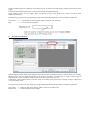
There are 4 modes, Normal, Preset, Set and Remote Control mode for the power supply.
Slide the Mode Selection Switch (8) to your desired Mode.
The power supply is factory preset to Normal Mode with maximum current level CC.
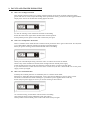
6.1 Normal Mode
This is the factory preset mode and the power supply output V, I are controlled by the dual action volume knobs.
Push the knobs to toggle the coarse and fine tuning, notice the subtle changes in brightness of related LED. .
Adjust the knobs to your desired values by trying coarse and fine tuning.
To check the preset current level, just turn the Current Knob lightly in any direction.
The display will resume its normal brightness after few seconds to double confirm your adjustment.
6.2 Preset Mode
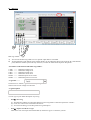
a. In this mode, the Rear Control Light is on to indicate panel V & I controls are de-activated.
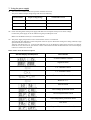
b. There are 3 preset output P1/ P2/ P3 at the Recall Selection Switch (9)
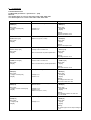
c. The preset values are factory set as following table.
d. End user can set his own output rating, please refer to paragraph 6.3
Recall No.
Output Voltage
Output Current
P1
5V
Maximum
P2
13.8V
Maximum
P3
HCS-3100: 15V
Maximum
HCS-3102: 25V
HCS-3104: 55V
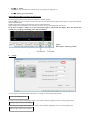
6.3 Set Mode – First enter into the Set Mode by pushing Switch (8) to Set Mode slot.
The power supply is then ready to be preset.
6.3.1
To define the preset output P1/ P2/ P3.
a. Select the Recall Switch (9) to the position P1, P2 or P3 which you want to set
b. Adjust the front panel voltage control knob to set your desired voltage value
c. Adjust the front panel current control knob to set your desired current limit value
d. Repeat the procedure for remaining recalls P1, P2, P3 if desired.
e. Move Mode Switch (8) from Set to Preset position to confirm your settings.
Remarks:
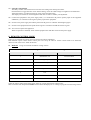
All the set values in the presets will be kept even after the power supply has been turned off.
Always check output voltage of Presets before connect to Load
To check the preset values, move Mode Switch (8) to preset position
Move the Recall Switch (9) to P1, P2 or P3.
The V and I settings of corresponding RECALL P1, P2, P3 will be show on the panel meters.
6.3.2
To reset the unit back to factory setting
a. Turn OFF the power supply
b. Push and hold both front panel voltage and current control knobs at the same time
c. Turn ON the power supply again
d. Release front panel voltage and current control knobs
6.4 Remote Control Mode
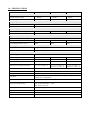
To control the output voltage and current by remote control connector (10)
Please refer to paragraph 8