1
LS3200_En.book
21 ページ
2015年5月13日 水曜日 午後5時51分
Useful Function
Using a TV Remote Controller
Preprogrammed feature
The unit has been preprogrammed so that the
unit can be operated using your TV remote
controller. Volume control and muting(*)
operations can be performed with this feature.
If you want to use other functions or cannot
operate the unit with your TV remote
controller, you can use the learning function
(described below) to enable these features.
To cancel this feature, press and hold - for
approximately 3 seconds while continuing to
press and hold ÍON/STANDBY on this unit.
When this feature is enabled, the
ON/STANDBY LED flashes white once.
When it is disabled, the LED flashes twice.
Perform the same procedures to use the TV
remote controller again.
* The mute state can be turned over each time you
press the Mute button on your TV remote
controller. In such case, you can synchronize the
mute status of the unit and the TV by pressing and
holding the Mute button on your TV remote
controller.
Learning function
The unit is set so that signals emitted from each
button on your TV remote controller control
specific operations.
* It is recommended to select buttons that do not
prevent TV operation when assigning the functions
to your remote controller. Signal of some types of
remote controller may not be received by the unit.
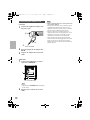
E.g.) To assign the unit’s ON/STANDBY
function to the TV remote controller:
1
While continuing to press and hold the
/TV input button on this unit, press
and hold ÍON/STANDBY for
approximately three seconds. The
ON/STANDBY LED flashes amber for
10 seconds.
2
While the ON/STANDBY LED is
flashing amber, press any button on the
TV remote controller three times while
aiming it at the remote control sensor of
the unit.
The ON/STANDBY LED flashes amber
twice to indicate that this was successfully
configured. After being configured,
pressing the button on the TV remote
controller will operate the
ON/STANDBY function on the
controller.
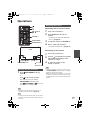
The learning function enables the following
unit functions to be operated with your TV
remote controller.
Press and hold the following buttons instead of
ÍON/STANDBY in step 1.
- VOLUME +: +
- VOLUME –: - MUTING: + and - INPUT: ÍON/STANDBY and +
- SOUND MODE: ÍON/STANDBY and To prevent incorrect operation:
The unit is preprogrammed to support a large
number of TV remote controllers. For this
reason, using remote controllers other than
that supplied with the unit and TV remote
controllers may result in unexpected
operation.
In order to prevent incorrect operation,
disable TV remote controller operation.
Note
• If you assign volume control and muting operations
with the learning function, the preprogrammed TV
remote controller feature (volume control and
muting) will be disabled. In addition, to cancel
operations assigned with the learning function, reset
the controller. (Æpage 22)
En
21