1
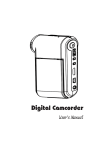
User's Manual
Safety Notice:
1. Do not drop, puncture or disassemble the camcorder; otherwise the warranty will be voided.
2. Avoid all contact with water, and dry hands before using.
3. Do not expose the camcorder to high temperature or leave it in direct sunlight. Doing so may
damage the camcorder.
4. Use the camcorder with care. Avoid pressing hard on the camcorder body.
5. For your own safety, avoid using the camcorder when there is a storm or lightning.
6. Do not use batteries of different specifications. Doing so may lead to the potential for serious
damage.
7. Remove the battery during long periods between usage, as a deteriorated battery may affect the
functionality of the camcorder.
8. Remove the battery if it shows signs of leaking or distortion.
9. Use only the accessories supplied by the manufacturer.
10. Keep the camcorder out of the reach of infants.
FCC Compliance Statement:
This device complies with Part 15 of the FCC Rules. Operation is subjected to the following two
conditions: (1) this device may not cause harmful interference, and (2) this device must accept any
interference received, including interference that may cause undesired operation.
This equipment has been tested and found to comply with limits for a Class B digital device,
pursuant to Part 15 of the FCC rules. These limits are designed to provide reasonable protection
against harmful interference in residential installations. This equipment generates, uses, and can
radiate radio frequency energy, and if not installed and used in accordance with the instructions,
may cause harmful interference to radio communications.
However, there is no guarantee that interference will not occur in a particular installation. If this
equipment does cause interference to radio or television equipment reception, which can be
determined by turning the equipment off and on, the user is encouraged to try to correct the
interference by one or more of the following measures:
-Reorient or relocate the receiving antenna.
-Move the equipment away from the receiver.
-Plug the equipment into an outlet on a circuit different from that to which the receiver is connected.
-Consult the dealer or an experienced radio/television technician for additional suggestions.
You are cautioned that any change or modifications to the equipment not expressly approved by
the party responsible for compliance could void Your authority to operate such equipment.
Getting Started
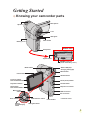
Knowing your camcorder parts
Microphone
Speaker
Lens
LED lights
Flash strobe
Battery cover
Strap hook
Bottom view
Tripod socket
SD/MMC card slot
(inside the battery cover)
Status LED (left) /
Charging LED (right)
Mode button
Menu button
LCD monitor
Shutter button
Previous button/
Fast backward button
Zoom (in/out) button
Play/Pause button
Record button
Next button/
Fast forward button
Earphone connector
Macro mode
switch
USB connector *
AV connector *
Flash switch
OK key/
4:3/16:9 display
switch
White balance switch
Power button
* inside the cover
LED lights switch
Installing the battery
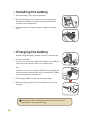
1. Slide the battery cover open as indicated.
2. Place the accessory Li-Ion battery into the compartment.
Note that the metallic contacts must be aligned with the
contacts in the compartment.
3. After the battery is properly installed, replace the battery
cover.
Charging the battery
Please charge the battery at least 4 hours for first time use.
1. Connect the cable.
Connect one end of the supplied AC adapter to the USB port
of the camcorder and the other end to a wall outlet.
OR
Connect one end of the supplied USB cable to the USB port
of the camcorder and the other end to a powered PC. Make
sure the camcorder is powered off.
2. The charging LED turns red and the charge starts.
3. When the charging LED turns off, the battery pack is fully
charged.
When using a PC to charge the battery, do not power on the
camcorder, or the charge will stop.
Inserting a memory card (optional)
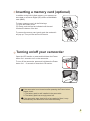
In addition to the built-in flash memory, your camera can
store data on a Secure Digital (SD) card or a MultiMedia
card (MMC).
To insert a memory card, do the followings:
(1) Open the battery cover.
(2) Gently push the card as indicated until the card
reaches the bottom of the slot.
To remove the memory card, gently push the card and it
will pop up. Then pull the card out of the slot.
Turning on/off your camcorder
Open the LCD monitor or press and hold down the Power
button for 1 second to turn on the camcorder.
To turn off the camcorder, press and hold down the Power
button for 1 ~ 3 seconds or close the LCD monitor.
If the camcorder is not turned on after pressing the Power button,
please check:
1. The battery pack is well installed in the camcorder.
2. The battery pack has enough power left.
If the camcorder stays inactive for a long period of time, it may
automatically shut down due to the Auto-Off setting.
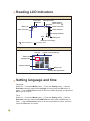
Reading LCD indicators
Digital Camcorder mode:
Flash mode
Selftimer
LED lights mode
White balance/
Macro mode ( )
Photo resolution
Mode icon
Video resolution
Zoom indicator
Storage medium*1
0008
Battery Life
Number of recordings
*1
: internal memory ;
: memory card.
Playback mode:
File type
Mode icon
MPEG
Current / Total recordings
0001/0009
Highlight box
Image thumbnail
Battery Life
Storage medium
Setting language and time
Language:
Power-on → Press the Mode button → Enter the Setting mode → Use the
Direction buttons to select the Language item and press the OK button to
enter → Use the Direction buttons to select a suitable language and press the
OK button to confirm.
Time:
Power-on → Press the Mode button → Enter the Setting mode → Use the
Direction buttons to select the Date&Time item and press the OK button to
enter → Use the Direction buttons to set the correct date and time, and then
press the OK button to confirm.
Basic Operations
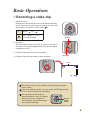
Recording a video clip
1. Adjust the focus:
Normally the camcorder can auto focus without adjusting
focus. If you want to take close-up pictures, you can push
the Up button to switch to macro mode ( ).
-
30cm ~
(12” ~ )
5cm ~ 30cm (2” ~ 12”)
* At 1X fixed zoom
Zoom in
2. Zooming:
Move the Zoom button up or down to zoom in or zoom out
the screen. The optical magnification is 3X and the digital
magnification is 8X.
3. Press the Record button to start recording.
4. Press the Record button again to stop recording.
Zoom out
Timer
00:00:07
0008
The zoom function is also available during recording (except in
macro mode).
If the surroundings are dark, you can switch the LED lights mode
to On or Auto to help focus and lighting.
You can press the OK button to
switch between 4:3 and 16:9 display.
Note that once you change the
screen display, the recorded image
will change accordingly.
4:3/16:9
display
switch
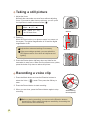
Taking a still picture
1. Adjust the focus:
Normally the camcorder can auto focus without adjusting
focus. If you want to take close-up pictures, you can push
the Up button to switch to macro mode ( ).
-
30cm ~
(12” ~ )
5cm ~ 30cm (2” ~ 12”)
* At 1X fixed zoom
Zoom in
2. Zooming:
Move the Zoom button up or down to zoom in or zoom out
the screen. The optical magnification is 3X and the digital
magnification is 8X.
Adjust other advanced settings if necessary.
Zoom out
If the surroundings are dark, you can switch the
LED lights mode to On or Auto to help focus and
lighting.
3. Press the Shutter button half way down and hold for the
camcorder to auto focus. When the focus frame turns yellow,
press the button fully down to take a still picture.
Recording a voice clip
1. Press the Mode button and use the Direction buttons to
select the Voice (
) mode. Then press the OK key to
enter.
2. Press the Record button to start recording.
3 When you are done, press the Record button again to stop
recording.
Avoid blocking
the microphone
Before or during recording, you can move the Direction buttons
toward left or right to adjust microphone sensibility, thus setting the
sound volume of the recording.
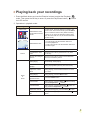
Playing back your recordings
1. Press the Mode button and use the Direction buttons to select the Playback (
)
mode. Then press the OK key to enter. Or press the Play/Pause button (
) below
the LCD monitor.
2. Operations in playback mode:
File type
How to...
Index mode
MPEG
0001/0009
Shift between index
mode and full-screen
mode
Shift between files
1. In index mode: Use the Direction buttons to
move the highlight box.
2. In full-screen mode: Use the Direction buttons to
move left or right.
Zoom in/out
Use the Direction buttons to move up or down.
Lock/Release zoom
ratio
When the zoom ratio is greater than 1.0x, press
the OK key.
Browse the enlarged
picture
When the zoom ratio is locked, use the Direction
buttons to browse the picture.
Start playing
When selected (in full-screen mode), the file
automatically starts playing.
Pause/Resume
playing
During playing/While paused, press the OK key.
Adjust the volume
level
During playing, use the Direction buttons to move
up or down.
Stop playing
During playing, press the Menu button.
Return to the
preview screen
Press the Shutter button.
Fast forward
During playing, press the Next ( ) button. To stop,
press the Play/Pause ( ) button.
Fast backward
During playing, press the Previous ( ) button. To
stop, press the Play/Pause ( ) button.
Select the next file
While paused/stopped, press the Next (
Select the previous
file
While paused/stopped, press the Previous (
button.
Full-screen mode
MPEG
0001/0009
Picture
Video
&
Audio
Action
In index mode, press the OK key to switch to fullscreen mode. In full-screen mode, press the Menu
button to switch to index mode. (When reviewing
a picture, if you move the Direction buttons down
when the zoom ratio is 1.0x, the screen will switch
to index mode.)
) button.
)
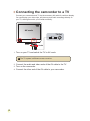
Connecting the camcorder to a TV
Connect your camcorder and TV via the accessory AV cable for real-time display.
You can display your video clips, still pictures, and audio recordings directly on
your TV, sharing them with your friends and family.
AV mode
TV Out
Video
Audio
1. Turn on your TV and switch the TV to AV mode.
The TV system is different across countries.
2. Connect the audio and video ends of the AV cable to the TV.
3. Turn on the camcorder.
4. Connect the other end of the AV cable to your camcorder.
Advanced Operations
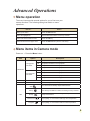
Menu operation
The menu items provide several options for you to fine-tune your
camera functions. The following table gives details on menu
operations.
How to...
Action
Bring up the menu
Press the Menu button.
Move the highlight bar
Use the Direction buttons to move up or down.
Enter sub-menu/Confirm an item
Press the OK key.
Exit menu/Go back to upper menu
Press the Menu button (when in sub-menu).
Menu items in Camera mode
Power-on → Press the Menu button.
Item
Option
8 mega-pixel
camcorder
Resolution
10 mega-pixel
camcorder
Description
1M
Set picture resolution to 1 mega pixels.
3M
Set picture resolution to 3 mega pixels.
5M
Set picture resolution to 5 mega pixels.
8M
Set picture resolution to 8 mega pixels.
1M
Set picture resolution to 1 mega pixels.
3M
Set picture resolution to 3 mega pixels.
5M
Set picture resolution to 5 mega pixels.
10M
Set picture resolution to 10 mega pixels.
Date Stamp
On/Off
Print a date mark on each picture when enabled.
Stabilizer
On/Off
Minimize image blur caused by hand shake when enabled.
Auto
Sunny
WB
Cloudy
Fluorescent
Tungsten
The camera automatically adjusts white balance.
This setting is suitable for outdoor recording in sunny weather.
This setting is suitable for recording in cloudy weather or
shady environments.
This setting is suitable for indoor recording with fluorescent
lamp lighting, or environments with high color temperature.
This setting is suitable for indoor recording with incandescent
lamp lighting, or environments with low color temperature.
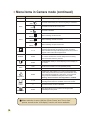
Menu items in Camera mode (continued)
Item
Option
Histogram
On/Off
Auto
Flash
On
Normal
B&W
Classic
Exposure
Selftimer
Icon
Video
Make recordings in natural color.
Make recordings in black and white.
Make recordings in sepia-toned color.
Manually adjust the exposure to gain better effect when the
preview image appears too bright or too dark. A positive
value indicates the image will be brighter than usual; while a
negative value makes the image dimmer.
On/Off
Enable/Disable the selftimer. After the selftimer is turned on,
the camera will have ten seconds delay before recording
when the Shutter button is pressed.
On/Off
Enable/Disable OSD (on screen display) icons to display on
the screen.
VGA
Set the video resolution to VGA (640x480 pixels).
QVGA
Set the video resolution to QVGA (320x240 pixels).
On/Off
Enabling this setting allows you to take a photograph with
a dark background. Since the shutter speed will slow down
when taking photographs at a dark place, we recommend
using a tripod to eliminate blurring from hand shake.
Warning: Noise increases when Night Shot is enabled.
1 ~ 10
This setting allows you to add customsized frames to photos.
10 background frames are available on the LCD monitor.
0
On/Off
Two-in-One
The flash is forced to fire in every shot.
-2~+2
NightShot
PhotoFrame
The flash automatically fires when the lighting is insufficient.
The flash is disabled.
Off
Effect
Description
Enable/Disable image histogram display on the screen.
The Photo-Frame function is disabled.
This setting allows you to combine two images taken
individually into one photo.
When resolution is set to 10M, the “Photo Frame” and “Two-in-One”
options, as well as the “16:9 display” function, will not be available.
10
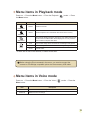
Menu items in Playback mode
Power-on → Press the Mode button → Enter the Playback (
the Menu button.
Item
Option
) mode → Press
Description
No/Yes
Delete current file.
No/Yes
Delete all pictures and video/audio files stored in the memory.
Delete One
Delete All
Slide Show
One
All
Print
Cancel
The camera displays images in sequence. Only JPEG pictures and
the first frames of MPEG files will be displayed. You can press the
Menu button to stop the slide show.
Print current image when connected to a PictBridge-ready printer.
Print all images when connected to a PictBridge-ready printer.
Cancel action.
* If there are no files in the camera, no items will be seen.
Before using the Print command in the menu, you need to connect the
camera to a PictBridge compatible printer via the accessory USB cable.
Menu items in Voice mode
Power-on → Press the Mode button → Enter the Voice (
Menu button.
Item
Delete One
Delete All
) mode → Press the
Description
Delete current voice recording.
Delete all voice recordings.
11
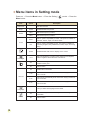
Menu items in Setting mode
Power-on → Press the Mode button → Enter the Setting (
Menu button.
Item
Option
Date & Time
-
Beep
On/Off
Enable/Disable beep sound.
50Hz
Set flicker frequency to 50Hz*.
60Hz
Set flicker frequency to 60Hz*.
NTSC
Set TV system compatibility to NTSC. This option is suitable for
America, Taiwan, Japan, and Korea areas.
PAL
Set TV system compatibility to PAL. This option is suitable for
Germany, England, Italy, Netherlands, China, Japan, and Hong
Kong.
Flicker
TV-out
Icon
LCD Bright
Format
Auto Off
Language
Default
12
) mode → Press the
Description
Set date and time.
On/Off
Enable/Disable OSD icons to display on the screen.
-2~+2
Set LCD brightness. A positive value makes the LCD brighter;
while a negative value makes the LCD dimmer.
Yes
Format the storage medium. Note that all files stored in the
medium will be gone.
No
Cancel action.
Off
Disable Auto-off function.
1 min
The camera automatically shuts down when staying inactive for
over 1 minute.
3 min
The camera automatically shuts down when staying inactive for
over 3 minutes.
5 min
The camera automatically shuts down when staying inactive for
over 5 minutes.
-
Lets you select the language used for OSD.
Yes
Restore factory defaults. Note that your current settings will be
overridden.
No
Cancel action.
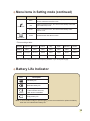
Menu items in Setting mode (continued)
Item
Option
Description
Menu
When connected to a PC, the camera displays a menu for you to
choose a desired connection mode.
Disk
When connected to a PC, the camera automatically enters Disk
(removable disk) mode.
USB Mode
Start Movie
Printer
When connected to a PC, the camera automatically enters
Printer mode.
On/Off
Enable/Disable Start Movie function.
* Flicker settings table:
Country
England
Germany
France
Italy
Spain
Netherlands
Setting
50Hz
50Hz
50Hz
50Hz
50Hz
50Hz
50Hz
Country
Portugal
America
Taiwan
China
Japan
Korea
Thailand
Setting
50Hz
60Hz
60Hz
50Hz
50/60Hz
60Hz
50Hz
Russia
Note: The flicker setting is based on the frequency standard of your local power supply.
Battery Life Indicator
Icon
Description
Full battery life
Moderate battery life
(white)
Low battery life
* If the indicator turns red,
flash strobe is disabled.
Empty battery life
Note: To avoid sudden outage of power supply, you are recommended to replace the battery
when the icon indicates low battery life.
13
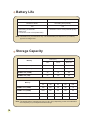
Battery Life
Still picture
Video clip
Number of shots
Recording time (minute)
130
110
* shoot every 30 seconds
** flash is off
*** resolution is set to 5M (2560x1920)
* resolution is set to VGA (640x480 pixels)
Note: This table is for your reference only. The actual battery life depends on your battery type and recharge level.
Storage Capacity
Video (min.)
Memory
Audio (min.)
VGA
QVGA
Maximum
SD/MMC card (128MB)
7
23
90
SD/MMC card (256MB)
14
46
190
SD/MMC card (512MB)
28
92
380
SD/MMC card (1GB)
56
184
760
Memory
Still picture
1M
3M
5M
8M
SD/MMC card (128MB)
520
230
130
80
10M
70
SD/MMC card (256MB)
1040
460
260
160
140
SD/MMC card (512MB)
2080
920
520
320
290
SD/MMC card (1GB)
4160
1840
1040
640
580
Note: The actual value of capacity may vary (up to ± 30%) depending on the color saturation
and complexity of your subject and surroundings.
14
Advanced Instructions
English
Copying files to Your PC
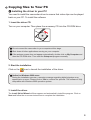
Installing the driver to your PC
You need to install the camcorder driver to ensure that video clips can be played
back on your PC. To install the software:
1. Insert the driver CD.
Turn on your computer. Then place the accessory CD into the CD-ROM drive.
Do not connect the camcorder to your computer at this stage.
Shut down all other applications running on your computer.
If the autorun screen does not appear automatically, double-click on My Computer and
then the CD-ROM drive. Then start the Setup.exe program manually.
2. Start the installation.
Click on the
icon to launch the installation of the driver.
Notice for Windows 2000 users:
During the installation process, a warning message regarding digital signature may
appear twice or more. Please click on Yes to continue the process. The software is fully
compatible with Windows 2000 operation system.
3. Install the driver.
The Install Shield Wizard will then appear and automatically install the program. Click on
Next and follow the on-screen instructions to complete the installation.
1
Copying files to Your PC (continued)
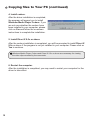
4. Install codecs.
After the driver installation is completed,
the program will prompt you to install
Windows Media Player Codecs. If you
are not sure whether the codecs have
been installed in your computer, please
click on Yes and follow the on-screen
instructions to complete the installation.
5. Install Direct X 9.0c or above.
After the codecs installation is completed, you will be prompted to install Direct X
9.0c or above if the program is not yet installed in your computer. Please click on
Yes to continue.
Windows Media Player Codecs and Direct X 9.0c or above are necessary for viewing
the video clips recorded by the camcorder.
6. Restart the computer.
After the installation is completed, you may need to restart your computer for the
driver to take effect.
2
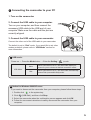
Connecting the camcorder to your PC
1. Turn on the camcorder.
2. Connect the USB cable to your computer.
Turn on your computer, and then connect the
accessory USB cable to the USB port of your
computer. Make sure the cable and the port are
correctly aligned.
3. Connect the USB cable to your camcorder.
Connect the other end of the USB cable to your camcorder.
The default is set to “Disk” mode, if you would likt to set other
modes as default, please refer to “USB Mode” section for
more information.
USB mode:
Power-on → Press the Mode button → Enter the Setting (
) mode.
Menu
When connected to a PC, the camcorder displays a
menu for you to choose a desired connection mode.
Disk
When connected to a PC, the camcorder automatically
enters Disk (removable disk) mode.
USB Mode
Notice for Windows 2000/XP users:
If you want to disconnect the camcorder from your computer, please follow these steps:
1. Double-click
2. Click
in the system tray.
(USB Disk), and then click Stop.
3. Select the camcorder when the confirmation screen appears and click OK.
4. Follow the on-screen instructions to safely disconnect the camcorder from your
computer.
3
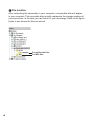
File location
After connecting the camcorder to your computer, a removable disk will appear
in your computer. The removable disk actually represents the storage medium of
your camcorder. In the disk you can find all of your recordings. Refer to the figure
below to see where the files are stored.
For multimedia files.
For MP3 files.
4
Appendix: A
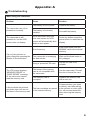
Troubleshooting
When using the camcorder:
Problem
The camcorder can not be
powered on normally.
The camcorder is still
powered on, but the LCD
screen does not display.
Can not take pictures or
video clips when pressing the
Shutter or Record button.
The LCD screen displays
“MEMORY ERROR” or
“CARD ERROR” message.
Or the camcorder cannot
read the memory card.
I did not delete the pictures
and video clips, but can not
find them in the memory card.
Cause
Solution
The battery is out of power.
Replace the battery.
The battery is incorrectly
installed.
Re-install the battery.
If the camcorder stays idle
over one minute, the LCD
screen will automatically shut
down to save power.
Press any button except the
power button to reactivate the
display.
Out of memory.
Free some space from the
SD/MMC card or the internal
memory.
The camcorder is recharging
the flash strobe.
Wait until the flash strobe is
fully charged.
Using a “protected” SD card.
Set the SD card to be
writable.
The format of the memory
card is not compatible with
the camcorder.
Use the camcorder “Format”
function to format the card.
The memory card is
corrupted.
Replace the memory card
with a new one.
The lost recordings are saved
in the internal memory.
It happens when you insert
a memory card after taking
a few pictures or video clips.
You can access those files
after removing the memory
card.
5
Appendix: A
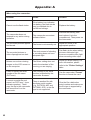
When using the camcorder:
6
Problem
Cause
Solution
Cannot use the flash strobe.
If the battery icon indicates
low battery, the flash strobe
may be disabled due to
insufficient voltage.
Replace the battery.
The camcorder does not
respond to any action during
operation.
The camcorder encounters
software failure.
Remove the battery pack
and replace it into the
compartment. Then power on
the camcorder.
The recorded pictures appear
too blurred.
The focus is not correctly set.
Adjust the focus to an
appropriate position.
The recorded pictures or
video clips appear too dark.
The environment of shooting
or recording does not have
adequate light.
Use flash strobe when taking
pictures. Add extra light
sources or enable video light
when recording video clips.
Noises occur when viewing
images on the LCD screen or
on the computer.
The flicker setting does not
match the standard of the
country you are staying.
Adjust the flicker setting. For
more information, please
refer to the “Flicker Settings”
table.
I want to restart the serial
number of the file name
(PICTxxxx).
The counting of the serial
number is handled by the
camcorder firmware.
Use the camcorder “Format”
function to format the card.
I convert a media file and
name it as PICTxxxx.* (xxxx
indicates number). Then I
copy the file to the camcorder
but cannot find it on the
camcorder.
There is another file with
duplicate serial number
(e.g. PICT0001.ASF and
PICT0001.JPG), or the file
type is not supported.
Give the file a distinctive
serial number and make sure
the file type is supported by
the camcorder.
Appendix: A
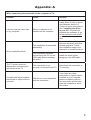
When connecting the camcorder to the computer or TV:
Problem
I cannot view the video clips
on my computer.
Driver installation failed.
The TV screen does not
display after connecting the
camcorder to the TV.
A conflict with other installed
camcorder or capture device
occurred.
Cause
Solution
Driver or software is not
installed on the computer.
Install Direct X 9.0c or above
and Windows Media 9.0
Codecs to solve this problem.
See “Installing the driver
to your PC” for details on
installing the software, or go
to http://www.microsoft.com
to download the required
files.
The installation is terminated
abnormally.
Remove the driver and other
related programs. Follow
the installation steps in the
manual to re-install the driver.
The camcorder has been
connected to the PC via the
USB cable before installing
the driver.
Install the driver before
plugging in the USB cable.
The camcorder is not
correctly connected to the TV.
Reconnect the camcorder to
TV correctly.
The device is not compatible
with the camcorder.
If you have any other
camcorder or capture device
installed in your computer,
please completely remove
the camcorder and its driver
from the computer to avoid
the conflict.
7
Appendix: A
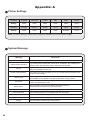
Flicker Settings
Country
England
Germany
France
Italy
Spain
Setting
50Hz
50Hz
50Hz
50Hz
50Hz
50Hz
Country
Portugal
America
Taiwan
China
Japan
Korea
Setting
50Hz
60Hz
60Hz
50Hz
50/60Hz
60Hz
Russia
Note: The flicker setting is based on the frequency standard of your local power supply.
System Message
Message
Recording
Please Unlock SD Card
No File
If you insert a SD card and the card is set to “Protected”, this message will
show up when the camcorder tries to write data into the card.
When the camcorder is set to Playback mode without any existing file to
play, this message will show up.
Please Change Battery
The battery life of the camcorder is low. You should replace the battery with
a new one immediately.
Memory Full
The storage memory is full and can not store any more files. Please change
the SD/MMC card or delete some files to free some memory space.
Card Error
The inserted card is not compatible with the camcorder. Please change the
card or try formatting the card.
Memory Error
Strobe Is Charging
File Format Error
Deleting
Formatting
Setting
8
Description
The camcorder is recording a file.
The camcorder can not access data in the internal memory.
Please format the medium to solve this problem.
The flash strobe is charging.
The file being played is not compatible with the camcorder.
The camcorder is performing file deletion.
The camcorder is formatting the storage medium.
The camcorder is performing a setting action.
Appendix: B
Instruction for ArcSoft MediaConverter™
Introduction
ArcSoft MediaConverter is a powerful all-in-one multimedia file converter. This
utility quickly and effortlessly converts photo, video, and music files into formats
optimized for use on your portable device. Multiple files and file types can be
converted at the same time. It’s easy! Three simple steps are all it takes. (Please
refer to “Converted files” section for more information.)
System requirements
To install and run the MediaConverter, your system must meet the following
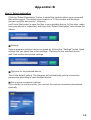
minimum requirements:
Microsoft Windows 2000/XP (Home or Professional)
50 MB free hard drive space
256 MB RAM
DirectX 9 (DirectX 9c recommended)
Microsoft Windows Media Player 9.0 (for converting WMA and WMV files)
Microsoft Windows 2000/XP (Home or Professional)
Apple QuickTime 6.5 (for converting MOV files)
9
Appendix: B
Supported file formats
Video
Video files are converted and copied to the selected location as MPEG-4
encoded AVI files, WMV files or MPEG-4 encoded ASF files (Default).
Supported file types for conversion
- AVI (Microsoft Video 1 format, Cinepak, Intel Indeo, uncompressed, etc.)
- MPEG-1 in MPEG, MPG, MPE
- DAT (VCD MPEG1)
- MPEG-4 in AVI format
- MPEG-4 in ASF
- WMV
- QuickTime MOV
QuickTime 6.5 and Windows Media Player 9.0 or above are required for
QuickTime MOV and WMV file conversion, respectively.
Supported file types for export
- AVI (MPEG-4 SP)
- WMV
- ASF(MPEG-4 SP)
10
Appendix: B
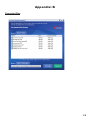
Converted files
11
Appendix: B
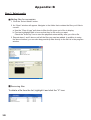
Step 1: Select media
Adding files for conversion
1 Click the “Select Media” button.
2 An “Open” window will appear. Navigate to the folder that contains the files you’d like to
convert.
a. Use the “Files of type” pull-down to filter the file types you’d like to display.
b. Preview highlighted files to be sure that they’re the ones you want.
Check the “AutoPlay” box to start the playback automatically after you click a file.
3 Repeat steps 1 and 2 above until all the files you want are added. In addition to using
the above method, you can also drag-and-drop files directly to the file list in the program
window.
Removing files
To delete a file from the list, highlight it and click the “X” icon.
12
Appendix: B
Step 2: Select destination
Click the “Select Destination” button to select the location where your converted
files will be saved. The default save location is “C:\Documents and Settings\
[current user]\My documents”. However,
you’ll most likely want to save the files to your portable device. In this case, make
sure your device is connected, and then click “Select Destination” and choose the
device.
Settings
Various program settings can be accessed by clicking the “Settings” button. Each
section lets you select one of two settings: “Optimize for the selected device,”
and “Use custom conversion settings.”
Optimize for the selected device
This is the default setting. The program will automatically set the conversion
parameters according to your selected device.
Use custom conversion settings
If you decide to use this option, you can set the various conversion parameters
manually.
13
Appendix: B
Video settings
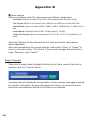
When converting a video file, there are several different parameters:
- Resolution (Options include QVGA (320 x 240) [default] and VGA (640 x 480))
- File Format (MPEG-4 encoded AVI files, WMV files or MPEG-4 encoded ASF files)
- Video Bitrate (Options include 500KB, 1.0MB, 1.5MB, 2.0 MB [default], 2.5 MB, and 3.0
MB)
- Audio Bitrate (Options include 96 KB, 128 KB [default], 192 KB)
- Frame Per Second (Options include [in fps] 15.00, 20.00, 24.00, 25.00 [default], and
29.97)
Selecting “Optimize for the selected device” uses the default values above,
where applicable.
After viewing/modifying the various settings, select either “Save” or “Cancel” to
return to the main screen. Click “Save” if you’d made changes that you’d like to
keep. Otherwise, click “Cancel.”
Step 3: Convert
When you’re ready, select (highlight) the files you’d like to convert from the list,
and then click the “Convert” button.
A progress bar will display the current status. Various popups may appear asking
for specific confirmation. A popup will appear and inform you once all the files
have been converted and stored to the location you selected.
14
Appendix: B
Playing the converted ASF files in your camcorder
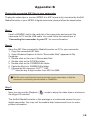
To play the video clips or movies (MPEG-4 in ASF format only) converted by ArcSoft
MediaConverter in your MPEG-4 digital camcorder, please follow the steps below.
Step 1
Insert a SD/MMC card in the card slot of the camcorder and connect the
camcorder to PC via the USB cable. You could follow the instructions of
“Connecting the camcorder to your PC” for more information.
Step 2
Save the ASF files converted by MediaConverter on PC to your camcorder.
1 Copy the converted ASF files.
2 Open Windows Explorer to find a “Removable Disk” appeared in My
Computer.
3 Double-click on the icon of Removable Disk.
4 Double-click on the DCIM file folder.
5 Double-click on the 100MEDIA file folder.
6 Paste the files into 100MEDIA file folder.
7 Change the file names to CLIP****.ASF.
**** could be any 4-digit number from 0001 to 9999.
The file name must follow the naming principle of your camcorder, so that the
camcorder could identify the files saved on 100MEDIA.
Step 3
Now you can use the Playback (
the large LCD monitor!
) mode to enjoy the video clips or movies on
The ArcSoft MediaConverter in this package is a customized version for your
digital camcorder. You may visit the website http:\\www.arcsoft.com for more
product information.
15
Appendix: C
System Requirements
Operating System: Windows 2000/XP
CPU: Pentium III or above
System RAM: 128MB or above
Graphic Card: 64MB, 24 bit true color
CD-ROM speed: 4x or above
Software: Direct X 9.0c or above and Windows Media Player Codecs
Other: USB connector
16
82-408-90010v1.0