1
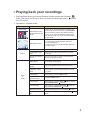
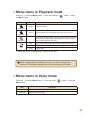
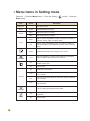
Menu items in Playback mode
Power-on → Press the Mode button → Enter the Playback (
the Menu button.
Item
Option
) mode → Press
Description
No/Yes
Delete current file.
No/Yes
Delete all pictures and video/audio files stored in the memory.
Delete One
Delete All
Slide Show
One
All
Print
Cancel
The camera displays images in sequence. Only JPEG pictures and
the first frames of MPEG files will be displayed. You can press the
Menu button to stop the slide show.
Print current image when connected to a PictBridge-ready printer.
Print all images when connected to a PictBridge-ready printer.
Cancel action.
* If there are no files in the camera, no items will be seen.
Before using the Print command in the menu, you need to connect the
camera to a PictBridge compatible printer via the accessory USB cable.
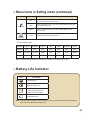
Menu items in Voice mode
Power-on → Press the Mode button → Enter the Voice (
Menu button.
Item
Delete One
Delete All
) mode → Press the
Description
Delete current voice recording.
Delete all voice recordings.
11