1
Appendix: B
Video settings
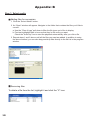
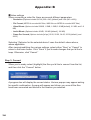
When converting a video file, there are several different parameters:
- Resolution (Options include QVGA (320 x 240) [default] and VGA (640 x 480))
- File Format (MPEG-4 encoded AVI files, WMV files or MPEG-4 encoded ASF files)
- Video Bitrate (Options include 500KB, 1.0MB, 1.5MB, 2.0 MB [default], 2.5 MB, and 3.0
MB)
- Audio Bitrate (Options include 96 KB, 128 KB [default], 192 KB)
- Frame Per Second (Options include [in fps] 15.00, 20.00, 24.00, 25.00 [default], and
29.97)
Selecting “Optimize for the selected device” uses the default values above,
where applicable.
After viewing/modifying the various settings, select either “Save” or “Cancel” to
return to the main screen. Click “Save” if you’d made changes that you’d like to
keep. Otherwise, click “Cancel.”
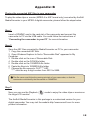
Step 3: Convert
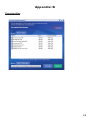
When you’re ready, select (highlight) the files you’d like to convert from the list,
and then click the “Convert” button.
A progress bar will display the current status. Various popups may appear asking
for specific confirmation. A popup will appear and inform you once all the files
have been converted and stored to the location you selected.
14