1
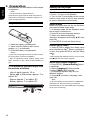
4 Preparation English Always follow the instructions in this chapter in sequence. Note: - Use of controls or adjustments or performance of procedures other than herein may result in hazardous radiation exposure or other unsafe operation. Find the correct viewing input 1. Press 1 to turn on this product. 2. Turn on the TV and switch to the correct video-in input (refer to the TV user manual on how to select the correct input). Prepare the remote control Initial Setting When you turn on this unit for the first time, you need to follow these steps. 1. A welcome page will be displayed when this product is powered on. 2. Press OK to enter language setting. 3. Select your desired language, resolution and aspect ratio using /, then press OK. 4. Press SETUP to exit the Setup menu. 1. Open the battery compartment. 2. Insert one R03 battery with correct polarity (+/-) as indicated. 3. Close the battery compartment. Notes: - If you are not going to use the remote control for a long time, remove the battery. - Risk of explosion! Keep battery away from heat, sunshine or fire. Never discard battery in fire. Use the SETUP menu 1. Press SETUP to display the Setup menu when the Blu-ray DiscTM Player is playing or no disc. And press SETUP to exit the Setup menu. • The maximum operable ranges from the unit are as follows. - Line of sight: approx. 10 m - Either side of the centre: approx. 7 m within 30° - Above: approx. 7 m within 30° - Below: approx. 7 m within 30° 7m 10 Setting up the player 10 m 7m Tip: - When playing high-definition sources, you must press STOP button to enter SETUP interface. Select menu display language 1. Press SETUP, [General Setting] menu is displayed. 2. Select [Language], then press . 3. Select [OSD], then press . - The language options may vary for different regions. 4. Press / to select a language, then press OK. Note: - If this disc player is connected to a HDMI CEC compliant TV, skip this setting. It switches automatically to the same OSD menu language as per your TV setting.