1
OfficeServ Link User Manual
Every effort has been made to eliminate errors and ambiguities in the information contained in this guide.
Any questions concerning information presented here should be directed to SAMSUNG
TELECOMMUNICATIONS AMERICA, 1301 E. Lookout Dr. Richardson, TX. 75082 telephone (972) 7617300. SAMSUNG TELECOMMUNICATIONS AMERICA disclaims all liabilities for damages arising from the
erroneous interpretation or use of information presented in this guide.
Samsung Telecommunications
Publication Information
SAMSUNG TELECOMMUNICATIONS AMERICA reserves the right without prior notice to revise information in
this publication for any reason. SAMSUNG TELECOMMUNICATIONS AMERICA also reserves the right without
prior notice to make changes in design or components of equipment as engineering and manufacturing may
warrant.
Copyright 2005
Samsung Telecommunications America
All rights reserved. No part of this manual may be reproduced in any form or by any means—graphic, electronic
or mechanical, including recording, taping, photocopying or information retrieval systems—without express
written permission of the publisher of this material.
PRINTED IN USA
G
Table of Contents
Chapter 1 — Introduction.................................................................................... 1
Overview of OfficeServ Link ............................................................................................................. 1
Chapter 2 — Installation of OfficeServ Link ........................................................ 2
Preparation for installing OfficeServ Link ........................................................................................ 2
iDCS Key Telephone Requirements ....................................................................................2
Configuration Environment ............................................................................................................... 3
System Administration Requirements ............................................................................................. 4
Installation .......................................................................................................................................... 4
Post Installation ................................................................................................................................. 9
Checking the “OfficeServ Link Program Group”...................................................................9
Chapter 3 — License Registration .................................................................... 10
Running the License Tools ............................................................................................................. 10
Installing the License....................................................................................................................... 11
Checking the License Status.......................................................................................................... 12
Chapter 4 — OfficeServ Link Settings .............................................................. 14
Executing OfficeServ Link............................................................................................................... 14
Description of OfficeServ Link Main Window ................................................................................ 15
Configuration of OfficeServ Link Main Window ..................................................................15
Communication Environment Setup .............................................................................................. 16
Switch Connection Type.....................................................................................................17
SIM / Serial Cable Parameters...........................................................................................17
TCP/IP Parameters ............................................................................................................17
Switch Type........................................................................................................................17
Listen Port No. for Client Connections ...............................................................................17
Password for System Information ......................................................................................17
Option Settings ................................................................................................................................ 18
Normal Options ..................................................................................................................18
Message Monitor / Save Option .........................................................................................19
SMDR / UCD Message External Send Option ...................................................................19
OfficeServ Call + Function Support Option ........................................................................20
OfficeServ Link Status Message Print Option ....................................................................20
OfficeServ Link Language Option ......................................................................................20
G
G
Switch Link Recovery Try Count ........................................................................................20
Recovery Try Time Period (Min 1-255) ..............................................................................20
Chapter 5 — Using OfficeServ Link .................................................................. 21
Connecting OfficeServ Link ............................................................................................................ 21
Disconnecting OfficeServ Link ....................................................................................................... 22
Viewing OfficeServ Link Status ...................................................................................................... 23
Connected User List View ..................................................................................................23
Chapter 6 — Message Monitoring .................................................................... 24
Switch Message Monitor Program ................................................................................................. 24
Running the Switch Message Monitor (SCMonitor.exe).....................................................24
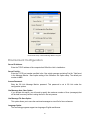
Environment Configuration ............................................................................................................. 26
Switch Message View ........................................................................................................27
To Start a Monitoring Session ............................................................................................27
To Stop a Monitoring Session ............................................................................................27
SMDR / UCD Message Monitoring Program ................................................................................ 28
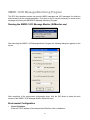
Running the SMDR / UCD Message Monitor (SUMonitor.exe)..........................................28
Environment Configuration.................................................................................................28
SMDR Message View ........................................................................................................30
UCD Message View ...........................................................................................................30
To Start a Monitoring Session ........................................................................................................ 30
Software License Agreement and Limited Warranty......................................... 31
G
G
GG
Chapter 1
G
Introduction
Overview of OfficeServ Link
OfficeServ Link is an application gateway that provides system level OAI (Open Architecture
Interface) to the OfficeServ family of CTI products. OfficeServ Link connects to properly equipped
iDCS 100 and iDCS 500 Key Telephone System using TCP/IP and a LAN connection.
OfficeServ Link allows multiple OfficeServ CTI applications and clients to connect to the iDCS 100
and iDCS 500 simultaneously without the need for multiple system level OAI (Open Architecture
Interface) ports and complicated hardware interface modules. Unlike previous CTI integration
methods the OfficeServ Link can simultaneously connect multiple OfficeServ Operator clients,
OfficeServ Call clients for screen pops and call control along with any custom developed CTI
application supported by the OfficeServ Open Telephony Server Provider (TSP) client.
OfficeServ Link combined with OpenTSP provides an industry standard developer interface building
upon the TAPI 2.x specification.
The OfficeServ Link application gateway provides a consolidated software licensing module for all
OfficeServ CTI products. This consolidated module allows Samsung to use a customer friendly
licensing key without having to use any type of hardware dongles or other hardware based solutions
that are difficult to use and can easily become damaged or lost.
The OfficeServ Link application gateway is currently required for the following products.
y
y
y
y
y
G
OfficeServ Call
OfficeServ Operator
OfficeServ OpenTSP
OfficeServ EasySet
Future OfficeServ CTI applications
1
G
Chapter 2
Installation of OfficeServ Link
Preparation for installing OfficeServ Link
30 DAY FREE TRIAL PERIOD
At this time of this publication Samsung Telecommunications America Inc., (STA) distributes its
OfficeServ Suite of CTI Applications on a single CD with a 30 day free trial period. Installing the
OfficeServ Link and any other application will start the 30 day period.
Failure to enter a valid license key (see Chapter 3, Installing the License) before the 30 day period
expires will cause the OfficeServ Link to stop communicating with the telephone system. This
renders the associated application useless.
A valid license key will be required to start the link working again.
Before installing the OfficeServ Link software, the following system requirements are needed.
The PC used for OfficeServ Link must be dedicated for OfficeServ CTI use only and meet the
following minimum requirements:
y
y
y
y
y
y
y
y
Microsoft Windows 2000 (Service Pack 2 or higher) , Windows XP (Service Pack 1 or higher)
operating system software
Pentium 4 1.6Ghz (or higher) microprocessor
512Mb (or higher) RAM
20Gb (or larger) hard disk drive
CD-ROM
10/100 Network Interface Card (NIC)
Standard VGA monitor, keyboard, and mouse
TCP/IP configuration
iDCS Key Telephone Requirements
The following table identifies the minimum connection and software requirements needed to connect
the OfficeServ Link to the iDCS family of Key Telephone Systems
iDCS System
Minimum Software Version
Connection Type
iDCS 100/500 R1, iDCS 100 LE
Not Supported
Not supported
iDCS 500 R2
2.4x or higher
MCP2 LAN Interface
iDCS 100 R2
2.4x or higher
SMCP1 LAN Interface
G
2
G
Configuration Environment
The following figure shows the connections between the OfficeServ Link-installed computer and the
iDCS Key telephone system, and relations among the CTI applications-installed computers.
GGGGGGGGGGG
OfficeServ CTI Application Suite
OfficeServ Link
Gateway Server
with EasySet
Installed
iDCS 500
OfficeServ Operator
LAN
OfficeServ Call
OfficeServ OpenTSP
Connections among OfficeServ Link, iDCS Key telephone system, and user applications
As shown in the figure above, OfficeServ Link supports TCP/IP connections over a LAN connection.
In addition, the OfficeServ Link receives and manages connection requests from each user’s
computer using the LAN, as well as transmits and receives messages generated between the iDCS
Key Telephone System and the CTI applications that are running on users’ computers.
G
3
G
System Administration Requirements
Users must be logged on with Administrator privileges to install and run OfficeServ Link successfully.
Installation
To install the OfficeServ Link application gateway, insert the CD-ROM in the drive and run
LinkSetup.exe.
Install the OfficeServ Link program as follows:
1. Execute OfficeServ LinkSetup.exe, and then the following dialog box will appear on the
screen.
Click on the [Next] button.
G
4
G
2. License Agreement dialog box appears on the screen. Read the text of License Agreement,
and click on the [Next] button if you agree to its contents. If you do not agree, the OfficeServ
Link installation program exits automatically.
3. User and Company Registration box appears on the screen. Enter your user name and
company name and then click on the [Next] button.
G
5
G
4. Press [Yes] to confirm.
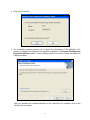
5. The installation program requires you to specify the destination of the OfficeServ Link
software. By default, the OfficeServ Link software is installed in “C:\Program Files\Samsung
Electronics\OfficeServ Link.” Click the [Browse] button if you want to install the software in
a different location.
After you specified the installed destination of the OfficeServ Link software, click on the
[Next] button to continue.
G
6
G
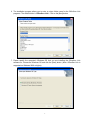
6. The installation program allows you to enter a unique folder name for the OfficeServ Link
programs. The default folder is “OfficeServ Link“. Click on the [Next] button.
7. Please specify the computer’s Windows OS that you are installing the OfficeServ Link
software on. Choose the Windows OS and click the [Next] button. (Note: OfficeServ Link is
supported on Windows 2000 or higher)
G
7
G
IMPORTANT NOTICE
OfficeServ Link will not operate correctly with Windows 98 and Windows ME in the United States.
This option is reserved for other countries.
8. OfficeServ Link software supports two languages, English and Korean. Choose a language
and click the [Next] button.
9. The installation program can automatically add a link to the “Startup Folder”.
G
8
G
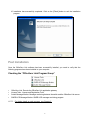
10. Installation has successfully completed. Click on the [Finish] button to exit the installation
program.
Post Installation
Once the OfficeServ Link software has been successfully installed, you need to verify that the
following programs have been installed on your computer.
Checking the “OfficeServ Link Program Group”
y
y
y
y
OfficeServ Link: Execute the OfficeServ Link application gateway
License Tools : License and Registration Tools
Switch Message Monitor: Message monitoring between the switch and the OfficeServ Link server
SMDR-UCD Message Monitor: SMDR-UCD message monitoring program
NOTE: For further details on each program, see Chapter 3.
G
9
G
Chapter 3
License Registration
This chapter describes the license installation and update procedure with the license tools. To use
any OfficeServ CTI application with OfficeServ link, you must first install a valid license key using the
License Tools program.
The OfficeServ Link License Tools are used to install a valid license key for use by OfficeServ Link.
Running the License Tools
Launch the License Tools Application
After launching the License Tools program, the following dialog box will appears on the screen.
License Tools Window
G
10
y
y
y
y
y
y
G
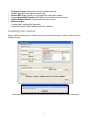
Registered License: Displays the currently installed license key.
License Type: iDCS key telephone system type.
Allowed MAC Type: Currently we only support the Switch MAC Address
License Allowed MAC Address: MAC Address to be allowed by the license key
Allowed Software Status: Licensed clients and license counts.
MAC Information:
Computer MAC Address (Not Supported)
Switch MAC Address (MAC address of the iDCS LAN Port)
Installing the License
Enter a valid license key into the “Enter License” field of the “Add License” section, and then click the
[Register] button.
After installing a valid license key, the license tool will show the registered license information.
G
11
G
Checking the License Status
After registering the valid license key, you will see the following dialog box that includes the valid
license information whenever you execute the link.
G
12
G
You can also view the license registration information anytime by clicking the “About Samsung
OfficeServ Link” in the control box menu of OfficeServ Link.
G
13
G
Chapter 4
OfficeServ Link Settings
Executing OfficeServ Link
Proceed to [Start] -> [Programs] -> [OfficeServ Link] and click on the OfficeServ Link icon. As soon
as OfficeServ Link starts running, the following information screen will appear on the screen. Click
the “OK” button to continue the OfficeServ Link startup process.
G
G
NOTE: If the Office Link application gateway has been set to connect automatically this information
screen will no longer appear on startup.
G
14
G
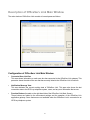
Description of OfficeServ Link Main Window
The main window of OfficeServ Link consists of several panes as follows:
Configuration of OfficeServ Link Main Window
y
Connected User List View
This area shows information on each user who has connected to the OfficeServ Link gateway. This
pane also shows the state of the user that has currently linked to the OfficeServ Link in real time.
y
Notification Message View
This area indicates the current working state of OfficeServ Link. This pane also shows the last
connection state to the iDCS key telephone system, users, and any error information that occurs.
y
Function Buttons (Located on the right hand side of the OfficeServ Link Main Screen)
These buttons are related to the environment settings and the operation of the OfficeServ Link
application gateway. Some features are not available when the OfficeServ Link is connected to an
iDCS key telephone system.
G
15
G
Communication Environment Setup
In-order to connect the OfficeServ Link application gateway to an iDCS key telephone system you
must first program the TCP/IP address of the iDCS LAN connection in the following window.
Choose the “Configuration” button to open the configuration screen.
NOTE: The use of serial port communication will not be supported on the iDCS 100 and iDCS 500
key telephone systems.
G
16
G
Switch Connection Type
Although OfficeServ Link provides three connection modes, the Samsung iDCS Key telephone
system is only supported using the TCP/IP Connection type.
y
TCP/IP connection mode: Uses LAN-based TCP/IP to connect
SIM / Serial Cable Parameters
This function is currently not supported
G
TCP/IP Parameters
The iDCS 100/R2 and iDCS 500/R2 Key telephone systems support LAN-based TCP/IP
communications. The environment settings for TCP/IP connections are as follows:
y
y
TCP/IP Address: Enter the LAN interface IP address of iDCS Key telephone system (See MMC 830
setting on the iDCS system)
Port No.: This setting is not configurable in the iDCS 100/R2 or iDCS 500/R2 at this time and should
not be changed. The default value is 5002.
Switch Type
Select the appropriate switch type
y
y
The “Normal Type” option is currently not being used.
Select OfficeServ Type when operating with the iDCS 500 Release 2 and iDCS 100 Release 2 key
telephone system.
Listen Port No. for Client Connections
As soon as a connection has been successfully established with the iDCS Key telephone system,
the OfficeServ Link starts a process used to receive requests from client connections. This value is
used to define the TCP/IP port number that will be used to listen for client requests. The value of this
setting is set to TCP/IP port “6000” by default. You can specify any TCP/IP port higher than 1024 if
necessary. TCP/IP ports 0 to 1023 have already been reserved in the OfficeServ Link.
Password for System Information
This field should match the EasySet option password set using MMC 841. The default value for this
field is “1234”.
G
17
G
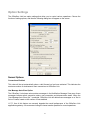
Option Settings
The OfficeServ Link has option settings that allow you to control various operations. Choose the
function of setting options, and then the following dialog box will appear on the screen.
Normal Options
Connections Enabled
This value will be set automatically when a valid license key has been activated. This indicates the
maximum number of simultaneous client connections to OfficeServ Link.
Use Message Auto Clear Option
The OfficeServ Link shows various status messages in the Notification Message View pane, these
messages indicate switch connection status, user connection and disconnection status. When the
“Use Message Auto Clear Opt.” is selected, OfficeServ Link will delete these messages on a “first in
first out” bases, based on the number of lines enabled.
NOTE: Use of this feature can severely degrade the overall performance of the OfficeServ Link
applications gateway. We recommend using the lowest number possible for normal operations.
G
G
G
18
G
Use Automatic Switch Connection Option
When this option is used, OfficeServ Link will automatically connect to the iDCS key telephone
system upon activation.
Message Monitor / Save Option
The OfficeServ Link provides a function of transmitting the internally processed messages to the
external monitoring program. The monitoring program is installed with the OfficeServ Link software.
In addition, if you install the additionally provided monitoring program, you can monitor the
messages that are currently processed via LAN on the other computers as well.
Use SW Message Monitor Option
A switch message means a call-processing message that is transmitted and received between the
OfficeServ Link and the iDCS Key telephone system. The OfficeServ Link transmits the switch
message to the switch message-monitoring program, and the monitoring program shows you the
received message.
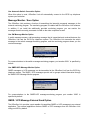
Switch Message Monitor program
For communications to the switch message-monitoring program, port number ‘6001’ is specified by
default.
Use SMDR-UCD Message Monitor Option
SMDR messages or UCD messages can be transmitted to the OfficeServ Link from the iDCS Key
telephone system. The SMDR / UCD messages provide call or groups related information through
the SMDR-UCD Message Monitor program.
SMDR / UCD message monitoring program
For communications to the SMDR-UCD message-monitoring program, port number ‘6002’ is
specified by default.
SMDR / UCD Message External Send Option
The OfficeServ Link provides a port capable of transmitting SMDR or UCD messages to an external
application. The external application receives SMDR or UCD messages from the OfficeServ Link
using port 6003 by default.
G
19
G
OfficeServ Call + Function Support Option
This function is currently not supported and is provided for future development only.
OfficeServ Link Status Message Print Option
Use of this option is reserved for troubleshooting when instructed by a Samsung Support Engineer
and should not be selected during normal operation.
OfficeServ Link Language Option
The OfficeServ Link supports English and Korean language,
Switch Link Recovery Try Count
In the event that OS Link loses connection to the iDCS system, this counter will determine how many
times OS Link will reattempt to connect to the iDCS system.
Recovery Try Time Period (Min 1-255)
The recovery time will determine how long OS Link will wait between the connection attempts to the iDCS
system. By default OS Link will retry every 1 Minute until the “Switch Link Recovery Try” counter is
exceeded.
G
20
G
Chapter 5
Using OfficeServ Link
Connecting OfficeServ Link
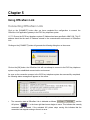
Click on the [CONNECT] button after you have completed the configuration to connect the
OfficeServ Link application gateway to the iDCS key telephone system.
NOTE: Ensure the iDCS key telephone system IP Address has been specified in MMC 830. This IP
address should be the same IP Address entered in the communication environment of OfficeServ
Link.
Clicking on the [CONNECT] button will generate the following dialog box on the screen.
Click on the [OK] button, the OfficeServ Link will now attempt to connect to the iDCS key telephone
system using the established communication environment.
As soon as the connection process to the iDCS key telephone system has successfully completed,
the following status messages will appear on the screen.
Example - Progress messages connecting to an iDCS key telephone system
y
The connection state of OfficeServ Link is indicated as follows
AVI pictureᇻ
, and the
ᇼ in the lower right hand corner begins to move. This indicates the currently
connected state is normal. If the animated AVI picture stops moving this indicates that the
connection has stopped running or there is an error
G
21
G
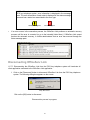
NOTE: If there is an error in the connection between OfficeServ Link and
iDCS key telephone system, error information is displayed in the message
pane. The error information of each state is displayed in the status message
pane and has a status icon associated to the error type.
*HQHUDO0HVVDJHLFR
y
(UURU0HVVDJHLFR
If an error occurs in the connection process, the OfficeServ Link performs an automatic recovery
process until the error is corrected (or up to the internally limited time). If OfficeServ Link cannot
perform the automatic recovery, it notifies administrators that an error has occurred through the
status message pane.
State message of automatic recovery after error occurrence
Disconnecting OfficeServ Link
NOTE: Disconnecting the OfficeServ Link from the iDCS key telephone system will terminate all
client application connected to the OfficeServ Link application.
1. Click on the [Disconnect] button to disconnect OfficeServ Link from the iDCS key telephone
system. The following dialog box appears on the screen
Verify Disconnect
Click on the [OK] button to disconnect.
Disconnection process in progress
G
22
G
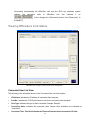
Successfully disconnecting the OfficeServ Link from the iDCS key telephone system
changes
the
connection
state
of
OfficeServ
Link
and
indicates
it
as
, it also changes the [Disconnect] button from [Disconnect] .to
[CONNECT].
Viewing OfficeServ Link Status
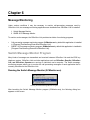
OfficeServ Link running in inactive mode of user management
Connected User List View
The following is the information shown in the Connected User List View window:
y
IP Address: Indicates the IP address of connected client computer.
y
Port No.: Indicates the TCP/IP port number in use for the connected client computer.
y
User Type: Indicates the type of client connected. Example “EasySet”
y
Connection State: Indicates the connection state. Normal client operations are indicated as
“Connected”.
y
Connected Time: This field indicates the Time and Date the client connected to OS Link.
G
23
G
Chapter 6
Message Monitoring
Under various conditions it may be necessary to monitor call-processing messages used by
OfficeServ Link; two message-monitoring applications are installed when OfficeServ Link is installed.
1. Switch Message Monitor
2. SMDR /UCD Message Monitor
To monitor such messages, the OfficeServ Link provides two kinds of monitoring programs.
y
y
Call processing message-monitoring program: SCMonitor.exe by default this application is installed
in [\Program Files\Samsung Electronics\OfficeServ Link].
SMDR / UCD message monitoring program: SUMonitor.exe by default this application is installed in
[\Program Files\Samsung Electronics\OfficeServ Link].
Switch Message Monitor Program
Many kinds of messages are transmitted and received between OfficeServ Link and the iDCS key
telephone system. OfficeServ Link and other applications such as OfficeServ EasySet, OfficeServ
Call, and OfficeServ Operator are running on individual user’s computer. The switch messagemonitoring program allows you to monitor the call processing messages of each application that is
currently connected to the OfficeServ Link.
Running the Switch Message Monitor (SCMonitor.exe)
Running the Switch Message Monitor Program
After launching the Switch Message Monitor program (SCMonitor.exe), the following dialog box
appears on the screen.
G
24
G
Environment Setup of Switch Message Monitor Program
Environment Configuration
Server IP Address:
Enter the TCP/IP address of the computer that OfficeServ Link is installed on.
Server Port No.:
Enter the TCP/IP port number specified in the “Use switch message monitoring Port No.” field found
in the Message Monitor / Save option setting of the OfficeServ link Option setup. The default port
number is 6001
Access Password:
Enter the OS Link Message Monitor password. This password is set in OS Link under the
configuration options.
Use Message Auto Clear Option:
If you activate this option, you will need to specify the maximum number of lines (messages) that
will be held in memory before invoking the first in first out process.
Use Message File Save Option
This option allows you to save the monitored messages to a text file for future reference.
Language Option
The monitoring programs support two languages: English and Korean.
G
25
G
Main Window of Switch Message Monitor
Switch Message View
Shows all call processing messages received by the OfficeServ Link. All call processing messages
are indicated by those messages being received from the client applications to the iDCS key
telephone system and those being transmitted from the iDCS key telephone system to the client
applications.
To Start a Monitoring Session
The [Start Monitor] button starts the monitoring of messages between the OfficeServ Link and the
iDCS key telephone system.
To Stop a Monitoring Session
Click on the [Stop Monitor] button to stop the monitoring session.
Click on the [Clear View] button to delete all messages that are currently being displayed in the “Switch
Message View” pane. This action has no impact on the “Use Message File Save Option”.
G
26
G
SMDR / UCD Message Monitoring Program
The iDCS Key telephone system can provide SMDR messages and UCD messages for collection
and processing by an external application. From time to time it may be necessary to monitor these
messages by running the SMDR/UCD Message Monitoring Program.
Running the SMDR / UCD Message Monitor (SUMonitor.exe)
Executing the SMDR / UCD Message Monitor
After launching the SMDR / UCD Message Monitor Program, the following dialog box appears on the
screen.
Setup of SMDR / UCD Message Monitor Environment
After completion of the environment configuration setup, click the [OK] button to show the main
window of the SMDR / UCD Message Monitor (SUMonitor.exe).
Environment Configuration
y
G
Server IP Address:
Enter the TCP/IP address of the computer that OfficeServ Link is installed on.
27
G
y
Server Port No.:
Enter the TCP/IP port number specified in the “Use SMDR/UCD message monitoring Port No.” field
found in the Message Monitor / Save option setting of the OfficeServ link Option setup. The default
port number is 6002
y
Server Password:
Enter the OS Link Message Monitor password. This password is set in OS Link under the
configuration options
y
Use Message Auto Clear Option
If you activate this option, you will need to specify the maximum number of lines
will be held in memory before invoking the first in first out process.
(messages) that
y
Use SMDR Message File Save Option
This option allows you to save the monitored messages to a text file for future reference.
y
Use UCD Message File Save Option
This option allows you to save the monitored messages to a text file for future reference.
y
Language Option
The monitoring programs support two languages: English and Korean.
Main Window of SMDR / UCD Message Monitor
G
28
G
SMDR Message View
This window indicates the current SMDR messages.
UCD Message View
This window indicates the current UCD messages.
To Start a Monitoring Session
The [Start Monitor] button starts the monitoring of SMDR/UCD messages between the OfficeServ
Link and the iDCS key telephone system.
Click on the [Stop Monitor] button to stop the monitoring session.
Click on the [Clear SMDR] or [Clear UCD] buttons to delete all messages that are currently being
displayed in the “Message View” panes. This action has no impact on the “Use Message File Save
Option”.
G
29
G
Software License Agreement & Limited Warranty
For OfficeServ CTI Applications for
iDCS Keyphone Series
IMPORTANT, READ CAREFULLY
This Samsung End-User License Agreement (EULA) is a legal binding agreement between you (either an individual or
an entity) and Samsung for Samsung software product identified above, which includes computer software and may
include printed material, and "online" or electronic documentation ("SOFTWARE"). By installing, using the SOFTWARE,
you indicate your acceptance of this Samsung License Agreement. If you do not agree to the terms of this License
Agreement, please do not install or use the enclosed SOFTWARE.
SOFTWARE LICENSE
The SOFTWARE is protected by copyright laws and international copyright treaties, as well as other intellectual
property laws and treaties.
1.
G
GRANT OF LICENSE. This License Agreement grants you following rights:
a.
SOFTWARE: Samsung grants to you a personal, non-exclusive license to make and use one (1) copy of the
SOFTWARE accompanying this Agreement on any single computer, provided the SOFTWARE is in use on only
one computer at any time. If you have multiple Licenses for the SOFTWARE, then at any time you may have
as many copies of the SOFTWARE in use as you have Licenses.
b.
Electronic Documents: Solely with respect to electronic documents included with the SOFTWARE, you may
make an unlimited number of the copies, provided that such copies shall be used only for internal purpose
and you shall not publish or distribute such to any third party, without Samsung Electronics Co., LTD. written
and expressed consent.
c.
Limitation on Reverse Engineering, Decompilation, Disassembly: You shall not reverse engineer, decompile or
disassemble the SOFTWARE, except to the extent that this restriction is expressly prohibited applicable law.
d.
Separation of Components: The SOFTWARE is licensed as a single product. Its component parts may not be
separated for use on more than one computer.
e.
Rental: You may not rent, lease and/or lend the licensed SOFTWARE.
f.
Support Services: Samsung may provide you with support services related to the SOFTWARE, according to
Samsung policies and programs and in for the country in which the SOFTWARE was purchased. With respect
to technical information you provide to Samsung as part of the support services, Samsung may use such
information for its business purpose, including for product support and development. Samsung will not utilize
such technical information in a form that personally identifies you.
g.
SOFTWARE Transfer: You may permanently transfer all of your rights according to this agreement, provided
you retain no copies, you transfer all of the SOFTWARE, and the recipient agrees to the terms of this
agreement by notifying in writing to authorized Samsung VAR, outfit and/or dealer in which the SOFTWARE
was purchased. And including all prior versions of SOFTWARE, if the SOFTWARE is an upgrade.
h.
Termination: Without prejudice to any other rights, Samsung may terminate this agreement if you fail to
comply with the terms and condition of this agreement. In such event, you must destroy all copies of the
SOFTWARE and all of its component parts.
30
2.
G
SOFTWARE ACTIVATION
Software Activation; Samsung will provide a software activation code that will allow use of the purchased
OfficeServ CTI products. The activation code will be associated with the MAC address of the LAN interface of the
Samsung telephone system. In the event of hardware failure associated with the LAN interface Samsung will issue
a replacement software activation code when requested by a Samsung authorized dealer. In the event that a
replacement software activation code is issued the defective hardware associated with the original software
activation code must be returned to Samsung. If the hardware associated to the software activation code is not
returned to Samsung by the dealer the dealer will be billed for the original purchase price of the OfficeServ CTI
application.
3.
UPGRADES & COPYRIGHT
a.
Upgrade: If the SOFTWARE is an upgrade of a component of a package of software programs that you
licensed as a single product, the SOFTWARE may be used and transferred only as an part of that single
product package and may not be separated for use on more than one computer.
b.
Copyright: The SOFTWARE is owned by Samsung or its suppliers and protected by copyright laws and
international treaty provisions. Therefore, you must treat the SOFWARE like any other copyrighted material
except that you may install the SOFTWARE on a single computer provided you keep the original solely for
backup or archival purpose. You may not copy the printed materials accompanying the SOFTWARE.
LIMITED WARRANTY
Samsung warrants that (a) the SOFTWARE will perform substantially in accordance with the accompanying written
materials for a period of ninety (90) days from the date of receipt, and (b) any Samsung supplied hardware
accompanying the SOFTWARE will be free from defects in materials and workmanship under normal use and service
for a period of one(1) year from the date of receipt. During the warranty periods specified above, Samsung will
replace or repair any software or hardware found to be defective. Warranty claims should be made through the
Samsung dealer from whom the products were purchased, and must be made within the applicable warranty period.
NO OTHER WARRANTIES
TO THE MAXIMUM EXTENT PERMITTED BY THE APPLICABLE LAW, SAMSUNG DISCLAIMS ALL OTHER WARRANTIES,
EITHER EXPRESS OR IMPLIED, INCLUDING BUT NOT LIMITED TO IMPLIED WARRANTIES OF MERCHANTABILITY
AND FITNESS FOR PARTICULAR PURPOSE, WITH RESPECT TO THE SOFTWARE, THE ACCOMPANYING PRODUCT
MANUAL(S) AND WRITTEN MATERIALS, AND ANY ACCOMPANYING HARDWARE.
NO LIABILITY FOR DAMAGES
TO THE MAXIMUM EXTENT PERMITTED BY APPLICABLE LAW, IN NO EVENT SHALL SAMSUNG OR ITS SUPPLIERS BE
LIABLE FOR ANY DAMAGES WHATSOEVER (INCLUDING, WITHOUT LIMITATION, DAMAGES FOR LOSS OF BUSINESS
PROFITS, BUSINESS INTERRUPTION, LOSS OF BUSINESS INFORMATION, OR ANY OTHER PECUNIARY LOSS)
ARISING OUT OF THE USE OF OR INABILITY TO USE THE SOFTWARE PRODUCT, EVEN IF SAMSUNG HAS BEEN
ADVISED OF THE POSSIBILITY OF SUCH DAMAGES.
Samsung Telecommunications America, L.P.
G
31


















![SamsungProdBulletin_211_4_4x_Software_Release[1]](http://vs1.manualzilla.com/store/data/005825179_1-598976db56b1ef1012f4b9b7fb2b917f-150x150.png)