1
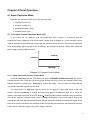
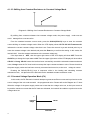
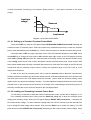
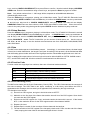
Diagram4.7 Constant Voltage Mode
4.1.3.1 Setting Up Standard Constant Voltage Mode
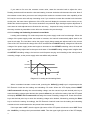
Pressing the
V-SET key - will display
STANDARD VOLT=xxxxxxxxV indicating the current
constant voltage value set-up field. Here, enter the constant voltage value desired, followed by pressing
Enter. Now theDC load will be in standard constant voltage mode.
If the input state is OFF , then the upper right right corner of the VFD display will show
OFF. Press
the On/Off key to change the input state to ON . Now the upper right right corner of the VFD display will
show either CV or Unreg. CV means the DC load has been successfully set withthe desiredconstant
voltage value; Unreg means the load couldn’t accept the selected constant voltage value. Check that the
- LED driver has been correctly connected and is powered on; make sure that the voltage of the LED
driver is normal and that its output current is not beyond the maximum current that the DC electronic load
can accept.
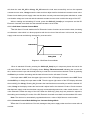
In order to adjustthe constant voltage value,rotate the encoder knob at the upper right on the front
panel display to adjust the value settings. Rotating clockwise increases the value while rotating
counter-clockwise decreases the value. Note: if the constant voltage value you want to set is beyond the
maximum constant voltage capabilityof the DC load, the current value will stop at its top end and not
increase despite continued rotation of the encoder knob. Once a proper value is selected, the lower right
corner of the VFD display shows the constant voltage value that has been set. Should a blinking cursor
show up under one of the digits, it will require additional tweaking.. If users wish to adjust the accuracy,
pushing inthe encoder knob will effectuate the change. Each time the encoder knob is pressed,the cursor
will move to the next digit position, left or right.
4.1.3.2 Loading and Unloading Constant Voltage Mode
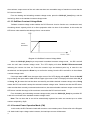
For the theory of operation on the loading and unloading of constant voltage mode , please refer to the
Diagram -4.1.1.2
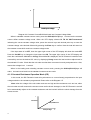
From thestandard constant voltage mode, press the Shift+1(V_Level) keys to enter into the
constant loading and unloading CV mode. When the VFD display shows ONSET VOLT=xxxxxxxxV
indicating the current loading voltage, press the numeric keys and decimal point key to enter the loading
voltage value desired, and then press the Enter key to confirm. The-VFD now displays, OFFSET
VOLT=xxxxxxxxV indicating the current offsetvoltage. Press the numeric keys and decimal point key to
enter the offsetvoltage value desired, followed by pressing the Enter key to confirm. Nowthe DC
electronic load will enter the loading and unloading constant voltage mode.
If the input state is OFF, then the upper right corner of the VFD display will show OFF. Press the key
On/Off to change the input state to ON.Then the upper right corner of the VFD display will show either
CV_UN or Unreg. CV_UN means the load has been successfully set withthe desired constant voltage
value; Unreg means the load couldn’t accept the desiredconstant voltage value. Check the power supply
under test has been correctly connected and turned on; also make sure the voltage set is normal and that
17