1
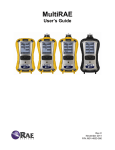
MultiRAE User’s Guide
Contents
1
2
3
4
5
6
7
8
9
Features Comparison .......................................................................................................................... 10
Standard Contents .............................................................................................................................. 11
General Information ........................................................................................................................... 12
3.1
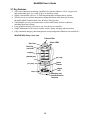
Key Features .............................................................................................................................. 13
User Interface ..................................................................................................................................... 15
4.1
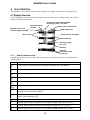
Display Overview ...................................................................................................................... 15
4.1.1
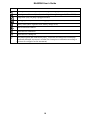
Status Indicator Icons .......................................................................................................... 15
4.1.1.1
Status Indicator Icons For Instruments Equipped with WiFi ...................................... 17
4.1.2
Keys And Interface ............................................................................................................. 18
4.1.3
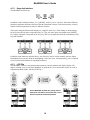
LCD Flip ............................................................................................................................. 18
4.1.4
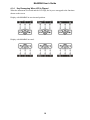
Key Remapping When LCD Is Flipped .............................................................................. 19
4.2
Screen Display For Various Numbers Of Active Sensors ......................................................... 20
4.3
Menus ........................................................................................................................................ 21
4.3.1
Hygiene Mode ..................................................................................................................... 21
4.3.2
Search Mode ....................................................................................................................... 22
4.3.3
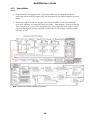
Instruments Equipped With WiFi ....................................................................................... 24
Wireless Control And Submenus ....................................................................................................... 25
Battery ................................................................................................................................................ 26
6.1
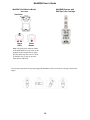
Charging With The MultiRAE Desktop Cradle ........................................................................ 26
6.2
Automatic PID Cleaning ........................................................................................................... 27
6.3
Charging With The Travel Charger ........................................................................................... 27
6.4
Carrying The MultiRAE In A Vehicle ...................................................................................... 28
6.4.1
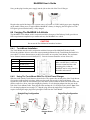
Truck Mount Installation .................................................................................................... 28
6.4.2
Using The Truck Mount With The 12-Volt Travel Charger ............................................... 28
6.5
Charging With The AutoRAE 2 ................................................................................................ 29
6.6
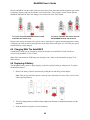
Replacing A Battery .................................................................................................................. 29
6.7
Charging Batteries With A MultiRAE Battery Charger ............................................................ 30
6.7.1
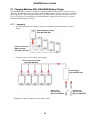
Assembly............................................................................................................................. 30
6.7.2
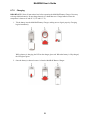
Charging .............................................................................................................................. 31
6.8
Battery States ............................................................................................................................. 32
6.9
Alkaline Battery Pack ................................................................................................................ 32
Turning The MultiRAE On And Off.................................................................................................. 33
7.1
Turning The MultiRAE On ....................................................................................................... 33
7.2
Turning The MultiRAE Off ....................................................................................................... 33
7.3
Testing Alarm Indicators ........................................................................................................... 34
7.4
Pump Status ............................................................................................................................... 34
7.5
Calibration Status ...................................................................................................................... 34
7.6
Bump Status............................................................................................................................... 35
7.7
Toggle Display: Alternating Between Correction Factor And Reading ................................... 35
7.8
Enabling Benzene Sep-Tube Cartridge Tutorial (MultiRAE Benzene) ................................... 35
Modes Of Operation ........................................................................................................................... 37
8.1
Hygiene Operation Mode .......................................................................................................... 37
8.2
Search Operation Mode ............................................................................................................. 37
8.3
Benzene-Specific Mode (MultiRAE Benzene Only) ................................................................ 37
8.3.1
Separation Tube Cartridge Installation ............................................................................... 38
8.3.2
Measurement ....................................................................................................................... 40
8.4
Basic User Mode ....................................................................................................................... 44
8.5
Advanced User Mode ................................................................................................................ 44
Programming ...................................................................................................................................... 44
9.1
Enter Programming In Advanced Mode .................................................................................... 44
9.2
Enter Programming In Basic Mode ........................................................................................... 45
9.3
Menus And Submenus ............................................................................................................... 46
9.3.1
Editing And Selecting Parameters And Sensors ................................................................. 46
3