1
Electronic Template: BOOKLET - PS3 Cover Ver. 4.0
1/8" BLEED ZONE
Doc: A0229.01
FLAT: 9.25" x 5.781"
FINISHED: 4.625" x 0.0" x 5.781"
2/07
1/16" SAFETY ZONE
Third Party templates are located at
https://www.sceapubsupport.com
PRINT/TEXT ZONES
File name: TPBOOKLETPS3cover108.eps
Rev 1/4/08
GETTING STARTED
GETTING STARTED
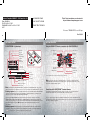
PLAYSTATION®3 system front
Using the SIXAXIS™ wireless controller (for PLAYSTATION®3)
Port indicators
Slot cover
CF*1 slot
Eject button
USB connector
L2 button
L1 button
R2 button
R1 button
Directional
buttons
button
button
button
button
Left stick/
L3 button*
Right stick/
R3 button*
SD*2 Memory
Card slot
Memory
Stick™ slot
CF
SD/miniSD
*1 CompactFlash®
*2 Secure Digital
Insert the disc with the
label side facing up.
START button
PS button
SELECT button
Disc slot
Power button
Vent
Eject button
WLAN access indicator
HDD access indicator
* The L3 and R3 buttons function when the sticks are pressed.
Note: To use the controller, you must first register or “pair” the controller with the
PLAYSTATION®3 system and assign a number to the controller. For details, refer to the
instructions supplied with the system.
USB connectors
Note: Some models of the PLAYSTATION®3
system do not include media slots. For specific
features included, refer to the instructions for use of your model of the PLAYSTATION®3 system.
Saved data for PLAYSTATION®3 format software
Starting a game: Before use, carefully read the instructions supplied with the PLAYSTATION®3
Saved data for PLAYSTATION®3 format software is saved on the system’s hard disk.
The data is displayed under “Saved Game Utility” in the Game menu.
Check that the MAIN POWER switch (located on the system rear) is turned on. Insert the
DISNEY SING IT: HIGH SCHOOL MUSICAL 3: SENIOR YEAR disc with the label facing up into
the disc slot. Select the icon for the software title under [Game] in the PLAYSTATION®3 system’s
home menu, and then press the button. Refer to this manual for information on using
the software.
Notice: Disney Sing It: High School Musical 3: Senior Year can be used with either the
SingStar® microphone or the Logitech USB microphone. If both are used, only the SingStar®
microphone will be recognized.
computer entertainment system. The documentation contains information on setting up and
using your system as well as important safety information.
Quitting a game: During gameplay, press and hold down the PS button on the wireless
controller for at least 2 seconds. Then select “Quit Game” from the screen that is displayed.
Hint
To remove a disc, touch the eject button after quitting the game.
4.625"
3
4.625"