1
Fedora 20
Release Notes
Release Notes for Fedora 20
The Fedora Docs Team
Fedora 20 Release Notes
Release Notes for Fedora 20
The Fedo ra Do cs Team
Legal Notice
Copyright © 2013 Fedora Project Contributors.
T he text of and illustrations in this document are licensed by Red Hat under a Creative Commons
Attribution–Share Alike 3.0 Unported license ("CC-BY-SA"). An explanation of CC-BY-SA is available at
http://creativecommons.org/licenses/by-sa/3.0/. T he original authors of this document, and Red Hat,
designate the Fedora Project as the "Attribution Party" for purposes of CC-BY-SA. In accordance with
CC-BY-SA, if you distribute this document or an adaptation of it, you must provide the URL for the original
version.
Red Hat, as the licensor of this document, waives the right to enforce, and agrees not to assert, Section
4d of CC-BY-SA to the fullest extent permitted by applicable law.
Red Hat, Red Hat Enterprise Linux, the Shadowman logo, JBoss, MetaMatrix, Fedora, the Infinity Logo,
and RHCE are trademarks of Red Hat, Inc., registered in the United States and other countries.
For guidelines on the permitted uses of the Fedora trademarks, refer to
https://fedoraproject.org/wiki/Legal:T rademark_guidelines.
Linux ® is the registered trademark of Linus T orvalds in the United States and other countries.
Java ® is a registered trademark of Oracle and/or its affiliates.
XFS ® is a trademark of Silicon Graphics International Corp. or its subsidiaries in the United States
and/or other countries.
MySQL ® is a registered trademark of MySQL AB in the United States, the European Union and other
countries.
All other trademarks are the property of their respective owners.
Abstract
T his document provides the release notes for Fedora 20. It describes major changes offered in
Heisenbug as compared to Fedora 19. For a detailed listing of all changes, refer to the Fedora T echnical
Notes.
Table of Contents
Table of Contents
. . .Welcome
1.
. . . . . . . . . .to
. . Fedora
. . . . . . . . 20
. . . . . . . . . . . . . . . . . . . . . . . . . . . . . . . . . . . . . . . . . . . . . . . . . . . . . . . . . . . . . . . . . . . . .4. . . . . . . . . .
1.1. Welcome to Fedora
4
1.1.1. Need Help?
4
1.2. Overview
4
1.3. Hardware Overview
4
1.3.1. Minimum System Configuration
4
1.3.2. Display resolution
5
1.3.3. Graphics Hardware
5
1.3.3.1. Minimum Hardware for Accelerated Desktops
5
1.3.3.2. CPU Accelerated Graphics
5
1.3.3.3. Choosing a Desktop Environment for your hardware
5
1.4. Architecture Specific Content
6
1.4.1. Cloud Specific Content
6
1.4.2. ARM Specific Content
6
1.5. Feedback
6
1.5.1. Providing Feedback on Fedora Software
6
1.5.2. Providing Feedback on Release Notes
6
. . .Changes
2.
. . . . . . . . . .in. .Fedora
. . . . . . . .for
. . . System
. . . . . . . . Administrators
. . . . . . . . . . . . . . . . . . . . . . . . . . . . . . . . . . . . . . . . . . . . . . . . . . . . . . . . . .6. . . . . . . . . .
2.1. Installation
6
2.1.1. Unversioned docdirs
6
2.2. Security
6
2.2.1. FreeIPA gains transitive trust support
6
2.2.2. SSSD adds ID mapping for CIFS shares
7
2.2.3. Shared System Certificate T ools
7
2.3. File Systems
7
2.3.1. SSD caching for block devices
7
2.4. Virtualization
7
2.4.1. ARM emulation on x86 Hosts
7
2.4.2. Libvirt Client Access Control
7
2.4.3. Virt-manager snapshots
8
2.5. Database Servers
8
2.5.1. MongoDB
8
2.5.2. Hadoop
8
2.6. Mail Servers
8
2.6.1. No default sendmail
8
2.7. Samba
9
2.7.1. SSSD adds ID mapping for CIFS shares
9
2.8. System Daemons
9
2.8.1. Syslog removed from default installation
9
2.8.2. systemd
9
2.8.2.1. New unit types: Scope
9
2.8.2.2. systemd-cryptsetup for T rueCrypt
10
2.8.2.3. Filtering by unit state with systemctl
10
2.8.3. journald
10
2.8.3.1. Viewing the logs of a specific boot
10
2.8.3.2. Referencing the journal with cursors
11
. . .Changes
3.
. . . . . . . . . in
. . .Fedora
. . . . . . . .for
. . . Desktop
. . . . . . . . . Users
. . . . . . . . . . . . . . . . . . . . . . . . . . . . . . . . . . . . . . . . . . . . . . . . . . . . . . . 11
............
3.1. Desktop
11
3.1.1. General
11
3.1.1.1. X2Go
11
1
Fedora 20 Release Notes
3.1.2. Cinnamon
3.1.3. Enlightenment
3.1.4. GNOME 3.10
3.1.4.1. GNOME Overview
3.1.4.2. GNOME Software
3.1.4.3. Further reading
3.1.5. KDE
3.1.5.1. KDE Plasma Workspaces 4.11
3.1.5.2. Plasma-nm Network applet
3.1.6. MAT E
3.1.7. Sugar 0.100
3.2. Networking
3.2.1. NetworkManager Bonding and Bridging
3.2.2. NetworkManager on the command line
3.2.3. Bluetooth stack updated to BlueZ 5
3.3. Internationalization
3.3.1. Input Methods
3.3.2. Font tools
3.3.3. Fonts
3.4. Printing
3.4.1. 3D Printing
3.4.1.1. slic3r
3.4.1.2. Cura
3.4.1.3. simarrange
12
12
12
12
13
13
13
13
14
14
14
15
15
15
15
15
15
15
15
17
17
17
17
17
. ...Changes
4
. . . . . . . . . .in
. . Fedora
. . . . . . . .for
. . . Developers
. . . . . . . . . . . . . . . . . . . . . . . . . . . . . . . . . . . . . . . . . . . . . . . . . . . . . . . . . . . . . . . . 17
............
4.1. Development
17
4.1.1. ACPICA T ools
17
4.1.2. Developer Assistant
17
4.1.3. Perl 5.18
17
4.1.4. python-setuptools updated
18
4.2. GCC T ools
18
4.2.1. Boost 1.54.0 Uplift
18
4.2.2. GLIBC 2.18
19
4.3. Haskell
19
4.3.1. ghc
19
4.4. Web Development
19
4.4.1. WildFly 8
19
4.4.2. Ruby on rails
19
. . .Changes
5.
. . . . . . . . . .in. .Fedora
. . . . . . . .for
. . . Specific
. . . . . . . . .Audiences
. . . . . . . . . . . . . . . . . . . . . . . . . . . . . . . . . . . . . . . . . . . . . . . . . . . . . . . 19
............
5.1. Circuit Design
19
5.1.1. gtkwave
19
5.1.2. XCircuit
20
5.2. Amateur Radio
20
5.2.1. fldigi
20
5.2.2. gnuradio
21
5.2.3. qucs
21
5.2.4. trustedqsl
21
5.2.5. xastir
21
5.2.6. xnec2c
21
. . .Contributors
A.
. . . . . . . . . . . . . . . . . . . . . . . . . . . . . . . . . . . . . . . . . . . . . . . . . . . . . . . . . . . . . . . . . . . . . . . . . . . . . . . . . . . . . . . 22
............
A.1. Writers
22
A.2. T ranslators
22
2
Table of Contents
. . . Revision
B.
. . . . . . . . . History
. . . . . . . . . . . . . . . . . . . . . . . . . . . . . . . . . . . . . . . . . . . . . . . . . . . . . . . . . . . . . . . . . . . . . . . . . . . . . . 24
............
.Index
. . . . . . . . . . . . . . . . . . . . . . . . . . . . . . . . . . . . . . . . . . . . . . . . . . . . . . . . . . . . . . . . . . . . . . . . . . . . . . . . . . . . . . . . . 24
............
A
24
B
24
C
24
F
24
G
24
H
25
I
25
J
25
L
25
M
25
P
25
R
25
S
25
W
26
X
26
3
Fedora 20 Release Notes
1. Welcome to Fedora 20
1.1. Welcome to Fedora
You can help the Fedora Project community continue to improve Fedora if you file bug reports and
enhancement requests. Refer to Bugs And Feature Requests, on the Fedora wiki, for more information
about bug and feature reporting. T hank you for your participation.
T o find out more general information about Fedora, refer to the following pages, on the Fedora wiki
(http://fedoraproject.org/wiki/):
Fedora Overview
Fedora FAQ
Help and Discussions
Participate in the Fedora Project
1.1.1. Need Help?
T here are a number of places you can get assistance should you run into problems.
If you run into a problem and would like some assistance, go to http://ask.fedoraproject.org. Many
answers are already there, but if you don't find yours, you can simply post a new question. T his has the
advantage that anyone else with the same problem can find the answer, too.
You may also find assistance on the #fedora channel on the IRC net irc.freenode.net. Keep in
mind that the channel is populated by volunteers wanting to help, but folks knowledgeable about a
specific topic might not always be available.
1.2. Overview
As always, Fedora continues to develop (Red Hat contributions) and integrate the latest free and open
source software (Fedora 20 Changes). T he following sections provide a brief overview of major changes
from the last release of Fedora.
For more details about the features that are included in Fedora 20 refer to the individual wiki pages that
detail feature goals and progress: http://fedoraproject.org/wiki/Releases/20/ChangeSet.
1.3. Hardware Overview
Fedora 20 provides software to suit a wide variety of applications. T he storage, memory and processing
requirements vary depending on usage. For example, a high traffic database server requires much more
memory and storage than a business desktop, which in turn has higher requirements than a singlepurpose virtual machine.
1.3.1. Minimum System Configuration
T he figures below are a recommended minimum for the default installation. Your requirements may differ,
and most applications will benefit from more than the minimum resources.
1GHz or faster processor
1GB System Memory
10GB unallocated drive space
4
1. Welcome to Fedora 20
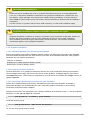
Low memory installations
Fedora 20 can be installed and used on systems with limited resources for some applications.
T ext, vnc, or kickstart installations are advised over graphical installation for systems with very
low memory. Larger package sets require more memory during installation, so users with less
than 768MB of system memory may have better results preforming a minimal install and adding to
it afterward.
For best results on systems with less than 1GB of memory, use the DVD installation image.
1.3.2. Display resolution
Graphical Installation requires 800x600 resolution or higher
Graphical installation of Fedora 20 requires a minimum screen resolution of 800x600. Owners of
devices with lower resolution, such as some netbooks, should use text or VNC installation.
Once installed, Fedora will support these lower resolution devices. T he minimum resolution
requirement applies only to graphical installation.
1.3.3. Graphics Hardware
1.3.3.1. Minimum Hardware for Accelerated Desktops
Fedora 20 supports most display adapters. Modern, feature-rich desktop environments like GNOME3
and KDE Plasma Workspaces use video devices to provide 3D-accelerated desktops. Older graphics
hardware may not support acceleration:
Intel prior to GMA9xx
NVIDIA prior to NV30 (GeForce FX5xxx series)
Radeon prior to R300 (Radeon 9500)
1.3.3.2. CPU Accelerated Graphics
Systems with older or no graphics acceleration devices can have accelerated desktop environments
using LLVMpipe technology, which uses the CPU to render graphics. LLVMpipe requires a processor
with SSE2 extensions. T he extensions supported by your processor are listed in the flags: section of
/proc/cpuinfo
1.3.3.3. Choosing a Desktop Environment for your hardware
Fedora 20's default desktop environment, GNOME3, functions best with hardware acceleration.
Alternative desktops are recommended for users with older graphics hardware or those seeing
insufficient performance with LLVMpipe.
Desktop environments can be added to an existing installation and selected at login. T o list the available
desktops, use the yum grouplist command:
yum grouplist -v hidden | grep desktop
Install the desired group:
yum groupinstall "KDE Plasma Workspaces"
Or, use the short group name to install:
5
Fedora 20 Release Notes
yum install @mate-desktop-environment
1.4. Architecture Specific Content
1.4 .1. Cloud Specific Content
Fedora 20 continues efforts to produce tested and proven cloud images. T he images are now built using
the same tooling as other release media, and the Fedora Cloud team has actively trimmed and improved
their product. Get started using Fedora 20 in the cloud now at http://fedoraproject.org/en/get-fedoraoptions#clouds!
1.4 .2. ARM Specific Content
ARM in Fedora is all grown up! With the release of Fedora 20, ARM is considered a primary architecture
meaning that it receives the same amount of attention that the x86 and x86-64 releases get. Fedora
ARM officially supports armv7hl, and work on AArch64 is underway. T o find out how to help or learn
about other unofficial ARM ports read the ARM section of the wiki. Architectures/ARM
1.5. Feedback
T hank you for taking the time to provide your comments, suggestions, and bug reports to the Fedora
community; this helps improve the state of Fedora, Linux, and free software worldwide.
1.5.1. Providing Feedback on Fedora Software
T o provide feedback on Fedora software or other system elements, please refer to Bugs And Feature
Requests. A list of commonly reported bugs and known issues for this release is available from Common
F20 bugs, on the wiki.
1.5.2. Providing Feedback on Release Notes
If you feel these release notes could be improved in any way, you can provide your feedback directly to
the beat writers. T here are several ways to provide feedback, in order of preference:
If you have a Fedora account, edit content directly at Docs-Beats page on the wiki.
Fill out a bug request using this template - This link is ONLY for feedback on the release notes
themselves. Refer to the admonition above for details.
E-mail the Release-Note mailing list at [email protected]
2. Changes in Fedora for System Administrators
2.1. Installation
2.1.1. Unversioned docdirs
Per package documentation is now installed into unversioned /usr/share/doc/packagename
directories. Previously the directory name contained the package's version in addition to the package's
name.
2.2. Security
2.2.1. FreeIPA gains transitive trust support
FreeIPA 3.3.2 adds support for complex Active Directory forests containing multiple domains. Users from
multiple AD domains can access resources in FreeIPA. FreeIPA administrators can selectively block
6
2. Changes in Fedora for System Administrators
access per each AD domain.
2.2.2. SSSD adds ID mapping for CIFS shares
T he Fedora 20 System Security Services Daemon has gained support for mapping between
Windows SIDs and POSIX IDs. Administrators using SSSD on their networks can establish access
control using two new utilities, setcifsacl and getcifsacl.
More information can be found in the upstream design document at
https://fedorahosted.org/sssd/wiki/DesignDocs/IntegrateSSSDWithCIFSClient and the manpages for
setcifsacl, getcifsacl, and other related SSSD packages.
2.2.3. Shared System Certificate T ools
Fedora's Shared System Certificate feature is being enhanced this release with the addition of the p11kit-trust application. T his package allows modification to trust anchors and blacklist keys and
certificates. With a single command, administrators can make changes to their system's certificate
database instead of adding a file to a special directory and running a special command. T his new tool
continues the development of the Shared System Certificate feature.
2.3. File Systems
2.3.1. SSD caching for block devices
Fedora 20 offers experimental support for adding solid state drives (SSDs) as fast, transparent caches
to traditional rotating storage (HDDs). Filesystems on the SSD cached block devices offer both the
speed of SSDs and volume of HDDs. Both traditional and LVM partitioning schemes can benefit from this
functionality.
Make backups!
Always back up your data before making low level changes, such as migrating to a bcache device.
Until tools like blocks are packaged for Fedora, users are advised to implement bcache by
creating clean bcache devices and populating their filesystems from a recent backup.
Learn more about this functionality, called bcache, from:
https://git.kernel.org/cgit/linux/kernel/git/torvalds/linux.git/plain/Documentation/bcache.txt
http://bcache.evilpiepirate.org/
https://fedoraproject.org/wiki/T est_Day:2013-10-13_SSD_Cache
2.4. Virtualization
2.4 .1. ARM emulation on x86 Hosts
Changes have been made to have smoother emulation of ARM guest virtual machines running on x86
hosts using standard libvirt tools, including virsh, virt-manager and virt-install. qemu has an
ARM emulator that works well and is actively used in the Fedora ARM effort. However libvirt and virtmanager currently have issues launching qemu-system-arm VMs, mostly by encoding x86 assumptions
in the generated command line that cause qem u-system -arm to fail to start. Changes have been made
to fix this issue. More information can be found at
https://fedoraproject.org/wiki/Changes/Virt_ARM_on_x86
2.4 .2. Libvirt Client Access Control
T he libvirt client allows for the setting of permission rules which can be applied to all managed objects
7
Fedora 20 Release Notes
T he libvirt client allows for the setting of permission rules which can be applied to all managed objects
and API operations, thus allowing for all client connections to be limited to a minimal set of rules and
privileges. T here are three levels of access which can be assigned.
Unauthenticated access is initially used for all connections. T his state allows all API operations that
are required to complete authentication. Following a successful authentication, two more levels can be
assigned: Unrestricted, which gives full access to all API operations, and Restricted, which allows
read only access.
System administrators can set permission rules for authenticated connections. Every API call in libvirt
has a set of permissions that are validated against the object that is being used. For example, User A
wants to change a parameter in the domain object. When the user tries to save the change,
virDomainSetSchedulerParametersFlags method will check whether the client has write permissions on
the domain object. Additional checks and permission settings can be processed as well. Filtering can
also be done to see which clients have permissions on which objects to allow for smother administration
of permissions. Documentation for polkit access control can be found at http://libvirt.org/aclpolkit.html.
T he libvirtd.conf configuration file is responsible for setting the access permissions. It uses the
access_drivers parameter to enable this operation. Note that if more than one access driver is
requested, all must succeed in order for permission to be granted.
More information can be found at https://fedoraproject.org/wiki/Changes/Virt_ACLs and
http://libvirt.org/acl.html
2.4 .3. Virt-manager snapshots
Virtual Machine Manager, or virt-manager, allows for easy management and monitoring of virtual
machine snapshots of KVM guests. Note that virt-manager will pause the guest virtual machine for a few
seconds while taking the snapshot. More information is available here:
http://fedoraproject.org/wiki/Changes/Virt_Manager_Snapshots
http://fedoraproject.org/wiki/Features/Virt_Live_Snapshots
http://libvirt.org/formatsnapshot.html
Snapshot section of m an 1 virsh
http://fedoraproject.org/wiki/QA:T estcase_Virt_Snapshot_UI
2.5. Database Servers
2.5.1. MongoDB
MongoDB has been updated to version 2.4 adding full text search, support for a wider array of
geospatial indexes, and security enhancements. For more information about this new version read the
release notes at http://docs.mongodb.org/manual/release-notes/2.4/.
2.5.2. Hadoop
Fedora 20 offers the core of the thriving Hadoop platform and many related packages. For a detailed
review of Hadoop in Fedora, refer to https://fedoraproject.org/wiki/Changes/Hadoop.
T he packaging of the Hadoop platform is the latest work of the Fedora Big Data SIG. Find this
Special Interest Group at https://fedoraproject.org/wiki/SIGs/bigdata, your gateway to using and
participating in the effort.
2.6. Mail Servers
2.6.1. No default sendmail
8
2. Changes in Fedora for System Administrators
Fedora 20 no longer includes a mail transfer by default. Previous releases of Fedora included sendmail,
but it has limited usefulness without manual configuration.
2.7. Samba
2.7.1. SSSD adds ID mapping for CIFS shares
Information on this feature can be found in the Security section.
2.8. System Daemons
2.8.1. Syslog removed from default installation
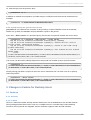
syslog is no longer included in default installations. journald logging serves most use cases as well
as, or better than, syslogd.
Users accustomed to checking /var/log/m essages for system logs should instead use
journalctl.
journalctl command examples
new journalctl
old messages
journalctl
less /var/log/m essages
journalctl -f
tail -f /var/log/m essages
journalctl --unit nam ed.service
grep nam ed /var/log/m essages
journalctl -b
Shows logs from current boot, no simple
equivalent.
2.8.2. systemd
2.8.2.1. New unit types: Scope
Systemd now has two new unit types, scope and slice.
scope units are automatically created by systemd out of existing processes. By grouping a process and
its children together, a scope unit can be used to organize processes, apply resource units, or kill a
group of processes. User sessions are one example of processes contained in a scope unit.
slice units are used to group units that manage processes into a hierarchy that allows control of
resources allocated to the slice. T he default slices are machine.slice, for virtual machines and
containers; system.slice, for system services; and user.slice, for user sessions. T hese default slices are
automatically populated.
Instance units, such as getty@ .service, are spawned on demand using the template defined in
their configuration file. Each type of template is given a subslice of the system slice, and instances
are contained within that slice.
Scope and service units assigned to a slice are descendants of that slice's node in the control group
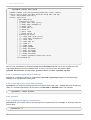
tree. A slice's name describes its position relative to the root slice. T he output below demonstrates how
user-1000.slice is a child of user.slice, which is in turn a child of ., the root slice. Each session is further
confined in a scope unit within the user's slice.
9
Fedora 20 Release Notes
systemctl status user.slice
Loaded:
Active:
Docs:
CGroup:
loaded (/usr/lib/systemd/system/user.slice; static)
active since Sun 2013-09-08 01:23:40 MDT; 18h ago
man:systemd.special(7)
/user.slice
├─user-1000.slice
│ ├─session-21.scope
│ │ ├─9226 sshd: pete [priv]
│ │ ├─9229 sshd: pete@pts/4
│ │ ├─9230 -bash
│ │ ├─9262 sudo su │ │ ├─9270 su │ │ ├─9271 -bash
│ │ └─9509 screen -R
│ ├─session-18.scope
│ │ ├─ 7939 sshd: pete [priv]
│ │ ├─ 7942 sshd: pete@pts/0
│ │ ├─ 7943 -bash
│ │ ├─ 7982 sudo su │ │ ├─ 7988 su │ │ ├─ 7989 -bash
│ │ ├─ 8206 SCREEN
│ │ ├─ 8207 /bin/bash
│ │ ├─ 8237 /bin/bash
│ │ ├─ 8486 less NEWS
│ │ ├─ 8489 /bin/bash
│ │ └─10637 systemctl status user.slice
## truncated ##
Services can be added to a slice with the Slice=slicename directive in their unit configuration file.
Arguments allowing resource limitation within a slice or service unit are described in m an
system d.directives. See also m an system d.slice and m an system d.cgroup.
2.8.2.2. systemd-cryptsetup for T rueCrypt
Support for T rueCrypt in Fedora is expanded by systemd-cryptsetup support for the technology,
allowing easy authentication during boot.
2.8.2.3. Filtering by unit state with systemctl
system ctl now supports filtering the unit list output by load state. T he --state option will accept any
value or a comma-separated list of the values of LOAD, SUB, or ACT IVE states. For example,
systemctl --state failed
2.8.3. journald
2.8.3.1. Viewing the logs of a specific boot
journalctl can now be used to view the logs from a specific boot. For example, to view logs from the
current boot:
journalctl -b
10
3. Changes in Fedora for D esktop Users
Or, view the logs from the previous boot:
journalctl -b -1
In addition to relative boot sequence, journald assigns a 128-bit boot ID that can be referenced. For
example:
journalctl -b 38fd9c3303574ed38e822233457f6b77
2.8.3.2. Referencing the journal with cursors
journalctl can reference the contents of the journal by a record identifier known as a cursor.
Similar to a git hash, the cursor uniquely identifies a point in the journal.
If you add --show-cursor to a journalctl query, the last line of output will contain the cursor value:
journalctl -b -u network --show-cursor --since 15:00
Sep 08 15:37:59 localhost.localdomain network[4074]: [FAILED]
Sep 08 15:37:59 localhost.localdomain systemd[1]: network.service: control
process exited, code=exited status=1
Sep 08 15:37:59 localhost.localdomain systemd[1]: Failed to start LSB: Bring
up/down networking.
Sep 08 15:37:59 localhost.localdomain systemd[1]: Unit network.service entered
failed state.
-- cursor:
s=13497722134642a2ac1544bada0c8836;i=1120d;b=8491c05dabd3444ca122e7069b5de0a9;m=d
b2118a46;t=4e5e7d81c7402;x=d177768ac95df831
T he cursor can be used to identify that point in the journal in a broader query to provide context:
journalctl -c
"s=13497722134642a2ac1544bada0c8836;i=1120d;b=8491c05dabd3444ca122e7069b5de0a9
;m=db2118a46;t=4e5e7d81c7402;x=d177768ac95df831"
Scripts parsing journalctl's output can store the cursor value and use it on their next run to pick up
where they left off:
journalctl --after-cursor
"s=13497722134642a2ac1544bada0c8836;i=1120d;b=8491c05dabd3444ca122e7069b5de0a9
;m=db2118a46;t=4e5e7d81c7402;x=d177768ac95df831"
3. Changes in Fedora for Desktop Users
3.1. Desktop
3.1.1. General
3.1.1.1. X2Go
X2Go is a featureful remote desktop solution based on a fork of NoMachine's GPL'ed NX3 libraries.
X2Go packages allow Fedora 20 to work as a scalable server or versatile client. Entire desktop
sessions can be paused and migrated, and the software supports audio and file transfers.
11
Fedora 20 Release Notes
X2Go with accelerated desktops
X2Go may not start properly with 3D accelerated desktops like GNOME3. For best results, use a
desktop environment that does not require acceleration.
Get started with X2Go using Fedora's X2Go packages and the documentation at
http://wiki.x2go.org/doku.php/doc:start
3.1.2. Cinnamon
T he community favorite desktop environment Cinnamon in Fedora 20 has been updated to version 2.0,
with many new features and improvements.
Some features of the release include:
Better edge tiling.
Edge Snapping, like tiling but snapped windows are not covered by other windows.
Fun and customizable sound effects
Enhanced user management, and a new user applet for common tasks
Many improvements in the file manager nemo, including system tray support for file operations, better
file type handling, and updates to the user interface.
More streamlined dependencies; Cinnamon no longer requires the entire GNOME Desktop
Environment to be installed, and the two environments get along better when they are both installed.
T o use Cinnamon on Fedora, install it with the command yum groupinstall "Cinnam on
Desktop" and choose it when logging in. A detailed look at the features in Cinnamon 2.0 can be found
at http://segfault.linuxmint.com/2013/10/cinnamon-2-0-released/
3.1.3. Enlightenment
Fedora 20 offers the newest version of Enlightenment. After over a decade of upstream development,
the Enlightenment project has released the E17 desktop shell, a window manager and supporting suite
of libraries. It can be configured as a fast, spartan window manager or as a visually appealing desktop
environment with ample eye candy.
Enlightenment can be installed with the command yum install @ enlightenm ent and used by
choosing it at login. T o learn more, read http://www.enlightenment.org/p.php?p=about&l=en
3.1.4 . GNOME 3.10
3.1.4 .1. GNOME Overview
Fedora 20 features GNOME 3.10. T his latest version of the GNOME desktop will have a number of new
applications and features:
Fine grained scrolling when dragging the scroll bar handle, or scrolling while holding the shift key.
Support for login and authentication with Sm art Cards.
Header bars merge title bars and toolbars into a single element, giving more screen space to window
content and improving presentation of application controls.
Improved Magnifier with caret tracking, press F7 to activate caret.
Lock screen background customization.
A new geolocation framework allows features like automatic timezone updates when traveling and
location detection in Maps.
GNOME Documents support for OwnCloud
12
3. Changes in Fedora for D esktop Users
Drag and drop files between your computer and a Boxes guest. Windows guests will need
http://spice-space.org/download/windows/spice-guest-tools/ installed, and Linux guests will need an
updated version of spice-vdagent.
Boxes gains support for importing filesystem images.
Improved user interface for Contacts
Improved automatic scaling for high pixel density displays.
Improved application selection in the shell Overview.
Flickr integration with GNOME Online Accounts allows access to Flickr content in GNOME Photos.
Improved, integrated system status menu.
Redesigned gnome-tweak-tool, with improved design, extension integration, and expanded
functionality.
A new application, GNOME Maps, brings a simple map application to the GNOME Desktop.
GNOME Music, a streamlined application for playing and sharing music.
System Status Area
T he new System Status Area unifies many settings that had their own icon and menu in
previous releases, such as wireless and other networking. Not all potential features are displayed
at all times; for example, the volume slider for a microphone does not appear when a microphone
is not present, and WiFi options do not appear when a wireless device is not detected. Learn
more about the System Status Area at http://afaikblog.wordpress.com/2013/08/31/feature-focusgnome-3s-new-system-status-area/ and
https://wiki.gnome.org/GnomeShell/Design/Guidelines/SystemStatus
3.1.4 .2. GNOME Software
GNOME in Fedora will offer a new, visually appealing application for browsing and installing applications.
GNOME Software shows information relevant to users, such as descriptions, screenshots, reviews
and more.
Applications describe themselves to Software and other supporting tools using the AppData
Specification. In support of this functionality, Fedora contributors have combined their efforts to offer
assistance and patches for AppData support to upstream projects.
T he older package management GUI, gpk-application, is still available.
3.1.4 .3. Further reading
T o learn more about GNOME 3.10, see:
Upstream release notes: https://help.gnome.org/misc/release-notes/3.10/
New applications: https://help.gnome.org/misc/release-notes/3.10/more-apps.html
User Experience updates: https://help.gnome.org/misc/release-notes/3.10/more-core-ux.html
Internationalization notes: https://help.gnome.org/misc/release-notes/3.10/i18n.html
Sysadmin/Developer Notes: https://help.gnome.org/misc/release-notes/3.10/developers.html
3.1.5. KDE
3.1.5.1. KDE Plasma Workspaces 4 .11
KDE Plasma Workspaces 4.11 is a long term release of the popular, full featured desktop environment.
Major changes have been made to user experience, personal information management, and
performance aspects of the platform.
13
Fedora 20 Release Notes
User experience changes
T askbar has been ported to QtQuick , providing more consistent and fluent behavior.
Battery widget now supports keyboard brightness, and displays status for multiple batteries in
peripherals, such as in mice and keyboards.
Notification popups now have a configure button, allowing customization of the type of notification
displayed.
Kmix, the KDE sound mixer, performs better and more stably, in addition to adding media player
controls to the widget.
Improved performance of Kwin, the KDE window manager.
T ext editor Kate has new plugins for Python2, Python3, Javascript, JQuery, and XML.
Improved user interface design in Kwallet.
Kolourpaint, a simple painting application, now supports the WebP image format.
PDF viewer Okular adds review tools and undo/redo support for annotations and forms.
T he JuK audio player and tagger adds support for playback and metadata editing of Ogg Opus
format files.
Personal Identity Management changes
Improved Kontact Suite, including better archiving, scheduled mail sending, simple message filtering
interface, better notifications, and scam detection in Kmail.
Performance Improvements
Numerous optimizations to Dolphin reduce memory usage by up to 30%.
Better indexing and various improvements to Nemopuk make searches up to 6x faster, adds
indexing for ODF, docx and other document formats, and improves backup and restoration
functionality.
Nemopuk and upgrading
Users upgrading to new versions of Nemopuk should expect their database to be automatically
re-indexed and upgraded. T he conversion will consume more system resources than normal but
will only occur on the first login after upgrading.
3.1.5.2. Plasma-nm Network applet
KDE in Fedora 20 includes Plasma-nm, a new applet for network management. It supports user-friendly
creation and editing of all connection types from NetworkManager, including bridges, bonds, and
VPNs, with a modern and intuitive interface.
3.1.6. MAT E
Because of compatibility issues with the new bluetooth stack, MAT E does not include a bluetooth applet
by default. Users that need this functionality should install the bluedevil package.
3.1.7. Sugar 0.100
T he Sugar Learning Platform in Fedora 20 has been updated to version 0.100. T he new release
features integration with online services like Facebook and T witter, multiple home views, a more
featureful Journal, improved Content Bundle support, and more. For details, see the project's
release notes at http://wiki.sugarlabs.org/go/0.100/Notes
14
3. Changes in Fedora for D esktop Users
3.2. Networking
3.2.1. NetworkManager Bonding and Bridging
NetworkManager now supports expanded bonding and bridging functionality, and incorporates better
with existing bonding or bridging tools and configurations. T his allows greater interoperability with
virtualization solutions like libvirt. Managed devices will not appear in configuration applets unless the
applet supports these device types.
Example configurations are available at http://fedoraproject.org/wiki/Networking/Bridging and
http://fedoraproject.org/wiki/Networking/Bonding
3.2.2. NetworkManager on the command line
T he NetworkManager command line tool nm cli in Fedora 20 gains the ability to add and edit network
connections.
3.2.3. Bluetooth stack updated to BlueZ 5
Fedora 20 includes the latest version of the BlueZ bluetooth management software. T he 5.0 release
includes numerous backend improvements, adds support for Low Energy profiles, and features the
command line tool bluetoothctl.
For detailed information on the changes in this release, consult the upstream release notes at
http://www.bluez.org/release-of-bluez-5-0/.
3.3. Internationalization
3.3.1. Input Methods
ibus now supports input method engine per window for non-GNOME desktop environments. It can be
enabled from ibus-setup.
ibus-cangjie is a new ibus engine for users of the Cangjie and Quick input methods. It is primarily
intended to Hong Kong people who want to input T raditional Chinese, as they are (by far) the majority of
Cangjie and Quick users.
ibus-rim e is a new Rime input method engine for Linux/IBus.
ibus-typing-booster, latn-post, and latn-pre input methods are not blacklisted anymore.
3.3.2. Font tools
ttnam e is a new CLI interface for editing the nam e table that contains the metadata in T rueT ype and
OpenT ype fonts.
fntsample is a new program for making font samples that show Unicode coverage of the font.
sfntly is a library for using, editing, and creating SFNT based Fonts.
3.3.3. Fonts
trabajo-fonts is a new package designed for use with the Shavian alphabet, a phonemic spelling reform
proposal for English, but also supports extended Latin, and basic Cyrillic. "T rabajo" (pronounced [tɾa
ˈβaxo] if you're Spanish or [tɹəˈbɑːhoʊ] if you're English) is Spanish for "I work". T rabajo has become a
Serif font as of version 2.0, for improved appearance.
campivisivi-titillium-fonts is a new package. T itillium is born inside the Accademia di Belle Arti di Urbino
15
Fedora 20 Release Notes
as a didactic project Course T ype design of the Master of Visual Design Campi Visivi.
mph-2b-damase-fonts is a new package. Mark Williamson's MPH 2B Damase is a free font for many
non-Latin scripts encoding.
google-noto-fonts script coverage is increased. It now has support for additional scripts, as listed below:
Avestan
Bengali
Brahmi
Carian
Cherokee
Coptic
Deseret
Egyptian Hieroglyphs
Glagolitic
Gujarati
Hanunno
Imperial Aramaic
Kaithi
Kannada
KayahLi
Kharoshthi
Lisu
Lycian
Lydian
Malayalam
Mandaic
Meeteimayek
Nko
Old-south-Arabian
Old T urkic
Osmanya
Phoenician
Shavian
Symbols
T agalog
T ai T ham
T ai Viet
T elugu
Ugaritic
Vai
lohit-devanagari-fonts from lohit2 project by completely rewritten open type tables, support for both dev2
and deva.
liberation-fonts with improved Serbian locale support in it and minor bugfixes.
16
4. Changes in Fedora for D evelopers
3.4. Printing
3.4 .1. 3D Printing
3.4 .1.1. slic3r
slic3r is a powerful tool for converting 3D models into printing instructions for a 3D printer. Fedora 20
includes the latest slic3r version, bringing a new wipe feature that retracts while moving along the last
path, a spiral vase option for continuously raising Z coordinate while printing, and numerous other code
improvements.
Detailed release notes are available at http://slic3r.org/releases/0.9.10b.
3.4 .1.2. Cura
T he latest version of 3D printing software Cura in Fedora 20 is a huge update compared to previous
versions.
Work faster: T here's no prepare button, because there is no need to prepare. Cura comes with a new
and much faster slicing engine that slices in realtime while you prepare your printing plate. Models that
took hours to prepare now take minutes.
Plan better: T he Project Planner tool has been integrated into the main interface.
Build Stronger: Infills are done with a grid of squares rather than random lines, giving strength to your
project without adding material.
For details on using Cura, refer to the project's manual at http://blog.ultimaker.com/cura-user-manual/
3.4 .1.3. simarrange
Fedora 20 offers a new plating tool called simarrange. T his command line utility takes a collection of
ST L files and arranges them to fit densely on a given plate size.
4. Changes in Fedora for Developers
4.1. Development
4 .1.1. ACPICA T ools
Developers working with the ACPI subsystem now have more resources available from Fedora. T he
acpica-tools package replaces the existing iasl and pm-tools packages to provide all the tools from
http://acpica.org.
4 .1.2. Developer Assistant
Developer Assistant, a tool for starting coding projects with popular languages and platforms, has been
updated to provide a graphical user interface and improved functionality.
Documentation for Developer Assistant is maintained at https://developer-assistant.readthedocs.org/.
4 .1.3. Perl 5.18
Perl in Fedora 20 has been updated to version 5.18, with a number of notable changes.
New features
17
Fedora 20 Release Notes
Unicode 6.2 is supported.
Matching Unicode properties is faster now.
Operators next, last, redo, and dump supports labels computed at run-time.
T he kill function allows to send a signal to a process group by symbolic name.
Experimental support for lexical subroutines has been added.
Config::Perl::V module to access perl -V data in structured way has been added into core modules.
DT race/SystemT ap provides new probes op-entry, loading-file, and loaded-file.
Changes
Hashes are randomized by default now. T hat means the order in which keys and values are returned
from a hash changes on each perl run. One can disable the randomization by setting
PERL_PERT URB_KEYS environment variable to 0.
qw() operator does not imply surrounding parentheses any more.
Unknown character names specified using \N{} syntax are processed at compile time and trigger a
syntax error now.
Vertical tab is considered as a white space now.
Values stored into environment variables are byte strings by default.
readline function on I/O reads given number of characters instead of bytes now.
Here-document delimited with quoted marker starts always on line following the marker now.
Alpha-numeric operators must always be separated from a regular expression delimiter now.
Smart-match and lexical $_ became experimental because they proved being problematic.
Swapping $< and $> variables can cause undesired effects. Localizing changed variable is
recommended.
Removed features:
PL_sv_objcount XS variable is deprecated.
All character classifying XS functions are deprecated.
to_uni_lower_lc, to_uni_title_lc, and to_uni_upper_lc XS functions are deprecated.
Perl developers should read http://search.cpan.org/dist/perl-5.18.0/pod/perldelta.pod and
http://search.cpan.org/dist/perl-5.18.1/pod/perldelta.pod for a more comprehensive description of this
release.
4 .1.4 . python-setuptools updated
T he version of the python-setuptools package has been updated to the 0.9.x series. T his release series
merges the setuptools and distribute upstream projects which has introduced a variety of
changes to the API and behavior.
Because this change is mostly compatible with the previous version, it should not impair any Python
packages in the Fedora. If you are writing or deploying other Python software you suspect may be
affected, please refer to http://pythonhosted.org/setuptools/merge.html and
https://pypi.python.org/pypi/setuptools#changes for more details.
4.2. GCC Tools
4 .2.1. Boost 1.54 .0 Uplift
boost has been upgraded to version 1.54.0. Apart from a number of bugfixes, this brings in three new
libraries: Boost.Log for logging, Boost.T T I for T ype T raits Introspection, and Boost.T ypeErasure
18
5. Changes in Fedora for Specific Audiences
for runtime polymorphism based on concepts.
T he upstream release notes at http://www.boost.org/users/history/version_1_54_0.html provide detailed
information on the release.
4 .2.2. GLIBC 2.18
Fedora 20 ships version 2.18 of the GNU C Library. For information on this release, see the upstream
release announcement at https://sourceware.org/ml/libc-alpha/2013-08/msg00160.html
4.3. Haskell
4 .3.1. ghc
GHC has been updated to version 7.6.3 and Haskell Platform to 2013.2. Many packages have been
updated and new packages added include idris and various libraries. All packages have been updated to
follow the new simplified revised Haskell Packaging Guidelines.
Note that ghc-7.6 does not officially support llvm-3.3 so there are some issues when using the llvm
backend (particularly on ARM where it is the default).
4.4. Web Development
4 .4 .1. WildFly 8
Fedora 20 includes the WildFly 8 Application Server, formerly known as the JBoss Application Server, a
very popular Java EE platform. WildFly is a very fast, modular and lightweight server. WildFly makes it
easy to run and manage cluster of servers with many applications deployed.
Get started with WildFly at http://wildfly.org.
4 .4 .2. Ruby on rails
Fedora 20 includes version 4.0 of the popular Ruby on Rails web framework. T his latest release
includes improved functionality, speed, and security in addition to better modularization.
Documentation for Ruby on Rails 4.0 can be found at http://weblog.rubyonrails.org/2013/6/25/Rails-4-0final/ and http://api.rubyonrails.org/
Developers moving to Ruby on Rails 4.0 can find assistance from the project's upgrade guide and
detailed information in the upstream Release Notes.
5. Changes in Fedora for Specific Audiences
5.1. Circuit Design
5.1.1. gtkwave
gtkwave has been updated from 3.3.41 to 3.3.51. T his includes a large number of upgrades including
Adding more support for newer constructs in Vermin.
Added scrollwheel support to rtlbrowse code windows.
Added VPD support via vpd2vcd.
Added preliminary do-nothing generate support in vermin.
Added "Open Hierarchy" option that will expand the SST and select the hierarchy for a given signal
19
Fedora 20 Release Notes
selected in the Signals window.
Added preliminary support for FsdbReader.
Added generate as scope type to VCD/FST /FSDB.
Display signal direction column in SST if not all signals are declared as FST _VD_IMPLICIT .
Added extraction of in/out/inout from FSDB into FST with vcd2fst helper executable.
Added support for SV structures, unions, classes, packages, programs, and interfaces.
Preliminary support for SV datatypes of bit, logic, int, shortint, longint, byte, enum, and shortreal in
VCD and FST . Added sparse array datatype to FST (currently unused by gtkwave).
Added support for attribute begin/end in FST . (Currently unused by gtkwave.) T his allows embedding
of various data inside the structure tree.
Added ability to store $comment in FST files via the attribute mechanism
(FST _AT _MISC/FST _MT _COMMENT ).
Added ability to store environment variable information in FST files (FST _MT _ENVVAR).
Added direction filters to SST name filter search. T hat is, adding +I+, +O+, +IO+, +B+, or +L+ before
the regular expression adds additional filtering criteria. Direction filters are case-insensitive.
Added VHDL hierarchy types to FST , internal VCD loaders and also vcdfst/fst2vcd.
Added in VHDL to FST (which will also allow other languages): gtkwave can process these types
(e.g., signal + std_ulogic), but there are currently no simulators supporting them.
Added "/File/Grab T o File" PNG image grab menu option.
Added VHDL package type to FST .
Added fstWriterSetSourceStem() so writers can embed source stems in the FST file.
Updated examples/gtkwaverc accel options to reflect the current state of the gtkwave main window
main menu.
In addition, there are numerous bug fixes and internal improvements. More detail may be found in the
ChangeLog or on the web site at http://gtkwave.sourceforge.net/.
5.1.2. XCircuit
xcircuit has been updated to 3.7.44. Version 3.7 has a modified selection mechanism that considers both
points and segments of elements as well as entire elements. T his allows the "edit" function to work as a
stretch function to many elements at once.
Also added linewidth invariance on objects. Object instances (such as circuit symbols) can be made
linewidth-invariant, such that an instance of the object can be scaled without changing the linewidth. T his
allows some circuit symbols to be resized relative to others on the same schematic without a
discontinuity in wire width at the pins.
A number of other useful additions including:
T racking spline control points for adjoining splines in paths
Clipmasks (shapes can be used to clip the view of other elements)
polygon-to-curve conversion routine
undo/redo on raise/lower elements
single-step raise and lower elements
gradient field generator---color graded fields are made from graphic image types
5.2. Amateur Radio
5.2.1. fldigi
20
5. Changes in Fedora for Specific Audiences
fldigi has been upgraded to 3.21.76. Some of the changes include:
Improvements to ADIF logging
Better weak signal MFSK
Improvements in T HOR
Allow display of UT F-8 when active ARQ client
Along with numerous others.
For complete details visit http://www.w1hkj.com/Fldigi.html.
5.2.2. gnuradio
Fedora 20 includes gnuradio 3.7.1.
Major new features include:
GRC Bus Ports http://gnuradio.org/redmine/projects/gnuradio/wiki/Busports
ControlPort http://gnuradio.org/doc/doxygen/page_ctrlport.html
Performance Measurement T ools
QT GUI Enhancements
New blocks include gr::analog::fast_noise_source and gr::analog::agc3_* . agc, agc2
and agc3 blocks now have a unified interface. New components gr-fec and gr-channels have
been added. A new tool allows the creation of out-of-tree VOLK libraries.
http://www.gnuradio.org includes details of these changes as well as extensive documentation.
5.2.3. qucs
qucs has been upgraded to 0.0.17. Some key improvements:
New BSIM nMOS and pMOS models
m-code transient solver interface
For full details refer to http://qucs.sourceforge.net
5.2.4 . trustedqsl
trustedqsl has been updated to 1.14.3. Updates include correcting some CQ zones, enhanced handling
of duplicates, and improvements in some error messages.
T he details may be found at the project web page at http://sourceforge.net/projects/trustedqsl/.
5.2.5. xastir
xastir 2.0.4 includes a large number of changes and performance improvements. Refer to the help file for
details, or visit the project's web site at http://www.xastir.org.
5.2.6. xnec2c
xnec2c has been updated to 2.3. T he differences between 2.1 and 2.3 are largely unnoticable to the
user but reflect cleaning up the application's internal. Most of these changes actually affect the
nec2cpackage which provides the calculation engine for xnec2c.
T he application web site is at http://www.qsl.net/5b4az/pages/nec2.html.
21
Fedora 20 Release Notes
A. Contributors
A large number of people contribute to Fedora each release. Among these are a number of writers and
translators who have prepared these release notes. T he following pages list those contributors.
A.1. Writers
Fedora Documentation Project
Petr Bokoc < pbokoc AT redhat DOT com >
John J. McDonough < jjmcd AT fedoraproject DOT org >
Laura Novich < lnovich AT redhat DOT com >
Z ach Oglesby <[email protected]>
Jens Petersen < petersen AT redhat DOT com >
Pravins Sapute < pravins AT fedoraproject DOT org
Pete T ravis < immanetize AT fedoraproject DOT org >
A.2. Translators
Fedora Translation Project
Alick Z hao <alick9188 AT gmail.com >
Antonio T rande <sagitter AT fedoraproject.org >
Atsushi <fedorakenken AT yahoo.co.jp >
Christopher Meng <cickumqt AT gmail.com >
Constantin DRABO <panda.constantin AT gmail.com >
Damien Gourbiere <dgourbiere AT gmail.com >
David Young <dhyang555 AT gmail.com >
Dorian <munto AT free.fr >
Dralyab <geodebay AT gmail.com >
Francesco D'Aluisio <fdaluisio AT fedoraproject.org >
Geert Warrink <geert.warrink AT onsnet.nu >
Gianluca Sforna <giallu AT gmail.com >
Guido Grazioli <guido.grazioli AT gmail.com >
Gé Baylard <Geodebay AT gmail.com >
Hajime T aira <htaira AT redhat.com >
Huan Chen <chenhuan126 AT 126.com >
Illan Rul – Da Cunha <inactive+Havok_Novak AT transifex.com >
Jiaming Liu <storypku AT gmail.com >
Jiro Matsuzawa <jmatsuzawa AT gnome.org >
Jérôme Fenal <jfenal AT gmail.com >
KAT .RAT 12 <spanish.katerina AT gmail.com >
Kiyoto Hashida <khashida AT redhat.com >
Kévin Raymond <shaiton AT fedoraproject.org >
Luca Manlio De Lisi <lukefiltroman AT gmail.com >
Luigi Votta <lewis41 AT fedoraproject.org >
MarbolanGos Fabien <marbolangos AT gmail.com >
Mike Manilone <zhtx10 AT gmail.com >
22
A. Contributors
Motohiro Kanda <kanda.motohiro AT gmail.com >
Nobrakal <nobrakal AT gmail.com >
Richard E. van der Luit <nippur AT fedoraproject.org >
Silvio Pierro <perplesso82 AT gmail.com >
T adashi "ELF" Jokagi <elf AT poyo.jp >
T adashi Jokagi <elf AT elf.no-ip.org >
T iansworld <tiansworld AT fedoraproject.org >
T ommy He <lovenemesis AT gmail.com >
T omoyuki KAT O <tomo AT dream.daynight.jp >
Valentin Laskov <laskov AT festa.bg >
Yuri Chornoivan <yurchor AT ukr.net >
Z hantong Z hang <zhantongz AT gmail.com >
amos <ch.linux.free AT gmail.com >
antoniomontag <antonio.montagnani AT alice.it >
aurisc4 <aurisc4 AT gmail.com >
aviator <pouillaude.a AT gmail.com >
chiachen L <luojiazhen AT gmail.com >
crl0x7c2 <crl0x7c2 AT gmail.com >
dominique bribanick <chepioq AT gmail.com >
germano.massullo <germano.massullo AT gmail.com >
neb <nick AT bebout.net >
noriko <noriko AT fedoraproject.org >
simonyanix <simonyan AT fedoraproject.org >
zsun <zamirs AT 163.com >
臻博 李 <litimetal AT gmail.com >
高一人参 @欠陥遺伝子 <www.carrotsoft AT gmail.com >
23
Fedora 20 Release Notes
B. Revision History
Revision 1.0-6
T hu Dec 5 2013
Corrections to the GNOME beat
Pete T ravis
Revision 1.0-1
Sun Oct 20 2013
F20 Beta Release notes, initial draft
Pete T ravis
Index
A
AArch64
- ARM, ARM Specific Content
ARM, ARM Specific Content
armv7l
- ARM, ARM Specific Content
B
bcache, SSD caching for block devices
boost, Boost 1.54 .0 Uplift
Bug Reporting, Welcome to Fedora
C
CIFS shares, SSSD adds ID mapping for CIFS shares
Clipmasks
- XCircuit, XCircuit
Cloud, Cloud Specific Content
F
FAQ
- Fedora, Welcome to Fedora
G
gcc, Boost 1.54 .0 Uplift
ghc, ghc
glibc, GLIBC 2.18
Gradient field generator
- XCircuit, XCircuit
24
B. Revision History
gtkterm, gtkwave
H
Hadoop, Hadoop
Help, Welcome to Fedora
I
idris, ghc
J
Java EE, WildFly 8
JBOSS
- Application Server, WildFly 8
journalctl, journald
journald, journald
L
Linewidth invariance
- XCircuit, XCircuit
llvm, ghc
M
MongoDB, MongoDB
P
Polygon to curve
- XCircuit, XCircuit
R
Rails
- Ruby on, Ruby on rails
Reporting
- Bug and Feature Request, Welcome to Fedora
S
Samba
- SSSD, SSSD adds ID mapping for CIFS shares
25
Fedora 20 Release Notes
sendmail, No default sendmail
shares
- CIFS, SSSD adds ID mapping for CIFS shares
Spline control points
- XCircuit, XCircuit
SSD Caching (see bcache)
SSSD
- ID mapping, SSSD adds ID mapping for CIFS shares
Stretch
- XCircuit, XCircuit
systemd, systemd
W
Wiki
- Fedora, Welcome to Fedora
Wildfly 8, WildFly 8
X
XCircuit, XCircuit
26