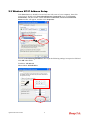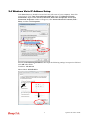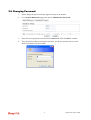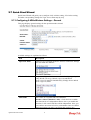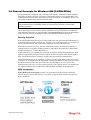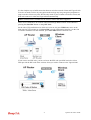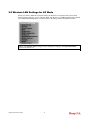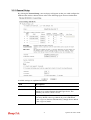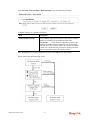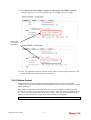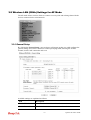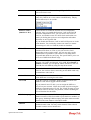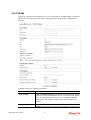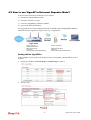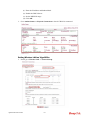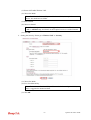
1
i VigorAP 900 User’s Guide VigorAP 900 User’s Guide ii VigorAP 900 Concurrent Dual Band AP User’s Guide Version: 1.5 Firmware Version: V1.1.6 Date: September 10, 2015 iii VigorAP 900 User’s Guide Intellectual Property Rights (IPR) Information Copyrights © All rights reserved. This publication contains information that is protected by copyright. No part may be reproduced, transmitted, transcribed, stored in a retrieval system, or translated into any language without written permission from the copyright holders. Trademarks The following trademarks are used in this document: Microsoft is a registered trademark of Microsoft Corp. Windows, Windows 95, 98, Me, NT, 2000, XP, Vista, 7 and Explorer are trademarks of Microsoft Corp. Apple and Mac OS are registered trademarks of Apple Inc. Other products may be trademarks or registered trademarks of their respective manufacturers. Safety Instructions and Approval Safety Instructions Warranty Read the installation guide thoroughly before you set up the modem. The modem is a complicated electronic unit that may be repaired only be authorized and qualified personnel. Do not try to open or repair the modem yourself. Do not place the modem in a damp or humid place, e.g. a bathroom. The modem should be used in a sheltered area, within a temperature range of +5 to +40 Celsius. Do not expose the modem to direct sunlight or other heat sources. The housing and electronic components may be damaged by direct sunlight or heat sources. Do not deploy the cable for LAN connection outdoor to prevent electronic shock hazards. Keep the package out of reach of children. When you want to dispose of the modem, please follow local regulations on conservation of the environment. We warrant to the original end user (purchaser) that the modem will be free from any defects in workmanship or materials for a period of one (1) year from the date of purchase from the dealer. Please keep your purchase receipt in a safe place as it serves as proof of date of purchase. During the warranty period, and upon proof of purchase, should the product have indications of failure due to faulty workmanship and/or materials, we will, at our discretion, repair or replace the defective products or components, without charge for either parts or labor, to whatever extent we deem necessary tore-store the product to proper operating condition. Any replacement will consist of a new or re-manufactured functionally equivalent product of equal value, and will be offered solely at our discretion. This warranty will not apply if the product is modified, misused, tampered with, damaged by an act of God, or subjected to abnormal working conditions. The warranty does not cover the bundled or licensed software of other vendors. Defects which do not significantly affect the usability of the product will not be covered by the warranty. We reserve the right to revise the manual and online documentation and to make changes from time to time in the contents hereof without obligation to notify any person of such revision or changes. Be a Registered Owner Web registration is preferred. You can register your Vigor modem via http://www.draytek.com. Firmware & Tools Updates Due to the continuous evolution of DrayTek technology, all modems will be regularly upgraded. Please consult the DrayTek web site for more information on newest firmware, tools and documents. http://www.draytek.com VigorAP 900 User’s Guide iv European Community Declarations Manufacturer: Address: Product: DrayTek Corp. No. 26, Fu Shing Road, Hukou Township, Hsinchu Industrial Park, Hsinchu County, Taiwan 303 VigorAP 900 DrayTek Corp. declares that VigorAP 900 is in compliance with the following essential requirements and other relevant provisions of R&TTE Directive 1999/5/EC, ErP 2009/125/EC and RoHS 2011/65/EU. The product conforms to the requirements of Electro-Magnetic Compatibility (EMC) Directive 2004/108/EC by complying with the requirements set forth in EN55022/Class B and EN55024/Class B. The product conforms to the requirements of Low Voltage (LVD) Directive 2006/95/EC by complying with the requirements set forth in EN60950-1. This product is designed for 2.4GHz/5GHz WLAN network throughout the EC region and Switzerland with restrictions in France. Federal Communication Commission Interference Statement This equipment has been tested and found to comply with the limits for a Class B digital device, pursuant to Part 15 of the FCC Rules. These limits are designed to provide reasonable protection against harmful interference in a residential installation. This equipment generates, uses and can radiate radio frequency energy and, if not installed and used in accordance with the instructions, may cause harmful interference to radio communications. However, there is no guarantee that interference will not occur in a particular installation. If this equipment does cause harmful interference to radio or television reception, which can be determined by turning the equipment off and on, the user is encouraged to try to correct the interference by one of the following measures: Reorient or relocate the receiving antenna. Increase the separation between the equipment and receiver. Connect the equipment into an outlet on a circuit different from that to which the receiver is connected. Consult the dealer or an experienced radio/TV technician for help. This device complies with Part 15 of the FCC Rules. Operation is subject to the following two conditions: (1) This device may not cause harmful interference, and (2) This device may accept any interference received, including interference that may cause undesired operation. The antenna/transmitter should be kept at least 20 cm away from human body. Please visit http://www.draytek.com for more information. You are cautioned that changes or modifications not expressly approved by the party responsible for compliance could void your authority to operate the equipment. FCC RF Radiation Exposure Statement 1. This Transmitter must not be co-located or operating in conjunction with any other antenna or transmitter. 2. This equipment complies with FCC RF radiation exposure limits set forth for an uncontrolled environment. This equipment should be installed and operated with a minimum distance of 20 centimeters between the radiator and your body. v VigorAP 900 User’s Guide VigorAP 900 User’s Guide vi Table of Contents Introduction .................................................................................................1 1.1 Introduction ............................................................................................................................. 1 1.2 LED Indicators and Connectors .............................................................................................. 3 1.3 Hardware Installation .............................................................................................................. 5 1.3.1 Wired Connection for PC in LAN ...................................................................................... 5 1.3.2 Wired Connection for Notebook in WLAN ........................................................................ 6 1.3.3 Wireless Connection......................................................................................................... 7 1.3.4 POE Connection ............................................................................................................... 8 Network Configuration................................................................................9 2.1 Windows 7 IP Address Setup.................................................................................................. 9 2.2 Windows 2000 IP Address Setup...........................................................................................11 2.3 Windows XP IP Address Setup ............................................................................................. 12 2.4 Windows Vista IP Address Setup.......................................................................................... 13 2.5 Accessing to Web User Interface.......................................................................................... 14 2.6 Changing Password .............................................................................................................. 15 2.7 Quick Start Wizard ................................................................................................................ 16 2.7.1 Configuring 2.4GHz Wireless Settings – General .......................................................... 16 2.7.2 Configuring 2.4GHz Wireless Settings based on the Operation Mode .......................... 18 2.7.3 Configuring 2.4GHz Security Settings ............................................................................ 23 2.7.4 Configuring 5GHz Wireless Settings .............................................................................. 25 2.7.5 Configuring 5GHz Security Settings ............................................................................... 26 2.7.6 Finishing the Wireless Settings Wizard .......................................................................... 28 2.8 Online Status......................................................................................................................... 28 Advanced Configuration.................................................................................31 3.1 Operation Mode .................................................................................................................... 32 3.2 LAN ....................................................................................................................................... 33 3.2.1 General Setup................................................................................................................. 33 3.2.2 Port Control..................................................................................................................... 36 3.3 Central AP Management ....................................................................................................... 36 3.3.1 General Setup................................................................................................................. 36 3.3.2 APM Log ......................................................................................................................... 37 3.3.3 Function Support List...................................................................................................... 37 3.3.4 Overload Management ................................................................................................... 38 3.3.5 Status of Settings............................................................................................................ 39 vii VigorAP 900 User’s Guide 3.4 General Concepts for Wireless LAN (2.4GHz/5GHz) ........................................................... 40 3.5 Wireless LAN Settings for AP Mode ..................................................................................... 42 3.5.1 General Setup................................................................................................................. 43 3.5.2 Security ........................................................................................................................... 47 3.5.3 Access Control................................................................................................................ 50 3.5.4 WPS................................................................................................................................ 51 3.5.5 AP Discovery .................................................................................................................. 52 3.5.6 WMM Configuration ........................................................................................................ 53 3.5.7 Bandwidth Management ................................................................................................. 55 3.5.8 Airtime Fairness.............................................................................................................. 56 3.5.9 Band Steering ................................................................................................................. 58 3.5.10 Station Control .............................................................................................................. 62 3.5.11 Roaming ....................................................................................................................... 63 3.5.12 Station List .................................................................................................................... 64 3.6 Wireless LAN Settings for AP Bridge-Point to Point/AP Bridge-Point to Multi-Point Mode .. 65 3.6.1 General Setup................................................................................................................. 66 3.6.2 AP Discovery .................................................................................................................. 69 3.6.3 WDS AP Status .............................................................................................................. 70 3.7 Wireless LAN Settings for AP Bridge-WDS Mode ................................................................ 71 3.7.1 General Setup................................................................................................................. 71 3.7.2 Security ........................................................................................................................... 76 3.7.3 Access Control................................................................................................................ 79 3.7.4 WPS................................................................................................................................ 80 3.7.5 AP Discovery .................................................................................................................. 81 3.7.6 WDS AP Status .............................................................................................................. 82 3.7.7 WMM Configuration ........................................................................................................ 82 3.7.8 Bandwidth Management ................................................................................................. 84 3.7.9 Airtime Fairness.............................................................................................................. 85 3.7.10 Band Steering ............................................................................................................... 87 3.7.11 Station Control .............................................................................................................. 90 3.7.12 Roaming ....................................................................................................................... 91 3.7.13 Station List .................................................................................................................... 93 3.8 Wireless LAN Settings for Universal Repeater Mode ........................................................... 95 3.8.1 General Setup................................................................................................................. 96 3.8.2 Security ......................................................................................................................... 100 3.8.3 Access Control.............................................................................................................. 103 3.8.4 WPS.............................................................................................................................. 104 3.8.5 AP Discovery ................................................................................................................ 105 3.8.6 Universal Repeater ....................................................................................................... 106 3.8.7 WMM Configuration ...................................................................................................... 108 3.8.8 Bandwidth Management ............................................................................................... 110 3.8.9 Airtime Fairness............................................................................................................ 111 3.8.10 Band Steering ............................................................................................................. 113 3.8.11 Station Control ............................................................................................................ 116 3.8.12 Roaming ..................................................................................................................... 118 3.8.13 Station List .................................................................................................................. 119 3.9 Wireless LAN (5GHz) Settings for AP Mode....................................................................... 121 3.9.1 General Setup............................................................................................................... 121 3.9.2 Security ......................................................................................................................... 123 3.9.3 Access Control.............................................................................................................. 126 3.9.4 WPS.............................................................................................................................. 127 3.9.5 AP Discovery ................................................................................................................ 128 3.9.6 WMM Configuration ...................................................................................................... 129 3.9.7 Bandwidth Management ............................................................................................... 130 3.9.8 Airtime Fairness............................................................................................................ 131 VigorAP 900 User’s Guide viii 3.9.9 Station Control .............................................................................................................. 133 3.9.10 Roaming ..................................................................................................................... 134 3.9.11 Station List .................................................................................................................. 135 3.10 Wireless LAN (5GHz) Settings for Universal Repeater Mode .......................................... 137 3.10.1 General Setup............................................................................................................. 137 3.10.2 Security ....................................................................................................................... 138 3.10.3 Access Control............................................................................................................ 142 3.10.4 WPS............................................................................................................................ 143 3.10.5 AP Discovery .............................................................................................................. 144 3.10.6 Universal Repeater ..................................................................................................... 145 3.10.7 WMM Configuration .................................................................................................... 147 3.10.8 Bandwidth Management ............................................................................................. 149 3.10.9 Airtime Fairness.......................................................................................................... 150 3.10.10 Station Control .......................................................................................................... 152 3.10.11 Roaming ................................................................................................................... 153 3.10.12 Station List ................................................................................................................ 154 3.11 RADIUS Server ................................................................................................................. 156 3.12 Applications ....................................................................................................................... 157 3.12.1 Schedule..................................................................................................................... 157 3.12.2 Apple iOS Keep Alive ................................................................................................. 159 3.12.3 Temperature Sensor................................................................................................... 160 3.13 System Maintenance......................................................................................................... 162 3.13.1 System Status............................................................................................................. 162 3.13.2 TR-069 ........................................................................................................................ 164 3.13.3 Administrator Password.............................................................................................. 166 3.13.4 Configuration Backup ................................................................................................. 167 3.13.5 Syslog/Mail Alert ......................................................................................................... 168 3.13.6 Time and Date ............................................................................................................ 169 3.13.7 Management............................................................................................................... 170 3.13.8 Reboot System ........................................................................................................... 171 3.13.9 Firmware Upgrade ...................................................................................................... 171 3.14 Diagnostics........................................................................................................................ 172 3.14.1 System Log................................................................................................................. 172 3.14.2 Speed Test ................................................................................................................. 172 3.14.3 Traffic Graph............................................................................................................... 173 3.14.4 WLAN (2.4GHz) Statistics .......................................................................................... 173 3.14.5 WLAN (5GHz) Statistics ............................................................................................. 174 3.14.6 Station Statistics ......................................................................................................... 175 3.15 Support Area ..................................................................................................................... 177 Applications.............................................................................................179 4.1 How to set different segments for different SSIDs in VigorAP 900 ..................................... 179 4.2 How to use VigorAP in Universal Repeater Mode? ............................................................ 183 Trouble Shooting.....................................................................................191 5.1 Checking If the Hardware Status Is OK or Not.................................................................... 191 ix VigorAP 900 User’s Guide 5.2 Checking If the Network Connection Settings on Your Computer Is OK or Not ................. 192 5.3 Pinging the Modem from Your Computer............................................................................ 195 5.4 Backing to Factory Default Setting If Necessary ................................................................ 196 5.5 Contacting DrayTek............................................................................................................. 197 VigorAP 900 User’s Guide x Introduction Note: This is a generic International version of the user guide. Specification, compatibility and features vary by region. For specific user guides suitable for your region or product, please contact local distributor. 1.1 Introduction Thank you for purchasing this VigorAP 900, the concurrent dual band wireless (2.4G/5G) access point offering high-speed data transmission. With this high cost-efficiency VigorAP 900, computers and wireless devices which are compatible with 802.11n/802.11a can connect to existing wired Ethernet network via this VigorAP 900, at the speed of 300Mbps. Easy install procedures allows any computer users to setup a network environment in very short time - within minutes, even inexperienced users. Just follow the instructions given in this user manual, you can complete the setup procedure and release the power of this access point all by yourself! VigorAP 900 also is a Power over Ethernet Powered Device which adopts the technology of PoE for offering power supply and transmitting data through the Ethernet cable. 1 VigorAP 900 User’s Guide AP Management The VigorAP900 can operate in standalone mode for your office network or a classroom or a waiting room of some transportation terminals (e.g. ferry terminal, bus station, train station) or a clinic's waiting room ; connected to your LAN and offering you with wireless access. If your network requires several VigorAP900 units, to centrally manage and monitor them individually as a group will be expected. DrayTek central wireless management (AP Management) lets control, efficiency, monitoring and security of your company-wide wireless access easier be managed. Inside the web user interface, we call “central wireless management” as Central AP Management which supports mobility, client monitoring / reporting and load-balancing to multiple APs. For central wireless management, you will need a Vigor2860 or Vigor2925 series router; there is no per-node licensing or subscription required. With the unified user interface of Vigor2860 Combo WAN series and Vigor2925 Triple WAN series, the multiple deployment of VigorAP900 can be clear at the first sight. For multiple wireless clients to apply the AP Load Balancing to the multiple APs, AP management will manage wireless traffic with smooth flow and enhanced efficiency. VigorAP 900 User’s Guide 2 1.2 LED Indicators and Connectors Before you use the Vigor modem, please get acquainted with the LED indicators and connectors first. LED Status Explanation ACT LAN A1 - A4 Off Blinking On Blinking On Off Blinking On Off Blinking On LAN B Off Blinking On The system is not ready or is failed. The system is ready and can work normally. A USB device is connected and active. The data is transmitting. Wireless function is ready. Wireless function is not ready. Data is transmitting (sending/receiving). Wireless function is ready. Wireless function is not ready. Data is transmitting (sending/receiving). A normal connection (rate with 100M/1000M) is through its corresponding port. LAN is disconnected. Data is transmitting (sending/receiving). A normal connection (rate with 100M/1000M) is through its corresponding port. LAN is disconnected. Data is transmitting (sending/receiving). USB 2.4G 5G Off Blinking 3 VigorAP 900 User’s Guide Interface Description WLAN ON - Press the button and release it within 2 seconds. When the wireless function is ready, the 2.4G/5G blue LED on front panel will be on. WLAN ON/OFF WPS WLAN OFF - Press the button and release it within 2 seconds to turn off the WLAN function. When the wireless function is not ready, 2.4G/5G blue LED on front panel will be off. WPS - When WPS function is enabled by web user interface, press this button for more than 2 seconds. This device will wait for any wireless client connecting to it through WPS. WPS – Press the button for more than 6 seconds, VigorAP 900 will disable the option of Enable AP Management under LAN>>General Setup and reset to the factory IP address, 192.168.1.2. Note that the disabled AP Management must be enabled manually if enabled AP Management is required. Restore the default settings. Usage: Turn on VigorAP 900. Press the button and keep for more than 10 seconds. Then the device will restart with the factory default configuration. LAN B Connecter for xDSL / Cable modem (Giga level) or router. LAN A1 (PoE) A4 Connecter for xDSL / Cable modem (Giga level) / computer or router. PWR: Connecter for a power adapter. USB VigorAP 900 User’s Guide Connector for a printer. 4 ON/OFF: Power switch. 1.3 Hardware Installation This section will guide you to install the VigorAP 900 through hardware connection and configure the device’s settings through web browser. Before starting to configure VigorAP 900, you have to connect your devices correctly. 1.3.1 Wired Connection for PC in LAN 1. Connect VigorAP 900 to ADSL modem, router, or switch/hub in your network through the LAN A port of the access point by Ethernet cable. 2. Connect a computer to other available LAN A port. Make sure the subnet IP address of the PC is the same as VigorAP 900 management IP, e.g., 192.168.1.X. 3. Connect the A/C power adapter to the wall socket, and then connect it to the PWR connector of the access point. 4. Power on VigorAP 900. 5. Check all LEDs on the front panel. ACT LED should blink and LAN LEDs should be on if the access point is correctly connected to the ADSL modem or router. (For the detailed information of LED status, please refer to section 1.2.) 5 VigorAP 900 User’s Guide 1.3.2 Wired Connection for Notebook in WLAN 1. Connect VigorAP 900 to ADSL modem or router in your network through the LAN A port of the access point by Ethernet cable. 2. Connect the A/C power adapter to the wall socket, and then connect it to the PWR connector of the access point. 3. Power on VigorAP 900. 4. Check all LEDs on the front panel. ACT LED should be steadily on, LAN LEDs should be on if the access point is correctly connected to the ADSL modem or router. (For the detailed information of LED status, please refer to section 1.2.) VigorAP 900 User’s Guide 6 1.3.3 Wireless Connection VigorAP 900 can access Internet via an ADSL modem, router, or switch/hub in your network through wireless connection. 1. Connect VigorAP 900 to ADSL modem or router via wireless network. 2. Connect the A/C power adapter to the wall socket, and then connect it to the PWR connector of the access point. 3. Power on VigorAP 900. 4. Check all LEDs on the front panel. ACT LED should be steadily on, LAN LEDs should be on if VigorAP 900 is correctly connected to the ADSL modem, router or switch/hub. (For the detailed information of LED status, please refer to section 1.2.) 7 VigorAP 900 User’s Guide 1.3.4 POE Connection VigorAP 900 can gain the power from the connected switch, e.g., VigorSwitch P2260. PoE (Power over Ethernet) can break the install limitation caused by the fixed power supply. 1. Connect VigorAP 900 to a switch in your network through the LAN A1 (PoE) port of the access point by Ethernet cable. 2. Connect a computer to VigorSwitch P2260. Make sure the subnet IP address of the PC is the same as VigorAP 900 management IP, e.g., 192.168.1.X. 3. Power on VigorAP 900. 4. Check all LEDs on the front panel. ACT LED should be steadily on, LAN LEDs should be on if the access point is correctly connected to the ADSL modem, router or switch/hub. VigorAP 900 User’s Guide 8 Network Configuration After the network connection is built, the next step you should do is setup VigorAP 900 with proper network parameters, so it can work properly in your network environment. Before you can connect to the access point and start configuration procedures, your computer must be able to get an IP address automatically (use dynamic IP address). If it’s set to use static IP address, or you’re unsure, please follow the following instructions to configure your computer to use dynamic IP address: For the default IP address of this AP is set “192.168.1.2”, we recommend you to use “192.168.1.X (except 2)” in the field of IP address on this section for your computer. If the operating system of your computer is… Windows 7 Windows 2000 Windows XP Windows Vista - please go to section 2.1 - please go to section 2.2 - please go to section 2.3 - please go to section 2.4 2.1 Windows 7 IP Address Setup Click Start button (it should be located at lower-left corner of your computer), then click Control Panel. Double-click Network and Internet, and the following window will appear. Click Network and Sharing Center. Next, click Change adapter settings and click Local Area Connection. 9 VigorAP 900 User’s Guide Then, select Internet Protocol Version 4 (TCP/IPv4) and click Properties. Under the General tab, click Use the following IP address. Then input the following settings in respective field and click OK when finish. IP address: 192.168.1.9 Subnet Mask: 255.255.255.0 VigorAP 900 User’s Guide 10 2.2 Windows 2000 IP Address Setup Click Start button (it should be located at lower-left corner of your computer), then click control panel. Double-click Network and Dial-up Connections icon, double click Local Area Connection, and Local Area Connection Properties window will appear. Select Internet Protocol (TCP/IP), then click Properties. Select Use the following IP address, then input the following settings in respective field and click OK when finish. IP address: 192.168.1.9 Subnet Mask: 255.255.255.0 11 VigorAP 900 User’s Guide 2.3 Windows XP IP Address Setup Click Start button (it should be located at lower-left corner of your computer), then click control panel. Double-click Network and Internet Connections icon, click Network Connections, and then double-click Local Area Connection, Local Area Connection Status window will appear, and then click Properties. Select Use the following IP address, then input the following settings in respective field and click OK when finish: IP address: 192.168.1.9 Subnet Mask: 255.255.255.0. VigorAP 900 User’s Guide 12 2.4 Windows Vista IP Address Setup Click Start button (it should be located at lower-left corner of your computer), then click control panel. Click View Network Status and Tasks, then click Manage Network Connections. Right-click Local Area Netwrok, then select ‘Properties’. Local Area Connection Properties window will appear, select Internet Protocol Version 4 (TCP / IPv4), and then click Properties. Select Use the following IP address, then input the following settings in respective field and click OK when finish: IP address: 192.168.1.9 Subnet Mask: 255.255.255.0. 13 VigorAP 900 User’s Guide 2.5 Accessing to Web User Interface All functions and settings of this access point must be configured via web user interface. Please start your web browser (e.g., Firefox). 1. Make sure your PC connects to the VigorAP 900 correctly. Notice: You may either simply set up your computer to get IP dynamically from the modem or set up the IP address of the computer to be the same subnet as the default IP address of VigorAP 900 192.168.1.2. For the detailed information, please refer to the later section - Trouble Shooting of the guide. 2. Open a web browser on your PC and type http://192.168.1.2. A pop-up window will open to ask for username and password. Pease type “admin/admin” on Username/Password and click OK. 3. The Main Screen will pop up. Note: If you fail to access to the web configuration, please go to “Trouble Shooting” for detecting and solving your problem. For using the device properly, it is necessary for you to change the password of web configuration for security and adjust primary basic settings. VigorAP 900 User’s Guide 14 2.6 Changing Password 1. Please change the password for the original security of the modem. 2. Go to System Maintenance page and choose Administrator Password. 3. Enter the new login password on the field of Password. Then click OK to continue. 4. Now, the password has been changed. Next time, use the new password to access the Web User Interface for this modem. 15 VigorAP 900 User’s Guide 2.7 Quick Start Wizard Quick Start Wizard will guide you to configure 2.4G wireless setting, 5G wireless setting and other corresponding settings for Vigor Access Point step by step. 2.7.1 Configuring 2.4GHz Wireless Settings – General This page displays general settings for the operation mode selected. Available settings are explained as follows: Item Description Operation Mode There are five operation modes for wireless connection. Settings for each mode are different. Wireless Mode At present, VigorAP 900 can connect to 11b only, 11g only, 11n only, Mixed (11b+11g), Mixed (11g+11n) and Mixed (11b+11g+11n) stations simultaneously. Simply choose Mixed (11b+11g+11n) mode. Main SSID Set a name for VigorAP 900 to be identified. Enable 2 Subnet (Simulate 2 APs) - Check the box to enable the function for two independent subnets. Once you enable this function, LAN-A and LAN-B would be independent. Next, you can connect one router in LAN-A, and another router in LAN-B. Such mechanism can make you feeling that you have two VigorAP 900 User’s Guide 16 independent AP/subnet functions in one VigorAP 900. If you disable this function, LAN-A and LAN-B ports are in the same domain. You could only connect one router (no matter connecting to LAN-A or LAN-B) in this environment. Multiple SSID - When Enable 2 Subnet is enabled, you can specify subnet interface (LAN-A or LAN-B) for each SSID by using the drop down menu. Channel Means the channel frequency of the wireless LAN. The default channel is 6. You may switch channel if the selected channel is under serious interference. If you have no idea of choosing the frequency, please select AutoSelect to let system determine for you. Extension Channel With 802.11n, there is one option to double the bandwidth per channel. The available extension channel options will be varied according to the Channel selected above. Station List Click the Display button to open the Station List dialog. It provides the knowledge of connecting wireless clients now along with its status code. AP Discovery Click this button to open the AP Discovery dialog. VigorAP 900 can scan all regulatory channels and find working APs in the neighborhood. This option is not available when AP is selected as the Operation Mode. After finishing this web page configuration, please click Next to continue. 17 VigorAP 900 User’s Guide 2.7.2 Configuring 2.4GHz Wireless Settings based on the Operation Mode In this page, the advanced settings will vary according to the operation mode chosen on 2.7.1. Advanced Settings for AP Bridge-Point to Point When you choose AP Bridge-Point to Point, you will need to configure the following page. Available settings are explained as follows: Item Description Phy Mode Data will be transmitted via HTMIX mode. Each access point should be setup to the same Phy mode for connecting with each other. Security Select WEP, TKIP or AES as the encryption algorithm. Type the key number if required. Peer MAC Address Type the peer MAC address for the access point that VigorAP 900 connects to. VigorAP 900 User’s Guide 18 Advanced Settings for AP Bridge-Point to Multi-Point When you choose AP Bridge-Point to Multi-Point, you will need to configure the following page. Available settings are explained as follows: Item Description Phy Mode Data will be transmitted via HTMIX mode. Each access point should be setup to the same Phy mode for connecting with each other. Security Select WEP, TKIP or AES as the encryption algorithm. Type the key number if required. Peer MAC Address Type the peer MAC address for the access point that VigorAP 900 connects to. 19 VigorAP 900 User’s Guide Advanced Settings for AP Bridge-WDS When you choose AP Bridge-WDS, you will need to configure the following page. Available settings are explained as follows: Item Description Phy Mode Data will be transmitted via HTMIX mode. Each access point should be setup to the same Phy mode for connecting with each other. Subnet Choose LAN-A or LAN-B for each SSID. Security Select WEP, TKIP or AES as the encryption algorithm. Type the key number if required. Peer MAC Address Type the peer MAC address for the access point that VigorAP 900 connects to. VigorAP 900 User’s Guide 20 Advanced Settings for AP Bridge-Universal Repeater When you choose AP Bridge-Universal Repeater you will need to configure the following page. Available settings are explained as follows: Item Description SSID Means the identification of the wireless LAN. SSID can be any text numbers or various special characters. MAC Address (Optional) Type the MAC address for the access point. Security Mode There are several modes provided for you to choose. Each mode will bring up different parameters (e.g., WEP keys, Pass Phrase) for you to configure. Encryption Type for Open/Shared This option is available when Open/Shared is selected as Security Mode. Choose None to disable the WEP Encryption. Data sent to the AP will not be encrypted. To enable WEP encryption for data transmission, please choose WEP. WEP Keys - Four keys can be entered here, but only one key can be selected at a time. The format of WEP Key is restricted to 5 ASCII characters or 10 hexadecimal values in 64-bit encryption level, or restricted to 13 ASCII characters or 26 hexadecimal values in 128-bit encryption level. The allowed content is the ASCII characters from 33(!) to 126(~) except '#' and ','. 21 VigorAP 900 User’s Guide Encryption Type for WPA/PSK and WPA2/PSK This option is available when WPA/PSK or WPA2/PSK is selected as Security Mode. Select TKIP or AES as the algorithm for WPA. Pass Phrase It is available when WPA/PSK or WPA2/PSK is selected. After finishing this web page configuration, please click Next to continue. VigorAP 900 User’s Guide 22 2.7.3 Configuring 2.4GHz Security Settings VigorAP 900 offers 2.4GHz wireless connection capability. You can setup 2.4GHz features in Quick Start Wizard first. Once the USB 2.4GHz wireless dongle connects to VigorAP 900, it can work immediately. Available settings are explained as follows: Item Description Mode There are several modes provided for you to choose. Disable - The encryption mechanism is turned off. WEP - Accepts only WEP clients and the encryption key should be entered in WEP Key. WPA/PSK or WPA2/PSK or Mixed (WPA+WPA2)/PSK Accepts only WPA clients and the encryption key should be entered in PSK. The WPA encrypts each frame transmitted from the radio using the key, which either PSK (Pre-Shared Key) entered manually in this field below or automatically negotiated via 802.1x authentication. WEP/802.1x - The built-in RADIUS client feature enables VigorAP 900 to assist the remote dial-in user or a wireless station and the RADIUS server in performing mutual authentication. It enables centralized remote access authentication for network management. WPA/802.1x - The WPA encrypts each frame transmitted from the radio using the key, which either PSK (Pre-Shared Key) entered manually in this field below or automatically negotiated via 802.1x authentication. 23 VigorAP 900 User’s Guide WPA2/802.1x - The WPA encrypts each frame transmitted from the radio using the key, which either PSK (Pre-Shared Key) entered manually in this field below or automatically negotiated via 802.1x authentication. WPA Algorithm Select TKIP, AES or TKIP/AES as the algorithm for WPA. Such feature is available for WPA2/802.1x, WPA/802.1x, WPA/PSK or WPA2/PSK or Mixed (WPA+WPA2)/PSK mode. Pass Phrase Either 8~63 ASCII characters, such as 012345678..(or 64 Hexadecimal digits leading by 0x, such as "0x321253abcde..."). Such feature is available for WPA/PSK or WPA2/PSK or Mixed (WPA+WPA2)/PSK mode. Key Renewal Internal WPA uses shared key for authentication to the network. However, normal network operations use a different encryption key that is randomly generated. This randomly generated key that is periodically replaced. Enter the renewal security time (seconds) in the column. Smaller interval leads to greater security but lower performance. Default is 3600 seconds. Set 0 to disable re-key. Such feature is available for WPA2/802.1,WPA/802.1x, WPA/PSK or WPA2/PSK or Mixed (WPA+WPA2)/PSK mode. PMK Cache Period Set the expire time of WPA2 PMK (Pairwise master key) cache. PMK Cache manages the list from the BSSIDs in the associated SSID with which it has pre-authenticated. Such feature is available for WPA2/802.1 mode. Pre-Authentication Enables a station to authenticate to multiple APs for roaming securer and faster. With the pre-authentication procedure defined in IEEE 802.11i specification, the pre-four-way-handshake can reduce handoff delay perceivable by a mobile node. It makes roaming faster and more secure. (Only valid in WPA2) Enable - Enable IEEE 802.1X Pre-Authentication. Disable - Disable IEEE 802.1X Pre-Authentication. Key 1 – Key 4 Four keys can be entered here, but only one key can be selected at a time. The format of WEP Key is restricted to 5 ASCII characters or 10 hexadecimal values in 64-bit encryption level, or restricted to 13 ASCII characters or 26 hexadecimal values in 128-bit encryption level. The allowed content is the ASCII characters from 33(!) to 126(~) except '#' and ','. 802.1x WEP Disable - Disable the WEP Encryption. Data sent to the AP will not be encrypted. Enable - Enable the WEP Encryption. Such feature is available for WEP/802.1x mode. After finishing this web page configuration, please click Next to continue. VigorAP 900 User’s Guide 24 2.7.4 Configuring 5GHz Wireless Settings VigorAP 900 offers 5GHz wireless connection capability. You can setup 5GHz features in Quick Start Wizard first. Once the USB 5GHz wireless dongle connects to VigorAP 900, it can work immediately. Available settings are explained as follows: Item Description Operation Mode There are two operation modes for wireless connection. Settings for each mode are different. Wireless Mode At present, VigorAP 900 can connect to 11a only, 11n only (5G), Mixed (11a+11n) stations simultaneously. Simply choose Mixed (11a+11n) mode. Main SSID Set a name for VigorAP 900 to be identified. Multiple SSID – Set the SSIDs and specify subnet interface (LAN-A or LAN-B) for each SSID by click Multiple SSID. Channel Means the channel of frequency of the wireless LAN. The default channel is 36. You may switch channel if the selected channel is under serious interference. Extension Channel With 802.11n, there is one option to double the bandwidth per channel. The available extension channel options will be varied according to the Channel selected above. Station List Click the Display button to open the Station List dialog. It provides the knowledge of connecting wireless clients now 25 VigorAP 900 User’s Guide along with its status code. AP Discovery Click this button to open the AP Discovery dialog. VigorAP 900 can scan all regulatory channels and find working APs in the neighborhood. This option is not available when Universal Repeater is selected as the Operation Mode. After finishing this web page configuration, please click Next to continue. 2.7.5 Configuring 5GHz Security Settings VigorAP 900 offers 5GHz wireless connection capability. You can setup 5G features in Quick Start Wizard first. Once the USB 5GHz wireless dongle connects to VigorAP 900, it can work immediately. Available settings are explained as follows: Item Description Mode There are several modes provided for you to choose. Disable - The encryption mechanism is turned off. WEP - Accepts only WEP clients and the encryption key should be entered in WEP Key. WPA/PSK or WPA2/PSK or Mixed (WPA+WPA2)/PSK Accepts only WPA clients and the encryption key should be entered in PSK. The WPA encrypts each frame transmitted from the radio using the key, which either PSK (Pre-Shared Key) entered manually in this field below or automatically negotiated VigorAP 900 User’s Guide 26 via 802.1x authentication. WEP/802.1x - The built-in RADIUS client feature enables VigorAP 900 to assist the remote dial-in user or a wireless station and the RADIUS server in performing mutual authentication. It enables centralized remote access authentication for network management. The WPA encrypts each frame transmitted from the radio using the key, which either PSK (Pre-Shared Key) entered manually in this field below or automatically negotiated via 802.1x authentication. Select WPA, WPA2 or Auto as WPA mode. WPA/802.1x - The WPA encrypts each frame transmitted from the radio using the key, which either PSK (Pre-Shared Key) entered manually in this field below or automatically negotiated via 802.1x authentication. WPA2/802.1x - The WPA encrypts each frame transmitted from the radio using the key, which either PSK (Pre-Shared Key) entered manually in this field below or automatically negotiated via 802.1x authentication. WPA Algorithm Select TKIP, AES or TKIP/AES as the algorithm for WPA. Such feature is available for WPA2/802.1x, WPA/802.1x, WPA/PSK or WPA2/PSK or Mixed (WPA+WPA2)/PSK mode. Pass Phrase Either 8~63 ASCII characters, such as 012345678..(or 64 Hexadecimal digits leading by 0x, such as "0x321253abcde..."). Such feature is available for WPA/PSK or WPA2/PSK or Mixed (WPA+WPA2)/PSK mode. Key Renewal Internal WPA uses shared key for authentication to the network. However, normal network operations use a different encryption key that is randomly generated. This randomly generated key that is periodically replaced. Enter the renewal security time (seconds) in the column. Smaller interval leads to greater security but lower performance. Default is 3600 seconds. Set 0 to disable re-key. Such feature is available for WPA2/802.1,WPA/802.1x, WPA/PSK or WPA2/PSK or Mixed (WPA+WPA2)/PSK mode. PMK Cache Period Set the expire time of WPA2 PMK (Pairwise master key) cache. PMK Cache manages the list from the BSSIDs in the associated SSID with which it has pre-authenticated. Such feature is available for WPA2/802.1 mode. Pre-Authentication Enables a station to authenticate to multiple APs for roaming securer and faster. With the pre-authentication procedure defined in IEEE 802.11i specification, the pre-four-way-handshake can reduce handoff delay perceivable by a mobile node. It makes roaming faster and more secure. (Only valid in WPA2) Enable - Enable IEEE 802.1X Pre-Authentication. Disable - Disable IEEE 802.1X Pre-Authentication. Key 1 – Key 4 Four keys can be entered here, but only one key can be selected at a time. The format of WEP Key is restricted to 5 ASCII characters or 10 hexadecimal values in 64-bit encryption level, or restricted to 13 ASCII characters or 26 hexadecimal values in 27 VigorAP 900 User’s Guide 128-bit encryption level. The allowed content is the ASCII characters from 33(!) to 126(~) except '#' and ','. 802.1x WEP Disable - Disable the WEP Encryption. Data sent to the AP will not be encrypted. Enable - Enable the WEP Encryption. Such feature is available for WEP/802.1x mode. After finishing this web page configuration, please click Next to continue. 2.7.6 Finishing the Wireless Settings Wizard When you see this page, it means the wireless setting wizard is almost finished. Just click Finish to save the settings and complete the setting procedure. 2.8 Online Status The online status shows the LAN status, Station Link Status for such device. Detailed explanation is shown below: Item Description IP Address Displays the IP address of the LAN interface. TX Packets Displays the total transmitted packets at the LAN interface. RX Packets Displays the total number of received packets at the LAN VigorAP 900 User’s Guide 28 interface. TX Bytes Displays the total transmitted size at the LAN interface. RX Bytes Displays the total number of received size at the LAN interface. 29 VigorAP 900 User’s Guide This page is left blank. VigorAP 900 User’s Guide 30 Advanced Configuration This chapter will guide users to execute advanced (full) configuration. As for other examples of application, please refer to chapter 5. 1. Open a web browser on your PC and type http://192.168.1.2. The window will ask for typing username and password. 2. Please type “admin/admin” on Username/Password for administration operation. Now, the Main Screen will appear. Be aware that “Admin mode” will be displayed on the bottom left side. 31 VigorAP 900 User’s Guide 3.1 Operation Mode This page provides several available modes for you to choose for different conditions. Click any one of them and click OK. The system will configure the required settings automatically. Available settings are explained as follows: Item Description Wireless LAN(2.4GHz) AP This mode allows wireless clients to connect to access point and exchange data with the devices connected to the wired network. AP Bridge-Point to Point This mode can establish wireless connection with another VigorAP 900 using the same mode, and link the wired network which these two VigorAP 900s connected together. Only one access point can be connected in this mode. AP Bridge-Point to Multi-Point This mode can establish wireless connection with other VigorAP 900s using the same mode, and link the wired network which these VigorAP 900s connected together. Up to 4 access points can be connected in this mode. AP Bridge-WDS This mode is similar to AP Bridge to Multi-Point, but access point is not working in bridge-dedicated mode, and will be able to accept wireless clients while the access point is working as a wireless bridge. VigorAP 900 User’s Guide 32 Universal Repeater This product can act as a wireless range extender that will help you to extend the networking wirelessly. The access point can act as Station and AP at the same time. It can use Station function to connect to a Root AP and use AP function to service all wireless clients within its coverage. Wireless LAN(5GHz) AP This mode allows wireless clients to connect to access point and exchange data with the devices connected to the wired network. Universal Repeater This product can act as a wireless range extender that will help you to extend the networking wirelessly. The access point can act as Station and AP at the same time. It can use Station function to connect to a Root AP and use AP function to service all wireless clients within its coverage. Note: The Wireless LAN settings will be changed according to the Operation Mode selected here. For the detailed information, please refer to the section of Wireless LAN. 3.2 LAN Local Area Network (LAN) is a group of subnets regulated and ruled by modem. 3.2.1 General Setup Click LAN to open the LAN settings page and choose General Setup. Note: Such page will be changed according to the Operation Mode selected. The following screen is obtained by choosing AP as the operation mode. 33 VigorAP 900 User’s Guide Available settings are explained as follows: Item Description LAN-A IP Network Configuration Enable DHCP Client – When it is enabled, VigorAP 900 will be treated as a client and can be managed / controlled by AP Management server offered by Vigor router (e.g., Vigor2860). IP Address – Type in private IP address for connecting to a local private network (Default: 192.168.1.2). Subnet Mask – Type in an address code that determines the size of the network. (Default: 255.255.255.0/ 24) Default Gateway – In general, it is not really necessary to specify a gateway for VigorAP 900. However, if it is required, simply type an IP address as the gateway for VigorAP 900. It will be convenient for the access point to acquire more service (e.g., accessing NTP server) from Vigor router. Enable Management VLAN – VigorAP 900 supports tag-based VLAN for wireless clients accessing Vigor device. Only the clients with the specified VLAN ID can access into VigorAP 900. VLAN ID – Type the number as VLAN ID tagged on the transmitted packet. “0” means no VALN tag. LAN-B IP Network VigorAP 900 User’s Guide IP Address – Type in private IP address for connecting to a local 34 Configuration private network (Default: 192.168.2.2). Subnet Mask – Type in an address code that determines the size of the network. (Default: 255.255.255.0/ 24) Enable Management VLAN – VigorAP 900 supports tag-based VLAN for wireless clients accessing Vigor device. Only the clients with the specified VLAN ID can access into VigorAP 900. VLAN ID – Type the number as VLAN ID tagged on the transmitted packet. “0” means no VALN tag. DHCP Server Configuration DHCP stands for Dynamic Host Configuration Protocol. DHCP server can automatically dispatch related IP settings to any local user configured as a DHCP client. Enable Server / Disable Server - Enable Server lets the modem assign IP address to every host in the LAN. Disable Server lets you manually or use other DHCP server to assign IP address to every host in the LAN. Relay Agent - Specify which subnet that DHCP server is located the relay agent should redirect the DHCP request to. Start IP Address - Enter a value of the IP address pool for the DHCP server to start with when issuing IP addresses. If the 1st IP address of your modem is 192.168.1.2, the starting IP address must be 192.168.1.3 or greater, but smaller than 192.168.1.254. End IP Address - Enter a value of the IP address pool for the DHCP server to end with when issuing IP addresses. Subnet Mask -Type in an address code that determines the size of the network. (Default: 255.255.255.0/ 24) Default Gateway - Enter a value of the gateway IP address for the DHCP server. Lease Time - It allows you to set the leased time for the specified PC. DHCP Server IP Address for Relay Agent - It is available when Enable Relay Agent is selected. Set the IP address of the DHCP server you are going to use so the Relay Agent can help to forward the DHCP request to the DHCP server. Primary IP Address - You must specify a DNS server IP address here because your ISP should provide you with usually more than one DNS Server. If your ISP does not provide it, the modem will automatically apply default DNS Server IP address: 194.109.6.66 to this field. Secondary IP Address - You can specify secondary DNS server IP address here because your ISP often provides you more than one DNS Server. If your ISP does not provide it, the modem will automatically apply default secondary DNS Server IP address: 194.98.0.1 to this field. After finishing this web page configuration, please click OK to save the settings. 35 VigorAP 900 User’s Guide 3.2.2 Port Control To avoid wrong connection due to the insertion of unsuitable Ethernet cable, the function of physical LAN ports can be disabled via web configuration. Available settings are explained as follows: Item Description Enable Port Control Check it to enable the port control. If it is enabled, you are allowed to disable the function of physical LAN port by checking the corresponding check box. Disable Port Choose and check the LAN port. After finishing this web page configuration, please click OK to save the settings. 3.3 Central AP Management Such menu allows you to configure VigorAP device to be managed by Vigor2860 series. 3.3.1 General Setup Available settings are explained as follows: Item Description Enable AP Management Check the box to enable the function of AP Management (APM). Enable Auto VigorAP 900 can be controlled under Central AP Management VigorAP 900 User’s Guide 36 Provision in Vigor2860 series. When both Vigor2860 series and VigorAP 900 have such feature enabled, once VigorAP 900 is registered to Vigor2860 series, the WLAN profile pre-configured on Vigor2860 series will be applied to VigorAP 900 immediately. Thus, it is not necessary to configure VigorAP 900 separately. 3.3.2 APM Log This page will display log information related to wireless stations connected to VigorAP 900 and central AP management. Such information also will be delivered to Vigor router (e.g., Vigor2860 or Vigor2925 series) and be shown on Central AP Management>>Event Log of Vigor router. 3.3.3 Function Support List Click the Client tab to list the AP management functions that the Access Points support under different firmware versions. 37 VigorAP 900 User’s Guide Note: DrayTek central wireless management (AP Management) lets control, efficiency, monitoring and security of your company-wide wireless access easier to be managed. Inside the web user interface, we call “central wireless management” as Central AP Management which supports mobility, client monitoring/reporting and load-balancing to multiple APs. For central wireless management, you will need a Vigor2860 or Vigor2925 series router; there is no per-node licensing or subscription required. With the unified user interface of Vigor2860 Combo WAN series and Vigor2925 Triple WAN series, the multiple deployment of VigorAP 900 can be clear at the first sight. For multiple wireless clients, to apply the AP Load Balancing to the multiple APs will manage wireless traffic with smooth flow and enhanced efficiency. 3.3.4 Overload Management Load Balance can help to distribute the traffic for all of the access points (e.g., VigorAP 900) registered to Vigor router. Thus, the bandwidth will not be occupied by certain access points. However, traffic overload might be occurred if too many wireless stations connected to VigorAP 900 for data incoming and outgoing. Therefore, “Force Overload Disassociation” is required to terminate the network connection of the client’s station to release network traffic. When the function of “Force Overload Disassociation” in web user interface of Vigor router (e.g., Vigor2860 or Vigor2925 series) is enabled, wireless clients specified in black list of such web page will be disassociated to solve the problem of traffic overload. The following web page is used to configure white list and black list for wireless stations. Available settings are explained as follows: Item Description White List/Black List Display the information (such as index number, MAC address and comment) for all of the members in White List/Black List. Wireless stations listed in Black List will be forcefully disconnected first when traffic overload occurs and “Force Overload Disassociation” is enabled. Client’s MAC VigorAP 900 User’s Guide Specify the MAC Address of the remote/local client. 38 Address Apply to White List – MAC address listed inside Client’s MAC Address will be categorized as one of members in White List. Black List - MAC address listed inside Client’s MAC Address will be categorized as one of members in Black List. Add Add a new MAC address into the White List/Black List. Delete Delete the selected MAC address in the White List/Black List. Edit Edit the selected MAC address in the White List/Black List. Cancel Give up the configuration. 3.3.5 Status of Settings Load Balance can help to distribute the traffic for all of the access points (e.g., VigorAP900s) registered to Vigor 2860 or Vigor2925 series. This web page displays the settings related to Load Balance for VigorAP 900. In which, By Station Number, By Traffic and Force Overload Disassociation indicate settings configured in Vigor 2860 or Vigor2925 series. “X” means the function is not enabled or VigorAP 900 has not registered to any Vigor router yet. Below shows a setting example for Load Balance settings configured in Vigor 2860 or Vigor2925 series. 39 VigorAP 900 User’s Guide 3.4 General Concepts for Wireless LAN (2.4GHz/5GHz) The VigorAP 900 is equipped with a wireless LAN interface compliant with the standard IEEE 802.11n draft 2 protocol. To boost its performance further, the VigorAP 900 is also loaded with advanced wireless technology to lift up data rate up to 300 Mbps*. Hence, you can finally smoothly enjoy stream music and video. Note: * The actual data throughput will vary according to the network conditions and environmental factors, including volume of network traffic, network overhead and building materials. In an Infrastructure Mode of wireless network, VigorAP 900 plays a role as an Access Point (AP) connecting to lots of wireless clients or Stations (STA). All the STAs will share the same Internet connection via VigorAP 900. The General Setup will set up the information of this wireless network, including its SSID as identification, located channel etc. Security Overview WEP (Wired Equivalent Privacy) is a legacy method to encrypt each frame transmitted via radio using either a 64-bit or 128-bit key. Usually access point will preset a set of four keys and it will communicate with each station using only one out of the four keys. WPA (Wi-Fi Protected Access), the most dominating security mechanism in industry, is separated into two categories: WPA-personal or called WPA Pre-Share Key (WPA/PSK), and WPA-Enterprise or called WPA/802.1x. In WPA-Personal, a pre-defined key is used for encryption during data transmission. WPA applies Temporal Key Integrity Protocol (TKIP) for data encryption while WPA2 applies AES. The WPA-Enterprise combines not only encryption but also authentication. Since WEP has been proved vulnerable, you may consider using WPA for the most secure connection. You should select the appropriate security mechanism according to your needs. No matter which security suite you select, they all will enhance the over-the-air data protection and /or privacy on your wireless network. The VigorAP 900 is very flexible and can support multiple secure connections with both WEP and WPA at the same time. WPS Introduction WPS (Wi-Fi Protected Setup) provides easy procedure to make network connection between wireless station and wireless access point (VigorAP 900) with the encryption of WPA and WPA2. VigorAP 900 User’s Guide 40 It is the simplest way to build connection between wireless network clients and VigorAP 900. Users do not need to select any encryption mode and type any long encryption passphrase to setup a wireless client every time. He/she only needs to press a button on wireless client, and WPS will connect for client and VigorAP 900 automatically. Note: Such function is available for the wireless station with WPS supported. There are two methods to do network connection through WPS between AP and Stations: pressing the Start PBC button or using PIN Code. On the side of VigorAP 900 series which served as an AP, press WPS button once on the front panel of VigorAP 900 or click Start PBC on web configuration interface. On the side of a station with network card installed, press Start PBC button of network card. If you want to use PIN code, you have to know the PIN code specified in wireless client. Then provide the PIN code of the wireless client you wish to connect to the VigorAP 900. 41 VigorAP 900 User’s Guide 3.5 Wireless LAN Settings for AP Mode When you choose AP as the operation mode, the Wireless LAN menu items will include General Setup, Security, Access Control, WPS, AP Discovery, WMM Configuration, Station List, Bandwidth Management, Airtime Fairness, Roaming, Status and Station Control. Note: The Wireless LAN settings will be changed according to the Operation Mode selected in section 3.1. VigorAP 900 User’s Guide 42 3.5.1 General Setup By clicking the General Setup, a new web page will appear so that you could configure the SSID and the wireless channel. Please refer to the following figure for more information. Available settings are explained as follows: Item Description Enable Wireless LAN Check the box to enable wireless function. Enable Limit Client Check the box to set the maximum number of wireless stations which try to connect Internet through Vigor device. The number you can set is from 3 to 64. Mode At present, VigorAP 900 can connect to 11b only, 11g only, 11n only, Mixed (11b+11g), Mixed (11g+11n) and Mixed (11b+11g+11n) stations simultaneously. Simply choose Mixed (11b+11g+11n) mode. 43 VigorAP 900 User’s Guide Enable 2 Subnet (Simulate 2 APs) Check the box to enable the function for two independent subnets. Once you enable this function, LAN-A and LAN-B would be independent. Next, you can connect one router in LAN-A, and another router in LAN-B. Such mechanism can make you feeling that you have two independent AP/subnet functions in one VigorAP 900. If you disable this function, LAN-A and LAN-B ports are in the same domain. You could only connect one router (no matter connecting to LAN-A or LAN-B) in this environment. Hide SSID Check it to prevent from wireless sniffing and make it harder for unauthorized clients or STAs to join your wireless LAN. Depending on the wireless utility, the user may only see the information except SSID or just cannot see any thing about VigorAP 900 while site surveying. The system allows you to set four sets of SSID for different usage. SSID Set a name for VigorAP 900 to be identified. Default settings are DrayTek-LAN-A and DrayTek-LAN-B. When Enable 2 Subnet is enabled, you can specify subnet interface (LAN-A or LAN-B) for each SSID by using the drop down menu. Subnet Choose LAN-A or LAN-B for each SSID. If you choose LAN-A, the wireless clients connecting to this SSID could only communicate with LAN-A. Isolate Member Check this box to make the wireless clients (stations) with the same SSID not access for each other. VLAN ID Type the value for such SSID. Packets transferred from such SSID to LAN will be tagged with the number. If your network uses VLANs, you can assign the SSID to a VLAN on your network. Client devices that associate using the SSID are grouped into this VLAN. The VLAN ID range is from 3 to 4095. The VLAN ID is 0 by default, it means disabling the VLAN function for the SSID. IGMP Snooping Check this box to enable this function. Multicast traffic will be forwarded to ports that have members of that group. Disabling IGMP snooping will make multicast traffic treated in the same manner as broadcast traffic. Mac Clone Check this box and manually enter the MAC address of the device with SSID 1. The MAC address of other SSIDs will change based on this MAC address. VigorAP 900 User’s Guide 44 Channel Means the channel of frequency of the wireless LAN. You may switch channel if the selected channel is under serious interference. If you have no idea of choosing the frequency, please select AutoSelect to let system determine for you. Extension Channel With 802.11n, there is one option to double the bandwidth per channel. The available extension channel options will be varied according to the Channel selected above. Configure the extension channel you want. Rate If you choose 11g Only, 11b Only, 11n Only, or Mixed (11b+11g), such feature will be available for you to set data transmission rate. Packet-OVERDRIVE This feature can enhance the performance in data transmission about 40%* more (by checking Tx Burst). It is active only when both sides of Access Point and Station (in wireless client) invoke this function at the same time. That is, the wireless client must support this feature and invoke the function, too. Note: Vigor N61 wireless adapter supports this function. Therefore, you can use and install it into your PC for matching with Packet-OVERDRIVE (refer to the following picture of Vigor N61 wireless utility window, choose Enable for TxBURST on the tab of Option). 45 VigorAP 900 User’s Guide Antenna VigorAP 900 can be attached with two antennas to have good data transmission via wireless connection. However, if you have only one antenna attached, please choose 1T1R. Tx Power The default setting is the maximum (100%). Lowering down the value may degrade range and throughput of wireless. Channel Width 20 MHZ- the device will use 20Mhz for data transmission and receiving between the AP and the stations. Auto 20/40 MHZ– the device will use 20Mhz or 40Mhz for data transmission and receiving according to the station capability. Such channel can increase the performance for data transmission. After finishing this web page configuration, please click OK to save the settings. VigorAP 900 User’s Guide 46 3.5.2 Security This page allows you to set security with different modes for SSID 1, 2, 3 and 4 respectively. After configuring the correct settings, please click OK to save and invoke it. By clicking the Security Settings, a new web page will appear so that you could configure the settings. Available settings are explained as follows: Item Description Mode There are several modes provided for you to choose. Disable - The encryption mechanism is turned off. WEP - Accepts only WEP clients and the encryption key should be entered in WEP Key. WPA/PSK or WPA2/PSK or Mixed (WPA+WPA2)/PSK Accepts only WPA clients and the encryption key should be entered in PSK. The WPA encrypts each frame transmitted from the radio using the key, which either PSK (Pre-Shared Key) entered manually in this field below or automatically negotiated via 802.1x authentication. WEP/802.1x - The built-in RADIUS client feature enables VigorAP 900 to assist the remote dial-in user or a wireless station and the RADIUS server in performing mutual 47 VigorAP 900 User’s Guide authentication. It enables centralized remote access authentication for network management. The WPA encrypts each frame transmitted from the radio using the key, which either PSK (Pre-Shared Key) entered manually in this field below or automatically negotiated via 802.1x authentication. Select WPA, WPA2 or Auto as WPA mode. WPA/802.1x - The WPA encrypts each frame transmitted from the radio using the key, which either PSK (Pre-Shared Key) entered manually in this field below or automatically negotiated via 802.1x authentication. WPA2/802.1x - The WPA encrypts each frame transmitted from the radio using the key, which either PSK (Pre-Shared Key) entered manually in this field below or automatically negotiated via 802.1x authentication. WPA Algorithms Select TKIP, AES or TKIP/AES as the algorithm for WPA. Such feature is available for WPA2/802.1x, WPA/802.1x, WPA/PSK or WPA2/PSK or Mixed (WPA+WPA2)/PSK mode. Pass Phrase Either 8~63 ASCII characters, such as 012345678..(or 64 Hexadecimal digits leading by 0x, such as "0x321253abcde..."). Such feature is available for WPA/PSK or WPA2/PSK or Mixed (WPA+WPA2)/PSK mode. Key Renewal Interval WPA uses shared key for authentication to the network. However, normal network operations use a different encryption key that is randomly generated. This randomly generated key that is periodically replaced. Enter the renewal security time (seconds) in the column. Smaller interval leads to greater security but lower performance. Default is 3600 seconds. Set 0 to disable re-key. Such feature is available for WPA2/802.1,WPA/802.1x, WPA/PSK or WPA2/PSK or Mixed (WPA+WPA2)/PSK mode. Key 1 – Key 4 Four keys can be entered here, but only one key can be selected at a time. The format of WEP Key is restricted to 5 ASCII characters or 10 hexadecimal values in 64-bit encryption level, or restricted to 13 ASCII characters or 26 hexadecimal values in 128-bit encryption level. The allowed content is the ASCII characters from 33(!) to 126(~) except '#' and ','. Such feature is available for WEP mode. 802.1x WEP Disable - Disable the WEP Encryption. Data sent to the AP will not be encrypted. Enable - Enable the WEP Encryption. Such feature is available for WEP/802.1x mode. Click the link of RADIUS Server to access into the following page for more settings. VigorAP 900 User’s Guide 48 Available settings are explained as follows: Item Description Use internal RADIUS Server There is a RADIUS server built in VigorAP 900 which is used to authenticate the wireless client connecting to the access point. Check this box to use the internal RADIUS server for wireless security. Besides, if you want to use the external RADIUS server for authentication, do not check this box. Please refer to the section, 3.11 RADIUS Server to configure settings for internal server of VigorAP 900. IP Address Enter the IP address of external RADIUS server. Port The UDP port number that the external RADIUS server is using. The default value is 1812, based on RFC 2138. Shared Secret The external RADIUS server and client share a secret that is used to authenticate the messages sent between them. Both sides must be configured to use the same shared secret. Session Timeout Set the maximum time of service provided before re-authentication. Set to zero to perform another authentication immediately after the first authentication has successfully completed. (The unit is second.) After finishing this web page configuration, please click OK to save the settings. 49 VigorAP 900 User’s Guide 3.5.3 Access Control For additional security of wireless access, the Access Control facility allows you to restrict the network access right by controlling the wireless LAN MAC address of client. Only the valid MAC address that has been configured can access the wireless LAN interface. By clicking the Access Control, a new web page will appear, as depicted below, so that you could edit the clients' MAC addresses to control their access rights (deny or allow). Available settings are explained as follows: Item Description Policy Select to enable any one of the following policy or disable the policy. Choose Activate MAC address filter to type in the MAC addresses for other clients in the network manually. Choose Blocked MAC address filter, so that all of the devices with the MAC addresses listed on the MAC Address Filter table will be blocked and cannot access into VigorAP 900. MAC Address Filter Display all MAC addresses that are edited before. Client’s MAC Address Manually enter the MAC address of wireless client. Add Add a new MAC address into the list. Delete Delete the selected MAC address in the list. Edit Edit the selected MAC address in the list. Cancel Give up the access control set up. VigorAP 900 User’s Guide 50 Backup Click it to store the settings (MAC addresses on MAC Address Filter table) on this page as a file. Restore Click it to restore the settings (MAC addresses on MAC Address Filter table) from an existed file. After finishing this web page configuration, please click OK to save the settings. 3.5.4 WPS Open Wireless LAN>>WPS to configure the corresponding settings. Available settings are explained as follows: Item Description Enable WPS Check this box to enable WPS setting. WPS Configured Display related system information for WPS. If the wireless security (encryption) function of VigorAP 900 is properly configured, you can see ‘Yes’ message here. WPS SSID Display current selected SSID. WPS Auth Mode Display current authentication mode of the VigorAP 900. Only WPA2/PSK and WPA/PSK support WPS. WPS Encryp Type Display encryption mode (None, WEP, TKIP, AES, etc.) of VigorAP 900. Configure via Push Button Click Start PBC to invoke Push-Button style WPS setup procedure. VigorAP 900 will wait for WPS requests from wireless clients about two minutes. Both ACT and 2.4G WLAN LEDs on VigorAP 900 will blink quickly when WPS is in progress. It will return to normal condition after two minutes. (You need to setup WPS within two minutes) Configure via Client PinCode Type the PIN code specified in wireless client you wish to connect, and click Start PIN button. Both ACT and 2.4G WLAN LEDs on VigorAP 900 will blink quickly when WPS 51 VigorAP 900 User’s Guide is in progress. It will return to normal condition after two minutes. (You need to setup WPS within two minutes). 3.5.5 AP Discovery VigorAP 900 can scan all regulatory channels and find working APs in the neighborhood. Based on the scanning result, users will know which channel is clean for usage. Also, it can be used to facilitate finding an AP for a WDS link. Notice that during the scanning process (about 5 seconds), no client is allowed to connect to Vigor. This page is used to scan the existence of the APs on the wireless LAN. Please click Scan to discover all the connected APs. Each item is explained as follows: Item Description SSID Display the SSID of the AP scanned by VigorAP 900. BSSID Display the MAC address of the AP scanned by VigorAP 900. RSSI Display the signal strength of the access point. RSSI is the abbreviation of Received Signal Strength Indication. Channel Display the wireless channel used for the AP that is scanned by VigorAP 900. Encryption Display the encryption mode for the scanned AP. Authentication Display the authentication type that the scanned AP applied. Scan It is used to discover all the connected AP. The results will be shown on the box above this button Channel Statistics It displays the statistics for the channels used by APs. VigorAP 900 User’s Guide 52 3.5.6 WMM Configuration WMM is an abbreviation of Wi-Fi Multimedia. It defines the priority levels for four access categories derived from 802.1d (prioritization tabs). The categories are designed with specific types of traffic, voice, video, best effort and low priority data. There are four accessing categories - AC_BE , AC_BK, AC_VI and AC_VO for WMM. Available settings are explained as follows: Item Description WMM Capable To apply WMM parameters for wireless data transmission, please click the Enable radio button. Aifsn It controls how long the client waits for each data transmission. Please specify the value ranging from 1 to 15. Such parameter will influence the time delay for WMM accessing categories. For the service of voice or video image, please set small value for AC_VI and AC_VO categories For the service of e-mail or web browsing, please set large value for AC_BE and AC_BK categories. CWMin/CWMax CWMin means contention Window-Min and CWMax means contention Window-Max. Please specify the value ranging from 1 to 15. Be aware that CWMax value must be greater than CWMin or equals to CWMin value. Both values will influence the time delay for WMM accessing categories. The difference between AC_VI and AC_VO categories must be smaller; however, the difference between AC_BE and AC_BK categories must be greater. Txop It means transmission opportunity. For WMM categories of AC_VI and AC_VO that need higher priorities in data transmission, please set greater value for them to get highest transmission opportunity. Specify the value ranging from 0 to 65535. ACM It is an abbreviation of Admission control Mandatory. It can 53 VigorAP 900 User’s Guide restrict stations from using specific category class if it is checked. Note: VigorAP 900 provides standard WMM configuration in the web page. If you want to modify the parameters, please refer to the Wi-Fi WMM standard specification. AckPolicy “Uncheck” (default value) the box means the AP will answer the response request while transmitting WMM packets through wireless connection. It can assure that the peer must receive the WMM packets. “Check” the box means the AP will not answer any response request for the transmitting packets. It will have better performance with lower reliability. After finishing this web page configuration, please click OK to save the settings. VigorAP 900 User’s Guide 54 3.5.7 Bandwidth Management The downstream or upstream from FTP, HTTP or some P2P applications will occupy large of bandwidth and affect the applications for other programs. Please use Bandwidth Management to make the bandwidth usage more efficient. Available settings are explained as follows: Item Description SSID Display the specific SSID name. Enable Check this box to enable the bandwidth management for clients. Upload Limit Define the maximum speed of the data uploading which will be used for the wireless stations connecting to Vigor device with the same SSID. Use the drop down list to choose the rate. If you choose User defined, you have to specify the rate manually. Download Limit Define the maximum speed of the data downloading which will be used for the wireless station connecting to Vigor device with the same SSID. Use the drop down list to choose the rate. If you choose User defined, you have to specify the rate manually. Auto Adjustment Check this box to have the bandwidth limit determined by the system automatically. After finishing this web page configuration, please click OK to save the settings. 55 VigorAP 900 User’s Guide 3.5.8 Airtime Fairness Airtime fairness is essential in wireless networks that must support critical enterprise applications. Most of the applications are either symmetric or require more downlink than uplink capacity; telephony and email send the same amount of data in each direction, while video streaming and web surfing involve more traffic sent from access points to clients than the other way around. This is essential for ensuring predictable performance and quality-of-service, as well as allowing 802.11n and legacy clients to coexist on the same network. Without airtime fairness, offices using mixed mode networks risk having legacy clients slow down the entire network or letting the fastest client(s) crowd out other users. With airtime fairness, every client at a given quality-of-service level has equal access to the network's airtime. The wireless channel can be accessed by only one wireless station at the same time. The principle behind the IEEE802.11 channel access mechanisms is that each station has equal probability to access the channel. When wireless stations have similar data rate, this principle leads to a fair result. In this case, stations get similar channel access time which is called airtime. However, when stations have various data rate (e.g., 11g, 11n), the result is not fair. The slow stations (11g) work in their slow data rate and occupy too much airtime, whereas the fast stations (11n) become much slower. Take the following figure as an example, both Station A(11g) and Station B(11n) transmit data packets through VigorAP 900. Although they have equal probability to access the wireless channel, Station B(11n) gets only a little airtime and waits too much because Station A(11g) spends longer time to send one packet. In other words, Station B(fast rate) is obstructed by Station A(slow rate). To improve this problem, Airtime Fairness is added for VigorAP 900. Airtime Fairness function tries to assign similar airtime to each station (A/B) by controlling TX traffic. In the following figure, Station B(11n) has higher probability to send data packets than Station A(11g). By this way, Station B(fast rate) gets fair airtime and it's speed is not limited by Station A(slow rate). VigorAP 900 User’s Guide 56 It is similar to automatic Bandwidth Limit. The dynamic bandwidth limit of each station depends on instant active station number and airtime assignment. Please note that Airtime Fairness of 2.4GHz and 5GHz are independent. But stations of different SSIDs function together, because they all use the same wireless channel. IN SPECIFIC ENVIRONMENTS, this function can reduce the bad influence of slow wireless devices and improve the overall wireless performance. Suitable environment: (1) Many wireless stations. (2) All stations mainly use download traffic. (3) The performance bottleneck is wireless connection. Available settings are explained as follows: Item Description Enable Airtime Fairness Try to assign similar airtime to each wireless station by controlling TX traffic. Airtime Fairness – Click the link to display the following screen of airtime fairness note. Triggering Client Number –Airtime Fairness function is applied only when active station number achieves this number. After finishing this web page configuration, please click OK to save the settings. 57 VigorAP 900 User’s Guide Note: Airtime Fairness function and Bandwidth Limit function should be mutually exclusive. So their webs have extra actions to ensure these two functions are not enabled simultaneously. 3.5.9 Band Steering Band Steering detects if the wireless clients are capable of 5GHz operation, and steers them to that frequency. It helps to leave 2.4GHz band available for legacy clients, and improves users experience by reducing channel utilization. If dual-band is detected, the AP will let the wireless client connect to less congested wireless LAN, such as 5GHz to prevent from network congestion. Note: To make Band Steering work successfully, SSID and security on 2.4GHz also MUST be broadcasted on 5GHz. VigorAP 900 User’s Guide 58 Open Wireless LAN (2.4GHz)>>Band Steering to get the following web page: Available settings are explained as follows: Item Description Enable Band Steering If it is enabled, VigorAP will detect if the wireless client is capable of dual-band or not within the time limit. Check Time…. – If the wireless station does not have the capability of 5GHz network connection, the system shall wait and check for several seconds (30 seconds, in default) to make the 2.4GHz network connection. Specify the time limit for VigorAP to detect the wireless client. After finishing this web page configuration, please click OK to save the settings. Below shows how Band Steering works. 59 VigorAP 900 User’s Guide How to Use Band Steering? 1. Open Wireless LAN (2.4GHz)>>Band Steering. 2. Check the box of Enable Band Steering and use the default value (30) for check time setting. 3. Click OK to save the settings. 4. Open Wireless LAN (2.4GHz)>>General Setup and Wireless LAN (5GHz)>> General Setup. Configure SSID as ap900-BandSteering for both pages. Click OK to save the settings. Same value for 2.4GHz and 5GHz VigorAP 900 User’s Guide 60 5. Open Wireless LAN (2.4GHz)>>Security and Wireless LAN (5GHz)>>Security. Configure Security as 12345678 for both pages. Click OK to save the settings. Same value for 2.4GHz and 5GHz 6. Now, VigorAP 900 will let the wireless clients connect to less congested wireless LAN, such as 5GHz to prevent from network congestion. 61 VigorAP 900 User’s Guide 3.5.10 Station Control Station Control is used to specify the duration for the wireless client to connect and reconnect VigorAP. If such function is not enabled, the wireless client can connect VigorAP until it shuts down. Such feature is especially useful for free Wi-Fi service. For example, a coffee shop offers free Wi-Fi service for its guests for one hour every day. Then, the connection time can be set as “1 hour” and reconnection time can be set as “1 day”. Thus, the guest can finish his job within one hour and will not occupy the wireless network for a long time. Note: Up to 300 Wireless Station records are supported by VigorAP. Available settings are explained as follows: Item Description SSID Display the SSID that the wireless station will use it to connect with Vigor router. Enable Check the box to enable the station control function. Connection Time / Reconnection Time Use the drop down list to choose the duration for the wireless client connecting /reconnecting to Vigor router. Or, type the duration manually when you choose User defined. Display All Station Control List All the wireless stations connecting to Vigor router by using such SSID will be listed on Station Control List. After finishing all the settings here, please click OK to save the configuration. VigorAP 900 User’s Guide 62 3.5.11 Roaming The network signal for a single wireless access point might be limited by its coverage range. Therefore, if you want to expand the wireless network in a large exhibition with a quick method, you can install multiple access points with enabling the Roaming feature for each AP to reach the purpose of expanding wireless signals seamlessly. These access points connecting for each other shall be verified by pre-authentication. This page allows you to enable the roaming feature and the pre-authentication. Available settings are explained as follows: Item Description PMK Cache Period Set the expire time of WPA2 PMK (Pairwise master key) cache. PMK Cache manages the list from the BSSIDs in the associated SSID with which it has pre-authenticated. Such feature is available for WPA2/802.1 mode. Pre-Authentication Enables a station to authenticate to multiple APs for roaming securer and faster. With the pre-authentication procedure defined in IEEE 802.11i specification, the pre-four-way-handshake can reduce handoff delay perceivable by a mobile node. It makes roaming faster and more secure. (Only valid in WPA2) Enable - Enable IEEE 802.1X Pre-Authentication. Disable - Disable IEEE 802.1X Pre-Authentication. After finishing this web page configuration, please click OK to save the settings. 63 VigorAP 900 User’s Guide 3.5.12 Station List Station List provides the knowledge of connecting wireless clients now along with its status code. General Display general information (e.g., MAC Address, SSID, Auth, Encrypt, TX/RX Rate) for the station. Available settings are explained as follows: Item Description MAC Address Display the MAC Address for the connecting client. Hostname Display the host name of the connecting client. SSID Display the SSID that the wireless client connects to. Auth Display the authentication that the wireless client uses for connection with such AP. Encrypt Display the encryption mode used by the wireless client. Tx Rate/Rx Rate Display the transmission /receiving rate for packets. Refresh Click this button to refresh the status of station list. Add to Access Control Client’s MAC Address - For additional security of wireless access, the Access Control facility allows you to restrict the network access right by controlling the wireless LAN MAC address of client. Only the valid MAC address that has been configured can access the wireless LAN interface. Add Click this button to add current typed MAC address into Access Control. Advanced Display more information (e.g., AID, PSM, WMM, RSSI PhMd, BW, MCS, Rate) for the station. VigorAP 900 User’s Guide 64 Control Display connection and reconnection time of the wireless stations. Neighbor Display more information for the neighboring wireless stations. 3.6 Wireless LAN Settings for AP Bridge-Point to Point/AP Bridge-Point to Multi-Point Mode When you choose AP Bridge-Point to Point or Point-to Multi-Point Mode as the operation mode, the Wireless LAN menu items will include General Setup, AP Discovery, WDS AP Status, Airtime Fairness, Roaming, Status and Station Control. AP Bridge-Point to Point allows VigorAP 900 to connect to another VigorAP 900 which uses the same mode. All wired Ethernet clients of both VigorAP 900s will be connected together. Point-to Multi-Point Mode allows AP 900 to connect up to four AP 900s which uses the same mode. All wired Ethernet clients of every VigorAP 900 will be connected together. 65 VigorAP 900 User’s Guide 3.6.1 General Setup By clicking the General Setup, a new web page will appear so that you could configure security, Tx Burst and choose proper mode. Please refer to the following figure for more information. Available settings are explained as follows: Item Description Enable Wireless LAN Check the box to enable wireless function. Mode At present, VigorAP 900 can connect to 11b only, 11g only, 11n only, Mixed (11b+11g), Mixed (11g+11n) and Mixed (11b+11g+11n) stations simultaneously. Simply choose Mixed (11b+11g+11n) mode. VigorAP 900 User’s Guide 66 Channel Means the channel of frequency of the wireless LAN. The default channel is 11. You may switch channel if the selected channel is under serious interference. If you have no idea of choosing the frequency, please select AutoSelect to let system determine for you. Extension Channel With 802.11n, there is one option to double the bandwidth per channel. The available extension channel options will be varied according to the Channel selected above. Rate If you choose 11g Only, 11b Only or 11n Only, such feature will be available for you to set data transmission rate. Phy Mode Data will be transmitted via HTMIX mode. Each access point should be setup to the same Phy mode for connecting with each other. Security Select WEP, TKIP or AES as the encryption algorithm. Type the key number if required. Peer Mac Address Type the peer MAC address for the access point that VigorAP 900 connects to. Packet-OVERDRIVE This feature can enhance the performance in data transmission about 40%* more (by checking Tx Burst). It is active only when both sides of Access Point and Station (in wireless client) invoke this function at the same time. That is, the wireless client must support this feature and invoke the function, too. Note: Vigor N61 wireless adapter supports this function. Therefore, you can use and install it into your PC for matching with Packet-OVERDRIVE (refer to the following picture of Vigor N61 wireless utility window, choose Enable for TxBURST on the tab of Option). 67 VigorAP 900 User’s Guide Antenna VigorAP 900 can be attached with two antennas to have good data transmission via wireless connection. However, if you have only one antenna attached, please choose 1T1R. Tx Power The default setting is the maximum (100%). Lowering down the value may degrade range and throughput of wireless. Channel Width 20 MHZ- the device will use 20Mhz for data transmission and receiving between the AP and the stations. Auto 20/40 MHZ– the device will use 20Mhz or 40Mhz for data transmission and receiving according to the station capability. Such channel can increase the performance for data transmission. After finishing this web page configuration, please click OK to save the settings. VigorAP 900 User’s Guide 68 3.6.2 AP Discovery VigorAP 900 can scan all regulatory channels and find working APs in the neighborhood. Based on the scanning result, users will know which channel is clean for usage. Also, it can be used to facilitate finding an AP for a WDS link. Notice that during the scanning process (about 5 seconds), no client is allowed to connect to VigorAP 900. This page is used to scan the existence of the APs on the wireless LAN. Yet, only the AP which is in the same channel of VigorAP 900 can be found. Please click Scan to discover all the connected APs. Available settings are explained as follows: Item Description SSID Display the SSID of the AP scanned by VigorAP 900. BSSID Display the MAC address of the AP scanned by VigorAP 900. RSSI Display the signal strength of the access point. RSSI is the abbreviation of Received Signal Strength Indication. Channel Display the wireless channel used for the AP that is scanned by VigorAP 900. Encryption Display the encryption mode for the scanned AP. Authentication Display the authentication type that the scanned AP applied. Scan It is used to discover all the connected AP. The results will be shown on the box above this button Channel Statistics It displays the statistics for the channels used by APs. AP’s MAC Address If you want the found AP applying the WDS settings, please type in the AP’s MAC address. AP’s SSID To specify an AP to be applied with WDS settings, you can specify MAC address or SSID for the AP. Here is the place that you can type the SSID of the AP. Add Type the MAC address of the AP. Click Add. Later, the MAC address of the AP will be added and be shown on WDS settings page. 69 VigorAP 900 User’s Guide 3.6.3 WDS AP Status VigorAP 900 can display the status such as MAC address, physical mode, power save and bandwidth for the working AP connected with WDS. Click Refresh to get the newest information. VigorAP 900 User’s Guide 70 3.7 Wireless LAN Settings for AP Bridge-WDS Mode When you choose AP Bridge-WDS as the operation mode, the Wireless LAN menu items will include General Setup, Security, Access Control, WPS, AP Discovery, WDS AP Status, WMM Configuration, Station List, Bandwidth Management, Airtime Fairness, Roaming, Status and Station Control. 3.7.1 General Setup By clicking the General Setup, a new web page will appear so that you could configure security, Tx Burst and choose proper mode. Please refer to the following figure for more information. 71 VigorAP 900 User’s Guide Available settings are explained as follows: Item Description Enable Wireless LAN Check the box to enable wireless function. Enable Limit Client Check the box to set the maximum number of wireless stations VigorAP 900 User’s Guide 72 which try to connect Internet through VigorAP. The number you can set is from 3 to 64. Mode At present, VigorAP 900 can connect to 11b only, 11g only, 11n only, Mixed (11b+11g), Mixed (11g+11n) and Mixed (11b+11g+11n) stations simultaneously. Simply choose Mixed (11b+11g+11n) mode. Enable 2 Subnet (Simulate 2 APs) Check the box to enable the function for two independent subnets. Once you enable this function, LAN-A and LAN-B would be independent. Next, you can connect one router in LAN-A, and another router in LAN-B. Such mechanism can make you feeling that you have two independent AP/subnet functions in one VigorAP 900. If you disable this function, LAN-A and LAN-B ports are in the same domain. You could only connect one router (no matter connecting to LAN-A or LAN-B) in this environment. Hide SSID Check it to prevent from wireless sniffing and make it harder for unauthorized clients or STAs to join your wireless LAN. Depending on the wireless utility, the user may only see the information except SSID or just cannot see any thing about VigorAP 900 while site surveying. The system allows you to set four sets of SSID for different usage. SSID Set a name for VigorAP 900 to be identified. Default settings are DrayTek-LAN-A and DrayTek-LAN-B. When Enable 2 Subnet is enabled, you can specify subnet interface (LAN-A or LAN-B) for each SSID by using the drop down menu. Subnet Choose LAN-A or LAN-B for each SSID. If you choose LAN-A, the wireless clients connecting to this SSID could only communicate with LAN-A. Isolate LAN Check this box to make the wireless clients (stations) with the same SSID not accessing for wired PC in LAN. Isolate Member Check this box to make the wireless clients (stations) with the same SSID not accessing for each other. VLAN ID Type the value for such SSID. Packets transferred from such SSID to LAN will be tagged with the number. If your network uses VLANs, you can assign the SSID to a VLAN on your network. Client devices that associate using the SSID are grouped into this VLAN. The VLAN ID range is from 3 to 4095. The VLAN ID is 0 by default, it means disabling the VLAN function for the SSID. 73 VigorAP 900 User’s Guide IGMP Snooping Check this box to enable this function. Multicast traffic will be forwarded to ports that have members of that group. Disabling IGMP snooping will make multicast traffic treated in the same manner as broadcast traffic. Mac Clone Check this box and manually enter the MAC address of the device with SSID 1. The MAC address of other SSIDs will change based on this MAC address. Channel Means the channel of frequency of the wireless LAN. You may switch channel if the selected channel is under serious interference. If you have no idea of choosing the frequency, please select AutoSelect to let system determine for you. Extension Channel With 802.11n, there is one option to double the bandwidth per channel. The available extension channel options will be varied according to the Channel selected above. Configure the extension channel you want. Rate If you choose 11g Only, 11b Only or 11n Only, such feature will be available for you to set data transmission rate. Phy Mode Data will be transmitted via HTMIX mode. Each access point should be setup to the same Phy mode for connecting with each other. Subnet Choose LAN-A or LAN-B for each SSID. Security Select Disabled, WEP, TKIP or AES as the encryption algorithm. Peer Mac Address Four peer MAC addresses are allowed to be entered in this page at one time. Packet-OVERDRIVE This feature can enhance the performance in data transmission about 40%* more (by checking Tx Burst). It is active only when both sides of Access Point and Station (in wireless client) invoke this function at the same time. That is, the wireless client must support this feature and invoke the function, too. Note: Vigor N61 wireless adapter supports this function. Therefore, you can use and install it into your PC for matching with Packet-OVERDRIVE (refer to the following picture of Vigor N61 wireless utility window, choose Enable for VigorAP 900 User’s Guide 74 TxBURST on the tab of Option). Antenna VigorAP 900 can be attached with two antennas to have good data transmission via wireless connection. However, if you have only one antenna attached, please choose 1T1R. Tx Power The default setting is the maximum (100%). Lowering down the value may degrade range and throughput of wireless. Channel Width 20 MHZ- the device will use 20Mhz for data transmission and receiving between the AP and the stations. Auto 20/40 MHZ– the device will use 20Mhz or 40Mhz for data transmission and receiving according to the station capability. Such channel can increase the performance for data transmission. After finishing this web page configuration, please click OK to save the settings. 75 VigorAP 900 User’s Guide 3.7.2 Security This page allows you to set security with different modes for SSID 1, 2, 3 and 4 respectively. After configuring the correct settings, please click OK to save and invoke it. By clicking the Security Settings, a new web page will appear so that you could configure the settings. Available settings are explained as follows: Item Description Mode There are several modes provided for you to choose. Disable - The encryption mechanism is turned off. WEP - Accepts only WEP clients and the encryption key should be entered in WEP Key. WPA/PSK or WPA2/PSK or Mixed (WPA+WPA2)/PSK Accepts only WPA clients and the encryption key should be entered in PSK. The WPA encrypts each frame transmitted from the radio using the key, which either PSK (Pre-Shared Key) entered manually in this field below or automatically negotiated via 802.1x authentication. WEP/802.1x - The built-in RADIUS client feature enables VigorAP 900 to assist the remote dial-in user or a wireless station and the RADIUS server in performing mutual authentication. It enables centralized remote access VigorAP 900 User’s Guide 76 authentication for network management. The WPA encrypts each frame transmitted from the radio using the key, which either PSK (Pre-Shared Key) entered manually in this field below or automatically negotiated via 802.1x authentication. Select WPA, WPA2 or Auto as WPA mode. WPA/802.1x - The WPA encrypts each frame transmitted from the radio using the key, which either PSK (Pre-Shared Key) entered manually in this field below or automatically negotiated via 802.1x authentication. WPA2/802.1x - The WPA encrypts each frame transmitted from the radio using the key, which either PSK (Pre-Shared Key) entered manually in this field below or automatically negotiated via 802.1x authentication. WPA Algorithms Select TKIP, AES or TKIP/AES as the algorithm for WPA. Such feature is available for WPA2/802.1x, WPA/802.1x, WPA/PSK or WPA2/PSK or Mixed (WPA+WPA2)/PSK mode. Pass Phrase Either 8~63 ASCII characters, such as 012345678..(or 64 Hexadecimal digits leading by 0x, such as "0x321253abcde..."). Such feature is available for WPA/PSK or WPA2/PSK or Mixed (WPA+WPA2)/PSK mode. Key Renewal Interval WPA uses shared key for authentication to the network. However, normal network operations use a different encryption key that is randomly generated. This randomly generated key that is periodically replaced. Enter the renewal security time (seconds) in the column. Smaller interval leads to greater security but lower performance. Default is 3600 seconds. Set 0 to disable re-key. Such feature is available for WPA2/802.1,WPA/802.1x, WPA/PSK or WPA2/PSK or Mixed (WPA+WPA2)/PSK mode. Key 1 – Key 4 Four keys can be entered here, but only one key can be selected at a time. The format of WEP Key is restricted to 5 ASCII characters or 10 hexadecimal values in 64-bit encryption level, or restricted to 13 ASCII characters or 26 hexadecimal values in 128-bit encryption level. The allowed content is the ASCII characters from 33(!) to 126(~) except '#' and ','. Such feature is available for WEP mode. 802.1x WEP Disable - Disable the WEP Encryption. Data sent to the AP will not be encrypted. Enable - Enable the WEP Encryption. Such feature is available for WEP/802.1x mode. Click the link of RADIUS Server to access into the following page for more settings. 77 VigorAP 900 User’s Guide Available settings are explained as follows: Item Description Use internal RADIUS Server There is a RADIUS server built in VigorAP 900 which is used to authenticate the wireless client connecting to the access point. Check this box to use the internal RADIUS server for wireless security. Besides, if you want to use the external RADIUS server for authentication, do not check this box. Please refer to the section, 3.11 RADIUS Server to configure settings for internal server of VigorAP 900. IP Address Enter the IP address of external RADIUS server. Port The UDP port number that the external RADIUS server is using. The default value is 1812, based on RFC 2138. Shared Secret The external RADIUS server and client share a secret that is used to authenticate the messages sent between them. Both sides must be configured to use the same shared secret. Session Timeout Set the maximum time of service provided before re-authentication. Set to zero to perform another authentication immediately after the first authentication has successfully completed. (The unit is second.) After finishing this web page configuration, please click OK to save the settings. VigorAP 900 User’s Guide 78 3.7.3 Access Control For additional security of wireless access, the Access Control facility allows you to restrict the network access right by controlling the wireless LAN MAC address of client. Only the valid MAC address that has been configured can access the wireless LAN interface. By clicking the Access Control, a new web page will appear, as depicted below, so that you could edit the clients' MAC addresses to control their access rights (deny or allow). Available settings are explained as follows: Item Description Policy Select to enable any one of the following policy or disable the policy. Choose Activate MAC address filter to type in the MAC addresses for other clients in the network manually. Choose Blocked MAC address filter, so that all of the devices with the MAC addresses listed on the MAC Address Filter table will be blocked and cannot access into VigorAP 900. MAC Address Filter Display all MAC addresses that are edited before. Client’s MAC Address Manually enter the MAC address of wireless client. Add Add a new MAC address into the list. Delete Delete the selected MAC address in the list. Edit Edit the selected MAC address in the list. Cancel Give up the access control set up. 79 VigorAP 900 User’s Guide Backup Click it to store the settings (MAC addresses on MAC Address Filter table) on this page as a file. Restore Click it to restore the settings (MAC addresses on MAC Address Filter table) from an existed file. After finishing this web page configuration, please click OK to save the settings. 3.7.4 WPS Open Wireless LAN>>WPS to configure the corresponding settings. Available settings are explained as follows: Item Description Enable WPS Check this box to enable WPS setting. WPS Configured Display related system information for WPS. If the wireless security (encryption) function of VigorAP 900 is properly configured, you can see ‘Yes’ message here. WPS SSID Display current selected SSID. WPS Auth Mode Display current authentication mode of the VigorAP 900r. Only WPA2/PSK and WPA/PSK support WPS. WPS Encryp Type Display encryption mode (None, WEP, TKIP, AES, etc.) of VigorAP 900. Configure via Push Button Click Start PBC to invoke Push-Button style WPS setup procedure. VigorAP 900 will wait for WPS requests from wireless clients about two minutes. Both ACT and 2.4G WLAN LEDs on VigorAP 900 will blink quickly when WPS is in progress. It will return to normal condition after two minutes. (You need to setup WPS within two minutes) Configure via Client PinCode Type the PIN code specified in wireless client you wish to connect, and click Start PIN button. Both ACT and 2.4G WLAN LEDs on VigorAP 900 will blink quickly when WPS is in progress. It will return to normal condition after two minutes. (You need to setup WPS within two minutes). VigorAP 900 User’s Guide 80 3.7.5 AP Discovery VigorAP 900 can scan all regulatory channels and find working APs in the neighborhood. Based on the scanning result, users will know which channel is clean for usage. Also, it can be used to facilitate finding an AP for a WDS link. Notice that during the scanning process (about 5 seconds), no client is allowed to connect to Vigor. This page is used to scan the existence of the APs on the wireless LAN. Yet, only the AP which is in the same channel of VigorAP 900 can be found. Please click Scan to discover all the connected APs. Each item is explained as follows: Item Description SSID Display the SSID of the AP scanned by VigorAP 900. BSSID Display the MAC address of the AP scanned by VigorAP 900. RSSI Display the signal strength of the access point. RSSI is the abbreviation of Received Signal Strength Indication. Channel Display the wireless channel used for the AP that is scanned by VigorAP 900. Encryption Display the encryption mode for the scanned AP. Authentication Display the authentication type that the scanned AP applied. Scan It is used to discover all the connected AP. The results will be shown on the box above this button Channel Statistics It displays the statistics for the channels used by APs. AP’s MAC Address If you want the found AP applying the WDS settings, please type in the AP’s MAC address. AP’s SSID To specify an AP to be applied with WDS settings, you can specify MAC address or SSID for the AP. Here is the place that you can type the SSID of the AP. Add Click Repeater for the specified AP. Next, click Add. Later, the MAC address of the AP will be added and be shown on WDS settings page. 81 VigorAP 900 User’s Guide 3.7.6 WDS AP Status VigorAP 900 can display the status such as MAC address, physical mode, power save and bandwidth for the working AP connected with WDS. Click Refresh to get the newest information. 3.7.7 WMM Configuration WMM is an abbreviation of Wi-Fi Multimedia. It defines the priority levels for four access categories derived from 802.1d (prioritization tabs). The categories are designed with specific types of traffic, voice, video, best effort and low priority data. There are four accessing categories - AC_BE , AC_BK, AC_VI and AC_VO for WMM. Available settings are explained as follows: Item Description WMM Capable To apply WMM parameters for wireless data transmission, please click the Enable radio button. Aifsn It controls how long the client waits for each data transmission. Please specify the value ranging from 1 to 15. Such parameter will influence the time delay for WMM accessing categories. For the service of voice or video image, please set small value for AC_VI and AC_VO categories For the service of e-mail or web browsing, please set large value for AC_BE and AC_BK categories. CWMin/CWMax CWMin means contention Window-Min and CWMax means contention Window-Max. Please specify the value ranging from VigorAP 900 User’s Guide 82 1 to 15. Be aware that CWMax value must be greater than CWMin or equals to CWMin value. Both values will influence the time delay for WMM accessing categories. The difference between AC_VI and AC_VO categories must be smaller; however, the difference between AC_BE and AC_BK categories must be greater. Txop It means transmission opportunity. For WMM categories of AC_VI and AC_VO that need higher priorities in data transmission, please set greater value for them to get highest transmission opportunity. Specify the value ranging from 0 to 65535. ACM It is an abbreviation of Admission control Mandatory. It can restrict stations from using specific category class if it is checked. Note: VigorAP 900 provides standard WMM configuration in the web page. If you want to modify the parameters, please refer to the Wi-Fi WMM standard specification. AckPolicy “Uncheck” (default value) the box means the AP will answer the response request while transmitting WMM packets through wireless connection. It can assure that the peer must receive the WMM packets. “Check” the box means the AP will not answer any response request for the transmitting packets. It will have better performance with lower reliability. After finishing this web page configuration, please click OK to save the settings. 83 VigorAP 900 User’s Guide 3.7.8 Bandwidth Management The downstream or upstream from FTP, HTTP or some P2P applications will occupy large of bandwidth and affect the applications for other programs. Please use Bandwidth Management to make the bandwidth usage more efficient. Available settings are explained as follows: Item Description SSID Display the specific SSID name. Enable Check this box to enable the bandwidth management for clients. Upload Limit Define the maximum speed of the data uploading which will be used for the wireless stations connecting to VigorAP with the same SSID. Use the drop down list to choose the rate. If you choose User defined, you have to specify the rate manually. Download Limit Define the maximum speed of the data downloading which will be used for the wireless station connecting to VigorAP with the same SSID. Use the drop down list to choose the rate. If you choose User defined, you have to specify the rate manually. Auto Adjustment Check this box to have the bandwidth limit determined by the system automatically. After finishing this web page configuration, please click OK to save the settings. VigorAP 900 User’s Guide 84 3.7.9 Airtime Fairness Airtime fairness is essential in wireless networks that must support critical enterprise applications. Most of the applications are either symmetric or require more downlink than uplink capacity; telephony and email send the same amount of data in each direction, while video streaming and web surfing involve more traffic sent from access points to clients than the other way around. This is essential for ensuring predictable performance and quality-of-service, as well as allowing 802.11n and legacy clients to coexist on the same network. Without airtime fairness, offices using mixed mode networks risk having legacy clients slow down the entire network or letting the fastest client(s) crowd out other users. With airtime fairness, every client at a given quality-of-service level has equal access to the network's airtime. The wireless channel can be accessed by only one wireless station at the same time. The principle behind the IEEE802.11 channel access mechanisms is that each station has equal probability to access the channel. When wireless stations have similar data rate, this principle leads to a fair result. In this case, stations get similar channel access time which is called airtime. However, when stations have various data rate (e.g., 11g, 11n), the result is not fair. The slow stations (11g) work in their slow data rate and occupy too much airtime, whereas the fast stations (11n) become much slower. Take the following figure as an example, both Station A(11g) and Station B(11n) transmit data packets through VigorAP 900. Although they have equal probability to access the wireless channel, Station B(11n) gets only a little airtime and waits too much because Station A(11g) spends longer time to send one packet. In other words, Station B(fast rate) is obstructed by Station A(slow rate). To improve this problem, Airtime Fairness is added for VigorAP 900. Airtime Fairness function tries to assign similar airtime to each station (A/B) by controlling TX traffic. In the following figure, Station B(11n) has higher probability to send data packets than Station A(11g). By this way, Station B(fast rate) gets fair airtime and it's speed is not limited by Station A(slow rate). 85 VigorAP 900 User’s Guide It is similar to automatic Bandwidth Limit. The dynamic bandwidth limit of each station depends on instant active station number and airtime assignment. Please note that Airtime Fairness of 2.4GHz and 5GHz are independent. But stations of different SSIDs function together, because they all use the same wireless channel. IN SPECIFIC ENVIRONMENTS, this function can reduce the bad influence of slow wireless devices and improve the overall wireless performance. Suitable environment: (1) Many wireless stations. (2) All stations mainly use download traffic. (3) The performance bottleneck is wireless connection. Available settings are explained as follows: Item Description Enable Airtime Fairness Try to assign similar airtime to each wireless station by controlling TX traffic. Airtime Fairness – Click the link to display the following screen of airtime fairness note. Triggering Client Number –Airtime Fairness function is applied only when active station number achieves this number. After finishing this web page configuration, please click OK to save the settings. VigorAP 900 User’s Guide 86 Note: Airtime Fairness function and Bandwidth Limit function should be mutually exclusive. So their webs have extra actions to ensure these two functions are not enabled simultaneously. 3.7.10 Band Steering Band Steering detects if the wireless clients are capable of 5GHz operation, and steers them to that frequency. It helps to leave 2.4GHz band available for legacy clients, and improves users experience by reducing channel utilization. If dual-band is detected, the AP will let the wireless client connect to less congested wireless LAN, such as 5GHz to prevent from network congestion. Note: To make Band Steering work successfully, SSID and security on 2.4GHz also MUST be broadcasted on 5GHz. 87 VigorAP 900 User’s Guide Open Wireless LAN (2.4GHz)>>Band Steering to get the following web page: Available settings are explained as follows: Item Description Enable Band Steering If it is enabled, VigorAP will detect if the wireless client is capable of dual-band or not within the time limit. Check Time…. – If the wireless station does not have the capability of 5GHz network connection, the system shall wait and check for several seconds (30 seconds, in default) to make the 2.4GHz network connection. Specify the time limit for VigorAP to detect the wireless client. After finishing this web page configuration, please click OK to save the settings. Below shows how Band Steering works. VigorAP 900 User’s Guide 88 How to Use Band Steering? 7. Open Wireless LAN(2.4GHz)>>Band Steering. 8. Check the box of Enable Band Steering and use the default value (30) for check time setting. 9. Click OK to save the settings. 10. Open Wireless LAN (2.4GHz)>>General Setup and Wireless LAN (5GHz)>> General Setup. Configure SSID as ap900-BandSteering for both pages. Click OK to save the settings. Same value for 2.4GHz and 5GHz 89 VigorAP 900 User’s Guide 11. Open Wireless LAN (2.4GHz)>>Security and Wireless LAN (5GHz)>>Security. Configure Security as 12345678 for both pages. Click OK to save the settings. Same value for 2.4GHz and 5GHz 12. Now, VigorAP 900 will let the wireless clients connect to less congested wireless LAN, such as 5GHz to prevent from network congestion. 3.7.11 Station Control Station Control is used to specify the duration for the wireless client to connect and reconnect VigorAP. If such function is not enabled, the wireless client can connect VigorAP until it shuts down. Such feature is especially useful for free Wi-Fi service. For example, a coffee shop offers free Wi-Fi service for its guests for one hour every day. Then, the connection time can be set as “1 hour” and reconnection time can be set as “1 day”. Thus, the guest can finish his job within one hour and will not occupy the wireless network for a long time. Note: Up to 300 Wireless Station records are supported by VigorAP. VigorAP 900 User’s Guide 90 Available settings are explained as follows: Item Description SSID Display the SSID that the wireless station will use it to connect with Vigor router. Enable Check the box to enable the station control function. Connection Time / Reconnection Time Use the drop down list to choose the duration for the wireless client connecting /reconnecting to Vigor router. Or, type the duration manually when you choose User defined. Display All Station Control List All the wireless stations connecting to Vigor router by using such SSID will be listed on Station Control List. After finishing all the settings here, please click OK to save the configuration. 3.7.12 Roaming The network signal for a single wireless access point might be limited by its coverage range. Therefore, if you want to expand the wireless network in a large exhibition with a quick method, you can install multiple access points with enabling the Roaming feature for each AP to reach the purpose of expanding wireless signals seamlessly. These access points connecting for each other shall be verified by pre-authentication. This page allows you to enable the roaming feature and the pre-authentication. 91 VigorAP 900 User’s Guide Available settings are explained as follows: Item Description PMK Cache Period Set the expire time of WPA2 PMK (Pairwise master key) cache. PMK Cache manages the list from the BSSIDs in the associated SSID with which it has pre-authenticated. Such feature is available for WPA2/802.1 mode. Pre-Authentication Enables a station to authenticate to multiple APs for roaming securer and faster. With the pre-authentication procedure defined in IEEE 802.11i specification, the pre-four-way-handshake can reduce handoff delay perceivable by a mobile node. It makes roaming faster and more secure. (Only valid in WPA2) Enable - Enable IEEE 802.1X Pre-Authentication. Disable - Disable IEEE 802.1X Pre-Authentication. After finishing this web page configuration, please click OK to save the settings. VigorAP 900 User’s Guide 92 3.7.13 Station List Station List provides the knowledge Station List of connecting wireless clients now along with its status code. General Display general information (e.g., MAC Address, SSID, Auth, Encrypt, TX/RX Rate) for the station. Available settings are explained as follows: Item Description MAC Address Display the MAC Address for the connecting client. Hostname Display the host name of the connecting client. SSID Display the SSID that the wireless client connects to. Auth Display the authentication that the wireless client uses for connection with such AP. Encrypt Display the encryption mode used by the wireless client. Tx Rate/Rx Rate Display the transmission /receiving rate for packets. Refresh Click this button to refresh the status of station list. Add to Access Control Client’s MAC Address - For additional security of wireless access, the Access Control facility allows you to restrict the network access right by controlling the wireless LAN MAC address of client. Only the valid MAC address that has been configured can access the wireless LAN interface. Add Click this button to add current typed MAC address into Access Control. Advanced Display more information (e.g., AID, PSM, WMM, RSSI PhMd, BW, MCS, Rate) for the station. 93 VigorAP 900 User’s Guide Control Display connection and reconnection time of the wireless stations. Neighbor Display more information for the neighboring wireless stations. VigorAP 900 User’s Guide 94 3.8 Wireless LAN Settings for Universal Repeater Mode When you choose Universal Repeater as the operation mode, the Wireless LAN menu items will include General Setup, Security, Access Control, WPS, AP Discovery, Universal Repeater, WMM Configuration, Station List, Bandwidth Management, Airtime Fairness, Roaming, Status and Station Control. 95 VigorAP 900 User’s Guide 3.8.1 General Setup By clicking the General Setup, a new web page will appear so that you could configure the SSID and the wireless channel. Please refer to the following figure for more information. Available settings are explained as follows: Item Description Enable Wireless LAN Check the box to enable wireless function. Enable Limit Client Check the box to set the maximum number of wireless stations which try to connect Internet through VigorAP. The number you can set is from 3 to 64. Mode At present, VigorAP 900 can connect to 11b only, 11g only, 11n only, Mixed (11b+11g), Mixed (11g+11n) and Mixed (11b+11g+11n) stations simultaneously. Simply choose Mixed (11b+11g+11n) mode. VigorAP 900 User’s Guide 96 Enable 2 Subnet (Simulate 2 APs) Check the box to enable the function for two independent subnets. Once you enable this function, LAN-A and LAN-B would be independent. Next, you can connect one router in LAN-A, and another router in LAN-B. Such mechanism can make you feeling that you have two independent AP/subnet functions in one VigorAP 900. If you disable this function, LAN-A and LAN-B ports are in the same domain. You could only connect one router (no matter connecting to LAN-A or LAN-B) in this environment. Hide SSID Check it to prevent from wireless sniffing and make it harder for unauthorized clients or STAs to join your wireless LAN. Depending on the wireless utility, the user may only see the information except SSID or just cannot see any thing about VigorAP 900 while site surveying. The system allows you to set four sets of SSID for different usage. SSID Set a name for VigorAP 900 to be identified. Default settings are DrayTek-LAN-A and DrayTek-LAN-B. When Enable 2 Subnet is enabled, you can specify subnet interface (LAN-A or LAN-B) for each SSID by using the drop down menu. Subnet Choose LAN-A or LAN-B for each SSID. If you choose LAN-A, the wireless clients connecting to this SSID could only communicate with LAN-A. Isolate LAN Check this box to make the wireless clients (stations) with the same SSID not accessing for wired PC in LAN. Isolate Member Check this box to make the wireless clients (stations) with the same SSID not accessing for each other. VLAN ID Type the value for such SSID. Packets transferred from such SSID to LAN will be tagged with the number. If your network uses VLANs, you can assign the SSID to a VLAN on your network. Client devices that associate using the SSID are grouped into this VLAN. The VLAN ID range is from 3 to 4095. The VLAN ID is 0 by default, it means disabling the VLAN function for the SSID. IGMP Snooping Check this box to enable IGMP Snooping. Multicast traffic will be forwarded to ports that have members of that group. Disabling IGMP snooping will make multicast traffic treated in the same manner as broadcast traffic. Mac Clone Check this box and manually enter the MAC address of the device with SSID 1. The MAC address of other SSIDs will change based on this MAC address. 97 VigorAP 900 User’s Guide Channel Means the channel of frequency of the wireless LAN. You may switch channel if the selected channel is under serious interference. If you have no idea of choosing the frequency, please select AutoSelect to let system determine for you. Extension Channel With 802.11n, there is one option to double the bandwidth per channel. The available extension channel options will be varied according to the Channel selected above. Configure the extension channel you want. Rate If you choose 11g Only, 11b Only or 11n Only, such feature will be available for you to set data transmission rate. Packet-OVERDRIVE This feature can enhance the performance in data transmission about 40%* more (by checking Tx Burst). It is active only when both sides of Access Point and Station (in wireless client) invoke this function at the same time. That is, the wireless client must support this feature and invoke the function, too. Note: Vigor N61 wireless adapter supports this function. Therefore, you can use and install it into your PC for matching with Packet-OVERDRIVE (refer to the following picture of Vigor N61 wireless utility window, choose Enable for TxBURST on the tab of Option). VigorAP 900 User’s Guide 98 Antenna VigorAP 900 can be attached with two antennas to have good data transmission via wireless connection. However, if you have only one antenna attached, please choose 1T1R. Tx Power The default setting is the maximum (100%). Lowering down the value may degrade range and throughput of wireless. Channel Width 20 MHZ- the device will use 20Mhz for data transmission and receiving between the AP and the stations. Auto 20/40 MHZ– the device will use 20Mhz or 40Mhz for data transmission and receiving according to the station capability. Such channel can increase the performance for data transmission. After finishing this web page configuration, please click OK to save the settings. 99 VigorAP 900 User’s Guide 3.8.2 Security This page allows you to set security with different modes for SSID 1, 2, 3 and 4 respectively. After configuring the correct settings, please click OK to save and invoke it. By clicking the Security Settings, a new web page will appear so that you could configure the settings. Available settings are explained as follows: Item Description Mode There are several modes provided for you to choose. Disable - The encryption mechanism is turned off. WEP - Accepts only WEP clients and the encryption key should be entered in WEP Key. WPA/PSK or WPA2/PSK or Mixed (WPA+WPA2)/PSK Accepts only WPA clients and the encryption key should be entered in PSK. The WPA encrypts each frame transmitted from the radio using the key, which either PSK (Pre-Shared Key) entered manually in this field below or automatically negotiated via 802.1x authentication. WEP/802.1x - The built-in RADIUS client feature enables VigorAP 900 to assist the remote dial-in user or a wireless station and the RADIUS server in performing mutual VigorAP 900 User’s Guide 100 authentication. It enables centralized remote access authentication for network management. The WPA encrypts each frame transmitted from the radio using the key, which either PSK (Pre-Shared Key) entered manually in this field below or automatically negotiated via 802.1x authentication. Select WPA, WPA2 or Auto as WPA mode. WPA/802.1x - The WPA encrypts each frame transmitted from the radio using the key, which either PSK (Pre-Shared Key) entered manually in this field below or automatically negotiated via 802.1x authentication. WPA2/802.1x - The WPA encrypts each frame transmitted from the radio using the key, which either PSK (Pre-Shared Key) entered manually in this field below or automatically negotiated via 802.1x authentication. WPA Algorithms Select TKIP, AES or TKIP/AES as the algorithm for WPA. Such feature is available for WPA2/802.1x, WPA/802.1x, WPA/PSK or WPA2/PSK or Mixed (WPA+WPA2)/PSK mode. Pass Phrase Either 8~63 ASCII characters, such as 012345678..(or 64 Hexadecimal digits leading by 0x, such as "0x321253abcde..."). Such feature is available for WPA/PSK or WPA2/PSK or Mixed (WPA+WPA2)/PSK mode. Key Renewal Interval WPA uses shared key for authentication to the network. However, normal network operations use a different encryption key that is randomly generated. This randomly generated key that is periodically replaced. Enter the renewal security time (seconds) in the column. Smaller interval leads to greater security but lower performance. Default is 3600 seconds. Set 0 to disable re-key. Such feature is available for WPA2/802.1,WPA/802.1x, WPA/PSK or WPA2/PSK or Mixed (WPA+WPA2)/PSK mode. Key 1 – Key 4 Four keys can be entered here, but only one key can be selected at a time. The format of WEP Key is restricted to 5 ASCII characters or 10 hexadecimal values in 64-bit encryption level, or restricted to 13 ASCII characters or 26 hexadecimal values in 128-bit encryption level. The allowed content is the ASCII characters from 33(!) to 126(~) except '#' and ','. Such feature is available for WEP mode. 802.1x WEP Disable - Disable the WEP Encryption. Data sent to the AP will not be encrypted. Enable - Enable the WEP Encryption. Such feature is available for WEP/802.1x mode. Click the link of RADIUS Server to access into the following page for more settings. 101 VigorAP 900 User’s Guide Available settings are explained as follows: Item Description Use internal RADIUS Server There is a RADIUS server built in VigorAP 900 which is used to authenticate the wireless client connecting to the access point. Check this box to use the internal RADIUS server for wireless security. Besides, if you want to use the external RADIUS server for authentication, do not check this box. Please refer to the section, 3.11 RADIUS Server to configure settings for internal server of VigorAP 900. IP Address Enter the IP address of external RADIUS server. Port The UDP port number that the external RADIUS server is using. The default value is 1812, based on RFC 2138. Shared Secret The external RADIUS server and client share a secret that is used to authenticate the messages sent between them. Both sides must be configured to use the same shared secret. Session Timeout Set the maximum time of service provided before re-authentication. Set to zero to perform another authentication immediately after the first authentication has successfully completed. (The unit is second.) After finishing this web page configuration, please click OK to save the settings. VigorAP 900 User’s Guide 102 3.8.3 Access Control For additional security of wireless access, the Access Control facility allows you to restrict the network access right by controlling the wireless LAN MAC address of client. Only the valid MAC address that has been configured can access the wireless LAN interface. By clicking the Access Control, a new web page will appear, as depicted below, so that you could edit the clients' MAC addresses to control their access rights (deny or allow). Available settings are explained as follows: Item Description Policy Select to enable any one of the following policy or disable the policy. Choose Activate MAC address filter to type in the MAC addresses for other clients in the network manually. Choose Blocked MAC address filter, so that all of the devices with the MAC addresses listed on the MAC Address Filter table will be blocked and cannot access into VigorAP 900. MAC Address Filter Display all MAC addresses that are edited before. Client’s MAC Address Manually enter the MAC address of wireless client. Add Add a new MAC address into the list. Delete Delete the selected MAC address in the list. Edit Edit the selected MAC address in the list. Cancel Give up the access control set up. 103 VigorAP 900 User’s Guide Backup Click it to store the settings (MAC addresses on MAC Address Filter table) on this page as a file. Restore Click it to restore the settings (MAC addresses on MAC Address Filter table) from an existed file. After finishing this web page configuration, please click OK to save the settings. 3.8.4 WPS Open Wireless LAN>>WPS to configure the corresponding settings. Available settings are explained as follows: Item Description Enable WPS Check this box to enable WPS setting. WPS Configured Display related system information for WPS. If the wireless security (encryption) function of VigorAP 900 is properly configured, you can see ‘Yes’ message here. WPS SSID Display current selected SSID. WPS Auth Mode Display current authentication mode of the VigorAP 900. Only WPA2/PSK and WPA/PSK support WPS. WPS Encryp Type Display encryption mode (None, WEP, TKIP, AES, etc.) of VigorAP 900. Configure via Push Button Click Start PBC to invoke Push-Button style WPS setup procedure. VigorAP 900 will wait for WPS requests from wireless clients about two minutes. Both ACT and 2.4G WLAN LEDs on VigorAP 900 will blink quickly when WPS is in progress. It will return to normal condition after two minutes. (You need to setup WPS within two minutes) Configure via Client PinCode Type the PIN code specified in wireless client you wish to connect, and click Start PIN button. Both ACT and 2.4G WLAN LEDs on VigorAP 900 will blink quickly when WPS is in progress. It will return to normal condition after two minutes. (You need to setup WPS within two minutes). VigorAP 900 User’s Guide 104 3.8.5 AP Discovery VigorAP 900 can scan all regulatory channels and find working APs in the neighborhood. Based on the scanning result, users will know which channel is clean for usage. Also, it can be used to facilitate finding an AP for a WDS link. Notice that during the scanning process (about 5 seconds), no client is allowed to connect to Vigor. This page is used to scan the existence of the APs on the wireless LAN. Yet, only the AP which is in the same channel of VigorAP 900 can be found. Please click Scan to discover all the connected APs. Each item is explained as follows: Item Description SSID Display the SSID of the AP scanned by VigorAP 900. BSSID Display the MAC address of the AP scanned by VigorAP 900. RSSI Display the signal strength of the access point. RSSI is the abbreviation of Received Signal Strength Indication. Channel Display the wireless channel used for the AP that is scanned by VigorAP 900. Encryption Display the encryption mode for the scanned AP. Authentication Display the authentication type that the scanned AP applied. Scan It is used to discover all the connected AP. The results will be shown on the box above this button Channel Statistics It displays the statistics for the channels used by APs. AP’s MAC Address If you want the found AP applying the WDS settings, please type in the AP’s MAC address. AP’s SSID To specify an AP to be applied with WDS settings, you can specify MAC address or SSID for the AP. Here is the place that you can type the SSID of the AP. Select as Universal Repeater In Universal Repeater mode, WAN would work as station mode and the wireless AP can be selected as a universal repeater. Choose one of the wireless APs from the Scan list. 105 VigorAP 900 User’s Guide 3.8.6 Universal Repeater The access point can act as a wireless repeater; it can be Station and AP at the same time. It can use Station function to connect to a Root AP and use AP function to serve all wireless stations within its coverage. Note: While using Universal Repeater mode, the access point will demodulate the received signal. Please check if this signal is noise for the operating network, then have the signal modulated and amplified again. The output power of this mode is the same as that of WDS and normal AP mode. Available settings are explained as follows: Item Description SSID Set the name of access point that VigorAP 900 wants to connect to. MAC Address (Optional) Type the MAC address of access point that VigorAP 900 wants to connect to. Channel Means the channel of frequency of the wireless LAN. The default channel is 11. You may switch channel if the selected channel is under serious interference. If you have no idea of choosing the frequency, please select AutoSelect to let system determine for you. Security Mode There are several modes provided for you to choose. Each mode will bring up different parameters (e.g., WEP keys, Pass Phrase) for you to configure. VigorAP 900 User’s Guide 106 Encryption Type for Open/Shared This option is available when Open/Shared is selected as Security Mode. Choose None to disable the WEP Encryption. Data sent to the AP will not be encrypted. To enable WEP encryption for data transmission, please choose WEP. WEP Keys - Four keys can be entered here, but only one key can be selected at a time. The format of WEP Key is restricted to 5 ASCII characters or 10 hexadecimal values in 64-bit encryption level, or restricted to 13 ASCII characters or 26 hexadecimal values in 128-bit encryption level. The allowed content is the ASCII characters from 33(!) to 126(~) except '#' and ','. Encryption Type for WPA/PSK and WPA2/PSK This option is available when WPA/PSK or WPA2/PSK is selected as Security Mode. Select TKIP or AES as the algorithm for WPA. Pass Phrase Either 8~63 ASCII characters, such as 012345678 (or 64 Hexadecimal digits leading by 0x, such as "0x321253abcde..."). Connection Type Choose DHCP or Static IP as the connection mode. DHCP – The wireless station will be assigned with an IP from VigorAP. Static IP – The wireless station shall specify a static IP for connecting to Internet via VigorAP. Device Name Type a name for the router as identification. Simply use the default name. IP Address This setting is available when Static IP is selected as Connection Type. Type an IP address with the same network segment of the LAN IP setting of the router. Such IP shall be different with any IP address in LAN. Subnet Mask This setting is available when Static IP is selected as 107 VigorAP 900 User’s Guide Connection Type. Type the subnet mask setting which shall be the same as the one configured in LAN for the router. Default Gateway This setting is available when Static IP is selected as Connection Type. Type the gateway setting which shall be the same as the default gateway configured in LAN for the router. After finishing this web page configuration, please click OK to save the settings. 3.8.7 WMM Configuration WMM is an abbreviation of Wi-Fi Multimedia. It defines the priority levels for four access categories derived from 802.1d (prioritization tabs). The categories are designed with specific types of traffic, voice, video, best effort and low priority data. There are four accessing categories - AC_BE , AC_BK, AC_VI and AC_VO for WMM. Available settings are explained as follows: Item Description WMM Capable To apply WMM parameters for wireless data transmission, please click the Enable radio button. Aifsn It controls how long the client waits for each data transmission. Please specify the value ranging from 1 to 15. Such parameter will influence the time delay for WMM accessing categories. For the service of voice or video image, please set small value for AC_VI and AC_VO categories For the service of e-mail or web browsing, please set large value for AC_BE and AC_BK categories. CWMin/CWMax CWMin means contention Window-Min and CWMax means contention Window-Max. Please specify the value ranging from 1 to 15. Be aware that CWMax value must be greater than CWMin or equals to CWMin value. Both values will influence the time delay for WMM accessing categories. The difference VigorAP 900 User’s Guide 108 between AC_VI and AC_VO categories must be smaller; however, the difference between AC_BE and AC_BK categories must be greater. Txop It means transmission opportunity. For WMM categories of AC_VI and AC_VO that need higher priorities in data transmission, please set greater value for them to get highest transmission opportunity. Specify the value ranging from 0 to 65535. ACM It is an abbreviation of Admission control Mandatory. It can restrict stations from using specific category class if it is checked. Note: VigorAP 900 provides standard WMM configuration in the web page. If you want to modify the parameters, please refer to the Wi-Fi WMM standard specification. AckPolicy “Uncheck” (default value) the box means the AP will answer the response request while transmitting WMM packets through wireless connection. It can assure that the peer must receive the WMM packets. “Check” the box means the AP will not answer any response request for the transmitting packets. It will have better performance with lower reliability. After finishing this web page configuration, please click OK to save the settings. 109 VigorAP 900 User’s Guide 3.8.8 Bandwidth Management The downstream or upstream from FTP, HTTP or some P2P applications will occupy large of bandwidth and affect the applications for other programs. Please use Bandwidth Management to make the bandwidth usage more efficient. Available settings are explained as follows: Item Description SSID Display the specific SSID name. Enable Check this box to enable the bandwidth management for clients. Upload Limit Define the maximum speed of the data uploading which will be used for the wireless stations connecting to VigorAP with the same SSID. Use the drop down list to choose the rate. If you choose User defined, you have to specify the rate manually. Download Limit Define the maximum speed of the data downloading which will be used for the wireless station connecting to VigorAP with the same SSID. Use the drop down list to choose the rate. If you choose User defined, you have to specify the rate manually. Auto Adjustment Check this box to have the bandwidth limit determined by the system automatically. After finishing this web page configuration, please click OK to save the settings. VigorAP 900 User’s Guide 110 3.8.9 Airtime Fairness Airtime fairness is essential in wireless networks that must support critical enterprise applications. Most of the applications are either symmetric or require more downlink than uplink capacity; telephony and email send the same amount of data in each direction, while video streaming and web surfing involve more traffic sent from access points to clients than the other way around. This is essential for ensuring predictable performance and quality-of-service, as well as allowing 802.11n and legacy clients to coexist on the same network. Without airtime fairness, offices using mixed mode networks risk having legacy clients slow down the entire network or letting the fastest client(s) crowd out other users. With airtime fairness, every client at a given quality-of-service level has equal access to the network's airtime. The wireless channel can be accessed by only one wireless station at the same time. The principle behind the IEEE802.11 channel access mechanisms is that each station has equal probability to access the channel. When wireless stations have similar data rate, this principle leads to a fair result. In this case, stations get similar channel access time which is called airtime. However, when stations have various data rate (e.g., 11g, 11n), the result is not fair. The slow stations (11g) work in their slow data rate and occupy too much airtime, whereas the fast stations (11n) become much slower. Take the following figure as an example, both Station A(11g) and Station B(11n) transmit data packets through VigorAP 900. Although they have equal probability to access the wireless channel, Station B(11n) gets only a little airtime and waits too much because Station A(11g) spends longer time to send one packet. In other words, Station B(fast rate) is obstructed by Station A(slow rate). To improve this problem, Airtime Fairness is added for VigorAP 900. Airtime Fairness function tries to assign similar airtime to each station (A/B) by controlling TX traffic. In the following figure, Station B(11n) has higher probability to send data packets than Station A(11g). By this way, Station B(fast rate) gets fair airtime and it's speed is not limited by Station A(slow rate). 111 VigorAP 900 User’s Guide It is similar to automatic Bandwidth Limit. The dynamic bandwidth limit of each station depends on instant active station number and airtime assignment. Please note that Airtime Fairness of 2.4GHz and 5GHz are independent. But stations of different SSIDs function together, because they all use the same wireless channel. IN SPECIFIC ENVIRONMENTS, this function can reduce the bad influence of slow wireless devices and improve the overall wireless performance. Suitable environment: (1) Many wireless stations. (2) All stations mainly use download traffic. (3) The performance bottleneck is wireless connection. Available settings are explained as follows: Item Description Enable Airtime Fairness Try to assign similar airtime to each wireless station by controlling TX traffic. Airtime Fairness – Click the link to display the following screen of airtime fairness note. Triggering Client Number –Airtime Fairness function is applied only when active station number achieves this number. After finishing this web page configuration, please click OK to save the settings. VigorAP 900 User’s Guide 112 Note: Airtime Fairness function and Bandwidth Limit function should be mutually exclusive. So their webs have extra actions to ensure these two functions are not enabled simultaneously. 3.8.10 Band Steering Band Steering detects if the wireless clients are capable of 5GHz operation, and steers them to that frequency. It helps to leave 2.4GHz band available for legacy clients, and improves users experience by reducing channel utilization. If dual-band is detected, the AP will let the wireless client connect to less congested wireless LAN, such as 5GHz to prevent from network congestion. Note: To make Band Steering work successfully, SSID and security on 2.4GHz also MUST be broadcasted on 5GHz. 113 VigorAP 900 User’s Guide Open Wireless LAN (2.4GHz)>>Band Steering to get the following web page: Available settings are explained as follows: Item Description Enable Band Steering If it is enabled, VigorAP will detect if the wireless client is capable of dual-band or not within the time limit. Check Time…. – If the wireless station does not have the capability of 5GHz network connection, the system shall wait and check for several seconds (30 seconds, in default) to make the 2.4GHz network connection. Specify the time limit for VigorAP to detect the wireless client. After finishing this web page configuration, please click OK to save the settings. Below shows how Band Steering works. VigorAP 900 User’s Guide 114 How to Use Band Steering? 13. Open Wireless LAN(2.4GHz)>>Band Steering. 14. Check the box of Enable Band Steering and use the default value (30) for check time setting. 15. Click OK to save the settings. 16. Open Wireless LAN (2.4GHz)>>General Setup and Wireless LAN (5GHz)>> General Setup. Configure SSID as ap900-BandSteering for both pages. Click OK to save the settings. Same value for 2.4GHz and 5GHz 115 VigorAP 900 User’s Guide 17. Open Wireless LAN (2.4GHz)>>Security and Wireless LAN (5GHz)>>Security. Configure Security as 12345678 for both pages. Click OK to save the settings. Same value for 2.4GHz and 5GHz 18. Now, VigorAP 900 will let the wireless clients connect to less congested wireless LAN, such as 5GHz to prevent from network congestion. 3.8.11 Station Control Station Control is used to specify the duration for the wireless client to connect and reconnect VigorAP. If such function is not enabled, the wireless client can connect VigorAP until it shuts down. Such feature is especially useful for free Wi-Fi service. For example, a coffee shop offers free Wi-Fi service for its guests for one hour every day. Then, the connection time can be set as “1 hour” and reconnection time can be set as “1 day”. Thus, the guest can finish his job within one hour and will not occupy the wireless network for a long time. Note: Up to 300 Wireless Station records are supported by VigorAP. VigorAP 900 User’s Guide 116 Available settings are explained as follows: Item Description SSID Display the SSID that the wireless station will use it to connect with Vigor router. Enable Check the box to enable the station control function. Connection Time / Reconnection Time Use the drop down list to choose the duration for the wireless client connecting /reconnecting to Vigor router. Or, type the duration manually when you choose User defined. Display All Station Control List All the wireless stations connecting to Vigor router by using such SSID will be listed on Station Control List. After finishing all the settings here, please click OK to save the configuration. 117 VigorAP 900 User’s Guide 3.8.12 Roaming The network signal for a single wireless access point might be limited by its coverage range. Therefore, if you want to expand the wireless network in a large exhibition with a quick method, you can install multiple access points with enabling the Roaming feature for each AP to reach the purpose of expanding wireless signals seamlessly. These access points connecting for each other shall be verified by pre-authentication. This page allows you to enable the roaming feature and the pre-authentication. Available settings are explained as follows: Item Description PMK Cache Period Set the expire time of WPA2 PMK (Pairwise master key) cache. PMK Cache manages the list from the BSSIDs in the associated SSID with which it has pre-authenticated. Such feature is available for WPA2/802.1 mode. Pre-Authentication Enables a station to authenticate to multiple APs for roaming securer and faster. With the pre-authentication procedure defined in IEEE 802.11i specification, the pre-four-way-handshake can reduce handoff delay perceivable by a mobile node. It makes roaming faster and more secure. (Only valid in WPA2) Enable - Enable IEEE 802.1X Pre-Authentication. Disable - Disable IEEE 802.1X Pre-Authentication. After finishing this web page configuration, please click OK to save the settings. VigorAP 900 User’s Guide 118 3.8.13 Station List Station List provides the knowledge Station List of connecting wireless clients now along with its status code. General Display general information (e.g., MAC Address, SSID, Auth, Encrypt, TX/RX Rate) for the station. Available settings are explained as follows: Item Description MAC Address Display the MAC Address for the connecting client. Hostname Display the host name of the connecting client. SSID Display the SSID that the wireless client connects to. Auth Display the authentication that the wireless client uses for connection with such AP. Encrypt Display the encryption mode used by the wireless client. Tx Rate/Rx Rate Display the transmission /receiving rate for packets. Refresh Click this button to refresh the status of station list. Add to Access Control Client’s MAC Address - For additional security of wireless access, the Access Control facility allows you to restrict the network access right by controlling the wireless LAN MAC address of client. Only the valid MAC address that has been configured can access the wireless LAN interface. Add Click this button to add current typed MAC address into Access Control. Advanced Display more information (e.g., AID, PSM, WMM, RSSI PhMd, BW, MCS, Rate) for the station. 119 VigorAP 900 User’s Guide Control Display connection and reconnection time of the wireless stations. Neighbor Display more information for the neighboring wireless stations. VigorAP 900 User’s Guide 120 3.9 Wireless LAN (5GHz) Settings for AP Mode The AP mode allows wireless clients to connect to access point and exchange data with the devices connected to the wired network. 3.9.1 General Setup By clicking the General Setup, a new web page will appear so that you could configure the general settings for wireless connection such as specifying SSID, selecting the wireless channel, isolate LAN connection and so on. Available settings are explained as follows: Item Description Enable Wireless LAN Check the box to enable wireless function. Enable Limit Client Check the box to set the maximum number of wireless stations 121 VigorAP 900 User’s Guide which try to connect Internet through VigorAP. The number you can set is from 3 to 64. Mode At present, VigorAP 900 can be connected by 11a only, 11n only (5G), Mixed (11a+11n) stations simultaneously. Simply choose Mixed (11a+11n) mode. Enable 2 Subnet (Simulate 2 APs) Check the box to enable the function for two independent subnets. Once you enable this function, LAN-A and LAN-B would be independent. Next, you can connect one router in LAN-A, and another router in LAN-B. Such mechanism can make you feeling that you have two independent AP/subnet functions in one VigorAP 900. If you disable this function, LAN-A and LAN-B ports are in the same domain. You could only connect one router (no matter connecting to LAN-A or LAN-B) in this environment. Hide SSID Check it to prevent from wireless sniffing and make it harder for unauthorized clients or STAs to join your wireless LAN. Depending on the wireless utility, the user may only see the information except SSID or just cannot see any thing about VigorAP 900 while site surveying. The system allows you to set four sets of SSID for different usage. SSID Set a name for VigorAP 900 to be identified. Default settings are Draytek_5G-LANA and Draytek_5G-LANB. When Enable 2 Subnet is enabled, you can specify subnet interface (LAN-A or LAN-B) for each SSID by using the drop down menu. Subnet Choose LAN-A or LAN-B for each SSID. If you choose LAN-A, the wireless clients connecting to this SSID could only communicate with LAN-A. Isolate Member Check this box to make the wireless clients (stations) with the same SSID not accessing for each other. VLAN ID Type the value for such SSID. Packets transferred from such SSID to LAN will be tagged with the number. If your network uses VLANs, you can assign the SSID to a VLAN on your network. Client devices that associate using the SSID are grouped into this VLAN. The VLAN ID range is from 3 to 4095. The VLAN ID is 0 by default, it means disabling the VLAN function for the SSID. IGMP Snooping Check this box to enable IGMP Snooping of the selected SSID. Multicast traffic will be forwarded to ports that have members of that group. Disabling IGMP snooping will make multicast traffic treated in the same manner as broadcast traffic. Channel Means the channel of frequency of the wireless LAN. The default channel is 36. You may switch channel if the selected channel is under serious interference. VigorAP 900 User’s Guide 122 Extension Channel With 802.11n, there is one option to double the bandwidth per channel. The available extension channel options will be varied according to the Channel selected above. Channel Width 20 MHZ- the AP will use 20Mhz for data transmission and receiving between the AP and the stations. Auto 20/40 MHZ– the AP will use 20Mhz or 40Mhz for data transmission and receiving according to the station capability. Such channel can increase the performance for data transmission. After finishing this web page configuration, please click OK to save the settings. 3.9.2 Security This page allows you to set security with different modes for SSID 1, 2, 3 and 4 respectively. After configuring the correct settings, please click OK to save and invoke it. By clicking the Security Settings, a new web page will appear so that you could configure the settings. Available settings are explained as follows: Item Description Mode There are several modes provided for you to choose. 123 VigorAP 900 User’s Guide Disable - The encryption mechanism is turned off. WEP - Accepts only WEP clients and the encryption key should be entered in WEP Key. WPA/PSK or WPA2/PSK or Mixed (WPA+WPA2)/PSK Accepts only WPA clients and the encryption key should be entered in PSK. The WPA encrypts each frame transmitted from the radio using the key, which either PSK (Pre-Shared Key) entered manually in this field below or automatically negotiated via 802.1x authentication. WEP/802.1x - The built-in RADIUS client feature enables VigorAP 900 to assist the remote dial-in user or a wireless station and the RADIUS server in performing mutual authentication. It enables centralized remote access authentication for network management. The WPA encrypts each frame transmitted from the radio using the key, which either PSK (Pre-Shared Key) entered manually in this field below or automatically negotiated via 802.1x authentication. Select WPA, WPA2 or Auto as WPA mode. WPA/802.1x - The WPA encrypts each frame transmitted from the radio using the key, which either PSK (Pre-Shared Key) entered manually in this field below or automatically negotiated via 802.1x authentication. WPA2/802.1x - The WPA encrypts each frame transmitted from the radio using the key, which either PSK (Pre-Shared Key) entered manually in this field below or automatically negotiated via 802.1x authentication. WPA Algorithms Select TKIP, AES or TKIP/AES as the algorithm for WPA. Such feature is available for WPA2/802.1x, WPA/802.1x, WPA/PSK or WPA2/PSK or Mixed (WPA+WPA2)/PSK mode. Pass Phrase Either 8~63 ASCII characters, such as 012345678..(or 64 Hexadecimal digits leading by 0x, such as "0x321253abcde..."). Such feature is available for WPA/PSK or WPA2/PSK or Mixed (WPA+WPA2)/PSK mode. Key Renewal Interval WPA uses shared key for authentication to the network. However, normal network operations use a different encryption key that is randomly generated. This randomly generated key that is periodically replaced. Enter the renewal security time (seconds) in the column. Smaller interval leads to greater security but lower performance. Default is 3600 seconds. Set 0 to disable re-key. Such feature is available for WPA2/802.1,WPA/802.1x, WPA/PSK or WPA2/PSK or Mixed (WPA+WPA2)/PSK mode. PMK Cache Period Set the expire time of WPA2 PMK (Pairwise master key) cache. PMK Cache manages the list from the BSSIDs in the associated SSID with which it has pre-authenticated. Such feature is available for WPA2/802.1 mode. Pre-Authentication Enables a station to authenticate to multiple APs for roaming VigorAP 900 User’s Guide 124 securer and faster. With the pre-authentication procedure defined in IEEE 802.11i specification, the pre-four-way-handshake can reduce handoff delay perceivable by a mobile node. It makes roaming faster and more secure. (Only valid in WPA2) Enable - Enable IEEE 802.1X Pre-Authentication. Disable - Disable IEEE 802.1X Pre-Authentication. Key 1 – Key 4 Four keys can be entered here, but only one key can be selected at a time. The format of WEP Key is restricted to 5 ASCII characters or 10 hexadecimal values in 64-bit encryption level, or restricted to 13 ASCII characters or 26 hexadecimal values in 128-bit encryption level. The allowed content is the ASCII characters from 33(!) to 126(~) except '#' and ','. Such feature is available for WEP mode. 802.1x WEP Disable - Disable the WEP Encryption. Data sent to the AP will not be encrypted. Enable - Enable the WEP Encryption. Such feature is available for WEP/802.1x mode. Click the link of RADIUS Server to access into the following page for more settings. Available settings are explained as follows: Item Description Use internal RADIUS Server There is a RADIUS server built in VigorAP 900 which is used to authenticate the wireless client connecting to the access point. Check this box to use the internal RADIUS server for wireless security. Besides, if you want to use the external RADIUS server for authentication, do not check this box. Please refer to the section, 3.11 RADIUS Server to configure settings for internal server of VigorAP 900. IP Address Enter the IP address of external RADIUS server. Port The UDP port number that the external RADIUS server is using. The default value is 1812, based on RFC 2138. Shared Secret The external RADIUS server and client share a secret that is used to authenticate the messages sent between them. Both 125 VigorAP 900 User’s Guide sides must be configured to use the same shared secret. Session Timeout Set the maximum time of service provided before re-authentication. Set to zero to perform another authentication immediately after the first authentication has successfully completed. (The unit is second.) After finishing this web page configuration, please click OK to save the settings. 3.9.3 Access Control For additional security of wireless access, the Access Control facility allows you to restrict the network access right by controlling the wireless LAN MAC address of client. Only the valid MAC address that has been configured can access the wireless LAN interface. By clicking the Access Control, a new web page will appear, as depicted below, so that you could edit the clients' MAC addresses to control their access rights (deny or allow). Available settings are explained as follows: Item Description Policy Select to enable any one of the following policy or disable the policy. Choose Activate MAC address filter to type in the MAC addresses for other clients in the network manually. Choose Blocked MAC address filter, so that all of the devices with the MAC addresses listed on the MAC Address Filter table will be blocked and cannot access into VigorAP 900. MAC Address Filter Display all MAC addresses that are edited before. VigorAP 900 User’s Guide 126 Client’s MAC Address Manually enter the MAC address of wireless client. Add Add a new MAC address into the list. Delete Delete the selected MAC address in the list. Edit Edit the selected MAC address in the list. Cancel Give up the access control set up. Backup Click it to store the settings (MAC addresses on MAC Address Filter table) on this page as a file. Restore Click it to restore the settings (MAC addresses on MAC Address Filter table) from an existed file. After finishing this web page configuration, please click OK to save the settings. 3.9.4 WPS Open Wireless LAN>>WPS to configure the corresponding settings. Available settings are explained as follows: Item Description Enable WPS Check this box to enable WPS setting. WPS Configured Display related system information for WPS. If the wireless security (encryption) function of VigorAP 900 is properly configured, you can see ‘Yes’ message here. WPS SSID Display current selected SSID. WPS Auth Mode Display current authentication mode of the VigorAP 900r. Only WPA2/PSK and WPA/PSK support WPS. WPS Encryp Type Display encryption mode (None, WEP, TKIP, AES, etc.) of VigorAP 900. Configure via Push Click Start PBC to invoke Push-Button style WPS setup 127 VigorAP 900 User’s Guide Button procedure. VigorAP 900 will wait for WPS requests from wireless clients about two minutes. Both ACT and 5G WLAN LEDs on VigorAP 900 will blink quickly when WPS is in progress. It will return to normal condition after two minutes. (You need to setup WPS within two minutes) Configure via Client PinCode Type the PIN code specified in wireless client you wish to connect, and click Start PIN button. Both ACT and 5G WLAN LEDs on VigorAP 900 will blink quickly when WPS is in progress. It will return to normal condition after two minutes. (You need to setup WPS within two minutes). 3.9.5 AP Discovery VigorAP 900 can scan all regulatory channels and find working APs in the neighborhood. Based on the scanning result, users will know which channel is clean for usage. Also, it can be used to facilitate finding an AP for a WDS link. Notice that during the scanning process (about 5 seconds), no client is allowed to connect to Vigor. This page is used to scan the existence of the APs on the wireless LAN. Please click Scan to discover all the connected APs. Each item is explained as follows: Item Description SSID Display the SSID of the AP scanned by VigorAP 900. BSSID Display the MAC address of the AP scanned by VigorAP 900. RSSI Display the signal strength of the access point. RSSI is the abbreviation of Received Signal Strength Indication. Channel Display the wireless channel used for the AP that is scanned by VigorAP 900. Encryption Display the encryption mode for the scanned AP. Authentication Display the authentication type that the scanned AP applied. Scan It is used to discover all the connected AP. The results will be shown on the box above this button VigorAP 900 User’s Guide 128 3.9.6 WMM Configuration WMM is an abbreviation of Wi-Fi Multimedia. It defines the priority levels for four access categories derived from 802.1d (prioritization tabs). The categories are designed with specific types of traffic, voice, video, best effort and low priority data. There are four accessing categories - AC_BE , AC_BK, AC_VI and AC_VO for WMM. Available settings are explained as follows: Item Description WMM Capable To apply WMM parameters for wireless data transmission, please click the Enable radio button. Aifsn It controls how long the client waits for each data transmission. Please specify the value ranging from 1 to 15. Such parameter will influence the time delay for WMM accessing categories. For the service of voice or video image, please set small value for AC_VI and AC_VO categories For the service of e-mail or web browsing, please set large value for AC_BE and AC_BK categories. CWMin/CWMax CWMin means contention Window-Min and CWMax means contention Window-Max. Please specify the value ranging from 1 to 15. Be aware that CWMax value must be greater than CWMin or equals to CWMin value. Both values will influence the time delay for WMM accessing categories. The difference between AC_VI and AC_VO categories must be smaller; however, the difference between AC_BE and AC_BK categories must be greater. Txop It means transmission opportunity. For WMM categories of AC_VI and AC_VO that need higher priorities in data transmission, please set greater value for them to get highest transmission opportunity. Specify the value ranging from 0 to 65535. ACM It is an abbreviation of Admission control Mandatory. It can 129 VigorAP 900 User’s Guide restrict stations from using specific category class if it is checked. Note: VigorAP 900 provides standard WMM configuration in the web page. If you want to modify the parameters, please refer to the Wi-Fi WMM standard specification. AckPolicy “Uncheck” (default value) the box means the AP will answer the response request while transmitting WMM packets through wireless connection. It can assure that the peer must receive the WMM packets. “Check” the box means the AP will not answer any response request for the transmitting packets. It will have better performance with lower reliability. After finishing this web page configuration, please click OK to save the settings. 3.9.7 Bandwidth Management The downstream or upstream from FTP, HTTP or some P2P applications will occupy large of bandwidth and affect the applications for other programs. Please use Bandwidth Management to make the bandwidth usage more efficient. Available settings are explained as follows: Item Description SSID Display the specific SSID name. Enable Check this box to enable the bandwidth management for clients. Upload Limit Define the maximum speed of the data uploading which will be used for the wireless stations connecting to VigorAP with the same SSID. Use the drop down list to choose the rate. If you choose User defined, you have to specify the rate manually. Download Limit Define the maximum speed of the data downloading which will be used for the wireless station connecting to VigorAP with the same SSID. Use the drop down list to choose the rate. If you choose User defined, you have to specify the rate manually. Auto Adjustment Check this box to have the bandwidth limit determined by the VigorAP 900 User’s Guide 130 system automatically. After finishing this web page configuration, please click OK to save the settings. 3.9.8 Airtime Fairness Airtime fairness is essential in wireless networks that must support critical enterprise applications. Most of the applications are either symmetric or require more downlink than uplink capacity; telephony and email send the same amount of data in each direction, while video streaming and web surfing involve more traffic sent from access points to clients than the other way around. This is essential for ensuring predictable performance and quality-of-service, as well as allowing 802.11n and legacy clients to coexist on the same network. Without airtime fairness, offices using mixed mode networks risk having legacy clients slow down the entire network or letting the fastest client(s) crowd out other users. With airtime fairness, every client at a given quality-of-service level has equal access to the network's airtime. After finishing this web page configuration, please click OK to save the settings. The wireless channel can be accessed by only one wireless station at the same time. The principle behind the IEEE802.11 channel access mechanisms is that each station has equal probability to access the channel. When wireless stations have similar data rate, this principle leads to a fair result. In this case, stations get similar channel access time which is called airtime. However, when stations have various data rate (e.g., 11g, 11n), the result is not fair. The slow stations (11g) work in their slow data rate and occupy too much airtime, whereas the fast stations (11n) become much slower. Take the following figure as an example, both Station A(11g) and Station B(11n) transmit data packets through VigorAP 900. Although they have equal probability to access the wireless channel, Station B(11n) gets only a little airtime and waits too much because Station A(11g) spends longer time to send one packet. In other words, Station B(fast rate) is obstructed by Station A(slow rate). To improve this problem, Airtime Fairness is added for VigorAP 900. Airtime Fairness function tries to assign similar airtime to each station (A/B) by controlling TX traffic. In the following figure, Station B(11n) has higher probability to send data packets than Station A(11g). By this way, Station B(fast rate) gets fair airtime and it's speed is not limited by Station A(slow rate). 131 VigorAP 900 User’s Guide It is similar to automatic Bandwidth Limit. The dynamic bandwidth limit of each station depends on instant active station number and airtime assignment. Please note that Airtime Fairness of 2.4GHz and 5GHz are independent. But stations of different SSIDs function together, because they all use the same wireless channel. IN SPECIFIC ENVIRONMENTS, this function can reduce the bad influence of slow wireless devices and improve the overall wireless performance. Suitable environment: (1) Many wireless stations. (2) All stations mainly use download traffic. (3) The performance bottleneck is wireless connection. Available settings are explained as follows: Item Description Enable Airtime Fairness Try to assign similar airtime to each wireless station by controlling TX traffic. Airtime Fairness – Click the link to display the following screen of airtime fairness note. Triggering Client Number –Airtime Fairness function is applied only when active station number achieves this number. After finishing this web page configuration, please click OK to save the settings. Note: Airtime Fairness function and Bandwidth Limit function should be mutually exclusive. So their webs have extra actions to ensure these two functions are not enabled simultaneously. VigorAP 900 User’s Guide 132 3.9.9 Station Control Station Control is used to specify the duration for the wireless client to connect and reconnect VigorAP. If such function is not enabled, the wireless client can connect VigorAP until it shuts down. Such feature is especially useful for free Wi-Fi service. For example, a coffee shop offers free Wi-Fi service for its guests for one hour every day. Then, the connection time can be set as “1 hour” and reconnection time can be set as “1 day”. Thus, the guest can finish his job within one hour and will not occupy the wireless network for a long time. Note: Up to 300 Wireless Station records are supported by VigorAP. Available settings are explained as follows: Item Description SSID Display the SSID that the wireless station will use it to connect with Vigor router. Enable Check the box to enable the station control function. Connection Time / Reconnection Time Use the drop down list to choose the duration for the wireless client connecting /reconnecting to Vigor router. Or, type the duration manually when you choose User defined. Display All Station Control List All the wireless stations connecting to Vigor router by using such SSID will be listed on Station Control List. After finishing all the settings here, please click OK to save the configuration. 133 VigorAP 900 User’s Guide 3.9.10 Roaming The network signal for a single wireless access point might be limited by its coverage range. Therefore, if you want to expand the wireless network in a large exhibition with a quick method, you can install multiple access points with enabling the Roaming feature for each AP to reach the purpose of expanding wireless signals seamlessly. These access points connecting for each other shall be verified by pre-authentication. This page allows you to enable the roaming feature and the pre-authentication. Available settings are explained as follows: Item Description PMK Cache Period Set the expire time of WPA2 PMK (Pairwise master key) cache. PMK Cache manages the list from the BSSIDs in the associated SSID with which it has pre-authenticated. Such feature is available for WPA2/802.1 mode. Pre-Authentication Enables a station to authenticate to multiple APs for roaming securer and faster. With the pre-authentication procedure defined in IEEE 802.11i specification, the pre-four-way-handshake can reduce handoff delay perceivable by a mobile node. It makes roaming faster and more secure. (Only valid in WPA2) Enable - Enable IEEE 802.1X Pre-Authentication. Disable - Disable IEEE 802.1X Pre-Authentication. After finishing this web page configuration, please click OK to save the settings. VigorAP 900 User’s Guide 134 3.9.11 Station List Station List provides the knowledge Station List of connecting wireless clients now along with its status code. General Display general information (e.g., MAC Address, SSID, Auth, Encrypt, TX/RX Rate) for the station. Available settings are explained as follows: Item Description MAC Address Display the MAC Address for the connecting client. Hostname Display the host name of the connecting client. SSID Display the SSID that the wireless client connects to. Auth Display the authentication that the wireless client uses for connection with such AP. Encrypt Display the encryption mode used by the wireless client. Tx Rate/Rx Rate Display the transmission /receiving rate for packets. Refresh Click this button to refresh the status of station list. Add to Access Control Client’s MAC Address - For additional security of wireless access, the Access Control facility allows you to restrict the network access right by controlling the wireless LAN MAC address of client. Only the valid MAC address that has been configured can access the wireless LAN interface. Add Click this button to add current typed MAC address into Access Control. Advanced Display more information (e.g., AID, PSM, WMM, RSSI PhMd, BW, MCS, Rate) for the station. 135 VigorAP 900 User’s Guide Control Display connection and reconnection time of the wireless stations. Neighbor Display more information for the neighboring wireless stations. VigorAP 900 User’s Guide 136 3.10 Wireless LAN (5GHz) Settings for Universal Repeater Mode 3.10.1 General Setup By clicking the General Setup, a new web page will appear so that you could configure the SSID and the wireless channel. Please refer to the following figure for more information. Available settings are explained as follows: Item Description Enable Wireless LAN Check the box to enable wireless function. Enable Limit Client Check the box to set the maximum number of wireless stations which try to connect Internet through VigorAP. The number you can set is from 3 to 64. Mode At present, VigorAP 900 can connect to 11a only, 11n only, and Mixed (11a+11n). Enable 2 Subnet (Simulate 2 APs) Check the box to enable the function for two independent subnets. Once you enable this function, LAN-A and LAN-B would be independent. Next, you can connect one router in LAN-A, and another router in LAN-B. Such mechanism can 137 VigorAP 900 User’s Guide make you feeling that you have two independent AP/subnet functions in one VigorAP 900. If you disable this function, LAN-A and LAN-B ports are in the same domain. You could only connect one router (no matter connecting to LAN-A or LAN-B) in this environment. Hide SSID Check it to prevent from wireless sniffing and make it harder for unauthorized clients or STAs to join your wireless LAN. Depending on the wireless utility, the user may only see the information except SSID or just cannot see any thing about VigorAP 900 while site surveying. The system allows you to set four sets of SSID for different usage. SSID Set a name for VigorAP 900 to be identified. Default settings are DrayTek5G-LAN-A and DrayTek5G-LAN-B. When Enable 2 Subnet is enabled, you can specify subnet interface (LAN-A or LAN-B) for each SSID by using the drop down menu. Subnet Choose LAN-A or LAN-B for each SSID. If you choose LAN-A, the wireless clients connecting to this SSID could only communicate with LAN-A. Isolate Member Check this box to make the wireless clients (stations) with the same SSID not accessing for each other. VLAN ID Type the value for such SSID. Packets transferred from such SSID to LAN will be tagged with the number. If your network uses VLANs, you can assign the SSID to a VLAN on your network. Client devices that associate using the SSID are grouped into this VLAN. The VLAN ID range is from 3 to 4095. The VLAN ID is 0 by default, it means disabling the VLAN function for the SSID. Channel Means the channel of frequency of the wireless LAN. You may switch channel if the selected channel is under serious interference. If you have no idea of choosing the frequency, please select AutoSelect to let system determine for you. Extension Channel With 802.11n, there is one option to double the bandwidth per channel. The available extension channel options will be varied according to the Channel selected above. Configure the extension channel you want. Channel Width 20 MHZ- the AP will use 20Mhz for data transmission and receiving between the AP and the stations. Auto 20/40 MHZ– the AP will use 20Mhz or 40Mhz for data transmission and receiving according to the station capability. Such channel can increase the performance for data transmission. After finishing this web page configuration, please click OK to save the settings. 3.10.2 Security This page allows you to set security with different modes for SSID 1, 2, 3 and 4 respectively. After configuring the correct settings, please click OK to save and invoke it. VigorAP 900 User’s Guide 138 By clicking the Security Settings, a new web page will appear so that you could configure the settings. Available settings are explained as follows: Item Description Mode There are several modes provided for you to choose. Disable - The encryption mechanism is turned off. WEP - Accepts only WEP clients and the encryption key should be entered in WEP Key. WPA/PSK or WPA2/PSK or Mixed (WPA+WPA2)/PSK Accepts only WPA clients and the encryption key should be entered in PSK. The WPA encrypts each frame transmitted from the radio using the key, which either PSK (Pre-Shared Key) entered manually in this field below or automatically negotiated via 802.1x authentication. WEP/802.1x - The built-in RADIUS client feature enables VigorAP 900 to assist the remote dial-in user or a wireless station and the RADIUS server in performing mutual authentication. It enables centralized remote access authentication for network management. The WPA encrypts each frame transmitted from the radio 139 VigorAP 900 User’s Guide using the key, which either PSK (Pre-Shared Key) entered manually in this field below or automatically negotiated via 802.1x authentication. Select WPA, WPA2 or Auto as WPA mode. WPA/802.1x - The WPA encrypts each frame transmitted from the radio using the key, which either PSK (Pre-Shared Key) entered manually in this field below or automatically negotiated via 802.1x authentication. WPA2/802.1x - The WPA encrypts each frame transmitted from the radio using the key, which either PSK (Pre-Shared Key) entered manually in this field below or automatically negotiated via 802.1x authentication. WPA Algorithms Select TKIP, AES or TKIP/AES as the algorithm for WPA. Such feature is available for WPA2/802.1x, WPA/802.1x, WPA/PSK or WPA2/PSK or Mixed (WPA+WPA2)/PSK mode. Pass Phrase Either 8~63 ASCII characters, such as 012345678..(or 64 Hexadecimal digits leading by 0x, such as "0x321253abcde..."). Such feature is available for WPA/PSK or WPA2/PSK or Mixed (WPA+WPA2)/PSK mode. Key Renewal Interval WPA uses shared key for authentication to the network. However, normal network operations use a different encryption key that is randomly generated. This randomly generated key that is periodically replaced. Enter the renewal security time (seconds) in the column. Smaller interval leads to greater security but lower performance. Default is 3600 seconds. Set 0 to disable re-key. Such feature is available for WPA2/802.1,WPA/802.1x, WPA/PSK or WPA2/PSK or Mixed (WPA+WPA2)/PSK mode. Key 1 – Key 4 Four keys can be entered here, but only one key can be selected at a time. The format of WEP Key is restricted to 5 ASCII characters or 10 hexadecimal values in 64-bit encryption level, or restricted to 13 ASCII characters or 26 hexadecimal values in 128-bit encryption level. The allowed content is the ASCII characters from 33(!) to 126(~) except '#' and ','. Such feature is available for WEP mode. 802.1x WEP Disable - Disable the WEP Encryption. Data sent to the AP will not be encrypted. Enable - Enable the WEP Encryption. Such feature is available for WEP/802.1x mode. Click the link of RADIUS Server to access into the following page for more settings. VigorAP 900 User’s Guide 140 Available settings are explained as follows: Item Description Use internal RADIUS Server There is a RADIUS server built in VigorAP 900 which is used to authenticate the wireless client connecting to the access point. Check this box to use the internal RADIUS server for wireless security. Besides, if you want to use the external RADIUS server for authentication, do not check this box. Please refer to the section, 3.11 RADIUS Server to configure settings for internal server of VigorAP 900. IP Address Enter the IP address of external RADIUS server. Port The UDP port number that the external RADIUS server is using. The default value is 1812, based on RFC 2138. Shared Secret The external RADIUS server and client share a secret that is used to authenticate the messages sent between them. Both sides must be configured to use the same shared secret. Session Timeout Set the maximum time of service provided before re-authentication. Set to zero to perform another authentication immediately after the first authentication has successfully completed. (The unit is second.) After finishing this web page configuration, please click OK to save the settings. 141 VigorAP 900 User’s Guide 3.10.3 Access Control For additional security of wireless access, the Access Control facility allows you to restrict the network access right by controlling the wireless LAN MAC address of client. Only the valid MAC address that has been configured can access the wireless LAN interface. By clicking the Access Control, a new web page will appear, as depicted below, so that you could edit the clients' MAC addresses to control their access rights (deny or allow). Available settings are explained as follows: Item Description Policy Select to enable any one of the following policy or disable the policy. Choose Activate MAC address filter to type in the MAC addresses for other clients in the network manually. Choose Blocked MAC address filter, so that all of the devices with the MAC addresses listed on the MAC Address Filter table will be blocked and cannot access into VigorAP 900. MAC Address Filter Display all MAC addresses that are edited before. Client’s MAC Address Manually enter the MAC address of wireless client. Add Add a new MAC address into the list. Delete Delete the selected MAC address in the list. Edit Edit the selected MAC address in the list. Cancel Give up the access control set up. VigorAP 900 User’s Guide 142 Backup Click it to store the settings (MAC addresses on MAC Address Filter table) on this page as a file. Restore Click it to restore the settings (MAC addresses on MAC Address Filter table) from an existed file. After finishing this web page configuration, please click OK to save the settings. 3.10.4 WPS Open Wireless LAN>>WPS to configure the corresponding settings. Available settings are explained as follows: Item Description Enable WPS Check this box to enable WPS setting. WPS Configured Display related system information for WPS. If the wireless security (encryption) function of VigorAP 900 is properly configured, you can see ‘Yes’ message here. WPS SSID Display current selected SSID. WPS Auth Mode Display current authentication mode of the VigorAP 900. Only WPA2/PSK and WPA/PSK support WPS. WPS Encrypt Type Display encryption mode (None, WEP, TKIP, AES, etc.) of VigorAP 900. Configure via Push Button Click Start PBC to invoke Push-Button style WPS setup procedure. VigorAP 900 will wait for WPS requests from wireless clients about two minutes. Both ACT and 5G WLAN LEDs on VigorAP 900 will blink quickly when WPS is in progress. It will return to normal condition after two minutes. (You need to setup WPS within two minutes) Configure via Client PinCode Type the PIN code specified in wireless client you wish to connect, and click Start PIN button. Both ACT and 5G WLAN LEDs on VigorAP 900 will blink quickly when WPS is in progress. It will return to normal condition after two 143 VigorAP 900 User’s Guide minutes. (You need to setup WPS within two minutes). 3.10.5 AP Discovery VigorAP 900 can scan all regulatory channels and find working APs in the neighborhood. Based on the scanning result, users will know which channel is clean for usage. Also, it can be used to facilitate finding an AP for a WDS link. Notice that during the scanning process (about 5 seconds), no client is allowed to connect to Vigor. This page is used to scan the existence of the APs on the wireless LAN. Yet, only the AP which is in the same channel of VigorAP 900 can be found. Please click Scan to discover all the connected APs. Each item is explained as follows: Item Description SSID Display the SSID of the AP scanned by VigorAP 900. BSSID Display the MAC address of the AP scanned by VigorAP 900. RSSI Display the signal strength of the access point. RSSI is the abbreviation of Received Signal Strength Indication. Channel Display the wireless channel used for the AP that is scanned by VigorAP 900. Encryption Display the encryption mode for the scanned AP. Authentication Display the authentication type that the scanned AP applied. Scan It is used to discover all the connected AP. The results will be shown on the box above this button AP’s MAC Address If you want the found AP applying the WDS settings, please type in the AP’s MAC address. AP’s SSID To specify an AP to be applied with WDS settings, you can specify MAC address or SSID for the AP. Here is the place that you can type the SSID of the AP. Select as Universal Repeater In Universal Repeater mode, WAN would work as station mode and the wireless AP can be selected as a universal repeater. Choose one of the wireless APs from the Scan list. VigorAP 900 User’s Guide 144 3.10.6 Universal Repeater The access point can act as a wireless repeater; it can be Station and AP at the same time. It can use Station function to connect to a Root AP and use AP function to serve all wireless stations within its coverage. Note: While using Universal Repeater mode, the access point will demodulate the received signal. Please check if this signal is noise for the operating network, then have the signal modulated and amplified again. The output power of this mode is the same as that of WDS and normal AP mode. Available settings are explained as follows: Item Description SSID Set the name of access point that VigorAP 900 wants to connect to. MAC Address (Optional) Type the MAC address of access point that VigorAP 900 wants to connect to. Channel Means the channel of frequency of the wireless LAN. The default channel is 36. You may switch channel if the selected channel is under serious interference. If you have no idea of choosing the frequency, please select AutoSelect to let system determine for you. Security Mode There are several modes provided for you to choose. Each mode will bring up different parameters (e.g., WEP keys, Pass Phrase) for you to configure. 145 VigorAP 900 User’s Guide Encryption Type for Open/Shared This option is available when Open/Shared is selected as Security Mode. Choose None to disable the WEP Encryption. Data sent to the AP will not be encrypted. To enable WEP encryption for data transmission, please choose WEP. WEP Keys - Four keys can be entered here, but only one key can be selected at a time. The format of WEP Key is restricted to 5 ASCII characters or 10 hexadecimal values in 64-bit encryption level, or restricted to 13 ASCII characters or 26 hexadecimal values in 128-bit encryption level. The allowed content is the ASCII characters from 33(!) to 126(~) except '#' and ','. Encryption Type for WPA/PSK and WPA2/PSK This option is available when WPA/PSK or WPA2/PSK is selected as Security Mode. Select TKIP or AES as the algorithm for WPA. Pass Phrase Either 8~63 ASCII characters, such as 012345678 (or 64 Hexadecimal digits leading by 0x, such as "0x321253abcde..."). Connection Type Choose DHCP or Static IP as the connection mode. DHCP – The wireless station will be assigned with an IP from. Static IP – The wireless station shall specify a static IP for connecting to Internet via VigorAP. Router Name This setting is available when DHCP is selected as Connection Type. Type a name for the VigorAP as identification. Simply use the default name. IP Address This setting is available when Static IP is selected as Connection Type. Type an IP address with the same network segment of the LAN IP setting of VigorAP. Such IP shall be different with any IP address in LAN. VigorAP 900 User’s Guide 146 Subnet Mask This setting is available when Static IP is selected as Connection Type. Type the subnet mask setting which shall be the same as the one configured in LAN for VigorAP. Default Gateway This setting is available when Static IP is selected as Connection Type. Type the gateway setting which shall be the same as the default gateway configured in LAN for VigorAP. After finishing this web page configuration, please click OK to save the settings. 3.10.7 WMM Configuration WMM is an abbreviation of Wi-Fi Multimedia. It defines the priority levels for four access categories derived from 802.1d (prioritization tabs). The categories are designed with specific types of traffic, voice, video, best effort and low priority data. There are four accessing categories - AC_BE , AC_BK, AC_VI and AC_VO for WMM. Available settings are explained as follows: Item Description WMM Capable To apply WMM parameters for wireless data transmission, please click the Enable radio button. Aifsn It controls how long the client waits for each data transmission. Please specify the value ranging from 1 to 15. Such parameter will influence the time delay for WMM accessing categories. For the service of voice or video image, please set small value for AC_VI and AC_VO categories For the service of e-mail or web browsing, please set large value for AC_BE and AC_BK categories. CWMin/CWMax CWMin means contention Window-Min and CWMax means contention Window-Max. Please specify the value ranging from 1 to 15. Be aware that CWMax value must be greater than CWMin or equals to CWMin value. Both values will influence 147 VigorAP 900 User’s Guide the time delay for WMM accessing categories. The difference between AC_VI and AC_VO categories must be smaller; however, the difference between AC_BE and AC_BK categories must be greater. Txop It means transmission opportunity. For WMM categories of AC_VI and AC_VO that need higher priorities in data transmission, please set greater value for them to get highest transmission opportunity. Specify the value ranging from 0 to 65535. ACM It is an abbreviation of Admission control Mandatory. It can restrict stations from using specific category class if it is checked. Note: VigorAP 900 provides standard WMM configuration in the web page. If you want to modify the parameters, please refer to the Wi-Fi WMM standard specification. AckPolicy “Uncheck” (default value) the box means the AP will answer the response request while transmitting WMM packets through wireless connection. It can assure that the peer must receive the WMM packets. “Check” the box means the AP will not answer any response request for the transmitting packets. It will have better performance with lower reliability. After finishing this web page configuration, please click OK to save the settings. VigorAP 900 User’s Guide 148 3.10.8 Bandwidth Management The downstream or upstream from FTP, HTTP or some P2P applications will occupy large of bandwidth and affect the applications for other programs. Please use Bandwidth Management to make the bandwidth usage more efficient. Available settings are explained as follows: Item Description SSID Display the specific SSID name. Enable Check this box to enable the bandwidth management for clients. Upload Limit Define the maximum speed of the data uploading which will be used for the wireless stations connecting to VigorAP with the same SSID. Use the drop down list to choose the rate. If you choose User defined, you have to specify the rate manually. Download Limit Define the maximum speed of the data downloading which will be used for the wireless station connecting to VigorAP with the same SSID. Use the drop down list to choose the rate. If you choose User defined, you have to specify the rate manually. Auto Adjustment Check this box to have the bandwidth limit determined by the system automatically. After finishing this web page configuration, please click OK to save the settings. 149 VigorAP 900 User’s Guide 3.10.9 Airtime Fairness Airtime fairness is essential in wireless networks that must support critical enterprise applications. Most of the applications are either symmetric or require more downlink than uplink capacity; telephony and email send the same amount of data in each direction, while video streaming and web surfing involve more traffic sent from access points to clients than the other way around. This is essential for ensuring predictable performance and quality-of-service, as well as allowing 802.11n and legacy clients to coexist on the same network. Without airtime fairness, offices using mixed mode networks risk having legacy clients slow down the entire network or letting the fastest client(s) crowd out other users. With airtime fairness, every client at a given quality-of-service level has equal access to the network's airtime. The wireless channel can be accessed by only one wireless station at the same time. The principle behind the IEEE802.11 channel access mechanisms is that each station has equal probability to access the channel. When wireless stations have similar data rate, this principle leads to a fair result. In this case, stations get similar channel access time which is called airtime. However, when stations have various data rate (e.g., 11g, 11n), the result is not fair. The slow stations (11g) work in their slow data rate and occupy too much airtime, whereas the fast stations (11n) become much slower. Take the following figure as an example, both Station A(11g) and Station B(11n) transmit data packets through VigorAP 900. Although they have equal probability to access the wireless channel, Station B(11n) gets only a little airtime and waits too much because Station A(11g) spends longer time to send one packet. In other words, Station B(fast rate) is obstructed by Station A(slow rate). To improve this problem, Airtime Fairness is added for VigorAP 900. Airtime Fairness function tries to assign similar airtime to each station (A/B) by controlling TX traffic. In the following figure, Station B(11n) has higher probability to send data packets than Station A(11g). By this way, Station B(fast rate) gets fair airtime and it's speed is not limited by Station A(slow rate). VigorAP 900 User’s Guide 150 It is similar to automatic Bandwidth Limit. The dynamic bandwidth limit of each station depends on instant active station number and airtime assignment. Please note that Airtime Fairness of 2.4GHz and 5GHz are independent. But stations of different SSIDs function together, because they all use the same wireless channel. IN SPECIFIC ENVIRONMENTS, this function can reduce the bad influence of slow wireless devices and improve the overall wireless performance. Suitable environment: (1) Many wireless stations. (2) All stations mainly use download traffic. (3) The performance bottleneck is wireless connection. Available settings are explained as follows: Item Description Enable Airtime Fairness Try to assign similar airtime to each wireless station by controlling TX traffic. Airtime Fairness – Click the link to display the following screen of airtime fairness note. Triggering Client Number –Airtime Fairness function is applied only when active station number achieves this number. After finishing this web page configuration, please click OK to save the settings. 151 VigorAP 900 User’s Guide 3.10.10 Station Control Station Control is used to specify the duration for the wireless client to connect and reconnect VigorAP. If such function is not enabled, the wireless client can connect VigorAP until it shuts down. Such feature is especially useful for free Wi-Fi service. For example, a coffee shop offers free Wi-Fi service for its guests for one hour every day. Then, the connection time can be set as “1 hour” and reconnection time can be set as “1 day”. Thus, the guest can finish his job within one hour and will not occupy the wireless network for a long time. Note: Up to 300 Wireless Station records are supported by VigorAP. Available settings are explained as follows: Item Description SSID Display the SSID that the wireless station will use it to connect with Vigor router. Enable Check the box to enable the station control function. Connection Time / Reconnection Time Use the drop down list to choose the duration for the wireless client connecting /reconnecting to Vigor router. Or, type the duration manually when you choose User defined. Display All Station Control List All the wireless stations connecting to Vigor router by using such SSID will be listed on Station Control List. After finishing all the settings here, please click OK to save the configuration. VigorAP 900 User’s Guide 152 3.10.11 Roaming The network signal for a single wireless access point might be limited by its coverage range. Therefore, if you want to expand the wireless network in a large exhibition with a quick method, you can install multiple access points with enabling the Roaming feature for each AP to reach the purpose of expanding wireless signals seamlessly. These access points connecting for each other shall be verified by pre-authentication. This page allows you to enable the roaming feature and the pre-authentication. Available settings are explained as follows: Item Description PMK Cache Period Set the expire time of WPA2 PMK (Pairwise master key) cache. PMK Cache manages the list from the BSSIDs in the associated SSID with which it has pre-authenticated. Such feature is available for WPA2/802.1 mode. Pre-Authentication Enables a station to authenticate to multiple APs for roaming securer and faster. With the pre-authentication procedure defined in IEEE 802.11i specification, the pre-four-way-handshake can reduce handoff delay perceivable by a mobile node. It makes roaming faster and more secure. (Only valid in WPA2) Enable - Enable IEEE 802.1X Pre-Authentication. Disable - Disable IEEE 802.1X Pre-Authentication. After finishing this web page configuration, please click OK to save the settings. 153 VigorAP 900 User’s Guide 3.10.12 Station List Station List provides the knowledge of connecting wireless clients now along with its status code. General Display general information (e.g., MAC Address, SSID, Auth, Encrypt, TX/RX Rate) for the station. Available settings are explained as follows: Item Description MAC Address Display the MAC Address for the connecting client. Hostname Display the host name of the connecting client. SSID Display the SSID that the wireless client connects to. Auth Display the authentication that the wireless client uses for connection with such AP. Encrypt Display the encryption mode used by the wireless client. Tx Rate/Rx Rate Display the transmission /receiving rate for packets. Refresh Click this button to refresh the status of station list. Add to Access Control Client’s MAC Address - For additional security of wireless access, the Access Control facility allows you to restrict the network access right by controlling the wireless LAN MAC address of client. Only the valid MAC address that has been configured can access the wireless LAN interface. Add Click this button to add current typed MAC address into Access Control. Advanced Display more information (e.g., AID, PSM, WMM, RSSI PhMd, BW, MCS, Rate) for the station. Control VigorAP 900 User’s Guide 154 Display connection and reconnection time of the wireless stations. Neighbor Display more information for the neighboring wireless stations. 155 VigorAP 900 User’s Guide 3.11 RADIUS Server VigorAP 900 offers a built-in RADIUS server to authenticate the wireless client that tries to connect to VigorAP 900. The AP can accept the wireless connection authentication requested by wireless clients. Available settings are explained as follows: Item Description Enable RADIUS Server Check it to enable the internal RADIUS server. Users Profile Username – Type a new name for the user profile. Password – Type a new password for such new user profile. Confirm Password – Retype the password to confirm it. Configure Add – Make a new user profile with the name and password specified on the left boxes. Cancel – Clear current settings for user profile. Delete Selected – Delete the selected user profile (s). Delete All – Delete all of the user profiles. Authentication Client This internal RADIUS server of VigorAP 900 can be treated as the external RADIUS server for other users. Specify the client IP and secret key to make the wireless client choosing VigorAP 900 as its external RADUIS server. Client IP – Type the IP address for the user to be authenticated by VigorAP 900 when the user tries to use VigorAP 900 as the external RADIUS server. Secret Key – Type the password for the user to be authenticated VigorAP 900 User’s Guide 156 by VigorAP 900 while the user tries to use VigorAP 900 as the external RADIUS server. Confirm Secrete Key – Type the password again for confirmation. Configure Add – Make a new client with IP and secrete key specified on the left boxes. Cancel – Clear current settings for the client. Delete Selected – Delete the selected client(s). Delete All – Delete all of the clients. Backup Click it to store the settings (RADIUS configuration) on this page as a file. Restore Click it to restore the settings (RADIUS configuration) from an existed file. After finishing this web page configuration, please click OK to save the settings. 3.12 Applications Below shows the menu items for Applications. 3.12.1 Schedule The VigorAP has a built-in clock which can update itself manually or automatically by means of Network Time Protocols (NTP). As a result, you can not only schedule the AP to dialup to the Internet at a specified time, but also restrict Internet access to certain hours so that users can connect to the Internet only during certain hours, say, business hours. The schedule is also applicable to other functions. You have to set your time before set schedule. In System Maintenance>> Time and Date menu, press Inquire Time button to set the VigorAP’s clock to current time of your PC. The clock will reset once if you power down or reset the AP. There is another way to set up time. You can inquiry an NTP server (a time server) on the Internet to synchronize the AP’s clock. This method can only be applied when the WAN connection has been built up. 157 VigorAP 900 User’s Guide Available settings are explained as follows: Item Description Schedule Enable Schedule - Check it to enable the function of schedule configuration. Schedule Configuration Index – Display the sort number of the schedule profile. Setting – Display the summary of the schedule profile. Action – Display the action performed by the router. Status – Display if the profile is enabled (V) or not (X). Add – Such button is available when Enable Schedule is checked. It allows to add a new schedule profile. You can set up to 15 schedules. To add a schedule: 1. Check the box of Enable Schedule. 2. Click the Add button to open the following web page. Available settings are explained as follows: Item Description Enable Check to enable such schedule profile. Start Date Specify the starting date of the schedule. Start Time Specify the starting time of the schedule. Action Specify which action should apply the schedule. Acts Specify how often the schedule will be applied. Once -The schedule will be applied just once Routine -Specify which days in one week should perform the VigorAP 900 User’s Guide 158 Item 3. Description schedule. After finishing this web page configuration, please click OK to save the settings. A new schedule profile has been created and displayed on the screen. 3.12.2 Apple iOS Keep Alive To keep the wireless connection (via Wi-Fi) on iOS device in alive, VigorAP 900 will send the UDP packets with 5353 port to the specific IP every five seconds. Available settings are explained as follows: Item Description Enable Apple iOS Keep Alive Check to enable the function. Index Display the setting link. Click the index link to open the configuration page for setting the IP address. Apple iOS Keep Alive IP Address Display the IP address. 159 VigorAP 900 User’s Guide 3.12.3 Temperature Sensor A USB Thermometer is now available that complements your installed DrayTek AP installations that will help you monitor the server or data communications room environment and notify you if the server room or data communications room is overheating. During summer in particular, it is important to ensure that your server or data communications equipment are not overheating due to cooling system failures. The inclusion of a USB thermometer in compatible VigorAP will continuously monitor the temperature of its environment. When a pre-determined threshold is reached you will be alerted via Syslog. Temperature Sensor Settings Available settings are explained as follows: Item Description Display Settings Calibration Offset- Type a value used for correcting the temperature error. Temperature Unit - Choose the display unit of the temperature. There are two types for you to choose. Alarm Settings Enable Syslog Alarm - The temperature log containing the alarm message will be recorded on Syslog if it is enabled. Enable Mail Alert – The temperature log containing the alarm message will be sent out by e-mail. High Alarm/Low Alarm - Type the upper limit and lower limit for the system to send out temperature alert. VigorAP 900 User’s Guide 160 Temperature Sensor Graph Below shows an example of temperature graph: 161 VigorAP 900 User’s Guide 3.13 System Maintenance For the system setup, there are several items that you have to know the way of configuration: Status, TR-069, Administrator Password, Configuration Backup, Reboot System, Firmware Upgrade. Below shows the menu items for System Maintenance. 3.13.1 System Status The System Status provides basic network settings of Vigor modem. It includes LAN and WAN interface information. Also, you could get the current running firmware version or firmware related information from this presentation. Each item is explained as follows: Item Description Model /Device Name Display the model name of the modem. Firmware Version Display the firmware version of the modem. Build Date/Time Display the date and time of the current firmware build. System Uptime Display the period that such device connects to Internet. Operation Mode Display the operation mode that the device used. VigorAP 900 User’s Guide 162 System Memory total Display the total memory of your system. Memory left Display the remaining memory of your system. LAN-A/LAN-B MAC Address Display the MAC address of the LAN Interface. IP Address Display the IP address of the LAN interface. IP Mask Display the subnet mask address of the LAN interface. Wireless LAN (2.4GHz/5GHz) MAC Address Display the MAC address of the WAN Interface. SSID Display the SSID of the device. Channel Display the channel that the station used for connecting with such device. 163 VigorAP 900 User’s Guide 3.13.2 TR-069 This device supports TR-069 standard. It is very convenient for an administrator to manage a TR-069 device (Vigor router, AP and etc.) through VigorACS SI (Auto Configuration Server). Available settings are explained as follows: Item Description ACS Settings URL/Username/Password – Such data must be typed according to the ACS (Auto Configuration Server) you want to link. Please refer to Auto Configuration Server user’s manual for detailed information. The setting for URL can be domain name or IP address. CPE Settings Such information is useful for Auto Configuration Server (ACS). Enable– Check the box to allow the CPE Client to connect with VigorAP 900 User’s Guide 164 Auto Configuration Server. On – Choose the interface (LAN-A or LAN-B) for VigorAP 900 connecting to ACS server. Port – Sometimes, port conflict might be occurred. To solve such problem, you might change port number for CPE. DNS Server IP Address – Such field is to specify the IP address if a URL is configured with a domain name. Periodic Inform Settings Primary IP Address –You must specify a DNS server IP address here because your ISP should provide you with usually more than one DNS Server. If your ISP does not provide it, the modem will automatically apply default DNS Server IP address: 194.109.6.66 to this field. Secondary IP Address –You can specify secondary DNS server IP address here because your ISP often provides you more than one DNS Server. If your ISP does not provide it, the modem will automatically apply default secondary DNS Server IP address: 194.98.0.1 to this field. The default setting is Enable. Please set interval time or schedule time for the AP to send notification to VigorACS server. Or click Disable to close the mechanism of notification. Interval Time – Type the value for the interval time setting. The unit is “second”. STUN Settings The default is Disable. If you click Enable, please type the relational settings listed below: Server Address – Type the IP address of the STUN server. Server Port – Type the port number of the STUN server. Minimum Keep Alive Period – If STUN is enabled, the CPE must send binding request to the server for the purpose of maintaining the binding in the Gateway. Please type a number as the minimum period. The default setting is “60 seconds”. Maximum Keep Alive Period – If STUN is enabled, the CPE must send binding request to the server for the purpose of maintaining the binding in the Gateway. Please type a number as the maximum period. A value of “-1” indicates that no maximum period is specified. After finishing this web page configuration, please click OK to save the settings. 165 VigorAP 900 User’s Guide 3.13.3 Administrator Password This page allows you to set new password. Available settings are explained as follows: Item Description Account Type the name for accessing into Web User Interface. Password Type in new password in this filed. Confirm Password Type the new password again for confirmation. When you click OK, the login window will appear. Please use the new password to access into the web user interface again. VigorAP 900 User’s Guide 166 3.13.4 Configuration Backup Backup the Configuration Follow the steps below to backup your configuration. 1. Go to System Maintenance >> Configuration Backup. The following windows will be popped-up, as shown below. 2. Click Backup button to get into the following dialog. Click Save button to open another dialog for saving configuration as a file. 3. In Save As dialog, the default filename is config.cfg. You could give it another name by yourself. 167 VigorAP 900 User’s Guide 4. Click Save button, the configuration will download automatically to your computer as a file named config.cfg. The above example is using Windows platform for demonstrating examples. The Mac or Linux platform will appear different windows, but the backup function is still available. Note: Backup for Certification must be done independently. The Configuration Backup does not include information of Certificate. Restore Configuration 1. Go to System Maintenance >> Configuration Backup. The following windows will be popped-up, as shown below. 2. Click Browse button to choose the correct configuration file for uploading to the modem. 3. Click Restore button and wait for few seconds, the following picture will tell you that the restoration procedure is successful. 3.13.5 Syslog/Mail Alert SysLog function is provided for users to monitor AP. There is no bother to directly get into the Web user interface of the AP or borrow debug equipments. Available settings are explained as follows: VigorAP 900 User’s Guide 168 Item Description Syslog Access Setup Enable - Check Enable to activate function of Syslog. Server IP Address -The IP address of the Syslog server. Destination Port -Assign a port for the Syslog protocol. The default setting is 514. Log Level - Specify which level of the severity of the event will be recorded by Syslog. Mail Alert Setup Check Enable to activate function of mail alert. SMTP Server - The IP address of the SMTP server. Mail To - Assign a mail address for sending mails out. Mail From - Assign a path for receiving the mail from outside. User Name - Type the user name for authentication. Password - Type the password for authentication. User Login - VigorAP will send an e-mail out when a user accesses into the user interface by using web or telnet. 3.13.6 Time and Date It allows you to specify where the time of VigorAP should be inquired from. Available parameters are explained as follows: Item Description Current System Time Click Inquire Time to get the current time. Use Browser Time Select this option to use the browser time from the remote administrator PC host as router’s system time. Use NTP Client Select to inquire time information from Time Server on the Internet using assigned protocol. Time Zone Select a time protocol. NTP Server Type the IP address of the time server. Use Default – Click it to choose the default NTP server. 169 VigorAP 900 User’s Guide Daylight Saving Check the box to enable the daylight saving. Such feature is available for certain area. NTP synchronization Select a time interval for updating from the NTP server. Click OK to save these settings. 3.13.7 Management This page allows you to specify the port number for HTTP and HTTPS server. Available parameters are explained as follows: Item Description Device Name Name - The default setting is VigorAP 900. Change the name if required. Management Port Setup HTTP port/HTTPS port -Specify user-defined port numbers for the HTTP and HTTPS servers. Wi-Fi Hardware Button Setup Stop people manually disabling the wireless if they do not have the right of administration to access to the device. Enable – Choose it to enable the hardware button function. Disable – Choose it to disable the hardware button function. LED Setup The LEDs blink always since VigorAP 900 is powered on. Some people might not like that. Therefore the function of LED is allowed to be disabled to make people feeling comfortable and undisturbed. When the box is checked, all the LEDs on VigorAP 900 will light off immediately after clicking OK. Enable – Choose it to enable the function of LED. Disable – Choose it to disable the function of LED. VigorAP 900 User’s Guide 170 3.13.8 Reboot System The web user interface may be used to restart your modem. Click Reboot System from System Maintenance to open the following page. If you want to reboot the modem using the current configuration, check Using current configuration and click OK. To reset the modem settings to default values, check Using factory default configuration and click OK. The modem will take 5 seconds to reboot the system. Note: When the system pops up Reboot System web page after you configure web settings, please click OK to reboot your modem for ensuring normal operation and preventing unexpected errors of the modem in the future. 3.13.9 Firmware Upgrade Before upgrading your modem firmware, you need to install the Modem Tools. The Firmware Upgrade Utility is included in the tools. The following web page will guide you to upgrade firmware by using an example. Note that this example is running over Windows OS (Operating System). Download the newest firmware from DrayTek's web site or FTP site. The DrayTek web site is www.draytek.com (or local DrayTek's web site) and FTP site is ftp.draytek.com. Click System Maintenance>> Firmware Upgrade to launch the Firmware Upgrade Utility. Click Browse to locate the newest firmware from your hard disk and click Upgrade. 171 VigorAP 900 User’s Guide 3.14 Diagnostics Diagnostic Tools provide a useful way to view or diagnose the status of your VigorAP 900. 3.14.1 System Log At present, only System Log is offered. 3.14.2 Speed Test Click the Start button on the page to test the speed. Such feature can help you to find the best installation place for Vigor AP. VigorAP 900 User’s Guide 172 3.14.3 Traffic Graph Click Traffic Graph to open the web page. Choose one of the managed Access Points, LAN-A or LAN-B, daily or weekly for viewing data transmission chart. Click Refresh to renew the graph at any time. The horizontal axis represents time; the vertical axis represents the transmission rate (in kbps). 3.14.4 WLAN (2.4GHz) Statistics Such page is used for debug by RD only. 173 VigorAP 900 User’s Guide 3.14.5 WLAN (5GHz) Statistics Such page is used for debug by RD only. VigorAP 900 User’s Guide 174 3.14.6 Station Statistics Such page is used for debug or for the user to observe network traffic and network quality. Available settings are explained as follows: Item Description Show Chart Choose one of the items to display the statistics chart for wireless stations. 175 VigorAP 900 User’s Guide Nearby & Connected Number – Choose it to have the statistics of the wireless stations which is nearby and connected to VigorAP 900. Visiting & Passing Number – Choose it to have the statistics of the wireless stations which is visiting and passing to VigorAP 900. Visiting Time - Choose it to have the statistics of the wireless stations which is visiting VigorAP 900. Daily Connected Number Analysis / Daily Visiting Number Analysis Click this button to get analysis pie chart for daily connected wireless stations / daily visiting wireless station. Weekly Connected Number Analysis / Weekly Visiting Number Analysis Click this button to get analysis pie chart for weekly connected wireless stations / weekly visiting wireless station. VigorAP 900 User’s Guide 176 3.15 Support Area When you click the menu item under Support Area, you will be guided to visit www.draytek.com and open the corresponding pages directly. 177 VigorAP 900 User’s Guide This page is left blank. VigorAP 900 User’s Guide 178 Applications 4.1 How to set different segments for different SSIDs in VigorAP 900 VigorAP 900 supports two network segments, LAN-A and LAN-B for different SSIDs. With such feature, the user can dispatch SSIDs with different network segments for reaching the target of managing wireless network. See the following figure. In the above figure, VigorAP 900 is used to control the wireless network connection. It can separate the wireless traffic between accessing internal server and the usage of video. Wireless station connecting to VigorAP 900 with SSID 2 can get the IP address with the network segment of 192.168.1.0/24 (LAN-A); wireless station connecting to VigorAP 900 with SSID 1 can get the IP address with the same network segment of 192.168.2.0/24 (LAN-B). LAN-B : 192.168.2.0/24 for internal server LAN-A : 192.168.1.0/24 for music, video traffic 179 VigorAP 900 User’s Guide Below shows you how to configure the web page for VigorAP 900: 1. In the page of Operation Mode, click AP mode for 2.4GHz Wireless and 5GHz Wireless. 2. Open Wireless LAN(2.4GHz) >> General Setup and then Wireless LAN(5GHz) >> General Setup. Choose the subnet LAN-B for SSID 1 and choose LAN-A for SSID 2. Specify the wireless channel. Then, click OK to save the configuration. VigorAP 900 User’s Guide 180 3. Open Wireless LAN(2.4GHz) >> Security Settings and Wireless LAN(5GHz) >> Security Settings. Set the encryption method and set the password for SSID 1 and SSID 2 respectively. 4. Open LAN>General Setup to configure the settings for enabling DHCP server on LAN-A/LAN-B. If there is a DHCP server configured in the same network segment, skip this step. 181 VigorAP 900 User’s Guide 5. After finishing the above settings, the wireless equipment connecting to VigorAP 900 with SSID 1 can get the IP address assigned by LAN-B 192.168.2.0/24 for accessing the internal server. The wireless equipment connecting to VigorAP 900 with SSID 2 can get the IP address assigned by LAN-A 192.168.1.0/24 for using the video/audio uploading and downloading services. VigorAP 900 User’s Guide 182 4.2 How to use VigorAP in Universal Repeater Mode? In your wireless network environment, if you want to: 1) install APs without Ethernet cable 2) extent the wireless coverage 3) solve the compatibility problems of WDS 4) get a better Wi-Fi performance It is suggested to use Universal Repeater Mode on AP900 with a distinguishable SSID to extent the wireless signal from Vigor router (e.g., Vigor2830n). LAN IP: 192.168.1.1 Enable DHCP Server SSID: DrayTek XXX Channel: 6 Security Mode: Mixed (WPA/WPA2) LAN IP: 192.168.1.2 SSID: DrayTek XXX X Channel: 6 Security Mode: Mixed (WPA/WPA2) Setting LAN on Vigor2830n In this example we use single LAN with 192.168.1.x/24 segment, and the DHCP server is enabled. 1. Please go to LAN >> General Setup >> Details Page for LAN 1. 2. Set up LAN 1. 183 VigorAP 900 User’s Guide (1) Enter the IP address and Subnet Mask. (2) Enable the DHCP Server. (3) Set the DHCP IP range. (4) Click OK. 3. Go to Online Status >> Physical Connection to check if WAN is connected. Setting Wireless LAN on Vigor2830n 1. Please go to Wireless LAN >> General Setup. VigorAP 900 User’s Guide 184 (1) Please tick Enable Wireless LAN. (2) Choose the Mode. Note: To utilize the Universal Repeater Mode on AP900, it’s required not to choose 11a mode here on 2830n. (3) Name a SSID. (4) Choose a channel. Note: To avoid signal interference, it’s suggested to do a Scan in Wireless LAN >> AP Discovery, and choose an unoccupied or not-so-crowded channel. (5) Click OK. 2. Setting the Security. Please go to Wireless LAN >> Security. (1) Choose the Mode. (2) Give a Pre-Shared Key. Note: The Mode and Pre-shared Key will be needed when setting on AP800, and it’s suggested to memorize them. (3) Click OK. 185 VigorAP 900 User’s Guide Setting Operation Mode on AP900 Please go to Operation Mode, and choose Universal Repeater. Setting LAN on AP900 Here we need to set AP900 using only one network segment, which is correspondent to the one used by Vigor2830n. Also the DHCP Server should be disabled, so users will be assigned IP addresses by Vigor2830n. 1. Please go to Wireless LAN >> General Setup, and remove the tick on “Enable 2 Subnet”. Please click OK to save setting. VigorAP 900 User’s Guide 186 2. Please go to LAN >> General Setup. (1) Enter the IP Address and Subnet Mask. Note: The IP address of AP900 can’t be the same as it of Vigor2830n. (2) Disable the DHCP Server. (3) Click OK. Configuring Settings for Universal Repeater Mode on AP900 1. Please go to Wireless LAN >> Access Point Discovery, and click Scan. 187 VigorAP 900 User’s Guide 2. Choose the SSID of Vigor2830n (which is “Draytek-2830” in this example), and click OK. 3. A window will pop up. Please enter the security information of Vigor2830n in it, and click OK. 4. Confirm the Universal Repeater connection is up. We can launch the Command Prompt (cmd.exe) on a wireless client of AP800 to ping Vigor2830 to confirm the Universal Repeater connection has been established successfully. VigorAP 900 User’s Guide 188 Setting Wireless LAN on AP900 1. Please go to Wireless LAN >> General Setup. Make SSID and Channel settings the same as configured for Vigor2830n. 2. Please go to Wireless LAN >> Security Settings. Make SSID and Channel settings the same as configured for Vigor2830n. Using the Wireless Service of AP900 1. Choose the SSID of AP900. 2. Enter the SSID key. 189 VigorAP 900 User’s Guide 3. Confirm the IP address has been acquired. 4. Confirm connection by ping. (1) Test the connection to Vigor2830n. (2) Test the connection to Internet. VigorAP 900 User’s Guide 190 Trouble Shooting This section will guide you to solve abnormal situations if you cannot access into the Internet after installing the modem and finishing the web configuration. Please follow sections below to check your basic installation status stage by stage. Checking if the hardware status is OK or not. Checking if the network connection settings on your computer are OK or not. Pinging the modem from your computer. Backing to factory default setting if necessary. If all above stages are done and the modem still cannot run normally, it is the time for you to contact your dealer for advanced help. 5.1 Checking If the Hardware Status Is OK or Not Follow the steps below to verify the hardware status. 1. Check the power line and cable connections. Refer to “1.3 Hardware Installation” for details. 2. Power on the modem. Make sure the POWER LED, ACT LED and LAN LED are bright. 3. If not, it means that there is something wrong with the hardware status. Simply back to “1.3 Hardware Installation” to execute the hardware installation again. And then, try again. 191 VigorAP 900 User’s Guide 5.2 Checking If the Network Connection Settings on Your Computer Is OK or Not Sometimes the link failure occurs due to the wrong network connection settings. After trying the above section, if the link is stilled failed, please do the steps listed below to make sure the network connection settings is OK. For Windows The example is based on Windows 7 (Professional Edition). As to the examples for other operation systems, please refer to the similar steps or find support notes in www.draytek.com. 1. Open All Programs>>Getting Started>>Control Panel. Click Network and Sharing Center. 2. In the following window, click Change adapter settings. 3. Icons of network connection will be shown on the window. Right-click on Local Area Connection and click on Properties. VigorAP 900 User’s Guide 192 4. Select Internet Protocol Version 4 (TCP/IP) and then click Properties. 5. Select Obtain an IP address automatically and Obtain DNS server address automatically. Finally, click OK. 193 VigorAP 900 User’s Guide For Mac Os 1. Double click on the current used Mac Os on the desktop. 2. Open the Application folder and get into Network. 3. On the Network screen, select Using DHCP from the drop down list of Configure IPv4. VigorAP 900 User’s Guide 194 5.3 Pinging the Modem from Your Computer The default gateway IP address of the modem is 192.168.1.2. For some reason, you might need to use “ping” command to check the link status of the modem. The most important thing is that the computer will receive a reply from 192.168.1.2. If not, please check the IP address of your computer. We suggest you setting the network connection as get IP automatically. (Please refer to the section 5.2) Please follow the steps below to ping the modem correctly. For Windows 1. Open the Command Prompt window (from Start menu> Run). 2. Type command (for Windows 95/98/ME) or cmd (for Windows NT/ 2000/XP/Vista). The DOS command dialog will appear. 3. Type ping 192.168.1.2 and press [Enter]. If the link is OK, the line of “Reply from 192.168.1.2:bytes=32 time<1ms TTL=255” will appear. 4. If the line does not appear, please check the IP address setting of your computer. For Mac Os (Terminal) 1. Double click on the current used Mac Os on the desktop. 2. Open the Application folder and get into Utilities. 3. Double click Terminal. The Terminal window will appear. 4. Type ping 192.168.1.2 and press [Enter]. If the link is OK, the line of “64 bytes from 192.168.1.2: icmp_seq=0 ttl=255 time=xxxx ms” will appear. 195 VigorAP 900 User’s Guide 5.4 Backing to Factory Default Setting If Necessary Sometimes, a wrong connection can be improved by returning to the default settings. Try to reset the modem by software or hardware. Warning: After pressing factory default setting, you will loose all settings you did before. Make sure you have recorded all useful settings before you pressing. The password of factory default is null. Software Reset You can reset the modem to factory default via Web page. Go to System Maintenance and choose Reboot System on the web page. The following screen will appear. Choose Using factory default configuration and click OK. After few seconds, the modem will return all the settings to the factory settings. Hardware Reset While the modem is running, press the Factory Reset button and hold for more than 5 seconds. When you see the ACT LED blinks rapidly, please release the button. Then, the modem will restart with the default configuration. VigorAP 900 User’s Guide 196 After restore the factory default setting, you can configure the settings for the modem again to fit your personal request. 5.5 Contacting DrayTek If the modem still cannot work correctly after trying many efforts, please contact your dealer for further help right away. For any questions, please feel free to send e-mail to [email protected]. 197 VigorAP 900 User’s Guide