1
in the white plastic.
- Push inwards the motor/lamp connectors
until the locking system on connectors is well
attached.
5) Connect hood to power supply and verify.
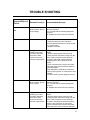
The blower is
too noisy
Filters are dirty
1) Verify that the grease and/or charcoal
filters are clean.
2) If they are not clean change charcoal
filter, or wash grease filter and verify.
False contact in the
connectors
During the hood
cleaning, the motor
connector has been
loose and a false
contact in the main
harness is performed.
1) Open the control box removing the
screws.
2) Remove power supply from the hood.
3) Verify that the connector coming from the
motor is well connected to the connector
mounted in the plastic and that the locking
system in the connectors is well locked.
4) If the connectors are not well connected:
- Hold and press main connectors attached
in the white plastic.
- Push inwards the motor/lamp connectors
until the locking system on connectors is well
attached.
5) Connect hood to power supply and verify.
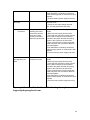
The hood and or
the lamp does not
work
A terminal or
connector is loose
1) Open the control box removing the 6
screws.
2) Remove power supply from the hood.
3) Verify that the connector coming from the
motor is well connected to the connector
mounted in the plastic and that the locking
system in the connectors is well locked.
4) If the connectors are not well connected:
- Hold and press main connectors attached
in the white plastic.
- Push inwards the motor/lamp connectors
until the locking system on connectors is well
attached.
5) Connect hood to power supply and verify.
If your problem is not listed in the trouble shooting above please contact
[email protected]
18