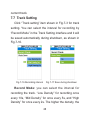
1
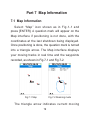
direction while real-time moving track in the blue
lines. The tracks, routes, and waypoints recorded
are displayed in a red line, and only one of them
can be displayed at one time. Click the up/down/left/
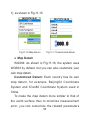
right key and a black cross cursor will appear on the
screen, indicating you enter the roaming mode, as
shown in Fig.7-2. The cross cursor moves while you
are pressing the up/down/left/right button. And on the
screen there appear the latitude/longitude coordinates
of the cursor position, distance to the current position,
and the bearing. Click ESC to exit the roaming mode,
and the cross cursor and related information will
disappear.
At the bottom left of the screen displays the map
scale and you can click [ZOOM IN/OUT] button to
change the scale.
On the Map interface, click [MENU] button then
to enter the Map Setting interface in which you can
select what to do next: “Current track”, “Tracks” for
track management, “Routes” for route management,
20