1
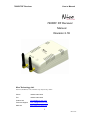
7600RF RF Receiver
User’s Manual
Attention
Before connecting peripheral equipment the power supply device has to be
switched off.
The connection is effected by means of the included screw less terminals.
Clamping range of the screw terminals:
- Power supply connections (5.08mm grid, terminals 6): 0.2 – 2.5mm
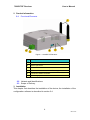
The pin assignment of the connections is described in chapter 3.1, also
containing wiring details.
Voltage
The 12~24 Volt DC connections are through connected in order to achieve
easy installation.
LonWorks Network
The connection to the LonWorks network is made by means of power line
channels.
Attention
The 7600RF RF Receiver power supply recommend use 24VDC power supply.
3.4 Software Installation
The configuration software of the 7600RF RF Receiver has to be installed
by starting the program Setup.exe on the data carrier provided. It suns
under Windows 9x/2000 and NT.
Download url: http://www.nico-tech.com/download
7
Rev.2.1E