1
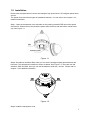
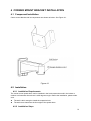
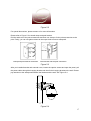
Please draw four holes position in the wall according to the holes of the corner installation
accessories. See Figure 4-2.
Installation hole
Figure 4-2
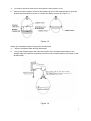
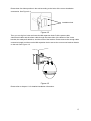
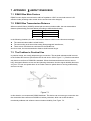
Then you can dig four holes and insert the M8 expansion bolts. Pull the power cable,
video/control cable and the alarm cable through the centre hole of the bottom of the corner
bracket, the waterproof adhesive, and the centre of the bracket. Please reserve the enough cable
connection length and then use the M8 expansion bolt to secure the corer mount bracket chassis
on the wall. See Figure 4-3.
Figure 4-3
Please refer to chapter 1.2 for detailed installation information.
15