1
© ETB Instruments LTD 2007
DigiDash2 Manual
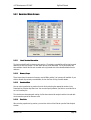
5.3.2 General Tab
5.3.2.1
Odometer
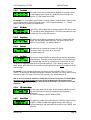
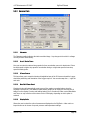
The Odometer reading indicates the total recorded mileage. Any changes to the vehicle’s mileage
can only be done at the factory.
5.3.2.2
Accel / Brake Timer
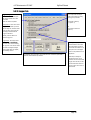
Here you can enter the start and stop speeds for timer acceleration runs or for brake tests. Enter a
low start speed to higher stop speed for acceleration timing or a high start speed to lower stop
speed for braking tests.
5.3.2.3
G Force Sensor
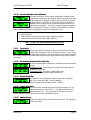
This box allows you to swap the lateral and longitudinal axes of the G-Sensor on board the Logger,
should the positioning and orientation of the Logger require it. You can also swap the +/- signs fro
each axis.
5.3.2.4
Max/Hold Timer Reset
Checking the box will automatically reset to zero all the maximum recorded values when the
Digidash is switched on. Two additional radio buttons enable you to modify the reset function of
button B on the display. Pressing and holding button B for 2 seconds will either reset all Max Holds
and Timers or only reset the screen shown on the LCD display, depending on which option is
selected.
5.3.2.5
Display Units
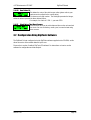
Allows the user to select the units of measurement displayed on the DigiDash – either metric or
imperial units can be chosen for speed, pressure and temperature readings.
Version: 1.01
Page 35