1
6. Functions
※(
), it means a remote control button.
3 MENU (MENU)
1 POWER (POWER)
AV/ S-VIDEO
=POWER ON/OFF KEY
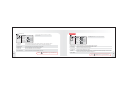
PICTURE(PICTURE)
① Push POWER(POWER) button. POWER is on.
② Push POWER (POWER) button again. POWER is OFF.
2 MODE(TV/AV)
=It is function to change external video signals to DSUB ANALOG/ DVI/ VIDEO/ S-VIDEO
DSUB ANALOG/ DVI DIGITAL/ AV/ S-VIDEO
BRIGHTNESS
55
CONTRAST
40
SHARPNESS
14
COLOR TINT
DSUB ANALOG/ DVI DIGITAL/ AV1/ AV2 (OPTION)
COLOR TONE
SYSTEM
14
DSUB ANALOG
DSUB ANALOG
DVI DIGITAL
DVI DIGITAL
AV
AV1
S-VIDEO
AV2
(Option)
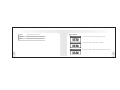
※ Adjust it with CH ▲▼
※ With VOL ▶, go to SUB MENU. After adjusting in SUB MENU,
press MENU to exit.
60
AUTO
NTSC
PAL
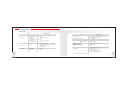
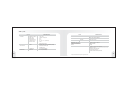
① BRIGHTNESS
Adjust the brightness of video without affecting RGB’s brightness.
② CONTRAST
Adjust the contrast of video without affecting RGB’s contrast.
③ SHARPNESS
Adjust the sharpness of video image.
④ COLOR TINT
Change the richness of color.
⑤ COLOR TONE
Change the tone of color.
⑥ SYSTEM
Change broadcast system NTSC, PAL, AUTO
※Press
MENU
MENU button to go to the Main menu.
15