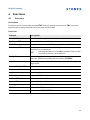
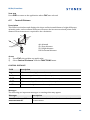
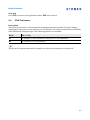
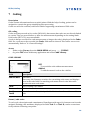
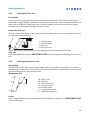
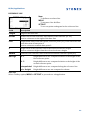
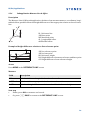
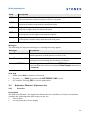
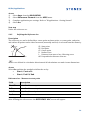
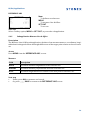
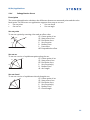
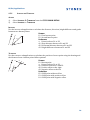
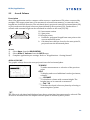
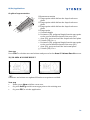
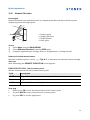
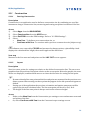
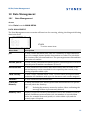
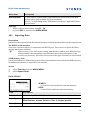
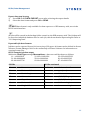
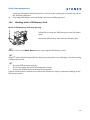
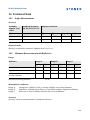
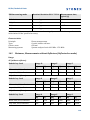
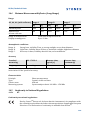
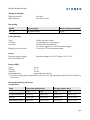
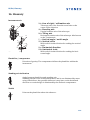
1
St onex® R5/R6Series User Manual Version1.0 English R5/R6, Table of Contents Table of Contents In this manual Chapter 1 Description of the System 1.1 1.2 1.3 2 9 9 9 10 11 12 13 14 14 16 17 18 19 19 21 21 25 27 Calibration Auto Start Routine System Information Loading Software 29 29 29 30 31 Functions 6.1 6.2 6 6 7 8 General Settings EDM Settings Communication Settings Tools 5.1 5.2 5.3 5.4 6 Instrument Setup Working with the Battery Data Storage Main Menu Survey Application Distance Measurements ‐ Guidelines for Correct Results Settings 4.1 4.2 4.3 5 Keyboard Screen Status Icons Softkeys Operating Principles Pointsearch Operation 3.1 3.2 3.3 3.4 3.5 3.6 4 System Components Container Contents Instrument Components User Interface 2.1 2.2 2.3 2.4 2.5 2.6 3 Page Overview Distance Offset 32 32 33 2 R5/R6, Table of Contents 6.3 6.4 6.5 6.6 Z‐Coordinate 2 Dist. Offset Control Distance EDM Continuous 7 Coding 8 Applications Getting Started 8.1 8.2 8.3 8.4 8.5 9 38 Overview Starting an Application Selecting the Job Selecting the Station Selecting the Orientation 8.5.1 Overview 8.5.2 Manual Orientation 8.5.3 Orientation with Coordinates Applications 9.1 9.2 9.3 9.4 9.5 9.6 9.7 34 34 36 37 Common Fields Survey Reference Element ‐ Reference Line 9.3.1 Overview 9.3.2 Defining the Base Line 9.3.3 Defining the Reference Line 9.3.4 Subapplication Measure Line & Offset 9.3.5 Subapplication Setout Reference Element ‐ Reference Arc 9.4.1 Overview 9.4.2 Defining the Reference Arc 9.4.3 Subapplication Measure Line & Offset 9.4.4 Subapplication Setout COGO 9.5.1 Starting COGO 9.5.2 Inverse and Traverse 9.5.3 Intersections 9.5.4 Offsets 9.5.5 Extension Missing Line Measurement Resection 9.7.1 Starting Resection 9.7.2 Measuring Information 40 40 40 41 42 42 42 43 43 46 46 46 47 47 48 48 50 51 52 52 53 54 55 57 57 58 59 60 61 61 63 63 64 3 R5/R6, Table of Contents 9.8 9.9 9.10 9.11 10 Data Management 10.1 10.2 10.3 10.4 10.5 10.6 11 Overview Preparation Calibrating Line‐of‐Sight and Vertical Index Error Calibrating the Circular Level of the Instrument and Tribrach Inspecting the Laser Plummet of the Instrument Servicing the Tripod Care and Transport 12.1 12.2 12.3 13 Data Management Exporting Data Importing Data Working with a USB Memory Stick Working with Bluetooth Working with Stonex Software and Stonex Software Tools Calibration 11.1 11.2 11.3 11.4 11.5 11.6 12 9.7.3 Computation Procedure 9.7.4 Resection Results Set Out Area & Volume Remote Elevation Construction 9.11.1 Starting Construction 9.11.2 Layout 9.11.3 As Built Check Transport Storage Cleaning and Drying Safety Directions 13.1 13.2 13.3 13.4 13.5 13.6 General Intended Use Limits of Use Responsibilities Hazards of Use Laser Classification 13.6.1 General 13.6.2 Distancer, Measurements with Reflectors 65 65 67 69 71 72 72 72 73 75 75 76 78 79 80 81 82 82 83 83 85 86 87 88 88 88 89 90 90 90 91 91 92 95 95 95 4 R5/R6, Table of Contents 13.7 13.8 14 13.6.3 Distancer, Measurements without Reflectors (Reflectorless mode) 13.6.4 Laser Plummet Electromagnetic Compatibility EMC FCC Statement, Applicable in U.S. Technical Data 14.1 14.2 14.3 14.4 14.5 14.6 14.7 14.8 Angle Measurement Distance Measurement with Reflectors Distancer, Measurements without Reflectors (Reflectorless mode) Distance Measurement Reflector (Long Range) Conformity to National Regulations 14.5.1 R5 14.5.2 R6 General Technical Data of the Instrument Scale Correction Reduction Formulas 96 98 100 101 103 103 103 104 106 106 106 107 107 110 112 15 Standard Limited Warranty 113 16 Glossary 116 Appendix A Menu Tree 118 Appendix B Directory Structure 120 Index 121 5 R5/R6, Description of the System 1 Description of the System 1.1 System Components Main Components c Zoom_001 GGO a b a) R5/R6 instrument b) Computer with Stonex Software or Stonex Software Tools software c) Data transfer Component Description R5/R6 instru‐ ment An instrument for measuring, calculating and capturing data. Ideally suited for tasks from simple surveys to complex applications. The various lines have a range of accuracy classes and support different features. All lines can be connected with Stonex Software or Stonex Software Tools to view, exchange and manage data. Firmware The firmware package installed on the instrument. Consists of a standard base operating system with optional additional features. Stonex Software An office software consisting of a suite of standard and extended programs or Stonex Soft‐ for the viewing, exchanging, managing and post processing of data. ware Tools soft‐ ware Data transfer Data can be always transferred between a R5/R6 instrument and a computer via a data transfer cable. For R6 instruments data can also be transferred via USB memory stick or Bluetooth. 6 R5/R6, Description of the System 1.2 Container Contents Container contents part 1 of 2 a b c a) Instrument with supplied tribrach b) ZDC100 data cable (USB‐RS232)* c) Protective cover * Optional Zoom_022a Container contents part 2 of 2 a a) Adjustment tools b) SC11 battery charger* c) USB memory stick ‐ for R6 instruments* d) SB21 battery* e) Tip for mini prism pole* f) User manual g) GLS115 mini prism pole* b Zoom_022 c d e f g * Optional 7 R5/R6, Description of the System 1.3 Instrument Components Instrument components part 1 of 2 a b c d a) Detachable carrying handle with mounting screw b) Optical sight c) Objective with integrated Electronic Distance Meas‐ urement (EDM). Exit for EDM laser beam d) Vertical drive e) Serial interface RS232/USB f) USB host port g) Horizontal drive h) Second keyboard* Zoom_002 e fg * Optional h Instrument components part 2 of 2 j i Zoom_003 k l mn o i) Focusing telescope image j) Eyepiece; focusing graticule k) Battery cover l) Foot screw m)Circular level n) Display o) Keyboard 8 R5/R6, User Interface 2 User Interface 2.1 Keyboard Alphanumeric keyboard a b c d e f g Zoom_009 a) Alphanumeric keypad b) Navigation key c) ENTER key d) Function keys F1 to F4 e) ESC key f) FNC key g) PAGE key Keys Key Description Page key. Displays the next screen when several screens are available. FNC key. Quick‐access to measurement supporting functions. Navigation key. Controls the focus bar within the screen and the entry bar within a field. ENTER key. Confirms an entry and continues to the next field. ESC key. Quits a screen or edit mode without saving changes. Returns to next higher level. Function keys that are assigned the variable functions displayed at the bottom of the screen. Alphanumeric keypad for entry of text and numerical values. 2.2 Screen Screen a b c d e Zoom_032 a) Title of screen b) Focus in screen. Active field c) Status icons d) Fields e) Softkeys 9 R5/R6, User Interface ) 2.3 All shown screens are examples. It is possible that local firmware versions are different to the basic version. Status Icons Description The icons provide status information related to basic instrument functions. Depending on the firmware version, different icons are displayed. Icons Icon Description The battery symbol indicates the level of the remaining battery capacity, 75% full shown in the example. Compensator is on. Compensator is off. IR EDM mode for measuring to prisms and reflective targets. RL EDM mode for measuring to all targets. ! Offset is active. Keypad is set to numeric mode. Keypad is set to alphanumeric mode. Indicates that horizontal angle is set to left side angle measurement (anticlock‐ wise). A double arrow indicates a field has a selectable list. Up and down arrows indicate that several screens are available, which are accessed using . Indicates telescope position is face I. Indicates telescope position is face II. Bluetooth is connected. If there is a cross beside the icon, the Bluetooth commu‐ nication port is selected, but the status is inactive. USB communication port is selected. 10 R5/R6, User Interface 2.4 Softkeys Description Softkeys are selected using the relevant F1 to F4 function key. This chapter describes the func‐ tionality of the common softkeys used by the system. The more specialised softkeys are described where they appear in the application chapters. Common softkey functions Key Description ALPHA To change the keypad operation to alphanumerical. NUM To change the keypad operation to numerical. ALL To start distance and angle measurements and save the measured values. BACK To return to the last active screen. COORD To open the manual coordinate entry screen. EDM To view and change EDM settings. Refer to "4.2 EDM Settings". EXIT To exit the screen or application. MEAS To start distance and angle measurements without saving the measured values. OK If entry screen: Confirms measured or entered values and continues the process. If message screen: Confirms message and continues with selected action or returns to the previous screen to reselect an option. IR/RL To toggle between IR and RL EDM modes. DISPL. To display the list of available points. REC To save the displayed values. DEFLT To reset all editable fields to their default values. SEARCH To search for an entered point. VIEW To display the coordinate and job details of the selected point. To display the next softkey level. 11 R5/R6, User Interface 2.5 Operating Principles Turn instrument on/off Use the On/Off key. Alphanumeric keypad The alphanumerical keypad is used to enter characters directly into editable fields. • Numeric fields: Can only contain numerical values. By pressing a key of the keypad the number will be displayed. • Alphanumeric fields: Can contain numbers and letters. By pressing a key of the keypad the first character written above that key will be displayed. By pressing several times you can toggle through the characters. For example: 1‐>S‐>T‐>U‐>1‐>S.... Edit fields ) ESC Deletes any change and restores the previous value. Moves the cursor to the left Moves the cursor to the right. Inserts a character at the cursor position. Deletes the character at the cursor position. ) In edit mode the position of the decimal place cannot be changed. The decimal place is skipped. Special characters Character Description * Used as wildcards in search fields for point numbers or codes. Refer to "2.6 Pointsearch". +/‐ In the alphanumeric character set "+" and "‐" are treated as normal alphanu‐ meric characters with no mathematical function. ) "+" / "‐" only appear in front of an entry. In this example selecting 2 on an alphanumeric keyboard would start the Set Out application. 12 R5/R6, User Interface 2.6 Pointsearch Description Pointsearch is a function used by applications to find measured or fixed points in the memory storage. It is possible to limit the point search to a particular job or to search the whole storage. The search procedure always finds fixed points before measured points that fulfill the same search criteria. If several points meet the search criteria, then the results are ordered according to the entry date. The instrument finds the most recent fixed point first. Direct search By entering an actual point number, for example 402, and pressing SEARCH, all points within the selected job and with the corresponding point number are found. SEARCH To search for matching points within the selected job. Wildcard search The wildcard search is indicated by a "*". The asterisk is a place holder for any following sequence of characters. Wildcards should be used if the point number is not fully known, or to search for a batch of points. Examples of point searches * All points are found. A All points with exactly the point number "A" are found. A* All points starting with "A" are found, for example, A9, A15, ABCD, A2A. *1 All points containing only one "1" are found, for example, 1, A1, AB1. A*1All points starting with "A" and containing only one "1" are found, for example, A1, AB1, A51. 13 R5/R6, Operation 3 Operation 3.1 Instrument Setup Description This topic describes an instrument setup over a marked ground point using the laser plummet. It is always possible to set up the instrument without the need for a marked ground point. ) Important features • • • It is always recommended to shield the instrument from direct sunlight and avoid uneven temperatures around the instrument. The laser plummet described in this topic is built into the vertical axis of the instrument. It projects a red spot onto the ground, making it appreciably easier to centre the instru‐ ment. The laser plummet cannot be used with a tribrach equipped with an optical plummet. Tripod ) When setting up the tripod pay attention to ensuring a horizontal position of the tripod plate. Slight corrections of inclination can be made with the foot screws of the tribrach. Larger corrections must be done with the tripod legs. Loosen the clamping screws on the tripod legs, pull out to the required length and tighten the clamps. a a) In order to guarantee a firm foothold sufficiently press the tripod legs into the ground. b) When pressing the legs into the ground note that the force must be applied along the legs. b Careful handling of tripod. • Check all screws and bolts for correct fit. • During transport always use the cover supplied. • Use the tripod only for surveying tasks. 14 R5/R6, Operation Setup stepbystep 7 2 3 6 1 1 1 5 5 4 5 Zoom_004 1 Extend the tripod legs to allow for a comfortable working posture. Position the tripod over the marked ground point, centring it as best as possible. 2 Fasten the tribrach and instrument onto the tripod. 3 Turn on the instrument, and, if tilt correction is set to 1‐ or 2‐axis, the laser plummet will be activated automatically, and the Level & Plummet screen appears. Otherwise, press FNC from within any application and select Level & Plummet. 4 Move the tripod legs (1) and use the tribrach footscrews (6) to center the plummet (4) over the ground point. 5 Adjust the tripod legs (5) to level the circular level (7). 6 By using the electronic level, turn the tribrach footscrews (6) to precisely level the instru‐ ment. Refer to "Level up with the electronic level step‐by‐step". 7 Center the instrument precisely over the ground point by shifting the tribrach on the tripod plate (2). 8 Repeat steps 6 and 7 until the required accuracy is achieved. Level up with the electronic level stepbystep The electronic level can be used to precisely level up the instrument using the footscrews of the tribrach. 1) Turn the instrument until it is parallel to two footscrews. 2) Center the circular level approximately by turning the footscrews of the tribrach. 3) Turn on the instrument, and, if tilt correction is set to 1‐ or 2‐axis, the laser plummet will be activated automatically, and the Level & Plummet screen appears. Otherwise, press FNC from within any application and select Level & Plummet. The bubble of the electronic level and the arrows for the rotating direction of the footscrews only appear if the instrument tilt is inside a certain levelling range. ) 4 5 Center the electronic level of the first axis by turning the two footscrews. Arrows show the direction of rotation required. When the elec‐ tronic level is centered the arrows are replaced by checkmarks. Center the electronic level for the second axis by turning the last footscrew. An arrow shows the direction of rotation required. When the elec‐ tronic level is centered the arrow is replaced by a checkmark. 15 R5/R6, Operation ) When the electronic level is centered and three checkmarks are shown, the instrument has been perfectly levelled up. 6 Accept with OK. Change the intensity of the laser plummet External influences and the surface conditions may require the adjustment of the intensity of the laser plummet. In the Level & Plummet screen, adjust the intensity of the laser plummet using the navigation key. The laser can be adjusted in 25% steps as required. Position over pipes or holes Under some circumstances the laser dot is not visible, for example over pipes. In this case, using a transparent plate enables the laser dot to be seen and then easily aligned to the center of the pipe. Zoom_005 3.2 Working with the Battery ) Charging / firsttime use • • • • The battery must be charged prior to using it for the first time because it is delivered with an energy content as low as possible. For new batteries or batteries that have been stored for a long time (> three months), it is effectual to make only one charge/discharge cycle. The permissible temperature range for charging is between 0°C to +40°C/+32°F to +104°F. For optimal charging we recommend charging the batteries at a low ambient temperature of +10°C to +20°C/+50°F to +68°F if possible. It is normal for the battery to become warm during charging. Using the chargers recom‐ mended by Stonex®, it is not possible to charge the battery if the temperature is too high. 16 R5/R6, Operation Operation / discharging • The batteries can be operated from ‐20°C to +50°C/‐4°F to +122°F. • Low operating temperatures reduce the capacity that can be drawn; very high operating temperatures reduce the service life of the battery. • For Li‐Ion batteries, a single discharging and charging cycle is sufficient. We recommend carrying out the process when the battery capacity indicated on the charger or on a Stonex® product deviates significantly form the actual battery capacity available. Change the battery stepbystep Open the battery compartment (1) and remove the battery holder. 2 Remove the battery from the battery holder (2). 1 Zoom_006 Insert the new battery into the battery holder (3), ensuring that the contacts are facing outward. The battery should click into position. 3 4 Zoom_007 Insert the battery holder back into the battery compart‐ ment (4). ) The polarity of the battery is displayed inside the battery housing. Warning 3.3 Data Storage If charged or discharged, batteries not recommended by Stonex® may be damaged. They may burn and explode. Precautions: Only charge and discharge batteries recommended by Stonex®. Description An internal memory is included in all instruments. The firmware stores all data in jobs in a data‐ base in the internal memory. Data can then be transferred to a computer or other device for post processing via a cable connected to the serial interface RS232 port. For R6 instruments, data can also be transferred from the internal memory to a computer or other device via: • a USB memory stick inserted into the USB host port, or • via a Bluetooth connection. 17 R5/R6, Operation Refer to "10 Data Management" for further information on data management and data transfer. 3.4 Main Menu Description The MAIN MENU is the starting place for accessing all functionality of the instrument. It is usually displayed immediately after the Level & Plummet screen, after switching on the instrument. MAIN MENU Description of the MAIN MENU functions Function Description Apps To select and start applications. Refer to "9 Applications". Data To manage jobs, data, codelists, formats, system memory and USB memory stick files. Refer to "10 Data Management". Settings To change EDM configurations, comm.‐setup and general instrument settings. Refer to "4 Settings". Survey Survey program to begin measuring immediately. Refer to "3.5 Survey Appli‐ cation". Transfer To export and import data. Refer to "10.2 Exporting Data". Tools To access instrument related tools such as calibrations, personal start up settings, licence keys and system information. Refer to "5 Tools". ) If desired, the instrument can be configured to start in a user defined place after the Level & Plummet screen, instead of the MAIN MENU. Refer to "5.2 Auto Start Routine". 18 R5/R6, Operation 3.5 Survey Application Description After switching on and setting up correctly, the instrument is immediately ready for measuring. Access Select Survey from the MAIN MENU. SURVEY CODING To find/enter codes. Refer to "7 Coding". STN To enter station data and set the station. Set HA To set the horizontal direction orientation. HA / HA To set the horizontal angle reading to the left (anti‐ clockwise) or to the right (clockwise). The procedure for the quick start Survey is identical to the procedure for the application Survey available under the Apps menu. Therefore this procedure is only described once within the application chapter. Refer to "9.2 Survey". 3.6 Distance Measurements Guidelines for Correct Results Description A laser distancer (EDM) is incorporated into the R5/R6 instruments. In all versions, the distance can be determined by using a visible red laser beam which emerges coaxially from the telescope objective. There are two EDM modes: • Prism measurements (IR) • Reflectorless measurements (RL) RL measurements • When a distance measurement is triggered, the EDM measures to the object which is in the beam path at that moment. If a temporary obstruction, for example a passing vehicle, 19 R5/R6, Operation • • • heavy rain, fog or snow is between the instrument and the point to be measured, the EDM may measure to the obstruction. Be sure that the laser beam is not reflected by anything close to the line of sight, for example highly reflective objects. Avoid interrupting the measuring beam while taking reflectorless measurements or measurements using reflective foils. Do not measure with two instruments to the same target simultaneously. IR measurements • Accurate measurements to prisms should be made in IR‐Default mode. • Measurements to strongly reflecting targets such as traffic lights in Prism mode without a prism should be avoided. The measured distances may be wrong or inaccurate. • When a distance measurement is triggered, the EDM measures to the object which is in the beam path at that moment. If for example people, cars, animals, or swaying branches cross the laser beam while a measurement is being taken, a fraction of the laser beam is reflected from these objects and may lead to incorrect distance values. • Measurements to prisms are only critical if an object crosses the measuring beam at a distance of 0 to 30 m and the distance to be measured is more than 300 m. • In practice, because the measuring time is very short, the user can always find a way of avoiding unwanted objects from interferring in the beam path. Red laser to prism • RL‐Long Range mode enables distance measurements of over 3.5 km to standard prisms using the visible red laser beam. Red laser to reflector foil • The visible red laser beam can also be used to measure to reflective foils. To guarantee the accuracy the red laser beam must be perpendicular to the reflector foil and it must be well adjusted. • Make sure the additive constant belongs to the selected target (reflector). Warning Due to laser safety regulations and measuring accuracy, using the Long Range Reflectorless EDM is only allowed to prisms that are more than 1000 m (3300 ft) away. 20 R5/R6, Settings 4 Settings 4.1 General Settings Access 1) Select Settings from the MAIN MENU. 2) Select General from the SETTINGS menu. 3) Press to scroll through the screens of available settings. SETTINGS DelLng To delete a selected language. Field Description Contrast 0% to 100% Sets the display contrast in 10% steps. Tilt Corr. Off Tilting compensation deactivated. Single Axis Vertical angles refer to the plummet line. Dual Axis Vertical angles refer to the plummet line and the hori‐ zontal directions are corrected by the standing axis tilt. For corrections depending on the HA Corr: setting, refer to the table "Tilt and horizontal corrections". ) If the instrument is used on an unstable base, for example a shaking platform or ship, the compensator should be deactivated. This avoids the compen‐ sator drifting out of it's measuring range and interrupting the measuring process by indicating an error. HA Corr. On Horizontal corrections are activated. For normal opera‐ tion the horizontal correction should remain active. Each measured horizontal angle will be corrected, depending on the vertical angle. For corrections depending on the Tilt Corr: setting, refer to the table "Tilt and horizontal corrections". Off Horizontal corrections are deactivated. Face I Def. Sets the face I in relation to the position of the vertical drive. VA-Left Sets face I to be when the vertical drive is on the left of the instrument. 21 R5/R6, Settings Field HA Incr. VA-Setting Description VA-Right Sets face I to be when the vertical drive is on the right of the instrument. Right Set horizontal angle to clockwise direction measurement. Left Set horizontal angle to counter‐clockwise direction meas‐ urement. Counter‐clockwise directions are displayed but are saved as clockwise directions. Sets the vertical angle. Zenith Zenith=0°; Horizon=90°. 45° 0° 90° 0° 27 ° 180 Horizont 5° ° +90 +4 0° Zenith=90°; Horizon=0°. Vertical angles are positive above the horizon and negative below it. ° -45 ° 180 ° - 90 +300 % +100% ° 71° --.--% 34” Slope % 45 Slope % 20° 360s gon n go 0 -5 ,5 gon -79 --.--% ) 0° ±VA -100 % -300 % Angle Unit +18 % 45°=100%; Horizon=0°. Vertical angles are expressed in % with positive above the horizon and negative below it. The % value increases rapidly. ‐‐.‐ ‐% appears on the display above 300%. ) Sets the units shown for all angular fields. °'" Degree sexagesimal. Possible angle values: 0° to 359°59'59'' dec. deg Degree decimal. Possible angle values: 0° to 359.999° gon Gon. Possible angle values: 0 gon to 399.999 gon mil Mil. Possible angle values: 0 to 6399.99mil. The setting of the angle units can be changed at any time. The actual displayed values are converted according to the selected unit. Min. Reading Sets the number of decimal places shown for all angular fields. This is for data display and does not apply to data export or storage. For Angle Unit ° ' '': (0° 00' 01" /0° 00' 05"/0° 00' 10"). 22 R5/R6, Settings Field Description Dec.deg: (0.0001 / 0.0005 / 0.001). Gon: (0.0001 / 0.0005 / 0.001). Mil: (0.01 / 0.05 / 0.1). Dist. Unit Temp. Unit Press.Unit Beep Sector Beep Sets the units shown for all distance and coordinate related fields. meter Meters [m]. ft (US) US feet [ft]. ft (INT) International feet [fi]. ft-in/16 US feet‐inch‐1/16 inch [ft]. Sets the units shown for all temperature fields. °C Degree Celsius. °F Degree Fahrenheit. Sets the units shown for all pressure fields. hPa Hecto Pascal. mbar Millibar. mmHg Millimeter mercury. inHg Inch mercury. The beep is an acoustic signal after each key stroke. Normal Normal volume. Loud Increased volume. Off Beep is deactivated. On Sector Beep sounds at right angles (0°, 90°, 180°, 270° or 0, 100, 200, 300 gon). 90° 1 3 2 1 0° Screen ill. 3 2 1 1)No beep. 2)Fast beep; from 95.0 to 99.5 gon and 105.0 to 100.5 gon. 3)Permanent beep; from 99.5 to 99.995 gon and from 100.5 to 100.005 gon. 180° Off Sector Beep is deactivated. On or Off Sets the screen illumination on or off. 23 R5/R6, Settings Field Description Crossh ill. Low, Medium Sets the illumination level of the crosshairs. or High Heating On The display heater is activated. Off The display heater is deactivated. ) The display heater is automatically activated when the display illumination is on and the instrument temperature is 5°C. Data Output Sets the location for data storage. GSI Format Mask Int. Mem. All data is recorded in the internal memory. Interface Data is recorded via the serial interface or the USB device port, depending on the port selected in the COMMUNICATION SETTINGS screen. This Data Output setting is only required if an external storage device is connected and measurements are started at the instrument with MEAS/REC or ALL. This setting is not required if the instrument is totally controlled by a datalogger. Sets the GSI output format. GSI 8 81..00+12345678 GSI 16 81..00+1234567890123456 Sets the GSI output mask. Mask1 Pt, HA, VA, sDIST, ppm+mm, TgtHGT, Instr.h. Mask2 Pt, HA, VA, sDIST, E, N, H, TgtHGT. Code saving Sets if the codeblock is saved before or after the measurement. Refer to "7 Coding". Language Sets the chosen language. The current loaded language(s) are shown. A selected language can be deleted by pressing DelLng. This function is available if more than one language is installed, and the selected language is not the chosen operating language. Auto-Off Enable The instrument switches off after 20 minutes without any activity , for example no key pressed or vertical and hori‐ zontal angle deviation is ±3". Disable Automatic switch‐off is deactivated. ) Battery discharges quicker. 24 R5/R6, Settings Tilt and horizontal corrections Setting Correction Tilt correc tion Horizontal correction Incline longi tudinal Incline trans Horizontal versal collimation Tilting axis Off On No No Yes Yes 1-Axis On Yes No Yes Yes 2-Axis On Yes Yes Yes Yes Off Off No No No No 1-Axis Off Yes No No No 2-Axis Off Yes No No No 4.2 EDM Settings Description The settings on this screen define the active EDM, Electronic Distance Measurement. Different settings for measurements are available with Recflectorless (RL) and Prism (IR) EDM modes. Access 1) Select Settings from the MAIN MENU. 2) Select EDM from the SETTINGS menu. EDM SETTINGS ATMOS To enter atmospheric data ppm. PPM To enter an individual ppm value. SCALE To enter projection scale details. SIGNAL To view EDM Signal reflection value. FREQ. To view the EDM frequency. Field Description Mode IR-Default Fine measuring mode for high precision measurements with prisms. IR-Quick Quick measuring mode with prisms, with higher measuring speed and reduced accuracy. 25 R5/R6, Settings Field Type Description IR-Continuous For continuous distance measurements with prisms. Foil For distance measurements using Retro reflective targets. RL-Default For distance measurements without prisms. RL-Continuous For continuous distance measurements without prisms. RL-Long For long range distance measurements with prisms. Standard prism ZPR100 Stonex® Constant: 0.0 mm Circular Custom The user can define their own prism. Constants can be entered in mm in Stonex® Const: Stonex® Constant: +34.4 mm Foil None Stonex® Const. RL-modes Stonex® Constant: +34.4 mm This field displays the Stonex® prism constant for the selected Type: Where Type: is Custom this field becomes editable to set a user defined constant. Input can only be made in mm. Limit value: ‐999.9 mm to +999.9 mm. Laser-Beam Off On Visible laser beam is deactivated. Visible laser beam for visualising the target point is activated. ATMOSPHERIC DATA ENTRY This screen enables the entry of atmospheric parameters. Distance measurement is influenced directly by the atmospheric conditions of the air in which the measurements are taken. In order to take these influences into consideration distance measurements are corrected using atmos‐ pheric correction parameters. The refraction correction is taken into account in the calculation of the height differences and the horizontal distance. Refer to "14.7 Scale Correction" for the application of the values entered in this screen. When PPM=0 is selected, the Stonex® standard atmosphere of 1013.25 mbar, 12°C, and 60% relative humidity will be applied. ) 26 R5/R6, Settings PROJECTION SCALE This screen enables entry of the scale of projection. Coordinates are corrected with the PPM parameter. Refer to "14.7 Scale Correction" for the application of the values entered in this screen. FreePPM Entry This screen enables the entry of individual scaling factors. Coordinates and distance measure‐ ments are corrected with the PPM parameter. Refer to "14.7 Scale Correction" for the applica‐ tion of the values entered in this screen. EDM SIGNAL REFLECTION This screen tests the EDM signal strength (reflection strength) in steps of 1%. Enables optimal aiming at distant, barely visible, targets. A percentage bar and a beeping sound, indicate the reflection strength. The faster the beep the stronger the reflection. 4.3 Communication Settings Description For data transfer the communication parameters of the instrument must be set. Access 1) Select Settings from the MAIN MENU. 2) Select Comm from the SETTINGS menu. COMMUNICATION SETTINGS BTCode To set a code for the Bluetooth connection. This softkey is only available for R6 instru‐ ments. The default Bluetooth code is ’0000’. ) Field Description Port Instrument port. For R6 instruments, the options are selectable. For R5 instru‐ ments, the value is set to RS232 and is uneditable. Bluetooth RS232 Communication is via the serial interface. USB Communication is via the USB host port. Bluetooth Communication is via Bluetooth. Automatically Communication is set to auto detect. On Bluetooth sensor is activated. 27 R5/R6, Settings Field Description Bluetooth sensor is deactivated. Off The following fields are active only when Port: RS232 is set. Field Description Baudrate Speed of data transfer from receiver to device in bits per second. 1200, 2400, 4800, 9600, 14400, 19200, 38400, 57600, 115200 Databits Parity Endmark Stopbits Number of bits in a block of digital data. 7 Data transfer is realised with 7 databits. 8 Data transfer is realised with 8 databits. Even Even parity. Available if data bit is set to 7. Odd Odd parity. Available if data bit is set to 7. None No parity. Available if data bit is set to 8. CR/LF The terminator is a carriage return followed by a line feed. CR The terminator is a carriage return. 1 Number of bits at the end of a block of digital data. 28 R5/R6, Tools 5 Tools 5.1 Calibration Description The CALIBRATION menu contains tools to be used for the electronic calibration of the instru‐ ment. Using these tools helps to maintain the measuring accuracy of the instrument. Access 1) Select Tools from the MAIN MENU. 2) Select Calibr. from the TOOLS MENU. 3) Select a calibration option from the CALIBRATION screen. Calibration options In the CALIBRATION screen there are several calibration options. Menu selection Description HA-Collimation Refer to "11.3 Calibrating Line‐of‐Sight and Vertical Index Error". Vertical Index Refer to "11.3 Calibrating Line‐of‐Sight and Vertical Index Error". View Calibration Displays the current calibration values that have been set for HA‐Collima‐ Data tion and V‐index. 5.2 Auto Start Routine Description Through the Auto Start tool, it is possible to record a user defined sequence of key presses so that, after switching on the instrument, a particular screen can be displayed after the Level & Plummet screen instead of the MAIN MENU. For example, the general SETTINGS screen for configuring the instrument settings. Access 1) Select Tools from the MAIN MENU. 2) Select Auto St. from the TOOLS MENU. Auto start stepbystep 1) Press REC in the AUTO START screen. 2) Press OK to confirm the information message and begin the recording process. 29 R5/R6, Tools 3) 4) The next key presses are stored, up to a maximum of 16. To end the recording press ESC. If the auto start Status: is set to On, the stored key presses will be executed automatically after switching on the instrument. ) The automatic start routine has the same effect as pressing the keys manually. Certain instru‐ ment settings can not be made in this way. Relative entries such as automatically setting EDM Mode: IR-Quick upon switching on the instrument, are not possible. 5.3 System Information Description The System information screens display instrument, system and firmware information, as well as settings for the date and time. Access 1) Select Tools from the MAIN MENU. 2) Select SysInfo from the TOOLS MENU. SYSTEM INFORMATION This screen displays information about the instrument and operating system. Firmw. To display details of the firmware package installed on the instrument. DATE To change the date and format. TIME To change the time. Next step Press Firmw. to view the firmware package information. SOFTWAREINFORMATION ) Before selecting FORMAT, to format the internal memory, ensure that all important data is first transferred to a computer. Jobs, formats, codelists, configuration files, uploaded languages and firmware will be deleted by formatting. Field Description R5/R6-FW. Versi Displays the firmware version number installed on the instrument. Build Displays the build number of the firmware. Current Lang Displays the current language and version number selected for the instrument. 30 R5/R6, Tools Field Description EDM-Firmware Displays the version number of the EDM firmware. Application Information Displays a list of the applications available on the instrument. 5.4 Loading Software Description To load application software or an additional language, connect the instrument to Stonex Soft‐ ware via the serial interface and load using "Stonex Software ‐ Software Upload". Refer to the Stonex Software online help for further information. For R6 instruments, the software can be loaded via a USB memory stick. This process is described below. Access 1) Select Tools from the MAIN MENU. 2) Select Load FW from the TOOLS MENU. ) • Load FW is only an option on the TOOLS MENU for R6 instruments. • Never disconnect the power supply during the system upload process. The battery must be at least 75% capacity before commencing the upload. Loading firmware and languages stepbystep 1) To load firmware and languages: Select R5/R6 Firmware. The Select File screen will appear. To load only languages: Select R5/R6 Languages only and skip to step 4 2 Select the firmware file from the system folder of the USB memory stick. All firmware and language files must be stored in the system folder to be transferred to the instrument. 3 Press OK. 4 The Upload Languages screen will appear displaying all language files in the system folder of the USB memory stick. Select Yes or No for a language file to be uploaded. At least one language must be set to Yes. 5 Press OK. 6 Press Yes on the power warning message to proceed and upload the firmware and/or selected languages. 7 Once successfully loaded, the system will shutdown and restart again automatically. 31 R5/R6, Functions 6 Functions 6.1 Overview Description Functions can be accessed by pressing FNC from any measurement screen. FNC opens the functions menu and a function can be selected and activated. Functions Function Description Level & Plummet Activates the laser plummet and electronic level. Distance Offset Refer to "6.2 Distance Offset". RL/IR Change Changes between the two EDM modes. Refer to "4.2 EDM Settings". Delete Last Observ. Deletes the last recorded data block. This can be either a measure‐ ment block or a code block. Deleting the last record is not reversible! Only records recorded in Survey can be deleted. ) Code-Library Starts Coding application to select a code from a codelist or enter a new code. Same functionality like the softkey CODING. Laserbeam Activates/deactivates the visible laser beam for illuminating the target point. Screen ill. On /Off Activates and deactivates the screen illumination light. Distance unit Sets the distance measurement unit. Angle unit Sets the angle measurement unit. Z-Coordinate Refer to "6.3 Z‐Coordinate". 2 Dist. Offset Refer to "6.4 2 Dist. Offset". Control Distance Refer to "6.5 Control Distance". Settings Refer to "4.1 General Settings". EDM Continuous Refer to "6.6 EDM Continuous". Menu Returns to the MAIN MENU. 32 R5/R6, Functions 6.2 Distance Offset Description This function calculates the target point coordinates if it is not possible to set up the reflector, or to aim at the target point directly. The offset values (length, trav. and/or height offset) can be entered. The values for the angles and distances are calculated to determine the target point. OP T_Off L_Off - MP L_Off+ T_Off+ MP OP T_Off L_Off Measurement point Offset point Length offset Cross offset Access 1) Press FNC when within any application. 2) Select Distance Offset from the FUNCTIONS menu. DISTOFF DEFLT To reset offset values to 0. Field Description Trav. Offset Perpendicular offset. Positive if the offset point is to the right of the measured point. Length Offset Longitudinal offset. Positive if the offset point is further away than the meas‐ ured point. Z-Offset Height offset. Positive if the offset point is higher than the measured point. Mode Period for which the offset is to apply. ) 0 after REC The offset values are reset to 0 after the point is saved. Continuous The offset values are applied to all further measurements. The offset values are always reset to 0 when the application is quit. 33 R5/R6, Functions Next step • Press OK to calculate the corrected values and return to the application from which the offset function was started. The corrected angle and distances are displayed as soon as a valid distance measurement has been triggered or exists. 6.3 ZCoordinate Description This function determines the height of the instrument from measurements to a maximum of five target points, with known heights, in two faces. With measurements to several targets, the improvement is indicated in the "d" value. 1 2 3 4 STn.Z Reflector 1 Reflector 2 Reflector 3 Instrument Access 1) Press FNC when within any application. 2) Select Z-Coordinate from the FUNCTIONS menu. ZCoordinate stepbystep 1) Select a known point and input the reflector height. Select; • PtHgt: To enter the height of a fixpoint. • Inst.h.: To enter the height transfer values for the instrument. 2) Press ALL to complete the measurement and display the calculated height. • AddTg: Adds another height of a known point. • FACE: Measures to the same target in second face. • OK: Saves the changes and sets the station height. 6.4 2 Dist. Offset Description This function is used for measurements to a point that is not directly visible, using a special 2 Dist. Offset pole. 34 R5/R6, Functions 3 2 1 1 2 3 E, N, H of Target Point Pole Length Distance P1‐P2 Access 1) Press FNC when within any application. 2) Select 2 Dist. Offset from the FUNCTIONS menu. Next step If required, press POLE to define the pole or EDM settings. POLE SETTINGS Field Description Mode Changes the EDM Mode. Type Changes the prism type. Stonex® Const Displays the prism constant. Pole Length Total length of 2 Dist. Offset pole Dist. P1-P2 Spacing between the centers of the prisms P1 and P2. Meas. Tol Limit for the difference between the given and measured spacing of the prisms. If the tolerance value is exceeded, the function will issue a warning. Next step In the 2 DIST. OFFSET screen, measure to the first and second prisms using ALL and the 2 DIST. OFFSET RESULT screen is displayed. 2 DIST. OFFSET RESULT Displays Easting, Northing and Height coordinates of the target point. END To record results and return to application where FNC was selected. NEW To return to the 2 DIST. OFFSET screen. 35 R5/R6, Functions Next step Press END to return to the application where FNC was selected. 6.5 Control Distance Description This function calculates and displays the slope and horizontal distance, height difference, azimuth, grade, and coordinate differences between the last two measured points. Valid distance measurements are required for the calculation. SD N Azi VD HD Azi Azimuth SD Slope distance VD Height distance HD Horizontal distance Access 1) Press FNC when within any application. 2) Select Control Distance from the FUNCTIONS menu. CONTROL DISTANCE Field Description Brg Difference in bearing between the two points. Grade Difference in gradient between the two points. hDIST Difference in horizontal distance between the two points. sDIST Difference in slope distance between the two points. d.d.Z Difference in height between the two points. Messages The following are important messages or warnings that may appear. Messages Description Less than two valid measurements! The values cannot be calculated as there are less than two valid measurements. 36 R5/R6, Functions Next step Press OK to return to the application where FNC was selected. 6.6 EDM Continuous Description This function activates or deactivates the tracking measurement mode. The new setting is displayed for about one second and then set. The function can only be activated from within the same EDM mode and prism type. The following options are available. Mode Off <=> On IR IR‐Default <=> IR‐Continuous / IR‐Quick <=> IR‐Continuous. RL RL‐Default <=> RL‐Continuous. ) The last active measurement mode remains set when the instrument is switched off. 37 R5/R6, Coding 7 Coding Description Codes contain information about recorded points. With the help of coding, points can be assigned to a particular group simplifying later processing. Codes are stored in codelists, with each codelist supporting a maximum of 200 codes. GSI coding Codes are always stored as free codes (WI41‐49), that means that codes are not directly linked to a point. They are stored before or after the measurement depending on the setting made. Point codes (WI71‐79) are not available. A code is always recorded for each measurement as long as the code is displayed in the Code: field. For a code not to be recorded, the Code: field must be cleared. This can be set to occur automatically. Refer to "4.1 General Settings". Access • Either, select Survey from the MAIN MENU and press CODING. • Or, press FNC when within any application and select Code Library. CODELIBRARY REC To record the code without measurement. AddLst To add the entered code to the codelist. Field Description Search/New Code name. After entry, the firmware searches for a matching code name, and displays these in the code field. If a matching code name doesn’t exist this value becomes the new code name. Code List of existing code names. Comment Additional remarks. Text1 to Text8 More information lines, freely editable. Used to describe attributes of the code. Extend / edit codes To each code a description and a maximum of 8 attributes with up to 16 characters each can be assigned. Existing code attributes, displayed in fields Text 1: to Text 8:, can be overwritten freely with the following exceptions: 38 R5/R6, Coding The codelist editor of Stonex Software can assign a status to the attributes. • Attributes with status "fixed" are write‐protected. They cannot be overwritten or edited. • For attributes with status "Mandatory" an input or a confirmation is required. • Attributes with status "Normal" can be edited freely. 39 R5/R6, Applications - Getting Started 8 Applications Getting Started 8.1 Overview Description Applications are predefined programs, that cover a wide spectrum of surveying duties and facil‐ itate daily work in the field. The following applications are available, although application pack‐ ages for each instrument may vary from that stated below: • Survey • Reference Element • COGO • Missing Line Measurement • Resection • Set Out • Area & Volume • Remote Elevation • Construction 8.2 Starting an Application Access 1) Select Apps from the MAIN MENU. 2) Press to move through the screens of available applications. 3) Press a function key, F1 ‐ F4, to select the specified application in the APPS menu. Presettings screens Pre‐settings for Survey is shown as an example. Any additional settings for particular applica‐ tions are explained within the chapters for those applications. [ • ] = Setting has been made. [ ] = Setting has not been made. F1-F4 To select menu item. Field Description Select Job To define the job where data will be saved. Refer to "8.3 Selecting the Job". Select Station To define the current position of the instrument station. Refer to "8.4 Selecting the Station". Select Orientn. To define the orientation, horizontal direction, of the instrument station. Refer to "8.5 Selecting the Orientation". 40 R5/R6, Applications - Getting Started Field Description Go! Starts the selected application. 8.3 Selecting the Job Description All data is saved in Jobs, like file directories. Jobs contain measurement data of different types, for example measurements, codes, fixed points, or stations. Jobs are individually manageable and can be exported, edited or deleted separately. Access Select Select Job in Pre-settings screen. SELECT JOB NEW To create a new job. Field Description Job Name of an existing job to be used. User Name of user, if entered. Date Date the selected job was created. Time Time the selected job was created. Next step • Either, press OK to continue with the selected job. • Or, press NEW to open the NEW JOB screen and create a new job. Recorded data Once a job is set up, all subsequent recorded data will be stored in this job. If no job was defined and an application was started, or if in Survey and a measurement was recorded, then the system automatically creates a new job and names it "DEFAULT". Next step Press OK to confirm the job and return to the Pre-Settings screen. 41 R5/R6, Applications - Getting Started 8.4 Selecting the Station Description All measurements and coordinate computations are referenced to the set station coordinates. The station coordinates that are set must include: • at least grid coordinates (E, N), and • the station height, if required. The coordinates can be entered manually or selected from the memory. STn.X STn.Y Directions X Easting Y Northing Z Height Station coordinates Stn.X Easting coordinate of station Stn.Y Northing coordinate of station Access Select Select Station in the Pre-settings screen. Station input Field Description Stn Station name of a previously saved station position. ) If no station was set and an application was started, or if in Survey and a measurement was recorded, then the last station is set as the current station. Next step The Inst.H. field appears once the station coordinates have been entered. Enter the instrument height if desired and press OK to return to the Pre-Settings screen. 8.5 8.5.1 Selecting the Orientation Overview Description All measurements and coordinate computations are referenced to the orientation of the set station. The orientation can be entered manually or determined from points that are either measured or selected from the memory. 42 R5/R6, Applications - Getting Started Access Select Select Orientn. in the Pre-settings screen and choose: • Angle To enter a new bearing. Refer to "8.5.2 Manual Orientation". • Coordinates To calculate and set the orientation using existing coordinates. A maximum of five target points can be used. Refer to "8.5.3 Orientation with Coordi‐ nates". 8.5.2 Manual Orientation Access Select Angle in the STN.ORIENTATION screen. MANUAL ANGLE SETTING HA=0 To set Brg: 0 Field Description Brg Horizontal direction of the station. TgtHGT. Height of the reflector. BS ID Point ID of the backsight point. Next step • Either, press ALL to measure and record the distance and horizontal angles. This will calculate and set the orientation and return to the Pre-Settings screen. • Or, press REC to record the horizontal direction only. This will set the orientation and return to the Pre-Settings screen. 8.5.3 Orientation with Coordinates HA =0 Diagram HA1 Known coordinates 1 Target point 2 Target point 3 Target point Calcuations HA1 Station orientation 43 R5/R6, Applications - Getting Started Access Select Coordinates in the STN-ORIENTATION screen. Orientation with coordinates Field Description Pt. Point ID of the backsight point. Next step Find an existing backsight point in the pointsearch or enter ENZ coordinates for a new point. Press OK to continue to Sight target point. Sight target point Field Description BS ID Point ID of the selected, or entered backsight point. Next step After each measurement the message, Do you want to take additional measurements appears. Selecting: • Yes returns to the Sight target point screen to take an additional measurement. A maximum of five target points can be used. • No proceeds to the STN. ORIENTATION RESULT screen. Result calculation If more than one target point is measured then the orientation is computed using the "least squares method". IF THEN the orientation is only measured in face II the horizontal direction is based on face II. the orientation is measured only in face I or the horizontal direction is based on face I. a mixture of I and II a target point is measured several times in the same face the last valid measurement is used for the computation. Stn. Orientation result Field Description Pts Number of points used in the calculation. Stn Station name for which the orientation has been set. HA Corr Horizontal correction 44 R5/R6, Applications - Getting Started Field Description Std.Dev Standard deviation indicating the potential variance between the true orienta‐ tion and that calculated. Next step • Either, press Resid to display the residuals. • Or, press OK to set the orientation and return to the Pre-Settings screen. Stn. Orientation Residuals (-) D dH dO ffs ( d HA(+) +) 1 Actual 2 Design P2 Target point d Offs Height correction d HD Correction in horizontal distance d HA Correction in horizontal direction Field Description BS ID Point IDs of the target points used in calculating the orientation. d.H.A The difference in horizontal direction to the target point. d.H.D The difference in horizontal distance to the target point. dZ The difference in height to the target point. ) If no orientation was set and an application was started, or if in Survey and a measurement was recorded, then the current horizontal direction is set as the orientation. Next step Select GO! to begin the application. 45 R5/R6, Applications 9 Applications 9.1 Common Fields Description of fields The following table describes common fields that are found within the firmware applications. These fields are described here once and not repeated in the application chapters unless the field has a specific meaning within that application. Field Description Pt, Pt 1 Point ID of the point. TgtHGT Height of the reflector. HA Horizontal direction to the point. VA Vertical angle to the point. hDIST Horizontal distance to the point. sDIST Slope distance to the point. dHGT Height to the point. E Easting coordinate of the point. N Northing coordinate of the point. Z Height coordinate of the point. 9.2 Survey Description Survey is an application used for the measurement of an unlimited number of points. It is comparable to Survey from the MAIN MENU, but includes pre‐settings for the job, station and orientation prior to beginning a survey. Access 1) Select Apps from the MAIN MENU. 2) Select Survey from the APPS menu. 3) Complete application pre‐settings. Refer to "8 Applications ‐ Getting Started". 46 R5/R6, Applications SURVEY I Pt To switch between individual and current point numbers. CODING To find/enter codes. Refer to "7 Coding". Field Description Comment / Comment or Code name depending on the coding method. Two coding methods Code are available: 1) Comment coding: This text is stored with the corresponding measure‐ ment. The code is not related to a codelist, it is just a simple comment. A codelist on the instrument is not necessary. 2) Expanded coding with codelist: Press CODING. The code that was entered is searched for within the code list and it is possible to add attributes to the code. Next step • Either, press ALL to record another point. • Or, press ESC to exit the application. 9.3 9.3.1 Reference Element Reference Line Overview Description Reference Element ‐ Line is an application that facilitates the easy set out or checking of lines, for example, for buildings, sections of road, or simple excavations. It allows the user to define a reference line and then complete the following tasks with respect to that line: • Line & offset • Set out points Access 1) Select Apps from the MAIN MENU. 2) Select Reference Element from the APPS menu. 3) Complete application pre‐settings. Refer to "8 Applications ‐ Getting Started". 4) Select Line Next step Define the base line for the reference line. 47 R5/R6, Applications 9.3.2 Defining the Base Line Description A reference line can be defined by referencing a known base line. The reference line can be offset either longitudinally, in parallel or vertically to the base line, or be rotated around the first base point as required. Furthermore the reference height can be selected as the first point, second point or interpolated along the reference line. Define the base line The base line is fixed by two base points. All points can be either measured, manually entered, or selected from the memory. 1 2 3 4 1st base point 2nd base point Base line Reference line Define the base line by measuring or selecting the start and end points of the line. Next step After defining the base line the REFERENCE LINE screen will appear for defining the reference line. 9.3.3 Defining the Reference Line Description The base line can be offset from, either longitudinally, in parallel or vertically, or be rotated around the first base point. This new line created from the offsets is called the reference line. All measured data refers to the reference line. Reference line BL RL BP2 R+ RP L+ BP1 Off+ BP BL RP RL Off L R Base point Base line Reference point Reference line Parallel offset Longitudinal offset Rotation parameter Access After completing the measurements required for defining the base line, the REFERENCE LINE screen will appear. 48 R5/R6, Applications REFERENCE LINE New To define a new base line. MEAS To measure Line & Offset. SETOUT To set out points orthogonal to the reference line. Field Description Length Length of the base line. Offset Parallel offset of the reference line relative to the base line (P1‐P2). Positive values are to the right of the base line. Line Longitudinal offset of the start point, reference point (P3), of the reference line in the direction of base point 2. Positive values are towards base point 2. Z Height offset of the reference line to the selected reference height. Positive values are higher than the selected reference height. Rotate Rotation of the reference line clockwise around the reference point (P3). Ref.Hgt Pt. 1 Height differences are computed relative to the height of the first reference point. Pt. 2 Height differences are computed relative to the height of the second reference point. Interpolated Height differences are computed along the reference line. w/o. Height Height differences are not computed or shown. Next step Select a softkey option, MEAS or SETOUT to proceed to a subapplication. 49 R5/R6, Applications 9.3.4 Subapplication Measure Line & Offset Description The Measure Line & Offset subapplication calculates from measurements or coordinates, longi‐ tudinal offsets, parallel offsets and height differences of the target point relative to the reference line. RL RL Reference line 1RPStart point MP Measured point dL Longitudinal offset dOffParallel offset d Off+ dL + MP 1RP Example of height difference relative to first reference point 1RP Hd+ RH d Z+ d Z- 1BP 1RP1st reference point 1BP1st base point RH Reference height Hd Height difference between reference and base point d Z Height difference from reference height Access Press MEAS in the REFERENCE LINE screen. Measure Field Description d Line Calculated distance longitudinal to the reference line. d Offset Calculated distance perpendicular from the reference line. d.d.Z Calculated height difference relative to the defined reference height. Next step • Either, press ALL to measure and record. • Or, press BACK to return to the REFERENCE LINE screen. 50 R5/R6, Applications 9.3.5 Subapplication Setout Description The setout subapplication calculates the difference between a measured point and the calcu‐ lated point. The orthogonal (dLine, dOffset, d.d.Z) and polar (dHA, d.hDIST, d.d.Z) differences are displayed. Example orthogonal setout RL d L- SP MP d O- 1RP 1RP1st reference point SP Set out point MP Measured point RL Reference line dL Longitudinal offset dO Parallel offset Access Press SETOUT from the REFERENCE LINE screen. SETOUT Enter the set out elements for the target points to be set out relative to the reference line. Field Description Line Longitudinal offset: Positive if set out point is further away from the reference line. Offset Perpendicular offset: Positive if set out point is to the right of the reference line. Z Height offset: Positive if set out point is higher than the reference line. Next step Press OK to proceed to measurement mode. SET OUT The signs for the distance and angle differences are correction values (required minus actual). The arrows indicate the direction to move to get to the set out point. NextPt To add the next point to be set out. 51 R5/R6, Applications Field Description d HA Horizontal direction from the measured point to the set out point. Positive if the telescope must be turned clockwise to the set out point. d.H.D Horizontal distance from the measured point to the set out point. Positive if the set out point is further away than the measured point. d.d.Z Height difference from the measured point to the set out point. Positive if the set out point is higher than the measured point. dOffset Perpendicular distance from the measured point to the set out point. Positive if the set out point is to the right of the measured point. dLine Longitudinal distance from the measured point to the set out point. Positive if the set out point is further away than the measured point. Messages The following are important messages or warnings that may appear. Messages Description Base line too short ! Base line is shorter than 1 cm. Choose base points such that the hori‐ zontal separation of both points is at least 1 cm. Coordinates invalid ! No coordinates or invalid coordinates for a point. Ensure that points used have at least Easting and Northing coordinates. Save via RS232 ! Data Output: is set to RS232 in the SETTINGS menu. To be able to successfully start reference element, Data Output: must be set to Internal. Next step • Either, press ALL to measure and record. • Or, press BACK to return to the REFERENCE LINE screen. • Or, continue selecting ESC to exit the application. 9.4 9.4.1 Reference Element Reference Arc Overview Description The Reference Element ‐ Arc application allows the user to define a reference arc and then complete the following tasks with respect to the arc: • Line & offset • Set out (Point, Arc, Chord, Angle) 52 R5/R6, Applications Access 1) Select Apps from the MAIN MENU. 2) Select Reference Element from the APPS menu. 3) Complete application pre‐settings. Refer to "8 Applications ‐ Getting Started". 4) Select Arc. Next step Define the reference arc. 9.4.2 Defining the Reference Arc Description The reference arc can be defined by a center point and start point, or a start point, end point, and radius. All points can be either measured, manually entered, or selected from the memory. P Off - EP L+ SP R CP SP EP CP R L Off Start point End point Center point Radius of arc Distance from start of arc, following curve Perpendicular distance from arc ) All arcs are defined in a clockwise direction and all calculations are made in two dimensions. Access Select Arc and then the method to define the arc by: • Start-/ Centre Pt. • Start-/ End Pt/ Rad. Reference Arc Measure to start point Field Description Start Pt Point ID of the start point. C-Pt Point ID of the center point. End Pt Point ID of the end point. Radius Radius of the arc. Next step After defining the reference arc the REFERENCE ARC screen will appear. 53 R5/R6, Applications REFERENCE ARC New To define a new base arc. MEAS To measure Line & Offset. SET OUT To set out. Next step Select a softkey option, MEAS or SET OUT, to proceed a subapplication. 9.4.3 Subapplication Measure Line & Offset Description The Measure Line & Offset subapplication calculates from measurements or coordinates, longi‐ tudinal and orthogonal offsets and height differences of the target point relative to the reference arc. Access Press MEAS from the REFERENCE ARC screen. Measure Field Description dLine Calculated distance longitudinal to the reference arc. dOffset Calculated distance perpendicular from the reference arc. d.d.Z Calculated height difference relative to the start point of reference arc. Next step • Either, press ALL to measure and record. • Or, press BACK to return to the REFERENCE ARC screen. 54 R5/R6, Applications 9.4.4 Subapplication Setout Description The setout subapplication calculates the difference between a measured point and the calcu‐ lated point. The reference arc application supports four ways to set out: • Set out point • Set out chord • Set out arc • Set out angle Set out point To set out a point by entering a line and an offset value. P CP Center point of arc Off EP SP Start point of arc EP End point of arc P Set out point L+ R Radius of arc L Line offset CP SP R Off Perpendicular offset Set out arc To set out a series of equidistant points along the arc. EP CP Center point of arc P AL SP Start point of arc EP End point of arc P AL P Set out point(s) R Radius of arc CP SP R AL Arc length Set out chord To set out a series of equidistant chords along the arc. EP CP Center point of arc P SP Start point of arc P EP End point of arc P Set out point(s) CL R Radius of arc CP SP R CL Chord length 55 R5/R6, Applications Set out angle To set out a series of points along the arc defined by the angle segments from the center point of the arc. EP CP Center point of arc SP Start point of arc MP b EP End point of arc b MP Measured point b R Radius of arc CP SP R b Central angle Access 1) Press SET OUT from the REFERENCE ARC screen. 2) Select one of the four methods of set out available. Set out point, arc, chord or angle Enter the set out values. Press PrevPt/NextPt to toggle through the calculated set out points. Field Description Distrib. For set out arc: Method of misclosure distribution. If the entered arc length is not an integer of the whole arc, there will be a misclosure. None All of the misclosure will be added to the last arc‐section. Equal The misclosure will be equally distributed between all sections. Start Arc All of the misclosure will be added to the first arc‐section. Arc Length For set out arc: The length of the arc‐segment to set out. Chord Length For set out chord: The length of the chord to set out. Angle For set out angle: The angle around the center point of the arc, of the points to be set out. Line For set out arc, chord and angle: Longitudinal offset from the reference arc. This is calculated by the arc length, chord length or angle and the selected misclosure distribution. For set out point: Longitudinal offset from the reference arc. Offset Perpendicular offset from the reference arc. Next step Press OK to proceed to measurement mode. REFERENCE ARC SET OUT The signs for the distance and angle differences are correction values (required minus actual). The arrows indicate the direction to move to get to the set out point. 56 R5/R6, Applications NextPt To add the next point to be set out. Field Description d HA Horizontal direction from the measured point to the set out point. Positive if the telescope must be turned clockwise to the set out point. d.H.D Horizontal distance from the measured point to the set out point. Positive if the set out point is further away than the measured point. d.d.Z Height difference from the measured point to the set out point. Positive if the set out point is higher than the measured point. Next step • Either, press ALL to measure and record. • Or, press BACK to return to the REFERENCE ARC screen. • Or, continue selecting ESC to exit the application. 9.5 9.5.1 COGO Starting COGO Description COGO is an application used to perform coordinate geometry calculations such as, coordinates of points, bearings between points and distances between points The COGO calculation methods are: • Inverse and Traverse • Offset • Intersections • Extension Access 1) Select Apps from the MAIN MENU. 2) Select COGO from the APPS menu. 3) Complete application pre‐settings. Refer to "8 Applications ‐ Getting Started". 4) Select from the COGO MAIN MENU: • Inverse & Traverse • Offset • Intersection • Extension 57 R5/R6, Applications 9.5.2 Inverse and Traverse Access 1) Select Inverse & Traverse from the COGO MAIN MENU. 2) Select Inverse or Traverse. Inverse Use the inverse subapplication to calculate the distance, direction, height difference and grade between two known points. Known P1 First known point P2 P2 Second known point d1 d3 Unknown α Direction from P1 to P2 d2 d1 Slope distance between P1 and P2 P1 d2 Horizontal distance between P1 and P2 d3 Height difference between P1 and P2 Traverse Use the traverse subapplication to calculate the position of a new point using the bearing and the distance from a known point. Offset optional. Known P4 d3 P2 P1 Known point d2 α Direction from P1 to P2 P3 d1 Distance between P1 and P2 d1 d2 Positive offset to the right d3 Negative offset to the left P1 Unknown P2 COGO point without offset P3 COGO point with positive offset P4 COGO point with negative offset 58 R5/R6, Applications 9.5.3 Intersections Access 1) Select Intersection from the COGO MAIN MENU. 2) Select the desired COGO method: • Brg-Brg • Dst-Dst • Brg-Dst • Ln-Ln BearingBearing Use the bearing‐bearing subapplication to calculate the intersection point of two lines. A line is defined by a point and a direction. Known P1 First known point P2 Second known point P3 1 α1 Direction from P1 to P3 2 α2 Direction from P2 to P3 P1 Unknown P2 P3 COGO point BearingDistance Use the bearing‐distance subapplication to calculate the intersection point of a line and a circle. The line is defined by a point and a direction. The circle is defined by the center point and the radius. Known P1 First known point P4 r P2 Second known point P3 P2 α Direction from P1 to P3 and P4 r Radius, as the distance from P2 to P4 or P3 P1 Unknown P3 First COGO point P4 Second COGO point DistanceDistance Use the distance‐distance subapplication to calculate the intersection point of two circles. The circles are defined by the known point as the center point and the distance from the known point to the COGO point as the radius. 59 R5/R6, Applications P1 P3 r1 Known P1 First known point P2 Second known point r1 Radius, as the distance from P1 to P3 or P4 r2 Radius, as the distance from P2 to P3 or P4 Unknown P3 First COGO point P4 Second COGO point P4 r2 P2 By Points Use the line‐line subapplication to calculate the intersection point of two lines. A line is defined by two points. P2 P4 a b P5 P3 P1 9.5.4 Known P1 First known point P2 Second known point P3 Third known point P4 Fourth known point a Line from P1 to P2 b Line from P3 to P4 Unknown P5 COGO point Offsets Access 1) Select Offset from the COGO MAIN MENU. 2) Select the desired COGO method: • DistOff • Set Pt Distance Offset Use the distance‐offset subapplication to calculate the distance and offset of a known point, with the basepoint in relation to a line. Known P2 P0 Instrument station P4 P1 Start point d2 P2 End point d1 P3 Offset point P3 Unknown P1 d1 d Line d2 d Offset P4 COGO (base) point 60 R5/R6, Applications Set point by.... Use the set point subapplication to calculate the coordinates of a new point in relation to a line from known longitudinal and offset distances. Known P2 P0 Instrument station P1 Start point b P2 End point a d1 d Line P3 d2 d Offset P1 Unknown P3 COGO point 9.5.5 Extension Access Select Extension from the COGO MAIN MENU. Extension Use the Extension subapplication to calculate the extended point from a known base line. Known P1 Baseline start point d L1 P3 Baseline end point P1 dL1,dL2 Distance P2 d L2 Unknown P3 P2, P4Extended COGO points P4 9.6 Missing Line Measurement Description Missing Line Measurement is an application used to compute slope distance, horizontal distance, height difference and azimuth of two target points which are either measured, selected from the memory, or entered using the keypad. Missing Line Measurement methods The user can choose between two different methods: • Polygonal: P1‐P2, P2‐P3, P3‐P4. • Radial: P1‐P2, P1‐P3, P1‐P4. 61 R5/R6, Applications Polygonal method T101 1st target point T202 2nd target point T303 3rd target point SD 1‐2Slope distance from T101‐T202 SD 2‐3Slope distance from T202‐T303 Az 1‐2Azimuth from T101‐T202 Az 2‐3Azimuth from T202‐T303 SD 1-2 SD 2-3 Radial method SD 1-2 SD 1-3 CP SD 1-4 1‐4 Target points SD 1‐2Slope distance from 1‐2 SD 1‐3Slope distance from 1‐3 SD 1‐4Slope distance from 1‐4 Az 1‐2Azimuth from 1‐2 Az 1‐3Azimuth from 1‐3 Az 1‐4Azimuth from 1‐4 CP Center point Access 1) Select Apps from the MAIN MENU. 2) Select Missing Line Meas. from the APPS menu. 3) Complete application pre‐settings. Refer to "8 Applications ‐ Getting Started". 4) Select Polygon or Radial. Missing line measurements After completing the measurements required, the MLM RESULT screen will appear. MISSING LINE RESULT Polygonal method NewPt 1 To calculate an additional line. Application starts again at point 1. NewPt 2 To set point 2 as the starting point of a new line. A new point 2 must be measured. RADIAL To switch to radial method. Field Description Grade Grade [%] between point 1 and point 2. d.S.D Slope distance between point 1 and point 2. 62 R5/R6, Applications Field Description d.H.D Horizontal distance between point 1 and point 2. d.d.Z Height difference between point 1 and point 2. Brg Azimuth between point 1 and point 2. Next step Press ESC to exit the application. 9.7 9.7.1 Resection Starting Resection Description Resection is an application used to determine the instruments position from measurements to known points. A minimum of two known points and a maximum of 5, can be used to determine the position. Z Access 1) Select Apps from the MAIN MENU. 2) Select Resection from the APPS menu. 3) Complete application pre‐settings. Refer to "8 Applications ‐ Getting Started". 4) Select Accuracy Limit: • Status: On to activate a warning message if the calculated standard deviation exceeds the limit. • Set the accuracy limits for the Easting, Northing and Height coordinates and the standard deviation angle. • Press OK to save the limits and return to the Pre-settings screen. 5) Select GO! to begin the application. Enter target data Enter the name of the station and the height of the instrument in the Station data screen and press OK. Next step To access the Sight target point screen: 63 R5/R6, Applications • • Either, press OK after entering the target data fields in the Target data screen. Or, press SKIP to skip entering the target data fields again when measuring the same point in another face. Sight target point In the Sight target point screen: 2 / I: Indicates that the second point was measured in face I. 2 / I II: Indicates that the second point was measured in faces I and II. CALC. To calculate and display the station coordinates, if at least two points and a distance were measured. NextPt To return to the Enter target data screen to select the next known point. Next step • Either, press NextPt to measure the next known point. • Or, press CALC. to calculate the station position. 9.7.2 Measuring Information Measurement sequences The following measurement sequences are possible: • Horizontal direction and vertical‐angles only (resection) • Distance and horizontal direction and vertical‐angle • Horizontal direction and vertical‐angles to some point(s) and horizontal direction and vertical angles plus distance to other point(s). Single face I, single face II, or dual face I and II measurements are always possible. No specific point sequence or specific face sequences are required. Dual face measurements When measuring the same target in both faces, the reflector height may not be changed when observing in the second face. Error checks are made for dual face measurements to ensure the same point is sighted with the other face. ) • If a target point is measured several times in the same face, only the last valid measure‐ • ment is used for computation. For the calculation of the station position, measured target points can be re‐measured, included in calculations, or excluded from calculations. 64 R5/R6, Applications Measurements not included in computations Target points with 0.000 height are discarded for height processing. If a target point has a valid height of 0.000 m, use 0.001 m to include it for height processing. 9.7.3 Computation Procedure Description The measuring procedure automatically determines the method of evaluation, for example resection or three point resection. If more than the minimum required measurements are performed, the procedure uses a least squares adjustment to determine the 3D position and averages orientation and height measure‐ ments. • The original averaged face I and face II measurements are used for the computation process. • All measurements are treated with the same accuracy, whether these are measured in single or dual face. • Easting and Northing are determined by the least squares method, which includes standard deviation and improvements for horizontal direction and horizontal distances. • The final height (H) is computed from averaged height differences based on the original measurements. • The horizontal direction is computed with the original averaged face I and face II meas‐ urements and the final computed plan position. 9.7.4 Resection Results Access Press CALC. from the Sight target point screen after at least two points and a distance have been measured. STATION COORDINATES This screen displays calculated station coordinates. The final computed results are Easting, Northing and Height coordinates of the present instrument station, including the instrument height. Standard deviations and residuals for accuracy assessments are provided. RESID To display residuals. Refer to "Target Residuals". StdDev To display the standard deviation of the coordinates and angle. ) If the instrument height was set to 0.000 in the setup screen, then the station height refers to the height of the tilting axis. 65 R5/R6, Applications Next step Press RESID to display the target residuals. Target Residuals The TARGET RESIDUALS screen displays the computed residuals for the horizontal and vertical distances and the horizontal direction. Residual = Calculated value ‐ Measured value. Messages The following are important messages or warnings that may appear. Messages Description Selected point has no valid data! This message occurs if the selected target point has no Easting or Northing coordinate. Max 5 points supported! 5 points have already been measured and another point is selected. The system supports a maximum of 5 points. Invalid data - no position computed! The measurements may not allow final station coordinates (Eastings, Northings) to be computed. Invalid data - no height Either the target height is invalid or insufficient measurements computed! are available to compute a final station height. HA (I - II) > 0.9 deg, measure point again! This error occurs if a point was measured in one face and the measurement in the other face differs by more than 180° ± 0.9° for the horizontal angle. VA (I - II) > 0.9 deg, measure point again! This error occurs if a point was measured in one face and the measurement in the other face differs by more than 360° ‐ VA ± 0.9° for the vertical angle. More points or distance There is insufficient data measured to be able to compute a posi‐ required! tion. Either there are not enough points used or not enough distances measured. Next step Press OK to return to the APPS menu. 66 R5/R6, Applications 9.8 Set Out Description Set Out is an application used to place marks in the field at predetermined points. These prede‐ termined points are the points to be staked. The points to be staked may already exist in a job on the instrument, or be manually entered. The application can continuously display differences, between current position and desired set out position. Set Out modes Points can be staked using different modes: Polar mode, Orthogonal to station mode and Carte‐ sian mode. Polar Set Out mode +d H D 1 Current position 2 Point to be set out dHDLongitudinal offset: positive if point to be setout is further away. dHAAngle offset: positive if point to be setout is to the right of the actual direction. +d HA Orthogonal to Station Set Out mode +d T d HA +d L 1 Current position 2 Point to be set out dL Longitudinal offset: positive if nominal point is further away. dT Transversal offset, perpendicular to line‐of‐sight: positive if nominal point is to the right of the meas‐ ured point. dHAAngle offset: positive if nominal point is to the right of the actual direction. Cartesian Set Out mode +d E +d N 1 Current position 2 Point to be set out d E Easting offset between point to be set out and actual point. d N Northing offset between point to be set out and actual point. 67 R5/R6, Applications Access 1) Select Apps from the MAIN MENU. 2) Select Set Out from the APPS menu. 3) Complete application pre‐settings. Refer to "8 Applications ‐ Getting Started". SET OUT MANUAL To manually enter coordinates of a point. B&D To enter the direction and horizontal distance to a set out point. ) Press to move through the pages. The bottom three measurement fields on the screen will change for the Polar, Orthogonal or Cartesian modes. Field Description Find Value for Point ID search. After entry, the firmware searches for matching points, and displays these in Pt: If a matching point doesn’t exist the pointsearch screen opens. d HA Angle offset: Positive if set out point is to the right of the measured point. d.H.D Horizontal offset: Positive if set out point is further away than the measured point. d.d.Z Height offset: Positive if set out point is higher than the measured point. dLength Longitudinal offset: Positive if set out point is further away than the measured point. dTrav. Perpendicular offset: Positive if set out point is to the right of the measured point. dE Easting offset: Positive if set out point is to the right of the measured point. dN Northing offset: Positive if set out point is further away than the measured point dZ Height offset: Positive if set out point is higher than the measured point. Next step • Either, press ALL to record measurements for a set out point. • Or, press ESC to exit the application. 68 R5/R6, Applications 9.9 Area & Volume Description Area is an application used to compute online areas to a maximum of 50 points connected by straights. The target points have to be measured, selected from memory, or entered via the keypad in a clockwise direction. The calculated area is projected onto the horizontal plane (2D) or projected onto the sloped reference plane defined by three points (3D). Furthermore a volume with constant height can be calculated in relation to the area (2D/3D). P2 a P3 b P1 P0 P4 P0 Instrument station P1 Start point P2‐4Target points a Perimeter, polygonal length from start point to the current measured point. b Calculated area always closed to the start point P1, projected onto the horizontal plane. Access 1) Select Apps from the MAIN MENU. 2) Select Area & Volume from the APPS menu. 3) Complete application pre‐settings. Refer to "8 Applications ‐ Getting Started". AREA & VOLUME The graphic always shows the area projected onto the horizontal plane. 1PtBACK To undo measurement or selection of the previous point. CALC To display and record additional results (perimeter, volume). VOLUME To calculate a volume with constant height. The heights have to be entered or measured. Def. 3D To define the sloped reference plane by selecting or measuring three points. ) The 2D area is calculated and displayed once three points have been measured or selected. The 3D area is calculated once the sloped reference plane is defined by three points. 69 R5/R6, Applications Graphical representation P2 P3 a b c d a P0 P1 P4 g f e P0Instrument station P1Target point which defines the sloped reference plane P2Target point which defines the sloped reference plane P3Target point which defines the sloped reference plane P4Target point a Constant height b Perimeter (3D), polygonal length from the start point to the current measured point of the area (3D) c Area (3D), projected onto the sloped reference plane d Volume (3D) = a x c e Perimeter (2D), polygonal length from the start point to the current measured point of the area (2D) f Area (2D), projected onto the horizontal plane g Volume (2D) = f x a Next step Press CALC to calculate area and volume and proceed to the Area & Volume Result screens. 2D/3DAREA & VOLUME RESULT ) Perimeter and volume are updated if further area points are added. Next step • Either, press New to define a new area. • Or, press AddTg to add a new target point to the existing area. • Or, press ESC to exit the application. 70 R5/R6, Applications 9.10 Remote Elevation Description Remote Elevation is an application used to compute points directly above the base prism without a prism at the target point. 1 2 3 4 Remote point Height difference Slope distance Base point Access 1) Select Apps from the MAIN MENU. 2) Select Remote Elevation from the APPS menu. 3) Complete application pre‐settings. Refer to "8 Applications ‐ Getting Started". Remote elevation measurement Measure to the base point or press Tgt.H=? to determine an unknown reflector height. Next step After measuring, the REMOTE ELEVATION screen appears. REMOTE ELEVATION Aim at remote point Aim the instrument at the inaccessible remote point. Field Description hDIST Height difference between the base point and the remote point. Z Height of the remote point. d.d.Z Calculated difference in Height between the base point and the remote point. Next step • Either, press OK to save the measurement of the remote point. • Or, press BACK to enter and measure a new base point. • Or, press ESC to exit the application. 71 R5/R6, Applications 9.11 Construction 9.11.1 Starting Construction Description Construction is an application used to define a construction site by combining set‐up of the instrument along a construction line, measuring and setting out points in relation to the line. Access 1) Select Apps from the MAIN MENU. 2) Select Construction from the APPS menu. 3) Select Set EDM: to set the EDM settings. Refer to "4.2 EDM Settings". 4) Select: • New line ‐ To define a new construction site, or • Continue with line ‐ To continue with a previous construction site (skips set‐up). ) If coordinates were entered by COORD and measured to known points, a plausibility check displays the calculated line length, the actual length and the difference. Next step Measure to the line start and end points and the LAY-OUT screen appears. 9.11.2 Layout Description Search or enter points for setting out relative to the defined construction line. The on‐screen graphics show the position of the prism relative to the set out point. Below the graphic, the exact values are displayed, combined with arrows to show the direction for setting out the point. ) • Be aware that the line start point and the line end point are measured in the previous coor‐ • • dinate system. When setting out these points they appear in the old system and appear as shifted. During use of the application the previous orientation and station parameters will be replaced by the new calculated ones. The line start point will be set to E=0, N=0. The height of the line start point is always used as the reference height! Access • Either, select New line from the Construction pre‐settings screen and measure start and end points of the line. • Or, select Continue with line from the Construction pre‐settings screen. 72 R5/R6, Applications LAYOUT The graphics are scaled to give a better overview. Therefore it is possible that the set out point moves in the graphic. AsBLT To switch to AsBuilt mode to check points relative to the construction line. Shift To enter values for shifting the line. Field Description dLi Longitudinal offset: Positive if target point is further away than the measured point. dOf Perpendicular offset: Positive if target point is to the right of the measured point. d HG Height offset: Positive if target point is higher than the measured point. Next step • Either, press AsBLT to check point locations relative to a contruction line. • Or, press Shift to enter offset values for shifting the construction line. 9.11.3 As Built Check Description The As built screen displays the Line, Offset and d.d.Z of a measured point in relation to the construction line. The on‐screen graphics show the position of the measured point relative to the construction line. ) The height of the line start point is always used as the reference height! Access Press AsBLT from the LAY OUT screen. ASBUILT CHECK The graphics are scaled to give a better overview. Therefore it is possible that the station point moves in the graphics. LAYOUT To switch to Layout mode to set out points. Shift To enter values for shifting the line. 73 R5/R6, Applications Field Description dLi Longitudinal offset: Positive if measured point is further along the construction line from the start point. dOf Perpendicular offset: Positive if measured point is to the right of the construction line. d HGT Calculated difference in height: Positive if measured point is higher than the construction line start point height. 74 R5/R6, Data Management 10 Data Management 10.1 Data Management Access Select Data from the MAIN MENU. DATA MANAGEMENT The Data Management menu contains all functions for entering, editing, checking and deleting data in the field. F1-F4 To select menu item. Menu item Description Job To view, create and delete jobs. Jobs are a summary of data of different types, for example, known points, observations or codes. The job defini‐ tion consists of the job name and user. The system generates time and date at the time of creation. Known points To view, create, edit and delete known points. Valid fixed points contain at least the point ID and the coordinates E, N or H. Observations To view and delete observation data. Observation data available in the internal memory can be searched for via a specific point search, or by viewing all points within a job. Code Library To view, create, edit and delete codes. To each code a description and a maximum of 8 attributes with up to 16 characters each can be assigned. Formats To view and delete data format files. Erase Job Memory To delete individual jobs, known points and measurements of a specific job or all jobs in the memory. ) Memory Info Deleting the memory cannot be undone. After confirming the message all data is permanently deleted. Displays job specific memory information such as the number of stored stations and known points within a job, the number of recorded data blocks, for example measured points, or codes within a job, and the memory space occupied. 75 R5/R6, Data Management Menu item Description USB-Explorer To view, delete, rename and create folders and files stored on the USB memory stick. Only available for R6 instruments. Refer to "10.4 Working with a USB Memory Stick"and "Appendix B Direc‐ tory Structure". Next step • Either, select a menu option using F1 ‐ F4. • Or, press ESC to return to the MAIN MENU. 10.2 Exporting Data Description Job data can be exported from the internal memory of the instrument. Data can be exported via: The RS232 serial interface A receiver, such as a laptop, is connected to the RS232 port. The receiver requires R5/R6 or another third party software. If the receiver is too slow in processing data the data could be lost. With this type of data transfer the instrument is not informed about the performance of the receiver (no protocol). Therefore the success of this type of transfer is not checked. A USB memory stick For R6 instruments. A USB memory stick can be inserted and removed from the USB host port. No additional software is required for the transfer. ) Access 1) Select Transfer from the MAIN MENU. 2) Select Export Data. DATA EXPORT SEARCH To search for jobs within the internal memory. DISPL. To list all jobs within the internal memory. Field Description To USB memory stick or RS232 serial interface. Data Type Data type to be transferred. Observations, Known Points or Obs. & Known points. Select Job Displays the selected job file. 76 R5/R6, Data Management Export data stepbystep 1) Press OK in the DATA EXPORT screen after selecting the export details. 2) Select the data format and press OK or SEND. ) The ASCII data format is only available for data exports to a USB memory stick, not via the RS232 serial interface. ) All jobs will be stored in the backup folder created on the USB memory stick. The job data will be stored as individual database files for each job, which can then be imported again. Refer to "10.3 Importing Data". Exportable job data formats Job data can be exported from a job in a variety of file types. A format can be defined in Stonex Software Format Manager. Refer to the online help of Stonex Software for information on creating format files. RS232 example job data output Within the Data Type setting Observations, a data set could be shown as follows: 11....+00000D19 31..00+00006649 82..00‐00005736 21..022+16641826 58..16+00000344 83..00+00000091 GSIIDs 22..022+09635023 81..00+00003342 87..10+00001700 GSIIDs continued 11 Pt 41‐49 Codes and attributes 21 Horizontal direction 51 ppm [mm] 22 Vertical angle 58 Prism constants 25 Orientation 81‐83 (E, N, H) Target point 31 Slope distance 84‐86 (E, N, H) Station point 32 Horizontal distance 87 Reflector height 33 Height difference 88 Instrument height 77 R5/R6, Data Management 10.3 Importing Data Description For R6 instruments, data can be imported to the internal memory of the instrument via a USB memory stick. Importable data formats When importing data, the instrument automatically stores the file in a directory folder based on the file extension. The following data formats can be imported: Data Type File extension Recognised as GSI .gsi Known points Format .frt Format file Codelist .cls Codelist file Access 1) Select Transfer from the MAIN MENU. 2) Select Import Data. DATA IMPORT Field Description From USB-Stick To Instrument File Single File Import data stepbystep 1) Press OK in the DATA IMPORT screen to proceed to the USB memory stick file directory. 2) Select the file on the USB memory stick to be imported and press OK. 3) Define the Job name for the imported file, and, if requested, the file definition and layers, and press OK to import. If a Job with the same name already exists in the internal memory, 78 R5/R6, Data Management 4) 10.4 a message will appear with the options to overwrite the existing job or rename the job for the file being imported. A message will display once the file has been successfully imported. Working with a USB Memory Stick Insert a USB memory stick stepbystep Lift the lid covering the USB host port on the R6 instru‐ ment. Insert the USB memory stick into the USB host port. Zoom_008 ) Always return to the Main Menu before removing the USB memory stick. ) Stonex cannot be held responsible for data loss or any other error that may occur when using ® a USB memory stick. ) • Keep the USB memory stick dry. • Use it only within the specified temperature range. • Protect the USB memory stick from direct impacts. Failure to follow these instructions could result in data loss and/or permanent damage to the USB memory stick. 79 R5/R6, Data Management 10.5 Working with Bluetooth Description R6 instruments can communicate with external devices via a Bluetooth connection. The instru‐ ment Bluetooth is a slave only. The Bluetooth of the external device will be the master, and therefore will control the connection and any data transfer. Establishing a connection stepbystep 1) On the instrument ensure that the communication parameters are set to Bluetooth and On. Refer to "4.3 Communication Settings". 2) Activate Bluetooth on the external device. The steps required depend on the Bluetooth driver and other device specific configurations. Refer to the device user manual for infor‐ mation on how to configure and search for a Bluetooth connection. The instrument will appear on the external device. 3 Some devices ask for the identification number of the Bluetooth. The default number for a R6 Bluetooth is 0000. This can be changed by: • Select Settings from the MAIN MENU. • Select Comm. from the SETTINGS menu. • Press BTCode from the COMMUNICATION SETTINGS screen. • Enter a new Bluetooth code in BT-Code: • Press OK to confirm the new Bluetooth code. 4 When the external Bluetooth device has located the instrument for the first time, a message will display on the instrument stating the name of the external device and requesting confir‐ mation that connection to this device should be allowed. • Press YES to allow, or • Press NO to disallow this connection 5 The instrument Bluetooth sends out the instrument name and serial number to the external Bluetooth device. 6 All further steps must be made in accordance to the user manual of the external device. Transferring data via Bluetooth Using Stonex Software Data Exchange Manager, data files can be transferred from the instru‐ ment to a local folder via the Bluetooth connection. The transfer is made through the serial port configured on the computer as the Bluetooth Serial Port, however, for faster data transfer speeds we recommend using the USB or RS232 connections. For more information about Stonex Software Data Exchange Manager refer to the comprehen‐ sive online help. For transferring data using other external devices or software programs, refer to the user manual of the device or software. The R6 Bluetooth does not establish or manage the data transfer. 80 R5/R6, Data Management 10.6 Working with Stonex Software and Stonex Software Tools Description The program package Stonex Software is used for the data exchange between the instrument and a computer. It contains several auxiliary programs in order to support the instrument. Installation on a computer The installation program can be found on the CD‐ROM supplied. Insert the CD and follow the on‐ screen instructions. Please note that Stonex Software can only be installed on computers with MS Windows 2000, XP and Vista operating systems. ) For more information about Stonex Software refer to the comprehensive online help. 81 R5/R6, Calibration 11 Calibration 11.1 Overview Description Stonex® instruments are manufactured, assembled and adjusted to a high quality. Quick temperature changes, shock or stress can cause deviations and decrease the instrument accu‐ racy. It is therefore recommended to calibrate the instrument from time to time. This can be done in the field by running through specific measurement procedures. The procedures are guided and have to be followed carefully and precisely as described in the following chapters. Some other instrument errors and mechanical parts can be adjusted mechanically. Electronic calibration The following instrument errors can be checked and calibrated electronically: • Horizontal collimation error, also called line‐of‐sight error. • Vertical index error, and simultaneously the electronic level. ) For determining these errors, it is necessary to measure in both faces, but the procedure can be started in any face. Mechanical calibration The following instrument parts can be calibrated mechanically: • Circular level on the instrument and tribrach. • Laser plummet. • Screws on the tripod. ) During the manufacturing process, the instrument errors are carefully determined and set to zero. As mentioned, these errors can change and it is highly recommended to redetermine them in the following situations: • Before the instrument is used for the first time. • Before every high precision survey. • After rough or long periods of transport. • After long periods of work or storage. • If the temperature difference between current environment and the temperature at the last calibration is more than 10°C (18°F). 82 R5/R6, Calibration 11.2 Preparation ) Before determining the instrument errors, level‐up the instrument using the elec‐ tronic level. The Level & Plummet is the first screen to appear after turning on the instrument. The tribrach, the tripod and the ground should be very stable and secure from vibrations or other disturbances. ) The instrument should be protected from direct sunlight in order to avoid thermal expansion on one side only. ) Before starting to work, the instrument has to become acclimatised to the ambient temperature. Approximately two minutes per °C of temperature difference from storage to working environ‐ ment, but at least 15 min, should be taken into account. 11.3 Calibrating LineofSight and Vertical Index Error Lineofsight error The line‐of‐sight error, or horizontal collimation error is the deviation from the perpendicular between the tilting axis and the line of sight. The effect of the line‐of‐sight error to the horizontal direction increases with the vertical angle. c d b a) Tilting axis b) Line perpendicular to tilting axis c) Horizontal collimation, or line‐of‐sight, error d) Line‐of‐sight a Zoom_011 Vertical index error The vertical circle should read exactly 90° (100 gon) when the line of sight is horizontal. Any deviation from this figure is termed vertical index error. This is a constant error that affects all vertical angle readings. a b c d a) Mechanical vertical axis of the instrument, also called standing axis b) Axis perpendicular to the vertical axis. True 90° c) Vertical angle is reading 90° d) Vertical index error By determining the vertical index error the electronic level is adjusted automatically ) Zoom_012 83 R5/R6, Calibration Access 1) Select Tools from the MAIN MENU. 2) Select Calibr. from the TOOLS MENU. • Select: • HA-collimation, or • Vertical Index. ) The procedures and conditions required to correct line‐of‐sight and vertical index errors are the same, therefore the procedure will only be described once. Calibration stepbystep 1) Level the instrument with the electronic level. Refer to "3 Operation"‐ "Level up with the electronic level step‐by‐step". 2 Aim at a point approximately 100 m from the instru‐ ment which is within 5° of the horizontal. m 0 0 ~1 ± 5° Zoom_013 3 Press REC to measure to the target point. 4 Change face and aim at the target point again 180° 180° For checking the horizontal aim, the difference in HA and VA are displayed. ) 5 Press REC to measure to the target point. The old and new calculated values are displayed. ) 6 Either: Zoom_014 • • Press OK to save the new calibration data, or Press ESC to exit without saving the new calibration data. Messages The following are important messages or warnings that may appear. 84 R5/R6, Calibration Messages Description VA-angle not suitable The vertical angle deviates from the required horizontal / line‐of‐ for adjustment ! sight, or in face II the vertical angle deviates by more than 5° from the target point. Aim at the target point with an accuracy of min. 5°. Confirmation of the message required. Results out of toler- Computed values out of tolerance. The previous values are ance. Previous values retained and measurements should be repeated. Confirmation of retained ! the message required. HA-angle not suitable Horizontal angle in face II deviates by more than 5° from the target for adjustment ! point. Aim on the target point with an accuracy of min. 5°. Confir‐ mation of the message required. Measurement Error. Try again. Measurement error appears when, for example, there is an unstable set up. Repeat the process. Confirmation of the message required. Time limit exceeded ! Time difference between measurements for results storage Please repeat adjust- exceeds 15 minutes. Repeat the process. Confirmation of the ment ! message required. 11.4 Calibrating the Circular Level of the Instrument and Tribrach Calibrate the circular level stepbystep 1 Place and secure the tribrach onto the tripod, and then secure the instrument onto the tribrach. 2 Using the tribrach footscrews, level the instrument with the electronic level. To activate the electronic level, turn on the instrument, and, if tilt correction is set to 1‐ or 2‐axis, the Level & Plummet screen appears automatically. Alternatively, press FNC from within any appli‐ cation and select Level & Plummet. 3 The bubbles of the instrument and tribrach levels must be centered. If one or both circular levels are not centered, adjust as follows. Instrument: If the bubble extends beyond the circle, use the Allen key supplied to center it with the adjustment screws. Tribrach: If the bubble extends beyond the circle, adjust it using the adjustment pin in conjunction with the adjustment screws. Turn the adjustment screws: 85 R5/R6, Calibration • To the left: and the bubble approaches the screw. • To the right: and the bubble goes away from the screw. 4 Repeat step 3 on the instrument and tribrach until both circular levels are centered and no further adjustments are necessary. ) After the calibration, no adjustment screw should be loose. 11.5 Inspecting the Laser Plummet of the Instrument ) The laser plummet is integrated into the vertical axis of the instrument. Under normal condi‐ tions of use, the laser plummet does not need adjusting. If an adjustment is necessary due to external influences, the instrument has to be returned to a Stonex® service department. Inspect the laser plummet stepbystep 1) 2) Set up the instrument on the tripod approximately 1.5 m above the ground and level up. To activate the laser plummet, turn on the instrument, and, if tilt correction is set to 1‐ or 2‐axis, the laser plummet will be activated automatically, and the Level & Plummet screen appears. Otherwise, press FNC from within any application and select Level & Plummet. Inspection of the laser plummet should be carried out on a bright, smooth and horizontal surface, such as a sheet of paper. 3 Mark the center of the red laser dot on the ground. 4 Turn the instrument slowly through 360°, carefully observing the movement of the red laser dot. ) ) The maximum diameter of the circular movement described by the center of the laser dot should not exceed 3 mm at a height of 1.5 m. 5 If the center of the laser dot makes a clearly circular movement, or moves more than 3 mm away from the point which was first marked, an adjustment may be required. Call your nearest Stonex® service department. Depending on brightness and surface type, the size of the laser dot can vary. At a height of 1.5 m an average diameter of 2.5 mm is estimated. 86 R5/R6, Calibration 11.6 Servicing the Tripod Service the tripod stepbystep 1 2 3 ) 1) 2) 3) The connections between metal and timber components must always be firm and tight. Tighten the leg cap screws moderately with the allen key supplied. Tighten the articulated joints on the tripod head just enough to keep the tripod legs open when lifting the tripod off the ground. Tighten the screws of the tripod legs. 87 R5/R6, Care and Transport 12 Care and Transport 12.1 Transport Transport in the field When transporting the equipment in the field, always make sure that you • either carry the product in its original transport container, • or carry the tripod with its legs splayed across your shoulder, keeping the attached product upright. Transport in a road vehicle Never carry the product loose in a road vehicle, as it can be affected by shock and vibration. Always carry the product in its transport container and secure it. Shipping When transporting the product by rail, air or sea, always use the complete original Stonex® packaging, transport container and cardboard box, or its equivalent, to protect against shock and vibration. Shipping, transport of batteries When transporting or shipping batteries, the person in charge of the product must ensure that the applicable national and international rules and regulations are observed. Before transpor‐ tation or shipping, contact your local passenger or freight transport company. Field adjustment After transport inspect the field adjustment parameters given in this user manual before using the product. 12.2 Storage Product Respect the temperature limits when storing the equipment, particularly in summer if the equipment is inside a vehicle. Refer to "14 Technical Data" for information about temperature limits. Field adjustment After long periods of storage inspect the field adjustment parameters given in this user manual before using the product. 88 R5/R6, Care and Transport LiIon batteries • Refer to "14 Technical Data" for information about storage temperature range. • At the recommended storage temperature range, batteries containing a 10% to 50% charge can be stored for up to one year. After this storage period the batteries must be recharged. • Remove batteries from the product and the charger before storing. • After storage recharge batteries before using. • Protect batteries from damp and wetness. Wet or damp batteries must be dried before storing or use. • A storage temperature range of ‐20°C to +30°C/‐4°F to 86°F in a dry environment is recommended to minimise self‐discharging of the battery. 12.3 Cleaning and Drying Objective, eyepiece and reflectors • Blow dust off lenses and prisms. • Never touch the glass with your fingers. • Use only a clean, soft, lint‐free cloth for cleaning. If necessary, moisten the cloth with water or pure alcohol. Do not use other liquids; these may attack the polymer components. Fogging of prisms Prisms that are cooler than the ambient temperature tend to fog. It is not enough simply to wipe them. Keep them for some time inside your jacket or in the vehicle to allow them to adjust to the ambient temperature. Damp products Dry the product, the transport container, the foam inserts and the accessories at a temperature not greater than 40°C /104°F and clean them. Do not repack until everything is completely dry. Always close the transport container when using in the field. Cables and plugs Keep plugs clean and dry. Blow away any dirt lodged in the plugs of the connecting cables. 89 R5/R6, Safety Directions 13 Safety Directions 13.1 General Description The following directions enable the person responsible for the product, and the person who actually uses the equipment, to anticipate and avoid operational hazards. The person responsible for the product must ensure that all users understand these directions and adhere to them. 13.2 Intended Use Permitted use • Measuring horizontal and vertical angles. • Measuring distances. • Recording measurements. • Visualizing the aiming direction and vertical axis. • Data communication with external appliances. • Computing by means of software. Adverse use • Use of the product without instruction. • Use outside of the intended limits. • Disabling safety systems. • Removal of hazard notices. • Opening the product using tools, for example screwdriver, unless this is specifically permitted for certain functions. • Modification or conversion of the product. • Use after misappropriation. • Use of products with obviously recognisable damages or defects. • Use with accessories from other manufacturers without the prior explicit approval of Stonex®. • Aiming directly into the sun. • Inadequate safeguards at the working site, for example when measuring on roads. • Deliberate dazzling of third parties. • Controlling of machines, moving objects or similar monitoring application without addi‐ tional control‐ and safety installations. Warning Adverse use can lead to injury, malfunction and damage. 90 R5/R6, Safety Directions It is the task of the person responsible for the equipment to inform the user about hazards and how to counteract them. The product is not to be operated until the user has been instructed on how to work with it. 13.3 Limits of Use Environment Suitable for use in an atmosphere appropriate for permanent human habitation: not suitable for use in aggressive or explosive environments. Danger Local safety authorities and safety experts must be contacted before working in hazardous areas, or close to electrical installations or similar situations by the person in charge of the product. 13.4 Responsibilities Manufacturer of the product Stonex® Europe srl, IT‐20052 Monza, hereinafter referred to as Stonex®, is responsible for supplying the product, including the user manual and original accessories, in a safe condition. Manufacturers of non Stonex® accessories The manufacturers of non Stonex® accessories for the product are responsible for developing, implementing and communicating safety concepts for their products, and are also responsible for the effectiveness of those safety concepts in combination with the Stonex® product. Person in charge of the product The person in charge of the product has the following duties: • To understand the safety instructions on the product and the instructions in the user manual. • To be familiar with local regulations relating to safety and accident prevention. • • To inform Stonex® immediately if the product and the application becomes unsafe. To ensure that the national laws, regulations and conditions for the operation of radio transmitters are respected. Warning The person responsible for the product must ensure that it is used in accordance with the instructions. This person is also accountable for the training and the deployment of personnel who use the product and for the safety of the equipment in use. 91 R5/R6, Safety Directions 13.5 Hazards of Use Warning The absence of instruction, or the inadequate imparting of instruction, can lead to incorrect or adverse use, and can cause accidents with far‐reaching human, material, financial and environ‐ mental consequences. Precautions: All users must follow the safety directions given by the manufacturer and the directions of the person responsible for the product. Caution Watch out for erroneous measurement results if the product has been dropped or has been misused, modified, stored for long periods or transported. Precautions: Periodically carry out test measurements and perform the field adjustments indicated in the user manual, particularly after the product has been subjected to abnormal use and before and after important measurements. Danger Because of the risk of electrocution, it is dangerous to use poles and extensions in the vicinity of electrical installations such as power cables or electrical railways. Precautions: Keep at a safe distance from electrical installations. If it is essential to work in this environment, first contact the safety authorities responsible for the electrical installations and follow their instructions. Caution Be careful when pointing the product towards the sun, because the telescope functions as a magnifying glass and can injure your eyes and/or cause damage inside the product. Precautions: Do not point the product directly at the sun. Warning During dynamic applications, for example stakeout procedures there is a danger of accidents occurring if the user does not pay attention to the environmental conditions around, for example obstacles, excavations or traffic. Precautions: The person responsible for the product must make all users fully aware of the existing dangers. 92 R5/R6, Safety Directions Warning Inadequate securing of the working site can lead to dangerous situations, for example in traffic, on building sites, and at industrial installations. Precautions: Always ensure that the working site is adequately secured. Adhere to the regulations governing safety and accident prevention and road traffic. Warning If computers intended for use indoors are used in the field there is a danger of electric shock. Precautions: Adhere to the instructions given by the computer manufacturer regarding field use with Stonex® products. Caution If the accessories used with the product are not properly secured and the product is subjected to mechanical shock, for example blows or falling, the product may be damaged or people can sustain injury. Precautions: When setting‐up the product, make sure that the accessories are correctly adapted, fitted, secured, and locked in position. Avoid subjecting the product to mechanical stress. Warning If the product is used with accessories, for example masts, staffs, poles, you may increase the risk of being struck by lightning. Precautions: Do not use the product in a thunderstorm. Warning Warning If charged or discharged, batteries not recommended by Stonex® may be damaged. They may burn and explode. Precautions: Only charge and discharge batteries recommended by Stonex®. Using a battery charger not recommended by Stonex® can destroy the batteries. This can cause fire or explosions. Precautions: Only use chargers recommended by Stonex® to charge the batteries. 93 R5/R6, Safety Directions Caution During the transport, shipping or disposal of batteries it is possible for inappropriate mechan‐ ical influences to constitute a fire hazard. Precautions: Before shipping the product or disposing of it, discharge the batteries by running the product until they are flat. When transporting or shipping batteries, the person in charge of the product must ensure that the applicable national and international rules and regulations are observed. Before transpor‐ tation or shipping contact your local passenger or freight transport company. Warning High mechanical stress, high ambient temperatures or immersion into fluids can cause leakage, fire or explosions of the batteries. Precautions: Protect the batteries from mechanical influences and high ambient temperatures. Do not drop or immerse batteries into fluids. Warning If battery terminals come in contact with jewellery, keys, metallised paper or other metals, short circuited battery terminals can overheat and cause injury or fire, for example by storing or transporting in pockets. Precautions: Make sure that the battery terminals do not come into contact with metallic objects. Warning If the product is improperly disposed of, the following can happen: • • If polymer parts are burnt, poisonous gases are produced which may impair health. If batteries are damaged or are heated strongly, they can explode and cause poisoning, burning, corrosion or environmental contamination. • By disposing of the product irresponsibly you may enable unauthorised persons to use it in contravention of the regulations, exposing themselves and third parties to the risk of severe injury and rendering the environment liable to contamination. Precautions: The product must not be disposed with household waste. Dispose of the product appropriately in accordance with the national regula‐ tions in force in your country. Always prevent access to the product by unauthorised personnel. Warning Only Stonex® authorised service workshops are entitled to repair these products. 94 R5/R6, Safety Directions 13.6 13.6.1 Laser Classification General General The following directions (in accordance with the state of the art ‐ international standard IEC 60825‐1 (2007‐03) and IEC TR 60825‐14 (2004‐02)) provide instruction and training informa‐ tion to the person responsible for the product and the person who actually uses the equipment, to anticipate and avoid operational hazards. The person responsible for the product must ensure that all users understand these directions and adhere to them. Products classified as laser class 1, class 2 and class 3R do not require: • laser safety officer involvement, • protective clothes and eyewear, • special warning signs in the laser working area if used and operated as defined in this user manual due to the low eye hazard level. Products classified as laser class 2 or class 3R may cause dazzle, flash‐blindness and afterimages, particularly under low ambient light conditions. ) ) 13.6.2 Distancer, Measurements with Reflectors General The EDM module built into this product produces a visible laser beam which emerges from the telescope objective. The laser product described in this section, is classified as laser class 1 in accordance with: • IEC 60825‐1 (2007‐03): "Safety of laser products". • EN 60825‐1 (2007‐10): "Safety of laser products". Class 1 laser products are safe under reasonably foreseeable conditions of operation and are not harmful to the eyes provided that the products are used and maintained in accordance with this user manual. Description Value Maximum average radiant power 0.33 mW Pulse duration 800 ps Pulse repetition frequency 100 MHz ‐ 150 MHz Wavelength 650 nm ‐ 690 nm 95 R5/R6, Safety Directions Labelling ........ ........ .... .... ................... ................... ................... ................... ......... Class 1 Laser Product according to IEC 60825-1 (2007 - 03) Complies with FDA performance standards for laser products except for deviations pursuant to Laser Notice No. 50, dated June 24, 2007. This device complies with part 15 of the FCC Rules. Operation is subject to the following two conditions: (1) This device may not cause harmful interference, and (2) this device must accept any interference received, including interference that may cause undesired operation. a Zoom_017 a) Laser beam 13.6.3 Distancer, Measurements without Reflectors (Reflectorless mode) General The EDM module built into the product produces a visible laser beam which emerges from the telescope objective. The laser product described in this section is classified as laser class 3R in accordance with: • IEC 60825‐1 (2007‐03): "Safety of laser products". • EN 60825‐1 (2007‐10): "Safety of laser products". Class 3R laser products: Direct intrabeam viewing may be hazardous (low‐level eye hazard), in particular for deliberate ocular exposure. The risk of injury for laser class 3R products is limited because of: • unintentional exposure would rarely reflect worst case conditions of (e.g.) beam align‐ ment with the pupil, worst case accommodation, • inherent safety margin in the maximum permissible exposure to laser radiation (MPE), natural aversion behaviour for exposure to bright light for the case of visible radiation. Description Value (A2/A4/A6) Maximum average radiant power 5.00 mW Pulse duration 800 ps Pulse repetition frequency 100 MHz ‐ 150 MHz Wavelength 650 nm ‐ 690 nm Beam divergence 0.2 mrad x 0.3 mrad NOHD (Nominal Ocular Hazard Distance) @ 0.25 s 80 m / 262 ft 96 R5/R6, Safety Directions Warning From a safety perspective class 3R laser products should be treated as potentially hazardous. Precautions: Prevent direct eye exposure to the beam. Do not direct the beam at other people. Warning Potential hazards are not only related to direct beams but also to reflected beams aimed at reflecting surfaces such as prisms, windows, mirrors, metallic surfaces etc. Precautions: Do not aim at areas that are essentially reflective, such as a mirror, or which could emit unwanted reflections. Do not look through or beside the optical sight at prisms or reflecting objects when the laser is switched on, in laser pointer or distance measurement mode. Aiming at prisms is only permitted when looking through the telescope. Labelling Laser Aperture a Laser Radiation Avoid direct eye exposure Class 3R Laser Product according to IEC 60825-1 (2007 - 03) Po 5.00 mW λ = 650 - 690 nm Zoom_020 a) Laser beam 97 R5/R6, Safety Directions ........ ........ .... .... ................... ................... ................... ................... ......... Complies with FDA performance standards for laser products except for deviations pursuant to Laser Notice No. 50, dated June 24, 2007. This device complies with part 15 of the FCC Rules. Operation is subject to the following two conditions: (1) This device may not cause harmful interference, and (2) this device must accept any interference received, including interference that may cause undesired operation. Zoom_018 13.6.4 Laser Plummet General The laser plummet built into the product produces a visible red laser beam which emerges from the bottom of the product. The laser product described in this section, is classified as laser class 2 in accordance with: • IEC 60825‐1 (2007‐03): "Safety of laser products". • EN 60825‐1 (2007‐10): "Safety of laser products". Class 2 laser products: These products are safe for momentary exposures but can be hazardous for deliberate staring into the beam. Description Value Maximum average radiant power 0.95 mW Pulse duration c.w. Pulse repetition frequency c.w. Wavelength 635 nm Warning From a safety perspective class 2 laser products are not inherently safe for the eyes. Precautions: Avoid staring into the beam or pointing the beam at other people. 98 R5/R6, Safety Directions Labelling ........ ........ .... .... ................... ................... ................... ................... ......... Complies with FDA performance standards for laser products except for deviations pursuant to Laser Notice No. 50, dated June 24, 2007. This device complies with part 15 of the FCC Rules. Operation is subject to the following two conditions: (1) This device may not cause harmful interference, and (2) this device must accept any interference received, including interference that may cause undesired operation. Laser Radiation Do not stare into the beam Class 2 Laser Product according to IEC 60825-1 (2007 - 03) Po 1.00 mW λ = 620 - 690 nm a Zoom_021 a) Will be replaced by a Class 3R warning label if applicable b a Zoom_016 a) Laser beam b) Exit for laser beam 99 R5/R6, Safety Directions 13.7 Electromagnetic Compatibility EMC Description The term Electromagnetic Compatibility is taken to mean the capability of the product to func‐ tion smoothly in an environment where electromagnetic radiation and electrostatic discharges are present, and without causing electromagnetic disturbances to other equipment. Warning Electromagnetic radiation can cause disturbances in other equipment. Although the product meets the strict regulations and standards which are in force in this respect, Stonex® cannot completely exclude the possibility that other equipment may be disturbed. Caution There is a risk that disturbances may be caused in other equipment if the product is used with accessories from other manufacturers, for example field computers, personal computers, two‐ way radios, non‐standard cables or external batteries. Precautions: Use only the equipment and accessories recommended by Stonex®. When combined with the product, they meet the strict requirements stipulated by the guidelines and standards. When using computers and two‐way radios, pay attention to the information about electromagnetic compatibility provided by the manufacturer. Caution Disturbances caused by electromagnetic radiation can result in erroneous measurements. Although the product meets the strict regulations and standards which are in force in this respect, Stonex® cannot completely exclude the possibility that the product may be disturbed by intense electromagnetic radiation, for example, near radio transmitters, two‐way radios or diesel generators. Precautions: Check the plausibility of results obtained under these conditions. Warning If the product is operated with connecting cables attached at only one of their two ends, for example external supply cables, interface cables, the permitted level of electromagnetic radia‐ tion may be exceeded and the correct functioning of other products may be impaired. Precautions: While the product is in use, connecting cables, for example product to external battery, product to computer, must be connected at both ends. Bluetooth Use of product with Bluetooth: 100 R5/R6, Safety Directions Warning Electromagnetic radiation can cause disturbances in other equipment, in installations, in medical devices, for example pacemakers or hearing aids and in aircraft. It can also affect humans and animals. Precautions: Although the product meets in combination with radio or digital cellular phone devices recom‐ mended by Stonex® the strict regulations and standards which are in force in this respect, Stonex® cannot completely exclude the possibility that other equipment may be disturbed or that humans or animals may be affected. • Do not operate the product with radio or digital cellular phone devices in the vicinity of filling stations or chemical installations, or in other areas where an explosion hazard exists. • Do not operate the product with radio or digital cellular phone devices near to medical equipment. • Do not operate the product with radio or digital cellular phone devices in aircraft. 13.8 FCC Statement, Applicable in U.S. Applicability The greyed paragraph below is only applicable for R5 instruments. Warning Warning This equipment has been tested and found to comply with the limits for a Class B digital device, pursuant to part 15 of the FCC rules. These limits are designed to provide reasonable protection against harmful interference in a residential installation. This equipment generates, uses and can radiate radio frequency energy and, if not installed and used in accordance with the instructions, may cause harmful interference to radio communica‐ tions. However, there is no guarantee that interference will not occur in a particular installation. If this equipment does cause harmful interference to radio or television reception, which can be determined by turning the equipment off and on, the user is encouraged to try to correct the interference by one or more of the following measures: • Reorient or relocate the receiving antenna. • Increase the separation between the equipment and the receiver. • Connect the equipment into an outlet on a circuit different from that to which the receiver is connected. • Consult the dealer or an experienced radio/TV technician for help. Changes or modifications not expressly approved by Stonex® for compliance could void the user's authority to operate the equipment. 101 R5/R6, Safety Directions Labelling R5/R6 instrument ........ ........ .... .... ................... ................... ................... ................... ......... Complies with FDA performance standards for laser products except for deviations pursuant to Laser Notice No. 50, dated June 24, 2007. This device complies with part 15 of the FCC Rules. Operation is subject to the following two conditions: (1) This device may not cause harmful interference, and (2) this device must accept any interference received, including interference that may cause undesired operation. Zoom_018 Labelling internal battery SB21 .. .... ........ .... .... .... .... .. .... .... ........ .... .... .... ........ .... .. .. .... .... ........ .... ...... .... .... .... .... . .... ........ .... .... ................ .... .. ... .... .... ........ .... .... ........ .... .... ........ .. .... ........ .... .... ... .... .... .. This device complies with part 15 of the FCC Rules. Operation is subject to the following two conditions: (1) This device may not cause harmful interference, and (2) this device must accept any interference received, including interference that may cause undesired operation. 102 R5/R6, Technical Data 14 Technical Data 14.1 Angle Measurement Accuracy Available angular accu racies Standard deviation HA, VA, ISO 171233 Display resolution ["] [mgon] ["] [°] [mgon] [mil] 2 0.6 1 0.0001 0.1 0.01 5 1.5 1 0.0001 0.1 0.01 Characteristics Absolute, continuous, diametric. Updates each 0.1 to 0.3 s. 14.2 Distance Measurement with Reflectors Range Reflector Range A Range B Range C [m] [ft] [m] [ft] [m] [ft] Standard prism 1800 6000 3000 10000 3500 12000 3 prisms 2300 7500 4500 14700 5400 17700 Reflector foil 60 mm x 60 mm 150 500 250 800 250 800 Shortest measuring distance: 1.5 m Atmospheric conditions Range A: Range B: Range C: Strong haze, visibility 5 km; or strong sunlight, severe heat shimmer Light haze, visibility about 20 km; or moderate sunlight, slight heat shimmer Overcast, no haze, visibility about 40 km; no heat shimmer Accuracy Accuracy refers to measurements to standard reflectors. 103 R5/R6, Technical Data EDM measuring mode Standard deviation ISO 171234 Measurement time, typical [s] IR‐Default 2 mm + 2 ppm 2.4 IR‐Quick 5 mm + 2 ppm 0.8 IR‐Continuous 5 mm + 2 ppm <0.15 Foil 5 mm + 2 ppm 2.4 Beam interruptions, severe heat shimmer and moving objects within the beam path can result in deviations of the specified accuracy. Characteristics Principle: Type: Carrier wave: Measuring system: 14.3 Phase measurement Coaxial, visible red laser 658 nm System analyser basis 100 MHz ‐ 150 MHz Distancer, Measurements without Reflectors (Reflectorless mode) Range A2 (without reflector) Kodak Gray Card Range D Range E Range F [m] [ft] [m] [ft] [m] [ft] White side, 90 % reflective 150 490 180 590 ≤250 ≤820 Grey side, 18 % reflective 80 260 100 330 ≤110 ≤360 A4 (without reflector) Kodak Gray Card Range D Range E Range F [m] [ft] [m] [ft] [m] [ft] White side, 90 % reflective 200 660 300 990 >400 >1310 Grey side, 18 % reflective 100 330 150 490 >200 >660 A6 (without reflector) Kodak Gray Card Range D Range E Range F [m] [ft] [m] [ft] [m] [ft] White side, 90 % reflective 350 1150 450 1480 ≤600 ≤1970 Grey side, 18 % reflective 200 660 250 820 ≤350 ≤1150 104 R5/R6, Technical Data Range of Measurement: Display unambiguous: 1.5 m to 1200 m up to 1200 m Atmospheric conditions Range D: Range E: Range F: Object in strong sunlight, severe heat shimmer Object in share, or overcast Day, night and twilight Accuracy Standard measuring ISO 171234 Measure time, typical [s] Measure time, maximum [s] 0 m ‐ 500 m 3 mm + 2 ppm 3 ‐ 6 12 >500 m 4 mm + 2 ppm 3 ‐ 6 12 Beam interruptions, severe heat shimmer and moving objects within the beam path can result in deviations of the specified accuracy. Continuous measuring* Standard deviation Measure time, typical [s] Continuous 5 mm + 3 ppm 0.25 * Accuracy and measure time depend on atmospheric conditions, target object and observa‐ tion situation. Characteristics Type: Carrier wave: Measuring system: Coaxial, visible red laser 658 nm System analyser basis 100 MHz ‐ 150 MHz Laser dot size Distance [m] Laser dot size, approximately [mm] at 30 7 x 10 at 50 8 x 20 105 R5/R6, Technical Data 14.4 Distance Measurement Reflector (Long Range) Range A2, A4, A6, (with reflector) Range A Range B Range C [m] [ft] [m] [ft] [m] [ft] Standard prism 2200 7300 7500 24600 >10000 >33000 Reflector foil 60 mm x 60 mm 600 2000 1000 3300 1300 4200 Range of measurement: Display unambiguous: From 1000 m up to 12000 m Up to 12 km Atmospheric conditions Range A: Range B: Range C: Strong haze, visibility 5 km; or strong sunlight, severe heat shimmer Light haze, visibility about 20 km; or moderate sunlight, slight heat shimmer Overcast, no haze, visibility about 40 km; no heat shimmer Accuracy Standard measuring ISO 171234 Measure time, typical [s] Measure time, maximum [s] Long range 5 mm + 2 ppm 2.5 12 Beam interruptions, severe heat shimmer and moving objects within the beam path can result in deviations of the specified accuracy. Characteristics Principle: Type: Carrier wave: Measuring system: 14.5 14.5.1 Phase measurement Coaxial, visible red laser 658 nm System analyser basis 100 MHz ‐ 150 MHz Conformity to National Regulations R5 Conformity to national regulations Hereby, Stonex® Europe srl, declares that the instrument is in compliance with the essential requirements and other relevant provisions of applicable European Directives. The declaration of conformity is available from Stonex®. 106 R5/R6, Technical Data 14.5.2 R6 Conformity to national regulations • • • FCC Part 15 (applicable in US). Hereby, Stonex® Europe srl, declares that the R6 instrument is in compliance with the essential requirements and other relevant provisions of Directive 1999/5/EC. The decla‐ ration of conformity is available from Stonex® Europe srl. Class 1 equipment according European Directive 1999/5/EC (R&TTE) can be placed on the market and be put into service without restrictions in any EEA Member state. The conformity for countries with other national regulations not covered by the FCC part 15 or European directive 1999/5/EC has to be approved prior to use and operation. Frequency band 2402 ‐ 2480 MHz Output power Bluetooth: 14.6 2.5 mW General Technical Data of the Instrument Telescope Magnification: Free Objective aperture: Focusing: Field of view: 30 x 40 mm 1.7 m/5.6 ft to infinity 1°30’/1.66 gon. 2.7 m at 100 m Compensation Quadruple axis compensation (2‐axis compensator with HA‐collimation and VA‐Index). Angular accuracy Setting accuracy Setting range ["] ["] [mgon] [’] [gon] 2 0.5 0.2 ±4 0.07 5 1.5 0.5 ±4 0.07 107 R5/R6, Technical Data Level Circular level sensitivity: Electronic level resolution: 6’/2 mm 2" Control unit Display: 280 x 160 pixels, LCD, backlit, 8 lines with 31 characters each, heatable (temp. <‐5°). Instrument Ports Name Description RS232 6 pin Hiroshi for power, communication, data transfer. This port is located at the base of the instrument. USB host port* USB memory stick port for data transfer. Bluetooth* Bluetooth connections for communication and data transfer. * Only for R6 instruments. 86.6 mm 316 mm 196 mm 316 mm 196 mm Instrument Dimensions 226 mm 86.6 mm 173.2 mm Zoom_024 Zoom_023 Weight Instrument: Tribrach: Battery SB21: 4.2 kg ‐ 4.5 kg (depending on hardware configuration) 760 g 110 g 108 R5/R6, Technical Data Tilting axis height Without tribrach: With tribrach: 196 mm 240 mm ±5 mm Recording Model Memory Type Number of measurements R5 / R6 Internal memory 10,000 Laser plummet Type: Location: Accuracy: Diameter of laser point: Visible red laser class 2 In standing axis of instrument Deviation from plumb line: 1.5 mm (2 sigma) at 1.5 m instrument height 2.5 mm at 1.5 m instrument height Power External supply voltage: (via serial interface) Nominal voltage 12.8 V DC, Range 11.5 V‐14 V Battery SB21 Type: Voltage: Capacity: Operating time*: Li‐Ion 7.4 V 2.2 Ah approximately 9 hours * Based on a single measurement every 30 s at 25°C. Operating time may be shorter if battery is not new. Environmental specifications Temperature Type Operating temperature Storage temperature [°C] [°F] [°C] [°F] R5/R6 instrument ‐20 to +50 ‐4 to +122 ‐40 to +70 ‐40 to +158 Battery ‐20 to +50 ‐4 to +122 ‐40 to +70 ‐40 to +158 USB memory stick ‐40 to +85 ‐40 to +185 ‐50 to +95 ‐58 to +203 109 R5/R6, Technical Data Protection against water, dust and sand Type Protection R5/R6 instrument IP54 (IEC 60529) Humidity Type Protection R5/R6 instrument Max 95% non condensing. The effects of condensation are to be effectively counteracted by peri‐ odically drying out the instrument. Automatic corrections The following automatic corrections are made: • • • • 14.7 Line of sight error Tilting axis error Earth curvature Standing axis tilt • • • • Vertical index error Refraction Compensator index error Circle eccentricity Scale Correction Use of scale correction By entering a scale correction, reductions proportional to distance can be taken into account. • Atmospheric correction. • Reduction to mean sea level. • Projection distortion. Atmospheric correction The distance displayed is correct if the scale correction in ppm, mm/km, which has been entered corresponds to the atmospheric conditions prevailing at the time of the measurement. The atmospheric correction includes: • Adjustments for air pressure • Air temperature For highest precision distance measurements, the atmospheric correction should be deter‐ mined with: • An accuracy of 1 ppm • Air temperature to 1°C • Air pressure to 3 mbar 110 R5/R6, Technical Data Atmospheric corrections °C Atmospheric corrections in ppm with temperature [°C], air pressure [mb] and height [m] at 60 % relative humidity. 600 650 700 750 800 850 900 950 10001050 mb 50°C 14 0 13 5 13 0 12 5 12 0 11 5 11 0 10 5 10 0 95 90 85 80 75 70 65 60 55 50 45 40 35 30 25 20 15 10 5 550 mb 50°C 40°C 30°C 20°C 10°C 30°C 20°C 10°C 0°C -1 5 -1 0 -2 5 -2 0 -3 5 -3 0 5 -4 0 0 0°C 40°C -10°C -20°C 550 mb 600 650 700 750 800 850 900 5000 m4500 40003500 3000 2500 2000 1500 1000 -10°C -20°C 950 10001050 mb 500 0m Atmospheric correction °F Atmospheric corrections in ppm with temperature [°F], air pressure [inch Hg] and height [ft] at 60 % relative humidity. -1 -5 -1 0 - 5 -2 20 - 5 - 30 - 35 -4 40 - 5 -5 50 5 0 14 14 5 0 13 13 5 12 0 12 5 11 0 11 5 10 0 10 5 0 95 90 85 80 75 70 65 60 5 50 5 45 40 35 3 25 0 2 15 0 10 5 16 17 18 19 20 21 22 23 24 25 26 27 28 29 30 31 32 inch Hg 130°F 130°F 120°F 120°F 110°F 110°F 100°F 100°F 90°F 90°F 80°F 80°F 70°F 70°F 60°F 60°F 50°F 50°F 40°F 40°F 30°F 30°F 20°F 20°F ft o [ ft ] 16 0 15 00 0 14 00 0 13 00 00 12 0 00 11 0 00 10 0 00 0 90 00 80 00 70 00 60 00 50 00 40 00 30 00 20 00 10 00 10°F 10°F 0°F 0°F -10°F -10°F -20°F -20°F 16 17 18 19 20 21 22 23 24 25 26 27 28 29 30 31 32 inch Hg 111 R5/R6, Technical Data 14.8 Reduction Formulas Formulas c SD VD HD b a Mean Sea Level b Instrument c Reflector a SD Slope distance HD Horizontal distance VD Height difference The instrument calculates the slope distance, horizontal distance, and height difference in accordance with the following formulas. Earth curvature (1/R) and mean refraction coefficient (k = 0.13) are automatically taken into account when calculating the horizontal distance and height difference. The calculated horizontal distance relates to the station height and not to the reflector height. Slope distance -6 SD = D · ( 1 + ppm · 10 0 ) + mm SD Displayed slope distance [m] D0 Uncorrected distance [m] ppmAtmospheric scale correction [mm/km] mmprism constant [mm] Horizontal distance HD = Y - A · X · Y HD Horizontal distance [m] Y SD * sinζ X SD * cosζ ζ = Vertical circle reading A (1 ‐ k/2)/R = 1.47 * 10‐7 [m‐1] k = 0.13 (mean refraction coefficient) R = 6.378 * 106 m (radius of the earth) Height difference VD = X + B · Y 2 VD Height difference [m] Y SD * sinζ X SD * cosζ ζ = Vertical circle reading B (1 ‐ k)/2R = 6.83 * 10‐8 [m‐1] k = 0.13 (mean refraction coefficient) R = 6.378 * 106 m (radius of the earth) 112 R5/R6, Standard Limited Warranty 15 Standard Limited Warranty One (1) year on Stonex® products The terms and conditions of this Limited Warranty constitute the complete and exclusive warranty agreement between the customer and Stonex® for the product and supersede any prior agreement or representation made in any Stonex® sales document or advice that may be provided to customer by any Stonex® representative in connection with customer’s purchase of the product. No change to the conditions of this Limited Warranty is valid unless it is made in written form and signed by an authorised Stonex® supervisor. Stonex® Europe warrants that its products: 1) are free from defects in materials or workmanship; 2) are in conformity with the factory specifications in effect at the time they were manufac‐ tured; have been tested/calibrated in proper working status prior to shipment. At its sole discretion, Stonex® Europe will restore the product to original working order (in accordance with factory specifications in effect at the time the product was manufactured) OR replace the product with one at least equivalent to the original product. Replaced parts or prod‐ ucts are warranted to be free from defects in materials and workmanship for thirty (30) days OR for the remainder of the Limited Warranty Period of the product in which they are installed, whichever is longer. Parts or products replaced under this Limited Warranty shall become property of Stonex® Europe. All parts that have to be replaced have to be returned to our repre‐ sentative office location via any delivery company the customer prefers, nevertheless Stonex® Europe is not accountable for the unlikely event that the products gets lost in transit. For accessories provided by Stonex with the Total Stations R5/R6 the warranty time is 90 days, including all power supply accessories and batteries. Warranty repair(s) policy Customer shall pay the standard repair fees for any service (whether part replacement or repairs) excluded from this Limited Warranty and performed by Stonex® Europe under request and explicit authorisation of the customer itself. In this case the customer is charged for return shipment’s fees as well. ANY DAMAGE INFLICTED BY THE CUSTOMER OR BY THIRDPARTY AFTER THE PRODUCTS HAS BEEN DELIVERED TO THE CUSTOMER IS EXCLUDED FROM THE LIMITED WARRANTY AS WELL ANY DAMAGE ARISING FROM AN IMPROPER USE, FROM ANY ACTION OR USE NOT PROVIDED FOR IN THE ENCLOSED USER GUIDES AND/OR MANUALS. Shipping policy Once warranty is over and/or for reasons stated above, the Customer or the dealer from whom the customer has bought the product (whichever is agreed upon) in required to pay for the charges for shipping to Stonex® Europe representative office (address listed above) and Stonex® Europe will provide the shipping for return. Any other purported transfer or assign‐ ment of this Limited Warranty is void. 113 R5/R6, Standard Limited Warranty Return policy All returned products have to be shipped to Stonex® Europe representative office. The original Purchaser has a period of seven (7) days or otherwise specified to return any purchase for a full refund (less shipping and handling), provided the merchandise is in new,resalable condition and returned in the original, undamaged packaging. Customer has to pay for both the return and the original freight fees, regardless of the original freight paid by the Company. All warranty books, instruction manuals, parts and accessories must be included as well the original box in which the item was shipped. We recommend to place the original carton inside another box, to avoid any additional damage to the carton itself. In some cases, returns of special items will require a re‐stock fee, as imposed by the manufacturer. Used items may not be returned, if in anyway damaged. Acceptance of returned merchandise is final only after inspection by Stonex® Europe. Disclaimer and Limitation of Remedy ALL OTHER EXPRESS AND IMPLIED WARRANTIES FOR THIS PRODUCT, INCLUDING THE IMPLIED WARRANTIES OF MERCHANTABILITY AND FITNESS FOR A PARTICULAR PURPOSE AND/OR NONINFRINGEMENT OF ANY THIRD PARTY’S RIGHTS, ARE HEREBY DISCLAIMED. STONEX® EXPRESSLY DISCLAIMS ALL WARRANTIES NOT STATED IN THIS LIMITED WARRANTY. ANY IMPLIED WARRANTIES THAT MAY BE IMPOSED BY LAW ARE LIMITED IN DURATION TO THE TERM OF THIS LIMITED WARRANTY. SOME JURISDICTIONS DO NOT ALLOW THE EXCLUSION OF IMPLIED WARRANTIES OR LIMITATIONS ON HOW LONG AN IMPLIED WARRANTY LASTS, SO THE ABOVE EXCLUSIONS OR LIMITATIONS MAY NOT APPLY TO CUSTOMER. CUSTOMER MUST READ AND FOLLOW ALL SET‐UP AND USAGE INSTRUC‐ TIONS IN THE APPLICABLE USER GUIDES AND/OR MANUALS ENCLOSED. IF CUSTOMER FAILS TO DO SO, THIS PRODUCT MAY NOT FUNCTION PROPERLY AND MAY BE DAMAGED. CUSTOMER MAY LOSE DATA OR SUSTAIN PERSONAL INJURIES. STONEX®, ITS AFFILIATES AND SUPPLIERS DO NOT WARRANT THAT OPERATION OF THIS PRODUCT WILL BE UNINTER‐ RUPTED OR ERROR FREE; AS DO ALL ELECTRONICS AT TIMES. IF THIS PRODUCT FAILS TO WORK AS WARRANTED ABOVE, CUSTOMER’S SOLE AND EXCLUSIVE REMEDY SHALL BE REPAIR OR REPLACEMENT. IN NO EVENT WILL STONEX®, ITS AFFILIATES OR SUPPLIERS BE LIABLE TO CUSTOMER OR ANY THIRD PARTY FOR ANY DAMAGE IN EXCESS OF THE PURCHASE PRICE OF THE PRODUCT. THIS LIMITATION APPLIES TO DAMAGES OF ANY KIND WHATSOEVER INCLUDING (1) DAMAGE TO, OR LOSS OR CORRUPTION OF, CUSTOMER’S RECORDS, PROGRAMS, DATA OR REMOVABLE STORAGE MEDIA, OR (2) ANY DIRECT OR INDI‐ RECT DAMAGES, LOST PROFITS, LOST SAVINGS OR OTHER SPECIAL, INCIDENTAL, EXEM‐ PLARY OR CONSEQUENTIAL DAMAGES, WHETHER FOR BREACH OF WARRANTY, CONTRACT, TORT OR OTHERWISE, OR WHETHER ARISING OUT OF THE USE OF OR INABILITY TO USE THE PRODUCT AND/OR THE ENCLOSED USER GUIDES AND/OR MANUALS, EVEN IF STONEX®, OR AN AUTHORIZED STONEX® REPRESENTATIVE, AUTHORIZED SERVICE PROVIDER OR RESELLER HAS BEEN ADVISED OF THE POSSIBILITY OF SUCH DAMAGES OR OF ANY CLAIM BY ANY OTHER PARTY. SOME JURISDICTIONS DO NOT ALLOW THE EXCLUSION OR LIMITATION OF INCIDENTAL OR CONSEQUENTIAL DAMAGES FOR SOME PRODUCTS, SO THE EXCLUSIONS OR LIMITATIONS MAY NOT APPLY TO CUSTOMER. THIS LIMITED WARRANTY GIVES 114 R5/R6, Standard Limited Warranty CUSTOMER SPECIFIC LEGAL RIGHTS, AND CUSTOMER MAY ALSO HAVE OTHER RIGHTS WHICH VARY FROM COUNTRY/STATE/JURISDICTION TO COUNTRY/STATE/JURISDICTION. Environmental recycling The cardboard box, the plastic in the package and the various parts of this product have to be recycled and disposed of in accordance with the current legislation of your Country. FOR COUNTRIES IN THE EUROPEAN UNION (EU) a) The disposal of electric and electronic device as solid urban waste is strictly prohibited: they must be collected separately. b) Contact Local Authorities to obtain practical information about correct handling of the waste, location and times of waste collection centres. When you buy a new device of ours, you can give back to our dealer a used similar device. c) The dumping of these devices at unequipped or unauthorised places may have hazardous effects on health and environment. d) The crossed dustbin symbol means that the device must be taken to authorised collection centres and must be handled separately from solid urban waste. FOR COUNTRIES OUTSIDE EUROPEAN UNION (EU) The treatment, recycling, collection and disposal of electric and electronic devices may vary in accordance with the laws in force in the Country in question. 115 R5/R6, Glossary 16 Glossary Instrument axis SA KA ZA KA SA SA V ZA KA VK Hz0 Hz HK TSOX_002 SA ZA= Line of sight / collimation axis Telescope axis = line from the cross hairs to the center of the objective. SA= Standing axis Vertical rotation axis of the telescope. KA= Tilting axis Horizontal rotation axis of the telescope. Also known as the Trunion axis. V = Vertical angle / zenith angle VK= Vertical circle With coded circular division for reading the vertical angle. Hz= Horizontal direction HK= Horizontal circle With coded circular division for reading the hori‐ zontal angle. Plumb line / compensator Direction of gravity. The compensator defines the plumb line within the instrument. Standing axis inclination Angle between plumb line and standing axis. Standing axis tilt is not an instrument error and is not eliminated by meas‐ uring in both faces. Any possible influence it may have on the horizontal direction or vertical angle is eliminated by the dual axis compensator. Zenith Point on the plumb line above the observer. 116 R5/R6, Glossary Crosshairs Glass plate within the telescope with reticle. Lineofsight error (horizontal collimation) The line‐of‐sight error (c) is the deviation from the perpendicular between the tilting axis and line of sight. This could be eliminated by measuring in both faces. c TS0X_005 Vertical index error With a horizontal line of sight the vertical circle reading should be exactly 90°(100 gon). The deviation from this value is termed the Vertical index error (i). i TS0X_006 Explanation of displayed data E, N, Z SD VD HD Stn.E, Stn.N, Stn.Z SD Indicated meteorological corrected slope distance between instrument tilting axis and center of prism/laser dot HD Indicated meteorological corrected horizontal distance VD Height difference between station and target point hr Reflector height above ground hi Instrument height above ground Stn.E, Stn.N, Stn.Z Easting, Northing and Height coordinates of station E, N, Z Easting, Northing and Height coordinates of target point 117 R5/R6, Menu Tree Appendix AMenu Tree ) Depending on local firmware versions the menu items may differ. Menu Tree |—— Apps | |—— Survey | | | |—— Reference Element | | | |—— COGO | | | |—— Missing Line Measurement | | | |—— Resection | | | |—— Setout | | | |—— Area & Volume | | | |—— Remote Elevation | | | |—— Construction |—— Data | |—— Jobs | | | |—— Known Points | | | |—— Observations | | | |—— Code Library | | | |—— Formats | | | |—— Erase Job Memory | | | |—— Memory Info | | | |—— USB‐Explorer |—— Settings | |—— General | | | |—— Contrast, Tilt Correction, HA Correction, Face I Definition, HA | | Increment, VA‐Setting, Angle Unit, Minimum Reading, Distance | | | | Unit, Temperature Unit, Pressure Unit, Beep, Sector Beep, | | | | Screen IIIumination, Crosshair IIIumination, Heating, Data | | | | Output, GSI Format, Mask, Code Saving, Language, Auto‐Off. | | | | | |—— EDM | | | |—— EDM Setting, Atmospheric Data, Free Entry PPM, Projection Scale, EDM Signal Reflection, EDM Frequency | |—— Comm. | | | |—— Communication Settings, Bluetooth Code |—— Survey | | |—— Transfer | |—— Export Data | | | |—— Import Data 118 R5/R6, Menu Tree |—— Tools | |—— Calibration | | | |—— HA‐Collimation | | | | | |—— Vertical Index | |—— Auto start | | | | |—— System Info | | | |—— Instrument Information, Software Information, Set Date, SetTime | |—— Load Firmware | | | |—— Firmware, Languages Only 119 R5/R6, Directory Structure Appendix BDirectory Structure Description On the USB memory stick, files are stored in certain directories. The following diagram is the default directory structure. Directory Structure |—— CODES | |—— FORMATS | |—— JOBS | | |—— SYSTEM | | | | | • Codelists (*.cls) • Format files (*.frt) • • GSI, DXF, ASCII files (*.*) Logfiles created from applications • • • Firmware files Language files Configuration files (*.cfg) 120 R5/R6, Index Index 2 2 Dist. Offset 34 A Accuracy Angle measurement 103 IR mode 103 Reflectorless mode 105 RL mode 106 Angle measurement 103 Angle unit, setting of 22, 32 Application Survey 46 Applications Area & Volume 69 COGO 57 Construction 72 Reference Element 47, 52 Remote Elevation 71 Resection 63 Set Out 67 Applications ‐ Getting Started 40 Pre‐settings for applications 40 Select Job 41 Select Orientation 42 Select Station 42 Set accuracy limit 63 Set EDM 72 Area & Volume, application 69 Atmospheric data, setting of 26 Auto start routine 29 Auto‐Off, setting of 24 B Base line 48 Battery Changing of 17 Charging 17 First‐time use 16 Icon 10 Technical data SB21 109 Baudrate 28 Beep, setting of 23 Bluetooth Code 27 Communication setup 27 Connection 80 Data transfer 80 Icon 10 Output power 107 Safety directions 100 C Calibration 82 Combined calibration 83 Electronic 82, 84 Errors, view current 29 Inspecting laser plummet 86 Line of sight 83 Mechanical 82 Of circular level on instrument 85 Of circular level on tribrach 85 Preparation 83 Vertical index 83 Care 88 Circular level, calibration of 85 Cleaning and Drying 89 Code Bluetooth Code 27, 80 Code Library 38 Coding Code library 32 Data management 75 Editing / Extending 38 GSI coding 38 COGO, application 57 Collimation axis 116 Communication Settings 27 Compensation 107 Compensator, icon 10 Connecting Bluetooth 80 Constants, prism 26 Construction, application 72 Container contents 7 Continuous, EDM 37 Contrast, setting of 21 Control Distance 36 Coordinates, orientation with 44 121 R5/R6, Index Corrections Atmospheric 110 Automatic 110 Scale 110 Crosshair illumination, setting of 24 Crosshairs 117 D Data Storage 17 Transfer 76 Data formats 78 Data management 75, 75 Data output, setting location of 24 Data types 78 Databits 28 Date 30 Delete last observation 32 Dimensions, of instrument 108 Directory structure 120 Display heater, setting of 24 Display, technical details of 108 Distance Offset 33 Distance unit, setting of 23, 32 E Edit fields, how to 12 Electromagnetic compatibility EMC 100 Electronic calibration 82 Electronic Distance Measurement EDM 19 Continuous 37 Icons 10 Laserbeam 26 Prism (Long Range) 106 Prism constant 26 Prism mode 103 Prism Types 26 RL Mode 96, 104 Settings 25 Signal reflection 27 Electronic level, level up instrument 15 Endmark 28 Erase job memory 75 Export data 76 Extension, COGO application 61 F Face, setting of 21 FCC Statement 101 Fields, common 46 File extensions 78 Firmware information 30 Folder structure 120 Formats, management of 75 Formatting Internal memory 30 Free PPM, setting of 27 Functions FNC Access 32 Description of 32 FNC key 9 G Glossary 116 GSI Coding 38 Ouput mask, setting of 24 Output format, setting of 24 H HA corrections, setting of 21 HA increment 22 Horizontal angle, setting of 22 I Icons 10 Import data 78 Instrument Components 8 Dimensions 108 Level up 15 Ports 108 Settings 21 Setup 14 Technical Data 107 Instrument components 8 Instrument information 30 Intended Use 90 Intersections, COGO application 59 Inverse and traverse, COGO application 58 J Job, management of 75 K Keyboard 9 Keys 9 122 R5/R6, Index Known point data 75 L Labelling 102 SB21 102 Language Deleting 21 Upload language 31 Language, setting of 24 Laser Classification 95 Distancer 19 Laser plummet Adjust intensity 16 Inspect 86 Safety directions 98 Technical data 109 Laserbeam On/Off 32 Setting of 26 Level 108 Level / Plummet screen, access 32 Li‐Ion battery Storage 89 Limits of use 91 Line of sight 117 Calibration 83 M Main menu 18 Manual angle setting, orientation 43 Mechanical calibration 82 Memory information, management of 75 Menu tree 118 Minimum reading, setting of 22 N Navigation key 9 O Observation data 75 Offsets, COGO application 60 Operating concept 6 Operating temperature 109 Operation, of instrument 14 Orientation Manual angle setting 43 With Coordinates 43 P Parity 28 Plumb line 116 Point search 13 Pole Length 35 Ports Communication setup 27 Instrument ports 108 PPM, setting of 27 Pressure unit, setting of 23 Prism Stonex® constant 26 Type 26 Prism measurements 20 Projection scale, setting of 27 Q Quadruple‐axis compensation 107 R Recording code, setting of 24 Reduction Formulas 112 Reference Arc, application 52 Reference Line, application 47 Refraction coefficient 112, 112 Remote Elevation, application 71 Remote point 71 Resection, application 63 Responsibilities 91 RL measurements 19 RL/IR Change 32 RS232, communication setup 28 S Safety Directions 90 Screen 9 Screen illumination, setting of 23 Search 13 Sector beep, setting of 23 Select job 41 Select orientation 42 Select station 42 Set Out, application 67 Settings, configuration of 21 Settings, setting of 21 Setup Instrument 14 Tripod 14 123 R5/R6, Index Softkeys 11 Software Loading 31 Software information Application information 31 Standing axis 116 Stonex Software/Stonex Software Tools Description 6 Stopbits 28 Storage 88 Storage temperature 109 Survey application 19, 46 T Technical data 103 Telescope 107 Temperature Battery 109 Instrument 109 USB stick 109 Temperature unit, setting of 23 Terminology 116 Tilt and horizontal corrections 25 Tilt correction, setting of 21 Time 30 Tools Auto start 29 Calibration 29 Load Software 31 System Information 30 Transport 88 Tripod Service 87 Setup 14 V Vertical angle Description 116 Setting of 22 Vertical index Calibration 83 Description 117 W Weight 108 Wildcard search 13 Z Z‐Coordinate 32, 34 Zenith 22, 116 Zenith angle 116 U Units, settings of 22 Upload languages 31 Upload software 31 USB Directory Structure 120 Explorer 76 Icon 10 Inserting 79 User Interface 9 124 R5/R6, Index 125 Stonex® Europe srl Via Giulini 1 20052 Monza (MB) Italy Phone +39 03 989 43897 Fax +39 03 989 42483 www.stonexeurope.com