1
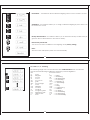
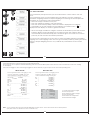
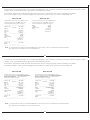
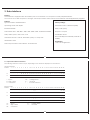
Data Output Examples + 123.4567 g
Position
1
2
3
4
or
or
N
1
or
T
o
t
Position 1 - 4 :
Position 5
:
Position 6 - 20 :
Position 21
:
Position 22 - 24:
Position 25
:
Position 26
:
5
6
7
8
9
10 11 12 13 14 15 16 17 18 19 20 21 22 23 24 25 26
+
1
2
3
.
4
5
6
7
g
LF CR
+
6
1
7
.
2
8
3
5
t
LF CR
+
2
0
.
0
0
0
0
g
LF CR
+
6
0
.
0
0
0
0
g
LF CR
c
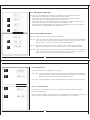
ID code Character or Space
Sign
Weight with Decimal Point; leading zeros = space
Space
Unit Symbol or Space
Line Feed
Carriage Return
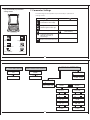
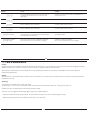
99
ID code
characters
Meaning
nRef
Counting: Reference sample quantity
wRef
Piece Counting, Percentage Weighing : Reference weight
Qnt
Piece Counting: Quantity
pRef
Weighing in percent: Reference percentage
Pct
Weighing in percent: Reference percentage
Cnt
Animal weighing: No. of sub-weighing operations
xNt
Animal weighing: Calculated average
N1
Formulation, Totalization Net : N1
N
Formulation, Totalization : Net N
Tot
Formulation, Totalization : Total Weight
Pur
Density : Purity of Gold
Den
Density : Density of sample
9.2 Data Input Format
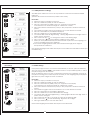
You can connect a computer to your balance to send commands via the balance interface port to control balance functions
and applications.
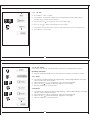
Format for commands
[
Command Code
Data
]
•[: it shows start of command frame.
•Command Code: it shows which functionality to be carried out for this command frame.
•Data: This field in frame is optional and it is intended to provide data information between Bi-directional communications.
•]: it shows end of command frame.
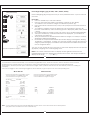
Commands
[W] : If host computer send this command to balance then balance will Send weight with current unit.
[T] : If host computer send this command then balance will do taring in balance. If stability is not achieved within 45 second
then it comes to that specific feature till that time it shows “-------“on LCM.
100