1
I.
INSTALLATION ON THE OSBORNE COMPUTER
A. Orientation
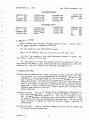
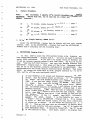
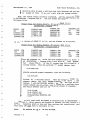
dBCITATIONS is provided. with adequate files so that versions are
possible for single and double density, 52 and 80 columns.
The program
diskettes supplied are single density so that they may be read by any
properly functioning Osborne Computer.
You must, however, make selections
from the files available.
The 52 and 80 column versions are mutually
exclusive.
Never attempt to mix these files.
Some of the files are for
single density applications, some for double, and still others for the
Osborne Executive.
Some of the files go on Program Disk A and some on
DataBase Disk B.
All of the feasible combinations are laid out for you in
this installation document.
You need only select the one that best fits
your conditions and carefully do it. You may disregard all others.
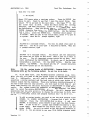
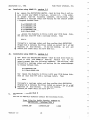
This installation on the Osborne 01 will require the use of your CP/M
program and utilities diskettes containing the files COPY, PIP, SETUP,
STAT, and SYSGEN.
On the Osborne Executive you will need to use the CP/M
Plus and Osborne utilities files COPY, COPYSYS, PIP, and SHOW. Some diskette swapping is necessary during installation, but is not necessary during
the actual running of the program.
Your
that you
dBase II
built on
Osborne,
But it is
version of dBase II must also be properly installed.
Be certain
select the full screen editing features when you are making your
installation.
The very core of the way dBCITATIONS operates is
these absolutely marvelous full screen editing feature~.
Your
dBase II and dBCITATIONS are all properly made for each other.
your responsibility to make certain that they mesh correctly.
Remember, the combinations are spelled out for you in this document.
You need select only the one that fits your conditions and do it. Ypu need
not be concerned about the others.
What combinations should you select?
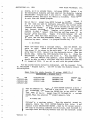
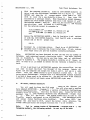
Single or double density. If you have double density available to you, by
all means take .that option.
We have discovered no disadvantages to
double density and no reasons to prefer single.
So, if you have the
option, choose double.
Of course, choose single if that is the way
your Osborne is configured:
dBase II Versions 2.3 or 2.4.
Either will work fine with dBCITATIONS, but
if you have both, choose 2.3 as it takes up less diskette space.
Version 2.4 is not very practical in a single density Osborne environment and we have not provided installation instructions for this
combination.
Write us for free special instructions if this is the
only way you can use dBCITATIONS.
r
'
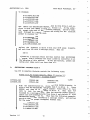
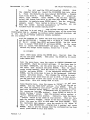
52 or 80 column.
If you do not have the 80 column option on your Osborne,
then choose 52.
If you have the Osborne Executive, use the 80 column
version as you can't get the larger characters anyway and the 52
column display sits radically to the left of the screen.
If you have
the Osborne 01 and have both displays available to you, the choice is
not automatically 80.
The 52 column version uses less diskette space
Version 1.5
1