1
ELECTRONIC BRAKE CONTROL INSTRUCTIONS
Instructions for Electronic Brake Control
For 2, 4, 6 and 8 brake applications
READ THIS FIRST:
Read and follow all instructions carefully
before installing or operating the Prodigy.
Keep these instructions with the Brake
Control for future reference.
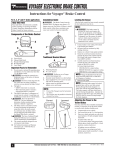
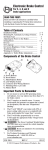
Components of the Brake Control
Important Facts to Remember
Do not mount or activate RF generating
items (cell phones, two way radios) near
(less than 12") the brake control.
2.
CAUTION Reversing the connection to
a breakaway battery on the trailer will
destroy the Prodigy.
3.
CAUTION Disconnect trailer plug
from the tow vehicle prior to testing a
breakaway switch or you may destroy
the Prodigy.
4.
5.
6.
7.
8.
9.
Mounting the Prodigy
WARNING The Prodigy must be mounted
from 0 degrees to 70 degrees nose up.
(See Below).
In hilly terrain it is advisable to leave a
margin at either extent to keep bars from
coming on when going up and down hills.
When mounted near level the lower bars
may come on during heavy acceleration
(see Trouble-shooting Chart). This will not
affect the performance during braking.
Failure to install the Prodigy within these
constraints may cause impaired performance.
Wiring Brake Control
Your Prodigy brake control has a new and
unique connector located at the back of the
control. This connector allows you two
options to wire your brake control.
A. Power Knob
B. Boost Button
C. Manual Knob
D. Connector (For Wiring Harness)
E. Mounting Hole (1 per side)
1.
Installation Guide
The Prodigy employs an inertial sensor.
It senses deceleration and generates an
output that is based on deceleration, thus
the term “Proportional Braking”.
Option 1:
Use Pigtail Wiring Harness included. This
harness can be installed by following the
Generic Wiring Guide.
Option 2:
Use a Ford, Dodge or GM specific wiring
harness.If your vehicle came with a factory tow
package that included a 7-way connector, you
can purchase a Tekonsha OEM wiring harness
with the Prodigy connector on one end and
your specific vehicle's connector on the other.
See Generic Wiring Guide, for location of your
vehicle's connector.
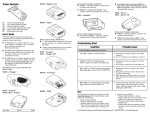
Display Readings after Wiring the Prodigy
After successfully wiring your Prodigy you
should see the following on the two-digit display:
1.
•
Power to Prodigy without trailer connected.
2.
3.
Displays for 15
seconds then
changes to:
4.
The Prodigy will “HOLD” your trailer
with 25% of power setting while you are
at a standstill with brake pedal applied for
longer than 5 seconds.
•
The Prodigy will brake proportionally in
reverse. It will apply the appropriate brake
voltage based on deceleration.
•
Manual Knob Activated without trailer
For Technical Assistance and Warranty
Information call: 1-888-785-5832 or
www.tekonsha.com.
•
Manual knob activated (with trailer), 5.4
denotes a hypothetical power output. This
value is set using the power knob. Range
is 0.0 to 13 volts. This is an indication of
voltage output to electric brakes.
Boost
feature
engaged.
C
Under Dash Pocket Mount
A. Pocket Mount
B. #6 X 1/2" Self Tapping Screws
C. Pocket Mount Template
•
Power to Prodigy but display is in power
saving mode (no motion or activity for at
1.
least fifteen minutes).
(Blank
Display)
1
CAUTION Drilling or use of longer
screws may damage unit.
Securely mount bracket to a solid surface.
Insert supplied #8 x 3/8" machine screws
on each side into the mounting holes.
Adjust control to desired position and
tighten screws until snug.
Power to Prodigy with trailer connected and
Boost
feature not
engaged.
WARNING The Gross Combined Weight
Rating (GCWR) must never exceed the
vehicle manufacturers recommendation.
CAUTION This control is not designed
for use with electric-hydraulic trailer
brake systems.
Traditional Bracket Mount
A. Mounting Bracket
B. #8 X 3/8" Machine Screw with Internal
Tooth Washer
2.
3.
Securely mount Pocket Mount to a solid
surface using supplied #6 X 1/2" Self
Tapping Screws.
Insert Prodigy Brake control.
Plug in connector.
Technical Assistance Call Toll-Free: 1-888-785-5832 or www.tekonsha.com
P/N 7689 REV H
ELECTRONIC BRAKE CONTROL INSTRUCTIONS
Instructions for Electronic Brake Control (continued)
Boost Setting
NOTE:
1. Front of the Prodigy must be horizontal,
see below.
2. The Prodigy must be parallel to direction
of travel, see below.
Correct
Incorrect
The boost button was designed to allow a more
aggressive setting for your trailer brakes and is
available in three levels - [ b.I ], [ b.2 ], [ b.3 ].
Each incremental boost setting increases the
sensitivity of the Prodigy’s inertial sensor,
enhancing the paticipation of the trailer brakes
during a braking event.
The first press on the boost button displays the
current setting. Boost is advanced to the next level
by continuing to press the boost button.
(Boost Setting continued)
[ b.I ], during a braking event, the power automatically starts out at approximately 13% of the power
setting and increases with deceleration. With the
boost on level 2, [ b.2 ], or with the boost on
level 3, [ b.3 ], during a braking event, the power
automatically starts out at approximately 25% of
the power setting and increases with deceleration.
Some cases where you might want to use the
boost button:
• You like the trailer braking to ‘LEAD’ the tow
vehicle’s braking
• Towing a full vs. empty trailer
• Degraded brake performance (most electric
brakes require manual adjustment - see
Appendix A or a dealer for adjustment or repair)
NOTE: Boost not intended to be used to take
place of trailer brake adjustment or repair.
Five seconds after setting the boost level, the display
will show
Boost On
indicating Boost On by the right most decimal.
D i r e c t i o n o f Tr ave l
D i r e c t i o n o f Tr ave l
Automatic Leveling of the Sensor
The Prodigy will automatically acquire the
proper level setting. It will also automatically
adjust as you travel up or down hills.
Adjusting the Power to the Trailer
Brakes (Prior to setting Boost)
Once the control has been securely mounted
within the 0 to 70-degree range, it is necessary
to set the power needed to stop the trailer
during a braking event.
For example: With the boost off, [ .c ], during a
braking event, the power to the brakes starts out at
zero and increases with deceleration.
With the boost on level 1,
See the chart below for recommended “Boost”
settings (indicated with X) for typical Trailer to
Vehicle weight relationships.
Select your boost setting based on your towing
situation, driving preference and condition of
your trailer brakes.
Ty p i c a l B o o s t S e t t i n g s F o r O p t i m a l P e r f o r m a n c e
(with properly adjusted trailer brakes*)
TRAILER WEIGHT compared to VEHICLE WEIGHT
BOOST “OFF”
➮
INCREASING BOOST LEVEL
➮
X
X
X
X
X
X
X
X
X
X
WARNING Do not exceed
Gross Combined Weight Rating (GCWR)
X
Trailer weighs LESS than Vehicle
1.
Connect trailer to tow vehicle.
2.
With engine running hold manual full left
and set Power Knob to indicate 6.0
Trailer weighs APPROXIMATELY SAME as Vehicle
3.
Drive tow vehicle and trailer on a dry level
paved surface at 25 mph and fully apply
manual knob.
Trailer weighs UP TO 25% MORE than Vehicle
✓
❑
If trailer brakes lock up:
Turn power down using power knob.
✓
❑
If braking was not sufficient:
Turn power up using power knob.
4.
Repeat Step (3) until power has been set
to a point just below wheel lock up or at
a sufficient force as to achieve maximum
braking power.
Trailer weighs UP TO 40% MORE than Vehicle
Trailer weighs OVER 40% MORE than Vehicle
* Increased Boost setting may be needed if trailer brakes are worn, see Appendix A or a dealer for brake adjustment or repair.
NOTE:
5.
Using the brake pedal, make a few low
speed stops to check the power setting.
Trailer braking is initiated and terminated
via the stoplight switch. When the brake
pedal is released, trailer braking will cease.
1.
2.
2
Always warm the trailer's brakes
before setting the power. Warm
trailer brakes tend to be more
responsive than cold brakes. To
warm trailer brakes, drive a short
distance (1/4 mile) at 45 MPH with
manual lever engaged enough to
cause trailer braking at a low level.
WARNING The power should
never be set high enough to cause
trailer brakes to lock up. Skidding
trailer wheels can cause loss of
directional stability of trailer and
tow vehicle.
3.
4.
5.
6.
The power may need to be adjusted
for different load weights and
road conditions.
Not all trailer brakes will lock up
due to various conditions. However,
inability to lock up the brakes
generally indicates the need for an
inspection to determine the cause.
When the power is set correctly you
should feel unified braking between
the trailer and tow vehicle.
WARNING Boost setting will
be cleared under abnormally low
battery conditions. Check boost
setting after starting vehicle.
Technical Assistance Call Toll-Free: 1-888-785-5832 or www.tekonsha.com
P/N 7689 REV H
ELECTRONIC BRAKE CONTROL INSTRUCTIONS
Instructions for Electronic Brake Control (continued)
Reverse
(Reverse continued)
When backing a trailer you can cancel
“BOOST” and “HOLD” for a period of three
minutes. This can be accomplished by pressing
the boost button continuously for five seconds
with the brake pedal depressed. The display
will indicate:
(If “boost” was active, the right hand decimal
point will also be on.) After three minutes
the “BOOST” and “HOLD” features will
automatically return to your previous settings.
NOTE:
Returning to your previous settings prior
to three minutes can be accomplished by
pressing the boost button.
Troubleshooting Chart
Display
Situation
(Blank
Display)
Probable Cause
Flashes 2 times a second or a
steady display.
Trailer is connected and Prodigy loses
connection to battery ground.
Flashes 2 times per second.
Prodigy “sees” an overload condition
during operation.
Flashes 2 times per second.
1. Brake wire sees short during
idle condition.
2. Use of some test lights or non-Tekonsha
testers can cause this problem.
The lower two bars flash
Prodigy is mounted at too low an angle.
The upper two bars flash
Prodigy is mounted at too high an angle.
Flashes for 15 seconds
1. Trailer not connected to tow vehicle.
2. Trailer connected with open circuit on
brake line.
3. Trailer connector disconnected or corroded.
4. Loss of trailer brake magnet ground.
1. Loss of power to Prodigy.
2. Loss of ground to Prodigy.
No display with manual or
pedal activation.
No display until activation
No braking
Prodigy is in power-saving mode due to no
motion for fifteen minutes.
Power control set to 0.
Power interruption while brake
pedal is depressed.
Appendix A: Trailer Brake Adjustment**
Brakes should be adjusted after the first 200 miles
of operation when the brake shoes and drums have
“seated” and at 3000 mile intervals, or as use and
performance requires. The brakes should be adjusted
in the following manner:
1. Jack up trailer and secure on adequate capacity
jack stands. Follow trailer manufacturers recommendations for lifting and supporting the unit.
Check that the wheel and drum rotate freely.
WARNING Do not lift or support trailer on
any part of the axle or the suspension system.
2. Remove the adjusting hole cover from the adjusting slot on the bottom of the brake backing plate.
3. With a screwdriver or standard adjusting tool,
rotate the starwheel of the adjuster assembly to
expand the brake shoes. Adjust the brake shoes
out until the pressure of the linings against the
drum makes the wheel very difficult to turn.
3
Note: With drop spindle axles, a modified adjusting
tool with about an 80 degree angle should be used.
4. Then rotate the starwheel in the opposite
direction until the wheel turns freely with
a slight lining drag.
5. Replace the adjusting hole cover and lower
the wheel to the ground.
6. Repeat the above procedure on all brakes.
WARNING Never crawl under your trailer
unless it is resting on properly placed
jack stands.
Follow the trailer manufacturers recommendations
for lifting and supporting the unit. Do not lift or
place supports on any part of the suspension system.
**Note: Trailer Brake Adjustment procedures
courtesy Dexter Axle.
Technical Assistance Call Toll-Free: 1-888-785-5832 or www.tekonsha.com
P/N 7689 REV H