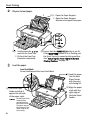
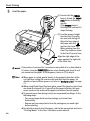
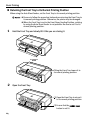
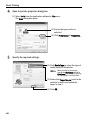
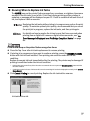
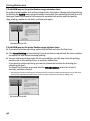
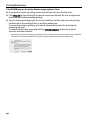
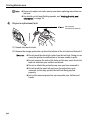
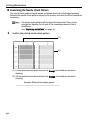
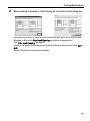
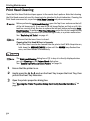
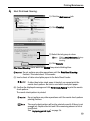
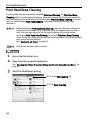
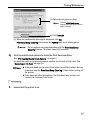
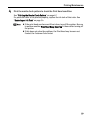
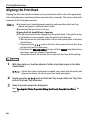
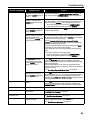
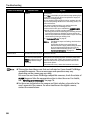
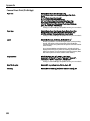
1
Photo Printer series Quick Start Guide The following ink tanks are compatible with this printer. For details on ink tank replacement, refer to “Replacing an Ink Tank” in this guide. QT5-0145-V02 XXXXXXXX ©CANON INC.2007 PRINTED IN JAPAN QT50145V02 Getting Help from Canon Ordering Information For additional supplies, use the following descriptions and order numbers. Help Us Help You Better Before you contact Canon, please record the following information. Serial Number (located on the inside of the product): Model Number (located on the top of the product): Setup CD-ROM number (located on the CD-ROM): Purchase Date: Customer Technical Support Sequence* 1. Internet — www.canontechsupport.com For quick and comprehensive self-help in an intuitively guided interactive troubleshooting environment, the place to start is our helpful tech support web site. In addition, the latest driver downloads, answers to frequently asked questions, product information, and “where to buy” instructions are found here. 2. Email Tech Support — www.canontechsupport.com For individual attention to a special issue, try emailing our friendly technical support representatives, specially trained to communicate quick, easy, and logical solutions to your inquiries within 24 hours. 3. Toll-Free Live Tech Support — (1-800-828-4040) This option provides live telephone technical support, free of service charges, MondaySaturday (excluding holidays), during your product’s 1 year limited warranty period. Telephone Device for the Deaf (TDD) support is available at (1-866-251-3752). 4. Extended Service and Support — www.canonesp.com Canon CarePAK Extended Service Plan is a cost-attractive and easy-to-use extended service program that provides up to three full years of service and support coverage at a very attractive price. CarePAK offers toll-free Canon technical support and includes Canon’s superb InstantExchange product replacement program. For further information about extending your Canon service and support, call (1-800-385-2155), or visit our Web site at www.canonesp.com. CarePAK must be purchased during your product’s warranty period. For more information and updated program specifics, please visit our web site at www.canontechsupport.com. Description Order # Ink Tanks PGI-9 Matte Black PGI-9 Photo Black PGI-9 Cyan PGI-9 Magenta PGI-9 Yellow PGI-9 Photo Cyan PGI-9 Photo Magenta PGI-9 Red PGI-9 Green PGI-9 Gray 1033B002 1034B002 1035B002 1036B002 1037B002 1038B002 1039B002 1040B002 1041B002 1042B002 Canon Specialty Papers Photo Paper Plus Glossy (4" x 6" / 20 sheets) Photo Paper Plus Glossy (4" x 6" / 50 sheets) Photo Paper Plus Glossy (4" x 6" / 120 sheets) Photo Paper Plus Glossy (5" x 7" / 20 sheets) Photo Paper Plus Glossy (8.5" x 11" / 20 sheets) Photo Paper Plus Glossy (13" x 19" / 20 sheets) Photo Paper Plus Semi-gloss (4" x 6" / 50 sheets) Photo Paper Plus Semi-gloss (8.5" x 11" / 20 sheets) Photo Paper Plus Semi-gloss (8" x 10" / 20 sheets) Photo Paper Plus Semi-gloss (13" x 19" / 20 sheets) Matte Photo Paper (4" x 6" / 120 sheets) Matte Photo Paper (8.5" x 11" / 50 sheets) Matte Photo Paper (13" x 19" / 20 sheets) Fine Art Photo Rag (8.5" x 11" / 20 sheets) Fine Art Photo Rag (13" x 19" / 20 sheets) Fine Art Premium Matte (8.5" x 11" / 20 sheets) Fine Art Premium Matte (13" x 19" / 20 sheets) Fine Art Museum Etching (8.5" x 11" / 20 sheets) Fine Art Museum Etching (13" x 19" / 20 sheets) Photo Stickers 7980A007 7980A012 7980A022 7980A019 7980A006 7980A014 1686B014 1686B020 1686B017 1686B031 7981A014 7981A004 7981A011 0587B005 0587B008 1263B004 1263B007 1262B004 1262B007 0001C001 Call 1-800-OK-CANON to locate a dealer near you, or visit the Canon eStore at www.estore.usa.canon.com. * Support program specifics are subject to change without notice. © 2007 Canon U.S.A., Inc. Canon is a registered trademark of Canon Inc. in the United States and may be a registered trademark or trademarks in other countries. All other product and brand names are trademarks of their respective owners. As an ENERGY STAR® partner, Canon U.S.A., Inc. has determined that this product meets the ENERGY STAR® guidelines for energy efficiency. series Photo Printer Quick Start Guide Canon PIXMA Pro9500 series Photo Printer Quick Start Guide. Copyright This manual is copyrighted by Canon U.S.A., Inc. with all rights reserved. Under the copyright laws, this manual may not be reproduced in any form, in whole or in part, without the prior written consent of Canon U.S.A., Inc. © 2007 Canon U.S.A., Inc. Disclaimer Canon U.S.A., Inc. has reviewed this manual thoroughly in order that it will be an easy-to-use guide to your Canon PIXMA Pro9500 series Photo Printer. All statements, technical information and recommendations in this manual and in any guides or related documents are believed reliable, but the accuracy and completeness thereof are not guaranteed or warranted, and they are not intended to be, nor should they be understood to be, representation or warranties concerning the products described. Specifications are subject to change without notice. As an ENERGY STAR® Partner, Canon Inc. has determined that this product meets the ENERGY STAR® guidelines for energy efficiency. The International ENERGY STAR® Office Equipment Program is an international program that promotes energy saving through the penetration of energy efficient computers and other office equipment. The program backs the development and dissemination of products with functions that effectively reduce energy consumption. It is an open system in which business proprietors can participate voluntarily. The targeted products are office equipment such as computers, monitors, printers, facsimiles, copiers, scanners, and multifunction devices. Their standards and logos are uniform among participating nations. All information regarding non-Canon products was compiled from publicly available information. No representation is made regarding the accuracy thereof. About Consumables Consumables (ink tanks / FINE Cartridges) are available for 5 years after production has stopped. Trademarks z Microsoft and Windows are either registered trademarks or trademarks of Microsoft Corporation in the U.S. and/or other countries. z Windows Vista is either a registered trademark or trademark of Microsoft Corporation in the United States and/or other countries. z Macintosh and Mac are trademarks of Apple Computer, Inc., registered in the U.S. and other countries. z Photo Rag is a trademark of Hahnemühle FineArt GmbH. z Adobe, Adobe Photoshop and Adobe RGB(1998) are either registered trademarks or trademarks of Adobe Systems Incorporated in the United States and/or other countries. Canon U.S.A., Inc. One Canon Plaza Lake Success, NY 11042 Contents Contents Basic Printing Turning on the Printer . . . . . . . . . . . . . . . . . . . . . . . . . . . . . . . . . . . . . . . . . . . . . . . . . . . . . . . . . . . . . 2 Turning off the Printer . . . . . . . . . . . . . . . . . . . . . . . . . . . . . . . . . . . . . . . . . . . . . . . . . . . . . . . . . . . . . 3 Loading Paper . . . . . . . . . . . . . . . . . . . . . . . . . . . . . . . . . . . . . . . . . . . . . . . . . . . . . . . . . . . . . . . . . . . 4 Using Specialty Media . . . . . . . . . . . . . . . . . . . . . . . . . . . . . . . . . . . . . . . . . . . . . . . . . . . . . . . . . . . 15 Printing with Windows . . . . . . . . . . . . . . . . . . . . . . . . . . . . . . . . . . . . . . . . . . . . . . . . . . . . . . . . . . . 17 Printing with Macintosh . . . . . . . . . . . . . . . . . . . . . . . . . . . . . . . . . . . . . . . . . . . . . . . . . . . . . . . . . . 20 Canceling Printing . . . . . . . . . . . . . . . . . . . . . . . . . . . . . . . . . . . . . . . . . . . . . . . . . . . . . . . . . . . . . . . 24 Advanced Printing Printing Photographs Directly from a PictBridge Compliant Device . . . . . . . . . . . . . . . . . . . . . . . 25 Accessing the Printer Driver (Windows) . . . . . . . . . . . . . . . . . . . . . . . . . . . . . . . . . . . . . . . . . . . . . 31 Using the Bundled Software. . . . . . . . . . . . . . . . . . . . . . . . . . . . . . . . . . . . . . . . . . . . . . . . . . . . . . . 32 Printing Maintenance Shaking the Ink Tanks Periodically . . . . . . . . . . . . . . . . . . . . . . . . . . . . . . . . . . . . . . . . . . . . . . . . . 33 Replacing an Ink Tank . . . . . . . . . . . . . . . . . . . . . . . . . . . . . . . . . . . . . . . . . . . . . . . . . . . . . . . . . . . . 34 When Printing Becomes Faint or Colors are Incorrect . . . . . . . . . . . . . . . . . . . . . . . . . . . . . . . . . . 45 Printing the Nozzle Check Pattern . . . . . . . . . . . . . . . . . . . . . . . . . . . . . . . . . . . . . . . . . . . . . . . . . . 47 Print Head Cleaning. . . . . . . . . . . . . . . . . . . . . . . . . . . . . . . . . . . . . . . . . . . . . . . . . . . . . . . . . . . . . . 52 Print Head Deep Cleaning . . . . . . . . . . . . . . . . . . . . . . . . . . . . . . . . . . . . . . . . . . . . . . . . . . . . . . . . . 56 Aligning the Print Head . . . . . . . . . . . . . . . . . . . . . . . . . . . . . . . . . . . . . . . . . . . . . . . . . . . . . . . . . . . 60 Troubleshooting Cannot Install the Printer Driver or an Application Program . . . . . . . . . . . . . . . . . . . . . . . . . . . . . 66 Cannot Connect to PC Properly . . . . . . . . . . . . . . . . . . . . . . . . . . . . . . . . . . . . . . . . . . . . . . . . . . . . 67 The Printer Is Vibrating . . . . . . . . . . . . . . . . . . . . . . . . . . . . . . . . . . . . . . . . . . . . . . . . . . . . . . . . . . . 68 Print Results Not Satisfactory or Contains Errors . . . . . . . . . . . . . . . . . . . . . . . . . . . . . . . . . . . . . . 68 Troubleshooting Printer Hardware. . . . . . . . . . . . . . . . . . . . . . . . . . . . . . . . . . . . . . . . . . . . . . . . . . 72 Paper Does Not Feed Properly . . . . . . . . . . . . . . . . . . . . . . . . . . . . . . . . . . . . . . . . . . . . . . . . . . . . . 74 Paper Jams . . . . . . . . . . . . . . . . . . . . . . . . . . . . . . . . . . . . . . . . . . . . . . . . . . . . . . . . . . . . . . . . . . . . . 75 Handling Error Messages . . . . . . . . . . . . . . . . . . . . . . . . . . . . . . . . . . . . . . . . . . . . . . . . . . . . . . . . . 76 An Error Message Appears on the Screen . . . . . . . . . . . . . . . . . . . . . . . . . . . . . . . . . . . . . . . . . . . . 80 An Error Message is Displayed on a PictBridge Compliant Device . . . . . . . . . . . . . . . . . . . . . . . . 84 Appendix Specifications . . . . . . . . . . . . . . . . . . . . . . . . . . . . . . . . . . . . . . . . . . . . . . . . . . . . . . . . . . . . . . . . . . 87 Safety Precautions . . . . . . . . . . . . . . . . . . . . . . . . . . . . . . . . . . . . . . . . . . . . . . . . . . . . . . . . . . . . . . 90 Regulatory Information . . . . . . . . . . . . . . . . . . . . . . . . . . . . . . . . . . . . . . . . . . . . . . . . . . . . . . . . . . . 92 Canon U.S.A., INC. LIMITED WARRANTY --- (USA Only) . . . . . . . . . . . . . . . . . . . . . . . . . . . . . . . . . 93 Index . . . . . . . . . . . . . . . . . . . . . . . . . . . . . . . . . . . . . . . . . . . . . . . . . . . . . . . . . . . . . . . . . . . . . . . . . . . . . . . . . . . . 95 1 Basic Printing Basic Printing This Quick Start Guide describes some of the features of your printer and how to use them. For more information, view the Pro9500 series User’s Guide onscreen manual, Printer Driver Guide on-screen manual, Photo Application Guide on-screen manual, and Digital Photo Printing Guide on-screen manual installed on your computer, or use the online help within your printer driver interface: While in the printer’s properties window, click in the upper right corner. Then click the feature you want to know more about, or click the Help button when displayed. While in the Page Setup dialog box or Print dialog box, click in the lower left corner. Clicking provides detailed information about each setting. When the Help window appears, select your desired topic. Turning on the Printer 1 Press the POWER button. The POWER lamp flashes blue while the printer warms up and changes to steady (non-flashing) when the printer is ready. If the ALARM lamp begins flashing orange, refer to “Handling Error Messages” on page 76. 2 Basic Printing Turning off the Printer 1 To turn off the printer, press the POWER button. When the POWER lamp stops blinking, the printer is turned off. About the Power Plug When removing the power plug after turing off the printer, be sure to check that the POWER lamp is not lit. If the power plug is removed from the wall outlet with the POWER lamp lit or blinking blue, the printer cannot protect its print heads and may be unable to print. 3 Basic Printing Loading Paper This section describes how to load paper in the Auto Sheet Feeder and the Front Tray. Using the Auto Sheet Feeder and the Front Tray You can load paper in both the Auto Sheet Feeder and the Front Tray. Loading paper in the Auto Sheet Feeder is easy, and is convenient if you frequently switch to and print on various sizes or types of paper. Use the Front Tray to print on large size paper or to print on thick paper such as art paper. * There are some kinds of paper, depending on their size or type, that can only be used in either the Auto Sheet Feeder or the Front Tray. See “Using Specialty Media” on page 15. Print Media to Avoid Do not use the following types of paper. Using such paper will not only produce unsatisfactory results, but can also cause the printer to jam or malfunction. • Folded, curled or wrinkled paper • Damp paper • Excessively thin paper Auto Sheet Feeder: Less than 64 gsm / 17 lb Front Tray: Less than 0.1 mm / 4 mil • Excessively thick paper Auto Sheet Feeder: More than 105 gsm / 28 lb (plain paper except for supported Canon genuine media) * However, you can use art paper that is not produced by Canon that is up to 200 gsm / 53 lb. See “Non-Canon Genuine Specialty Paper” in the User’s Guide on-screen manual. Front Tray: More than 1.2 mm / 47 mil • Picture postcards • Postcards affixed with photos or stickers • Envelopes • Any type of paper with holes • Paper that is not rectangular • Paper bound with staples or glue etc. • Paper coated with adhesive • Paper decorated with glitter etc. • The following Canon genuine papers: High Resolution Paper, Glossy Photo Paper, Photo Paper Glossy, Photo Paper Plus Double Sided, Photo Paper Pro, Transparencies, and T-Shirt Transfers 4 Basic Printing Handling Paper • Be careful not to rub or scratch the surfaces of any types of paper when handling. • Hold the paper as closely as possible to its edges and try not to touch the printing surface. The print quality may be degraded if the printing surface is smudged with sweat or oil that comes from your hands. • Do not touch the printed surface until the ink has fully dried. Even when the ink has fully dried, be careful not to touch the printed surface as much as possible when handling. Due to the nature of the pigment ink, the ink on the printed surface may be removed when being rubbed or scratched. Loading Paper in the Auto Sheet Feeder For detailed information on the Canon genuine media for use with its various printers, refer to “Using Specialty Media” on page 15, or “Printing Media” in the User’s Guide on-screen manual. 1 Flatten the four corners of the paper before loading it. z Before loading paper, be sure to flatten its four corners. Otherwise, the paper may jam. z When paper is curled, gently bend it in the opposite direction of the curl (without curling the reverse side) and then load the paper. For details on how to flatten paper curl, refer to “Media is curled” on page 71. z When using Photo Paper Plus Semi-gloss, even if the sheet is curled, load one sheet at a time as it is. If you roll up this paper to flatten, this may cause cracks on the surface of the paper and reduce the print quality. z To prevent paper from being curled, we recommend handling it in the following ways: - Put unused paper back into the package, and store them horizontally. - Remove only as many sheets from the package as you need right before printing. 5 Basic Printing 2 Prepare to load paper. 2 (1) 1 Open the Paper Support. 2 Open the Paper Support Extension to support the paper. 1 1 2 (2) 1 Gently press the mark on the Front Tray. 2 Pull out the Front Tray Extension completely. 3 (3) Ensure that the FRONT FEED button is not lit. If the FRONT FEED button is lit or flashing, set the Front Tray to its normal printing position. See “Returning the Front Tray to Its Normal Printing Position” on page 14. Load the paper. Load Limit Mark Do not load beyond this Load Limit Mark. (1) Load the paper into the Auto Sheet Feeder with the print side facing UP. (3) Pinch the Paper Guide and slide it against the left side of the paper stack. Set the Paper Guide correctly when printing from the Auto Sheet Feeder. The paper may not feed correctly if the Paper Guide is not set correctly. 6 (2) Align the paper stack with the right edge of the Auto Sheet Feeder. Basic Printing z The following paper can be used in the Auto Sheet Feeder. Paper Size Standard paper: From 4" x 6" / 101.6 x 152.4 mm to A3+ (13" x 19") size (329.0 x 483.0 mm / 13 x 19 inches) Non-standard paper: From 89.0 x 120.0 mm / 3.50 x 4.72 inches to 329.0 x 584.2 mm / 12.95 x 23 inches Weight From 64 gsm / 17 lb to 105 gsm / 28 lb (plain paper except for supported Canon genuine media) *You can use art paper that is not produced by Canon that is up to 200 gsm / 53 lb. Do not use heavier or lighter paper (except for supported Canon genuine media), as it could jam in the printer. See “Non-Canon Genuine Specialty Paper” of the User’s Guide onscreen manual. z When printing on plain paper (64 gsm / 17 lb), load up to 150 sheets in the Auto Sheet Feeder. However, the paper may not feed correctly depending on the type of paper and the environment (high temperature / high humidity / low temperature / low humidity). If this happens, reduce the number of sheets of paper by about half (approximately 5 mm / 0.2 inches). z When printing on art paper that is not produced by Canon that is up to 200 gsm / 53 lb, load one sheet at a time. z When printing on plain paper, do not stack more than 50 sheets in the Front Tray. z Do not touch the printed surfaces until the ink dries. For specific drying times, refer to the instructions packaged with your media. 7 Basic Printing Loading 4" x 6" or 5" x 7"-Sized Paper in the Auto Sheet Feeder If you cut plain paper to 4" x 6" / 101.6 x 152.4 mm, 5" x 7" / 127.0 x 177.8 mm for a trial print, it can cause paper jams. (1) Load the paper and align it with the right edge of the Auto Sheet Feeder with the print side facing UP. • Load the paper lengthways regardless of the direction of the document. • You can load up to 20 sheets of 4" x 6"-sized paper; 10 sheets of 5" x 7"-sized paper. (2) Pinch the Paper Guide and slide it against the left side of the paper stack. (3) Ensure that the FRONT FEED button is not lit. If the FRONT FEED button is lit or flashing, set the Front Tray to its normal printing position. See “Returning the Front Tray to Its Normal Printing Position” on page 14. (4) Select 4 x 6 in 101.6 x 152.4 mm or 5 x 7 in 127.0 x 177.8 mm from Page Size in the printer driver. For a detailed description of the printer driver settings, refer to “Printing with Windows” on page 17, or “Printing with Macintosh” on page 20. Always load paper in portrait orientation. Loading paper in landscape orientation can cause the paper to be jammed. Portrait Landscape We recommend using Canon genuine photo media when printing photographs. See “Using Specialty Media” on page 15. 8 Basic Printing Loading Paper in the Front Tray FRONT FEED Button You can check the printer status by FRONT FEED button indication. The FRONT FEED button flashes quickly (two flashes at a time) when preparations for loading the paper in the Front Tray are finished. Load the paper in the Front Tray correctly. The FRONT FEED button flashes slowly (one long flash at a time) when preparations to start printing from the Front Tray are complete. Start printing from the Front Tray. The FRONT FEED button is unlit when the Front Tray is in its normal printing position. The FRONT FEED button lights when the Front Tray is in the Front Paper Feeding Position. When loading paper in the Front Tray, the paper sticks out from the back of the printer. Keep a space of 40 cm / 15.7 inches for this purpose behind the printer. There are wheels on the back corners of the printer. Lift up the front of the printer to move it back and forth. For detailed information on the Canon genuine media for use with its various printers, refer to “Using Specialty Media” on page 15, or “Printing Media” in the User’s Guide on-screen manual. 1 Open the Front Tray. (1) Gently press the on the Front Tray. mark 9 Basic Printing 2 Set the Front Tray in the Front Paper Feeding Position. Side view of the printer (1) Tilt the Front Tray upward. (3) While keeping the Front Tray lifted, tilt the Front Tray forward to set it in the Front Paper Feeding Position. 10 (2) Lift the Front Tray until it stops. The FRONT FEED button lights. (4) Ensure that the FRONT FEED button is lit. Basic Printing 3 Open the Rear Support. (1) Press the REAR SUPPORT button to open the Rear Support. 4 Prepare to load paper. (2) Press the right corner of the Rear Support to open the Rear Support Extension. When loading paper that is Letter size or smaller, this procedure is not necessary. (1) Pull out the Front Tray Extension completely. (3) Press the FRONT FEED button. The printer starts making operating noises and then the POWER lamp flashes for about 20 seconds. Do not load paper when the POWER lamp is flashing. Otherwise, the paper or the printer may be damaged. 11 Basic Printing 5 Load the paper. (1) Ensure that the POWER lamp is lit and the FRONT FEED button is flashing quickly. If the POWER lamp is flashing blue, wait until it stops flashing. (2) Load the paper straight into the Front Tray with the print side facing UP. Align the front edge of the paper with the mark on the Front Tray. When printing from the Front Tray, load one sheet in the Front Tray at a time. Align the right edge of the paper against the right side of the Front Tray. If the printer is not used for 5 minutes or more while it is as described in (1) above, then the FRONT FEED button stops flashing and stays lit and you cannot set the paper. If this happens, return to (3) in step 4. z When paper is curled, gently bend it in the opposite direction of the curl (without curling the reverse side) and then load the paper. For details on how to flatten paper curl, refer to “Media is curled” on page 71. z When using Photo Paper Plus Semi-gloss, even if the sheet is curled, load one sheet at a time as it is. If you roll up this paper to flatten, this may cause cracks on the surface of the paper and reduce the print quality. z To prevent paper from being curled, we recommend handling it in the following ways: - Put unused paper back into the package, and store them horizontally. - Remove only as many sheets from the package as you need right before printing. z For details on how to load the paper, refer to the appropriate section in “Printing Media” in the User’s Guide on-screen manual. 12 Basic Printing 6 Prepare to start printing. (1) Press the FRONT FEED button. The paper feeds into the printer automatically and the FRONT FEED button flashes slowly. Printing preparations are complete. Start printing. z The following paper can be used in the Front Tray. Paper Size Standard paper: From 4" x 6" / 101.6 x 152.4 mm to 14" x 17" / 355.6 x 431.8 mm Non-standard paper: From 100.0 x 148.0 mm / 3.94 x 5.83 inches to 355.6 x 584.2 mm / 14 x 23 inches Thickness From 0.1 mm / 4 mil to 1.2 mm / 47 mil Do not use paper thicker than this, as it could jam in the printer. z When printing on other than 14" x 17" / 355.6 x 431.8 mm paper from a PictBridge compliant device, load paper in the Auto Sheet Feeder. For details on paper that can be used for a PictBridge compliant device, refer to “About PictBridge Print Settings” on page 27. To Print Continuously z To print from the Front Tray again, return to (3) in step 4 and load paper in the Front Tray. Then start printing. 13 Basic Printing Returning the Front Tray to Its Normal Printing Position When using the Auto Sheet Feeder, set the Front Tray to its normal printing position. z Be sure to follow the procedure below when returning the Front Tray to its normal printing position. Otherwise, the printer may be damaged. z When the Front Tray is set to the Front Paper Feeding Position, printing by using the Auto Sheet Feeder is not possible. Be sure to set it to its normal printing position. 1 Hold the Front Tray and slowly tilt it like you are closing it. Tilting the Front Tray lowers it to its normal printing position. 2 Open the Front Tray. (1) Open the Front Tray to return it to its normal printing position. (2) Ensure that the FRONT FEED button is not lit. 14 Basic Printing Using Specialty Media Canon recommends that you use Canon genuine media to ensure optimal print quality. Photo Quality Media • Matte Photo Paper • Photo Paper Plus Glossy • Photo Paper Plus Semi-gloss • Fine Art Paper “Museum Etching” • Fine Art Paper “Photo Rag™” • Fine Art Paper Premium Matte • Photo Stickers Media Suited for Business Documents • Super White Paper Canon Genuine Media Media Type Paper Support Load Limit Auto Sheet Feeder Front Tray Super White Paper Up to 100 sheets 1 sheet Matte Photo Paper 13" x 19": 1 sheet 13" x 19": 1 sheet Letter: up to 10 Letter: 1 sheet sheets 4" x 6": up to 20 4" x 6": 1 sheet sheets Photo Paper Plus 13" x 19": 1 sheet 13" x 19": 1 sheet Glossy Letter: up to 10 Letter: 1 sheet sheets*1 5" x 7": up to 10 5" x 7": 1 sheet sheets*1 4" x 6": up to 20 4" x 6": 1 sheet sheets*1 Printer Driver Setting for Media Type Plain Paper Matte Photo Paper Photo Paper Plus Glossy 15 Basic Printing Media Type Photo Paper Plus Semi-gloss Fine Art Paper “Museum Etching”*4*5 Fine Art Paper “Photo Rag”*4*5 Fine Art Paper Premium Matte*5 Photo Stickers*2 Paper Support Load Limit Auto Sheet Feeder Front Tray 13" x 19": 1 sheet 13" x 19": 1 sheet 8" x 10": up to 10 8" x 10": 1 sheet sheets*1 Letter: up to 10 Letter: 1 sheet sheets*1 4" x 6": up to 20 4" x 6": 1 sheet sheets*1 Not loadable*3 13" x 19": 1 sheet Letter: 1 sheet Printer Driver Setting for Media Type 13" x 19": 1 sheet Letter: 1 sheet Not loadable*3 Fine Art Photo Rag 1 sheet 13" x 19": 1 sheet Letter: 1 sheet 13" x 19": 1 sheet Letter: 1 sheet 1 sheet Photo Paper Plus Semi-gloss Fine Art Museum Etching Fine Art Premium Matte Photo Paper Plus Glossy *1 When loading a stack of paper, the printed side may be marked when it is fed in. If this happens, load paper one sheet at a time. *2 You can specify the print setting easily by using the Easy-PhotoPrint provided with the Setup CD-ROM. *3 Feeding from the Auto Sheet Feeder can damage the printer. Always load in the Front Tray. *4 Canon genuine media is produced and stored to get optimum printing quality. We recommend using Canon genuine media. *5 If you are using this paper, you cannot print in a 35 mm / 1.38 inches margin on the top and bottom edges. If you choose a paper size which says “Art XX [Margin 35 mm]” in the printer driver, a limit is set to prevent printing in a 35 mm / 1.38 inches margin on the top and bottom edges of the paper. We recommend checking the area being printed in the preview screen before printing. Refer to the Printer Driver Guide on-screen manual. The following Canon genuine papers cannot be used: High Resolution Paper, Glossy Photo Paper, Photo Paper Glossy, Photo Paper Plus Double Sided, Photo Paper Pro, Transparencies, and T-Shirt Transfers z When using plain paper (64 gsm or 17 lb), up to 150 sheets (13 mm or 0.52 inches in height) can be loaded in the Auto Sheet Feeder. Select Plain Paper from Media Type in the printer driver. z For a detailed description of printing media types, refer to the User’s Guide on-screen manual. 16 Basic Printing Printing with Windows z Depending on your application program, operations may differ. For details, refer to the instruction manual of your application. z The steps described in this section are for printing in Windows® XP Service Pack 2 (hereafter, called Windows XP SP2). z You can use Easy-PhotoPrint or Easy-PhotoPrint Pro to easily do print operations when printing photographs. Easy-PhotoPrint and Easy-PhotoPrint Pro are provided on the Setup CD-ROM. For details on how to use EasyPhotoPrint and Easy-PhotoPrint Pro, refer to the Photo Application Guide onscreen manual. 1 Turn on the printer. See “Turning on the Printer” on page 2. 2 Load the paper in the printer. See “Loading Paper in the Auto Sheet Feeder” on page 5 or “Loading Paper in the Front Tray” on page 9. 3 Create a document or open a file to print. When printing in grayscale, depending on an image, the printing troubles may occur on the top and/or bottom edges of the paper such as uneven coloration or white streaks. In this case, we recommend printing with the top and bottom margins of the paper set to more than 45 mm / 1.77 inches using the Easy-PhotoPrint Pro provided on the Setup CD-ROM or your page layout software. When using a page layout software or the like, prepare paper whose longer side is at least 90 mm / 3.54 inches longer than the length of the image, then print it with the top and bottom margins set to more than 45 mm / 1.77 inches. For details on how to use the Easy-PhotoPrint Pro, refer to the Photo Application Guide on-screen manual. 17 Basic Printing 4 Open the printer properties dialog box. (1) Select Print from the application software’s File menu. The Print dialog box opens. (2) Ensure that your printer is selected. (3) Click Preferences or Properties. 5 Specify the required settings. (1) Click Media Type to select the type of media loaded in the printer. When printing on plain paper, change the Media Type setting to Plain Paper. The setting for printing on photo paper is set by default. (2) Ensure that Paper Source is set to the position in which you loaded the paper in step 2. (3) Click OK. 18 Basic Printing z From the Page Setup tab, select the correct document size to be printed. If the size is different from that set in the application, then you need to set it to the same size or use Scaled Printing or Fit-to-Page Printing. Refer to the Printer Driver Guide on-screen manual. z To adjust the Print Quality settings, select Custom and click Set on the Main tab. You can control the print quality in the Custom dialog box. z For details about other printer driver functions, click Help or Instructions to view the Help or Printer Driver Guide on-screen manual. Instructions is displayed on the Main and Maintenance tabs only. If the On-screen Manual is not installed, Instructions is not displayed. z Selecting the Preview before printing check box displays a preview screen that allows you to confirm the selected printing effects and how your document will look when printed. Some applications do not have a preview function. 6 Print the document. (1) Click Print or OK. Do not open the Top Cover while printing. You can cancel a print job in progress by simply pressing the RESUME/ CANCEL button on the printer. See “Canceling Printing” on page 24. 19 Basic Printing Printing with Macintosh z Depending on your application program, operations may differ. For details, refer to the instruction manual of your application. z The steps described in this section are for printing in Mac® OS X v.10.4.x (hereafter called Macintosh®). z You can use Easy-PhotoPrint or Easy-PhotoPrint Pro to easily do print operations when printing photographs. Easy-PhotoPrint and Easy-PhotoPrint Pro are provided on the Setup CD-ROM. For details on how to use EasyPhotoPrint and Easy-PhotoPrint Pro, refer to the Photo Application Guide onscreen manual. 1 Turn on the printer. See “Turning on the Printer” on page 2. 2 Load the paper on the printer. See “Loading Paper in the Auto Sheet Feeder” on page 5 or “Loading Paper in the Front Tray” on page 9. 3 Create a document or open a file to print. When printing in grayscale, depending on an image, the printing troubles may occur on the top and/or bottom edges of the paper such as uneven coloration or white streaks. In this case, we recommend printing with the top and bottom margins of the paper set to more than 45 mm / 1.77 inches using the Easy-PhotoPrint Pro provided on the Setup CD-ROM or your page layout software. When using a page layout software or the like, prepare paper whose longer side is at least 90 mm / 3.54 inches longer than the length of the image, then print it with the top and bottom margins set to more than 45 mm / 1.77 inches. For details on how to use the Easy-PhotoPrint Pro, refer to the Photo Application Guide on-screen manual. 20 Basic Printing 4 Select Paper Size. (1) Select Page Setup from the application software’s File menu. The Page Setup dialog box opens. (2) Confirm that Pro9500 series is selected in Format for. (3) Select the desired paper size from Paper Size. (4) Click OK. 5 Specify the required settings. (1) Select Print from the application software’s File menu. The Print dialog box opens. (2) Select Quality & Media from the pop-up menu. (3) Select the desired media type from Media Type. When printing on plain paper, change the Media Type setting to Plain Paper. The setting for printing on photo paper is set by default. (4) Ensure that Paper Source is set to the position in which you loaded the paper in step 2. (5) Select the print mode appropriate to your document from Print Mode. 21 Basic Printing When you select the print mode appropriate to your document from Print Mode, the document will be printed in color and at a print quality suited to the characteristics of the Media Type you have selected. - Printing a top-quality photo: Select when printing documents consisting mainly of photographs and graphics featuring fine color gradation. - Printing tables and charts: Select when printing documents consisting mainly of graphs and graphics (illustrations) with strong color definition. - Printing a composite document: Select when printing documents consisting mainly of text. - Detailed Setting: Select to fine-tune the Print Quality and Halftoning settings. (6) Select Color Options from the pop-up menu. (7) Select the type of the document from Color Mode. z For details about the printer driver, refer to the Printer Driver Guide on-screen manual. z To view the Printer Driver Guide on-screen manual, click on any Print dialog box that has a Quality & Media, Color Options, Special Effects, Borderless Printing, or Margin selected from the pop-up menu. If the On-screen Manual is not installed, the Printer Driver Guide on-screen manual is not displayed even if is clicked. z Clicking the Preview button displays a preview screen that allows you to confirm the selected printing effects and how your document will look when printed. Some applications do not have a preview function. 22 Basic Printing 6 Print the document. (1) Click Print. Do not open the Top Cover while printing. You can cancel a print job while printing. See “Canceling Printing” on page 24. 23 Basic Printing Canceling Printing You can cancel a print job while printing, with the RESUME/CANCEL button on the printer. 1 Press the RESUME/CANCEL button while printing. (1) Press the RESUME/CANCEL button. Printing is canceled and paper is fed out. You can also cancel a print job by clicking Cancel Printing on the Canon IJ Status Monitor. To display the Canon IJ Status Monitor, click Canon Pro9500 series on the taskbar. 1 Click the printer’s icon in the Dock and display the list of print jobs in progress. If you are using Mac OS X v.10.2.8, click on the printer icon in the Dock to start up the Print Center and double-click on the name of your printer in the Printer List to open a list of print jobs in progress. 2 Select an undesired document and click the Delete icon. The print job is deleted. To temporarily stop a job in progress, click Hold. To cancel all the jobs in the list, click Stop Jobs. 24 Advanced Printing Advanced Printing Printing Photographs Directly from a PictBridge Compliant Device Connecting a PictBridge compliant device such as a digital camera, camcorder or mobile phone to the printer allows you to print recorded images directly without using a computer. PictBridge is an industry standard enabling a range of digital photo solutions, including the Direct Printing of photos from a digital camera, camcorder or mobile phone* without the need to use a computer. A device can be connected to this printer for direct printing regardless of the manufacturer or the model as long as it complies with the PictBridge standard. * Hereafter, the PictBridge compliant digital camera, digital camcorder, or camera-equipped mobile phone are collectively called a PictBridge compliant device. A device with this mark is PictBridge-compatible. Connecting a PictBridge Compliant Device To connect a PictBridge compliant device to this printer, use a USB cable recommended by the device’s manufacturer. Do not connect any equipment other than PictBridge compliant devices to the Direct Print Port of the printer. If you do so, electric shock, fire, or damage to the device could result. z When printing photos with the digital device connected to the printer, it is advisable to use the AC adapter supplied with the device. If you use the device battery, be sure to charge it fully. z Never disconnect the USB cable during printing unless when explicitly allowed to by the PictBridge compliant device. When disconnecting the USB cable between the PictBridge compliant device and printer, follow the instructions given in the device’s instruction manual. 1 Turn on the printer and load the paper in the Auto Sheet Feeder. See “Turning on the Printer” on page 2 and “Loading Paper in the Auto Sheet Feeder” on page 5. When printing on 14" x 17" / 355.6 x 431.8 mm paper, load paper in the Front Tray. See “Loading Paper in the Front Tray” on page 9. 25 Advanced Printing 2 Connect the PictBridge compliant device to the printer. Depending on the model or brand of your PictBridge compliant device, you may have to select a print mode of producing photos before connecting the device. You may also have to turn on the device or select Play mode manually after connecting the device to the printer. Perform necessary operations according to the instruction manual supplied with your device. (1) Make sure the device is turned off. (2) Connect the device to the printer using a USB cable recommended by the manufacturer of the device. The PictBridge compliant devices turn on automatically, when connected to the printer. For a device not turns on automatically, turn it on manually. 26 Advanced Printing (3) Set up the device for Direct Printing. When the connection between the device and printer has been established, the POWER lamp on the printer flashes twice. * The power-on sequence may differ depending on the model or brand of the device. will appear on the LCD display of the device when the printer is correctly connected. 3 Specify the print settings such as paper type and layout. You can make settings using the menu on the LCD of your PictBridge compliant device. Select the size and type of paper that you loaded in the printer. If your PictBridge compliant device does not have setting menu, change the setting from the computer. For details, see “Setting on the Computer” on page 30. 4 Start printing from your PictBridge compliant device. About PictBridge Print Settings Settings on a PictBridge Compliant Device This section describes the print settings on a PictBridge compliant device. When operating the device, be sure to follow the instructions given in the instruction manual of your PictBridge compliant device. In the following description, names of setting items are given according to those used in Canon-brand PictBridge compliant devices. Setting item names may be different depending on the brand or model of your device. Some setting items explained below may not be available on some devices. In this case, the settings made on the computer using the Canon Setup Utility are applied. Also, when some items are set to Default on a PictBridge compliant device, the computer settings for these items are applied. For details, see “Setting on the Computer” on page 30. Printable Image Data Format This printer prints images taken with a DCF (Design rule for Camera File system)compatible digital camera*. * Exif2.21 compliant 27 Advanced Printing Paper Size and Paper Type Settings The following sizes and types of printing paper can be used when printing from a PictBridge compliant device. “Paper size” setting “Paper type” setting Paper loaded in printer Paper Source 4" x 6" (Default) Photo (Default) Photo Paper Plus Glossy Auto Sheet *1 Semi-gloss Photo Paper Plus Semi- Feeder gloss *2 Photo Photo Paper Plus Glossy 5" x 7" *1 8" x 10" Semi-gloss Photo Paper Plus Semigloss *4 8.5" x 11" (Letter) Photo Photo Paper Plus Glossy Semi-gloss*1 Photo Paper Plus Semigloss *3 Fine Art Fine Art Paper “Photo Rag” *2 Photo Photo Paper Plus Glossy 13" x 19" *1 Semi-gloss Photo Paper Plus Semigloss *3 Fine Art Fine Art Paper “Photo Rag” *1 This setting can be selected only for Canon PictBridge compliant devices (note that it cannot be selected for some models). If your device does not have this setting, select Photo or Default in Paper type. *2 This size can be selected only for Canon PictBridge compliant devices (note that it cannot be selected for some models). *3 This setting can be selected only for Canon PictBridge compliant devices (note that it cannot be selected for some models). When Fine Art is selected for Paper type, bordered printing will be performed even when Borderless is selected for Layout. Also, you cannot print in a 35 mm / 1.38 inches margin along the top and bottom edges (except for the following layouts: Shooting Info in 20-up layout, 35 mm Film Style Layout, and index). *4 When 8.5" x 11" (Letter) is selected in Paper size, you can select Plain Paper in Paper type. When Plain Paper is selected in Paper type, bordered printing will be performed even if you select Borderless in Layout. Layout Setting Various layout options are available. • Bordered/Borderless: You can select whether or not to print an image with a border. • Shooting Info (Exif Data)*1: You can print shooting info (Exif Data) along with the image. The following two options are available. 1-up: Prints the shooting info (Exif Data) in the margin of selected individual images. 20-up: Prints 20 images specified with DPOF*2 and their shooting info (Exif Data) in list format on a single sheet of paper. • 35 mm Film Style Layout (Contact Printing Layout)*1: You can print the multiple images specified with DPOF*2 in a list format that looks like a negative film. 28 Advanced Printing Besides the above options, you can also specify to print an index of images in the DPOF print settings menu. *1 You can use this option only when 8.5" x 11" (Letter) is selected for Paper size. *2 DPOF (Digital Print Order Format) is a standard format to record the specified information regarding images, such as which image or number of copies to print. Date/File No. Print Setting You can specify whether the date and/or file number will be printed. * If the images already have dates superimposed when shot, set this PictBridge setting item to Off. If you select Date, File No., or Both, the date and/or file number will be printed over the date printed by the camera’s function. * Depending on the paper size and layout, the date will only be printed even when Both is selected. Image Optimize Setting You can select the optimization method to obtain high print quality. When you select On, the shooting information is used to print the optimized image. If you are using a Canon-brand PictBridge compliant device, the following additional options may be available, depending on the model. * VIVID prints green and blue portions of photos more vividly. NR (Noise Reduction) reduces noise in blue portions, such as the sky, and dark portions. VIVID+NR is a combination of the VIVID and NR functions. Face corrects the contrast of backlit images. Red-Eye corrects red eyes in portraits caused by flash photography. • For Flexible Color Adjustment With some types of Canon PictBridge compliant single-lens reflex cameras you can make finer color adjustments by selecting the color mode that is most suitable for what you want to achieve. You can select from; Natural, Natural M, B/W, Cool tone or Warm tone. Refer to the Digital Photo Printing Guide on-screen manual or the instruction manual provided with your PictBridge compliant Canon device. * When Natural is selected, natural colors are realistically reproduced in the printed photo. When Natural M is selected, you can adjust the color (contrast etc.) more carefully specifically than Natural. When B/W is selected, the photo is printed like a black and white photo. When Cool tone is selected, the photo is printed in a cool black and white tone. When Warm tone is selected, the photo is printed in a warm black and white tone. * If the printing troubles have occurred on the top and/or bottom edges of the paper such as uneven coloration or white streaks when printing with B/W, Cool tone, or Warm tone selected, we recommend printing it from the computer with the top and bottom margins set to more than 45 mm / 1.77 inches. For details on how to print in grayscale from the computer, refer to the Printer Driver Guide on-screen manual or Photo Application Guide onscreen manual. Trimming Setting You can select an area to print. 29 Advanced Printing Setting on the Computer You can change the PictBridge print settings on the computer. To do this, install the Canon Setup Utility from the Setup CD-ROM and connect the printer to a computer. For details, refer to “Canon Setup Utility Menu (Windows)” or “Canon Setup Utility Menu (Macintosh)” in the User’s Guide on-screen manual. When you do not change print settings on a PictBridge compliant device (Default is selected) or when you use a device that does not have print setting menu, the computer settings are applied. When you do not change print settings both on a device and computer, the printer prints images as follows: - 30 Paper size: 4" x 6" Paper type: Photo Layout: 1-up, Borderless Date/File No. Print: Off (not printed) Image Optimize: On (the shooting information will be used for optimized printing) Advanced Printing Accessing the Printer Driver (Windows) The printer properties dialog box can be opened from either within an application program, or directly from the Windows Start menu. Opening the Printer Properties Dialog Box from Your Application Program When specifying the printer settings before printing, follow the procedure below. Depending on your application program, operations may differ. For details, refer to the instruction manual of your application. 1 In your application program, select the menu to print a document. The Print dialog box can usually be opened by selecting Print from the File menu in your application program. 2 Ensure that the name of your printer is selected. Then click Preferences (or Properties). The printer properties dialog box opens. Opening the Printer Properties Dialog Box Directly from the Start Menu This method is used for printer maintenance and configuring shared print settings for all application programs. When opening the printer properties dialog box from Properties, the tabs related to the Windows function (e.g., the Ports tab) appear. These tabs do not appear when opening the printer properties dialog box from Printing Preferences or applications. For details on the tabs related to the Windows function, refer to the Windows documentation. 1 Click Start and select Control Panel, Printers and Other Hardware, and then Printers and Faxes. For non-Windows XP, click Start, select Settings, and then Printers. 2 3 Click the icon of your printer. Open the File menu and select Printing Preferences. The printer properties dialog box opens. For details on how to set each function, refer to the Help or Printer Driver Guide on-screen manual. 31 Advanced Printing Using the Bundled Software The Setup CD-ROM includes photo applications designed to edit the photographs taken by a digital camera and print them as photo-lab quality prints without standard white borders. Please use the application(s) suitable for your print purposes. z To install applications, refer to the Easy Setup Instructions. z For details about using the photo applications, refer to the Photo Application Guide on-screen manual. Easy-PhotoPrint You can make a Borderless Print easily and quickly, just by selecting a photograph taken with a digital camera and the paper type on which to print. Also it has tools to correct red eye caused by the camera’s flash or smooth and beautify the facial skin. It is compatible with ExifPrint*. * ExifPrint is the worldwide standard. Under ExifPrint, the digital camera can record data tags for specific camera settings and functions such as whether the flash was on or off, if the camera was in portrait or night scene mode, etc. Canon PIXMA Printers support ExifPrint and use a suitable photo application to read the camera data precisely, producing optimal prints. This enables you to create prints that reproduce color more accurately. Easy-PhotoPrint Pro Use Easy-PhotoPrint Pro with Adobe® Photoshop® CS or Adobe Photoshop CS2 for professional level editing and printing. You can also maintain high image quality when printing by using it together with Digital Photo Professional, which is included with digital single-reflex cameras manufactured by Canon. These recommendations are for people who demand higher quality when printing photos. 32 Printing Maintenance Printing Maintenance Shaking the Ink Tanks Periodically To maintain optimal print quality, shake the ink tanks about once a week following the procedure below. You cannot shake the ink tanks during printing. Perform the procedure below after printing is complete. 1 Ensure that the printer is turned on. If the POWER lamp is flashing blue, wait until it stops flashing. 2 Press the RESUME/CANCEL button on the printer. The printer vibrates for about ten seconds to two minutes to shake the ink tanks. Do not open the Top Cover while the printer is operating (the POWER lamp is flashing blue). 33 Printing Maintenance Replacing an Ink Tank Replace ink tank(s) if they are out of ink. To continue printing under the ink out condition may cause the printing trouble such as the mixing of inks, or a printer malfunction. When replacing them, check the model numbers and their installation positions. With this printer, the following ink tanks are used. z Photo Magenta: PGI-9PM z Magenta: PGI-9M z Photo Black: PGI-9PBK z Yellow: PGI-9Y z Matte Black: PGI-9MBK z Cyan: PGI-9C z Photo Cyan: PGI-9PC z Green: PGI-9G z Gray: PGI-9GY z Red: PGI-9R z Carefully check the labels on the ink tanks so you do not mistakenly insert them in the wrong positions. The installation positions of the ink tanks from the left are; photo magenta, photo black, matte black, photo cyan, gray, magenta, yellow, cyan, green and red. z Should missing characters or white streaks appear despite sufficient ink levels, refer to “When Printing Becomes Faint or Colors are Incorrect” on page 45. 34 Printing Maintenance Getting the Ink Level Information Ink Level Indication on the Printer You can confirm the ink level in each ink tank through the ink lamps. Open the Top Cover of the printer to see how the ink lamps light or flash. Ink is low: The ink lamp flashes slowly (at about three second interval). You can continue printing, but we recommend preparing a new ink tank to replace the associated ink tank. Repeats Ink is out: The ink lamp flashes quickly (at about one second interval), and the ALARM lamp on the printer flashes orange four, seventeen, or eighteen times. Replace the ink tank with a new one. Repeats * When the ALARM lamp on the printer flashes orange seven times, an error has occurred and therefore the printer is unable to print. For details, refer to “Handling Error Messages” on page 76. When the ink lamp is unlit and the ALARM lamp on the printer is also unlit, the function for detecting the remaining ink level has been released. Replacing with a new ink tank will activate this function again. Ink Level Indication on the PC Open the Canon IJ Status Monitor to check the ink level information. 1. Open the printer properties dialog box. See “Accessing the Printer Driver (Windows)” on page 31. 2. Click View Printer Status on the Maintenance tab. The following message will be displayed. * You can also display the Canon IJ Status Monitor by clicking the Canon IJ Status Monitor button which appears on the taskbar during printing. Confirm whether any symbols are displayed here. Ink is low: The [!] symbol appears above an ink tank that is low. You can continue printing, but we recommend preparing a new ink tank to replace the associated ink tank. Ink is out: The [x] symbol appears above an empty ink tank. Click Ink Details to show the ink tank information, then replace the ink tank with a new one. 35 Printing Maintenance Open the Canon IJ Printer Utility to check the ink level information. 1. Select Applications from the Go menu, and then double-click the Utilities folder. 2. Double-click the Printer Setup Utility icon. When using Mac OS X v.10.2.8, double-click the Print Center icon. 3. Select the name of your printer from the Name list and click Utility. When using Mac OS X v.10.2.8, select the name of your printer from the Name list and click Configure. 4. Select the name of your printer from the Product list and click Maintenance. The Canon IJ Printer Utility launches. 5. Select Ink Level Information from the pop-up menu. The following dialog box is displayed. Confirm whether any symbols are displayed here. Ink is low: The [!] symbol appears above an ink tank that is low. You can continue printing, but we recommend preparing a new ink tank to replace the associated ink tank. Ink is out: The [x] symbol appears above an empty ink tank. Click Ink Details to show the ink tank information, then replace the ink tank with a new one. 36 Printing Maintenance Knowing When to Replace Ink Tanks The ALARM lamp on the printer flashes orange four, seventeen, or eighteen times once any one of the ink tanks is out of ink. If ink is out during printing or after printing is complete, a message will be displayed on your PC. Check to see which ink tank is out of ink, and replace it with a new one. Replacing the ink tanks while printing is in progress may reduce the print quality. To maintain optimal print quality, we recommend that you cancel the print job in progress, replace the ink tanks, and then print again. For details on how to resolve the ink out errors that have occurred when printing from a digital still camera or digital video camcorder, see “An Error Message is Displayed on a PictBridge Compliant Device” on page 84. If the ALARM lamp on the printer flashes orange four times z Close the Top Cover after ink tank replacement to resume printing. z If printing is in progress and you want to continue printing, press the RESUME/CANCEL button with the ink tank installed. Then printing can continue under the ink out condition. Replace the empty ink tank immediately after the printing. The printer may be damaged if printing is continued under the ink out condition. * Printing does not resume if any of the ink tanks are removed. Be sure to press the RESUME/CANCEL button with the ink tanks installed. * Continuing to print in the out of ink state will cause the remaining ink level to be displayed incorrectly in the Canon IJ Status Monitor. z Click Cancel Printing to cancel printing. Replace the ink tank with a new one. Ink tank with no ink 37 Printing Maintenance If the ALARM lamp on the printer flashes orange seventeen times To avoid printing troubles such as the mixing of inks, this printer is designed to stop printing by flashing the ALARM lamp orange seventeen times when the remaining ink level in an ink tank goes under the amount of ink required to maintain both printer and print quality. Stop printing, replace the ink tank, and then print again. Ink tank with no ink If the ALARM lamp on the printer flashes orange eighteen times z If you want to continue printing, replace the ink tank and close the Top Cover. z Click Cancel Printing to stop printing if you do not have a new ink tank. Be sure to replace the empty ink tank before resuming printing. z You can continue printing under the ink out condition, but this may cause the printing trouble such as the mixing of inks, or a printer malfunction. If you want to continue printing, you need to release the function for detecting the remaining ink level. To release this function, press and hold the RESUME/CANCEL button for at least 5 seconds, and then release it. * Releasing the function for detecting the remaining ink level is memorised. Please be advised that Canon shall not be liable for any malfunction or trouble which may be caused by continuation of printing or refilling of ink. Ink tank with no ink 38 Printing Maintenance If the ALARM lamp on the printer flashes orange four times z Close the Top Cover after ink tank replacement to resume printing. z If printing is in progress and you want to continue printing, press the RESUME/CANCEL button with the ink tank installed. Then printing can continue under the ink out condition. Replace the empty ink tank immediately after the printing. The printer may be damaged if printing is continued under the ink out condition. * Printing does not resume if any of the ink tanks are removed. Be sure to press the RESUME/CANCEL button with the ink tanks installed. * Continuing to print in the out of ink state will cause the remaining ink level to be displayed incorrectly in the Canon IJ Printer Utility. z Click Delete Job to cancel the current printing job. Click Stop Job to stop the current printing job. Click Stop All Jobs to stop all printing jobs. Replace the ink tank with a new one. If the ALARM lamp on the printer flashes orange seventeen times To avoid printing troubles such as the mixing of inks, this printer is designed to stop printing by flashing the ALARM lamp orange seventeen times when the remaining ink level in an ink tank goes under the amount of ink required to maintain both printer and print quality. Stop printing, replace the ink tank, and then print again. 39 Printing Maintenance If the ALARM lamp on the printer flashes orange eighteen times z If you want to continue printing, replace the ink tank and close the Top Cover. z Click Stop Job to stop printing if you do not have a new ink tank. Be sure to replace the empty ink tank before resuming printing. z You can continue printing under the ink out condition, but this may cause the printing trouble such as the mixing of inks, or a printer malfunction. If you want to continue printing, you need to release the function for detecting the remaining ink level. To release this function, press and hold the RESUME/CANCEL button for at least 5 seconds, and then release it. * Releasing the function for detecting the remaining ink level is memorised. Please be advised that Canon shall not be liable for any malfunction or trouble which may be caused by continuation of printing or refilling of ink. 40 Printing Maintenance Replacing Ink Tanks When an ink tank runs out of ink, replace it using the following steps. 1 Ensure that the printer is on, and then open the Front Tray. Gently press the 2 mark on the Front Tray. Open the Top Cover. The Print Head Holder moves to the center. z Do not hold the Print Head Holder to stop or move it. z Do not touch the metallic parts inside the printer. z If the Top Cover is left open for more than 10 minutes, the Print Head Holder moves to the right. Close and reopen the Top Cover to return the Print Head Holder to the center. z If you open the Top Cover while the printer is preparing to feed paper from the Front Tray (when the FRONT FEED button is flashing quickly), the Print Head Holder may not move to the center. If this happens, close the Top Cover, press the FRONT FEED button and wait until the FRONT FEED button stops flashing and stays lit. To continue printing from the Front Tray after replacing the ink tank, go to (3) in step 4 in “Loading Paper in the Front Tray” on page 11 and start printing again. 3 Remove the empty ink tank. Do not touch the lock lever; remove only the ink tank. Push the tab and remove the ink tank. z Handle ink tanks carefully to avoid staining clothing or the surrounding area. z Discard empty ink tanks according to the local laws and regulations regarding disposal of consumables. 41 Printing Maintenance z Be sure to replace ink tanks one by one when replacing more than one ink tank. z For details on ink lamp flashing speeds, see “Getting the Ink Level Information” on page 35. 4 Prepare a replacement tank. Do not touch the electrical contacts. (1) Unpack the new ink tank. (2) Remove the orange protective cap from the bottom of the ink tank and discard it. z Do not touch the electrical contacts on the ink tank. Doing so can cause the printer to malfunction or become unable to print. z Do not squeeze the side of ink tanks as this may cause the ink to leak out and stain your clothes and hands. z Do not re-attach the protective cap once you have removed it. z Do not touch the open ink port once the protective cap is removed, as this may prevent the ink from being ejected properly. z Ink on the removed protective cap may stain your clothes and hands. 42 Printing Maintenance 5 Insert the ink tank. Lamp lights red (1) Insert the ink tank into the Print Head. (2) Press on the mark on the ink tank until the ink tank snaps firmly into place. (3) Ensure that the ink lamp lights red. Ensure that all the ink tanks are installed in the order directed by the label. The printer cannot be used unless all the ink tanks are installed. 43 Printing Maintenance 6 Close the Top Cover. The ink tank installation process is now complete. The printer start shaking the ink tanks automatically. Wait until the POWER lamp displays a steady blue light and the printer has stopped making operating noises. It takes about two minutes or less. Do not open the Top Cover while the printer is operating (the POWER lamp is flashing blue). z If the ALARM lamp still flashes orange after the Top Cover is closed, see “Handling Error Messages” on page 76. z To maintain optimal print quality, use an ink tank within six months of its first use. z Once an ink tank has been installed, do not remove it from the printer and leave it out in the open. This will cause the ink tank to dry out and the printer may not operate properly if it is reinstalled. z Color ink consumption may occur even when black-and-white or grayscale printing is specified. Color ink is consumed in the head cleaning and deep cleaning, which are necessary to maintain the printer’s capabilities. 44 Printing Maintenance When Printing Becomes Faint or Colors are Incorrect When printing becomes faint or colors are incorrect, even if ink remains in the ink tanks, the Print Head nozzles are probably clogged. Follow the procedures below to clean the nozzles. If the ruled lines are shifted after running the print head maintenance, align the Print Head. Before printing the nozzle check pattern or cleaning the Print Head, check the following; z Open the Top Cover and make sure that all the ink tanks click into place and then their ink lamps light red. If any one of the ink lamps is flashing slowly, the associated ink tank is running low. You can continue printing, but we recommend preparing a new ink tank to replace the associated ink tank. If any one of the ink lamps is flashing quickly, make sure that the correct ink tank color is inserted in each position referring to the color guide on the print head lock lever. See “Replacing an Ink Tank” on page 34. If an ink lamp is flashing even though the correct ink tank color is inserted, the associated ink tank is empty. Replace the ink tank. See “Replacing Ink Tanks” on page 41. If any one of the ink lamps is unlit, press the mark on the ink tank to fully insert it. If an ink lamp is unlit even though the ink tank is installed properly, the function for detecting the remaining ink level has been released. Replacing with a new ink tank will activate this function again. z Increase the Print Quality setting in the printer driver settings. See “Print Results Not Satisfactory or Contains Errors” on page 68. Step 1 See “Printing the Nozzle Check Pattern” on page 47 If white stripes appear Step 2 After print head cleaning, print the nozzle check pattern. See “Print Head Cleaning” on page 52 45 Printing Maintenance If the problem remains after performing print head cleaning twice Step 3 See “Print Head Deep Cleaning” on page 56 If Print Head Deep Cleaning does not resolve the problem, the Print Head may be defective. Contact the Customer Care Center. z If the ruled lines are shifted See “Aligning the Print Head” on page 60 When Not Using the Printer When not using the printer, close the Paper Support, Front Tray and Rear Support of your printer to retain the optimum print results. We recommend that you use the printer in the following environment: Temperature: 15 to 25°C (59 to 77°F) Humidity: 40 to 60% RH (no condensation) 46 Printing Maintenance Printing the Nozzle Check Pattern Print the nozzle check pattern to determine whether the ink ejects properly from the Print Head nozzles. Use this function when printed results are blurred or the color is incorrect. z Nozzle check pattern cannot be printed from the Front Tray. Always load paper in the Auto Sheet Feeder. z Ensure that the Inner Cover is closed. Printing the Nozzle Check Pattern Without a Computer z Nozzle check pattern printing can also be executed from the printer itself. 1. With the printer on, load a sheet of Letter-sized plain paper in the Auto Sheet Feeder. 2. Gently press the mark on the Front Tray to open the Front Tray, then pull out the Front Tray Extension. 3. Hold down the RESUME/CANCEL button until the POWER lamp flashes blue twice, and then release it immediately. The nozzle check pattern is printed. Do not open the Top Cover while printing. Printing the Nozzle Check Pattern 1 With the printer on, load a sheet of Letter-sized plain paper in the Auto Sheet Feeder. If other than Letter-sized paper is loaded, you cannot print the nozzle check pattern. Be sure to use Letter-sized plain paper. 2 3 Gently press the mark on the Front Tray to open the Front Tray, then pull out the Front Tray Extension. Open the printer properties dialog box. See “Opening the Printer Properties Dialog Box Directly from the Start Menu” on page 31. 47 Printing Maintenance 4 Print the Nozzle Check Pattern. (1) Click the Maintenance tab. (2) Click Nozzle Check. (3) Confirm the displayed message and click Print Check Pattern. The nozzle check pattern will be printed. Do not open the Top Cover while printing. Clicking Initial Check Items displays the items to be checked before printing the pattern. 5 Examine the pattern and take the appropriate action. See “Examining the Nozzle Check Pattern” on page 50. 1 With the printer on, load a sheet of Letter-sized plain paper in the Auto Sheet Feeder. If other than Letter-sized paper is loaded, you cannot print the nozzle check pattern. Be sure to use Letter-sized plain paper. 2 48 Gently press the mark on the Front Tray to open the Front Tray, then pull out the Front Tray Extension. Printing Maintenance 3 Open the Canon IJ Printer Utility dialog box. (1) Select Applications from the Go menu, and then double-click the Utilities folder. (2) Double-click the Printer Setup Utility icon. When using Mac OS X v.10.2.8, double-click the Print Center icon. (3) Select the name of your printer from the Name list and click Utility. When using Mac OS X v.10.2.8, select the name of your printer from the Name list and click Configure. (4) Select the name of your printer from the Product list and click Maintenance. 4 Print the Nozzle Check Pattern. (1) Select Test Print from the pop-up menu. (2) Click Nozzle Check. (3) Confirm the displayed message and click Print Check Pattern. The nozzle check pattern will be printed. Do not open the Top Cover while printing. Clicking Initial Check Items displays the items to be checked before printing the pattern. 5 Examine the pattern and take the appropriate action. See “Examining the Nozzle Check Pattern” on page 50. 49 Printing Maintenance Examining the Nozzle Check Pattern The nozzle check pattern should appear as follows when ink is discharged properly. Examine the nozzle check pattern output by the printer, and clean the Print Head when necessary. The nozzle check pattern will not be printed correctly if there is not enough ink. Replace the ink tank if the remaining amount of ink is insufficient. See “Replacing an Ink Tank” on page 34. 1 Confirm the printed nozzle check pattern. (1) (2) (1) If these patterns have white stripes, the Group1 print head nozzle needs cleaning. (2) If these patterns have white stripes, the Group2 print head nozzle needs cleaning. Example: When white stripes appear 50 Printing Maintenance 2 When cleaning is necessary, click Cleaning on the Pattern Check dialog box. If you want to continue to clean the Print Head from here, go to (3) in step 4 of the Windows or Macintosh Print Head Cleaning procedures as appropriate. See “Print Head Cleaning” on page 52. If both of the group (1) and the group (2) patterns have no white stripes, click Exit or Quit. Nozzle Check Pattern examination finishes. 51 Printing Maintenance Print Head Cleaning Clean the Print Head if white stripes appear in the nozzle check pattern. Note that cleaning the Print Head causes ink used for cleaning to be absorbed in the ink absorber. Cleaning the Print Head consumes ink, so perform Print Head Cleaning only when necessary. Before performing Print Head Cleaning, open the Top Cover and ensure that all of the ink lamps are lit. If any one of the ink lamps flashes red fast or unlit, this tank has run out of ink. Be sure to replace the ink tank before performing Print Head Cleaning. To perform Print Head Cleaning under the ink out condition may cause the printing trouble such as the mixing of inks, or a printer malfunction. See “Replacing Ink Tanks” on page 41. z Ensure that the Inner Cover is closed. Cleaning the Print Head Without a Computer z The Print Head can also be cleaned from the printer itself. With the printer on, hold down the RESUME/CANCEL button until the POWER lamp flashes blue once, and then release it immediately. The Print Head Cleaning dialog box of (3) in step 4 is directly displayed when you click Cleaning on the Pattern Check dialog box. See “Examining the Nozzle Check Pattern” on page 50. 1 2 3 Ensure that the printer is on. Gently press the mark on the Front Tray to open the Front Tray, then pull out the Front Tray Extension. Open the printer properties dialog box. See “Opening the Printer Properties Dialog Box Directly from the Start Menu” on page 31. 52 Printing Maintenance 4 Start Print Head Cleaning. (1) Click the Maintenance tab. (2) Click Cleaning. (3) Select the ink group to clean. Clicking Initial Check Items displays the items to be checked before cleaning. (4) Click Execute. Print Head Cleaning starts when the POWER lamp starts blinking blue. Do not perform any other operations until the Print Head Cleaning finishes. This takes about 120 seconds. (5) Load a sheet of Letter-sized plain paper in the Auto Sheet Feeder. If other than Letter-sized paper is loaded, you cannot print the nozzle check pattern. Be sure to use Letter-sized plain paper. (6) Confirm the displayed message and click Print Check Pattern to print the nozzle check pattern. The nozzle check pattern is printed. Do not perform any other operations until the nozzle check pattern printing finishes. The nozzle check pattern will not be printed correctly if there is not enough ink. Replace the ink tank if the remaining amount of ink is insufficient. See “Replacing an Ink Tank” on page 34. 53 Printing Maintenance 5 Check the Print Head condition with the printed nozzle check pattern. See “Examining the Nozzle Check Pattern” on page 50. If the problem remains after performing Print Head Cleaning twice, try Print Head Deep Cleaning. See “Print Head Deep Cleaning” on page 56. The Cleaning dialog box of (3) in step 4 is directly displayed when you click Cleaning on the Pattern Check dialog box. See “Examining the Nozzle Check Pattern” on page 50. 1 2 3 Ensure that the printer is on. Gently press the mark on the Front Tray to open the Front Tray, then pull out the Front Tray Extension. Open the Canon IJ Printer Utility dialog box. (1) Select Applications from the Go menu, and then double-click the Utilities folder. (2) Double-click the Printer Setup Utility icon. When using Mac OS X v.10.2.8, double-click the Print Center icon. (3) Select the name of your printer from the Name list and click Utility. When using Mac OS X v.10.2.8, select the name of your printer from the Name list and click Configure. (4) Select the name of your printer from the Product list and click Maintenance. 4 Start Print Head Cleaning. (1) Ensure that Cleaning is selected from the pop-up menu. (2) Click Cleaning. 54 Printing Maintenance (3) Select the ink group to clean. Clicking Initial Check Items displays the items to be checked before cleaning. (4) Click OK. Print Head Cleaning starts when the POWER lamp starts blinking blue. Do not perform any other operations until the Print Head Cleaning finishes. This takes about 120 seconds. (5) Load a sheet of Letter-sized plain paper in the Auto Sheet Feeder. If other than Letter-sized paper is loaded, you cannot print the nozzle check pattern. Be sure to use Letter-sized plain paper. (6) Confirm the displayed message and click Print Check Pattern to print the nozzle check pattern. The nozzle check pattern is printed. Do not perform any other operations until the nozzle check pattern printing finishes. The nozzle check pattern will not be printed correctly if there is not enough ink. Replace the ink tank if the remaining amount of ink is insufficient. See “Replacing an Ink Tank” on page 34. 5 Check the Print Head condition with the printed nozzle check pattern. See “Examining the Nozzle Check Pattern” on page 50. If the problem remains after performing Print Head Cleaning twice, try Print Head Deep Cleaning. See “Print Head Deep Cleaning” on page 56. 55 Printing Maintenance Print Head Deep Cleaning If print quality does not improve by standard Print Head Cleaning, try Print Head Deep Cleaning, which is a more powerful process. Note that cleaning the Print Head causes ink used for cleaning to be absorbed in the ink absorber. Print Head Deep Cleaning consumes more ink than standard Print Head Cleaning, so perform this procedure only when necessary. Before performing Print Head Deep Cleaning, open the Top Cover and ensure that all of the ink lamps are lit. If any one of the ink lamps flashes red fast or unlit, this tank has run out of ink. Be sure to replace the ink tank before performing Print Head Deep Cleaning. To perform Print Head Deep Cleaning under the ink out condition may cause the printing trouble such as the mixing of inks, or a printer malfunction. See “Replacing Ink Tanks” on page 41. Ensure that the Inner Cover is closed. 1 2 Ensure that the printer is on. Open the printer properties dialog box. See “Opening the Printer Properties Dialog Box Directly from the Start Menu” on page 31. 3 Start Print Head Deep Cleaning. (1) Click the Maintenance tab. (2) Click Deep Cleaning. 56 Printing Maintenance (3) Select the ink group to clean. Clicking Initial Check Items displays the items to be checked before cleaning. (4) Click Execute. (5) When the confirmation message is displayed, click OK. Print Head Deep Cleaning starts when the POWER lamp starts blinking blue. Do not perform any other operation until the Print Head Deep Cleaning finishes. This takes about 180 seconds. 4 Print the nozzle check pattern to check the Print Head condition. See “Printing the Nozzle Check Pattern” on page 47. If a particular color is not printed properly, replace the ink tank of that color. See “Replacing an Ink Tank” on page 34. z If the print head nozzles are still not clean, turn off the printer. Be sure to perform another Print Head Deep Cleaning 24 hours after turning off the printer. z If this does not solve the problem, the Print Head may be worn out. Contact the Customer Care Center. 1 Ensure that the printer is on. 57 Printing Maintenance 2 Open the Canon IJ Printer Utility dialog box. (1) Select Applications from the Go menu, and then double-click the Utilities folder. (2) Double-click the Printer Setup Utility icon. When using Mac OS X v.10.2.8, double-click the Print Center icon. (3) Select the name of your printer from the Name list and click Utility. When using Mac OS X v.10.2.8, select the name of your printer from the Name list and click Configure. (4) Select the name of your printer from the Product list and click Maintenance. 3 Start Print Head Deep Cleaning. (1) Ensure that Cleaning is selected from the pop-up menu. (2) Click Deep Cleaning. (3) Select the ink group to clean. Clicking Initial Check Items displays the items to be checked before cleaning. (4) Click OK. Print Head Deep Cleaning starts when the POWER lamp starts blinking blue. Do not perform any other operation until the Print Head Deep Cleaning finishes. This takes about 180 seconds. 58 Printing Maintenance 4 Print the nozzle check pattern to check the Print Head condition. See “Printing the Nozzle Check Pattern” on page 47. If a particular color is not printed properly, replace the ink tank of that color. See “Replacing an Ink Tank” on page 34. z If the print head nozzles are still not clean, turn off the printer. Be sure to perform another Print Head Deep Cleaning 24 hours after turning off the printer. z If this does not solve the problem, the Print Head may be worn out. Contact the Customer Care Center. 59 Printing Maintenance Aligning the Print Head Aligning the Print Head positions allows you to print without shifts in the color registration. Print head alignment is performed either automatically or manually. This section deals with automatic Print Head alignment only. z Automatic print head alignment cannot be performed from the Front Tray. Always load paper in the Auto Sheet Feeder. z Ensure that the Inner Cover is closed. Aligning the Print Head Without a Computer z The Print Head can also be aligned from the printer itself. If the printer driver is not installed in the computer, align the print head in this way. 1. With the printer on, load two sheets of Letter-sized plain paper in the Auto Sheet Feeder. 2. Gently press the mark on the Front Tray to open the Front Tray, then pull out the Front Tray Extension. 3. Hold down the RESUME/CANCEL button until the POWER lamp flashes blue four times, and then release it immediately. Two pattern sheets are printed. Do not open the Top Cover while printing. 1 With the printer on, load two sheets of Letter-sized plain paper in the Auto Sheet Feeder. If other than Letter-sized paper is loaded, you cannot print the print head alignment patterns. Be sure to use Letter-sized plain paper. 2 3 Gently press the mark on the Front Tray to open the Front Tray, then pull out the Front Tray Extension. Open the printer properties dialog box. See “Opening the Printer Properties Dialog Box Directly from the Start Menu” on page 31. 60 Printing Maintenance 4 Print the pattern. (1) Click the Maintenance tab. (2) Click Print Head Alignment. (3) Confirm the displayed message and click Print Head Alignment. Two pattern sheets are printed. It takes about seven minutes to complete printing. Do not open the Top Cover while printing. Print head alignment is automatically adjusted by printing the patterns. The printer is now ready to use. 61 Printing Maintenance z If the patterns are not printed successfully, refer to “Eleven flashes” in “Handling Error Messages” on page 76. z If results of Automatic Print Head Alignment are not satisfactory, refer to “Routine Maintenance” of the User’s Guide on-screen manual and align the Print Head manually. z Clicking Check Setting prints the current settings and finishes the print head alignment. z Two different patterns other than the ones shown above may be printed if you align the Print Head automatically for the first time after installing the printer driver. 1 With the printer on, load two sheets of Letter-sized plain paper in the Auto Sheet Feeder. If other than Letter-sized paper is loaded, you cannot print the print head alignment patterns. Be sure to use Letter-sized plain paper. 2 3 Gently press the mark on the Front Tray to open the Front Tray, then pull out the Front Tray Extension. Open the Canon IJ Printer Utility dialog box. (1) Select Applications from the Go menu, and then double-click the Utilities folder. (2) Double-click the Printer Setup Utility icon. When using Mac OS X v.10.2.8, double-click the Print Center icon. (3) Select the name of your printer from the Name list and click Utility. When using Mac OS X v.10.2.8, select the name of your printer from the Name list and click Configure. (4) Select the name of your printer from the Product list and click Maintenance. 62 Printing Maintenance 4 Print the pattern. (1) Select Test Print from the pop-up menu. (2) Click Print Head Alignment. (3) Confirm the displayed message and click Print Head Alignment. Two pattern sheets are printed. It takes about seven minutes to complete printing. Do not open the Top Cover while printing. Print head alignment is automatically adjusted by printing the patterns. The printer is now ready to use. 63 Printing Maintenance z If the patterns are not printed successfully, refer to “Eleven flashes” in “Handling Error Messages” on page 76. z If results of Automatic Print Head Alignment are not satisfactory, refer to “Routine Maintenance” of the User’s Guide on-screen manual and align the Print Head manually. z Clicking Check Setting prints the current settings and finishes the print head alignment. z Two different patterns other than the ones shown above may be printed if you align the Print Head automatically for the first time after installing the printer driver. 64 Troubleshooting Troubleshooting This section provides troubleshooting tips for the most common printing problems. Troubleshooting usually falls into one of the following categories. z “Cannot Install the Printer Driver or an Application Program” on page 66 z “Cannot Connect to PC Properly” on page 67 z “The Printer Is Vibrating” on page 68 z “Print Results Not Satisfactory or Contains Errors” on page 68 z “Troubleshooting Printer Hardware” on page 72 z “Paper Does Not Feed Properly” on page 74 z “Paper Jams” on page 75 z “Handling Error Messages” on page 76 z “An Error Message Appears on the Screen” on page 80 z “An Error Message is Displayed on a PictBridge Compliant Device” on page 84 Refer to the User’s Guide on-screen manual for additional information on topics not covered in this section. When an Error Occurs When an error occurs in printing such as the printer is out of paper or paper jams, a troubleshooting message is displayed automatically. Take the appropriate action described in the message. The message may vary depending on the version of your Windows operating system. 65 Troubleshooting Cannot Install the Printer Driver or an Application Program Problem Possible Cause Cannot Install the Printer Driver Unable to proceed beyond the Printer Connection screen Installation does not start automatically when the Setup CD-ROM is inserted into the drive Try This Reinstall the printer driver. 1. Click Cancel on the Printer Connection screen. 2. Click Start Over on the Installation Failure screen. 3. Click Back on the screen that appears next. 4. Click Exit on the Welcome screen, then remove the CD-ROM. 5. Turn the printer off. 6. Check the cable connection. 7. Restart the computer. 8. Make sure no other applications (including anti-virus programs) are running. 9. Carefully follow the procedures described in the Easy Setup Instructions and reinstall the driver. If the printer driver installation did not start automatically when you inserted the Setup CD-ROM into the CD-ROM drive: 1. Click Start and select My Computer. 2. Double-click the CD-ROM icon . For non-Windows XP, double-click the My Computer icon on the desktop and then double-click the CD-ROM icon . Double-click the CD-ROM icon on your desktop to start installation. If the CD-ROM icon is not displayed, restart your computer. If the icon is still not displayed, try different disks and see if they are displayed. If other disks are displayed, there is a problem with the Setup CD-ROM. Contact the Customer Care Center. Installation procedure not followed correctly Follow the Easy Setup Instructions packaged with your printer for proper printer driver installation. If the installer was forced to be terminated due to an error, Windows may be unstable. Remove the CD-ROM from the CD-ROM drive and restart your computer. Reinstall the printer driver. If this problem persists, refer to your Windows documentation for more information. 66 Troubleshooting Problem Easy-PhotoPrint Pro does not start up or EasyPhotoPrint Pro menu does not appear Possible Cause Try This After EasyIf the Easy-PhotoPrint Pro menu does not appear on Adobe Photoshop although PhotoPrint Pro had you have installed Easy-PhotoPrint Pro, make sure that Adobe Photoshop is not been installed, running and install Adobe Photoshop Plug-In as described below. Adobe Photoshop is installed 1. Click Start, and select All Programs (or Programs), Canon Utilities, EasyPhotoPrint Pro and then Photoshop Plug-In Installer. 2. Follow the on-screen instructions to install Adobe Photoshop Plug-In. 1. Select Applications from the Go menu, and double-click the Canon Utilities folder, the Easy-PhotoPrint Pro folder and then the Plug-In Installer icon. 2. Follow the on-screen instructions to install Adobe Photoshop Plug-In. In Macintosh If you have never started up Adobe Photoshop before, Adobe Photoshop Plug-In cannot be installed. Cannot Connect to PC Properly Problem Printing Speed Is Slow / USB 2.0 Hi-Speed Connection Does Not Work Possible Cause Try This Your environment is If your environment is not fully compatible with USB 2.0, the printer will operate at not fully compatible a lower speed provided under USB 1.1. with USB 2.0. Check the following to ensure that your PC environment supports USB 2.0 HiSpeed connection. z The USB port on your PC supports USB 2.0 Hi-Speed connection. z Both the USB cable and USB hub support USB 2.0 Hi-Speed connection. Be sure to use a certified USB 2.0 Hi-Speed cable. You are recommended to use the cable no longer than 3 meters (10 feet). z The operating system of your computer supports the USB 2.0 Hi-Speed connection. Obtain the latest version of the OS update program and install it on your PC. z The USB 2.0 Hi-Speed driver operates properly. Obtain the latest version of the USB 2.0 Hi-Speed driver and install it on your PC. For details on checking the above, contact the maker of your computer, USB cable, or USB hub. When you connect to a computer running Windows XP, the screen shows the warning message “Hi-speed USB device plugged into non-hi-speed USB hub” or “This device can perform faster” Your environment is See “Printing Speed Is Slow / USB 2.0 Hi-Speed Connection Does Not Work” on not fully compatible page 67. with USB 2.0. 67 Troubleshooting The Printer Is Vibrating Problem The Printer Is Vibrating Possible Cause The printer is shaking the ink tanks Try This When the POWER lamp flashes blue and the printer vibrates, the printer is shaking the ink tanks. This is not a malfunction, so wait until the POWER lamp stops flashing and stays lit, and the printer stops vibrating. Do not open the Top Cover while the printer is operating (the POWER lamp is flashing blue). Print Results Not Satisfactory or Contains Errors Problem Printing is Blurred/ Colors are Wrong/ White Streaks appear Possible Cause Try This Print Head nozzles are Open the Top Cover and check if all ink lamps are lit. clogged See “Replacing an Ink Tank” on page 34. Print the nozzle check pattern to check for uneven ink output. See “Printing the Nozzle Check Pattern” on page 47. When a specific color is missing from the nozzle check pattern, clean the Print Head. See “Print Head Cleaning” on page 52. The particle concentration of the ink becomes uneven in the ink tank, and this is not the optimum condition of the ink for printing The particles of the ink may settle toward the bottom of the tank. z Perform Print Head Cleaning. See “Print Head Cleaning” on page 52. z Press the RESUME/CANCEL button on the printer to shake the ink tanks. See “Shaking the Ink Tanks Periodically” on page 33. To maintain optimal print quality, press the RESUME/CANCEL button on the printer about once a week to shake the ink tanks. If printout color of photographs that are taken in Adobe RGB mode is not satisfactory, configure the input profile and then try printing again. It may The input profile in the improve the quality of printout color. printer driver is 1. Open the printer properties dialog box. incorrect See “Opening the Printer Properties Dialog Box Directly from the Start Menu” on page 31. 2. On the Main tab, select Manual for Color/Intensity, and then click Set. 3. Select ICM [Windows Image Color Management] for Color Correction. 4. Select Adobe RGB(1998) for Input Profile. If Adobe RGB(1998) is not displayed, install the Adobe RGB(1998) following the procedure described in your setup sheet. Print Head is misaligned Perform Automatic Print Head Alignment. See “Aligning the Print Head” on page 60. If this does not solve the problem, refer to “Routine Maintenance” of the User’s Guide on-screen manual and align the Print Head manually. Paper loaded wrong side up Check the print side of the paper. Follow the instructions packaged with your specialty media for loading and handling. Incorrect paper type On the Main tab of the printer driver, ensure that the Media Type selected matches the paper loaded. In the Print dialog box of the printer driver, select Quality & Media from the pop-up menu, and then ensure that the Media Type selected matches the paper loaded. 68 Troubleshooting Problem Printing is Blurred/ Colors are Wrong/ White Streaks appear Possible Cause Try This Print Quality is not set Be sure to set the Print Quality setting to High in Windows, or Fine in properly Macintosh. 1. Open the printer properties dialog box. 2. On the Main tab, click High for the Print Quality setting. When you cannot choose the High setting or when the print quality does not improve, select Custom, click Set and then adjust the Quality bar for higher print quality. 1. Open the Print dialog box. 2. Select Quality & Media from the pop-up menu and then click Detailed Setting. 3. Drag the Print Quality slide bar to the Fine end. Printed Ruled Lines are Displaced Printing in grayscale using the printer driver or EasyPhotoPrint Pro When printing in grayscale, depending on an image, the printing troubles may occur on the top and/or bottom edges of the paper such as uneven coloration or white streaks. In this case, we recommend printing with the top and bottom margins of the paper set to more than 45 mm / 1.77 inches using the Easy-PhotoPrint Pro provided on the Setup CD-ROM or your page layout software. To set margins using the Easy-PhotoPrint Pro, print following the procedure described in “Printing Grayscale Photos from Easy-PhotoPrint Pro” in “Grayscale Printing” in the Digital Photo Printing Guide on-screen manual. If you want to print with no margin, convert the image to grayscale using an image-editing software or the like, then print it without the Grayscale Printing setting in the printer driver. To do so, in Windows, clear the Grayscale Printing check box on the Main tab, then print. In Macintosh, select Quality & Media from the pop-up menu in the Print dialog box, and clear the Grayscale Printing check box, then print. If printing using the Easy-PhotoPrint Pro provided on the Setup CD-ROM after converting to grayscale, clear the Grayscale Photo check box. The gray balance of the image printed after grayscale conversion may seem different compared with the one printed with the Grayscale Printing setting in the printer driver or the Grayscale Photo setting in the EasyPhotoPrint Pro. Print Head is misaligned Align the Print Head. See “Aligning the Print Head” on page 60. Print Quality is not set Be sure to set the Print Quality setting to High in Windows, or Fine in properly Macintosh. 1. Open the printer properties dialog box. 2. On the Main tab, click High for the Print Quality setting. When you cannot choose the High setting or when the print quality does not improve, select Custom, click Set and then adjust the Quality bar for higher print quality. 1. Open the Print dialog box. 2. Select Quality & Media from the pop-up menu and then click Detailed Setting. 3. Drag the Print Quality slide bar to Fine end. 69 Troubleshooting Problem Printed Paper Curls or Ink Blots Possible Cause Paper being used is too thin Try This Use photo paper to print photos or pictures in deep color that have high color saturation. Incorrect paper type On the Main tab of the printer driver, ensure that the Media Type selected matches the paper loaded. Printed Surface is Scratched/Back of Paper is Smudged Inappropriate paper type is used In the Print dialog box of the printer driver, select Quality & Media from the pop-up menu, and then ensure that the Media Type selected matches the paper loaded. Check to see if the paper you are printing on is too thick or curled. See“Print Media to Avoid” on page 4. Note that smudging may occur at the top and bottom edges of the paper when using Borderless Printing. Ensure that the paper you are using is compatible with Borderless Printing. Paper feed roller is dirty Clean the paper feed roller. See “Paper Feed Roller is dirty” in “Paper Does Not Feed Properly” on page 74. Inside of the printer is dirty If the inside of the printer is stained with excess ink, the printed paper may be smudged. Periodically clean the inside of the printer. See “Cleaning the Inside of the Printer” in the User’s Guide on-screen manual. Thick paper is used Select the Prevent paper abrasion check box to widen the clearance between the Print Head and the loaded paper. The settings here are also applied under Direct Printing from a digital camera. Clear the Prevent paper abrasion check box once printing is complete, and then click Send. 1. Open the printer properties dialog box. 2. Click the Maintenance tab and then Custom Settings. 3. Select the Prevent paper abrasion check box and click Send. Click OK when the confirmation message appears. 1. Open the Canon IJ Printer Utility dialog box. 2. Select Custom Settings from the pop-up menu. 3. Select the Prevent paper abrasion check box and click Send. Click OK when the confirmation message appears. Paper abrasion can be prevented by pressing the RESUME/ CANCEL button on the printer. With the printer on, hold down the RESUME/CANCEL button until the POWER lamp flashes blue seven times, and then release the button. To cancel the setting, turn off the printer. Board paper or especially thick paper is used 70 If you are printing on board paper or especially thick paper (from 0.6 mm / 23 mil to 1.2 mm / 47 mil), select Board Paper from Media Type in the printer driver. The printed surface may be scratched or a malfunction may occur if Media Type is set to anything other than Board Paper. Paper that is thicker than 1.2 mm / 47 mil cannot be used. Troubleshooting Problem Printed Surface is Scratched/Back of Paper is Smudged Possible Cause Media is curled Try This If the paper is curled, it may become marked or not feed properly. Use paper after correcting paper curl as follows. When using Photo Paper Plus Semi-gloss, even if the sheet is curled, load one sheet at a time as it is. If you roll up this paper to flatten, this may cause cracks on the surface of the paper and reduce the print quality. 1. Place the paper on a flat surface with the print side*1 face up, then cover it with plain regular paper to avoid damaging the surface. 2. Roll up the paper in the opposite direction as shown in the figure below. (1) (2) *1 3. Check the printing paper if paper curl is corrected within approximately 2 to 5 mm / 0.08 to 0.2 inches*2. It is recommended to print the curl-corrected paper one sheet at a time. *1 *2 71 Troubleshooting Troubleshooting Printer Hardware Problem Printer Does Not Start or Printer Stops During Print Jobs Possible Cause Try This The printer is warming Wait for a while. The printer will automatically start printing, when it finishes up or processing data warming up or processing data. Ink tank is not Open the Top Cover, and make sure that the ink lamp lights red. If the ink lamp installed in the correct flashes red fast (at about one second interval), the ink tank may have been position installed in a wrong position. Make sure that the correct ink tank color is inserted in each position. See “Replacing an Ink Tank” on page 34. Ink tank is empty If the ink lamp flashes red fast (at about one second interval) even though each ink tank is installed in its appropriate position, ink is empty. Check the number of how many the ALARM lamp flashes orange, then replace the ink tank. See “Replacing an Ink Tank” on page 34. z If multiple ink lamps are flashing, check how fast they flash. Fast flashing (at about one second interval) indicates the ink is empty. Slow flashing (at about three second interval) indicates ink is low. For details on different flashing speeds, see “Getting the Ink Level Information” on page 35. z When the ink lamp is unlit and the ALARM lamp on the printer is also unlit, the function for detecting the remaining ink level has been released. Replacing with a new ink tank will activate this function again. Ink tank is not fully inserted When the ink lamp is unlit, press the mark on the ink tank until it clicks into place. The ink lamp lights red when the ink tank is fully inserted. When the ink lamp is unlit and the ALARM lamp on the printer is also unlit, the function for detecting the remaining ink level has been released. Replacing with a new ink tank will activate this function again. 72 Incorrect page size is selected Press the RESUME/CANCEL button on the printer to clear the error. Then check the Page Size setting in the Page Setup tab (Windows) or the Page Setup dialog box (Macintosh) in the printer driver and load paper that is the same size as the setting and try printing again. If printing does not start even when the paper loaded in the printer is the same as the setting, set the printer driver not to detect the width of the paper. See “Error Regarding the Width of Paper” on page 82. Incorrect paper type and page size When using Fine Art Paper “Museum Etching”, Fine Art Paper “Photo Rag”, Fine Art Paper Premium Matte, or non-Canon genuine specialty paper, be sure to select the type of each media from Media Type and a paper size which says “Art XX [Margin 35 mm]” from Page Size. For more details on printer driver settings, refer to the appropriate section in “Printing Media” in the User’s Guide on-screen manual. Check the settings with the following procedure and then try printing again. 1. Ensure that a paper size which says “Art XX [Margin 35 mm]” is selected in the application. If the paper size you want to use is not displayed, open the File menu of the application and select Print. Then ensure that the name of your printer is selected. 2. Ensure that the paper selected for Media Type in the Main tab (Windows) or the Quality & Media in the pop-up menu of the Print dialog box (Macintosh) in the printer driver matches the paper loaded in the printer. 3. Ensure that the Page Size setting in the Page Setup tab (Windows) or the Page Setup dialog box (Macintosh) in the printer driver is the same as the size set in step 1. Troubleshooting Problem Printer Does Not Start or Printer Stops During Print Jobs Possible Cause Try This Other than Lettersized paper is loaded when printing the nozzle check pattern or the print head alignment patterns If other than Letter-sized paper is loaded, you cannot print these patterns. Press the RESUME/CANCEL button on the printer to clear the error, and load Letter-sized plain paper in the Auto Sheet Feeder. Then try performing again. There may be problems with your operating system Restart your computer. It may solve the problem. Delete an undesired print job, if there is any. Use Canon IJ Status Monitor in Windows or click the printer’s icon in the Dock in Macintosh for the deletion. If an error occurs while performing Automatic Print Head Alignment, there could be a different cause. For details, see “Eleven flashes” in “Handling Error Messages” on page 76. 1. Open the printer properties dialog box. See “Opening the Printer Properties Dialog Box Directly from the Start Menu” on page 31. 2. Click the Maintenance tab and then View Printer Status. 3. Click Display Print Queue. 4. Select Cancel All Documents in the Printer menu. You may not be able to select this depending on the privileges of the account. 5. When the confirmation message is displayed, click Yes. The print job is deleted. 1. Click the printer’s icon in the Dock and display the list of print jobs in progress. If you are using Mac OS X v.10.2.8, click on the printer icon in the Dock to start up the Print Center and double-click on the name of your printer in the Printer List to open a list of print jobs in progress. 2. Select the print job to delete and click . The print job is deleted. Cannot Print to End of Job The size of the print data is too large Check the size of the print data. For Windows XP and Windows 2000, if the size of the data is too large, part of it may be lost. When the spool format is EMF, follow the procedure below. 1. Open the printer properties dialog box. 2. On the Page Setup tab, click Print Options. 3. Select the Reduce spool data size check box, and click OK. When Reduce spool data size is set, the print quality may be degraded. Part of the Page Is Not Printed Photo paper plus glossy is used If printing stops frequently and there are problems with the print quality when printing on Photo Paper Plus Glossy, quit any applications that you are not using and reduce the number of prints to one. Incorrect page size is selected Ensure that the page size setting matches the size of the paper loaded in the printer: z Check the Page Size setting from within your application to ensure that it matches the size of the paper loaded. z Check Page Size on the Page Setup tab in the printer properties dialog box of the printer driver (Windows) or the Page Setup dialog box of the printer driver (Macintosh) to ensure that it matches the size of the paper loaded. 73 Troubleshooting Paper Does Not Feed Properly Problem Paper Does Not Feed Properly Possible Cause Try This Inappropriate paper Check to see if the paper you are printing on is too thick, too heavy, or curled. type is used See “Print Media to Avoid” on page 4. Paper Feed Roller is Follow the steps described below to clean the Paper Feed Rollers. dirty Cleaning the Paper Feed Rollers consumes them, so perform this procedure only when necessary. Ensure that the Inner Cover is closed. 1. Ensure that the printer is on and there is no paper loaded in the printer. 2. Gently press the mark on the Front Tray to open the Front Tray, then pull out the Front Tray Extension. 3. Hold down the RESUME/CANCEL button and release after the POWER lamp flashes blue three times. The Paper Feed Rollers will rotate as they clean. 4. Repeat step 3 twice. 5. Load three or more sheets of Letter-sized plain paper lengthways in the Auto Sheet Feeder. 6. Hold down the RESUME/CANCEL button and release after the POWER lamp flashes blue three times. The paper cleans the inside of the printer as it feeds through the printer. 7. Repeat step 6 three times. If repeating this procedure three times or more does not solve the problem, contact the Customer Care Center. 74 Paper is loaded incorrectly Always load paper in the portrait orientation in the Auto Sheet Feeder or Front Tray regardless of the print direction selected in the printer driver. Ensure that paper is loaded correctly. When loading paper in the Auto Sheet Feeder, slide the Paper Guide against the paper stack. See “Loading Paper” on page 4. A large quantity of plain paper is loaded in the Auto Sheet Feeder Depending on the environment in which it is used (high temperature/high humidity/low temperature/low humidity), some types of plain paper may not feed correctly. If this happens, reduce the number of pages loaded to about the half the recommended maximum (stack approx. 5 mm or 0.2 inches high). Heavy art paper is loaded in the Auto Sheet Feeder If you are using art paper that is not produced by Canon, ensure that the paper is 200 gsm (53 lb) or less. Printing cannot be done from the Auto Sheet Feeder if the paper is too heavy. Check the paper’s package for information on its weight. If it is more than 200 gsm (53 lb), load it in the Front Tray. Troubleshooting Paper Jams Problem Paper Jams Possible Cause Paper jams in the Auto Sheet Feeder/ Front Tray/Rear Support Try This Remove the paper according to the following procedure. 1. Slowly pull the paper out, from the Auto Sheet Feeder, the Front Tray, or the back of the printer, whichever is easier. Feeding from the Auto Sheet Feeder Feeding from the Front Tray If the paper tears and a piece remains inside the printer, open the Top Cover and remove it. Be careful not to touch the components inside the printer at this time. After removing all paper, close the Top Cover, turn the printer off and turn it back on. 2. Reload the paper into the printer, and press the RESUME/CANCEL button on the printer. • Set the Paper Guide correctly when printing from the Auto Sheet Feeder. The paper may not feed properly if the Paper Guide is not set correctly. See step (3) in “Load the paper.” on page 6. • If you have turned off the printer in step 1, you will need to try printing again, because this operation cancels any print jobs in progress. When reloading the paper into the printer, refer to “Paper Does Not Feed Properly” on page 74 to confirm that you are using the correct paper and are loading it into the printer correctly. If you cannot remove the paper or the paper tears inside the printer, or if the paper jam error continues after removing the paper, contact the Customer Care Center. 75 Troubleshooting Handling Error Messages When a printer error occurs, the ALARM lamp flashes orange in the way as shown below. The number of flashes (orange) indicates the type of error that has occurred. Count the flashes and take the appropriate action to correct the error. Repeats Note the number of flashes Number of Flashes Possible Cause Try This Two flashes No paper in the Auto Sheet Feeder Reload paper to the Auto Sheet Feeder and press the RESUME/CANCEL button. Three flashes Front Tray or Rear Support is closed/ Paper jam If the Front Tray is closed, open it to resume printing. If the Rear Support is closed when printing from the Front Tray, open it and press the RESUME/CANCEL button on the printer. If the error still remains when the Front Tray or the Rear Support is opened, paper may be jammed. Remove the jammed paper, reload paper in the printer, then press the RESUME/CANCEL button. See “Paper Jams” on page 75. Four flashes The ink tank is not installed properly/ The ink has run out Possible causes are as follows: z The ink tank may not be installed properly (The lamp on the ink tank is off). Install the appropriate ink tank. z Ink has run out (The lamp on the ink tank flashes). Replace the ink tank and close the Top Cover. If printing is in progress and you want to continue printing, press the RESUME/ CANCEL button with the ink tank installed. Then printing can continue under the ink out condition. Replace the empty ink tank immediately after the printing. The printer may be damaged if printing is continued under the ink out condition. See “Replacing Ink Tanks” on page 41. If multiple ink lamps are flashing, check how fast they flash. Fast flashing (at about one second interval) indicates the ink is empty. Slow flashing (at about three second interval) indicates ink is low. For details on different flashing speeds, see “Getting the Ink Level Information” on page 35. Five flashes Print Head is not installed/Defective Print Head Install the Print Head. If the Print Head is already installed, remove the Print Head and reinstall it. If this error still remains, the Print Head may be damaged. Contact the Customer Care Center. Six flashes Inner Cover is open Close the Inner Cover and press the RESUME/CANCEL button. Do not open or close the Inner Cover during printing because this can damage the printer. Seven flashes The ink tank is not installed in the appropriate position Possible causes are as follows: z Some ink tanks are not installed in place. z More than one ink tanks of the same color are installed. Confirm that the ink tanks are installed in the appropriate positions. See “Replacing an Ink Tank” on page 34. 76 Troubleshooting Number of Flashes Eight flashes Possible Cause Try This Ink absorber almost The printer has a built-in ink absorber for the ink used during print head cleaning, full for example. Eight flashes indicates that the ink absorber is nearly full. Press the RESUME/CANCEL button to cancel the error so you can continue printing. Before the ink absorber becomes completely full, contact the Customer Care Center. (You will need to replace a particular part of the printer.) Canon recommends that you call for service as soon as this error occurs. Once the ink absorber becomes completely full, printing cannot be performed until the ink absorber is replaced. Nine flashes z A communication time out occurs if an operation that involves communication A specified period takes too long or if it takes too much time to send data. This may stop printing. of time has elapsed Disconnect the camera cable and reconnect it. without receiving a response from the digital camera/The Depending on the model or brand of your PictBridge compliant digital camera or device, you may have to select a print mode before connecting the digital video device. camcorder You may also have to turn on the device or select Play mode manually connected is not after connecting the device to the printer. compatible with Perform necessary operations according to the instruction manual this printer supplied with your device. If the error is still unresolved, try printing other photographs and see if you can print it. z Check if a device connecting to the Direct Print Port is compatible to the printer. PictBridge-compatible digital camera or digital video camcorder can be connected to your printer for Direct Printing. Ten flashes The Front Tray is not set to its correct position/The Front Tray was moved during printing When printing from the Auto Sheet Feeder, return the Front Tray to its normal printing position. Ensure that paper is loaded in the Auto Sheet Feeder and then press the RESUME/CANCEL button on the printer to resume printing. Refer to “Returning the Front Tray to Its Normal Printing Position” on page 14 for details about how to return the Front Tray to its normal printing position. If you have moved the Front Tray during printing, return the Front Tray to the correct position, then press the RESUME/CANCEL button on the printer and try printing again. Do not move the Front Tray during printing. 77 Troubleshooting Number of Flashes Possible Cause Try This Eleven flashes Automatic print When performing Automatic Print Head Alignment head alignment Possible causes are as follows: failed/The Page z Letter-sized paper is not loaded on the Auto Sheet Feeder. Size setting does Press the RESUME/CANCEL button on the printer to clear the error, then load not match the size two sheets of Letter-sized plain paper in the Auto Sheet Feeder. of the paper loaded Automatic print head alignment cannot be performed using paper from the in the printer Front Tray. For automatic print head alignment, always load paper in the Auto Sheet Feeder. z Print Head nozzles are clogged. Press the RESUME/CANCEL button on the printer to clear the error, and then print out the nozzle check pattern to examine the print head condition. See “Printing the Nozzle Check Pattern” on page 47 for information on how to print a nozzle check pattern. z The Paper Output Slot has been exposed to a strong light source preventing correct print head alignment. Press the RESUME/CANCEL button to clear the error and move the printer to a darker location. After carrying out the above measures, if the problem continues after aligning the Print Head again, press the RESUME/CANCEL button to clear the error, and then perform manual print head alignment. For details on manual print head alignment, refer to “Aligning the Print Head” in the User’s Guide on-screen manual. When printing the nozzle check pattern or performing Manual Print Head Alignment Other than Letter-sized paper is loaded. Press the RESUME/CANCEL button on the printer to clear the error, and load Lettersized plain paper in the Auto Sheet Feeder. Then try performing again. When performing an ordinary print job Press the RESUME/CANCEL button on the printer to clear the error. Then check the Page Size setting in the Page Setup tab (Windows) or the Page Setup dialog box (Macintosh) in the printer driver and load paper that is the same size as the setting and try printing again. If this error occurs even when the paper loaded in the printer is the same as the setting, set the printer driver not to detect the width of the paper. See “Error Regarding the Width of Paper” on page 82. Twelve flashes The paper is not loaded correctly in the Front Tray Fourteen flashes The ink tank cannot The ink tank may not be compatible with this printer (The lamp on the ink tank is be recognized off). Install the appropriate ink tank. See “Replacing an Ink Tank” on page 34. Fifteen flashes The ink tank cannot Ink tank errors have occurred (The lamp on the ink tank is off). be recognized Replace the ink tank. See “Replacing an Ink Tank” on page 34. Seventeen Flashes Printer detected ink Printer detected ink out condition (The lamp on the ink tank flashes). out condition To avoid printing troubles such as the mixing of inks, this printer is designed to stop printing by flashing the ALARM lamp orange seventeen times when the remaining ink level in an ink tank goes under the amount of ink required to maintain both printer and print quality. Stop printing, replace the ink tank, and then print again. See “Replacing Ink Tanks” on page 41. Press the RESUME/CANCEL button on the printer to clear the error, and then load the paper correctly in the Front Tray according to the procedure described in “Loading Paper in the Front Tray” on page 9 and try printing again. If multiple ink lamps are flashing, check how fast they flash. Fast flashing (at about one second interval) indicates the ink is empty. Slow flashing (at about three second interval) indicates ink is low. For details on different flashing speeds, see “Getting the Ink Level Information” on page 35. 78 Troubleshooting Number of Flashes Eighteen Flashes Possible Cause Try This Printer detected ink Printer detected ink out condition (The lamp on the ink tank flashes). out condition If you want to continue printing, replace the ink tank and close the Top Cover. Click Cancel Printing (Windows) or Stop Job (Macintosh) to stop printing if you do not have a new ink tank. Be sure to replace the empty ink tank before resuming printing. You can continue printing under the ink out condition, but this may cause the printing trouble such as the mixing of inks, or a printer malfunction. If you want to continue printing, you need to release the function for detecting the remaining ink level. To release this function, press and hold the RESUME/CANCEL button for at least 5 seconds, and then release it. * Releasing the function for detecting the remaining ink level is memorised. Please be advised that Canon shall not be liable for any malfunction or trouble which may be caused by continuation of printing or refilling of ink. See “Replacing Ink Tanks” on page 41. z If multiple ink lamps are flashing, check how fast they flash. Fast flashing (at about one second interval) indicates the ink is empty. Slow flashing (at about three second interval) indicates ink is low. For details on different flashing speeds, see “Getting the Ink Level Information” on page 35. z For details on how to resolve this error that has occurred when printing from a digital still camera or digital video camcorder, see "Ink Error" in “An Error Message is Displayed on a PictBridge Compliant Device” on page 84. ALARM (orange) lamp is lit POWER (blue) and ALARM (orange) lamps flash alternately The printer is not ready to feed paper from the Front Tray yet. Load the paper correctly in the Front Tray according to the procedure described in “Loading Paper in the Front Tray” on page 9 and press the RESUME/CANCEL button on the printer. An error that requires contacting the Customer Care Center may have occurred. Disconnect the printer cable from the printer, and then turn the printer off and unplug the printer from the power supply. Plug the printer back in and turn the printer back on after leaving it for a while. If the problem remains, contact the Customer Care Center. 79 Troubleshooting An Error Message Appears on the Screen Problem Possible Cause Printer is not ready Writing Error/ Output Error/ Communication Error Try This Ensure that the POWER lamp lights. If the POWER lamp is off, turn the printer on. The POWER lamp will flash blue when the printer is initializing. Wait until the POWER lamp stops flashing and remains lit blue. When the ALARM lamp is flashing orange, an error may have occurred in the printer. For details on how to resolve the error, refer to “Handling Error Messages” on page 76. Printer port setting Check the printer port settings. does not match the 1. Click Start and select Control Panel, Printers and Other Hardware, and then interface connected Printers and Faxes. to the printer For non-Windows XP, click Start, select Settings, and then Printers. 2. Select the icon of your printer. 3. Open the File menu and select Properties. 4. Click the Ports tab to confirm the port settings. Make sure that a port named USBnnn (Canon Pro9500 series) (where “n” is a number) is selected for Print to the following port(s). If the port setting is not correct, change the port setting according to the interface you are using on the Ports tab, or reinstall the printer driver. Faulty connection Ensure that the printer is securely connected to the computer. z If you are using a relay device such as a USB hub, disconnect it, connect the printer directly to the computer, and try printing again. If printing starts normally, there is a problem with the relay device. Consult the reseller of the relay device for details. z There could also be a problem with the USB cable. Replace the USB cable and try printing again. Printer driver is not installed properly 80 Uninstall then reinstall the printer driver. 1. Click Start, and select All Programs (or Programs), the name of your printer, and Uninstall. 2. Follow the on-screen instructions to uninstall the driver. 3. Follow the procedures described in the Easy Setup Instructions and reinstall the printer driver. Troubleshooting Problem Possible Cause Try This Error Regarding the The printer is not Load the paper correctly in the Front Tray according to the procedure described Auto Sheet Feeder or ready to feed paper in “Loading Paper in the Front Tray” on page 9 and press the RESUME/CANCEL Front Tray from the Front Tray button on the printer. yet A paper size that cannot feed from Click Cancel Printing, in the dialog box that is displayed. Then select Front Tray the Auto Sheet from Paper Source on the Main tab in the printer driver. Load the paper in the Feeder is selected in the printer driver Front Tray and try printing again. Click Delete Job in the dialog box that is displayed. Select Quality & Media from the pop-up menu in the Print dialog box and select Front Tray from Paper Source. Then load the paper in the Front Tray and try printing again. A paper size that cannot feed from the Front Tray is selected in the printer driver Click Cancel Printing, in the dialog box that is displayed. Then select Auto Sheet Feeder from Paper Source on the Main tab in the printer driver. Load the paper in the Auto Sheet Feeder and try printing again. The paper is not loaded correctly in the Front Tray Click Delete Job in the dialog box that is displayed. Select Quality & Media from the pop-up menu in the Print dialog box and select Auto Sheet Feeder from Paper Source. Then load the paper in the Auto Sheet Feeder and try printing again. Press the RESUME/CANCEL button on the printer to clear the error, and then load the paper correctly in the Front Tray according to the procedure described in “Loading Paper in the Front Tray” on page 9 and try printing again. The Front Tray is up when printing from the Auto Sheet Feeder starts Return the Front Tray to its normal printing position. Ensure that paper is loaded in the Auto Sheet Feeder and then press the RESUME/CANCEL button on the printer to resume printing. Refer to “Returning the Front Tray to Its Normal Printing Position” on page 14 for details about how to return the Front Tray to its normal printing position. The Front Tray is pulled up while printing from the Auto Sheet Feeder Return the Front Tray to its normal printing position, then press the RESUME/ CANCEL button on the printer and try printing again. Refer to “Returning the Front Tray to Its Normal Printing Position” on page 14 for details about how to return the Front Tray to its normal printing position. Do not move the Front Tray during printing. The Front Tray is pulled down while printing from the Front Tray Return the Front Tray to the Front Paper Feeding Position, then press the RESUME/CANCEL button on the printer and try printing again. Refer to “Loading Paper in the Front Tray” on page 9 for details about how to return the Front Tray to the Front Paper Feeding Position. Do not move the Front Tray during printing. 81 Troubleshooting Problem Possible Cause Try This Error Regarding the Width of Paper The Page Size setting does not match the size of the paper loaded in the printer Press the RESUME/CANCEL button on the printer to clear the error. Then check the Page Size setting in the Page Setup tab (Windows) or the Page Setup dialog box (Macintosh) in the printer driver and load paper that is the same size as the setting and try printing again. If this message appears even when the paper loaded in the printer is the same as the setting, set the printer driver not to detect the width of the paper. The settings here are also applied under Direct Printing from a digital camera. Select the Detect paper width check box again once printing is complete, and then click Send. 1. Open the printer properties dialog box. 2. Click the Maintenance tab and then Custom Settings. 3. Clear the Detect paper width check box, and then click Send. Click OK when the confirmation message appears. 1. Open the Canon IJ Printer Utility. 2. Select Custom Settings from the pop-up menu. 3. Clear the Detect paper width check box, and then click Send. Click OK when the confirmation message appears. Other than LetterIf other than Letter-sized paper is loaded, you cannot print these patterns. Press sized paper is the RESUME/CANCEL button on the printer to clear the error, and load Letterloaded when sized plain paper in the Auto Sheet Feeder. Then try performing again. printing the nozzle check pattern or the print head alignment patterns “Error No.: 92” A paper size that Click Delete Job in the dialog box that is displayed. Select Quality & Media from cannot feed from the pop-up menu in the Print dialog box and select Front Tray from Paper the Auto Sheet Source. Then load the paper in the Front Tray and try printing again. Feeder is selected in the printer driver “Error No.: 93” A paper size that cannot feed from the Front Tray is selected in the printer driver 82 Click Delete Job in the dialog box that is displayed. Select Quality & Media from the pop-up menu in the Print dialog box and select Auto Sheet Feeder from Paper Source. Then load the paper in the Auto Sheet Feeder and try printing again. Troubleshooting Problem Possible Cause Printer is not ready “Error No.: 300” Try This Ensure that the POWER lamp lights blue. If the POWER lamp is off, turn the printer on. The POWER lamp will flash blue when the printer is initializing. Wait until the POWER lamp stops flashing. When the ALARM lamp is flashing orange, an error may have occurred in the printer. For details on how to resolve the error, refer to “Handling Error Messages” on page 76. Printer is not Ensure that the printer is securely connected to the computer. properly connected z If you are using a relay device such as a USB hub, disconnect it, connect the printer directly to the computer, and try printing again. If printing starts normally, there is a problem with the relay device. Consult the reseller of the relay device for details. z There could also be a problem with the USB cable. Replace the USB cable and try printing again. Printer you want to use is not selected on the Printer popup menu on the Print dialog box Select Pro9500 series on the Printer pop-up menu on the Print dialog box. If Pro9500 series does not appear on the Printer pop-up menu, do the following to confirm the printer settings: 1. Select Print & Fax Preferences from the Printer pop-up menu. When using Mac OS X v.10.3.x or Mac OS X v.10.2.8, select Edit Printer List from the Printer pop-up menu. 2. Ensure that Pro9500 series is displayed and the check box is selected in the screen that is displayed. When using Mac OS X v.10.2.8, ensure that Pro9500 series is displayed in the Printer List. 3. If Pro9500 series is not displayed in the screen displayed in step 2, click Add(+) to add the printer. If you cannot add the printer, follow the procedures described in the Easy Setup Instructions and reinstall the driver. “Error No.: 1281” The Front Tray is up when printing from the Auto Sheet Feeder starts Return the Front Tray to its normal printing position. Ensure that paper is loaded in the Auto Sheet Feeder and then press the RESUME/CANCEL button on the printer to resume printing. Refer to “Returning the Front Tray to Its Normal Printing Position” on page 14 for details about how to return the Front Tray to its normal printing position. “Error No.: 1283” The Front Tray is pulled up while printing from the Auto Sheet Feeder Return the Front Tray to its normal printing position, then press RESUME/ CANCEL button on the printer and try printing again. Refer to “Returning the Front Tray to Its Normal Printing Position” on page 14 for details about how to return the Front Tray to its normal printing position. Do not move the Front Tray during printing. “Error No.: 1284” The Front Tray is pulled down while printing from the Front Tray Return the Front Tray to the Front Paper Feeding Position, then press the RESUME/CANCEL button on the printer and try printing again. Refer to “Loading Paper in the Front Tray” on page 9 for details about how to return the Front Tray to the Front Paper Feeding Position. Do not move the Front Tray during printing. “Error No.: 1320” The printer is not Load the paper correctly in the Front Tray according to the procedure described ready to feed paper in “Loading Paper in the Front Tray” on page 9 and press the RESUME/CANCEL from the Front Tray button on the printer. yet “Error No.: 1321” The paper is not loaded correctly in the Front Tray Press the RESUME/CANCEL button on the printer to clear the error, and then load the paper correctly in the Front Tray according to the procedure described in “Loading Paper in the Front Tray” on page 9 and try printing again. 83 Troubleshooting Problem Possible Cause Try This The ink absorber is nearly full The printer has a built-in ink absorber to hold the ink used during print head cleaning, for example. This error message indicates that this ink absorber is nearly full. Press the RESUME/CANCEL button to clear the error so you can continue printing. Before the ink absorber becomes completely full, contact the Customer Care Center. When you experience this error, you will need to call for servicing to replace the ink absorber and to check the printer for proper operation. Close the Inner Cover, then press the RESUME/CANCEL button to resume printing. “Error No.: 1851” Inner Cover is open when printing starts “Error No.: 1856” Inner Cover is opened while printing Close the Inner Cover, then press the RESUME/CANCEL button. One page of the print data being sent at the time of the error will be erased, so print that page again. “Error No.: 1700” “Error No.: 2001” “Error No.: 2500” z A communication time out occurs if an operation that involves A specified period communication takes too long or if it takes too much time to send data. This of time has elapsed may stop printing. Disconnect the camera cable and reconnect it. without receiving a response from the digital camera/The Depending on the model or brand of your PictBridge compliant digital camera or device, you may have to select a print mode before connecting the digital video device. camcorder You may also have to turn on the device or select Play mode connected is not manually after connecting the device to the printer. compatible with Perform necessary operations according to the instruction manual this printer supplied with your device. If the error is still unresolved, try printing other photographs and see if you can print it. z Check if a device connecting to the Direct Print Port is compatible to the printer. PictBridge-compatible digital camera or digital video camcorder can be connected to your printer for Direct Printing. Automatic Print Head alignment failed See “Eleven flashes” in “Handling Error Messages” on page 76. An Error Message is Displayed on a PictBridge Compliant Device The following are the possible errors that may occur when printing directly from a digital still camera or digital video camcorder*, and the countermeasures to eliminate them. *Hereafter, the digital still camera and digital video camcorder are collectively called a digital camera or camera. Camera Error Message Printer in use No paper 84 Possible Cause Try This Images are being printed from Wait until printing ends. the computer The printer is warming up Wait until warm-up ends. When it is ready, the printer starts printing automatically. No paper in the Auto Sheet Feeder Load the paper in the Auto Sheet Feeder, and select Continue* in the display on your camera. * To resume printing, you can press the RESUME/CANCEL button on the printer instead of selecting Continue. Troubleshooting Camera Error Message Paper Error Possible Cause Try This The printer is not ready to Load the paper correctly in the Front Tray according to the feed paper from the Front Tray procedure described in “Loading Paper in the Front Tray” on yet (Printer ALARM lamp is lit page 9 and press the RESUME/CANCEL button on the printer. orange.) The Front Tray or the Rear Support is closed (Printer ALARM lamp flashes orange three times.) If the Front Tray is closed, open it to resume printing. If the Rear Support is closed when printing from the Front Tray, open it and select Continue* in the display on your camera. * To resume printing, you can press the RESUME/CANCEL button on the printer instead of selecting Continue. The Inner Cover is open (Printer ALARM lamp flashes orange six times.) Close the Inner Cover and select Stop in the display on your camera to stop printing. The Front Tray is not set to its correct position or the Front Tray was moved during printing (Printer ALARM lamp flashes orange ten times.) When printing from the Auto Sheet Feeder, return the Front Tray to its normal printing position. Ensure that paper is loaded in the Auto Sheet Feeder and then select Continue* in the display on your camera to resume printing. Refer to “Returning the Front Tray to Its Normal Printing Position” on page 14 for details about how to return the Front Tray to its normal printing position. If you have moved the Front Tray during printing, select Stop in the display on your camera to stop printing. Return the Front Tray to the correct position, and try printing again. Do not move the Front Tray during printing. * To resume printing, you can press the RESUME/CANCEL button on the printer instead of selecting Continue. The Paper size setting does not match the size of the paper loaded in the printer (Printer ALARM lamp flashes orange eleven times.) Select Stop in the display on your camera to stop printing. Check the Paper size setting on the PictBridge compatible device and then load paper that is the same size as the setting and try printing again. If this message appears even when the paper loaded is the same size as the setting, set the printer driver not to detect the width of the paper. See “Error Regarding the Width of Paper” on page 82. The paper is not loaded correctly in the Front Tray (Printer ALARM lamp flashes orange twelve times.) Select Stop in the display on your camera to stop printing. When printing on 14" x 17" / 355.6 x 431.8 mm paper, load the paper correctly in the Front Tray according to the procedure described in “Loading Paper in the Front Tray” on page 9 and try printing again. Paper jam A paper is jammed in the printer Select Stop in the display on your camera to stop printing. Remove the jammed paper, load new paper, and press the RESUME/CANCEL button on the printer and try printing again. Printer cover open The Top Cover is open Close the Top Cover on the printer. No printhead The Print Head is defective or not installed For details on how to resolve the error, refer to “Five flashes” in “Handling Error Messages” on page 76. Waste tank full / Ink absorber full The ink absorber is nearly full For details on how to resolve the error, refer to “Eight flashes” in “Handling Error Messages” on page 76. No ink The ink tank is not installed properly or empty Check the number of how many the ALARM lamp flashes and take the appropriate action to resolve the error. See “Handling Error Messages” on page 76. 85 Troubleshooting Camera Error Message Ink Error Possible Cause Printer detected ink out condition Try This If you want to continue printing, replace the ink tank and close the Top Cover. Select Stop in the display on your camera to stop printing if you do not have a new ink tank. Be sure to replace the empty ink tank before resuming printing. You can continue printing under the ink out condition, but this may cause the printing trouble such as the mixing of inks, or a printer malfunction. If you want to continue printing, you need to release the function for detecting the remaining ink level. To release this function, press and hold the RESUME/CANCEL button for at least 5 seconds, and then release it. * Releasing the function for detecting the remaining ink level is memorised. Please be advised that Canon shall not be liable for any malfunction or trouble which may be caused by continuation of printing or refilling of ink. See “Replacing Ink Tanks” on page 41. If multiple ink lamps are flashing, check how fast they flash. Fast flashing (at about one second interval) indicates the ink is empty. Slow flashing (at about three second interval) indicates ink is low. For details on different flashing speeds, see “Getting the Ink Level Information” on page 35. Hardware Error Ink tank errors have occurred Replace the ink tank. Printer error An error requiring servicing might have occurred (Printer POWER lamp flashes blue and ALARM lamp flashes orange alternately) Disconnect the cable between the printer and the camera, turn off the printer, and unplug the power cord of the printer from the power supply. After a while, plug the power cord of the printer back in, turn on the printer, and then reconnect the camera to the printer. If the same error occurs, contact the Customer Care Center. z This section describes errors that are indicated on Canon-brand PictBridgecompatible cameras. The error messages and operations may vary depending on the camera you are using. For errors on non-Canon PictBridge-compatible cameras, check the status of ALARM lamp and take the appropriate action to clear the error. For details, see “Handling Error Messages” on page 76. z For the errors indicated on the camera and their solution, also refer to the user’s manual of the camera. For other troubles on the digital camera, contact the manufacturer. 86 Appendix Appendix Specifications General Specifications Printing resolution (dpi): 4800 (horizontal) x 2400 (vertical) Print width: Auto Sheet Feeder: 322.2 mm max. (12.7 inches) (for Borderless Printing: 329 mm / 12.9 inches) Front Tray: 348.8 mm max. (13.7 inches) (for Borderless Printing: 356 mm / 14 inches) Acoustic noise level: Approx. 36.0 dB (A) (when printing in the highest print quality mode on Photo Paper Plus Semi-gloss) Operating environment: Temperature: 5 to 35°C (41 to 95°F) Humidity: 10 to 90%RH (no condensation) Storage environment: Temperature: 0 to 40°C (32 to 104°F) Humidity: 5 to 95% RH (no condensation) Power supply: AC 110-240 V, 50/60 Hz Power consumption: Printing: Approx. 20 W Standby: Approx. 1.8 W OFF: Approx. 1 W External dimensions: 660 (W) x 354 (D) x 191 (H) mm 26.0 (W) x 13.9 (D) x 7.6 (H) inches * Weight: Approx. 15.4 kg (33.9 lb.) * Print Head: With the Paper Support, Front Tray, and Rear Support retracted. With the Print Head and ink tanks installed. 7680 nozzles 87 Appendix Camera Direct Print (PictBridge) Paper size Default (Photo Paper Plus Glossy 4" x 6"), 4" x 6" (Photo Paper Plus Glossy, Photo Paper Plus Semigloss), 5" x 7" (Photo Paper Plus Glossy)*, 8" x 10" (Photo Paper Plus Semi-gloss), 8.5" x 11" (Photo Paper Plus Glossy, Photo Paper Plus Semi-gloss, Fine Art Paper “Photo Rag”*, Plain Paper), 13" x 19" (Photo Paper Plus Glossy, Photo Paper Plus Semigloss, Fine Art Paper “Photo Rag”)* * Paper type Default (Photo Paper Plus Glossy), Photo (Photo Paper Plus Glossy), Semi-gloss* (Photo Paper Plus Semi-gloss), Fine Art* (Fine Art Paper “Photo Rag”), Plain Paper (Letter) * Layout If using a Canon PictBridge-compatible camera, you can select it. If using a Canon PictBridge-compatible camera, you can select it. Default (Borderless), Borderless, Bordered, 35-up* * Photos are printed in 35 mm Film Style layout (contact printing layout). This option can be selected for Canon PictBridgecompliant devices only. (Note that this option cannot be used for some models.) For a Canon PictBridge-compliant device, selecting the item displayed with the [i] icon prints the shooting information (Exif data) in list format, or in the margins of specified photos. (Note that these options cannot be used for some models.) Image optimize Default (ExifPrint), On, Off, “VIVID”*, “NR” (Noise Reduction)*, “VIVID+NR”*, “Face”*, “Red eye”*, “Natural”*, “Natural M”*, “B/W”*, “Cool tone”*, “Warm tone”* * If using a Canon PictBridge-compatible camera, you can select it. Date/File No. print Default (Off: No printing), Date, File No., Both, Off Trimming Default (Off: No trimming), On (follow camera’s setting), Off 88 Appendix Minimum System Requirements*1 *2 Operating System Windows Vista™ Processor Pentium II 300 MHz *3 RAM 256 MB Hard Disk Space*4 500 MB Windows XP SP1, SP2 Windows 2000 Professional SP2, SP3, SP4 *5 Operating System Mac OS X v.10.4 Mac OS X v.10.2.8 - v.10.3 Processor Intel processor PowerPC G4 RAM 256 MB Hard Disk Space*4 450 MB *1 Conform to the operating system’s requirement when it is higher than this. For updated compatibility, visit our website. *2 Operation can only be guaranteed on a PC with built-in USB or USB 2.0 Hi-Speed port and pre-installed Windows Vista, XP, or 2000. *3 Including compatible processors. *4 For bundled software installation. *5 Macintosh File System : Mac OS Extended (Journaled), Mac OS Extended. z CD-ROM drive z Display : SVGA 800 x 600 Additional System Requirements for On-screen Manuals z Browser: Windows HTML Help Viewer *Microsoft® Internet Explorer 5.0 or later must be installed. The on-screen manual may not be displayed properly depending on your operating system or Internet Explorer version. We recommend that you keep your system up to date with Windows Update. z Browser: Help Viewer *The on-screen manual may not be displayed properly depending on your operating system or Help Viewer version. We recommend that you keep your system up to date with Software Update. 89 Appendix Safety Precautions Please read the safety warnings and cautions provided in this manual to ensure that you use your printer safely. Do not attempt to use printer in any way not described in this manual. You may cause an electric shock, fire or damage the printer if you ignore any of these safety precautions. Choosing a location Do not place the printer close to flammable solvents such as alcohol or thinners. Power supply Never attempt to plug in or unplug the printer from the power supply when your hands are wet. Always push the plug all the way into the power outlet. Never damage, modify, stretch or excessively bend or twist the power cord. Do not place heavy objects on the power cord. Never plug the printer into a power socket that is shared with other equipment (extension lead/cord, 2- or 3-way adapter, etc.). Never use the printer if the power cord is bundled or knotted. If you detect smoke, unusual smells or strange noises around the printer, immediately unplug the printer at the power supply and call for service. Periodically, unplug the printer and use a dry cloth to wipe off any dust or dirt collected on the plug and the power outlet. If the printer is placed at a location exposed to a lot of dust, smoke, or high humidity, the dust collected on the plug absorbs moisture and may cause insulation failure and fire. Use the power cable included with the printer. Cleaning the printer Use a damp cloth to clean the printer. Never use flammable solvents such as alcohol, benzene or thinners. If flammable solvents come in contact with electrical components inside the printer, it could cause a fire or electric shock. Always unplug the printer from the power outlet before cleaning the printer. If you accidentally switch the printer on while cleaning it, you could injure yourself or damage the printer. Maintaining the printer Do not attempt to disassemble or modify the printer. There are no user serviceable parts inside the printer. The printer contains high-voltage components. Never attempt any maintenance procedure not described in this guide. Working around the printer Do not use highly flammable sprays near the printer. This could cause a fire or electric shock if the spray comes into contact with electrical components inside the printer. 90 Appendix You may cause injury or damage the printer if you ignore any of these safety precautions. Choosing a location Do not install the printer in a location that is unstable or subject to excessive vibration. Do not install the printer in locations that are very humid or dusty, in direct sunlight, outdoors, or close to a heating source. To avoid the risk of fire or electric shocks, install the printer in a location with an ambient temperature range of 5°C to 35°C (41°F to 95°F) and humidity of 10% to 90% (condensation free). Do not place the printer on a thick rug or carpet. Do not place the printer with its back attached to the wall. Power supply Ensure that the area around the power outlet is kept clear at all times so you can easily unplug the power cord if necessary. Never remove the plug by pulling on the cord. Do not use an extension lead/ cord. Working around the printer Never put your hands or fingers in the printer while it is printing. Do not place any object on the printer. Do not place metal objects (paper clips, staples, etc.) or containers of flammable solvents (alcohol, thinners, etc.) on top of the printer. If any foreign object (metal or liquid) fall into the printer, unplug the power cord and call for service. Do not transport or store the printer on a slant, vertically or upside-down, as the ink may leak and damage the printer. Print heads and ink tanks For safety reasons store Print Heads and ink tanks out of the reach of small children. If a child ingests any ink, consult a doctor immediately. Do not shake Print Heads or ink tanks. Ink may spill out and stain clothing or the surrounding area. Never touch the electrical contacts on a Print Head after printing. The metal parts may be very hot and could cause burns. Do not throw ink tanks into fire. 91 Appendix Regulatory Information FCC Notice (U.S.A. Only) For 120V, 60Hz model Model Number: K10272 This device complies with Part 15 of the FCC Rules. Operation is subject to the following two conditions: (1) This device may not cause harmful interference, and (2) this device must accept any interference received, including interference that may cause undesired operation. Note: This equipment has been tested and found to comply with the limits for a Class B digital device, pursuant to Part 15 of the FCC Rules. These limits are designed to provide reasonable protection against harmful interference in a residential installation. This equipment generates, uses and can radiate radio frequency energy and, if not installed and used in accordance with the instructions, may cause harmful interference to radio communications. However, there is no guarantee that interference will not occur in a particular installation. If this equipment does cause harmful interference to radio or television reception, which can be determined by turning the equipment off and on, the user is encouraged to try to correct the interference by one or more of the following measures: z Reorient or relocate the receiving antenna. z Increase the separation between the equipment and receiver. z Connect the equipment into an outlet on a circuit different from that to which the receiver is connected. z Consult the dealer or an experienced radio/TV technician for help. Use of a shielded cable is required to comply with Class B limits in Subpart B of Part 15 of the FCC Rules. Do not make any changes or modifications to the equipment unless otherwise specified in the manual. If such changes or modifications should be made, you could be required to stop operation of the equipment. Canon U.S.A., Inc. One Canon Plaza Lake Success, NY 11042 1-516-328-5600 92 Appendix Canon U.S.A., INC. LIMITED WARRANTY --- (USA Only) The limited warranty set forth below is given by Canon U.S.A., Inc. (“Canon USA”) with respect to the new or refurbished Canon- brand product (“Product”) packaged with this limited warranty, when purchased and used in the United States only. The Product is warranted against defects in materials and workmanship under normal use and service (a) for a period of one (1) year from the date of original purchase when delivered to you in new condition in its original container or (b) for 90 days from the date of original purchase for refurbished Products. Product returned to a Canon USA repair facility or a Canon USA Authorized Service Facility (“ASF”), and proven to be defective upon inspection will be (a) repaired utilizing new, remanufactured, repaired and/or recycled parts (b) exchanged for new or; (c) exchanged for a refurbished Product, as determined by the Canon USA repair facility or the ASF. Warranty repair or replacement shall not extend the original warranty period of the Product. A dated proof of purchase is required at the time of warranty service. A copy of your dated bill of sale will satisfy this requirement. This warranty does not cover any accessories, or any consumables, such as paper or ink cartridges, as to which there shall be no warranty or replacement. This limited warranty shall only apply if the Product is used in conjunction with compatible computers, peripheral equipment and software. Canon USA shall have no responsibility for such items except for compatible Canon brand peripheral equipment covered by a separate warranty (“Separate Warranty”). Repairs of such Canon brand peripheral equipment shall be governed by the terms of the Separate Warranty. Non-Canon brand equipment and software that may be distributed with the Product are sold “as is” and without warranty of any kind by Canon USA, including any implied warranty regarding merchantability or fitness for a particular purpose, and all such warranties are disclaimed. The sole warranty, if any, with respect to such nonCanon brand items is given by the manufacturer or producer thereof. This limited warranty covers all defects encountered in normal use of the Product and does not apply in the following cases: (a) Loss of or damage to the Product due to abuse, neglect, mishandling, improper packaging by you, alteration, accident, electrical current fluctuations, improper use, failure to follow operating or maintenance instructions in, or environmental conditions prescribed in, Canon USA’s user’s manual or other documentation, or services performed by someone other than a Canon USA repair facility or ASF. Without limiting the foregoing, dropping the Product, scratches, and abrasions will be presumed to have resulted from misuse, abuse or failure to operate the Product as set forth in the user’s manual or other documentation for the Product. (b) Use of parts, media, software or supplies (other than those sold by Canon USA), including non-Canon ink cartridges or refilled ink cartridges, that cause damage to the Product or cause abnormally frequent service calls or service problems. (c) If the Product has had its serial number or dating defaced, altered or removed. ANY SYSTEM SOFTWARE (WHETHER FACTORY LOADED ON THE PRODUCT OR CONTAINED ON THE SOFTWARE DISKETTES OR CDROMS ENCLOSED WITH, OR ACCOMPANYING, THE PRODUCT), AND ANY UTILITY SOFTWARE, DISTRIBUTED WITH OR FOR THE PRODUCT, IS SOLD "AS IS" AND WITHOUT WARRANTY BY CANON USA. THE SOLE WARRANTY WITH RESPECT TO SUCH SOFTWARE IS CONTAINED IN THE SOFTWARE MANUFACTURER'S LICENSE AGREEMENT DISTRIBUTED THEREWITH, INCLUDING ANY LIMITATIONS AND DISCLAIMERS THEREON. PLEASE CONTACT CANON USA IMMEDIATELY IF YOU HAVE NOT RECEIVED A COPY OF THE SOFTWARE MANUFACTURER'S LICENSE AGREEMENT. NO IMPLIED WARRANTY, INCLUDING ANY IMPLIED WARRANTY OF MERCHANTABILITY OR FITNESS FOR A PARTICULAR PURPOSE, APPLIES TO THE PRODUCT AFTER THE APPLICABLE PERIOD OF THE EXPRESS LIMITED WARRANTY STATED ABOVE, AND NO OTHER EXPRESS WARRANTY OR GUARANTY, EXCEPT AS MENTIONED ABOVE, GIVEN BY ANY PERSON OR ENTITY WITH RESPECT TO THE PRODUCT SHALL BIND CANON USA, OR ITS ASF. (SOME STATES DO NOT ALLOW LIMITATIONS ON HOW LONG AN IMPLIED WARRANTY LASTS, SO THE ABOVE LIMITATION MAY NOT APPLY TO YOU.) CANON USA SHALL NOT BE LIABLE FOR LOSS OF REVENUES OR PROFITS, INCONVENIENCE, EXPENSE FOR SUBSTITUTE EQUIPMENT OR SERVICE, STORAGE CHARGES, LOSS OR CORRUPTION OF DATA, OR ANY OTHER SPECIAL, INCIDENTAL OR CONSEQUENTIAL DAMAGES CAUSED BY THE USE, MISUSE, OR INABILITY TO USE THE PRODUCT REGARDLESS OF THE LEGAL THEORY ON WHICH THE CLAIM IS BASED, AND EVEN IF CANON USA OR ITS ASF HAS BEEN ADVISED OF THE POSSIBILITY OF SUCH DAMAGES. NOR SHALL RECOVERY OF ANY KIND AGAINST CANON USA OR ITS ASF BE GREATER IN AMOUNT THAN THE PURCHASE PRICE OF THE PRODUCT CAUSING THE ALLEGED DAMAGE. WITHOUT LIMITING THE FOREGOING, YOU ASSUME ALL RISK AND LIABILITY FOR LOSS, DAMAGE OR INJURY TO YOU AND YOUR PROPERTY AND TO OTHERS AND THEIR PROPERTY ARISING OUT OF THE POSSESSION, USE, MISUSE, OR INABILITY TO USE THE PRODUCT SOLD BY CANON USA NOT CAUSED SOLELY AND DIRECTLY BY THE NEGLIGENCE OF CANON USA, OR ITS ASF. (SOME STATES DO NOT ALLOW THE EXCLUSION OR LIMITATION OF INCIDENTAL OR CONSEQUENTIAL DAMAGES, SO THE ABOVE EXCLUSION OR LIMITATION MAY NOT APPLY TO YOU.) THIS LIMITED WARRANTY SHALL NOT EXTEND TO ANYONE OTHER THAN THE ORIGINAL PURCHASER OF THE PRODUCT OR THE PERSON FOR WHOM IT WAS PURCHASED AS A GIFT, AND STATES YOUR EXCLUSIVE REMEDY. 93 Appendix Canon USA offers a range of customer technical support* options: z Interactive troubleshooting, e-mail technical support, the latest driver downloads and answers to frequently asked questions (www.canontechsupport.com) z Toll-free live technical support Monday—Saturday (excluding holidays) at 1-800-828-4040 z Telephone Device for the Deaf (TDD-1-866-251-3752) z Repair or Exchange Service Options: In the event service is required for the Product during the limited warranty period, Canon USA offers two hardware support options: Authorized Service Facility Carry-In / Mail-In Service Canon USA’s Carry-In/Mail-In Service provides repair or exchange, at Canon USA’s option, through Canon USA’s Authorized Service Facility (ASF) network. The name and telephone number of the ASF(s) near you may be obtained from Canon USA’s Web site at www.canontechsupport.com or by calling the Canon USA Customer Care Center at 1-800-828-4040, or any time while speaking to a technical support person. A Product covered by this limited warranty will be repaired or exchanged, as determined by Canon USA, and returned without charge by the ASF. InstantExchange Service ** A Canon Customer Care Center or ASF technician will attempt to diagnose the nature of the problem and, if possible, correct it over the telephone. If the problem cannot be corrected over the telephone, and you elect the InstantExchange option, a reference number will be issued to you. You will be asked for the Product serial number and other information pertaining to your Product and for a ship-to location for the replacement Product (must include street address). The Canon USA repair facility will ship out the replacement Product prepaid by Canon USA. After receipt of the replacement Product (with instructions and a prepaid waybill), follow the enclosed instructions on how to ship your product to the Canon USA repair facility. Your Product must be returned in the shipping carton in which the replacement Product was packed and include the reference number, A COPY OF YOUR DATED PROOF OF PURCHASE (BILL OF SALE), and a complete explanation of the problem. DO NOT INCLUDE ANY OTHER ITEMS WITH THE YOUR PRODUCT IN THE RETURN SHIPPING CARTON, AND BE SURE TO RETAIN YOUR PRINTHEAD, INK CARTRIDGE(S) AND TANK(S). InstantExchange Service exchanges your Product with a replacement Product, which will normally be shipped the same day if your request for this service is by 3 p.m. E.T. Monday through Friday, except holidays. Canon USA does not guarantee same day shipment in the event of the occurrence of factors beyond its reasonable control. The replacement Product you receive may be a refurbished or reconditioned unit and will be covered for the balance of the period remaining on your original limited warranty. NOTE THAT BY USING THIS SERVICE YOU WILL KEEP THE REPLACEMENT PRODUCT THAT IS SENT TO YOU. CANON USA WILL RETAIN THE PRODUCT THAT YOU ORIGINALLY PURCHASED, WHICH SHALL BECOME THE PROPERTY OF CANON USA. InstantExchange warranty program service is available only during the express limited-warranty period for your Product and only in the continental United States, Alaska and Hawaii during such period. This limited warranty gives you specific legal rights, and you may also have other rights, which vary from state to state. * Support program specifics are subject to change without notice. ** InstantExchange warranty service is subject to the availability of refurbished or new replacement units. Canon U.S.A., Inc. One Canon Plaza Lake Success, NY 11042 USA ©2007 Canon U.S.A., Inc. Canon is a registered trademark of Canon Inc. in the United States and may also be a registered trademark in other countries. 94 Index Index A I Accessing the Printer Driver ........................................ 31 Advanced Printing ....................................................... 25 ALARM lamp ................................................................ 76 Aligning the Print Head ............................................... 60 An Error Message Appears on the Screen ..................... 80 An Error Message is Displayed on a PictBridge Compliant Device ..................................................................... 84 Ink lamp Ink Level Indication on the Printer ........................ 35 Insert the ink tank ............................................... 43 B Borderless Printing ..................................................... 70 C K Knowing When to Replace Ink Tanks ............................ 37 L Load Limit Mark ............................................................. 6 Loading Paper ............................................................... 4 Loading Paper in the Auto Sheet Feeder ........................ 5 Loading Paper in the Front Tray ..................................... 9 Camera Error Message ................................................. 84 Canceling Print Jobs (Windows) ................................... 19 Canceling Printing ....................................................... 24 Cannot Connect to PC Properly .................................... 67 Cannot Install the Printer Driver .................................. 66 Canon IJ Printer Utility dialog box (Macintosh) ............. 49 Canon IJ Status Monitor (Windows) .............................. 73 Canon U.S.A., INC. LIMITED WARRANTY --- (USA Only) .. 93 Cleaning ................................................................ 53, 54 M D Nozzle Check ......................................................... 48, 49 Nozzle Check Pattern examining ........................................................... 50 printing ............................................................... 47 Deep Cleaning ....................................................... 56, 58 Driver settings (Macintosh) ............................................ 21 settings (Windows) .............................................. 18 E Easy-PhotoPrint .......................................................... 32 Easy-PhotoPrint Pro .................................................... 32 Examining the Nozzle Check Pattern ............................ 50 ExifPrint ...................................................................... 32 F Fine Art Paper "Museum Etching" ................................ 16 Fine Art Paper “Photo Rag” .......................................... 16 Fine Art Paper Premium Matte ..................................... 16 G Getting the Ink Level Information ................................ 35 H Handling Error Messages ............................................. 76 Help button ................................................................... 2 Matte Photo Paper ...................................................... 15 Media specialty .............................................................. 15 to avoid ................................................................. 4 Media Type ......................................................15, 18, 21 N O Opening the Printer Properties Dialog Box Directly from the Start Menu (Windows) ............................................. 31 Opening the Printer Properties Dialog Box from Your Application Program (Windows) ............................... 31 P Page Setup (Macintosh) ........................................ 21, 73 Page Setup dialog box (Macintosh) ............................. 21 Paper Does Not Feed Properly ...................................... 74 Paper Feed Roller ........................................................ 74 Paper Jams .................................................................. 75 Paper Size ................................................................... 21 Paper Support Load Limit ............................................ 15 PGI-9C Cyan ................................................................ 34 PGI-9G Green .............................................................. 34 PGI-9GY Gray ............................................................... 34 PGI-9M Magenta ......................................................... 34 PGI-9MBK Matte Black ................................................ 34 PGI-9PBK Photo Black ................................................. 34 PGI-9PC Photo Cyan .................................................... 34 PGI-9PM Photo Magenta ............................................. 34 PGI-9R Red .................................................................. 34 95 Index PGI-9Y Yellow .............................................................. 34 Photo Paper Plus Glossy .............................................. 15 Photo Paper Plus Semi-gloss ....................................... 16 Photo Stickers ............................................................. 16 POWER button ............................................................... 2 POWER lamp .................................................................. 2 Print dialog box ..................................................... 18, 21 Print Head Alignment ............................................. 61, 63 Print Head Cleaning ..................................................... 52 Print Head Deep Cleaning ............................................ 56 Print Head Holder ........................................................ 41 Print Media to Avoid ...................................................... 4 Print Quality ................................................................ 69 Print Results Not Satisfactory or Contains Errors .......... 68 Printer Driver Setting for Media Type ........................... 15 Printer Properties dialog box ........................... 18, 31, 47 Printing Photographs Directly from a PictBridge Compliant Device ..................................................................... 25 Printing the Nozzle Check Pattern ................................ 47 Printing with Macintosh ............................................... 20 Printing with Windows ................................................. 17 R Regulatory Information ................................................ 92 Replacing an Ink Tank .................................................. 34 RESUME/CANCEL button .............................................. 19 S Safety Precautions ...................................................... 90 Shaking the Ink Tanks Periodically .............................. 33 Specialty Media ........................................................... 15 Specifications ............................................................. 87 Super White Paper ....................................................... 15 T Troubleshooting .......................................................... 65 Troubleshooting Printer Hardware ............................... 72 Turning off the Printer .................................................... 3 Turning on the Printer .................................................... 2 U Uninstalling the printer driver (Windows) ..................... 80 USB 2.0 Hi-speed Connection Does Not Work Properly . 67 Using Specialty Media ................................................. 15 Using the Auto Sheet Feeder and the Front Tray ............. 4 Using the Bundled Software ........................................ 32 W Warranty ..................................................................... 93 When Printing Becomes Faint or Colors are Incorrect ... 45 96 This product uses the following copyrighted software: exit.c Copyright © 1990 The Regents of the University of California. All rights reserved. Redistribution and use in source and binary forms are permitted provided that the above copyright notice and this paragraph are duplicated in all such forms and that any documentation, advertising materials, and other materials related to such distribution and use acknowledge that the software was developed by the University of California, Berkeley. The name of the University may not be used to endorse or promote products derived from this software without specific prior written permission. THIS SOFTWARE IS PROVIDED ''AS IS'' AND WITHOUT ANY EXPRESS OR IMPLIED WARRANTIES, INCLUDING, WITHOUT LIMITATION, THE IMPLIED WARRANTIES OF MERCHANTABILITY AND FITNESS FOR A PARTICULAR PURPOSE. environ.c Copyright © 1995, 1996 Cygnus Support. All rights reserved. Redistribution and use in source and binary forms are permitted provided that the above copyright notice and this paragraph are duplicated in all such forms and that any documentation, advertising materials, and other materials related to such distribution and use acknowledge that the software was developed at Cygnus Support, Inc. Cygnus Support, Inc. may not be used to endorse or promote products derived from this software without specific prior written permission. THIS SOFTWARE IS PROVIDED ''AS IS'' AND WITHOUT ANY EXPRESS OR IMPLIED WARRANTIES, INCLUDING, WITHOUT LIMITATION, THE IMPLIED WARRANTIES OF MERCHANTABILITY AND FITNESS FOR A PARTICULAR PURPOSE. impure.c string.h _ansi.h Copyright © 1994, 1997 Cygnus Solutions. All rights reserved. Redistribution and use in source and binary forms are permitted provided that the above copyright notice and this paragraph are duplicated in all such forms and that any documentation, advertising materials, and other materials related to such distribution and use acknowledge that the software was developed at Cygnus Solutions. Cygnus Solutions may not be used to endorse or promote products derived from this software without specific prior written permission. THIS SOFTWARE IS PROVIDED ''AS IS'' AND WITHOUT ANY EXPRESS OR IMPLIED WARRANTIES, INCLUDING, WITHOUT LIMITATION, THE IMPLIED WARRANTIES OF MERCHANTABILITY AND FITNESS FOR A PARTICULAR PURPOSE. 97 98 Getting Help from Canon Ordering Information For additional supplies, use the following descriptions and order numbers. Help Us Help You Better Before you contact Canon, please record the following information. Serial Number (located on the inside of the product): Model Number (located on the top of the product): Setup CD-ROM number (located on the CD-ROM): Purchase Date: Customer Technical Support Sequence* 1. Internet — www.canontechsupport.com For quick and comprehensive self-help in an intuitively guided interactive troubleshooting environment, the place to start is our helpful tech support web site. In addition, the latest driver downloads, answers to frequently asked questions, product information, and “where to buy” instructions are found here. 2. Email Tech Support — www.canontechsupport.com For individual attention to a special issue, try emailing our friendly technical support representatives, specially trained to communicate quick, easy, and logical solutions to your inquiries within 24 hours. 3. Toll-Free Live Tech Support — (1-800-828-4040) This option provides live telephone technical support, free of service charges, MondaySaturday (excluding holidays), during your product’s 1 year limited warranty period. Telephone Device for the Deaf (TDD) support is available at (1-866-251-3752). 4. Extended Service and Support — www.canonesp.com Canon CarePAK Extended Service Plan is a cost-attractive and easy-to-use extended service program that provides up to three full years of service and support coverage at a very attractive price. CarePAK offers toll-free Canon technical support and includes Canon’s superb InstantExchange product replacement program. For further information about extending your Canon service and support, call (1-800-385-2155), or visit our Web site at www.canonesp.com. CarePAK must be purchased during your product’s warranty period. For more information and updated program specifics, please visit our web site at www.canontechsupport.com. Description Order # Ink Tanks PGI-9 Matte Black PGI-9 Photo Black PGI-9 Cyan PGI-9 Magenta PGI-9 Yellow PGI-9 Photo Cyan PGI-9 Photo Magenta PGI-9 Red PGI-9 Green PGI-9 Gray 1033B002 1034B002 1035B002 1036B002 1037B002 1038B002 1039B002 1040B002 1041B002 1042B002 Canon Specialty Papers Photo Paper Plus Glossy (4" x 6" / 20 sheets) Photo Paper Plus Glossy (4" x 6" / 50 sheets) Photo Paper Plus Glossy (4" x 6" / 120 sheets) Photo Paper Plus Glossy (5" x 7" / 20 sheets) Photo Paper Plus Glossy (8.5" x 11" / 20 sheets) Photo Paper Plus Glossy (13" x 19" / 20 sheets) Photo Paper Plus Semi-gloss (4" x 6" / 50 sheets) Photo Paper Plus Semi-gloss (8.5" x 11" / 20 sheets) Photo Paper Plus Semi-gloss (8" x 10" / 20 sheets) Photo Paper Plus Semi-gloss (13" x 19" / 20 sheets) Matte Photo Paper (4" x 6" / 120 sheets) Matte Photo Paper (8.5" x 11" / 50 sheets) Matte Photo Paper (13" x 19" / 20 sheets) Fine Art Photo Rag (8.5" x 11" / 20 sheets) Fine Art Photo Rag (13" x 19" / 20 sheets) Fine Art Premium Matte (8.5" x 11" / 20 sheets) Fine Art Premium Matte (13" x 19" / 20 sheets) Fine Art Museum Etching (8.5" x 11" / 20 sheets) Fine Art Museum Etching (13" x 19" / 20 sheets) Photo Stickers 7980A007 7980A012 7980A022 7980A019 7980A006 7980A014 1686B014 1686B020 1686B017 1686B031 7981A014 7981A004 7981A011 0587B005 0587B008 1263B004 1263B007 1262B004 1262B007 0001C001 Call 1-800-OK-CANON to locate a dealer near you, or visit the Canon eStore at www.estore.usa.canon.com. * Support program specifics are subject to change without notice. © 2007 Canon U.S.A., Inc. Canon is a registered trademark of Canon Inc. in the United States and may be a registered trademark or trademarks in other countries. All other product and brand names are trademarks of their respective owners. As an ENERGY STAR® partner, Canon U.S.A., Inc. has determined that this product meets the ENERGY STAR® guidelines for energy efficiency. Photo Printer series Quick Start Guide The following ink tanks are compatible with this printer. For details on ink tank replacement, refer to “Replacing an Ink Tank” in this guide. QT5-0145-V02 XXXXXXXX ©CANON INC.2007 PRINTED IN JAPAN QT50145V02