1
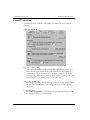
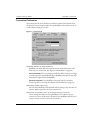
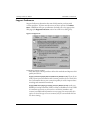
RealPlayer 8 Plus User Manual CHAPTER 7: Preferences Performance Preferences Settings on the Performance tab tailor system compatibility. In most cases you should not change them. However, you may find them helpful if you have an older system or if you are experiencing specific video problems (see Video/Display Problems on page 75). Figure 7-9: Performance tab Playback performance RealPlayer uses this setting to optimize the performance of clip playback. Change this performance setting only if your computer seems sluggish or has problems while playing content. Clip Cache: (Default is On) Some content is created so that frequently used media can be cached, or temporarily saved, so you dont have to stream the information again only a short time later. The next time you play the clip or other clips that use the cached information they will begin playing sooner than if you had to stream that information again. From this dialog you can Enable cache, select the cache file size (by using the slider) and clear the cache, by clicking Empty clip cache... Settings... 71