1
Vor Störungsbehebung unbedingt Euro-Stecker herausziehen !
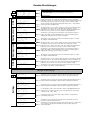
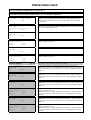
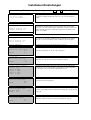
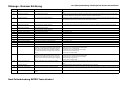
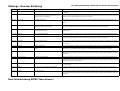
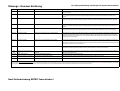
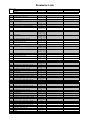
Störungs - Nummer Erklärung
Report no. Origin
Reason/Problem
Solution (when done solving the problem push the Enter button)
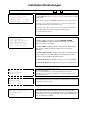
Display is blank and none of the green lights on the I/O
board are lit
Fuse F16 is broken or connection (clamps1,3) could be interrupted;
level indicator or STB defective.
Change fuse F16 (see the according scheme) or check the connection at clamps 1 and 3; check level indicator and STB connections;
Display is blank and green light H5 is not lit (while H4 is)
Ribbon cable connecting the board and control panel defective; Control Check the ribbon cable between I/O board and control panel; otherwise contact the service department;
panel or GSM module defective
Display is blank and green light H5 is lit
Ribbon cable not properly connected or control panel defective
Check the ribbon cable's connection or replace the cable or the control panel;
Display is blank 2 black bars shown on the display
EPROM is missing or plugged in incorrectly, control panel is broken
Plug in an EPROM at the backside of the control panel (according to the scheme on the guard plate) ; replace EPROM if it was plugged in
incorrectly or replace the control panel;
----
Display light not lit
Display light is broken
contact the service department; replace the control panel;
----
Fault light doesn't work
Fuse F17 destroyed by short circuit or fault light not connected
fix the short circuit; correctly connect the fault light or replace fuse F17 (see board and fuse scheme);
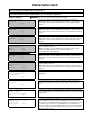
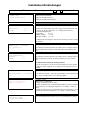
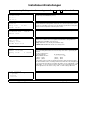
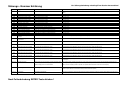
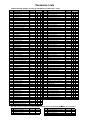
001
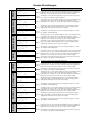
Safety thermostat (STB)
Over temperature at boiler or STB connection jammed
Cool down the boiler below 90°C; remove STB protection cap and press the button, otherwise have STB connection checked by an electrician; (short
term emergency operation is possible, see "operation without hardware test" at the end of error description)
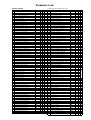
002
Overcurrent stoker auger
Combustion chamber jam-packed, stoker auger clogged by slag or
debris jamming rotary gate valve
While mode switch is set to "Manual"
- open the pusher grate (no.2), where required remove jam-packing or slag;
- check stoker auger, if the motor doesn't work correctly there most likely is debris stuck in the rotary gate valve; unscrew lid and remove pellets and
debris;
-contact the service department if the motor still doesn't work properly;
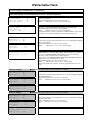
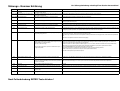
003
Overcurrent extraction auger
Extraction auger motor not connected properly or defective (Capacitor);
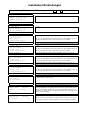
Extraction auger jammed (water or humidity in the storage room); Level
indicator defective or not adjusted properly;
Debris stuck in the extract auger;
Unscrew the extraction auger's maintainance lid and remove jamming pellets, check the storage room for water leaks or humidity; try to run the
motor into both directions while the mode switch is set to "Manual"; check the auger's direction of rotation by pressing the + and - buttons; if no
jamming parts can be found check or replace the motor and capacitor;
While the mode switch is in "Manual" position and either display no.7 or no. 7a is shown, check the level indicator and it's orange diode like this:
- if the display shows "empty" and the level indicator diode is lit while the intermediate bin is jam-packed, replace the level indicator;
If there is a suction turbine perform the following steps while in "Manual" mode:
- briefly rotate extract auger (no.6) backwards, remove both hoses, remove jam-packing and empty the hoses;
- start the suction turbine (no.5) and check it for free pass, where required clean the turbine;
Contact the service department if you find brown disposal;
If there is a pellet suction turbine, a jammed or defect turbine may be
the origin of the problem.
004
Thermal protection extraction auger
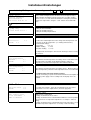
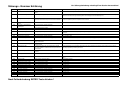
005
Ash box to be emptied
Extraction auger rough-running, jam-packed or jammed by debris;
Treat like error no. 003; indication for this fault if the motor has been rough-running for a while or fault no. 003 happens repeatedly;
auger motor (capacitor) defective.
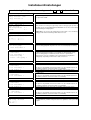
Ash box 3/4 full, pusher grate rough-running; the boiler will continue
Empty the ash box - thenn press Enter; if the ash box is not full, check if the pusher grate is rough running by pressing the + button while the mode
operation but will soon be affected by error no.006 and stop operation if switch is set to Manual and display no.2 is shown. (motor current must not exceed 0,9A),otherwise contact the service department;
the ash box is not emptied.
006
Ash box full
ash box overfilled or pusher grate rough running
007
Pusher grate won't open
008
Pusher grate won't close
Neither the open end position nor the closed end position have been
In "Manual" operation mode check if the pusher grate can be fully opened/closed using the +/- buttons; if it can't contact the service department;
correctly reached.
The closed end position hasn't been reached correctly (while the open see no. 007
end position has).
009
Overcurrent cleaning device
Cleaning device is rough-running
Nach Fehlerbehebung ENTER-Taste drücken !
see no.005
In "Manual" operation mode, check if the cleaning device is rough running; if the current is close to or above 5A contact the service department;