1
Menus
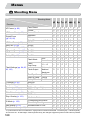
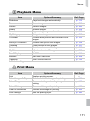
1 Playback Menu
Item
Options/Summary
Ref. Page
Slideshow
Erase
Plays back images automatically.
Erases images.
p. 113
p. 123
Protect
Rotate
Favorites
Protects images.
Rotates images.
Tag or untag images as favorites.
p. 120
p. 129
p. 127
My Category
i-Contrast
Categorizes images.
Corrects dark portions and contrast in still
images.
Corrects red eyes in still images.
Trims portions of still images.
Resizes and saves still images.
Adjusts colors in still images.
On*/Off
Last seen*/Last shot
Fade*/Scroll/Slide/Off
p. 125
p. 133
Red-Eye Correction
Trimming
Resize
My Colors
Scroll Display
Resume
Transition
* Default setting
p. 134
p. 131
p. 130
p. 132
p. 111
p. 154
p. 116
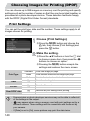
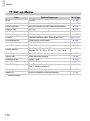
2 Print Menu
Item
Print
Select Images & Qty.
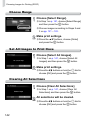
Select Range
Select All Images
Clear All Selections
Print Settings
Options/Summary
Displays printing screen.
Chooses individual images for printing.
Chooses starting and ending images for
printing.
Chooses all images for printing.
Cancels all settings for printing.
Sets the printing style.
Ref. Page
—
p. 141
p. 142
p. 142
p. 142
p. 140
171