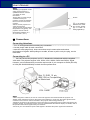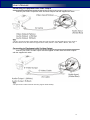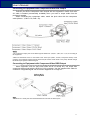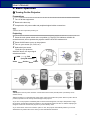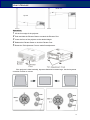
1
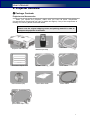
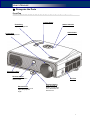
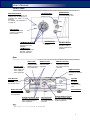
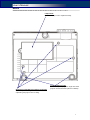
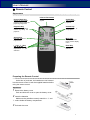
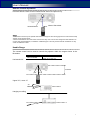
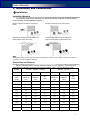
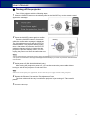
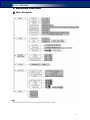
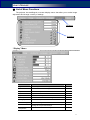
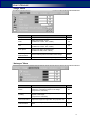
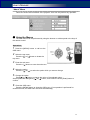
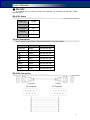
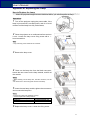
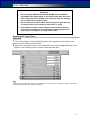
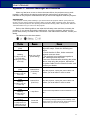
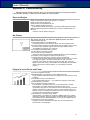
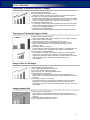
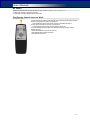
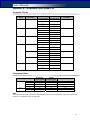
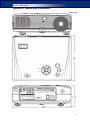
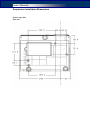
User’s Manual DLPTM Data Projector DX-400 DX-380 DX-300 DX-280 DS-250 User’s Manual Safety Instructions Please read this manual carefully before using your projector. Any action without specific description in this manual is regarded as unauthorized operation. It may cause errors and accidents. The manufacturer will not be responsible for the faults caused by unauthorized operations. All warnings on the product and in the operating instructions should be adhered to. Unplug this product from the wall outlet before cleaning. Do not use liquid cleaners or aerosol cleaners such as alcohol, benzene and thinner. Use a soft cloth damped with water for cleaning. Do not use this product where is capable being spilled by liquid. Slots and openings in the cabinet are provided for ventilation to ensure reliable operation of the product and to protect it from overheating, and these openings must not be blocked or covered. The openings should never be blocked by placing the product on a bed, sofa, rug, or other similar surface. This product should not be placed in a built-in installation such as a bookcase or rack unless proper ventilation is provided. A suitable place for the projector should be found before opening the package. Select a level and firm desktop or stand. Leave space of more than 20cm around the product to prevent internal heat build-up. Avoid using a common receptacle with the other electrical devices which are large power and easily to make the voltage fluctuating. Please use the supplied power cable. Don’t route the power cable that can be walked on. If the power cable or plug is damaged or frayed, Stop using and change a new one. Avoid using the projector in high temperature and high humidity environment. For example: under direct sunlight, near heat sources, in a dirty and smoky place. Remove lens cap while using. Do not stare into the beam of light, avoid to damage your eyes. To prevent the risk of electric shock or short circuit, never push objects of any kind into this product through openings. Do not attempt to service this product yourself, as opening or removing cabinet may expose you to dangerous voltage hazards. Refer all servicing to qualified personnel. Unplug the unit when unused for a long period. Be careful not to drop down the product when carrying and taking it. Turn off the projector, unplug the power cable and have the projector serviced by qualified service personnel under the following conditions: A:When the power cable or plug is damaged or frayed. B:If liquid has been spilled into the projector. C:If the projector has been exposed to rain or water. D:When you follow the instructions described in this user’s manual, but the projector does not operate normally. E:If the projector has been dropped or the cabinet has been damaged. F:When the projector exhibits a distinct change in performance, this indicates a need for service. i User’s Manual Safety Instructions of Lamp This projector utilizes an OSRAM® pressurized mercury lamp. The lamp will be very hot and bright when it is working. Do not open the lamp cover when the product is projecting. Do not knock, press or violently touch the lamp, it may cause the lamp ballast breaking. To replace the lamp, first turn off the projector, and unplug the power cable. If the lamp is just turned off, to avoid injuries, wait for 15 to 60 minutes until the lamp has fully cooled down, then open the lamp cover to replace the lamp. Refer to “Replacing the Lamp” on Page 23 for details. If the lamp bursts, the mercury inside the lamp will go out of the projector. Leave the area immediately if the lamp scatters while being operated and ventilate the area for at least 30 minutes. Otherwise it could be harmful to user’s health. In such a case, it is recommended you contact our sales service personnel, do not clean up the glass particles yourself. Do not look into the lens while the lamp lighting. It would damage your eyes. Because failure lamp contains mercury, when you want to dispose the failure lamp, please contact our sales service personnel for recycling. Or dispose of in accordance with local, state or federal laws. Notes: • This manual is subject to change without notice. • All the parts of this product are recyclable. When you dispose of this product, please contact the Jolimark service center or your local dealer to recycle without any paying. ii User’s Manual Before using the projector, please read this manual carefully. You can get below information: ◆ How to use the projector safely. ◆ How to use the remote control. ◆ How to install and connect the projector. ◆ How to turn on and turn off the projector. ◆ How to use the OSD(On Screen Display). ◆ How to replace the lamp. ◆ How to solve the frequent problems. Cautions: □ Please read the safety instructions carefully. Impropriety operations may cause the risk of fire, electric shock, human injury, or projector life time decreasing. □ When the red indicator is blinking, it indicates the projector is in protecting or warning status. Reasons and remedies refer to Appendix C on Page 25. iii User’s Manual Contents Safety Instructions .............................................................................................................. i Safety Instructions of Lamp............................................................................................... ii 1. Projector Features .......................................................................................................... 1 2. Projector Overview ......................................................................................................... 2 ① Package Contents ........................................................................................................ 2 Projector and Accessories ............................................................................................. 2 ② Recognize the Parts ..................................................................................................... 3 Front/Top ....................................................................................................................... 3 Control Panel................................................................................................................. 4 Rear............................................................................................................................... 4 Bottom ........................................................................................................................... 5 ③ Remote Control ............................................................................................................ 6 Appearance ................................................................................................................... 6 Preparing the Remote Control ....................................................................................... 6 Remote Control Operation............................................................................................. 7 Usable Range................................................................................................................ 7 3. Installation and Connections ......................................................................................... 8 ① Installation .................................................................................................................... 8 Installation Methods....................................................................................................... 8 Screen Size and Distance ............................................................................................. 8 ② Connections.................................................................................................................. 9 Connecting Attentions.................................................................................................... 9 Connecting to a PC ....................................................................................................... 9 Connecting to Equipment with Video Output ............................................................... 10 Connecting to Equipment with S-video Output ............................................................ 10 Connecting to Equipment with Component Video RCA Output ................................... 11 Connecting to Equipment with Component Video RGB Output ................................... 11 4. Basic Operation ............................................................................................................ 12 ① Turning On the Projector............................................................................................. 12 Preparations ................................................................................................................ 12 Projecting..................................................................................................................... 12 ② Adjusting the Image Size ............................................................................................ 13 ③ Adjusting the Projection Angle and Correcting Keystone ............................................ 13 ④ Turning off the projector.............................................................................................. 15 5. Advanced Functions..................................................................................................... 16 ① Menu Navigator .......................................................................................................... 16 ② List of Menu Functions................................................................................................ 17 “Display” Menu ............................................................................................................ 17 “Image” Menu .............................................................................................................. 18 “Autosync” Menu ......................................................................................................... 18 “Language” Menu ........................................................................................................ 19 “Advanced” Menu ........................................................................................................ 19 “About” Menu............................................................................................................... 20 ③ Using the Menus ......................................................................................................... 20 ④ RS-232C..................................................................................................................... 21 RS-232C Setup ........................................................................................................... 21 Control Commands...................................................................................................... 21 RS-232C Connection................................................................................................... 21 Appendix ........................................................................................................................... 22 Appendix A. Maintenance ............................................................................................... 22 Cleaning ...................................................................................................................... 22 Appendix B. Replacing the Lamp .................................................................................... 23 How to Replace the Lamp ........................................................................................... 23 iv User’s Manual Resetting the Lamp Timer............................................................................................ 24 Appendix C. Indicator Messages and Remedies............................................................. 25 Appendix D. Troubleshooting .......................................................................................... 26 Does not Project .......................................................................................................... 26 No Picture.................................................................................................................... 26 Picture is out of Focus and Fuzzy................................................................................ 26 Interference or Distortion Appear in Images ................................................................ 27 The Image is Truncated (Large) or Small .................................................................... 27 Image Colors are not Right.......................................................................................... 27 Images Appear Dark .................................................................................................... 27 No Sound..................................................................................................................... 28 The Remote Control does not Work ............................................................................ 28 Appendix E. Compatible Input Signal List ....................................................................... 29 Computer Picture......................................................................................................... 29 Component Video ........................................................................................................ 29 Appendix F. Appearance Dimensions.............................................................................. 30 v User’s Manual 1. Projector Features It is appreciated that you have bought the Jolimark® projector. This product is a high performance and rich functions multimedia projector which can meet your needs. The projector offers the following features: ◆ Optics by Carl Zeiss. ◆ Single chip TI DLP® technology. ◆ High brightness/High Contrast/Sharp Image. ◆ 4:3/16:9 screen aspect ratios adjustment. ◆ Auto input search. ◆ Keystone correction. ◆ Separable air filter. ◆ Quick power off (DX-280/300/380/400 only). ◆ Power-fail protection. ◆ Auto ceiling detection. ◆ Compatibility with NTSC, PAL, SECAM and HDTV. 1 User’s Manual 2. Projector Overview ① Package Contents Projector and Accessories When you unpack the projector, make sure you have all these components (Accessories and components may vary by dealer and region). If any of the components is missing or incorrect, please contact the dealer. Note: Please save the original shipping carton and packing material in order to transport the projector in the future. Projector with Lens Cap Remote Control Batteries (AAAX2) Guarantee Repair Card S-video Cable User’s Manual (CD) Quick Start Guide AV Cable Audio Cable Power Cable VGA Cable (HD D-SUB 15pin 1.8m) 2 User’s Manual ② Recognize the Parts Front/Top Control Panel Status Indicator Zoom Ring Adjust the image size. ON Indicator Focus Ring Adjust the image focus. Ventilation Holes Remote Sensor Receive signals from the remote control. Air Filter Elevator Button Elevator Foot Raise or lower the foot to adjust the projection angle. Press and hold the button, you can draw out or draw back the elevator foot. 3 User’s Manual Control Panel STATUS Indicator ON/OFF Button The color of the indicators and whether they are blinking or lit indicates the status of the projector. For details, see Appendix C on page 25. Turns the projector power on or off. MENU Button Displays or closes the on-screen display menu. ON Indicator Green light means the projector is working in good condition. [ ][ ][ ][ ] Button Select items or make adjustments to your selection. ENTER Button Confirms the selection. [ ][ ] Button Shortcut: Adjust image distortion caused by tilting the projector. SOURCE Button Selects RGB, (DVI), S-VIDEO, VIDEO, YCrCb signal source circularly. Rear S-Video Jack Connects to the S video output (Y/C video output) of video equipment. Video Jack Audio In Jack RS232 Connector Connects to the composite video (VIDEO) output of video equipment. Connect to the audio output of video equipment. Connects to a computer to operate the projector from the computer. USB Connector Connects to a computer for firmware update. Rear Remote Sensor Speaker Receive signals from the remote control AC Inlet Connects the supplied power cord. Audio Out Jack (stereo minijack) Power Switch Power On/Off Connects to external active speaker. Component Video Jack DVI Connector Connect to the Component video (YPbPr/YCbCr) of video equipment. Connects to the DVI digital output of computer Analog RGB Connector Connects to analog RGB output of computer or YCbCr of video equipment. Note: •DVI Connector is only provided in DX-380/400。 4 User’s Manual Bottom Lamp Cover Remove the lamp cover to replace the lamp. Tilt-Adjustment Foots Suspension bracket fixing points (4 points) Extend to adjust the projection angle so that the projector is horizontal when placed on desktop. Install the optional ceiling mount here when suspending the projector from a ceiling. 5 User’s Manual ③ Remote Control Appearance Infrared Transmitter Picture Mode Key Selects the appropriate picture mode to match the projecting image best. Outputs remote control signals. On/Off Key Turns on/off the projector. Keystone Key Volume Key Adjust image distortion caused by tilting the projector. Adjust volume of the projector Source Key Menu Key Manually selects an input source. Displays or closes the on-screen display menu. [ ][ ][ ][ ] Key Enter Key Select items or make adjustments to your selection. Confirms the selection. Preparing the Remote Control At the time of purchase, the batteries are not inserted into the remote control. Insert the supplied batteries before using the remote control. 电池仓盖 Operations: 1 Remove the battery cover Push and slide the cover to open the battery cover. 2 Insert the batteries Make sure the polarities correctly match the ○ + and - marks inside the battery compartment. ○ 3 Put back the cover 6 User’s Manual Remote Control Operation Point the remote control to the infrared remote sensor and press a key. Infrared Sensor Infrared Transmitter Notes: • The remote control may not operate when there is sunlight or other strong light such as a fluorescent lamp shining on the remote sensor. • Remove the batteries from the remote control once they have run out and change two new batteries. Do not mix new and old batteries, or batteries of different types. This may shorten the life on batteries or may cause old batteries to leak. Usable Range The remote control can be used to control the projector within the ranges shown in the illustration. Reception Distance About 7m/22feet Reception Angle Horizontal ±30° Upper 30° / Lower 15° Horizontal ±30° 7m/22feet 30° 30° Upper 30°, Lower 15° 30° 15° Hanging on ceiling 30° 7 User’s Manual 3. Installation and Connections ① Installation Installation Methods The projector supports the following four different projection methods. Install according to the condition of the installation location. •Project images from behind a translucent screen. •Project images from front of the screen. •Suspend the projector from the ceiling and project images before the screen. •Suspend the projector from the ceiling and project images behind a translucent screen. Note: •An optional ceiling mount is required when suspending the projector from a ceiling. Contact your dealer if you want to use this installation method. Screen Size and Distance See the following table to choose the best position for your projector. There may be a slight different between the actual value and the design value, use the table as a guide. MODEL DS-250、DX-280、DX-300 Throw ratio 1.94 2.27 Screen Size (feet) Minimum Distance (cm) Maximum Distance (cm) 40 158 60 DX-380、DX-400 1.8 2.1 (cm) Minimum Distance (cm) Maximum Distance (cm) (cm) 185 8.7 146 171 7.5 237 277 13.8 219 256 11.3 80 315 370 19.0 293 342 15.1 100 394 461 21.7 366 427 18.9 120 473 553 26.0 439 512 22.7 150 591 692 32.5 549 640 28.3 180 710 830 38.1 658 768 34.0 200 788 923 41.9 732 853 37.7 250 986 1158 52.5 914 1066 47.1 300 1183 1384 65.0 1098 1279 57 A * ○ A * ○ 8 User’s Manual Notes: •Installing your projector on the ceiling must be done by a qualified technician. Contact your dealer for more information. •Ensure that you have enough ventilation around your projector so heat can dissipate. Do not cover the vents of the projector. •Do not use the projector in a smoky environment. •Do not use the projector where temperatures vary greatly. The projector must be used at temperatures between 41℉ (5℃) and 104℉ (40℃). Screen A ○ is the distance between lens center and screen bottom (top of screen for ceiling application). ② Connections Connecting Attentions • Turn off all equipments before making any connection. • Use the proper cable for each connection. • Insert the cable plugs firmly, loose connections may increase noise and reduce performance of signals. When pulling out a cable, be sure to pull it out by the plug, not the cable itself. Connecting to a PC You can connect the projector to a PC, a Notebook or a Macintosh with the supplied VGA cable. The projector support VGA, SVGA, XGA, WXGA, SXGA and SXGA+ signal. However, we recommend that you set the output mode of your computer to SVGA (DS-250) or XGA (DX-280/300/380/400) to obtain the best performance. Notes: •When using with a notebook, be sure to connect the projector and notebook while the projector is in standby mode and before turning on the power of the notebook. In most case, the output signal from the notebook is not turned on unless connected to the projector before being powered up. •Displaying an image on the notebook’s LCD screen does not necessarily mean it outputs the signal to the projector. Usually, a combination function keys can enable/disable the external display. For details, refer to the operation instructions supplied with your notebook. •Do not tie your VGA cable and power cable together. Otherwise the picture signal will be interfered. 9 User’s Manual Connecting to Equipment with Video Output Connect your DVD’s composite video and audio outputs with the supplied AV cable. Note: •Usually, connect the video signal with the yellow line of the AV cable. And the white line for mono audio or the left of stereo audio, the red line for right of stereo audio (Yellow = Video, White = Mono/L, Red = R). Connecting to Equipment with S-video Output Connect your DVD’s S-video output with the supplied S-video cable and audio outputs with the supplied AV cable. Note: •The pins of the S-video connector are slim, plug the cable carefully. 10 User’s Manual Connecting to Equipment with Component Video RCA Output Connect your DVD’s component video outputs with the supplied AV cable. One more AV cable is needed (commercially available) when you want to output audio from the projector’s speaker. When connecting the component cable, match the jack colors with the component cable (Green = Y, Blue = Pb, Red = Pr). Notes: •The component output jacks of the DVD might be labeled as Y,Pb,Pr / Y,B-Y,R-Y / Y,Cb,Cr according to the equipment. •When non-interlaced source is connected to the video input (Video, S-video, Component Video) of the projector, the projecting images might be abnormal (the screen would divide to two parts). Please change the DVD output signal to interlaced signal. Connecting to Equipment with Component Video RGB Output Some equipment, such as some new DVDs and D-TV set-top box, can output their component video signal with the RGB (or VGA) connector. Use the supplied VGA cable for connection. Supported signal can be found in Appendix E on Page 29. DVD or D-TV Set-Top BOX Note: •The Audio In L and R jacks are shared between the VGA and all videos inputs. 11 User’s Manual 4. Basic Operation ① Turning On the Projector Preparations 1 2 3 Turn off all the equipments. Remove the lens cap. Complete the AC power cable and peripheral signal cables connections. Note: •Remove the lens cap before powering on. Projecting 1 Press the main power switch to the on position (I).The STATUS Indicator will blink for several seconds, do not operate the projector until the STATUS Indicator is lit. 2 3 4 Press On/Off button to turn on the projector. Turn on your source (PC, DVD, etc). Select the input source. Each time you press the SOURCE button, the input signal switches as follow: VGA Video Light DVI (Only DX-380/400) S-video YCbCr Notes: •The Projector has two power switches: a main switch and a Power (On/Off) button (On/Off Key on the remote control). •Before plugging in or unplugging the power cable, make sure that the main power switch is push to the off position (O). Failure to do so may cause damage to the projector. •If you turn on the projector immediately after an abnormal shutting down, the lamp’s temperature is high, the projector will start the Power-fail protection: The ON Indicator blinks, the fans run without displaying an image for some time and then the projector is put into standby mode. •If you have set the “Auto Source Select” option to “ON”, the projector automatically detects your source. Otherwise it only detects the source which you had selected the latest time. 12 User’s Manual ② Adjusting the Image Size The image size is determined by the distance between the projector and the screen. Operations: •Slide the Zoom Ring to adjust the image size. •You can only enlarge the image by 1.16 times at most by sliding the Zoom Ring. If you want more, position the projector farther away from the screen. •Rotate the Focus Ring to focus the image. •A still image is recommended for focusing. Notes: •It is hard to focus the image when there is stain or condensation on the lens. Please remove them first. •The optimal projection distance is range 1 to 5m. You can not focus the image exactly outside the range. ③ Adjusting the Projection Angle and Correcting Keystone Place the projector on a flat surface and ensure that it is square to the screen. If the projected image does not appear square to the screen then use the Elevator Foot and the Tilt Foot to adjust. With them you can adjust the projection angle approximately15° in vertical direction. 13 User’s Manual Down 15° 15° Up 15° 15° Operations: 1 Lift the front edge of the projector. 2 Push and hold the Elevator Button to extend the Elevator Foot. 3 Lower the front of the projector to the desired height. 4 Release the Elevator Button to lock the Elevator Foot. 5 Rotate the Tilt-Adjustment Foots to make fine adjustment. If the projector is tilted vertically, keystone distortion becomes large. Use the keystone correction function to correct. 14 User’s Manual ④ Turning off the projector Turn off the projector with the following steps. 1 Press the ON/OFF button on the cabinet panel or the ON/OFF key on the remote control. Appear the message: 2 Press the ON/OFF button again to confirm. Press the ON/OFF button in 5 seconds while the confirmation message is displayed. The ON Indicator turns off and the STATUS Indicator blinks. The projector starts cooling down. After about 60 seconds, the STATUS Indicator changes to light. It means that the projector is put into standby mode. You can unplug the power cord from the wall outlet now. Blinking Notes: •Do not disconnect the main power supply during projection. •The power off confirmation message will disappear automatically if you have not press the ON/OFF button in 5 seconds. 3 Quick power off (DX-280/300/380/400 only). After turning the projector’s power off, you can disconnect the power cable without having to wait for the projector to cool down first. Note: •DS-250 has not the quick power off function, do not remove the power supply until the cooling completes. 4 Retract the Elevator Foot and the Tilt-Adjustment Foots. The front cabinet will be very hot while the projector is just turning off. Take careful please. 5 Cover the lens cap. 15 User’s Manual 5. Advanced Functions ① Menu Navigator 16 User’s Manual ② List of Menu Functions The projector has multilingual on-screen display menus that allow you to make image adjustment and change a variety of settings. Top Menu Sub Menu “Display” Menu Sub Menu Function Brightness Set the brightness of the image. Default 50 Contrast Set the difference between light and dark areas. 50 Keystone Correct the keystone distortion. 0 Volume Adjust the volume. Aspect Ratio Select the video aspect ratio. 0 Native Backdrop Color Select the screen color while having no source. Blue Scaling Options Select how the picture fits on the screen. White Peaking Increase the brightness of white areas. Select the factory presets optimized for various types of image to suit your surroundings. Scene Mode Color Temperature Adjust the overall tint of the image. Native 10 Computer Standard 17 User’s Manual “Image” Menu Sub Menu Function Sharpness Sharpen or soften the image. Default 50 Color Adjust the intensity of colors. (available in S-video, Video, YPbPr) 50 Tint Shift colors toward red or green. (available in S-video, Video, YPbPr) 50 Color Space Set the color space for signals input. (available in RGB, YCbCr, YPbPr) - Wide Image Vertical Position Set the vertical position of the wide screen image. Full Screen Project the S-video or Video image fully in the widow. Middle OFF “Autosync” Menu Sub Menu Function Default Phase You can adjust computer images when flickering, fuzziness, or interference appear in the image. (only active in VGA mode) 50 Tracking You can adjust computer images when vertical stripes appear in the image. (only active in VGA mode) 50 Horizontal Position Adjust the image left or right within the projection area. 0 Vertical Position Adjust the image up or down within the projection area. 0 18 User’s Manual “Language” Menu Sub Menu Function Default English Set the OSD language to English. - 中文 Set the OSD language to Chinese. - “Advanced” Menu Sub Menu No Signal Power Off Auto Power Off Low Consume Mode Gamma Auto Source Select Rear Ceiling Factory Reset Lamp Reset Function When this option is selected you can enable the projector to automatically turn off (at the selected time: 3,6,9,12 min.) if there is no signal received by any input. If no operation is performed for specific period of time, the projector automatically turn off. Use this function to dim the projector lamp light output which will lower power consumption and increase lamp life. Do not switch between the normal mode and the low consume mode frequently, for this will decrease the lamp life. Select the desired gamma position. Default Automatically scan the input source. Flip the projection image horizontally. Use the function while projecting images from behind a translucent screen. Flip the projection image vertically. Use the function while suspending the projector from the ceiling and projecting images from front of the screen. Reset all items in all menus to their default settings. Clear the cumulative lamp hours use time, and return it to “0”. Reset it when you had just replaced the lamp. OFF OFF OFF OFF RGB OFF OFF - 19 User’s Manual “About” Menu This menu shows the information of the projector. User can not perform any operation. ③ Using the Menus The OSD menus can be performed by using the buttons on cabinet panel or the keys of the remote control. Operations: 1 Press the [MENU] button to call out the OSD menu. 2 Select the top menu. Press the [ ] or [ ] button to locate the top menu. 3 Enter the sub menu. Press the [ ] button to enter the sub menu. 4 Select the option. Press the [ ] or [ ] to select the option which you want to change. 5 Change the option. Press [ ] or [ ] button to change the value of the selected option. Some options are changed by [ ] or [ ] button, some need to use the [Enter] button to confirm. 6 Close the OSD menu. Press the [MENU] button to close the OSD menu. (If no operation is performed for several seconds, the OSD menu will close automatically.) 20 User’s Manual ④ RS-232C A computer can be used to control the projector by connecting a RS-232C cable between them. RS-232C Setup Baud rate 115200 Data length 8 Parity bit None Stop bit 1 Flow control None Control Commands Send command codes listed in the following table to control the projector. Operation ASCII HEX Power On JKON 4Ah 4Bh 4Fh 4Eh Power Off JKOF 4Ah 4Bh 4Fh 46h [ ] JKUP 4Ah 4Bh 55h 50h [ ] JKWN 4Ah 4Bh 57h 4Eh [ ] JKLF 4Ah 4Bh 4Ch 46h [ ] JKRI 4Ah 4Bh 52h 49h MENU JKME 4Ah 4Bh 4Dh 45h SOURCE JKSU 4Ah 4Bh 53h 55h Enter JKSE 4Ah 4Bh 53h 45h RS-232C Connection To Computer To Projector 21 User’s Manual Appendix Appendix A. Maintenance Cleaning Clean the projector if it becomes dirty or if the quality of projected images starts to deteriorate. Turn off the projector and unplug the power cable before any cleaning. Cleaning the Projector’s Surface Clean the projector's surface by wiping it gently with a soft cloth. If the projector is particularly dirty, moisten the cloth with water containing a small amount of water or neutral detergent, and then firmly wring the cloth dry before using it to wipe the projector's surface. Note: • Do not use volatile substances such as wax, alcohol, or thinner to clean the projector's surface. The quality of the case may change or become discolored. Cleaning the Lens Use a commercially available cloth for cleaning glasses to gently wipe the lens. Note: • Do not rub the lens with harsh materials or subject the lens to shocks, as it can easily become damaged. Cleaning the Air Filter If dust collects on the air filter, it blocks the air flowing, and causes the internal temperature of the projector to rise. This can lead to problems with operation and shorten the optical engine's service life. Operations: 1 Remove the filter by pulling down on the catch of the filter. 2 Clean the air filter, the exhaust vents and the intake vents with a vacuum cleaner. 3 Reinstall the filter. Air Filter Catch Notes: •It is recommended that you clean the air filter every 100 hours of operation. If the projector is using in a particularly dusty and smoky environment, clean the air filter and the vents more often. •If the dust can not be removed from the air filter, replace the air filter with a new one. For details on new air filter, consult with your dealer. 22 User’s Manual Appendix B. Replacing the Lamp How to Replace the Lamp When the projected images become dark and sallow, you should replace the lamp. Operations: 1 Turn off the projector unplug the power cable. If the lamp is just turned off, to avoid injuries, wait for 15 to 60 minutes until the lamp has fully cooled down, 2 Place the projector on a cushioned surface and turn it over. Loosen the lamp cover fixing screw with a + head screwdriver. Lamp Cover Note: • Only one fixing screw needs to be loosened. 3 Remove the lamp cover. 4 Draw out the lamp wire from the black connector, loosen the two screws on the lamp module, and lift out the module. Notes: • When drawing out the lamp wire, hold the connector, not the wire. • Be careful not to touch the glass surface of the lamp. 5 Insert the new lamp module, tighten the two screws, and connect the lamp wire. Notes: • Ensure the screws are tightened properly. • Jolimark replacement lamp module: Optional Spare Lamp Module Applying Projector JMSP010 DS-250/DX-280/DX-300 JMSP020 DX-380/DX-400 6 Replace the lamp cover. Loosen the fixing screw. 23 User’s Manual Cautions: □ Use a Jolimark JMSP010 (DS-250/DX-280/DX-300) or JMSP020 (DX-380/DX-400) lamp module as the replacement lamp. Using the other lamps may cause damage to the projector and our company will not offer the free repair for that. □ Do not remove the lamp module from the projector right after use. The lamp will be very hot and may cause burn or injury. □ This product includes a lamp component that contains mercury (Hg). Please consult your local regulations regarding disposal or recycling. Do not dispose of it with normal waste. Resetting the Lamp Timer Operations: 1 Turn on the projector. Press the [MENU] button of the projector’s control panel or the remote control to call out the OSD menu. 2 Select the “Lamp Reset” option in the “Advanced” menu, press the [ENTER] button of the projector or the remote control to confirm to reset the lamp timer. Note: • Reset the lamp timer only after you had replaced a new lamp. Do not reset the timer as your likes. Otherwise the lamp life alarm clock will be failure. 24 User’s Manual Appendix C. Indicator Messages and Remedies When any fatal error occurs or the environment effects, the projector can not work normally. It will perform the warning and protection mechanism to protect itself. The indicators on the projector will illuminate to let you know what happens inside the projector. Important Note: • If the projector lost the power suddenly or you had shut down the projector with the “quick power off” function, and you want to restart the projector within 10 minutes. While connecting power, the projector starts the power-fail protection: fans spinning and ON Indicator blinking. Wait 1 minute please. When the STATUS Indicator is lit, you can turn on the projector. Refer to the following table to see what the indicators mean and how to remedy the problems. If you cannot deal with the malfunction, turn off the projector, disconnect the power cable, and try to restart it after 10 minutes. If the malfunction continues, contact your dealer. The indicators provide three states: Status Reason Remedy High Temp Error (Overheating) The lamp turns off automatically and projection stops. Check the following two points. • Check that the air filter, intake vents and exhaust vents are clear. • The projector is not positioned against a wall. Nothing blocks the vents. If the error continues after checking the points above, stop using the projector, disconnect the power cable from the electrical outlet, and contact your dealer. STATUS Indicator (Red) Blinking Cycle(0.1 sec on, 0.1s off, after blinking for 5 times, 2 sec off) STATUS Indicator (Red) Blinking Cycle(0.1 sec on, 2 sec off) Internal Error (ColorWheel Error) Stop the projector, unplug the power cable, and contact your local dealer or service center. Internal Error (Fan Error) Stop the projector, unplug the power cable, and contact your local dealer or service center. STATUS Indicator (Red) Blinking Cycle(0.1 sec on, 0.1 sec off) STATUS Indicator (Red) Blinking Cycle(1 sec on, 1 sec off) ON Indicator (Green) Blinking Cycle(0.5 sec on 0.5sec off) for at most 50 seconds Lamp Error Environment temperature must be between 0℃ to 40℃. Power-fail Protection It is caused by having loosened power suddenly or the "Quick power off". Wait one minute. When the STATUS Indicator is lit, you can turn on the projector. 25 User’s Manual Appendix D. Troubleshooting Please read the following section when you encounter problems in using the projector. If the problem persists, contact your local dealer or service center. Does not Project •Have you pressed the main power switch to “I” position? •Have you removed the lens cap? •Have Remote control batteries run out. •Did you replace the lamp just now? Ensure that the lamp wire has been connected while replacing the lamp. •Did the projector lose power suddenly and you want to restart it within 10 minutes? Just wait 1 minute. Refer to Page 25. No Picture No picture, but when you press the [MENU] button, the OSD menu can be call out. •Is the projected picture completely black? Some input pictures, such as screen saver, may be completely black. •Do the input signal resolution and the refresh rate correspond to the mode? Ensure that your projector supports the input signal. Please refer to “Compatible Input Signal List” in Page 29. •Is the image signal format setting correct? •Are the cables connected correctly? •Is the correct input port selected? Change the image by pressing the [SOURCE] button on the control panel. •Is the power of the computer or video source turned on? •Is the signal being output to the projector? (Only for Notebook) If the signal is only being output to the notebook’s LCD monitor, you need to change the output to an external destination as well. For some notebook model, when the signal is output externally, they no longer appear on the LCD monitor. See details in the notebook’s documentation, under a title such as “External Output” or “Connecting an external monitor”. Picture is out of Focus and Fuzzy •Is the focus adjusted correctly? •Does the Elevator Foot extend too long to affect the focus? Large projection angle causes the focus departs from the center too much to adjust. •Is the projector at the correct distance? The recommended range is 1~5m, position the projector in this range. •Is there blemish on the lens? •Has condensation formed on the lens? If the projector is suddenly taken from a cold environment to a warm environment or if sudden ambient temperature change occurs, condensation may form on the surface of the lens, and this may cause the images to appear fuzzy. Place the projector in the room about one hour before it is used. If condensation forms on the lens, turn the projector off and wait for the condensation to disappear. •Is the resolution of the input signal native? If the projector is connecting to computer or RGB signal source, please change the resolution of the input signal to 800*600 85Hz (DS-250) and 1024*768 85Hz (DX-280/300/380/400), you can get the clearest picture. •Is the Keystone correction activated? Keystone correction will distort the image. Do not use the keystone function that is not necessary. 26 User’s Manual Interference or Distortion Appear in Images •Are all the cables tied together? •Is the image signal format setting correct? Change the setting according to the signal for the connected equipment. •Are “Phase” and “Tracking” settings adjusted correctly? Press the [SOURCE] button on the projector’s control panel or the remote control to search the signal again. If the images are not correct yet, adjust “Phase”, “Tracking” settings in the “Autosync” menu manually. •Is an extension cable being used? If an extension cable is used, electrical interference may affect the signals. Use the cables supplied with the projector to check if the cables you are using may be causing the problem. •Are the cables connected properly? Check that all the cables required for projection are securely connected. The Image is Truncated (Large) or Small •Is “Aspect Ratio” adjusted correctly? Adjust “Aspect Ratio” setting in the “Display” menu according to the signal. •Is “Full screen” adjusted correctly? Adjust “full screen” setting in the “Image” menu to “OFF”. •Are “Horizontal Position” and “Vertical Position” adjusted correctly? Adjust “Horizontal Position” and “Vertical Position” settings in the “Autosync” menu. •Is the correct resolution selected? Set the computer so that the signals being output are compatible with the projector. Please refer to “Compatible Input Signal List” in Page 29. •Is the computer set for dual display? If dual display is activated in the “Display Properties” of the computer’s control panel, only about half of the image on the computer screen is projected. To display the entire image on the computer screen, turn off the dual display setting. See details in the computer video driver documentation. Image Colors are not Right • Are the cables connected correctly? • Is the image brightness adjusted correctly? • Is the image contrast adjusted correctly? • Are “Color” and “Tint” settings adjusted correctly? • Is the lamp due for replacement? When the lamp is nearly ready for replacement, the images become darker and the color quality becomes poorer. When this happens, replace the lamp. •Do not match the CRT or LCD screen. Computer monitors and LCD screens have different color reproduction performance. So the colors projected by the projector and the colors appearing on the monitor may not necessarily match, but this is not a sign of a problem. Images Appear Dark • Is the lamp due for replacement? When the lamp is nearly ready for replacement, the images become darker and the color quality becomes poorer. When this happens, replace the lamp. • Is the image brightness adjusted correctly? • Is the image contrast adjusted correctly? 27 User’s Manual No Sound • Is the audio source connected correctly? • Is the volume setting adjusted to the minimum? The Remote Control does not Work ? • Is the infrared transmitter of the remote control pointing towards the infrared sensor on the projector when it is operated? The operating angle for the remote control is described in Page 7. • Is the remote control too far from the projector? The operating range for the remote control is about 7m. • Is direct sunlight or strong light from fluorescent lamps shining onto the infrared sensor? • Are there batteries in the remote control? • The batteries are inserted correctly? • Are batteries used out? 28 User’s Manual Appendix E. Compatible Input Signal List Computer Picture Signal Resolution VGA 640×480 SVGA 800×600 XGA 1024×768 SXGA 1152×864 1280×960 1280×1024 WXGA 1280×768 Horizontal Frequency(kHz) 31.5 Vertical Frequency(Hz) 60 37.9 72 37.5 75 43.3 85 37.9 60 48.1 72 46.9 75 53.7 85 48.4 60 56.5 72 60 75 68.7 85 63.8 70 67.5 75 77.1 85 60 60 70 70 75 75 64 60 75 70 80 75 47.8 60 60.3 75 68.6 85 Input Port VGA、DVI VGA、DVI VGA、DVI VGA VGA VGA、DVI VGA Component Video Signal SDTV HDTV 480i 576i 480p 576p 720p 1080i Horizontal Frequency(kHz) 15.8 15.6 31.5 31.3 45 33.8 Vertical Frequency(Hz) 60 50 60 50 60 60 Input Port S-Video、Video、YCbCr S-Video、Video、YCbCr VGA VGA VGA VGA Note: • Even when signals other than those mentioned above are input, it is likely that the image can be projected. However, not all functions may be supported.. 29 User’s Manual Appendix F. Appearance Dimensions (Unit: mm) 30 User’s Manual Suspension Installation Dimensions Screws spec: M5 Unit: mm User’s Manual Class A This is a Class A product. In a domestic environment this product may cause radio interference in which case the user may be required to take adequate measures. JIANGMEN KONGYUE JOLIMARK INFORMATION TECHNOLOGY LTD. Add: KongYue Industrial Park, 18 KongYue Road, JinGuZhou Zone, XinHui District, JiangMen City, GuangDong Province, P.R.C. Post Code: 529141 Service Tel: 800-8308198 Fax: (86) 750 6390382 Web Site: Http: //www.jolimark.com.cn