1
User Manual
Menu 13: Accounts Payable
Accounts Payable
Contents
MENU 13: ACCOUNTS PAYABLE
TABLE OF FIGURES
Purpose
Basic Procedure
Daily Processing
Month-End Processing
Annual Processing
After December Fiscal Period
Basic A/P Process
13.1
VOUCHER ENTRY
13.1.1
13.1.1A
13.1.2
13.1.3
13.1.4
13.1.5
13.1.6
13.1.7
13.1.8
13.1.9
13.1.10
13.1.11
13.2
CASH DISBURSEMENTS
13.2.1
13.2.1A
13.2.2
13.2.3
13.2.4
13.2.5
13.2.6
13.2.6A
13.2.7
13.2.8
13.2.9
13.2.10
13.2.11
13.2.12
13.2.13
13.2.14
13.3
Voucher Input
Open Batch Listing
Voucher Maintenance
Voucher Maintenance by Vendor
Voucher Deletion
Sequential Voucher Register
Daily Handcheck Register
Daily Expense Distribution Reports
Recurring Voucher Input/Maintenance
Recurring Voucher Listing
Recurring Voucher Update
Open Accounts Payable Maintenance
A/P Payment Schedule (Aged)
A/P Summary Payment Schedule
Scheduled Cash Disbursements
Cash Disbursements (by due date)
Cash Disbursements (individual vouchers)
Clear Check Print File
A/P Check Print
Laser Checks
Check Register
Bank Activity Report
Bank Reconciliation Entry
Bank Reconciliation Listing
Check Reversal
Open Payables on Hold Report
Due Date Update on Item Past Cash Discount
Void Unused Checks
MONTH-END REPORTS
13.3.1
13.3.2
13.3.3
13.3.4
13.3.5
Expense Distribution Register
Sequential Voucher Listing
A/P Check Register & Paid Invoice Register
Hand Check Register
Month-End C/D Summary
4
5
5
5
6
6
7
7
10
10
13
14
15
15
16
16
16
17
20
20
20
22
22
22
23
24
25
25
25
26
27
27
27
28
29
30
30
30
31
31
32
32
32
32
13-2
Accounts Payable
13.3.6
13.3.7
13.3.8
13.3.10
13.3.11
13.4
13.4A
13.5
13.5A
13.5B
13.6
13.7
13.8
MONTH-END JOB STREAM
ACCOUNTS PAYABLE/GL TAPE BACKUP
VENDOR PAYABLES INQUIRY
VENDOR PURCHASE HISTORY INQUIRY
VOUCHER/PO INQUIRY
OPEN ACCOUNTS PAYABLE LISTING
ACCOUNTS PAYABLE VENDOR CARD
1099 PROCEDURES
13.8.1
13.8.2
13.8.3
13.8.4
13.8.5
13.10
13.11
13.20
1099 File Adjustment Entry/Maintenance
1099 Vendor File List
1099 Form Print
1099 Forms on Tape
1099 File Purge
VENDOR-CUSTOMER LISTING
A/P INVOICE VERIFICATION LIST
NEW ACCOUNTS PAYABLE
13.20.1
13.20.2
13.20.3
13.20.4
13.20.5
13.20.6
13.20.7
13.20.11
13.20.12
13.20.13
13.20.14
13.20.15
13.20.16
13.25
Open Accounts Payable Listing
Vendor File Month/Year-End Update
Temporary Vendor Deletion
Update Vendor History File
Voucher History Report
Accounts Payable Voucher Input
Purchase Order Receipts Update to A/P
Auto Post Corp Invoices
Open Batch Listing
Sequential Voucher Register
Daily Handcheck Register
Purchase Order Receipts Not Invoiced
Print Corp Packing List
Print Corp Invoices
Build Corp Invoice Receipt File
Match Receiving to Corp Invoice
Receiving Invoice Reconciliation Report
Rebuild Corp Invoice File
ASSIGN PRINTER
33
33
33
33
33
33
34
34
35
35
36
36
38
38
38
39
39
39
39
40
41
41
46
47
48
49
49
49
49
50
51
51
51
52
52
APPENDIX
53
INDEX
55
13-3
Accounts Payable
Table of Figures
Figure 13-1. Accounts Payable main menu...................................................................................... 5
Figure 13-2. Basic Accounts Payable new process .....................................................................10
Figure 13-3. Basic Accounts Payable old process .......................................................................10
Figure 13-4. Accounts Payable Voucher Selector ...........................................................................10
Figure 13-5. Voucher Control Entry ...............................................................................................11
Figure 13-6. Voucher Input−blank screen.......................................................................................12
Figure 13-7. Voucher Input−filled in..............................................................................................13
Figure 13-8. Open Batches Voucher List........................................................................................14
Figure 13-9. Voucher Maintenance ................................................................................................14
Figure 13-10. Voucher Maintenance by Vendor .............................................................................15
Figure 13-11. Voucher Deletion.....................................................................................................16
Figure 13-12. Expense Distribution Register ..................................................................................17
Figure 13-13. Recurring Voucher Maintenance−blank screen .........................................................18
Figure 13-14. Recurring Voucher Maintenance−filled in ................................................................19
Figure 13-15. Recurring Voucher Maintenance− ............................................................................19
Figure 13-16. Recurring Voucher Listing .......................................................................................20
Figure 13-17. Voucher Washout Entry−blank screen ......................................................................21
Figure 13-18. Accounts Payable Cash Disbursement menu.............................................................22
Figure 13-19. A/P Payment Schedule .............................................................................................23
Figure 13-20. Scheduled Cash Disbursement..................................................................................24
Figure 13-21. Cash Disbursement Journal ......................................................................................25
Figure 13-22. Bank Maintenance....................................................................................................26
Figure 13-23. Bank Reconciliation.................................................................................................28
Figure 13-24. Bank Reconciliation.................................................................................................29
Figure 13-25. Check Reversal Entry (regular checks) .....................................................................30
Figure 13-26. Accounts Payable Month-End Reports menu ............................................................31
Figure 13-27. Expense Distribution Register ..................................................................................32
Figure 13-28. Vendor Payables Inquiry ..........................................................................................34
Figure 13-29. Vendor Purchase History Inquiry..............................................................................35
Figure 13-30. Voucher and Purchase Order Inquiry ........................................................................35
Figure 13-31. Accounts Payable Open Activity report ....................................................................36
Figure 13-32. Vendor Ledger (by company) ..................................................................................37
Figure 13-33. Vendor Ledger (consolidated) ..................................................................................37
Figure 13-34. Accounts Payable 1099 menu...................................................................................38
Figure 13-35. 1099 Vendor File report ...........................................................................................39
Figure 13-36. Vendor-Customer Listing .........................................................................................40
Figure 13-37. AP Invoice Verification List.....................................................................................40
Figure 13-38. New Accounts Payable menu ...................................................................................41
Figure 13-39. New Accounts Payable Voucher Entry .....................................................................42
Figure 13-40. A/P Voucher Input (blank screen).............................................................................43
Figure 13-41. A/P Maintenance−G/L Distribution ..........................................................................44
Figure 13-42. Voucher Input (filled)...............................................................................................44
Figure 13-43. Auto Update A/P from PO Receipts..........................................................................47
Figure 13-44. Open Voucher Batches Listing .................................................................................48
Figure 13-45. Sequential Voucher Listing ......................................................................................49
Figure 13-46. Print Corp Pick Tickets ............................................................................................50
Figure 13-47. Print Corp Invoices ..................................................................................................51
Figure 13-48. Printer Assignment...................................................................................................52
13-4
Accounts Payable
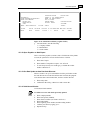
Menu 13
Accounts Payable
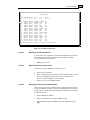
MENU-13
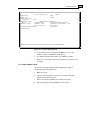
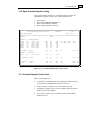
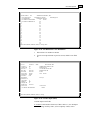
ACCOUNTS PAYABLE MENU
14:08:45 27 Jun 1998
1 JSS.TEST dbs
--Input & Update------------------1. Voucher Entry
20. New Accounts Payable
2. Cash Disbursements
3. Month-End Reports
4A.Accounts Payable/GL Tape Backup
4. Month-End Job Stream
--Inquiries-------------5. Vendor Payables Inquiry
5A.Vendor Purchase History Inquiry
5B.Voucher/PO Inquiry
--Other---------6. Open Accounts Payable Listing
7. Accounts Payable Vendor Card
8. 1099 Procedures
10. Vendor-Customer Listing
11. A/P Invoice Verification List
25. Assign Printer
Figure 13-1. Accounts Payable main menu
Purpose
The Accounts Payable system is an online system for entering bills,
tracking open bills, and paying bills.
Basic Procedure
Daily Processing
Although not mandatory on a daily basis, run these reports after each
batch is complete, or after each check run, and at least once immediately
before the Month-End process:
1.
2.
3.
Sequential Voucher Register, with update (Menus 13.1.5 and 13.20.5)
Daily Handcheck Register, with update (Menus 13.1.6 and 13.20.6)
Check Register, with update (Menu 13.2.7)
If necessary, run the Daily Expense Distribution Register (Menu 13.1.7)
for each batch of vouchers as it is completed.
§
Run the Sequential Voucher Register with update every time a batch
of vouchers is entered into the system through Voucher Entry Input
(Menu 13.20.1 or Menu 13.20.2 or Menu 13.1.1 in the old program).
§
If any of the vouchers were paid with a handcheck, then run the
Handcheck Register with update immediately following the Sequential
Voucher Register.
13-5
Accounts Payable
§
Run the Check Register with your Check Run procedure.
Month-End Processing
The Month-End process does the following;
q
q
q
q
q
q
q
Updates the 1099 file for vendors (with the 1099 flag)
Deletes voucher history for pay dates over 100 days prior
Updates the GLA (General Ledger Activity) file
Resets the vendor month-to-date fields
Deletes fully-paid temporary vendors
Rolls the company record into the next A/P fiscal period
Generates these reports:
• Expense Distribution Register
• Monthly Sequential Voucher Register (by voucher and batch
number)
• Paid Invoice Register
• A/P Activity Report
• Monthly Check Register
• Monthly Handcheck Register
• Regular Checks Cash Disbursements Summary
• Handchecks Disbursements Summary
You may run Month-End from Menu 13.4; however, logging onto
"Month-End" and running option 2 is better since the reports are printed
as well as held in the spooler until the end of the month.
When you run Month-End from Menu 13.4, at the printer select
screen, follow the printer number with “H” (for example, “0H”) to
send the report to the spooler. The AP reports will remain in the
spooler for at least a couple of days, providing you the opportunity to
reprint them if the printer jams or another accident occurs.
Before you start the Month-End run, follow these steps:
1.
Check for any open batches for the period using Menu 13.1.1A and
Menu 13.20.4. If you spot any unbalanced batches, balance them or
delete them if empty.
2.
Run the Sequential Voucher Register, Menu 13.1.5 and Menu
13.20.5. This run should be free of open batches.
3.
Run the Check Register with update in Menu 13.2.7.
4.
Run the Handcheck Register with update in Menu 13.1.6 and Menu
13.20.6.
If one of the four steps above is missing, an error message display
recommending the next step. Once you enter the month ending date and
the fiscal period to close, the period is verified and the Month-End
processing begins.
Annual Processing
The Year-End process clears the vendor year-to-date purchases and
payment fields, and zeros out the year-to-date amounts. Only the year-todate informational fields are affected.
13-6
Accounts Payable
Run Year-End after the 12th fiscal period is closed from Menu 18.3,
Vendor File Year-End Update. This process is not lengthy, but you must
run it before any Accounts Payable work is added for the new fiscal year.
Do not enter any A/P work for the new fiscal year before running
Menu 18.3. If you do, none of the work will reflect in the Year-to-Date
totals after the run; however, it will not adversely impact the G/L or
the check-paying process.
After December Fiscal Period
This is an optional process for calendar year reporting of 1099 items. Use
Menu 13.8:
1.
Run Menu 13.8.2 for a printout of the vendor file.
2.
For any file adjustment entry and maintenance, use Menu 13.8.1.
3.
Run Menu 13.8.2 again for another printout of the vendor file list.
Verify your changes from Step 2.
4.
Run Menu 13.8.3 to print the 1099 forms on blank paper (for your
accountant) or load the 1099 forms first into the report printer before
running them. Enter the calendar year of payment, and then enter the
company numberrun only one company at a time.
5.
As long as you have a printed copy or form for your files, the 1099
tape backup procedure in Menu 13.8.4 is optional.
6.
Run Menu 13.8.5 to purge the files at the end of the calendar year.
Basic A/P Process
The flowchart on the next page gives you a visual understanding of the
basic Accounts Payable process. To help differentiate the menus within
the process, the diagram consists of various elements; they are
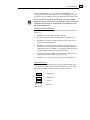
= required step
= optional step
= process
= document
13-7
Accounts Payable
Voucher Input
(System Checks)
Menu 13.20.1
Voucher Input
(from PO Receiving)
Menu 13.20.2
Daily Handcheck Register
Menu 13.20.6
Voucher Input
( from Corp invoices)
Menu 13.20.3
Voucher Input
(from Handcheck register)
Menu 13.20.1
Sequential Voucher Register
Menu 13.20.5
Sched. Cash Disbursement
Menu 13.2.2
Cash Disbursement (by due date)
Menu 13.2.3
A/P Check Print
Menu 13.2.6
and/or
Cash Disbursement (by voucher)
Menu 13.2.4
or
Laser Check Print
Menu 13.2.6A
Check Register
Menu 13.2.7
Figure 13-2. Basic Accounts Payable new process
13-8
Accounts Payable
System Checks
Menu 13.1.1
Voucher Maintenance
Menu 13.1.2
Handcheck (paid)
Menu 13.1.1
Sequential Voucher Register
Menu 13.1.5
Daily Handcheck Register
Menu 13.1.6
Sched. Cash Disbursement
Menu 13.2.2
Cash Disbursement (by due date)
Menu 13.2.3
A/P Check Print
Menu 13.2.6
and/or
Cash Disbursement (by voucher)
Menu 13.2.4
or
Laser Check Print
Menu 13.2.6A
Check Register
Menu 13.2.7
Figure 13-3. Basic Accounts Payable old process
13-9
Accounts Payable
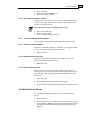
13.1 Voucher Entry
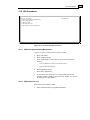
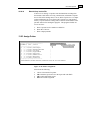
MENU-13.1
14:08:56 27 Jun 1998
--Input---------1. Voucher Input
ACCOUNTS PAYABLE VOUCHER SELECTOR
--Maintenance / Deletion--------------------------1A. Open Batch Listing
2. Voucher Maintenance
3. Voucher Maintenance By Vendor
4. Voucher Deletion
1 JSS.TEST dbs
--Recurring Vouchers----------------------8. Recurring Voucher Input/Maint
9. Recurring Voucher Listing
10. Recurring Voucher Update
--Washout Entry-----------------11. Open Accounts Payable Maintenance
--Registers with Update-------------------------5. Sequential Voucher Register
6. Daily Handcheck Register
--Reports-----------7. Daily Expense Distribution Reports
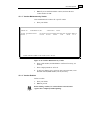
Figure 13-4. Accounts Payable Voucher Selector
We recommend you use Menu 13.20, New Accounts Payable, instead
of this menu.
13.1.1 Voucher Input
Creates and adds items that are or will be due; enters invoices as vouchers.
Applied totals should balance against control totals, so before you enter
invoices, run the tape to obtain the invoice count and total dollars to input.
a.
Type your initials and the Voucher Control Entry screen appears:
13-10
Accounts Payable
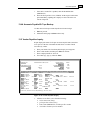
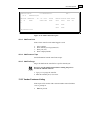
*** VOUCHER CONTROL ENTRY ***
BATCH#:
1. CO#:
2. PERIOD:
3. # OF VOUCHERS:
4. GROSS AMT $:
5. DUE DATE:
ENTER BATCH #,<RTN> FOR NEW BATCH #, OR 'END': NNNNNN
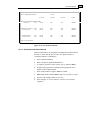
Figure 13-5. Voucher Control Entry
b.
Enter a batch number or Enter for a new number. A batch number, as
used in Accounts Payable, is a reference number used to keep track of
vouchers.
c.
Enter company number.
d.
Enter period (YYMM) to report.
e.
Enter the number of vouchers.
f.
Enter gross dollar amount.
g.
Enter due date of bill.
h.
Confirm by pressing Enter.
i.
Record the batch number and then Enter. The Voucher Input screen
displays:
13-11
Accounts Payable
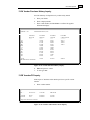
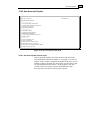
VOUCHER INPUT
MON: 9806
BATCH: 000947
VEND#:
NAME:
ADDR:
TERMS:
1.INV#:
4.GROSS:
8.WARR SEQ :
TRANSACTION CD (I/C/D/OA):
2.INV DT:
3.DUE DATE(OR PAID):
5.MERCH:
6.NON-DISC:
NET:
COMP: 01
7.DISC:
ENTER 'L' FOR LOOKUP, VENDOR #, 'END', 'INQ': AAAAAAAA
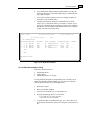
Figure 13-6. Voucher Input
j.
Enter a vendor number. To find a number, use 'l' for Vendor Lookup,
or 'inq' for the Inquiry Menu.
k.
Once you choose a vendor number, confirm the address associated
with it.
l.
Choose a transaction CD (Credit Memo/Debit Memo) for the type of
voucher you are entering. Your choices are 'I'nvoice, 'C'redit memo,
'D'ebit memo, or 'OA' on account.
m. Enter an invoice number.
n.
Type the invoice date.
o.
Enter a due or paid date (MM/DD/YY).
p.
Enter the gross dollar amount (total amount of bill paid).
q.
Enter the merchant amountthe gross amount minus any discounts
or fees taken by the vendor.
r.
Enter the discount amount.
s.
Enter the pay status CD. Press Enter for default "P" to pay the
voucher, or type 'n' to not pay it.
t.
Enter the bank number, or Enter for the previous bank.
u.
To pay this voucher on a separate check type 'y'; otherwise type 'n' or
press Enter.
v.
Type any miscellaneous description.
13-12
Accounts Payable
VOUCHER INPUT
VEND#: tammy
NAME: vanco
ADDR: 123 zero street
oregano, wa
TERMS: NET DAYS
1.INV#:111
4.GROSS: 1200.00
COMP:
MON:
BATCH:
97217
TRANSACTION CD (I/C/D/OA):i
2.INV DT:09/01/98
3.DUE DATE(OR PAID):09/01/98
5.MERCH: 123.00
6.NON-DISC: 1077.00 7.DISC: 10.00
9.PAY STATUS CD: P
NET: 1190.00
10.BANK#:001 WELLS FARGO
11.SNG CK: Y
12.MISC DESC:test
-
ENTER LINE# TO CHANGE,'DELETE' TO DELETE OR '0' TO ACCEPT THE HEADER:
Figure 13-7. Voucher Input−
− filled in
w. To accept this header screen type '0' and Enter. Or, enter a line
number to change, or 'delete' the header entirely.
x.
For standard general ledger numbers, press Enter to continue.
y.
Enter a GL code number to expense the voucher ("01-1200-00" is for
inventory).
13.1.1A Open Batch Listing
Lists all open Accounts Payable batches, including the amount of
vouchers and their total amount open.
a.
Enter to proceed.
b.
Choose your output option: '1' screen, or '2' printer. If choosing a
printer, specify which one to use.
c.
Enter a fiscal period (YYMM) or type 'all' for all periods.
d.
Once report displays or prints, Enter to return to menu.
13-13
Accounts Payable
09 Jul 1998
OPEN VOUCHER BATCHES LISTING
PAGE
1
(NOTE: FOR ANY BATCH, THE BATCH TOTALS SHOULD EQUAL THE VOUCHER TOTALS)
BATCH. .
SOURCE.........
PERIOD
#VOU
GROSS.AMT.
000947
BATCH TOTALS
9806
2
1200.00
BATCH TOTALS
9809
1
100.00
***
000946
***
[405] 2 items listed out of 2 items.
Figure 13-8. Open Batches Voucher List
13.1.2 Voucher Maintenance
Changes voucher data that is entered in Menu 13.1.1. Do not use this
menu to maintain any vouchers entered through Menu 13.20.
a.
Enter your initials.
VOUCHER MAINTENANCE
COMP: 01
391
GEM PRODUCTS, INC.
PO BOX 3245
GARDEN GROVE, CA
92842
TERMS: 2.00% 0 DAYS/NET 0 DAYS
TRANSACTION CD (I/C/D): I
8.INV#:1
INV DT:12/01/98
1.DUE DATE(OR PAID):01/10/99
2.GROSS: 2000.00
MERCH: 2000.00 NON-DISC: 0.00 3.
DISC: 40.00
MICRO#:
4.PAY STATUS CD:
P
NET: 1960.00
5.BANK#: 001 WELLS FARGO
6.SNG CK: N
VOUCHER NO -->> 01064387
7.MISC DESC:
VEND#:
NAME:
ADDR:
ENTER LINE# TO CHANGE,'X' TO EXIT OR '0' TO ACCEPT THE HEADER:
Figure 13-9. Voucher Maintenance
b.
Enter company number
c.
Enter voucher number.
d.
Edit a line, 'x' to exit, or '0' to accept the header.
e.
If you accept the voucher, Enter if it is correct or 'n' to enter the next
G/L code.
13-14
Accounts Payable
f.
Enter if you are satisfied with this voucher, and enter the next
voucher number or 'end.'
13.1.3 Voucher Maintenance by Vendor
Lists and maintains all vouchers for a specific vendor.
a.
Enter your initials.
***** VOUCHER MAINTENANCE BY VENDOR *****
VENDOR: 391
GEM PRODUCTS, INC.
VOUCH# VENDOR INVOICE#
01064387 1
A/P BALANCE:
2458.00
INV-DATE DUE-DATE GROSS-AMT DISC-AMT NET/OPEN BNK H S
12/01/98
01/10/99
2000.00
40.00
1960.00
001 P
ENTER VENDOR NUMBER 'L' FOR LOOKUP, OR 'E' TO END :
Figure 13-10. Voucher Maintenance by Vendor
b.
Enter vendor number, and then Enter to confirm. If necessary, use
'L'ookup.
c.
Enter company number or 'a' for all.
d.
To skip any changes, type a period, or enter a new Due Date, a new
Discount Amount, Bank Number, "H"old, and "P"ay.
13.1.4 Voucher Deletion
Deletes vouchers.
a.
b.
Enter your initials.
Enter to proceed.
Before deleting vouchers, be certain all check runs and check
registers have completely finished printing.
13-15
Accounts Payable
VOUCHER DELETION
COMP:
VEND#:
NAME:
ADDR:
TERMS:
INVNO:
GROSS:
INV DT:
MERCH:
TRANSACTION CD (I/C/D):
DUE DATE (OR PAID):
DISC:
NET:
ENTER COMPANY NUMBER OR 'END': ##
Figure 13-11. Voucher Deletion
c.
Enter company number.
d.
Enter voucher number.
e.
To delete the voucher type 'y***'. Otherwise Enter.
f.
If you deleted the voucher, enter the date (MM/DD/YY) of the
deletion or Enter for today's date.
g.
Enter to continue.
h.
Enter the next voucher number.
13.1.5 Sequential Voucher Register
Prints a list of open vouchers, or batches, to pay.
a.
b.
c.
d.
e.
Select a printer destination.
Enter to proceed.
Enter company number or 'a' for all.
Enter six-digit batch number 'a' for all.
Before answering ‘y***’ to update the list, be sure to review it for
correct voucher entries.
13.1.6 Daily Handcheck Register
Prints a list of the vouchers entered as handwritten checks.
a.
Enter to proceed.
b.
To update and erase the check print file, type 'y.'
c.
If the handcheck register printed satisfactorily, type 'y***'; otherwise
type 'n.'
13.1.7 Daily Expense Distribution Reports
Prints a list of vouchers and the GL accounts they affect.
a.
Enter date of report (MM/DD/YY).
13-16
Accounts Payable
b.
Choose to report by:
1. BY G/L #
2. BY DEPARTMENT
3. BY JOB #
c.
To update the voucher file type 'y***.' Be sure all the Daily Expense
Distribution reports have printed first. If they have not, type 'n' and
print them.
EXPENSE DIST. REGISTER FOR
07/09/98
PAGE:
FISCAL PERIOD: 9806
CO: 01 Database Business Systems
G/L
23:57:51
07/09/98
DESCRIPTION
BANK REF JOB NO VOUCH# VEND NUM V E N D O R N A M E INVOICE NO
1020
***********************************
064342 tsa
TAMMY 123456
-------------DEPARTMENT
00
-------------ACCOUNT 1020
1060
78.00
TOTAL:
TOTAL:
78.00
78.00
PAYROLL ACCOUNT
***********************************
064344 491
PARAGON 567895
-------------DEPARTMENT
06/24/98 PAID
00
-------------ACCOUNT 1400
5311
05/20/98 PAID
INV DATE DUE DATE DIST AMOUNT
TOTAL:
PREPAID INTEREST
263.00 654
01/01/98 01/01/98
5.00
5.00
TOTAL:
5.00
FREIGHT
***********************************
123456
064343 001
JOHNSTONE SUPPLY trest
-------------DEPARTMENT
00
06/24/98 PAID
TOTAL:
-------------- ACCOUNT 5311
FREIGHT
-------------FISCAL 9806
TOTAL:
112.00
112.00
TOTAL:
112.00
458.00
COMPANY: 01
TOTAL
- - - C R E D I T T O A / P A C C T 01-2010-00
:
GRAND TOTAL --- CREDIT TO A/P ACCT
458.00
458.00
Figure 13-12. Expense Distribution Register
13.1.8 Recurring Voucher Input/Maintenance
Adds or maintains vouchers that return every month. For example, a
rent/lease check that is a recurring payment for the same amount.
1
13-17
Accounts Payable
a.
Enter your initials.
** RECURRING VOUCHER MAINT **
VEND#:
NAME:
ADDR:
TERMS:
1.INV#:
4.GROSS:
8.P/O NUMB:
10.BANK#:
2.INV DT:
5.MERCH:
9.PAY STATUS CD:
11.SNG CK:
COMP:
MON:
REF#:
TRANSACTION CD (I/C/D):
3.DUE DATE:
6.NON-DISC:
NET:
7.DISC:
ENTER COMPANY NUMBER OR 'END': ##
Figure 13-13. Recurring Voucher Maintenance−
−blank screen
b.
Enter company number.
c.
Enter reference number.
d.
Enter vendor number, and then Enter to confirm.
e.
The vendor's terms display. To accept a discount press Enter;
otherwise type 'n.'
f.
Choose a transaction CD.
g.
Enter an invoice number.
h.
Enter an invoice date.
i.
Type the due date.
j.
Enter gross dollar amount.
k.
Enter merchant amount.
l.
Enter purchase order number.
m. Choose pay status CD.
n.
Enter bank account number or Enter for same account as previously
entered.
o.
To pay this voucher on a separate check type 'y.' Otherwise type 'n' or
Enter.
p.
To accept the header information, type '0.' To edit select a line
number, or type 'delete' to delete the entire voucher.
13-18
Accounts Payable
** RECURRING VOUCHER MAINT **
COMP: 01
VEND#: 001
MON: 9806
NAME: JOHNSTONE SUPPLY
REF#: 000111
ADDR: PO BOX 3010
PORTLAND, OR
97220
TERMS: 5.00% 10 DAYS/NET 30 DAYS
TRANSACTION CD (I/C/D): i
1.INV#:111
2.INV DT:07/09/98 3.DUE DATE:
07/19/98
4.GROSS: 120.00
5.MERCH: 120.00 6.NON-DISC:
0.00 7.DISC:
6.00
8.P/O NUMB:999
9.PAY STATUS CD:
p
NET: 114.00
10.BANK#:001 WELLS FARGO
11.SNG CK: Y
ENTER LINE# TO CHANGE,'DELETE' TO DELETE OR '0' TO ACCEPT THE HEADER:
Figure 13-14. Recurring Voucher Maintenance−
−filled in
** RECURRING VOUCHER MAINT **
COMP: 01
VEND#: 001
MON: 9806
NAME: JOHNSTONE SUPPLY
REF#: 000111
ADDR: PO BOX 3010
PORTLAND, OR
97220
TERMS: 5.00% 10 DAYS/NET 30 DAYS TRANSACTION CD (I/C/D): i
1.INV#:111
2.INV DT:07/09/98 3.DUE DATE:
07/19/98
4.GROSS: 120.00 5.MERCH: 120.00 6.NON-DISC:
0.00 7.DISC:
6.00
8.P/O NUMB:999
9.PAY STATUS CD:
p
NET: 114.00
10.BANK#:001 WELLS FARGO
11.SNG CK: Y
G/L CODE
DESCRIPTION
JOB NO RECPT# DIST AMT OK?
01-1300-00
01-5311-00
01-1500-00
INVENTORY
FREIGHT
F/A FURNITURE & FIXTURES
STANDARD G/L#'S
PRESS <RTN> TO CONTINUE:
Figure 13-15. Recurring Voucher Maintenance−
−
q.
Once you accept the header, Enter to input the general ledger code.
r.
Enter a description for the GL code.
s.
Enter for the default distribution amount.
t.
If the recurring voucher expenses are acceptable, press Enter.
Otherwise type 'n.'
13-19
Accounts Payable
u.
Choose the period for your vouchers:
(A) 1 EVERY FISCAL PERIOD,
(B) SPECIFIC FISCAL PERIODS
(C) KEEP SAME
v. Enter the number of fiscal periods.
w. Enter the next reference number or 'end' to exit.
13.1.9 Recurring Voucher Listing
Lists vouchers set up to automatically display every month.
a.
b.
Enter to continue.
Enter '1' for one company or 'a' for all.
R E C U R R I N G V O U C H E R L I S T I NG
CO: 01 Database Business Systems
TIME: 00:05:51
REF # VEND NO. VENDOR NAME
# OF SPEC INV #
FISC FISC
G/L CODE DIST. 01-1200-00
20.00
000002 001
*** TOTAL:
20.00
JOHNSTONE SUPPLY
000111 001
*** TOTAL:
1.00
JOHNSTONE SUPPLY
01-1300-00
01-1300-00
000147 001
000795
PAGE 1
INV DATE DUE DATE GROSS AMT DISCOUNT NET AMOUNT BANK# LST UPD
24
23
01/29/98
02/08/98
1.00
0.05
0.95
001
4
111
07/09/98
07/19/98
120.00
6.00
114.00
001
76
1145-8
11/04/96
11/09/96
1.00
1.00
001
9705 0110065845 04/01/97
09/06/01
5000.00
1.00
120.00
*** TOTAL:
120.00
JOHNSTONE SUPPLY
01-1200-00
DATE: 07/10/98
0.00
9712
1.00
*** TOTAL:
1.00
VENDOR NOT ON FILE
5.00
4995.00
001
Figure 13-16. Recurring Voucher Listing
13.1.10 Recurring Voucher Update
Update the Accounts Payable files with the recurring vouchers (after their
input in Menu 13.1.8).
a.
b.
c.
Enter to continue.
Enter '1' for one company or 'a' for all.
Enter fiscal month.
13.1.11 Open Accounts Payable Maintenance
Use this program to "washout" vouchers entered as open vouchers but
later paid with a handcheck. You can also post multiple vouchers to one
handcheck.
a.
Enter your initials.
13-20
Accounts Payable
***** VOUCHER WASHOUT ENTRY *****
COMPANY:
NN
BANK:
FISCAL (YYMM):
CHECK DATE:
VENDOR:
NEXT CHECK:
CHECK TOTAL
LINE# VOUCHER GROSS AMT
DISC AMT DISC TAKEN AMT PAID TD
BAL OPEN
Figure 13-17. Voucher Washout Entry−
− blank screen
b.
Enter company number.
c.
Enter bank account number.
d.
Enter fiscal period (YYMM).
e.
Enter date of check.
f.
Enter check number.
g.
Enter vendor number.
h.
Enter voucher number.
i.
To change the discount amount type 'y' and then the discount amount
at the prompt. To leave the amount as is press Enter.
j.
To partially pay the voucher type 'y' and then the amount at the
prompt. Press Enter to bypass this option.
k.
To confirm and accept the voucher press Enter. To make changes
type 'n' to return to the Voucher Number prompt and start over.
l.
After you enter all the vouchers that were paid with the check, type
'end' at the Voucher Number prompt.
m. At the prompt IS THIS WHAT YOU WANT? Type 'y' to enter more checks
and additional vouchers. Type 'n' if you entries are not correct and
choose 'w'ipe-out to start over, 'a'dd for additional vouchers, or
'd'elete to remove the vouchers.
n.
Upon completion run the Check Register, Menu 13.2.7, with update.
13-21
Accounts Payable
13.2 Cash Disbursements
MENU-13.2
ACCOUNTS PAYABLE CASH DISBURSEMENT SELECTOR
00:10:06 10 Jul 1998
1 JSS.TEST dbs
--Reports---Other Disbursment Activity----------------------------------------1. A/P Payment Schedule (Aged)
11. Check Reversal
1A. A/P Summary Payment Schedule
12. Open Payables on Hold Report
2. Scheduled Cash Disbersements
13. Due Dte Updt on Itm Past Cash Disc
14. Void Unused Checks
--Check Writing-----------------3. Cash Disbursements (By Due Date)
4. Cash Disbursements (Indiv Vchrs)
5. Clear Check Print File
6. A/P Check Print
6A. Laser Checks
7. Check Register
--Bank Reports----------------8. Bank Activity Report
9. Bank Reconciliation Entry
10. Bank Reconciliation Listing
Figure 13-18. Accounts Payable Cash Disbursement menu
13.2.1 A/P Payment Schedule (Aged)
Prints a list of aged items that must paid. The items print when they are
due.
a.
Enter to proceed.
b.
Enter three successive dates: First Date, Second Date, Third Date
c.
Choose one ('1') or all ('a') companies.
d.
To total by vendor only type 'y'; otherwise 'n.'
e.
For a range of vendors, type 'y,' and then enter the starting and ending
vendor number. Otherwise type 'n.'
13.2.1A A/P Summary Payment Schedule
Lists only totals for amounts due in the upcoming fiscal periods.
a.
Enter to proceed.
b.
Enter three successive dates that are the due-date ranges: First Date,
Second Date, Third Date.
c.
Choose one ('1') or all ('a') companies.
d.
To total by vendor only type 'y'; otherwise 'n.'
e.
For a range of vendors, type 'y,' and then enter the starting and ending
vendor number. Otherwise type 'n.'
f.
Choose to print to screen ('y') or printer ('n').
13-22
Accounts Payable
A/P PAYMENT SCHEDULE
CO: 01 JOHNSTONE SUPPLY
21:19:21
01/01/98
07/13/98
PAGE: 1
02/01/98
03/01/98
TOTAL
A/P BALANCE GREATER THAN ZERO
TOTALS:--0.00
100.00
0.00
0.00
10499.60
COMPANY 01 TOTALS:--- 0.00
PAY TOTALS:--0.00
100.00
100.00
0.00
0.00
0.00
0.00
10499.60
10499.60
100.00
100.00
0.00
0.00
0.00
0.00
10499.60
10499.60
GRAND TOTALS:
PAY TOTALS:
0.00
0.00
HIT NL TO CONTINUE:
Figure 13-19. A/P Payment Schedule
13.2.2 Scheduled Cash Disbursements
Prints vouchers that are due and payable, including their due dates that are
the same or earlier than the date you enter. Also prints vouchers of
vendors that still have credit balances.
a.
Select a printer destination.
b.
Enter a due date for payment (MM/DD/YY).
c.
To suppress payment to certain vendors, type 'y'; otherwise Enter.
d.
If suppressing payment, the Vendor Payment Suppression screen
displays. Enter company number.
e.
Enter vendor number to suppress. Enter to confirm.
f.
Enter when finished, and then Enter again if your entries are correct.
g.
Type the next company number or 'n' to exit.
h.
Select company: '1' for one company, 'a' for all, or 'o' to omit all
companies.
13-23
Accounts Payable
13-24
S C H E D U L E D C A S H D I S B U R S E M E N T S J O U R N A L F O R 12/31/99
CO: 01 Test - Database Business
09:25:25
06/07/99
PAGE: 1
VEND NUM V E N D O R N A M E INVOICE NO INV DATE DUE DATE
G/L CODE GROSS AMOUNT DISCOUNT NET AMOUNT VOUCH#
433
04/03/99
01-1060-00
100.00
2.00
98.00
A.O. SMITH CORPORATION 12385
03/04/99
433
A.O. SMITH CORPORATION 1365
12/01/98
12/31/98
01-1060-00
4000.00
0.00
4000.00
064414
433
A.O. SMITH CORPORATION 321456
04/28/99
05/28/99
01-1200-00
52.00
0.00
52.00
064422
4152.00
2.00
4150.00 *****
2000.00
0.00
2000.00
2000.00
0.00
2000.00 *****
VENDOR 433
321
AERO M., INC.
1113134564
VENDOR 321
TOTAL:
02/09/99
03/11/99
01-1060-00
TOTAL:
064410
064391
***************************************************************
* THIS VENDOR HAS A NEGATIVE TOTAL AND WILL NOT BE PAID!! *
***************************************************************
Figure 13-20. Scheduled Cash Disbursement
13.2.3 Cash Disbursements (by due date)
Prints report of items due by specific date, and prepares the file to print
checks for vouchers appearing on the report. This is useful for paying
bills on time, for example, on the 15th of the month. Similar to previous
menu except this list includes only those vouchers that can be paid. This is
usually the first step in printing checks.
a.
Select printer destination.
b.
Enter due date of payment (MM/DD/YY) to automatically reduce
your cash account. This date is generally the date the check is issued.
Select all items with a due date prior to or on the date entered. This
procedure sets up the CKP file, which sets up vouchers that will run
as checks.
c.
To pay specific vendors type 'y'; otherwise 'n'.
d.
Select company: '1' for one company, 'a' for all, or 'o' to omit all
companies.
e.
To selectively pay one vendor type 'y'. Then enter vendor number.
f.
To pay all vendor type 'n'.
g.
Enter next company number or 'end'.
Accounts Payable
C A S H D I S B U R S E M E N T S J O U R N A L F OR 01/01/98
CO: 01 JOHNSTONE SUPPLY 21:25:48
07/13/98
PAGE: 1
VEND NUM V E N D O R N A M E BANK# INVOICE NO
INV DATE DUE DATE
001
09/14/94
JOHNSTONE SUPPLY, INC.
001
876
09/14/94
GROSS AMOUNT DISCOUNT NET AMOUNT VOUCH#
100.00
0.00
100.00
VENDOR 001 TOTAL:
100.00
0.00
100.00 *****
BANK: 001 TOTALS:
100.00
0.00
100.00
GRAND TOTALS:
100.00
0.00
100.00
003539
Figure 13-21. Cash Disbursement Journal
13.2.4 Cash Disbursements (individual vouchers)
This particular cash disbursement updates the CKP file for specific
vouchers as opposed to all vouchers on certain due dates.
a.
b.
c.
d.
Enter date of payment (MM/DD/YY).
Type your operator initials.
Enter company number.
Enter voucher number.
13.2.5 Clear Check Print File
Clears the Print file if a check number that printed does not match the
check register. Use this only if you detect a problem.
Running this program before the check register run with update
clears all the work completed in Menu 13.2.3, Menu 13.2.4, and Menu
13.2.6.
a.
b.
To clear the Check Print file type 'y***.'
Enter to proceed with process.
To continue using the same check number series, be sure to reset the
check number in the bank file.
13.2.6 A/P Check Print
Prints the computer-generated checks for vouchers listed in Menu 13.2.3.
This also automatically runs the check register for this check run.
a.
Enter to proceed.
b.
Select a printer destination.
c.
Enter the date you want to print on the check (MM/DD/YY), and
then type 'y' to confirm date. If incorrect, type 'n' and retype date.
d.
Enter company number or 'all.'
13-25
Accounts Payable
If you answered "all" to the Company Number prompt in Menu
13.2.3, you must answer "all" here as well.
e.
Enter three-digit bank number.
f.
To verify or change (maintain) next check number type 'm' to display
Bank Maintenance screen (Figure 13-21 below). Enter to skip this
step and continue with the process.
BANK MAINTENANCE
COMPANY #:01
BANK #:
001
1. BANK NAME
2. G/L NUMBER
3. ACCOUNT #
4. NEXT CHECK #
5. NEXT WASHOUT CK #
JOHNSTONE SUPPLY
BANK ONE
01-1010-00
*
010019
090000
Enter Line#, Backout, DELETE, Edit, 0 to Accept
Figure 13-22. Bank Maintenance
g.
In Bank Maintenance, change Next Check # (4) only if it does not
match the number of the next check you are printing. Type '0' to
accept, and then enter 'end' until you get back to the check printing
routine.
13.2.6A Laser Checks
Use this program if you use laser printers instead of line printers to print
checks.
a.
Enter to proceed.
b.
Note the following message on your screen:
CHECK PRINT PROGRAM IS NOW FORMATTED FOR LASER PRINTER.
CONTINUOUS FORM CHECKS WILL NOT PRINT CORRECTLY.
c.
To continue type 'y***.'
d.
Select a printer.
e.
Enter date of run (MM/DD/YY), and then confirm date ('y'). Type 'n'
if incorrect and enter new date.
f.
Enter company number or 'all.'
g.
Enter three-digit bank number.
13-26
Accounts Payable
13.2.7 Check Register
Prints a list of checks and their amounts. Be sure to review this list before
updating the check run.
a.
Enter to proceed.
b.
Select printer.
c.
To update and erase check print file, type 'y.'
d.
Verify the report. If it printed satisfactorily type 'y***'. If not, type 'n'
and start over.
13.2.8 Bank Activity Report
Prints a report of various activities: cash receipts (ROA’s and cash with
orders), cash disbursements, and any GL activity that impacted the
General Ledger account number of a specific bank (see Menu 12.1.2 for
the account number). After updating files, use this menu to run a report of
bank activity and balances within a specific period.
a.
Select one of the following:
1) UPDATE FILE Clears the file and returns to the General Ledger
activity, the cash receipts, and the cash disbursements to
recreate the file. This file is not updated from any other
source.
2) RUN REPORT Always run Option 1 before running this option.
b.
To update the file, enter beginning date. This date is the first date on
the report.
Cash receipts and cash disbursements are not kept on the system for
more than 90 days, so any earlier date may not produce accurate
results.
c.
Enter ending date--the last day you want to see on the report.
d.
Enter number of company for which you are running report.
e.
Enter bank number of the company entered.
f.
Enter 'y***' to let the system calculate a starting balance, or enter a
starting balance from the bank statement. The default bank balance is
calculated from the General Ledger balance and any activity between
the General Ledger close prior to the requested beginning date and
the beginning date itself.
g.
To run the bank report, select '2'.
h.
Choose to print to printer ('p') or screen ('s').
13.2.9 Bank Reconciliation Entry
Maintains all checks that have cleared the bank. Use this also to make
status inquiries on checks.
a.
Enter to proceed.
b.
Enter company number or Enter for all.
c.
Enter bank number.
13-27
Accounts Payable
DATE:
d.
Type starting check number and then ending number. You may also
enter only one check at a time and multiple ranges of check numbers.
Type 'end' when done.
e.
If you entered a range of checks, choose 'i' to display an inquiry on
each check, or 'm' for maintenance.
f.
Choosing "M"aintenance prompts to automatically clear checks.
Answer 'y***' to flag all the checks you entered as "cleared." If you
answer 'n', each check displays awaiting your input: clear each check
individually, enter an check amount different from the one originally
written, or type in notes on the check.
07/13/98
BANK RECONCILIATION
O U T S T A N D I N G C H E CK S
PAGE:
FISCAL PERIOD:
9804
1
CO#: 01 JOHNSTONE SUPPLY
COUNT CO# BANK# BANK.NAME........... CHECK# CODE
1
2
3
4
01
01
01
01
001
001
001
001
BANK ONE
BANK ONE
BANK ONE
BANK ONE
000101
001001
010017
010018
VEND#..... VENDOR.NAME......... CHECK-DATE CHECK-AMT
REMARKS..........
001
JOHNSTONE SUPPLY, IN
001
JOHNSTONE SUPPLY, IN
VOID
VOID
391
GEM PRODUCTS, INC.
***
10/11/93
10/11/93
09/10/94
09/10/94
100.00
100.00
0.00
200.00
400.00
***
400.00
[405] 4 items listed out of 5 items.
Figure 13-23. Bank Reconciliation
13.2.10 Bank Reconciliation Listing
Prints three separate reports on:
§
§
§
Outstanding checks
Cleared checks
Outstanding checks over 90 days
You may both list and update or just update the files. Generally, run an
update after Bank Reconciliation Entry (previous menu) since updates
clear the checks from the list of outstanding checks.
a.
Enter date of report.
b.
Enter fiscal month (YYMM).
c.
Choose to list and update ('L'), or only update ('U').
d.
If listing and updating, choose a sort selection:
1) BY COMPANY, BY CHECK NUMBER
2) BY BANK, BY CHECK NUMBER
e.
To update the bank reconciliation file, type 'y***'. This removes all
cleared checks from the file. Answer 'n' to keep the cleared checks on
file.
13-28
Accounts Payable
DATE:
07/13/98
BANK RECONCILIATION
CHECKS OVER
9 0 DA Y S
PAGE:
F I S C A L P E R I O D : 9804
1
CO#: 01 JOHNSTONE SUPPLY
COUNT CO# BANK# BANK.NAME...........CHECK# CODE VEND#..... VENDOR.NAME.........
1
2
3
4
01
01
01
01
001
001
001
001
BANK ONE
BANK ONE
BANK ONE
BANK ONE
000101
001001
010017
010018
001
JOHNSTONE SUPPLY, IN
001
JOHNSTONE SUPPLY, IN
VOID
VOID
391
GEM PRODUCTS, INC.
CHECK-DATE
10/11/93
10/11/93
09/10/94
09/10/94
***
***
CHECK-AMT REMARKS..........
100.00
100.00
0.00
200.00
400.00
400.00
C.
C.
[405] 4 items listed out of 4 items.
Figure 13-24. Bank Reconciliation
13.2.11 Check Reversal
Reverses a check if you decide not to pay it after it has run. Follow this
program with the Check Register program, Menu 13.2.7.
a.
Choose to reverse regular checks ('1') or hand checks ('2').
b.
Enter your operator initials.
c.
For regular checks, enter the following in the order you are prompted:
1)
2)
3)
4)
5)
d.
Void date
Company number
Fiscal month (YYMM)
Bank number
Check number
If correct, type 'y' to confirm your entry and to continue.
e. Enter to confirm if the information is correct; otherwise type 'n' to
start over.
f.
Enter the next check number or type 'end' several times to exit.
13-29
Accounts Payable
***** REGULAR CHECK REVERSAL ENTRY *****
VOID DATE: 06/08/99
FISC MO: 9904
VENDOR: 847
COMP#: 01 Test - Database Business
NAME: CHROMALOX APPLIANCE
BANK: 001 WELLS FARGO
ADDR: C/O AL BROWN
G/L#: 01-1010-00
PO BOX 19102
CHECK#: 044459
CHECK DT: 06/05/98
PORTLAND, OR
CK AMT: 5000.00
97280
VOUCHER
GROSS: 5000.00 DISCOUNT:
0.00 NET: 5000.00
TOTALS:
VOUCH#
INV.NO
064286
22222
INV.DATE
02/01/98
DUE.DTE
TC P/S GROSS AMT DISC.AMT
03/03/98
I
P
5000.00
NET.AMT
0.00
5000.00
Figure 13-25. Check Reversal Entry (regular checks)
g.
For hand checks, enter the following:
1) Company number
2) Bank number
3) Check number
13.2.12 Open Payables on Hold Report
This is a list of the payables (vouchers) with a "H"old status in Pay Status.
As such, the system does not issue checks for these vouchers.
a.
Enter date of report
b.
Enter number of companies to report: '1' or 'a' for all.
c.
To selectively list only one vendor type 'y', and then the vendor
number. Otherwise 'n'.
13.2.13 Due Date Update on Item Past Cash Discount
When a voucher is set up it is assumed that it will be paid in time to take
the cash discount. In case the discount due date is missed, this program
resets the due date to the Net Due Date, and zeros out the discount.
a.
b.
Enter today's date.
Confirm the date with 'y,' otherwise 'n' and re-enter date.
13.2.14 Void Unused Checks
Voids unused check numbers.
Use Menu 13.2.11 to void checks previously printed.
a.
b.
c.
d.
e.
f.
g.
Enter company number.
Enter fiscal period (YYMM).
Enter check's void date (use format "21JUL87").
Enter bank number.
Enter beginning check number, and then ending number.
Confirm your entries by typing 'y***.'
Repeat last step.
13-30
Accounts Payable
h.
When processing is complete, press Enter.
13.3 Month-End Reports
All reports within this menu print automatically with the Accounts
Payable Month-End process.
MENU-13.3
ACCOUNTS PAYABLE MONTH END REPORTS
00:10:54 10 Jul 1998
1. Expense Distribution Register
2. Sequential Voucher Listing
3. A/P Check Regist & Paid Invce Regist
4. Hand Check Register
5. Month End C/D Summary
6. Open Accounts Payable Listing
7. Vendor File Month/Year End Update
8. Temporary Vendor Deletion
10. Update Vendor History File
11. Voucher History Report
1 JSS.TEST dbs
Figure 13-26. Accounts Payable Month-End Reports menu
13.3.1 Expense Distribution Register
Lists all expenses by G/L number that were entered through Accounts
Payable for a specific open period.
This report is part of the A/P Month-End processing.
a.
b.
c.
Enter end-of-month date (MM/DD/YY).
Enter fiscal period (YYMM).
Choose sort method:
1. BY G/L #
2. BY DEPARTMENT
3. BY JOB #
13-31
Accounts Payable
21:29:09 08 Jun 1999
E X P E N S E D I S T . R E G I S T E R F O R M / E 06/30/99
PAGE: 1
FISCAL PERIOD: 9904
CO: 01 Test - Database Business
G/L
1060
DESCRIPTION
BANK REF JOB NO
21:29:09
06/08/99
VOUCH# VEND NUM V E N D O R N A M E
***********************************
01
064419
433
064423
436
064424
436
-------------DEPARTMENT
1300
INVOICE NO
INV DATE DUE DATE DIST AMOUNT
PAYROLL ACCOUNT
A.O. SMITH CORPORATION
13652
MAGNETEK UNIVERSAL EL.
444
MAGNETEK UNIVERSAL EL. 1233456
00
TOTAL:
04/27/99
04/28/99
04/29/99
paid
05/28/99
05/29/99
04/30/99
05/07/99
05/30/99
EFT
50.00
444.00
444.00
938.00
INVENTORY
***********************************
064425
064426
-------------DEPARTMENT
001
001
JOHNSTONE SUPPLY
JOHNSTONE SUPPLY
00
TOTAL:
10036
123456789
100.00
100.00
200.00
Figure 13-27. Expense Distribution Register
13.3.2 Sequential Voucher Listing
Lists all vouchers entered for selected period.
This report is part of the A/P Month-End processing.
a.
b.
Enter end-of-month date (MM/DD/YY).
Enter fiscal period (YYMM).
13.3.3 A/P Check Register & Paid Invoice Register
Prints two separate reports based on the fiscal period you enter: 1) report
of all regular checks issued, and 2) report of all vouchers paid.
This report is part of the A/P Month-End processing.
a.
b.
Enter end-of-month date (MM/DD/YY).
Enter fiscal period (YYMM).
13.3.4 Hand Check Register
Prints report of all handchecks posted for the fiscal period you enter.
This report is part of the A/P Month-End processing.
a.
b.
Enter end-of-month date (MM/DD/YY).
Enter fiscal period (YYMM).
13.3.5 Month-End C/D Summary
Prints report of each check batch run for the fiscal period you enter.
This report is part of the A/P Month-End processing.
13-32
Accounts Payable
a.
b.
c.
Enter to continue.
Enter date of report (MM/DD/YY).
Enter fiscal period (YYMM).
13.3.6 Open Accounts Payable Listing
Prints report of 1) all vouchers open as of the last A/P Month-End, 2) all
vouchers entered since that same time, and 3) the open balance of each
voucher as of the date entered.
This report is part of the A/P Month-End processing.
a.
b.
c.
Enter end-of-month date.
Enter fiscal fiscal month.
Enter a company number or 'a' for all.
13.3.7 Vendor File Month/Year-End Update
Do not run this program without Database Business Systems' consent.
13.3.8 Temporary Vendor Deletion
Deletes any vendor that is flagged as "temporary" ("T" -flagged in Menu
12.4.1.2, #17) and that lacks a current open balance.
§
Enter to proceed.
13.3.10 Update Vendor History File
Copies (does not delete) all vouchers in the current Open Accounts
Payable file (OAP) into the History file.
§
Enter to proceed.
13.3.11 Voucher History Report
Prints report of Accounts Payable expense distributions for the fiscal
periods you enter. You may report on all General Ledger numbers or just
one. The range of this report is limited by the information stored in the
History file.
a.
Enter date of run.
b.
Enter beginning fiscal period, and then enter ending.
c.
To print a range of general ledger numbers type 'y'; otherwise type 'n'.
13.4 Month-End Job Stream
See "Month-End Processing" on Page 2 before continuing with this
process.
a.
Select a printer.
b.
If some items have not been updated in your voucher file, a warning
appears stating so. Enter to stop the end-of-month jobstream, balance
your batches, and then run the sequential voucher list again using
Menu 13.1.
13-33
Accounts Payable
c.
If the entire voucher file is updated, enter the Month-End date
(MM/DD/YY).
d.
Enter the fiscal period to close (YYMM). All the reports in this menu
print immediately, updating the company record to reflect the new
current A/P period.
13.4A Accounts Payable/GL Tape Backup
Use this menu to backup Accounts Payable and General Ledger.
a.
b.
Enter to proceed.
Mount the backup tape and Enter when ready.
13.5 Vendor Payables Inquiry
Report displays the status of all Open Accounts Payable items (items that
were open as of the last A/P month-end and all new vouchers entered
since then) by vendor.
a.
b.
c.
d.
Enter your initials. The Vendor Payables Inquiry screen appears.
Enter vendor number, and then press Enter to confirm.
Enter company number or 'a' for all.
For a hard copy, type 'y'; otherwise Enter.
***** VENDOR PAYABLES INQUIRY *****
VENDOR: 001
JOHNSTONE SUPPLY, INC.
PURCHASES M-T-D:
Y-T-D:
LAST-YR:
0.00
1142.00
0.00
A/P BALANCE:
OPEN L/C:
PAYMENTS M-T-D:
Y-T-D:
LAST-YR:
420.00
0.00
0.00
722.00
0.00
VOUCH# INV-DATE DUE-DATE GROSS-AMT DISC-AMT AMT-PAID LAST-DT CHECK# AMT-DUE H
01003610 03/17
03/17/98
9999.60
0.00
9999.60 P
INV#: 01123889
DESC: 987654
PERIOD: 9801
G/L#: 01-1400-00
AMT: 9989.60
G/L#: 01-5020-00
AMT: 10.00
01003539 09/14
09/14/94
100.00
0.00
0.00
09/10/94 000876
100.00 P
INV#: 876
DESC:
PERIOD: 9507
G/L#: 01-140-00
AMT: 100.00
G/L#:
AMT:
01003537 09/14
09/14/94
90.000.00
90.0009/10/94 NONE
0.00 P
INV#: 8888
DESC:
PERIOD: 9507
G/L#: 01-140-00
AMT: -90.00
G/L#:
AMT:
01003536 09/14
09/14/94
90.00
0.00
90.00
09/10/94 NONE
0.00 P
INV#: 90
DESC:
PERIOD: 9507
G/L#: 01-140-00
AMT:
90.00
G/L#:
AMT:
'N'ext screen, 'P'revious screen, Date(mm/dd/yy), 'I'nvoice#, 'E'nd
Figure 13-28. Vendor Payables Inquiry
e.
After the screen fills in, select from the following:
§
§
§
§
'n' for next screen (if any)
'p' for previous screen (if any)
Enter a date (MM/DD/YY) to find a specific voucher
'I' to find a voucher by invoice number
13-34
Accounts Payable
13.5A Vendor Purchase History Inquiry
Provides summary of all purchases by vendor and by month.
a.
Enter your initials.
b.
Enter company number.
c.
Enter vendor number, and then Enter to confirm. The payable
information displays:
CO# 01
VENDOR PAYABLE INQUIRY
VENDOR : 001
JOHNSTONE SUPPLY, INC.
PAYABL$
NEXT YR
------JAN
FEB
MAR
APR
MAY
JUN
JUL
AUG
SEP
OCT
NOV
DEC
TOTAL
HIT RETURN TO CONTINUE.
PAYABL$
THIS-YR
------141536
136790
213782
233564
129649
151933
201952
245578
245150
271503
222367
256872
PAYABL$
LAST-YR
------323577
223422
236812
165911
156384
139592
149967
221079
299519
278770
173097
1230
PAYABL$
2 YRS AGO-YR
-----------303171
192058
194159
159951
725672
2674725
2268977
Figure 13-29. Vendor Purchase History Inquiry
d.
e.
Enter to input new vendor.
To exit type 'end'.
13.5B Voucher/PO Inquiry
Prints report of Purchase Order numbers paid on a specific voucher
number.
§
Page 1
Enter voucher number.
PO
PO........
PO.VALUE.....
VOUCH#..
ORD.DATE
01100306
01100393
296.45
73.95
01003629
01003629
07/23/98
04/27/99
[405] 2 items listed out of 170 items.
Figure 13-30. Voucher and Purchase Order Inquiry
13-35
Accounts Payable
13-36
13.6 Open Accounts Payable Listing
This report is identical to Menu 13.3.6 and the one that runs in the AP
Month-End except that you may select a printer with this menu.
a.
b.
c.
d.
Select printer.
Enter end-of-month date (MM/DD/YY).
Enter fiscal month date (YYMM).
Enter company number or 'a' for all.
ACCOUNTS PAYABLE ACTIVITY LIST AS OF: 01/15/95
FISC PER: 9501
CO: 01 JOHNSTONE SUPPLY
VOUCH NO INVOICE NO
DEL.AMT
VENDOR: 001
01000112
01000113
01003531
01003532
01003536
01003537
01003539
INV DATE DUE DATE PO NO GROSS AMT DISC AMT
TAKEN
05:50:24
NET AMT BAL-OPEN CHECK# CHECK-DT CHECK AMT
JOHNSTONE SUPPLY, INC.
1003
1004
555
556
90
8888
876
10/11/93
10/11/93
09/14/94
09/14/94
09/14/94
09/14/94
09/14/94
VENDOR- 001
VENDOR: 835
01003534
PAGE 1
07/12/98
TOTALS:
100.00
100.00
0.00
0.00
0.00
0.00
0.00
0.00
0.00
0.00
0.00
0.00
0.00
0.00
100.00
100.00
0.00
0.00
0.00
0.00
0.00
0.00
0.00
001001
000101
10/11/93
10/11/93
100.00
100.00
200.00
0.00
200.00
0.00
200.00
0.00
0.00
0.00
0.00
0.00
0.00
0.00
0.00
0.00
0.00
200.00
200.00
0.00
0.00
200.00
200.00
0.00
0.00
200.00
200.00
0.00
0.00
ROBERT SHAW
555555
VENDOR- 835
PAID
PAID
09/30/94
09/14/94
09/14/94
09/14/94
09/14/94
09/14/94
TOTALS:
COMPANY- 01
TOTALS:
GRAND
TOTALS:
09/14/94
Figure 13-31. Accounts Payable Open Activity report
13.7 Accounts Payable Vendor Card
Prints a vendor ledger card.
a.
To update the vendorHistory file before printing the ledger card, type
'y' first. Otherwise, Enter and proceed to the next step.
b.
Choose to print by company (1) or a consolidated report (2).
c.
If printing by company, enter '1' for one company, and then enter the
number, or 'a' for all companies.
d.
For a range of vendors, type 'y' and then enter the vendor numbers.
Otherwise type 'n'.
Accounts Payable
VENDOR LEDGER
CO: 01 Database Business Systems
PORTLAND, OR
LAST CHECK#: 123451
07/12/98
PAGE 1
05:59:50
DISC%: 5.00 LAST YR: 45027.63
LAST YR: 40836.58
DATE-PD: 06/24/98 AMT: 112.00
VOUCH NO INVOICE NO INV DATE DUE DATE PO NO GROSS AMT DISC AMT
TAKEN
01000269
01000281
01000282
01000283
01000284
01000296
01000298
VENDOR- 001
3131
12345
100
333
123468
123456
123
TOTALS:
09/13/95
03/11/96
03/11/96
03/11/96
02/28/96
05/10/96
06/14/96
10/16/95
03/11/96
03/10/96
03/21/96
03/15/96
05/20/96
06/24/96
13-37
1.00
10.00
10.00
10.00
100.00
100.00
1.00
101344.72
0.00
0.00
0.00
0.00
0.00
0.00
0.00
41.50
97220
DISC DAYS: 10 DUE DAYS: 30
NET AMT BAL-OPEN CHECK# CHECK-DT CHECK AMT P
1.00
10.00
10.00
10.00
100.00
0.00
1.00
98432.25
1.00
10.00
10.00
10.00
100.00
100.00
1.00
59901.09
P
N
N
N
N
N
N
41402.13
Figure 13-32. Vendor Ledger (by company)
CONSOLIDATED VENDOR LEDGER
07/12/98
PAGE 1
06:00:33
VENDOR NUMBER:
NAME: ** VENDOR NOT ON FILE *
ADDRESS:
PHONE:
NAME: ** VENDOR NOT ON FILE *
ADDRESS:
PHONE:
DUNS#: Y-T-D: 500.00
Y-T-D:
DISC DAYS:
DUE DAYS: 30
CONTACT:
A/P BALANCE:
4096.58
PURCHASES M-T-D:
0.00
PAYMENTS M-T-D:
0.0
CONTACT:
A/P BALANCE:
4096.58
PURCHASES M-T-D:
0.00
PAYMENTS M-T-D:
0.00
500.00
DISC%:
LAST YR:
0.00
LAST CHECK#: 555556
DATE-PD: 12/15/97
AMT:
VOUCH NO INVOICE NO INV DATE DUE DATE PO NO GROSS AMT DISC AMT
TAKEN
0.00
01000269
01000281
01000282
01000283
01000284
01000296
01000298
1.00
10.00
10.00
10.00
100.00
100.00
1.00
09/13/95
03/11/96
03/11/96
03/11/96
02/28/96
05/10/96
06/14/96
10/16/95
03/11/96
03/10/96
03/21/96
03/15/96
05/20/96
06/24/96
1.00
10.00
10.00
10.00
100.00
100.00
1.00
0.00
0.00
0.00
0.00
0.00
0.00
0.00
0.00
NET AMT BAL-OPEN CHECK# CHECK-DT CHECK AMT P
01064239
123456
12/10/97
PAID
500.00
0.00
500.00
PORTLAND, OR
DISC%: 5.00
LAST YR: 45027.63
LAST YR: 40836.58
97220
DISC DAYS: 10
LAST CHECK#: 123451
DATE-PD: 06/24/98
AMT: 112.00
3131
12345
100
333
123468
123456
123456789
LAST YR:
500.00
1.00
10.00
10.00
10.00
100.00
0.00
1.00
555556
12/15/97
500.00
Y
DUE DAYS: 30
Figure 13-33. Vendor Ledger (consolidated)
P
N
N
N
N
N
N
Accounts Payable
13.8 1099 Procedures
MENU-13.8
ACCOUNTS PAYABLE 1099 PROCEDURES
06:01:19 12 Jul 1998
1. 1099 File Adjustment Entry/Maintence
2. 1099 Vendor.File.List
3. 1099 Form Print
4. 1099 Forms On Tape
5. 1099 File Purge (End of Calendar Yr)
1 JSS.TEST dbs
Figure 13-34. Accounts Payable 1099 menu
13.8.1 1099 File Adjustment Entry/Maintenance
Corrects or creates a 1099 record for a specific vendor.
a.
b.
c.
Enter your initials.
Enter company number.
Enter vendor number. If the vendor is not on file, the following
displays:
NOT ON 1099 FILE. IS THIS A NEW ITEM (Y/CR)
?
Type 'y' if the item is new.
d.
Enter adjustment amount.
e.
Enter date of adjustment.
f.
If your entries are correct, type '0' to accept and then enter next
company number or 'end'. To edit, select a line number, or to cancel
the entire process, type 'delete'.
13.8.2 1099 Vendor File List
Prints report of all 1099s by vendor.
§
Select a printer and the report prints immediately.
13-38
Accounts Payable
DATE 06:03:23 12 Jul 1998
CO#: 01
***** 1099 FILE LISTING *****
CONO VEND#..... VENDOR.NAME.............. SS#........ VOU..... INV.NO......... INV.DATE
01
001
PAGE:
1
Database Business Systems
TAMMY
01064300 444456
02/20/98
GROSS.AMT. DATE-PAID CHECK#
1,000.00
03/06/98
1,000.00
03/06/98
1,000.00
03/06/98
044444
PERIOD
9804
***
[405] 1 items listed out of 10 items.
Figure 13-35. 1099 Vendor File report
13.8.3 1099 Form Print
Prints a Form 1099 for each vendor flagged as such.
a.
b.
c.
d.
Select a printer.
Enter calendar year of payment (YY).
Enter year (YY).
Enter company number.
13.8.4 1099 Forms on Tape
Sends information from the 1099 forms to tape.
13.8.5 1099 File Purge
Purges all data from the 1099 file for a specific calendar year.
Be sure to run the 1099 Form first before running this process
because the 1099 file will clear.
a. Type 'y***' to purge the 1099 file.
b. Enter the calendar year (YY) to clear.
13.10 Vendor-Customer Listing
Prints report of all vendors with a customer number entered in Menu
12.4.1.2, prompt 34.
§
Enter to proceed.
13-39
Accounts Payable
12 Jul 1998
VENDOR-CUSTOMER LISTING
PAGE:
1
CO#: 01 Database Business Systems
CO# VEND#... VENDOR.NAME..............
CUST#.
OPBAL........
01
01
01
100393
100292
100517
55,933.75
5,687.23
22,744.53
001
1001
3019
JOHNSTONE SUPPLY
JOHNSTONE SUPPLY
ACME MANUFACTURING
ARBAL.......
Y
***
Figure 13-36. Vendor-Customer Listing
13.11 A/P Invoice Verification List
Prints report by vendor name and invoice number for each corresponding
voucher number.
§
Selecting this menu immediately prints the list.
PAGE 1
******** A/P INVOICE VERIFICATION LISTING *********
DATE 07:39:17 12 Jul 1998
VEND#...
VENDOR.NAME.............. INV.NO......... VOUCH#.. DAT.CREATED
***
001
001
001
001
001
001
001
001
001
001
001
001
001
001
JOHNSTONE SUPPLY
JOHNSTONE SUPPLY
JOHNSTONE SUPPLY
JOHNSTONE SUPPLY
JOHNSTONE SUPPLY
JOHNSTONE SUPPLY
JOHNSTONE SUPPLY
JOHNSTONE SUPPLY
JOHNSTONE SUPPLY
JOHNSTONE SUPPLY
JOHNSTONE SUPPLY
JOHNSTONE SUPPLY
JOHNSTONE SUPPLY
JOHNSTONE SUPPLY
000
004247
01123456
04248
082365365
1
100671
100680
100682
100701
100702
100719
100734
100735
01064324
01000441
01064301
01000442
01064089
01064222
01000447
01000448
01000449
01000450
01000451
01000452
01000453
01000454
04/08/98
09/10/97
03/09/98
09/10/97
09/29/97
12/09/97
09/10/97
09/10/97
09/10/97
09/10/97
09/10/97
09/10/97
09/10/97
09/10/97
Figure 13-37. AP Invoice Verification List
13-40
Accounts Payable
13.20 New Accounts Payable
MENU-13.20
06:05:40 12 Jul 1998
NEW ACCOUNTS PAYABLE
1 JSS.TEST dbs
Input/Maintenance/Deletion
-------------------------1. Accounts Payable Voucher Input
2. Purchase Order Receipts Update to A/P
3. Auto Post Corp Invoices
Listings/Registers/Reports
-------------------------4. Open Batch Listing
5. Sequential Voucher Register
6. Daily Handcheck Register
7. Purchase Order Receipts not Invoiced
Corporate Invoices
-----------------11. Print Corp Packing List
12. Print Corp Invoices
13. Build Corp Invoice Receipt File
14. Match Receiving to Corp Invoice
15. Receiving to Invoice Reconciliation Report
16. Rebuild Corp Invoice File
Figure 13-38. New Accounts Payable menu
13.20.1 Accounts Payable Voucher Input
This new program combines most of the functions of the old voucher
input, maintenance and deletion (Menus 13.1.1 through 13.1.4) into one
program. After a voucher is completed and updated in this menu, you can
maintain or delete it using this same menu option. Use this menu to enter
any and all handchecks and vouchers. Use this program to also enter
vouchers for the receiving that was done through Purchase Order
Receiving and to enter invoices directly from Corporate.
13-41
Accounts Payable
$$$$$$$$$$$
23:12:58 02 Mar 1999
NEW ACCOUNTS PAYABLE VOUCHER ENTRY
1. Operator code :
2. Company number:
3. Voucher number:
4. Batch number :
5. # of vouchers :
6. Gross $ amount:
7. Fiscal period :
8. Due date :
9. Bank number :
DATABASE
01
06438787
Control
1
2,000.00
9812
01/12/99
001
$$$$$$$$$$$
1 JSS.TEST dbs
Applied
2,000.00
Enter Line #, 'D'elete batch, END-exit, or <enter> for voucher input
Figure 13-39. New Accounts Payable Voucher Entry
a.
Enter your operator code.
b.
Enter company number.
c.
Enter voucher number, or Enter for new number. If you enter a
voucher that is not currently in an open batch, a new batch will be
created for this voucher. However, if the voucher is in an existing
open batch the voucher will remain in the same batch. In either case,
the Voucher screen displays.
Open vouchers can be deleted or maintained. Use the 'L'ookup
option to find a voucher number by vendor. The option 'PARAM' is
also available (with authorization) to maintain required fields, stops,
and defaults for the voucher input items.
d.
If you enter an existing voucher number, edit a line, 'd'elete a batch,
Enter for a new voucher, or 'end.'
e.
If you enter a new voucher number, enter a batch number, or Enter to
start a new batch. You may also use 'L'ookup to choose from a list of
open A/P batches; select a number without the leading zeroes.
Use CTRL+X to stop the listing of multiple screens of open
batches.
f.
Type the number of vouchers. The number of vouchers and the gross
amounts are the control totals, which must be entered and match the
applied totals before a completed batch will updated.
g.
Enter gross dollar amount of voucher.
h.
Enter fiscal period or Enter for default to the oldest Accounts
Payable period not yet closed.
i.
Enter a default due date for all vouchers in this batch, or Enter for
default (the system calculates the due date on each voucher
13-42
Accounts Payable
separately). For a batch of handchecks type 'paid.' For vendor terms
press Enter.
j.
Enter a bank number.
k.
To delete the batch type 'd,' or Enter for Voucher Input screen.
l.
Record batch number and Enter to continue.
ACCOUNTS PAYABLE VOUCHER INPUT
ESC TO END
Co #: 01
1. Vendor #
2. Trans code
3. Invoice #
4. Inv date
5. Due date
6. Gross amt
7. Merch amt
8. Non-disc
9. Discount $
10. Discount %
11. Pay status
12. Bank #
13. Single chk
14. Misc desc
15. G/L Code
Voucher #: NEW
########
I
Fiscal Period: 9801
NET
0.00
net days
P
001
N
16. Dist Amt
Figure 13-40. A/P Voucher Input (blank screen)
m. In the Voucher Input screen, type vendor number, and then Enter to
confirm. (For an explanation of each field, see next page.)
n.
Enter invoice number.
o.
Enter date of invoice.
p.
Type due date of invoice or Enter for default.
q.
Enter gross dollar amount.
r.
Enter merchant amount or Enter for default (same as gross amount).
s.
For Field 15, G/L Code, the A/P Maintenance−G/L Distribution
screen displays:
13-43
Accounts Payable
A/P Maintenance - G/L Distribution - Screen 1
Vendor Number : 001
JOHNSTONE SUPPLY, INC.
Gross Amt 100.00
Total Dist Amt 100.00
Remaining 0.00
G/L Distribution
Distribution Amount
1. 01-1400-00 INVENTORY
19.
100.00
2. 01-5020-00 FREIGHT IN
20.
3.
21.
4.
22.
5.
23.
6.
24.
7.
25.
8.
26.
9.
27.
10.
28.
11.
29.
12.
30.
13.
31.
14.
32.
15.
33.
16.
34.
17.
35.
18.
36.
Enter Line#, Backout, DELETE, Edit, 0 to Accept, More
Figure 13-41. A/P Maintenance−
−G/L Distribution
t.
Edit or delete G/L number or amount.
u.
Type '0' to accept and return to previous screen, which is now filled
in.
ACCOUNTS PAYABLE VOUCHER INPUT
Co #: 01
Voucher #: NEW
1. Vendor #
001
2. Trans code
I
3. Invoice #
111
4. Inv date
01/01/98
5. Due date
01/01/98
6. Gross amt
100.00
7. Merch amt
100.00
8. Non-disc
0.00
9. Discount $
10. Discount %
11. Pay status
P
12. Bank #
001
13. Single chk
N
14. Misc desc
XYZ CO
15. G/L Code
01-1400-00 INVENTORY
Fiscal Period: 9801
JOHNSTONE SUPPLY, INC.
PO BOX 3010
123 NE 3RD SUITE 400
PORTLAND, OR
97208
NET 100.00
net days
16. Dist Amt
100.00
Enter Line#, Backout, DELETE, Edit, 0 to Accept
Figure 13-42. Voucher Input (filled)
Voucher Input screen fields:
1. Vendor# Vendor number. Enter one of three choices: 1) use 'L'ookup to
enter an existing vendor by name, 2) for a temporary vendor, enter a
13-44
Accounts Payable
unique vendor number and the program prompts you through the setup of
Vendor Master and Detail files, or 3) Enter to default to the vendor
number from the previous voucher.
2. Trans Code Transaction code. Your choices are 'I'nvoice, 'C'redit
Memo, 'D'ebit Memo, or 'OA' On Account. Credits automatically change
the due date to equal the invoice date and eliminate any discounts.
3. Invoice# Enter a unique invoice number for this vendor. A message
displays if the invoice number already exists on another voucher.
4. Inv Date Invoice date. Press Enter for today’s date. Use any of the
following formats: 1.2.98, 1/2/98, 01/02/98, or 1.2 (which assumes the
current year).
5. Due Date The due date is based on the vendor terms in Field 9 next to
the discount, and is calculated from the invoice date. Press Enter for the
system-calculated due date, or type another date in the format described
above.
6. Gross Amt Gross amount is the total amount due from the voucher.
The net amount displays to the right, showing the gross amount less any
discounts.
7. Merch Amt Merchant amount is the amount from the voucher that is
discountable. For purchasing vendors, this amount automatically posts to
the inventory account.
8. Non-Disc Non-discount amount is subtracted from the gross amount to
calculate the merchandise amount and discount. For purchasing vendors,
this amount automatically posts to the freight account.
9. Discount $ This discount amount is deducted from the invoice if paid
by the discount due date. Entering '0' changes the due date to the invoice
due date (Field 5).
10 .Discount % Enter an alternate discount percentage from the one in
Vendor Terms. This percentage calculates the discount of the merchandise
amount.
11. Pay Status Choose one of three options: 'P'ay, 'H'old, 'PAID', or 'EFT'
(Electronic Fund Transfers). Pay is the default and indicates that you will
pay this voucher. Hold indicates a payable that is not disbursed
automatically. PAID is for creating hand checks (enter a hand check
number and hand check date, followed by a date).
12. Bank # Number of bank that will pay this voucher.
13. Single Chk Single check. Enter 'y' for this voucher to print on a
separate check. Otherwise, all vouchers entered for a vendor combine onto
one check.
14. Misc Desc Miscellaneous description. The default for this field is the
Vendor Customer number stored in Vendor Detail, Menu 12.4.1.3, Field
13. This field is limited to 30 characters, which print on the check.
15. G/L Code General Ledger code displays the G/L Distribution screen
(see Fig. 13-46). Enter a four-digit account number that converts to the
full G/L format (CO-ACCT-00). For a list of G/L numbers, enter '?' at the
account number prompt.
16. Dist Amt Distribution amount displays the same screen as G/L Code
(Field 15). If the total gross amount of the voucher does not agree with the
13-45
Accounts Payable
total distribution amount, a message notifies you about the remaining
balance.
v.
When finished, type '0' to accept. To change an entry, type a line
number or 'e'dit to change every line one at a time.
w. Record the batch number and voucher number, and Enter to
continue.
x.
Enter next vendor number or 'end' to exit.
13.20.2 Purchase Order Receipts Update to A/P
Automatically updates Accounts Payable from Purchase Order receipts.
Use the menu to balance your General Ledger inventory on a monthly
basis and to print an accurate report of purchase order receipts not yet
invoiced at Month-End.
Step 1
Before you begin with this menu, we recommend completing the next two
steps:
1.
Match the Receivers and Invoices together, then use Menu 13.20.14
to input the invoice and receiver numbers. When you are finished,
type 'end' to exit the program.
2.
Print out the Receiving to Invoice Reconciliation report, Menu
13.20.15, and review any discrepancies.
Step 2
You are ready to proceed with Menu 13.20.2 and enter invoices, reconcile
prices, quantities, and freight amounts.
The first time you use this program, select this menu item and enter the
password ("POR") to create the cross-reference file for collecting the
Receiving. Activate this before starting a new month.
Once the cross-reference file is created, it is updated daily from the
Purchase Order Receipts Posting (Menu 7.3) and Bar Code Receiving
(Menu 34.2) programs. The receivers post either to the vendor used
on the Purchase Order or to Vendor 001 (Johnstone Corporate) if the
vendor "Bill To" is Corporate.
a.
The same Voucher screen as in Figure 13-39 (Menu 13.20.1) appears
with the same prompts. Follow the steps on Page 36.
b.
Type a vendor number, and then Enter to confirm entry. The screen
displays all open receivers for the particular company and vendor.
c.
Enter invoice number.
d.
Enter freight amount.
e.
Once the first invoice is updated, record the system-generated batch
number and the date is was entered.
13-46
Accounts Payable
Auto Update Accounts Payable from Purchase Order Receipts
Company # 01
JOHNSTONE SUPPLY
Vendor # 001
1.
2.
3.
4.
5.
6.
7.
RCVR#
001075
001061
001081
001082
001083
001084
001085
JOHNSTONE SUPPLY, INC.
PO BOX 3010
123 NE 3RD SUITE 400
PORTLAND, OR 97208
AMT RECEIVED
DATE
NOT INVOICED
04/23/98
5.270
04/16/98
276.150
05/11/98
0.000
05/11/98
86.220
05/11/98
0.000
05/13/98
0.000
05/13/98
97.450
PURCHASE ORDER NUMBERS
100230
100213
100256
100256
100256
100258
100258
Enter Line#, Rcvr#, <Enter>-next, P-revious,U-pdate or END
Figure 13-43. Auto Update A/P from PO Receipts
f.
At Auto Update screen, choose from the following prompts:
Line#
Select a line number of the receiver to voucher.
Rcvr#
Enter the 6-digit receiver number to voucher instead of
selecting a line number.
Enter
View next screen, if any.
'p'
Option to return to previous screen of receivers.
'u'
Once you select all receiver and purchase orders for
vouching, type 'u' to update the the A/P Voucher Input
screen with the total selected through Voucher Input
screen.
'end'
Exit without changes.
g.
Select a line number to input new invoice number.
h.
Select from the following:
'd' to display line detail
'c' to clear
'0' to accept
i.
Run Menu 13.20.5 for a Sequential Voucher listing, and verify the
information that was input.
13.20.3 Auto Post Corp Invoices
Automatically post Corporate invoices to Accounts Payable. This is
another method of voucher entry for automatic posting of Corporate
invoices.
Step 1
Create your batch.
13-47
Accounts Payable
Step 2
Post the invoices:
a.
Enter company number or Enter for all.
b.
Enter beginning invoice date (MM/DD/YY).
c.
Enter ending invoice date. The number of invoices selected displays.
d.
Type the inventory account, Enter for the default.
e.
Add the freight amount.
f.
Enter fiscal period (YYMM).
g.
The system processes through the invoices and lists the batch
numbers and vouchers. Type 'c' to continue.
h.
At the Batch Control screen, verify batch balances and make any
necessary adjustments.
Step 3
Run Menu 13.20.5, Sequential Voucher Register.
13.20.4 Open Batch Listing
Displays all open voucher batches that are started either in Menu 13.20.1,
Menu 13.20.2, or Menu 13.20.3. We recommend balancing and closing
these batches on a daily basis.
14 Jul 1998
a.
Enter to continue.
b.
Select output option:
1. CRT
2. PRINTER
c.
Enter fiscal period to report (YYMM) or Enter for all.
OPEN VOUCHER BATCHES LISTING
PAGE
(NOTE: FOR ANY BATCH, THE BATCH TOTALS SHOULD EQUAL THE VOUCHER TOTALS)
BATCH. . SOURCE.........
PERIOD #VOU
000105 BATCH TOTALS
9801
GROSS.AMT.
***
000106 BATCH TOTALS
000106 1 VOUCHER TOTALS
9801
9801
3
300.00
***
000107 BATCH TOTALS
9801
***
000108 BATCH TOTALS
9801
***
Figure 13-44. Open Voucher Batches Listing
1
13-48
Accounts Payable
13-49
13.20.5 Sequential Voucher Register
Prints a list of open vouchers by batch number and updates the Voucher
file with this information.
a.
Enter company number or Enter for all.
b.
Enter batch number or Enter for all. The report prints immediately.
c.
If you are satisfied with the printed report, type 'y***' to update and
close the batch. If not, type 'n' to start over. Any batches out of
balance will result in none of the batches updating the Voucher file.
S E Q U E N T I A L V O U C H E R L I S T I NG
TIME: 22:34:51
CO: 01 JOHNSTONE SUPPLY
DATE: 07/14/98
PAGE 1
BATCH: 000106 PERIOD: 9801
VOUCH# VEND NO. V E N D O R N A M E INVOICE NO. INV DATE DUE DATE GROSS AMT DISCOUNT NET AMOUNT JOB#
BANK REF
003607
391
GEM PRODUCTS, INC.
DKDK
02/20/98
03/22/98
100.00
0.00
100.00
01-1400-00
100.00
*** TOTAL:
100.00
003608
391
GEM PRODUCTS, INC.
KDKD
02/20/98
03/22/98
100.00
0.00
100.00
01-1400-00
100.00
*** TOTAL:
100.00
003609
391
GEM PRODUCTS, INC.
djdjd
02/20/98
03/22/98
100.00
0.00
100.00
01-1400-00
80.00
01-1100-00
10.00
01-1200-00
10.00
*** TOTAL:
100.00
BATCH: 000106 TOTAL:
300.00
0.00
300.00
300.00
Figure 13-45. Sequential Voucher Listing
13.20.6 Daily Handcheck Register
Run this menu for any handchecks entered in Menu 13.20.1, Accounts
Payable Voucher Input.
a.
Enter to sort the handcheck register and then spool it.
b.
If the report printed satisfactorily, type 'y***' and the file is updated
and then erased. Type 'n' to start over if incorrect.
13.20.7 Purchase Order Receipts Not Invoiced
Prints a report of all receivers not yet invoiced after posting Accounts
Payable directly from your Purchase Order receipts. This report
demonstrates the importance of detail needed for the monthly inventory
and Accounts Payable accrual. Consider adding this report to your MonthEnd job stream to post a journal entry to account for the receiving not yet
vouchered.
a.
b.
c.
13.20.11
Enter to continue.
Select printer destination.
Enter last date to include in receiving (MM/DD/YY).
Print Corp Packing List
Prints packing lists transmitted from Johnstone Corporate. Any unprinted
packing lists can be printed automatically during end-of-day.
Accounts Payable
a.
b.
c.
Choose to print to 'S'creen or 'P'rinter.
Enter company number or Enter for all.
Select a packing list from the last 90 days.
Print Corp Pick Tickets
Line Ship Date Invoice
Po#
Type
Printed
------------------------------------------------------------------------------1
04/07/98 438248 05024620 TRUCK No
2
10/09/97 397816
023494
B/O
Yes
3
10/09/97 397817
023506 B/O
Yes
4
10/09/97 397818
023506 B/O
Yes
5
10/09/97 399028
506973 CORP
Yes
6
10/09/97 399030 023569 CORP
Yes
7
0/09/97 399129 023309 B/O
Yes
8
10/09/97 399130 023441 B/O
Yes
9
10/07/97 398221 023553
UPS NXT DYes
10
09/18/97 393978 023292 B/O
Yes
11
09/18/97 393979 023294 B/O
Yes
12
09/18/97 394180 023441 CORP
Yes
13
09/18/97 394181 023441 CORP
Yes
14
09/11/97 391655 506767 B/O
Yes
15
09/11/97 391656 506767 B/O
Yes
Enter line#'s separated by ;, range (ie 50-65), <Enter> to continue, or 'END'
Figure 13-46. Print Corp Pick Tickets
13.20.12
Print Corp Invoices
Prints Corporate invoices. Any Corporate invoices not yet printed can be
automatically printed during end-of-day.
a.
Select print option:
1) DISPLAY ON SCREEN
2) PRINT SELECTED INVOICES
3) PRINT ALL UNPRINTED INVOICES
b.
Enter a company number or Enter for all.
c.
Invoices for the last 90 days display for your selection. Choose an
invoice.
13-50
Accounts Payable
Print Corp Invoices
Line Ship Date Invoice
Po#
Type
Printed
------------------------------------------------------------------------------1
04/07/98 438248 05024620 TRUCK No
2
10/09/97 397816
023494
B/O
Yes
3
10/09/97 397817
023506 B/O
Yes
4
10/09/97 397818
023506 B/O
Yes
5
10/09/97 399028
506973 CORP
Yes
6
10/09/97 399030 023569 CORP
Yes
7
0/09/97 399129 023309 B/O
Yes
8
10/09/97 399130 023441 B/O
Yes
9
10/07/97 398221 023553
UPS NXT DYes
10
09/18/97 393978 023292 B/O
Yes
11
09/18/97 393979 023294 B/O
Yes
12
09/18/97 394180 023441 CORP
Yes
13
09/18/97 394181 023441 CORP
Yes
14
09/11/97 391655 506767 B/O
Yes
15
09/11/97 391656 506767 B/O
Yes
Enter line#'s separated by ;, range (ie 50-65), <Enter> to continue, or 'END'
Figure 13-47. Print Corp Invoices
13.20.13
Build Corp Invoice Receipt File
If you do not receive Corporate's invoice transmission before your end-ofday completes, run this menu to build the files for display in Menu
13.20.11 and Menu 13.20.12 above.
§
13.20.14
Enter to process file.
Match Receiving to Corp Invoice
Creates an accurate reconciliation of Menu 13.20.15.
13.20.15
a.
Enter an invoice number.
b.
Enter corresponding receiver number. The program informs you if the
invoice has already been matched, and if so, to which receiver
(invoice may have multiple receiver matches).
c.
Enter 'y***' to accept a multiple match.
Receiving Invoice Reconciliation Report
After receiving Corporate's purchase orders, run this reconciliation report
to show the difference between Corporate's transmitted invoices and your
receipts report. Consider using this information to update your Receiving
to match the invoices.
a.
Print to 'D'isplay or 'P'rinter.
b.
Enter receiver number to compare or Enter for all.
c.
For full detailed report press Enter; for report of differences, type
'diff.'
13-51
Accounts Payable
13.20.16
Rebuild Corp Invoice File
If an invoice is missing or a product was substituted but not changed on
the Purchase Order before receiving a transmission, rebuild the Corporate
Invoice file before running menu 13.20.12, Print Corp Invoices. Use alpha
product maintenance to cross reference the Corporate C16 (part number
used by Corp for billed non-catalog items) to the non-stock number on the
purchase order before running this program. This program rebuilds one
invoice at a time.
a.
b.
c.
Enter Corporate invoice number to rebuild file.
Enter date of invoice.
Enter company number.
13.25 Assign Printer
--------|---- |-----|---------- |-----------------------CURRENT ASSIGNMENT-----|NUMBER | # | LINE | STATUS
LOCATION
Line# Status Copies Form#|
|------- |---- |-----|---------- |----------------1
hs
1
0
| 0 | 0 | 19 | inactive | Oki-521 Report
| 1 | 1 | 18 | inactive | PRINTEC MONSTER
|
| 2 | 2 | 23 | inactive | Laser Printer
|
| 3 | 3 | 29 | inactive | Support OKI520
|
| 4 | 4 | 20 | inactive | Support Laser
|
| 5 | 5 | 27 | inactive | Database Invoices
|
| 6 | 6 | 26 | inactive | Mara's Printer
|
| 8 | 8 | 28 | inactive | Gordon's Laser
|
--------|---- |----- |----------|------------------------ENTER PRINTER#, HS-HOLD SPOOLER, #H-PRINT & HOLD, OR <CR> FOR CURRENT
Figure 13-48. Printer Assignment
Select from the following:
§
§
§
§
Choose a line number for printer
'HS' to hold the spooler and view the report with "SP-EDIT"
'#H' to print and hold the report
Enter for current assignment
13-52
Accounts Payable
Appendix
Prompt Options
Option
<RTN>, NL
B
END
I
I, INQ
N
P
Definition
Enter
Backout; exit without changes
To exit or end process
Invoice number
Access Inquiry screen
Next screen
Previous screen
Screen Columns
See also Voucher Input screen, p. 40.
Name
Meaning
#VOU
Number of vouchers
AMT
Amount
ARBAL
BAL-OPEN
Accounts Receivable Balance
Open Balance
BNK
Bank
CD
CONO
Credit Memo/Debit Memo
Deleted Amount
DAT, DT
Date
DEL.AMT
DESC
DISC
DIST
Amount Deleted
Description
Discount
Distribution
DUE DT, DUE DATE
Due date
H
INV#
Hold
Invoice Number
LN#
Line number of item
LST UPD
MERCH
MISC
Last Update
Merchandise
Miscellaneous
NO
Number
OPBAL
OPER
Open Balance
Operator name; person who created
the purchase order
ORD.DATE
Date of Order
ORDER#, ORDER
Purchase order number
13-53
Accounts Payable
Name
Meaning
P
PERIOD
PO
QTY
RCVR#
REF
Pay
Fiscal period
Purchase Order Number
Quantity
Receiver number
Reference
SNG CK
SS#
VOU , VOUCH#
Social Security Number
Voucher number
WARR SEQ
Warranty Sequence
13-54
Accounts Payable
Index
1099, 5, 6, 7, 38, 39
After December Fiscal Period, 7
aged items, 22
Annual Processing, 6
balances, 27, 48
bank activity, 27
Basic A/P Process, 7
basic procedure, 5
batches, 5, 6, 11, 13, 16, 32, 33, 42, 43, 46,
47, 48, 49
cash, 24, 25, 27, 30
cash account, 24
cash disbursements, 27
CD, 12, 13, 14, 16, 18, 19
Check Print file, 25
check register, 25
Check Register, 5, 6, 21, 22, 25, 27, 29, 31,
32, 49
check run, 5, 25, 27
CKP, 24, 25
cleared checks, 28
credit balances, 23
Daily Handcheck Register, 5, 10, 16, 41, 49
daily processing, 5
discount, 21
Expense Distribution Register, 5, 6, 17, 31,
32
fiscal period, 6, 7, 13, 20, 21, 22, 28, 30, 31,
32, 33, 34, 36, 42, 48
flowchart
elements, 7
flowcharts
Accounts Payable, 7
General Ledger, 5, 6, 13, 19, 27, 33, 34, 45,
46
GL. See General Ledger
GLA, 6
handcheck, 5, 6, 10, 16, 20, 41, 49
Handchecks Disbursements Summary, 6
History file, 33
Inquiry Menu, 12
invoices, 10, 41, 46, 47, 48, 50, 51
ledger card, 36
Menu 18.3, 7
Month-End, 5, 6, 31, 32, 33, 34, 36, 46, 49
Month-End Processing, 6
month-to-date, 6
Open Accounts Payable file, 33
outstanding checks, 28
packing lists, 49
Paid Invoice Register, 6, 32
PO. See Purchase Order
printing checks, 24
Purchase Order, 5, 14, 19, 30, 35, 36, 37, 41,
44, 46, 47, 49, 52
purchases, 6, 35
purpose of Menu 13, 5
Receiving, 41, 46, 49, 51, 52
reconciliation, 28, 51
Regular Checks Cash Disbursements
Summary, 6
reports
Aged Payments, 22
Bank Activity, 27
Cash Disbursements, 24
Checks, 27
Cleared Checks, 28
Daily Expense Distribution, 16
Daily Handcheck, 16
Invoice Verification, 40
Month-End, 31
Open Accounts Payable, 36
Open Batch, 13, 48
Open Payables On Hold, 30
Outstanding Checks, 28
Receiving Invoice Reconciliation, 51
Recurring Voucher, 20
Sequential Voucher, 16, 49
Vendor-Customer, 39
Sequential Voucher Register, 5, 6, 10, 16, 41,
48, 49
tape, 7, 10, 34, 39
tape backup, 7
vendor, 6, 7, 12, 15, 18, 21, 22, 23, 24, 30, 33,
34, 35, 36, 38, 39, 40, 42, 43, 44, 45, 46
Vendor Lookup, 12
vendors, 6, 22, 23, 24, 36, 39, 45
voucher, 5, 6, 10, 11, 12, 13, 14, 15, 16, 17,
18, 19, 20, 21, 23, 24, 25, 30, 32, 33, 34,
35, 40, 41, 42, 45, 46, 47, 48, 49
voucher history, 6
washout vouchers, 20
Year-End, 6, 7, 33
13-55