1
English
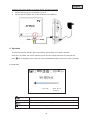
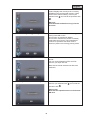
You can use this to format the SD card. The
system displays the memory that is currently
available (Free) and the total memory (Total).
Press OK to start formatting. Confirm your
and cancel the operation with
selection with
.
SD Card Format = format SD card
Warning:
Format the SD card before using it for the
first time.
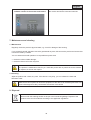
Power Saving = energy-saving mode
Use the ◄► buttons to switch the energysaving mode ON or OFF.
This function is activated by default.
This function switches the screen to standby
mode after two minutes. The loudspeakers
continue to operate at the same volume.
Press any button to exit energy-saving mode.
TV-Format = TV output resolution
Use the ◄► buttons to select the desired TV
format.
You can choose between NTSC and PAL.
Confirm your input with OK.
Note that the format selected can affect the
resolution.
Set to Factory Default = reset to factory defaults
Press OK to start the factory settings.
and cancel the
Confirm your selection with
.
operation with
Please note:
Note that this operation does not format the
SD card.
38