1
DMX CONTROL ADDRESS
The control address, also known as the start channel, is the first channel used to
receive instructions from the controller. Each fixture needs its own control
address set, and uses this address and subsequent control channels to receive
instructions from a controller. The Wizard uses one, six, or eight control channels
depending on the DMX mode that has been specified.
If the Wizard is set to 6-channel mode, it reads the data on the start channel and
the next five channels. If the DMX control address is set to 100, the fixture uses
channels 100, 101, 102, 103, 104, and 105. Channel 106 would be the control
address for the next fixture.
For independent control, each fixture must be assigned its own address and nonoverlapping control channels. If two or more fixtures are set up with the same
address, they will receive the same instructions and should behave identically.
Setting up identical fixtures with the same address is a good tool for
troubleshooting unexpected behavior and an easy way to achieve synchronized
action.
Specifying a DMX address
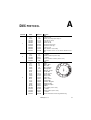
DIP-switch pins 1-9 are used to set the control address:
1 Select an address for the fixture on your controller. If you are calculating the DMX
addresses for multiple fixtures then the Martin Address Calculator is available on
the internet at http://www.martin.dk/service/utilities/AddrCalc/index.asp
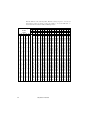
2 Look up the DIP-switch setting using the Martin DIP Switch Calculator (also
available on the internet, at http://www.martin.dk/service/dipswitchpopup.htm), or
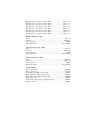
look for the address in the following DIP-switch settings table.
3 Disconnect the fixture from power.
4 Set pins 1 through 9 to the ON (1) or OFF (0) position as listed in the table.
DMX operation
21