1
2. Motivation
When CPU architects design a new machine, they typically write an instruction-level simulator
to test their ideas. Later, when they are confident of the stability of their design, software engineers
are often told to make system software work using the architects’ simulator. When the real
hardware arrives and is debugged, the software engineers usually switch to using real hardware
to test their programs.
The simulators that CPU architects write typically execute thousands of host instructions for
every simulated instruction. These simulators are written to test concepts and processor design
tradeoffs; flexibility is important and speed is not. Also, they often gather instruction execution time
statistics, and this constrains and slows down the simulator. The software engineers, however,
would like a simulator that is as fast as possible and is complete enough to run their programs.
With a little more work, a simulator can be had that is more complex but is much faster.
We wanted to bring a workstation to market quickly. By building and then using our 88000
simulator, we were able to start debugging software six months earlier than we otherwise would
have. The simulator has useful debugging features not available in the actual machine and so is
still in use. Some operations, such as downloading text and data, are faster on the simulator than
on the real machine.
In the terminology of May [3], ours is a second generation simulator. We translate 88000
instructions to threaded code, while May does flow analysis and generates host instruction
sequences with semantics that match the program being simulated. A scheme, similar to ours, for
translating target instructions to threaded code is outlined in [4]. Other systems that translate
instructions on the fly to a quick-to-execute form include the VAX-8800®series of computers [5],
the CRISP microprocessor [6], and a Smalltalk 80 interpreter [7].
When Tektronix engineers debug kernels and diagnostic programs on the hardware, they use
a cross-debugger that runs on a 68020-based workstation. The workstation communicates with
the hardware via an RS-232 serial link. The cross-debugger, simulator, and dbx front-end are all
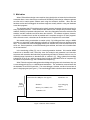
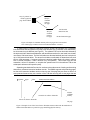
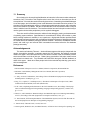
part of a single program (see Figure 1). The cross-debugger and the simulator share the dbx-based
Human Interface (dbx plus X11 support)
Single
UNIX
process
44,000 lines of C
Simulator
Cross debugging
support
Memory, I/O, CMMU, CPU
3,500 lines of C
17,000 lines of C
Simulator Host
UNIX kernel
Figure 1: Structure of the simulator