1
Contents
Chapter 1. Product Overview...................................................................................... 1
1.1 Product Features................................................................................................... 1
1.2 Package Contents ................................................................................................. 1
Chapter 2. Product Installation ................................................................................... 2
Chapter 3. Configuration Guide .................................................................................. 3
3.1 AP Configuration Using Locator ...................................................................... 3
3.2 AP Configuration Using Web User Interface.................................................... 3
Chapter 4. Wireless Configuration - AP Mode ........................................................... 5
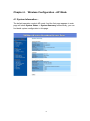
4.1 System Information –........................................................................................... 5
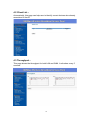
4.2 Client List –.......................................................................................................... 6
4.3 Throughput – ........................................................................................................ 6
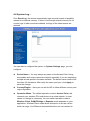
4.4 System Log – ....................................................................................................... 7
4.5 IP Settings – ......................................................................................................... 8
4.6 Spanning Tree Settings – ................................................................................... 10
4.7 Wireless Network - ............................................................................................ 11
4.8 Wireless Security - ............................................................................................. 13
4.9 Wireless MAC Filter – ....................................................................................... 16
4.10 Wireless Advanced Settings -........................................................................... 17
Chapter 5. Management ............................................................................................ 20
5.1 Administration –................................................................................................. 20
5.2 SNMP Settings– ................................................................................................. 21
5.3 Backup/Restore and Reset to factory default Settings– ..................................... 22
5.4 Firmware Upgrade – .......................................................................................... 23
5.5 Time Settings – .................................................................................................. 24
5.6 Log Settings – .................................................................................................... 25
5.7 Diagnostics –...................................................................................................... 26
5.8 System Reset – ................................................................................................... 26
Chapter 6. Wireless Configuration – Pt(M)P Bridge Mode (Point to Point & Point to
Multi-Point).................................................................................................................. 28
6.1 Wireless Setting – .............................................................................................. 28
6.2 Considerations before installation –................................................................... 29
6.3 Wireless Bridge (WDS) Security – .................................................................... 30
Chapter 7. Wireless Configuration – Wireless Client Mode ..................................... 32
7.1 Connection Status - ............................................................................................ 33
7.2 Wireless Network - ............................................................................................ 34
i