1
SIP IP Phone
User’s Manual
Table of Contents
Chapter 1 Overview of the VIP-152T................................................................................... 1
1.1 Hardware Overview................................................................................................ 2
1.1.1 Front View and Keypad function .................................................................. 2
1.1.2 Rear panel.................................................................................................... 3
1.1.3 Specification ................................................................................................. 4
1.2 Software Features and Specification ...................................................................... 5
Chapter 2 Configuring the VIP-152T through LCD Phone menu......................................... 7
2.1 Initialize VIP-152T .................................................................................................. 7
2.2 LCD Menu Configuration........................................................................................ 9
Chapter 3 Configuring the VIP-152T through Web Pages................................................. 15
Step 1. Browse the IP Address predefined via Keypad .............................................. 15
Step 2. Input the login name and password ............................................................... 15
Step 3. Enter the web interface main screen.............................................................. 16
Step 4. Start configuration .......................................................................................... 16
1. Network Interface ............................................................................................ 17
2. SIP Information ............................................................................................... 19
3. System Configuration...................................................................................... 21
4. PPPoE Configure ............................................................................................ 22
5. Voice Setting ................................................................................................... 23
6. Phone Book..................................................................................................... 24
7. Password ........................................................................................................ 25
8. Firmware Upgrade .......................................................................................... 26
9. Version Information ......................................................................................... 27
10. Reboot System.............................................................................................. 28
Chapter 4 Configuring the VIP-152T through Telnet command lines................................. 29
4.1. [help] command................................................................................................... 29
4.2. [quit] command.................................................................................................... 30
4.3. [debug] command................................................................................................ 30
4.4. [reboot] command ............................................................................................... 30
4.5. [pbook] command................................................................................................ 30
4.6. [commit] command .............................................................................................. 31
4.7. [ping] command................................................................................................... 32
4.8. [time] command................................................................................................... 32
4.9. [ifaddr] command................................................................................................. 32
4.10. [pppoe] command.............................................................................................. 33
PLANET VIP-152T User’s Manual
1
4.11. [flash] command ................................................................................................ 34
4.12. [sysconf] command ........................................................................................... 34
4.13. [sip] command ................................................................................................... 35
4.14. [security] command ........................................................................................... 37
4.15. [voice] command ............................................................................................... 37
4.16. [tos] command................................................................................................... 39
4.17. [bureau] command ............................................................................................ 40
4.18. [rom] command ................................................................................................. 40
4.19. [passwd] command ........................................................................................... 41
Chapter 5 Upgrading Software on the VIP-152T ............................................................... 43
5.1 From LCD Phone Menu ....................................................................................... 43
5.2 Web Management ................................................................................................ 44
5.3 Telnet command lines........................................................................................... 44
PLANET VIP-152T User’s Manual
2
Chapter 1
Overview of the VIP-152T
Based on the next-generation Internet telephony service demands--Session Initialization Protocol (SIP), the
PLANET VIP-152T brings cost-effective solution for voice communications and interoperates with major
other-vendor VoIP hardware and systems as well as the traditions of PLANET VoIP family. As a feature-rich
IP Phone, the VIP-152T fulfills your needs. It’s simple to use, and has additional features such as: built-in
PPPoE/DHCP clients, large LCD display, hands-free speakerphone, telephone number phonebook,
direct-dial hotkeys, last number redial, incoming message indicator, and user-intuitive web administration
system.
PLANET VIP-152T is the perfect desktop IP phone for office or home use, as well as installation for Internet
Telephony Service Provider (ITSP) from leading vendors. It's the delivery platform for IP voice services that
makes plenty features extremely easy to use.
VIP-152T, which built-in a powerful, self-contained, integrated microprocessor — offers a intelligent phone
features, and powerful voice procesing power. The PLANET VIP-152T can effortlessly deliver toll voice
quality equivalent to regular PSTN connections utilizing cutting-edge Quality of Service, echo cancellation,
comfort noise generation and voice compensation technology. Meanwhile, the dual Ethernet interfaces on the
VIP-152T allow users to install in an existing network location without interfering with desktop PC network
connections.
PLANET VIP-152T User’s Manual
1
1.1 Hardware Overview
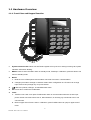
1.1.1 Front View and Keypad function
¨
System Indication LED: When VIP-152T didn’t register to Proxy server or having incoming call, system
indication LED will be blinking.
¨
MENU: Press to enter LCD Menu when in standby mode; if already in LCD Menu, press this button can
return to standby mode
¨
MUTE:
1. Mute the voice of Microphone and let others can’t hear from user in communication.
2. Change input mode to be digit or character mode: When configuration in LCD menu can change
input mode to be input digit only or input character.
¨
▲▼: Move to up/down, left/right ; increase/decrease value.
¨
¨
OK: Press OK to confirm the modification.
Flash:
1. Transfer a call. User A can press FLASH button when in communication with user B, then input
phone number can make call to User C, after talk with C, A can hang up, User B and User C can
communicate.
2. Back to upper level of menu: when in LCD Menu, press FLASH button can jump to upper level of
menu.
PLANET VIP-152T User’s Manual
2
¨
REDIAL / HOLD:
1. Redial the last outgoing call or hold one call in communication.
2. Upper-case/Lower-case character: change input character mode to be upper-case or lower-case.
¨
SPEAKER: Speaking without picking up handset.
¨
5 Graphic Memory key: User presses these keys to do speed dial according to phone book data 1-5
(please refer to LCD configuration-Phone Book, Configuring the VIP-152T through Telnet command
lines - [pbook] command, or Web Configuration-Phone Book chapter).
¨
Number 1 –10, * and #: The function is as the same as the general phone set.
Corresponding list of keypad and symbol:
1
“1”
2
“a” ; “ b” ; “c” ; “2”
3
“d” ; “e” ; “f” ; “3”
4
“g” ; “h” ; “i” ; “4”
5
“j” ; “k” ; “l” ; “5”
6
“m” ; “n” ; “o” ; “6”
7
“p” ; “q” ; “r” ; “s” ; “7”
8
“t” ; “u” ; “v” ; “8”
9
“w” ; “x” ; “y” ; “z” ; “9”
*
“.” ; “@” ; “_” ; ”-“ ; “,” ; “!” ; “?” ; “’” ; “+” ; “$” ; “*”
0
“Space” ; “0”
#
“#”
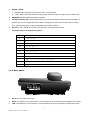
1.1.2 Rear panel
¨
DC 5V: DC 5V power input outlet
¨
WAN: 10/100 Base-T RJ-45 connectors, connected directly to the Hub through the straight CAT-5 cable.
¨
LAN: 10/100 Base-T RJ-45 connector, connected directly to the PC through the straight CAT-5 cable
PLANET VIP-152T User’s Manual
3
1.1.3 Specification
1. Ethernet Port:
Ethernet port is for connecting VIP-152T to network, transmit rate supports 10/100 Base-T.
Ethernet connector(LAN)
PLANET VIP-152T User’s Manual
4
1.2 Software Features and Specification
Application:
l
ISP/ITSP (Internet Telephony Service Provider)
l
IP-PBX with office telephony services
l
Multi-nation enterprise communication
l
SOHO Telephony
Calling Features
l
Call Hold
l
Call Transfer
l
Call Forward
l
5 configurable speed dials
Network Supported
l
Fixed IP
l
Dynamic Host Configuration Protocol (DHCP)
l
PPPoE connection (When PPPoE disconnect, VIP-152T can automatically re-connect)
l
Behind NAT IP Sharing Device
l
Support QOS by setting DSCP (Differentiated Service Code Point) parameters of VoIP packet
Audio Features
l
G.711 a/μ-Law, G.723.1, G.729, G.729a
l
VAD, CNG
l
G.165/G.168 compliant echo cancellation
l
Programmable Dynamic Jitter Buffer
l
Bad Frame Interpolation
l
Gain/Attenuation Settings
Provisioning and Configuration
l
SIP (RFC3261) compliance
l
LCD configuration password protection
l
Provide Proxy Mode or Peer-to-Peer Mode (Non Proxy Server needed) selection
l
Ring tone, Speaker and Handset volume adjustable
l
Support DNS server inquiry
Management Features
l
Software Upgrade: TFTP/FTP download
PLANET VIP-152T User’s Manual
5
l
Three easy ways for system configuration
l
LCD Front Panel
l
Web Browser
l
Telnet
Environmental
l
Operating and storage Humidity: 10 to 95 % (Non-condensing)
l
Operational Temperature: 0 to +40 °C
l
Storage Temperature: -10 to 60℃
PLANET VIP-152T User’s Manual
6
Chapter 2
Configuring the VIP-152T through LCD
Phone menu
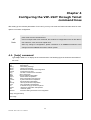
1. After any configuration has changed for the VIP-152T, user has to do reboot in the
selection “Reboot”.
?
Note:
2. It is suggested to setup IP address via LCD menu Network→Get IP mode / IP Address /
Subnet Mask / Default GW first, then go to chapter 3 to do other configurations via web
browser. If user need to do more detail or advanced configurations, please refer to
chapter 4 and use Telnet command lines.
3. User can also try to enter web configuration via default IP address of VIP-152T:
192.168.0.1
2.1 Initialize VIP-152T
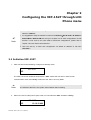
1. After VIP-152T finish initializing, it will get into standby mode:
VIP-152T
P2P
The main LCD screen would be shown above. “P2P” means the VIP-152T in Peer-to-Peer
communication mode, and “Proxy” means the VIP-152T is in Proxy Mode.
?
Note:
If VIP-152T didn’t register to Proxy server, when VIP-152T been off-hook, user will hear busy
tone instead of dial tone, also system LED indication will be blinking.
2. When VIP-152T is under peer-to-peer mode, on LCD will show “P2P” instead of “Proxy”.
VIP-152T
P2P
PLANET VIP-152T User’s Manual
10:10:10 AM
7
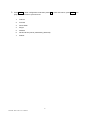
3. Press MENU to enter configuration mode then press OK to enter sub menus; press FLASH can
jump out current menu to previous level.
1.
Call List
2.
Forward
3.
Phone Book
4.
Ringer
5.
Network
6.
Advanced Set (can be protected by password)
7.
Reboot
PLANET VIP-152T User’s Manual
8
2.2 LCD Menu Configuration
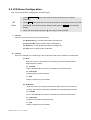
User can set the following configurations via LCD keypad.
1.
?
Press REDIAL/HOLD before input data can switch characters to be capital or
lowercase.
2.
Note:
Press MUTE before input data can switch input mode to be character mode or IP mode;
for example, user wants to enter IP address, after pressing SPEED can enter digits
directly.
3.
When user is inputting data, press ▲ will clear previous input data.
1. Call List
User can check all call records in this call list menu.
(1) Missed Calls:to see all missed calls in message box.
(2) Received:to see all received calls in message box.
(3) Dialed No.: to see all dialed numbers in message box.
(4) Exit: return to upper level of LCD Menu
2. Forward
There are 3 selections in Forward type, user must select under which condition to forward calls.
(1) Busy
When VIP-152T is in busy status, the incoming call will be forwarded to the
assigned phone number.
A. Activate
Enter a forwarded phone number to activate busy forward function.
B. Deactivate
Deactivate Busy Forward function.
C. Exit
Return to upper level of LCD Menu
(2) No Answer
When VIP-152T has incoming call and hasn’t been picked up for around 10
seconds, the incoming call will be forwarded to the assigned phone number.
A. Activate
Enter a forwarded phone number to activate No Answer Forward function.
B. Deactivate
Deactivate No Answer Forward function.
C. Exit
Return to upper level of LCD Menu
PLANET VIP-152T User’s Manual
9
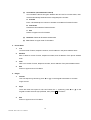
(3)
Uncondition (Unconditional Forward)
It is included the above two types. Whether the VIP-152T is in which status, calls
will be automatically forwarded to the assigned phone number.
A. Activate
Enter a forwarded phone number to activate Unconditional Forward function.
B. Deactivate
Deactivate Unconditional Forward function.
C. Exit
Return to upper level of LCD Menu
(4)
Delete All: Delete all forward activated data.
(5)
Exit: Return to upper level of LCD Menu.
3. Phone Book
1.
List
List all records of name, telephone number, and IP address in the phone address book.
2.
Edit/Del
Edit or delete a record of name, telephone number, and IP address of the phone address
book.
3.
New
Add a new record of name, telephone number, and IP address of the phone address book.
4.
Exit
Return to upper level of LCD Menu
4. Ringer
1.
Volume
User can adjust ring volume by press ▼ or ▲ on the keypad to decrease or increase
ringer volume.
2.
Style
There are three tone styles for VIP-152T. Move the “>” symbol by press ▼ or ▲ on the
keypad to select the tone style preferred, then press OK to confirm it.
3.
Exit
Return to upper level of LCD Menu
PLANET VIP-152T User’s Manual
10
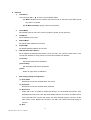
5. Network
1.
Information
User can press ▼ or ▲ to check current network status:
(1) Mode: Display current network connection mode of VIP-152T to be Static (Fixed
IP), DHCP, or PPPoE.
(2) IP, Mask, Gateway: display current IP information.
2.
Get IP Mode
Set network mode of VIP-152T to be Fix (Fixed IP), DHCP, or PoE (PPPoE).
3.
IP address
Set IP address of VIP-152T.
4.
Subnet Mask
Set subnet mask address of VIP-152T.
5.
Default GW
Set default gateway address of VIP-152T.
6.
DNS (Domain Name Server)
Set IP address of Domain Name Server. Once VIP-152T can connect to DNS server, user
can set URL address for Proxy server or Phone book instead of IP address.
(1) Primary
Set Primary DNS server IP address
(2) Secondary
Set Secondary DNS server IP address
(3) Exit
Return to upper level of LCD Menu
7.
PoE Config (PPPoE Configuration)
(1) User Name
Set PPPoE connection authentication user name.
(2) Password
Set PPPoE connection authentication password.
(3) Reconnect
Select ON or OFF to enable or disable this function. If user enables this function, after
PPPoE disconnected, VIP-152T will automatically reboot to re-connect, and after reboot,
if VIP-152T still can’t connect with server, VIP-152T will keep trying to connect. On the
other hand, if user disables this function, VIP-152T won’t reboot and keep trying to
connect.
(4) Exit
PLANET VIP-152T User’s Manual
11
Return to upper level of LCD Menu
8.
IP-Sharing
(1) If VIP-152T is behind IP sharing or NAT device, and VIP-152T is under
Peer-to-Peer mode or Proxy mode (doesn’t support endpoint behind NAT function),
on IP sharing must enable “DMZ” function or set “Virtual Server” to open ports
(UDP port: 5060 and 16384, 16385). VIP-152T must enable this IP sharing
function.
(2) User must enter public IP address of IP sharing.
9.
Exit: Return to upper level of LCD Menu
6. Advanced Set (can be protected by password)
l
Password:
User must key in password to enter this menu if password has been set, items under this
command are all important ones, which can only be configured by advanced users. If
password hasn’t been set, user can enter this menu directly without entering password.
1.
?
If user forget password, please contact with your distributor, we will generate a specific
password according to your MAC address of VIP-152T.
Note:
2.
User can also try to configure VIP-152T via Telnet or Web browser with default IP
address: 192.168.0.1. (If IP haven’t been changed)
1.
SIP
(1) Mode
Select SIP connection mode to be peer-to-peer mode or Proxy mode.
(2) Proxy
A. Proxy
Set Proxy IP address or Domain Name.
B. Outbound
Set Outbound Proxy IP address or Domain Name.
C. Px port
Set Proxy port for VIP-152T to send messages.
D. Expire (in seconds)
Set expire time of registration, in the duration of 2/3 expire time, VIP-152T will
PLANET VIP-152T User’s Manual
12
re-register to Proxy Server again.
E. Exit
Return to upper level of LCD Menu
(3) User Info
A. User Name (Mandatory)
Set User Name of VIP-152T to register to Proxy Server. If Proxy server
doesn’t request specific User name, please enter Line number here.
B. Line No.
Set Line Number of VIP-152T to register to Proxy Server.
C. Password
Set User Password of VIP-152T to register to Proxy Server. This configuration
is not necessary, if Proxy server doesn’t request client to set password, user
only has to set User Name the same as Line Number.
D. Exit
Return to upper level of LCD Menu
(4) Exit
Return to upper level of LCD Menu
2.
SW Update
(1) Method
There are two methods to download new version file, please move the “>“ symbol by
press ▲or ▼ on the keypad to select TFTP or FTP method, then press OK to confirm
it.
(2) Sever
User has to offer one TFTP/FTP server IP Address and set this IP Address via keypad.
The IP Address is necessary for upgrading VIP-152T new application rom file.
(3) Account
User has to input user name for FTP server login .It is necessary for upgrading
VIP-152T new application rom file via FTP method.
(4) Password
User has to input user password for FTP server login .It is necessary for upgrading
VIP-152T new application rom file via FTP method.
(5) File Name
User has to press the file name of new application rom file prepared for upgrading
(6) Version
Show versions of all software and hardware.
(7) Upgrade
Select YES or NO to start upgrade.
PLANET VIP-152T User’s Manual
13
(8) Exit
Return to upper level of LCD Menu
?
Note:
3.
Download via LCD command can only upgrade new application rom file.
Menu Password
Set entry password of phone LCD menu.
4.
Exit
Return to upper level of LCD Menu
7. Reboot
Reboot machine. It is necessary and important for user to reboot VIP-152T after any
configurations has been made. VIP-152T will ask user again before reboot.
PLANET VIP-152T User’s Manual
14
Chapter 3
Configuring the VIP-152T through Web Pages
The VIP-152T web management interface provides user an easier way to configure rather than command line
method through TELNET.
The configuration function and steps are similar with the way through command line. Please refer to the
chapter 4-Configuring the VIP-152T through Telnet command lines for more detail information. Below is a
guide for user to configure via web interface.
Step 1. Browse the IP Address predefined via Keypad
Please enter IP address (user have to set via LCD menu first) of VIP-152T in web browser. the default IP
address of VIP-152T is 192.168.0.1, user can connect to VIP-152T with this default IP via standard web
browser.
Step 2. Input the login name and password
n
Login name: root or administrator
User who requests authorization to execute all configuration commands needs to login with
“root”. If a user login with “administrator”, commands below are not functional:
1. Password: set password of login: “root” users.
2. Flash clean: clean all current configurations
3. Rom configuration: upgrade boot sector
4. Rom configuration: upgrade whole 2m software file
n
Password (The same with TELNET): Null (no need to key in password in default value)
PLANET VIP-152T User’s Manual
15
?
Note:
User can set password later in PASSWORD configuration menu..
Step 3. Enter the web interface main screen
After logging in machine, user can see web interface main screen as below.
Step 4. Start configuration
Most important items are Network Interface, SIP Information, and Phone Book (in Peer-to-Peer mode).
Please remember to configure these commands before start to work with VIP-152T.
PLANET VIP-152T User’s Manual
16
?
After change any settings, please remember to reboot (in Reboot System) VIP-152T so that
Note:
changes can take effect.
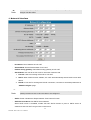
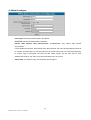
1. Network Interface
-
IP Address: Set IP Address of VIP-152T
-
Subnet Mask: Set the Subnet Mask of VIP-152T
-
Default routing gateway: Set Default routing gateway of VIP-152T
-
Get IP Mode: User has to set VIP-152T to use which network mode.
1. Fixed IP: User has to assign a fixed IP to VIP-152T.
2. DHCP: When DHCP function enables, VIP-152T will automatically search DHCP server after
reboot.
3. PPPoE: If VIP-152T is working with PPPoE connection, user have to set related parameters in
“PPPoE Configure “page.
?
Note:
If User set “Get IP mode” as DHCP or PPPoE, IP address, Subnet Mask, and Default routing
gateway will become 0.0.0.0 and not allow to be configured.
-
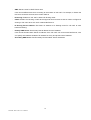
SNTP: Enable / Disable the Simple Network Time Protocol function
-
SNTP Server Address: Set SNTP Server Address
When SNTP server is available, enable VIP-152T SNTP function to point to SNTP server IP
address so that VIP-152T can get correct current time.
PLANET VIP-152T User’s Manual
17
-
GMT: Set time zone for SNTP Server time
User can set different time zone according to the location of VIP-152T. For example, in Taiwan the
time zone should be set as 8,which means GMT+8.
-
IP Sharing: Enable it if VIP-152T is behind IP Sharing router.
-
UPnP: Enable it if IP sharing or NAT device supports UPnP function so that no need to configure IP
sharing or VIP-152T when VIP-152T is behind NAT device.
-
IP Sharing Server Address: Set Public IP Address of IP Sharing router for VIP-152T to work
behind IP sharing.
-
Primary DNS Server: Set Primary Domain Name Server IP address.
User can set Domain Name Server IP address. Once VIP-152T can connect with DNS server, user
can specify URL address instead of IP address for Proxy and phone book IP address.
-
Secondary DNS Server: Set Secondary Domain Name Server IP address.
PLANET VIP-152T User’s Manual
18
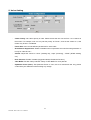
2. SIP Information
-
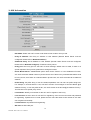
Run Mode: Select VIP-152T to work under Peer-to-Peer mode or Proxy mode.
-
Proxy IP Address: Set Proxy IP Address or URL address (Domain Name Server must be
configured. Please refer to Network Interface).
-
Outbound Proxy: Set IP Address or URL address (Domain Name Server must be configured.
Please refer to Network Configure) of outbound Proxy server.
-
Proxy port: Set Proxy port for VIP-152T to send message, default value is 5060, if there is no
special request of Proxy server, please don’t change this value.
-
Phone Book Search: enable/disable phone book search function. If user enabled this function,
VIP-152T will search dialed number in phone book to see if there is any matched table before send
to Proxy server, and if there is a matched data in phone book, VIP-152T will make call to related IP
address.
-
Prefix String: set prefix string. If user ID contains alphabets, user can set it as prefix string here.
For example, if Account Name is 123, VIP-152T will sent out messages as Account Name @”IP
address of Proxy”, if user set prefix as abc, VIP-152T will set out as abc123@”IP address of Proxy”.
This function is for special proxy server.
-
Line Number: identify one number for the VIP-152T to register to the Proxy.
-
Line Account: set user name of VIP-152T for registering. User can set user name and password
for registering. If password is no need, please set user name the same as line number or VIP-152T
won’t register successfully.
-
Line Password: set password for registering.
-
SIP Port: set SIP UDP port.
PLANET VIP-152T User’s Manual
19
-
RTP Port: set RTP port for sending voice data.
-
Expire: set expire time of registration. VIP-152T will keep re-registering to proxy server before
expire timed out
PLANET VIP-152T User’s Manual
20
3. System Configuration
-
Keypad DTMF Type: set DTMF type. User can select DTMF type VIP-152T transmits.
-
RFC2833 Payload Type: change RFC2833 Payload type. This is for special request from the other
site, if RFC2833 payload types of 2 sites are different, it may cause some problem of connection.
-
Inter Digit Time: Set the DTMF inter digit time (second)
To set the duration (in second) of two pressed digits in dial mode as timed out. If after the duration
user hasn’t pressed next number, VIP-152T will dial out all number pressed.
-
End of Dial Digit: select end of dialing key, e.g. set end of dial key as * button, after finished
pressing dialing number then press * will dial out.
PLANET VIP-152T User’s Manual
21
4. PPPoE Configure
-
User Name: Set PPPoE authentication User Name.
-
Password: Set PPPoE authentication password.
-
Reboot After Remote Host Disconnection: Enable/Disable auto reboot after PPPoE
disconnection
If user enables this function, after PPPoE being disconnected, VIP-152T will automatically reboot to
re-connect, and after reboot, if VIP-152T still can’t get contact with server, VIP-152T will keep trying
to connect. After re-connected, VIP-152T will also restart system. On the other hand, if user
disables this function, VIP-152T won’t reboot and keep trying to connect.
-
Other items: for reference only, cannot allow to be configured.
PLANET VIP-152T User’s Manual
22
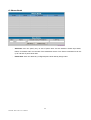
5. Voice Setting
-
Codec Priority: set codecs priority in order. Please notice that user can set from 1 to 5 codecs as
their need. For example, user can only set first priority as G.723.1, and set the others as x, that
means only G.723.1 is available.
-
Frame Size: User can set different packet size for each codec.
-
G.723 Silence Suppression: Enable / Disable sound compression and comfort noise generation. It
is only for codec G.723.1
-
Volume: Adjust the volume in “Voice” (sending out); “Input” (receiving); “ DTMF” (DTMF sending
out).
-
Echo Cancelor: Enable / Disable (suggested always Enable this function).
-
Jitter Buffer: Set Min. Delay and Max. Delay of Jitter Buffer for voice packets.
-
Optimized Factor (Jitter): Set Optimized Factor of voice, this is for advanced user only, please
contact with your distributor before making any change.
PLANET VIP-152T User’s Manual
23
6. Phone Book
-
Add Data: User can specify only 10 sets of phone book via web interface. Please input index,
Name, IP Address and E.164 number of the destination device. From Telnet command line can set
up to 100 sets of phone book data.
-
Delete Date: User can delete any configured phone book data by assign index.
PLANET VIP-152T User’s Manual
24
7. Password
-
Change: First select login name as root or administrator, then enter current password, new
password and confirm new password again to set new password.
-
Abort: Press abort will clean all inputs.
User who requests authorization to execute all configuration commands needs to login with
“root”. If a user login with “administrator”, commands below are not functional:
1.
Password: set password of login: “root” users.
2.
Flash clean: clean all current configurations
3.
Rom configuration: upgrade boot sector
4.
Rom configuration: upgrade whole 2m software file
PLANET VIP-152T User’s Manual
25
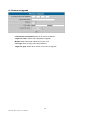
8. Firmware Upgrade
-
FTP/TFTP Server IP Address: Set TFTP server IP address
-
Target File name: Set file name prepared to upgrade
-
Method: Select download method as TFTP or FTP
-
FTP Login: Set FTP login name and password
-
Target File Type: Select which sector of VIP-152T to upgrade
PLANET VIP-152T User’s Manual
26
9. Version Information
-
Application:
Application image version information of VIP-152T.
This field has no default value.
PLANET VIP-152T User’s Manual
27
10. Reboot System
-
Press reboot will reset VIP-152T.
?
Note:
To execute reboot via web browser, VIP-152T will automatically save all data before reboot.
To execute reboot via TELNET command, please remember to do commit before reboot.
PLANET VIP-152T User’s Manual
28
Chapter 4
Configuring the VIP-152T through Telnet
command lines
After setting up the network parameters of VIP-152T, you may now enter the Telnet command lines for more
options in machine configuration.
•
?
After user enter VIP-152T configuration via telnet, please use login: ”root”, password: null,
press enter to enter command lines.
•
Note:
User must input lower-case command, but contents of configurations such as SIP alias or
user name etc, user can set as capital case.
•
After any change of configuration, please remember to do commit command to save
changes and then reboot command to reboot system.
4.1. [help] command
Type help or man or ? to display all the command lists. The following figure is shown all commands of
VIP-152T.
help
quit
debug
reboot
pbook
commit
ping
time
ifaddr
pppoe
flash
sysconf
sip
security
voice
tos
bureau
rom
passwd
help/man/? [command]
quit/exit/close
show debug message
reboot local machine
Phonebook information and configuration
commit flash rom data
test that a remote host is reachable
show current time
internet address manipulation
PPPoE stack manipulation
clean configuration from flash rom
System information manipulation
SIP information manipulation
Security information manipulation
Voice information manipulation
IP Packet ToS (Type of Service)values
Bureau line information manipulation
ROM file update
Password setting information and configuration
usage: help [command]
usr/config$
PLANET VIP-152T User’s Manual
29
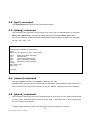
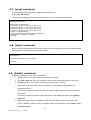
4.2. [quit] command
Type quit/exit/close will logout VIP-152T and Telnet Program.
4.3. [debug] command
This command is for engineers to debug system of VIP-152T. User can add debug flag via command
debug –add “debug flags”, and then start debug function via command debug –open. When
VIP-152T is working on screen will display related debug messages. Most frequently used debug flag
are “sip”, “fsm”, “msg”…etc.
usr/config$ debug
Debug message information and configuration
Usage:
debug [-add type1 [[type2]...]] | -open | -close | -status
-status
Display the enabled debug flags.
-add
Add debug flag.
-delete
Remove specified debug flag.
-open
Start to show debug messages.
-close
Stop showing debug messages.
Example:
debug -add sip msg
debug -open
usr/config$
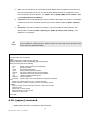
4.4. [reboot] command
After typing commit command, type reboot to restart the VIP-152T.
Sometimes after user type reboot, on terminal screen will display: "Data modified, commit to flash rom?”
which means VIP-152T will record call history or not. (Ex. REDIAL, outgoing and incoming call data)
4.5. [pbook] command
This command is functional both in Proxy mode and Peer-to-Peer mode. In proxy mode, use speed dial
or 10 DL button will dial out e.164 number in phone book. In the other hand, in peer-to-peer mode,
VIP-152T will dial out IP address.
1. -print: display phone book data. User can print all data in phone book by command
30
PLANET VIP-152T User’s Manual
(pbook –print). Furthermore, user can also print only a section of data by indicate parameter “start
index” and “end index” (pbook –print “start index” “end index”). If parameter “end index” is omitted,
only record “start index” will be displayed. (pbook –print “start prefix”).
2. -add: add a new record in phone book table by giving name, IP address, and e.164 number of callee
endpoint.
(pbook –add name “X” ip “xxx.xxx.xxx.xxx” e164 “X”)
3. -delete: delete a record of certain listed index in phone book table. (pbook –delete “index number”)
4. -modify: modify record of a certain index in phone book . Please notice that the name, IP address
and e164 number must be modified together; user cannot just modify one parameter only.
(pbook –modify “index” name “X” ip “xxx.xxx.xxx.xxx” e164 “X”)
usr/config$ pbook
Phonebook information and configuration
Usage:
pbook [-print [start_record] [end_record]]
pbook [-add [ip ipaddress] [name Alias] [e164 phonenumber]]
pbook [-delete index]
pbook [-modify [index] [ip ipaddress] [name Alias] [e164 phonenumber]]
-print
Display phonebook data.
-add
Add an record to phonebook.
-delete
Delete an record from phonebook.
-modify
Modify an exist record.
Example:
pbook -print 1 10
pbook -print 1
pbook -print
pbook -add name Test ip 210.59.163.202 e164 1001
pbook -delete 3
pbook -modify 3 name Test ip 210.59.163.202 e164 1001
usr/config$
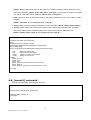
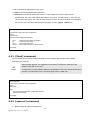
4.6. [commit] command
Save any changes after configuring the VIP-152T.
usr/config$ commit
This may take a few seconds, please wait....
Commit to flash memory ok!
usr/config$
PLANET VIP-152T User’s Manual
31
4.7. [ping] command
Command ping can test which the IP address is reachable or not.
Usage: ping “IP address”
The message will display packets transmitting condition or no answer from the IP address.
usr/config$ ping 168.95.1.1
PING 168.95.1.1: 56 data bytes
64 bytes from 168.95.1.1: icmp_seq=0. time=50. ms
64 bytes from 168.95.1.1: icmp_seq=1. time=50. ms
64 bytes from 168.95.1.1: icmp_seq=2. time=50. ms
64 bytes from 168.95.1.1: icmp_seq=3. time=50. ms
----168.95.1.1 PING Statistics---4 packets transmitted, 4 packets received, 0% packet loss
round-trip (ms) min/avg/max = 50/50/50
usr/config$
4.8. [time] command
When VIP-152T enables SNTP function and be able to connect with SNTP server, type time command
will show the current time retrieved from SNTP server.
usr/config$ time
Current time is WED DEC 08 10:44:23 2004
usr/config$
4.9. [ifaddr] command
Configure and display the VIP-152T IP information.
1. –print: print out all current configurations of ifaddr command.
2. -ip, -mask, -gate: Set VIP-152T IP Address, subnet mask and default gateway respectively.
3. -ipmode: Set VIP-152T network mode to be Fixed IP, DHCP or PPPoE.
When User set IP mode to be fixed IP, please set IP, subnet Mask, default gateway as
mentioned in item 2.
If User set IP mode to be DHCP, VIP-152T will search for DHCP server to capture IP address
after reboot.
If user set IP mode to be PPPoE, please remember to set related parameters under [pppoe]
command.
4. -sntp: When SNTP server is available, enable VIP-152T SNTP function and assign SNTP
server IP address so that VIP-152T can capture current time from SNTP server. (ifaddr –sntp 1
“xxx.xxx.xxx.xxx”)
PLANET VIP-152T User’s Manual
32
5. -dns: User can set primary and secondary Domain Name Server IP address. Once VIP-152T
can connect with DNS server, user can specify URL address instead of IP address for Proxy
Server and phone book IP address...etc. (ifaddr –dns 1 “primary DNS server address” –dns
2 “secondary DNS server address”)
6. –timezone: User can set different time zone according to the location VIP-152T is. For example,
in Taiwan the time zone should be set as 8,which means GMT+8. (GMT-8: ifaddr –timezone
-8)
7. -ipsharing: If VIP-152T is behind a IP-sharing , user must enable IP sharing function and
specify public IP address.(ifaddr –ipsharing 0/1 “public IP address of IP sharing” , 0 for
disable and 1 for enable)
?
Note:
Some Proxy servers support endpoint behind NAT function, in this case VIP-152T doesn’t
have to enable IP sharing function, please contact with the local service provider (Proxy
Server vendor for detail information).
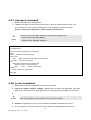
usr/config$ ifaddr
LAN information and configuration
Usage:
ifaddr [-print]|[-dhcp used]|[-sntp mode [server]]
ifaddr [-ip ipaddress] [-mask subnetmask] [-gate defaultgateway]
ifaddr [-dns index [dns server address]]
-print
Display LAN information and configuration.
-ip
Specify ip address.
-mask
Set Internet subnet mask.
-gate
Specify default gateway ip address
-ipmode
Set get IP mode(0:Fixed IP/1:DHCP/2:PPPoE)
-sntp
Set SNTP server mode and specify IP address.
-dns
specify IP address of DNS Server.
-timezone
Set local timezone.
-ipsharing
Specify usage of an IP sharing device and specify IP address.
Note:
Range of ip address setting (0.0.0.0 ~ 255.255.255.255).
SNTP mode (0=no update, 1=specify server IP, 2=broadcast mode).
Example:
ifaddr -ip 210.59.163.202 -mask 255.255.255.0 -gate 210.59.163.254
ifaddr -ipmode 1
ifaddr -sntp 1 210.59.163.254
ifaddr -ipsharing 1 210.59.163.254
ifaddr -dns 1 168.95.192.1
usr/config$
4.10. [pppoe] command
1. -print: display all current configurations and information.
PLANET VIP-152T User’s Manual
33
2. –id: to set PPPoE authentication user name.
3. –pwd: to set PPPoE authentication password.
4. –reboot: Select enable or disable this function. If user enables this function, after PPPoE
disconnected, VIP-152T will automatically reboot to re-connect, and after reboot, if VIP-152T still
can’t connect with server, VIP-152T will keep trying to connect. On the other hand, if user disables
this function, VIP-152T won’t reboot and keep trying to connect. (pppoe –reboot 0/1)
usr/config$ pppoe
PPPoE device information and configuration
Usage:
pppoe [-print]
pppoe [-id username][-pwd password]
-print
-id
-pwd
-reboot
Display PPPoE device information.
Connection user name.
Connection password.
Reboot after remote host disconnection.
usr/config$
4.11. [flash] command
This command can be used to clear the existing machine settings, and load the factory default
parameters into machine.
?
Note:
•
After firmware upgrade, it is suggested to execute this command to make sure new
software work well on VIP-152T.
• To execute the command flash –clean, all configuration of VIP-152T stored in flash will be
cleaned. It is authorized for the user whose login name is “root” only.
usr/config$ flash
Flash memory information and configuration
Usage:
flash -clean
Note:
This command will clean the configuration stored in
the flash and reboot it.
usr/config$
4.12. [sysconf] command
1. -print: display all current configurations.
PLANET VIP-152T User’s Manual
34
2. -idtime: set the duration(in second) of two pressed digits in dial mode as timed out. If after the
duration user hasn’t pressed next number, VIP-152T will dial out all number pressed.
3. -keypad: set DTMF type .User can select DTMF type VIP-152T receive and
transmit.(sysconf –keypad 0/1 , 0 for in band ,1 for RFC2833.)
4. -2833type: change RFC2833 Payload type.
5. -eod: select end of dialing key, e.g. set end of dial key as “*” button , after finished pressing dialing
number then press “*” will dial out. (sysconf –eod 0/1/2 , 0 for no end of dial key , 1 for “*” button,
2 for “#” button )
usr/config$ sysconf
System information and configuration
Usage:
sysconf [-idtime digit] [-keypad dtmf]
[-2833type type] [-eod digit]
sysconf -print
-print
-idtime
-service
-keypad
Display system overall information and configuration.
Inter-Digits time.(1~10 sec)
Specify lanphone service type. (0: Normal service,
1: HotLine service.)
Select DTMF type: 0=In-band,
1=RFC2833.
RFC2833 Payload Type (range:96~128 inter-used:100,102~105)
End of Dial Digit setting(0: NONE, 1: *, 2: #)
Privacy Number Type(0: NONE, 1: Japan)
-2833type
-eod
-privacy
Example:
sysconf -keypad 0 -eod 2
usr/config$
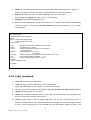
4.13. [sip] command
1. –print: display all current configurations.
2. –mode: enable VIP-152T in SIP Proxy or Peer-to-Peer Mode.
Usage: sip –mode 0/1(1 for Proxy mode, 0 for Peer-to-Peer mode)
3. –px: set proxy server IP address or URL address (sip –px “IP address or URL of Proxy server”).
4. –pxport: set listening port of Proxy server.
5. –outpx: set IP address of outbound proxy server. After user set outbound proxy, all packets form
VIP-152T will be sent to outbound proxy server.
6. –prefix: set prefix string. If user ID contains alphabets, user can set it as prefix string here. For
example, if Account Name is 123, VIP-152T will sent out messages as Account Name @”IP address
of Proxy”, if user set prefix as abc, VIP-152T will set out as abc123@”IP address of Proxy”. This
PLANET VIP-152T User’s Manual
35
function is for special proxy server.
7. –line: identify one number for the VIP-152T to register to the Proxy (SIP –line “line number”).
?
Note:
In proxy mode please remember to set user account information under security command.
8. –pbsearch: enable/disable phone book search function under Proxy Mode. If user enabled this
function, VIP-152T will search dialed number in phone book to see if there is any matched table
before send to Proxy server, and if there is a matched data in phone book, VIP-152T will make call
to related IP address.
9. –expire: set expire time of registration. VIP-152T will keep re-registering to proxy server before
expire timed out.
10. –port: set listening UDP port or VIP-152T.
11. –rtp: set RTP port number. VIP-152T will use this port to send and receive voice.
usr/config$ sip
SIP stack information and configuration
Usage:
sip [-mode pxmode]
sip [-px address] [-prefix prefixstring]
[-pxport ProxyPort][-outpx address][-line number]
[-expire t1] [-port udpPort] [-rtp rtpPort]
sip -print
-print
-mode
-px
-pxport
-outpx
-prefix
Display SIP stack information and configuration.
Configure as Proxy mode or Peer-to-Peer mode.
Proxy server address. (Proxy IPv4 address or Proxy dns name)
Proxy server port.
(the port of proxy)
OutBound Proxy server address. (Proxy IPv4 address or Proxy dns name)
specify as null)
Specify prefix string, use it when UserID contains alphabets
(if UserID uses numerals, specify as null)
TEL Phone number.
Search phone book
0:off/1:on.
The relative time after which the message expires(0 ~ (2^31-1))
SIP local UDP port number (5060~5070), Default: 5060
RTP receive port number (2326~65534), Default: 16384
-line
-pbsearch
-expire
-port
-rtp
Example:
sip -mode 1
sip -px 210.59.163.171 -line 70
usr/config$
PLANET VIP-152T User’s Manual
36
4.14. [security] command
1. –print: display all current configurations.
2. -name: set user ID of VIP-152T for registering. User can set user name and password for
registering. If password is no need, please set user name the same as line number or VIP-152T
won’t register successfully.
3. –pwd: set account password for registering.
usr/config$ security
Secuirty information and configuration
Usage:
security [-name username] [-password password]
security [-print]
-print
Display system account information and configuration.
-name
Specify user name.
-pwd
Specify password.
Example:
security -name 2298353 -pwd 123
usr/config$
4.15. [voice] command
The voice command is associated with the voice codec setting information.
1. -print: display voice codec information and configuration.
2. -send: three voice packet size can be configured as 20 ms, 40 ms or 60 ms.(only 30 and 60 ms for
G..723.1)
3. -priority: set codecs priority in order. Please notice that user can set from 1 to 5 codecs as their
need, for example, voice –priority g723 or voice –priority g723 711a g711u g729 g729a means
VIP-152T can support only one codec or four codecs.
4. -volume: There are three types can be adjustable, voice volume, input gain and DTMF volume.
Voice volume means the volume user can hear, input gain means the volume the other side can
hear from VIP-152T, DTMF means DTMF transmitting volume. (voice –volume voice “value of
37
PLANET VIP-152T User’s Manual
volume”, voice –volume input “value of volume”, voice –volume dfmt “value of volume”)
?
Note:
If value of volume set as 0 means –32db, 1 means –31db…etc.
5. -nscng: enable or disable sound compression and comfort noise generation. It is only for codec
G.723.1. (0 for off, 1 for on)
6. -echo: enable or disable echo cancellation function .
7. -mindelay: set minimum delay of jitter buffer(0~150)
8. -maxdealy: set maximum delay of jitter buffer(0~150)
?
Note:
It is for advanced administrator use only. Please ask your distributor before
changing any settings of this command.
usr/config$ voice
Voice codec setting information and configuration
Usage:
voice [-send [G729 ms] [G723 ms] [G711U ms] [G711A ms] ]
[-volume line [voice level] [ring level] [input level] [dtmf
[-nscng [G711U used1] [G711A used2] [G723 used3]]
voice -print
voice -priority [G729] [G723] [G711U] [G711A]
-print
-send
-priority
-volume
level]]
Display voice codec information and configuration.
Specify sending packet size.
G.729 (20/40/60 ms)
G.723 (30/60/90 ms)
G.711U (20/40/60 ms)
G.711A (20/40/60 ms)
Priority preference of installed codecs.
G.729
G.723
G.711U
G.711A
Specify the following levels:
voice volume (0~9, default: 7),
ring volume (0~9, default: 7),
No sound compression and CNG. (G.723.1 only, On=1, Off=0).
-nscng
Example:
voice -send g729 60 g723 60 g711u 60 g711a 60
voice -volume voice 7 ring 7
1
usr/config$
PLANET VIP-152T User’s Manual
38
4.16. [tos] command
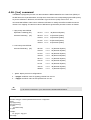
TOS/DiffServ (DS) priority function can discriminate the Differentiated Service Code Point (DSCP) of
the DS field in the IP packet header, and map each Code Point to a corresponding egress traffic priority.
As per the definition in RFC2474, the DS field is Type-of-Service (TOS) octet in IPv4. The
recommended DiffServ Code Point is defined in RFC2597 to classify the traffic into different service
classes. The mapping of Code Point value of DS-field to egress traffic priorities is shown as follows.
1. High priority with DS-field.
Expected Forwarding (EF)
101110
Assured Forwarding
001010
====>
10 (Decimal System)
010010
====>
18 (Decimal System)
011010
====>
26 (Decimal System)
100010
====>
34 (Decimal System)
(AF)
====>
46 (Decimal System)
2. Low Priority with DS-field:
Assured Forwarding
(AF)
001100
====>
12 (Decimal System)
010100
====>
20 (Decimal System)
011100
====>
28 (Decimal System)
100100
====>
36 (Decimal System)
001110
====>
14 (Decimal System)
010110
====>
22 (Decimal System)
011110
====>
30 (Decimal System)
100110
====>
38 (Decimal System)
000000
====>
0 (Decimal System)
1. -print : display all current configurations.
2. –rtptype: set DSCP value of signaling packets from 0 to 63
3. –siptype: set DSCP value of RTP packets from 0 to 63
?
Note:
This command won’t be functional until whole network environment support DSCP function,
e.g. all routers or switches in your network have enabled DSCP feature.
usr/config$ tos
IP Packet ToS(type of Service)/Differentiated Service configuration
Usage:
tos [-rtptype dscp]
tos [-sigtype dscp]
tos -print
[-rtpreliab mode]
tos -print
39
PLANET VIP-152T User’s Manual
Example:
tos -rtptype 7 -sigtype 0
usr/config$
4.17. [bureau] command
1. -print: display all current configurations.
2. –hotline: set hotline IP and remote phone number. If user has enable Hotline function, once
VIP-152T been off-hook, it will automatically dial out to assigned IP and phone number.
(bureau –hotline “IP of destination” “Phone number of destination”)
?
Note:
To set VIP-152T under hotline mode must set following configurations:
1. Peer-to-Peer mode: sip –mode 0
2. Hotline service: sysconf –service 1
usr/config$ bureau
Bureau line setting information and configuration
Usage:
bureau [-hotline [Port DestIP TELnum]]
bureau -print
-print
Display Bureau line information and configuration.
-hotline
Set Hot line information.
Note:
Hotline feature should be used together with:
$sysconf -service 1 (HotLine service)
$sip
-mode
0 (peer-to-peer mode)
Example:
bureau -hotline 192.168.4.69 628
usr/config$
4.18. [rom] command
1. -print: show all current configurations and version information.
2. -app,-boot, -dsptest, -dspcore, -dspapp,: upgrade main boot code, main application code, DSP
testing code, DSP kernel code, DSP application code, Ring Back Tone PCM file and Hold Tone .
3.
?
Note:
After upgrade Application, please remember to execute flash –clean command, which will
clean all configurations become factory values except IP address.
4. -boot2m: to upgrade 2mb rom file, which includes all firmware file mentioned in item 2.
5. -s: it is necessary to prepare TFTP/FTP server IP address for upgrading firmware rom file.
PLANET VIP-152T User’s Manual
40
6. -f: the file name prepared for upgrading is necessary as well.
7. –method: specify download method to be TFTP or FTP(0 for TFTP.1 for FTP)
8. –ftp: specify user name and password for FTP download method.
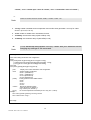
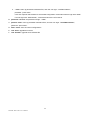
For example: User prepares to upgrade the latest app rom file – vip152t.100, the TFTP server is
192.168.0.10, User has to input command as below:
rom –app –s 192.168.0.1 –f vip152t.100
usr/config$ rom
ROM files updating commands
Usage:
rom [-print][-app][-dsptest][-dspcore][-dspapp]
-s TFTP/FTP server ip -f filename
rom -print
-print
show versions of rom files. (optional)
-app
update main application code(optional)
-dsptest
update DSP testing code(optional)
-dspcore
update DSP kernel code(optional)
-dspapp
update DSP application code(optional)
-s
IP address of TFTP/FTP server (mandatory)
-f
file name(mandatory)
-method
download via TFTP/FTP (TFTP: mode=0, FTP: mode=1)
-ftp
specify username and password for FTP
Note:
This command can run select one option in 'app',
, 'dsptest', 'dspcore', and 'dspapp'.
Example:
rom -method 1
rom -ftp vwusr vwusr
rom -app -s 192.168.4.101 -f app.bin
usr/config$
Command rom –print can show current version installed in VIP-152T.
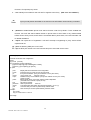
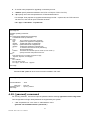
usr/config$ rom -print
Download Method
:
TFTP
Boot Rom : boot.152t
Application Rom : vip152t_1208.bin
usr/config$
4.19. [passwd] command
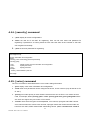
For security protection, user has to input the password before entering application user/config mode.
Two configurations of login name/password are supported by the system.
1. –set: set password of “root” users or “administrator” users.
(passwd –set root/administrator “password”)
PLANET VIP-152T User’s Manual
41
2. –clean: clean up password restored before, and user can login :”root/administrator”,
password: ”press enter”.
User who requests authorization to execute all configuration commands needs to login with “root”.
If a user login with “administrator”, commands below are not functional:
B. password –set root: set password of login : “root”.
C. passwd –clean: clean up password restored before, and user can login :”root/administrator”,
password: ”press enter”.
D. flash –clean: clean all current configurations
E. rom –boot: upgrade boot sector
F. rom –boot2m: upgrade whole software file
PLANET VIP-152T User’s Manual
42
Chapter 5
Upgrading Software on the VIP-152T
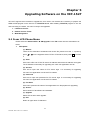
VIP-152T supports three methods to upgrade the new version. All methods are necessary to prepare the
TFTP or FTP program on the host PC as TFTP/FTP server. After installing TFTP/FTP program on one PC
and connecting to network, VIP-152T is ready to be upgraded.
1. LCD Panel Control
2. Remote Control: Telnet
3. Web Management
5.1 From LCD Phone Menu
Please select the Advanced Set → SW Upgrade. Press OK to enter into the sub-selection as
below.
1.
SW Update
(1) Method
There are two methods to download new version file, please move the “>“ symbol by
press ▲or ▼ on the keypad to select TFTP or FTP method, then press OK to confirm
it.
(2) Sever
User has to offer one TFTP/FTP server IP Address and set this IP Address via keypad.
The IP Address is necessary for upgrading VIP-152T new application rom file.
(3) Account
User has to input user name for FTP server login .It is necessary for upgrading
VIP-152T new application rom file via FTP method.
(4) Password
User has to input user password for FTP server login .It is necessary for upgrading
VIP-152T new application rom file via FTP method.
(5) File Name
User has to press the file name of new application rom file prepared for upgrading
(6) Version
Show versions of all software and hardware.
(7) Upgrade
Select YES or NO to start upgrade.
(8) Exit
Return to upper level of LCD Menu
PLANET VIP-152T User’s Manual
43
?
Note:
Download via LCD command can only upgrade new application rom file.
5.2 Web Management
-
FTP/TFTP Server IP Address: Set TFTP server IP address
-
Target File name: Set file name prepared to upgrade
-
Method: Select download method as TFTP or FTP
-
FTP Login: Set FTP login name and password
-
Target File Type: Select which sector of VIP-152T to upgrade
?
Note:
1. After 2mb file download is finished, all configurations might change to default values,
user has to configure again.
2. After upgrade Application, please remember to execute Flash Clean, which will clean all
configurations become factory values except IP address.
5.3 Telnet command lines
Please refer to chapter 4.17 [rom] command
1. -print: show all current configurations and version information.
2. -app,-boot, -dsptest, -dspcore, -dspapp,: upgrade main boot code, main application code, DSP
testing code, DSP kernel code, DSP application code, Ring Back Tone PCM file and Hold Tone .
?
Note:
After upgrade Application, please remember to execute flash –clean command, which will
clean all configurations become factory values except IP address.
PLANET VIP-152T User’s Manual
44
3. -boot2m: to upgrade 2mb rom file, which includes all firmware file mentioned in item 2.
4. -s: it is necessary to prepare TFTP/FTP server IP address for upgrading firmware rom file.
5. -f: the file name prepared for upgrading is necessary as well.
6. –method: specify download method to be TFTP or FTP(0 for TFTP.1 for FTP)
7. –ftp: specify user name and password for FTP download method.
For example: User prepares to upgrade the latest app rom file – vip152t.100, the TFTP server is
192.168.0.10, User has to input command as below:
rom –app –s 192.168.0.1 –f vip152t.100
usr/config$ rom
ROM files updating commands
Usage:
rom [-print][-app][-dsptest][-dspcore][-dspapp]
-s TFTP/FTP server ip -f filename
rom -print
-print
show versions of rom files. (optional)
-app
update main application code(optional)
-dsptest
update DSP testing code(optional)
-dspcore
update DSP kernel code(optional)
-dspapp
update DSP application code(optional)
-s
IP address of TFTP/FTP server (mandatory)
-f
file name(mandatory)
-method
download via TFTP/FTP (TFTP: mode=0, FTP: mode=1)
-ftp
specify username and password for FTP
Note:
This command can run select one option in 'app',
, 'dsptest', 'dspcore', and 'dspapp'.
Example:
rom -method 1
rom -ftp vwusr vwusr
rom -app -s 192.168.4.101 -f app.bin
usr/config$
PLANET VIP-152T User’s Manual
45