1
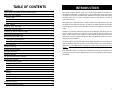
TABLE OF CONTENTS
Introduction........................................................................................................................1
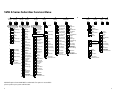
SVM E-Series Subscriber Services Menu Diagram ............................................2–3
Accessing your Mailbox ............................................................................................4
Inside Callers..................................................................................................................4
Outside Callers..............................................................................................................4
From a Station Other Than Your Own..................................................................4
Getting Started ...............................................................................................................5
Listen to your Messages .............................................................................................5
Subscriber Services Menu .........................................................................................5
Listening to Old or New Messages .........................................................................6
Group New or Old Messages .........................................................................................7
Record and Send a Message..........................................................................................7
Setting Message Attributes......................................................................................8
Scheduling Future Delivery......................................................................................8
Access Manager ............................................................................................................8
Personal Greetings ........................................................................................................10
Mailbox Administration ..............................................................................................12
Message Broadcast ......................................................................................................14
Personal Services ...........................................................................................................15
INTRODUCTION
This guide describes how to setup and use the various features available to a
Subscriber. A Subscriber is a person that has been authorized access to the various features and services available in the SVMi E-Series. Please review this section
carefully before you use your Authorized Features and Services, known as
Subscriber Services.
Voice Mail is one of the Subscriber Services available. Your voice mail box has the
capability of storing private messages, and offers a number of options for sending
or redirecting messages as well as provides several ways to notify you of new messages.
Another very common Subscriber Service is Access Manager.This allows you control over when and where you receive your calls as well as what to speak to your
callers in the event you are unable to speak to them directly. The ‘events’ are
referred to as “Call Conditions”. No-Answer, Busy, and Blocked are the most commonly used Call Conditions.
This guide can be used by Subscribers from within the office or from telephones
outside the office. The basic operation is the same, but the access method will be
different. See the SVMi E-Series Subscriber Services Menu Diagram for more
details.
Note that some features and prompts detailed here may not be available to all
Subscribers. See your System Administrator if you have questions about feature
availability.
Personal Administration Settings ............................................................................16
Keyset User Features ...................................................................................................17
Message Waiting Lights..........................................................................................17
Answer Machine Emulation ..................................................................................17
AME Password ...........................................................................................................18
Call Record..................................................................................................................18
Shortcuts .........................................................................................................................19
Calling ...........................................................................................................................19
Being Called ................................................................................................................19
Direct Messaging .....................................................................................................19
Call Record...................................................................................................................19
Interactive Displays .......................................................................................................19
Viewing Mailbox Contents.....................................................................................19
1