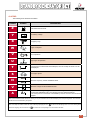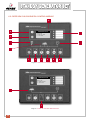
1
1
WELCOME
2
2
BASIC SAFETY RULES
3
3
ESCRIPTION OF GENERATOR SET
4
3.1
SOUND INSULATION
7
3.2
CONTROL UNITS
8
3.2.1
GECO / GPM-2 analog control module
9
3.2.2
DEEP SEA digital control module
11
3.2.3
INTELIGEN digital control module
12
3.3
ELECTRICAL CONFIGURATION
13
3.4
DRIP PAN
14
INSTALLATION OF THE GENERATOR SET
15
4.1
UNLOADING AND TRANSPORT
15
4.2
INSTALLATION
16
4.2.1
Premises
16
4.2.2
Start of installation
16
4.2.3
Ventilation and cooling
17
4.2.4
Fuel
17
4.2.5
Exhaust
18
4.2.6
Generator startup
18
4.2.7
Electrical connection
19
4
4.3
4.2.7.1 Installation of CONTROL section
21
4.2.7.2 Installation of ELECTRICAL POWER section
22
STORAGE
22
5
STARTUP
23
6
OPERATION MANUAL
24
6.1
ELECTRICAL PANEL COMPONENTS
24
6.2
GECO ANALOG CONTROL MODULE
26
6.3
GPM-2 ANALOG CONTROL MODULE
30
6.4
DEEP SEA 5210/5220 DIGITAL CONTROL MODULE
35
6.5
DEEP SEA 5310/5320 DIGITAL CONTROL MODULE
44
6.6
INTELIGEN DIGITAL CONTROL MODULE
54
MAINTENANCE OF GENERATOR SET
60
7.1
PRIOR TO MAINTENANCE
60
7.2
DURING MAINTENANCE
60
7.3
MAINTENANCE CHART
61
8
TROUBLESHOOTING
62
9
PROTECTION FROM THE ENVIRONMENT
62
10
WARRANTY
63
11
NOISE LEVEL
64
12
DECLARATION OF CONFORMITY
64
13
APPENDIX 1: FIGURES
64
14
APPENDIX 2: IMAGE INDEX
67
7
1
1.- WELCOME
Thank you for choosing a GESAN generator set.
The purpose of this manual is to familiarize the user on how to use and work
with the electrical generator, its components and maintenance.
We recommend a carefully reading this document prior to working with the
equipment to ensure its correct use.
Save this manual for future reference and if the generator set is resold be
sure to include the manual along with the unit.
The following is a general description of the unit and the information necessary
for installation, operation and preventive maintenance.
Additionally, you should have received a specific user manual for the engine
and alternator, electrical setup, a set of keys, ATS (upon order), silencer or
exhaust tube and flexible tube (supplied separately for open-skid units).
Should you have any problem with the equipment provided, please contact
the distributor directly.
GRUPOS ELECTRÓGENOS GESAN, S.A., in a constant effort towards
product improvement, shall revise its manuals and include improvements made
to the supplied units. Thus the information contained in this document is subject
to change without prior notice and without obligation to update.
2
2.- BASIC SAFETY RULES
Safety precautions and recommendations for handling the generator set supplied by GESAN.
1) Do not allow the unit to be used by non-authorized personnel or minors not accompanied by an adult.
2) Use the necessary Individual protection equipment.
3) Ground the machine and ATS panel.
4) Make sure there is sufficient lighting on the control panel.
5) Do not install the open-skid electrical generator outdoors: risk of electrocution and non-functioning.
6) The connection should be made by a qualified electrician in accordance with current norms and regulations. An
incorrectly made connection can cause electrical feedback with electrocution hazards for anyone working with the
mains power supply. The mains connection should always be made using an automatic transfer switch (ATS); if
none has been supplied, contact your distributor or GRUPOS ELECTRÓGENOS GESAN, S. A.
7) The supply line between the generator set and the consumers should be protected by means of a differential relay
for protection against earth leakage.
8) The electrical installation between the generator unit and ATS should be protected using electromagnetic circuit
breaker for protection against short circuits. The circuit breaker is supplied optionally by GRUPOS ELECTRÓGENOS
GESAN, S.A.
9) Do not operate the unit with the doors open: risk of electrocution, burns or entrapment.
10) The exhaust system produces enough heat to ignite certain materials.
11) Do not inhale exhaust gases produced by the unit.
12) Do not touch the engine or the exhaust while the generator set is operating as this could produce serious burns.
13) Ensure proper ventilation in the area where the generator is installed in order to guarantee sufficient flow of cooling
air.
14) Do not refuel while the engine is running or in poorly ventilated areas.
15) Know how to stop the unit in case of emergency.
16) The fuel used is flammable and volatile.
17) Do not overfill the tank and make sure it is closed properly after filling. Use extreme precaution if fuel is spilled: the
vapors and the fuel itself are flammable. Clean the area completely before starting up the unit.
18) Do not smoke or bring any flames or sparks in the vicinity of the generator set: risk of explosions.
19) If you notice abnormal behavior by the generator set, stop the unit, locate, examine and resolve the potential failure
of the unit prior to restarting. Contact our technical services department if needed.
20) Keep the unit at least one meter away from buildings or other units.
21) Be cautious when switching or installing batteries as they contain acids which are highly hazardous. Avoid spills
and use protection to avoid contact with the skin and eyes. In case of contact, rinse thoroughly with water and
contact a doctor immediately.
22) In case of ingestion of battery acid, drink large amounts of water and milk and contact a doctor immediately.
23) Use only distilled water in the battery: tap water reduces its life expectancy.
24) If a battery is filled above the maximum level, the electrolytes will spill out; if this happens, clean the area quickly to
avoid corrosion of the parts it has come in contact with.
25) Frequently clean the unit to avoid obstructions or the entry of foreign elements into the unit (dust, moisture, etc.).
26) Regularly inspect the unit’s electrical cables.
27) Prolonged contact with used oil can cause skin cancer. Wash your hands after working with the generator.
28) Avoid oil spills on both the inside and outside of the generator. In case of an oil spill on the inside of the unit, clean
it properly as it could potentially become a flammable material.
3
3.- DESCRIPTION OF GENERATOR SET
General overview of the generator set and its different configurations manufactured by GRUPOS
ELECTRÓGENOS GESAN, S.A.
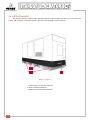
Image 1 - GENERATOR SET WITH SOUND PROOF CANOPY
Image 2 - GENERATOR SET WITHOUT CANOPY
4
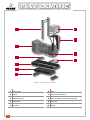
1
9
2
10
3
11
12
4
13
5
14
15
6
16
7
17
8
Image 3 - DETAILED VIEW OF IMAGE 1
1) Coolant tank hatch
2) Side access door
3) Fuel tank cap
4) Exhaust silencer
5) Engine
6) Shock absorbers
7) Base frame
10) Electrical panel door
11) Ventilation grill
12) Lifting frame and eyebolt
13) Electrical control panel
14) Alternator
15) Electrical power control panel
8) Base support
16) Battery
9) Canopy
17) Fuel tank
5
7
1
8
2
9
3
10
4
5
6
Image 4 - DETAILED VIEW OF IMAGE 2
1) Lifting frame
6) Base
2) Engine
7) Electrical control panel
3) Shock absorbers
8) Electrical power control panel (optional)
4) Base frame
9) Alternator
5) Fuel tank
6
10) Battery
3.1 .- SOUND INSULATION
The supplied unit may be:
• Soundproofed. Includes sound-insulating canopy.
• Open skid. Please keep in mind that compliance with current regulations requires that proper sound insulation
be provided for this model. (See 4.2 INSTALLATION).
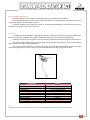
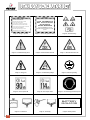
Each generator set is provided with a sticker indicating the level of noise output produced and the need to use
hearing protection.
Noise output 90 dBA
Noise output 114 dBA
Use of hearing protection
required.
The noise level has been measured according to the european directive 2000/14/EC and in compliance with the
maximum levels established by directive 2005/88/EC.
Image 5 - INTERIOR OF A SOUNDPROOFED GENERATOR SET
7
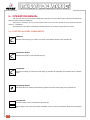
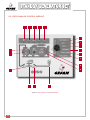
3.2.- CONTROL UNITS
The unit provided may be controlled by different modules depending on the type of function it has been designed
to perform.
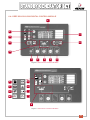
The following is a generic control panel, which contains all of the electrical and mechanical options available.
AMMETER
FREQUENCY METER
HOUR METER
Hz
A
VOLTMETER
V
LOCK
HOURS
VOLTMETER
SWITCH
F
ENGINE BLOCK
HEATER PILOT
AUTOMATIC
CONTROL
UNIT
BATTERY
VOLTMETER
LOCK
DIFFERENTIAL
AUTO FUEL
REFILL SWITCH
TEMP AND
FUEL GAUGE BUTTON
OIL PRESSURE
(OPTIONAL)
AMMETER
BATTERY VOLTMETER
(OPTIONAL)
ENGINE
TEMPERATURE
Image 6 - GENERIC CONTROL PANEL
8
FUEL
3.2.1.- GECO / GPM-2 analog control module
diagram:
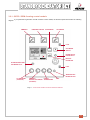
If you purchased a generator unit with a GECO control module, the electrical panel will look like the following
AMMETER
FREQUENCY METER
A
HOUR METER
Hz
VOLTMETER
V
LOCK
HOURS
VOLTMETER
SWITCH
F
ENGINE BLOCK
HEATER PILOT
BATTERY
VOLTMETER
ALTERNATOR BATTERY
VOLTMETER PILOT
LOCK
TEMP AND FUEL
GAUGE BUTTON
OIL PRESSURE
(OPTIONAL)
AMMETER
BATTERY VOLTMETER
(OPTIONAL)
ENGINE
TEMPERATURE
FUEL
Image 7 - - ELECTRICAL PANEL OF GECO CONTROL MODULE
9
If you purchased a generator unit with a GPM-2 control module, the electrical panel will look like the following
diagram:
AMMETER
A
FREQUENCY METER
HOUR METER
Hz
VOLTMETER
V
LOCK
HOURS
VOLTMETER
SWITCH
F
ENGINE BLOCK
HEATER PILOT
BATTERY
VOLTMETER
LOCK
TEMP AND FUEL
GAUGE BUTTON
OIL PRESSURE
(OPTIONAL)
AMMETER
BATTERY VOLTMETER
(OPTIONAL)
ENGINE
TEMPERATURE
FUEL
Image 8 - CONTROL PANEL OF THE GPM-2 CONTROL MODULE
10
3.2.2.- DEEP SEA digital control Module
diagram:
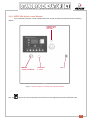
If you purchased a generator unit with a DEEP SEA control module, the electrical panel will look like the following
ENGINE BLOCK
HEATER LIGHT
(YELLOW)
AMMETER
BATTERY VOLTMETER
DIAGNOSTIC
BUTTON
LOCK
Image 9 - CONTROL PANEL OF THE DEEP SEA CONTROL MODULE
Note: The
button on the control module performs the same function as the diagnostic button (while in OFF/AUTO mode).
11
3.2.3.- INTELIGEN digital control module
diagram:
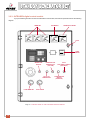
If you purchased a generator unit with an INTELIGEN control module, the electrical panel will look like the following
AMMETER
A
A
FREQUENCY METER
VOLTMETER
A
Hz
V
LOCK
HOURS
ENGINE BLOCK
HEATER PILOT
(YELLOW)
GREEN FUEL
BUTTON
PILOT ON:
GREEN LIGHT
LOAD AMMETER
AUTO
FUEL REFILL SWITCH
(OPTIONAL)
SLAVE/MASTER
SWITCH
(OPTIONAL)
FUEL GAUGE
Image 10 - CONTROL PANEL OF THE INTELIGEN CONTROL MODULE
12
HOUR
METER
3.3.- ELECTRICAL CONFIGURATION
The supplied unit may be one of three types:
• The generator unit is supplied with ATS.
• The generator unit is supplied without ATS. Note that its installation is required.
GENERATOR
SET
MAIN POWER
SUPPLY
PCS
ATS
UTILIZATION
(CONSUMERS)
Image 11 - LOAD TRANSFER DIAGRAM
Note: PCS = Power control switch.
ATS may be with contactors or motorized transfer switch.
• Standby by signal. The generator set without ATS sits idle until it receives a signal from an autonomous external
system which monitors the mains and controls the transfer switch for startup.
13
3.4.- RETENTION BATH
The generator set may include a built-in galvanized drip pan to prevent spills from the unit—such as fuel, oil or
coolant—with a capacity of 110% with respect to the total volume of liquids in the generator set.
2
3
1
Image 12 - DRIP PAN
1) 4 drain plugs, 2 on each side of the pan
2) Slots for inserting forklift arms
3) Retention bath level senders (optional)
14
4.- INSTALLATION OF THE GENERATOR SET
4.1.- UNLOADING AND TRANSPORT
When unloading an generator set, certain minimum conditions should be observed in terms of safety and efficiency.
The loading and transport of the unit should be done by qualified personnel.
• The ground must be capable of supporting the full weight of the generator and the forklift.
• Make sure that the battery is disconnected.
• Make sure that the fuel tank is empty..
• Place the open arms of the forklift below the chassis at an equal distance with respect to the lifting frame.
• With a hoist, raise the unit using the lifting frame eyebolt.
The image below shows a drawing of a generator unit which includes a frame with a single lifting point.
Image 13 - LIFTING FRAME
15
4.2.- INSTALLATION
This manual describes the installation of a “generic” generator set comprised of a diesel engine, an alternator and
an electrical panel. Our technicians can advise you on each of the specific applications.
4.2.1.- Premises
The following considerations must be kept in mind: the fuel supply, ventilation of the premises, the output and direction
of the exhaust gases and the noise produced.
• Dimensions
The dimensions should allow for the various required maintenance or disassembly operations. A minimum of one
meter should be left on all sides of the generator to allow for the doors to be opened.
• Openings
The premises should have an entrance that is large enough for the generator to pass through and allows for ventilation
(fresh-air intake, hot-air exhaust), with the appropriate surface area based on the generator’s output, the premises’ cooling
system and the soundproofing system used.
4.2.2.- Start of installation
GRUPOS ELECTRÓGENOS GESAN, S.A., does not recommend installing canopied units in closed spaces.
If the unit must be installed in a enclosed space, it is recommended to use an open-skid model and soundproof the
work area, in keeping with the current fire-prevention regulations.
The following image shows a typical installation of an open-skid unit in a closed space.
1
2
3
4
5
9
6
7
8
Image 14 - DETAILED VIEW OF INSTALLATION OF AN OPEN-SKID UNIT
1) Air intake grill. Will be at least 1.4 times the surface area of the engine’s radiator panel.
2) Smoke exhaust line. This will be explained in more detail later.
3) Silencer. Must be firmly installed and fastened to a stable structure.
4) Smoke exhaust outlet. Smoke must flow out through a point which impedes its reentry into the space where
theworking unit is installed.
5) Radiator air outlet grill. Will be at least 1.25 times the surface area of the engine’s radiator panel.
6) Channeling duct for cooling air. Prevents re-entry of hot air into the space where the unit is installed.
7) Optional fuel tank. The tank may or may not be supplied by GRUPOS ELECTRÓGENOS GESAN, S.A.
8) Auxiliary fuel pump, SAB-BE system. Optional accessory for filling of the electrical generator’s day tank from
large-capacity tank.
9) Fuel line, adequate for transporting fuel and complies with current regulations.
16
4.2.3.- Ventilation and cooling
The heat produced by the generator’s thermal engine must be evacuated from the premises.
The heat is generated by the cooling of the cylinders, the radiation from the engine block, the exhaust passage, the
cooling of the alternator and the radiator air output.
Insufficient ventilation could produce an increase in the atmospheric temperature of the premises and cause the
generator to lose engine power or even shut down.
4.2.4.- Fuel
In keeping with current legislation, special attention should be paid to the storage of fuel, which is classified as a
hazardous product. The installation of the generator will include a day tank and an optional fuel storage tank.
Depending on the output of the generator, the fuel tank may be external instead of being built into the base frame.
The tank should be installed within a maximum distance (see the engine manufacturer’s manual). The installation
will be carried out according to current legislation.
The unit may include a self-suction, eccentric fuel transfer pump (SAB-BE) with self-adjusting blades. Includes a
recirculation bypass valve. The pump has an internal removable 352 micron filter, which must be used.
Image 15 - SAB-BE PUMP
PARAMETER
OUTPUT
ENGINE SPEED
FUEL SUPPLY
FREQUENCY
COOLING
BYPASS PRESSURE
LINE IN/OUT
PROTECTION LEVEL
MAX AIR FLOW
PUMP INTENSITY
ASPIRATION
VALUES
1/3 H.P.
3,000 R.P.M.
230 ACV
50 Hz, SINGLE PHASE
FAN
From 2 to 2.5 bar
1” diameter
IP-25
50 l/min.
1.5 A
2.7 meters
N�
Note: The pump will function if the generator set is running; it has an ON/OFF switch located on the door of the unit’s electrical panel.
17
4.2.5.- Exhaust
Given the importance of complying to environmental regulations, special attention must be given to gas emissions.
Preventable load loss, insulation, suspension, sound levels and air contamination should all be taken into account.
The compensators and flexible tubing used in the installation will absorb the displacement of the unit (due to dilations
and vibrations).
The units supplied by GRUPOS ELECTRÓGENOS GESAN, S.A., may or may not include a rain cap. The units are
equipped with two holes on the underside to prevent internal water accumulation.
The potimun muffler locations are, first, directly behind the exhaust manifold, and secondly at 2/5 or 4/5 of the total
exhaust system length. The reason for this are the existing standing waves, especially for long exhaust systems, when the
natural tube frequency is in resonance with the fundamental engine frequency or one of its harmonics. The worst muffler
locations in order of valve are 1/3, 3/5 or at the end of the system.
The best muffler locations in order of values are
The worst muffler locations in order of value are
L= total exhaust system length (elbows may be considered as straight portions).
Note: In installations where it needs long exhaust system. It will must have bigger diameter. If the installation isn´t correct.
4.2.6.- Generator startup
Startup failure entails the stopping of the motor and, as a result, of the entire generator unit. The intention is to ensure
correct startup of the generator set by preheating the entire unit (heating of coolant water) by means of a boiler connected
to the mains voltage. It will be correctly indicated on the panel by a lamp, which will be turned on or off automatically as
needed.
Note: The generator set includes a regulated factory thermostat between 40º y 60ºC.
The startup system used by the generator set is electrical and consists of a 12 or 14 V electric engine powered by
one or more batteries, usually lead.
If the unit has been shipped to somewhere outside Spain, the placement into service of the dry-charged batteries
should be done by removing the vent caps, filling each cell using sulfuric acid with a density of 1.28 (or 1.23 in tropical
countries). Let it sit for at least 20 minutes and check the electrolyte level (25 mm above the plates); never fill to the brim.
Put the caps back on.
It is recommended that protective eyewear and gloves be worn when adding battery acid. Make sure that there is nearby
access to running water in order to wash any areas that come into contact with the acid.
All operations must be performed with the utmost precaution and safety as indicated in this manual. (Be especially careful with
potential short circuits that could occur when coming in contact with the unit’s metallic objects).
18
4.2.7.- Electrical connection
These connections should be made while following a number of safety measures:
1) Use the proper individual protection equipment to ensure complete safety while performing the electrical
installation.
2) Set the control module switch to the OFF position.
3) Make sure the emergency button has been pressed.
4) Verify that the battery is disconnected.
5) Swich off main power.
6) Before beginning the installation of the unit provided, make sure that it meets your particular needs for
voltage and frequency.
7) Handle cables with maximum precaution as they may carry a charge.
8) The installation of the electrical generator must be performed correctly and the ATS ground connection should be
identified by the following icon:
The unit manufactured by GRUPOS ELECTRÓGENOS GESAN, S.A., may or may not be supplied with ATS
(depends on electrical configuration: see section 3.3); if it is not supplied, it must be added by the customer.
The ATS is comprised of contactors or a motorized switch supplier. The ATS will prevent simultaneous supply by
the mains and the electrical generator.
The following diagram shows the ATS setup.
GENERATOR
SET
MAIN
POWER SUPPLY
AUTOMATIC
TRANSFER
SWITCH (ATS)
CONSUMERS
Image 16 - ATS SETUP
19
The electrical installation of the ATS is performed in two separate steps: first, the installation of the CONTROL
section (control and management of mains and ATS) and second, the ELECTRICAL POWER section (transmission of
electrical energy).
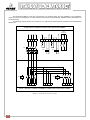
The following diagram shows the connections of a typical ATS manufactured by GRUPOS ELECTRÓGENOS
GESAN, S.A.
CONTROL CONNECTIONS ON CONTROL PANEL
GECO
module only
R
S
T
N
37 38 39 40 41 42 43 44 45 46 47
KM1
KM2
KM2 KM1
QM1
A1
A1
KM2
>
A1
>
>
KM1
>
1
3
5
7
2
4
6
8
R
S
T
N
A2
A2
A1
KM2
1
3
5
7
2
4
6
8
KM1
A2
A2
X
Y
Z
N
U
V W N
ELECTRICAL POWER CONNECTIONS ON CONTROL PANEL
Image 17 - DIAGRAM OF CONTROL PANEL
20
4.2.7.1 Installation of CONTROL section:
The installation of the control section can be done in three different ways:
1) ATS supplied by GESAN
2) ATS not supplied by GESAN
3) Unit is the “Standby by signal” type
1) ATS provided by GRUPOS ELECTRÓGENOS GESAN, S.A
Connect the terminals R S T N on the control panel installed on the generator and the terminals numbered 37,
40, 41 and 44 (for the GECO module, also connect 45, 46 and 47) to the terminals on the ATS panel with the
same numbering.
CAUTION: Do not mistake control terminals R S T N with the electrical power terminals R S T N (see the connections diagram
preceding the installation instructions for the control and electrical power sections).
In making these connections, you must use an 8-wire conductor (or 11-wire for the GECO module) of 1.5mm²,
the length of which will depend on the distance separating the two panels; this cable is not provided with the
generator set.
The maximum distance between the electrical panel and the and the ATS panel should be 25m for a 1.5mm² section
and a voltage of 650 kVA. In case of higher voltage, use the same maximum distance and a 2.5mm² section.
2) If the ATS was not supplied by GRUPOS ELECTRÓGENOS GESAN, S.A., check the user manual of the
corresponding ATS and follow these steps:
- Connect the terminals R S T N of the control panel (referential Mains Voltage) to the input of the electric
company mains.
- Connect the terminals numbered 37 to 47 to the ATS control panel (check the electrical setup on
the electrical generator control panel).
- Make sure that the electrical and mechanical interlocking is completed correctly. Also make sure that
the ATS that you want to install is compatible with the generator unit provided. Assembly is typicall y done
with contactors; for motorized switches please check with GRUPOS ELECTRÓGENOS GESAN, S.A.
- The conductor section must be adequate for installation.
3) If your generator unit is the “Standby by signal” type, it will not monitor the mains or control the ATS:
these must be controlled by the user’s management system.
The terminals through which the generator set receives the startup signal are 184 and 185, which should be
volt-free.
The generator set uses terminals 120 and 121 to return a volt-free signal when the voltage and frequency of the
generator set are correct.
Terminals R S T N should be connected to a mains input prior to the ATS, as these terminals provide the power
supply for the engine block heater and battery maintainer. The conductor section should be appropriate for
your installation.
21
4.2.7.2
4.2.7.2 Installation of ELECTRICAL POWER section:
A diagram of a connection can be seen in image 15.
The ELECTRICAL POWER installation may be done in two ways:
1) ATS supplied by GESAN
- Connect the generator’s current output terminals U V W N to the ATS terminals U V W N.
- Connect the electric company’s power control switch (PCS) to terminals R S T N.
- Then connect terminals X Y Z N to the installation for which you want to guarantee electrical power.
2) ATS not supplied by GESAN or the generator set is the “Standby via signal” type.
- Connect the generator’s current output terminals U V W N to the input of the ATS on the generator set.
Checkthe manual of your ATS.
This installation should be performed by qualified personnel, who should determine the conductor section to be
used.
Remember that you must ground the unit according to the current regulations in effect where the installation is performed.
4.3.- STORAGE
If you think your generator will be inactive for a long period of time, follow these instructions:
1) Switch the control module to the OFF position.
2) Press the emergency stop button to avoid future involuntary startups when connecting.
3) Empty the fuel tank.
4) Leave the battery disconnected.
5) Avoid storing the unit in spaces with high dust accumulation or excessive humidity.
6) Do not use pressurized water when cleaning the unit.
7) Check your engine manual for care instructions; the manual has been provided together with this document.
8) Check your alternator manual for care instructions; the manual has been provided together with this document.
22
5.- STARTUP
To start up the generator set, follow these steps listed below:
1) Check levels: oil, coolant and fuel.
2) Turn the battery shutoff switch to the ON position.
3) Release the emergency shutoff switch if it has been pressed.
4) Connect to the mains power and verify that the voltage indicator is giving an adequate reading.
5) Check the automatic switch or motor guard (levers should be raised).
6) After completing the pre-startup tasks, make sure that the generator’s control module switch is in the desi
red position. For this reason, the user should carefully read about the operation of the control module in section
6 ofthe OPERATION MANUAL.
7) It is recommendable to run a simulation of mains failure to verify that the unit is functioning properly.
Note: It is not advisable to operate the generator set at low load for extended periods of time. The generator is considered to be running
at low load when it is below 30% of the unit’s nominal power.
23
6.- OPERATION MANUAL
The generator set you purchased was designed for standby use, which means that it will mainly be operational
when the mains voltage is inadequate.
Therefore it is necessary to connect the outside mains to the unit’s ATS as well as to the generator set (see
section 4 – Installation).
The following is a description of the different variable elements, according to the generator set chosen.
6.1.- ELECTRICAL PANEL COMPONENTS
A
AMMETER:
Measures the Intensity (A), by means of a switch, of the different phases of the generator set.
Hz
FREQUENCY METER:
Indicates the frequency of the generator set (Hz).
V
VOLTMETER:
Indicates the voltage (V) of the main power supply or generator set, depending on the position of the voltmeter
switch.
VOLTMETER SWITCH:
This switch allows for voltage measurement by phase of the main power supply or the generator set.
HORAS
HOUR METER:
Indicates number of hours worked by the generator set.
The two digits in red on the right indicate hundredths of hours. Hours are indicated in white from the third digit
on.
24
V
BATTERY VOLTMETER:
Indicates current voltage of battery.
ENGINE BLOCK PILOT LIGHT (WARMING UP):
Amber pilot light. Indicates engine block heating system is turned on. Turns on and off automatically according
to the needs of the thermostat.
BATTERY VOLTAGE FAILURE PILOT LIGHT (GECO MODULE ONLY).
Red pilot light. Indicates alternator battery charge failure.
EMERGENCY STOP BUTTON:
Pressing this button brings the generator set to an immediate stop. To cancel, turn to the left, when the end of
the emergency situation has been confirmed.
GAUGES INDICATING ENGINE PARAMETERS:
Oil pressure
Intensity of battery voltage
Engine temperature
Fuel level
Activated by temperature and fuel button when
generator set is stopped. When the generator
is operating, the gauges show the corresponding
levels.
DIAGNOSTIC BUTTON:
Allows engine parameters to be checked when generator set is stopped (electronically controlled engines).
Also gives a readout of the generator’s different alarms.
DIFFERENTIAL:
Protection against earth leakage of one phase, setting off the generator’s set primary protection switch.
25
6.2.- GECO ANALOG CONTROL MODULE
1
2
3
4
5
6
7
8
19
9
18
10
11
12
13
17
16
15
14
Image 18 - GECO DIGITAL CONTROL MODULE
26
The following is an explanation of each of the items shown on the GECO control module; this module is for generator
units with/without ATS:
NUMBER
SYMBOL
DESCRIPTION
IDENTIFICATION
1
Startup failure/No voltage
or frequency detected/
Emergency button pushed
Red LED
2
Low oil pressure
Red LED
3
High temperature/
Low coolant level
Red LED
4
Overload
Red LED
5
Low fuel level
Red LED
6
Load test mode
7
Test mode
8
Automatic mode
9
OFF/RESET mode
10
SERV-1/START mode
11
SERV-2/START mode
12
BAT
13
Battery charging
14
15
Vac
Mains correct
SERV.-1
16
17
18-19
Battery voltage OK
SERV.-2
Vac
Hz
Different module
operational modes
Green LED
Constant red: batteries charging/
Flashing red light: batteries fully
charged.
Green LED
Mains contactor
Yellow LED on indicates
contactor closed
Consumer power supply
Yellow LED on indicates
consumers supplied
Generator contactor
Yellow LED on indicates
contactor closed
Generator voltage and frequency
correct
Green LED indicates correct
voltage and frequency
27
The GECO module has six operating modes, differentiated in automatic mode (AUTO) and manual mode (MAN),
which can be configured using the module switch (numbers 6-11 on the control module’s descriptive panel).
• AUTOMATIC mode (8), (normal operating mode):
When mains failure occurs, the GECO module registers this by turning off LED indicators (14) and (13), at which
point the mains contactor closes, LED (15) turns off and the command is sent to turn on the unit. There will be a maximum
of three startup attempts lasting 20 seconds each, with a 10 second pause between each.
Once the unit has started up, if the generator set voltage is correct LED indicators (19) and (18) will be turned on,
at which point the generator’s set contactor closes and LED indicators (17) and (16) will be turned on, and the customer’s
installation receives a power supply until the mains power returns.
If all three startup attempts have been unsuccessful, LED indicator (1) will be lit and an acoustic signal will be given,
lasting 120 seconds
Upon return of the mains power, LED indicator (14) on the control module will be lit and the unit’s shutdown
sequence begins, which lasts approximately 60 seconds (in order to check the stability of the mains power) following the
return of the mains power, the generator’s set contactor will be disconnected, which in turn shuts off LED indicators (17)
and (16), followed by the closing of the mains power contactor and the illuminating of LED indicators (17) and (16).
From this moment, the unit will continue operating for 120 seconds at no load before stopping completely to cool
the engine
If the mains power falters during the shutdown sequence, the operating cycle will be repeated, thus guaranteeing
adequate electrical supply..
On this control module in automatic mode, two additional selections can be made (in addition to the automatic
option, seen previously):
- Load TEST MODE (6): with the switch turned to this position, a simulation is made of mains failure and the load is
transferred to the generator set. If the switch is turned to another option while correct power and intensity levels
exist, the loads will be transferred to the mains power.
- No-load TEST MODE (7): this option simulates a mains failure: no loads are transferred to the generator set.
If a mains failure occurs during this operation, the loads will be transferred to the generator unit. This mode will
terminate if another option is selected.
Note: For terminating test modes, it is recommendable to turn the switch to OFF/RESET and then turn the switch to the AUTO position.
• MANUAL mode (3 different modes)
- OFF/RESET mode performs two functions, the first of which is to stop the unit whether it is in manual mode
(MAN) or automatic mode (AUTO); the second function is to cancel the active alarms, allowing for a new startup
of the generator set.
- SERV-1/START mode (10): when turning the switch to this option, the unit startup is ordered (manual operation of
the generator unit); if it is operating in this mode and a mains failure occurs, the generator set will not supply
energy to the consumers.
- SERV-2/START mode (11): when turning the switch to this option, the unit startup is ordered (manual operation of
the generator unit) and LED (17) is lit. If the generator stops in this mode, the loads would not be transferred to the
mains power. The alarms are automatically set.
If a TEST has been run, whether in automatic mode (AUTO) or in manual mode (MAN), to stop the generator set turn the
control module switch to the OFF mode (9); once the engine is stopped the switch can be set to a new operating mode.
Finally, if the red STOP button is pressed, an emergency stop will take place. If the switch is turned to a position other
than OFF, LED indicators (15) and (1) will light up and an acoustic signal will be activated.
Note: If the emergency stop button is pushed while the generator unit is stopped (in the OFF position of the control module), the GECO
control module will not give any indication of this, however the unit will not start up.
28
INDICATOR LIGHTS:
BAT
This control module includes a 2 ampere battery charger; receives power supply from external
transformer connected to the mains power. LED will turn on when battery voltage is correct.
12
LED is lit while batteries are charging. Lit only when connection with the mains power exists. LED
illuminated intermittently when battery voltage is correct.
13
ALARMS:
The various alarms of the GECO module are LED indicators 1 through 5. There are two alarm
types, one which issues the stop command and one which does not; if it is the first of these, move
the switch to the OFF position (9) and fix whatever caused the alarm and select the desired
option.
1
2
3
Indicates startup failure. Either voltage or frequency is not detected or the emergency stop button
has been pressed; in both cases the LED indicator (1) will turn on and the control module will
issue a stop command to the generator unit. To stop the alarm, turn the control module switch to
the OFF/RESET position (9).
Indicates low oil pressure. LED indicator (2) will turn on and the control module will issue a stop
command to the generator unit. To stop the alarm, turn the control module switch to the OFF/RESET
position (9).
Indicates high engine coolant temperature or low coolant level. LED indicator (3) will turn on
and the control module will issue a stop command to the generator unit. To stop the alarm,
turn the control module switch to the OFF/RESET position (9).
Indicates overload of the generator unit. LED indicator (4) will light up and the control module will
issue a stop command to the generator unit.
4
To stop the alarm, turn the control module switch to the OFF/RESET position (9).
Open the electrical panel door
and check the status of the motor guard. Check the reason for the
overload and reset. Close the electrical panel door.
Put the module in AUTO mode.
Indicates low fuel level; LED indicator (5) will be lit. System warning; must respond accordingly.
5
29
6.3.- GPM-2 ANALOG CONTROL MODULE
This module is for “Standby by signal” type generators.
15
1
2
8
3
9
4
10
5
11
6
7
17
16
14
13
Image 19 - PLACA DE CONTROL GPM-2
30
12
NUMBER
SYMBOL
DESCRIPTION
IDENTIFICATION
Flashing red light; three startup
failures. Continuous red light;
voltage failure or low frequency.
1
Unit startup failure /
Alternator failure
2
Battery charge failure
Flashing red light; charge failed.
Continuous red light; unit stopped.
3
Low oil level
Flashing red light; low oil level.
Continuous red light; unit stopped.
4
Low level / High coolant
Temperature
5
Overload
Flashing red light; unit overload.
6
Low fuel level
Flashing red light; low fuel level.
7
Emergency stop / Overspeed
8
AUTO
TEST
9
10
STOP
Flashing red light; High
Temperature.
Continuous red light; low level.
Flashing red light; emergency stop.
Flashing red light; overspeed.
Remote startup mode
Green LED
Unit warming up
Yellow LED
Stop signal
Flashing red light; cool-down period.
Continuous red light; stop
command issued.
11
Maintenance signal
12
Maintenance reset button /
Contact block button
Button
13
Unit startup button
Button
14
Flashing blue light;
maintenance required
Manual mode
MAN
15
Key position for stopping unit
STOP
16
Automatic mode
AUTO
17
Programmable alarm
Fuel
Flashing or continuous red light;
user-defined.
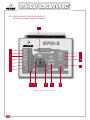
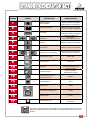
The GPM-2 control module has three positions: STOP, automatic (AUTO) and manual
(MAN). Key selectable (numbers 14 through 16 of the descriptive chart on the control
module).
31
•
AUTOMATIC mode (AUTO):
When key is turned to the automatic mode position, unit will sit idle until receiving an external startup command. If
mains failure occurs, the external mains monitoring system will issue a signal to the electrical generator, which will begin
to operate, supplying the necessary electricity.
At the moment in which the external startup signal is received, while the key is in the AUTO position, the LED indicator
for low oil level
LED
will light up, as well as the alternator battery voltage indicator
and AUTO TEST
(numbers 3, 2 and 8 of the descriptive panel on the control module, respectively).
There will be a maximum of three startup attempts lasting 10 seconds each, with a 10 second pause between
each.
After three unsuccessful startup attempts, LED indicator
(1) will turn on.
If the unit was operating in automatic mode and the mains failure is resolved, once the external signal disappears 60
seconds will pass in order for the engine to be cooled; during these 60 seconds the LED indicator
(10) will flash
and later it will be continuously displayed and the engine will stop, with the LED indicator light remaining for 20 seconds.
If the mains power falters during the shutdown sequence, the operating cycle will be repeated, thus guaranteeing
adequate electrical supply.
•
No-load test mode (Manual):
When key is turned to the manual mode position, LED indicators for low oil level
battery charge indicator
(3) and alternator
(2) will be turned on. To start up the unit, press the START button
(13). If the
key selection has been made on the generator unit and this button is not pushed in 20 seconds, the control module will shut
off the system; the startup signal will be cut off when LED indicators for low oil level
charge
•
(3) and alternator battery
(2) turn on; the startup signal will also be cut off when the frequency exceeds 20 Hz.
Load test mode (Manual):
Must be done using the external ATS controller with the control module in automatic mode.
32
INDICATOR LIGHTS:
AUTO
TEST
Indicates remote startup; continuous green light turns on when unit is operating remotely.
8
Indicates unit is warming up; continuous yellow light turns on when unit is being heated.
9
STOP
10
11
Indicates stop signal.
Flashing: Indicates engine cooling period.
Continuous: The control module issues a stop command to the engine; stays lit for 20 seconds
following the complete stopping of the engine.
Indicates maintenance; flashing light; the first time the light turns on after 50 operating hours and
afterwards every 150 hours.
To reset the maintenance hour meter, the generator set must be running; turn the key to the
STOP position while pressing down the button
(12) until the control module becomes
completely deactivated.
Contact button.
If service is needed, engine contact must be maintained. With the key turned to the STOP position,
press button
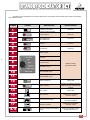
(12) and without releasing it turn the key to the MAN position.
12
33
ALARMS:
The following is a chart describing the possible alarms of the GPM-2 module:
NUMBER
SYMBOL
DESCRIPTION
IDENTIFICATION
If the light is flashing, generator is shut down.
1
2
3
Unit startup failure /
Alternator failure
Alternator battery charge
failure
Low oil pressure
4
Low level / High coolant
temperaturee
5
Overload
6
7
17
If light is continuous and the engine is
stopped, indicates CONTACT.
If light is flashing, indicates failure and the
control module issues unit stop command.
If light is continuous and the engine is
stopped, indicates CONTACT.
If light is flashing, indicates failure and the
control module issues unit stop command.
If light is continuous, indicates low
Coolant level and module issues unit
stop command.
If light is flashing, indicates high coolant
temperature and the control module issues
unit stop command.
Light will flash and indicate that the
protection switch is open; module issues
stop unit command.
If light is flashing, indicated WARNING.
Low fuel level
Emergency stop /
Overspeed
Programmable alarm
Note: If at any point 3 or more LED indicators turn on, it could indicate low battery level.
34
If light is continuous, indicates low frequency.
If it runs below nominal frequency for more
than 30 seconds, unit is shut down.
If light is continuous, module issues unit
stop command.
If light is continuous, module issues unit
stop command, indicating an emergency
stop (emergency button activated).
If the light is flashing, module issues unit
stop command, indicating engine High
speed.
If the light is continuous, indicates
WARNING.
If light is flashing, module issues unit stop
command.
6.4.- DEEP SEA 5210/5220 DIGITAL CONTROL MODULE
8
9
7
10
6
11
12
1
2
3
4
5
Image 20 - DEEP SEA 5220 CONTROL MODULE
Z
V
Y
U
X
T
W
S
A
Image 21 - DEEP SEA 5210 CONTROL MODULE
35
NUMBER
DESCRIPCIÓN
IDENTIFICATION
1
Stop button
Green LED
2
Button for switching to NO-LOAD
TEST mode
Green LED
3
Button for switching to LOAD TEST
mode
Green LED (available on model 5220
only)
4
Button for switching to AUTOMATIC
mode
Green LED
5
Button for starting up generator set
In manual mode
6
If turned on, indicates that generator
set is ready
Green LED
7
Configurable LCD indicators
8
Screen indicating the status of the
generator set
9
Down button on the screen menu
10
Event Log button
11
LED turned on: mains power
available
12
Status of ATS for mains and generator Left LED indicator: mains closed /
set
Right LED indicator: Generator closed
A
36
SYMBOL
Status of the generator set
Green LED (available on
model 5220 only)
LED turned on: Generator set
supplying consumers
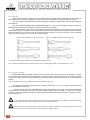
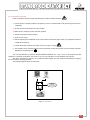
The Deep Sea 5220 control module is an automatic module that controls the main power supply; if a mains failure
occurs, generator set will start up. Loads are transferred when the mains supply fails. This control module also gives the
option of manual startup. The user can also control all of the generator unit’s parameters as well as the status of mains
power supply. This module is supplied with automatic generator set with or without ATS.
The Deep Sea 5210 control module is supplied in “standby by signal” type units.
•
AUTOMATIC mode (AUTO):
This is the normal operating mode.
Automatic mode will be activated by pressing the button
(4). The LED at the top of the button will turn on,
indicating that it is operational.
(5220) If the mains power supply fails for longer than the unit’s programmed period, the LED
(11) indicating
that the mains power is available will be turned off.
(5210) If a mains failure occurs, the external management system should send a startup signal to the generator
set, at which point the LED indicating remote startup active (7) turns on and the startup process of the generator set begins.
Once the generator unit is up and running, the display
V
Hz
V
Hz
(6) lights up.
If a startup failure occurs, there will be a maximum number of startup attempts (3); after three failed startup attempts,
the flashing stop signal
will appear along with the startup failure indicator
When mains power is restored (or when the remote startup signal disappears) there will be a period of time in which
the engine will continue operating at no load to cool down before stopping completely.
If a mains failure occurs during the no-load operating period (cool-down period), the generator set would begin the
startup process again.
Press
•
(1) or the emergency stop button to intentionally stop the unit.
NO-LOAD TEST mode (Manual):
The no-load test mode is activated by pressing the button
(2), at which point the LED at the top of the button
(2) will turn on, indicating that it is operational.
Press
(5) to start up the unit.
If a mains failure occurs or a remote startup signal is received, loads will be transferred to the generator set. (5220,
the unit will continue operating with a load, regardless of the status of the mains power supply).
To terminate this mode, press the button
(4).
Once button (4) is pressed and there is adequate mains power supply (without the remote startup signal activated),
the shutdown sequence will begin as described in the automatic mode.
Press
(1) or the emergency stop button to intentionally stop the unit.
37
•
LOAD TEST mode (Manual):
Select by pressing
(3). Test to check proper functioning of the generator set.
To start up, press the start button
(5).
In this operating mode, a mains failure is simulated, with the loads being transferred to the generator set.
To terminate this mode, press the button
Once button
(4).
(4) is pressed and there is adequate mains power supply (without the remote startup signal
activated), the shutdown sequence will begin as described in the automatic mode. After this period of time, the load will be
carried by the mains power.
Press
(1) or the emergency stop button to intentionally stop the unit.
The status screen of the Deep Sea 52XX control module will indicate all of the possible events of the generator
set.
This image shows all of the indications of the LCD screen (8).
kW kVAr CosØ
The LCD screen (8) will normally
look similar to this:
Example of the screen indicating
the voltage readings for each phase
of the generator set.
L1L2L3-
38
229.2
N 231.5
N 235.7
N
V
V
V
ICON
DESCRIPTION
Indicates that the screen display information refers to the
mains power.
Indicates that the screen display information refers to the
generator set.
Indicates that the event log reading is being accessed
(Flashing).
Indicates that the programming mode is being accessed.
Indicates that the generator set is idle.
Indicates that the generator’s set system date and time
is being shown.
This icon indicates a stoppage or alarm:
Warning =
, Stoppage =
Indicates fuel level in percentage.
Indication related to the battery.
Indicate battery level outside established limits.
Indicates keypad is locked.
KW and kVAr indicate units of current power.
CosØ: Indicates power factor.
º C:
º F:
~ :
V :
A :
....:
Bar Rpm
psi Hz
Kpa
L1-L2N L2-L3N L3-L1N
Measurement given in degrees celsius.
Measurement given in degrees Fahrenheit.
Measurement related to alternating current.
Measurement of voltage.
Measurement of intensity (Amperes).
Indicates direct current.
If Lx-Lx is displayed:
Indicates measurement of phase-phase voltage.
If Lx-N is displayed:
Indicates measurement of phase-neutral voltage.
Bar, rpm, PSI, Hz, kPa:
Indicate measurement units for the corresponding parameter.
The lock icon indicates keypad is locked.
39
To view the values of the various parameters, press
below in the following order:
-
and the LCD indicator (8) will display the items listed
RPM of generator / frequency (Hz)
Line-Neutral AC voltage of generator
Line-Line AC v oltage of generator
Oil pressure
Coolant temperature
Fuel level (%)
Engine operating hours
DC voltage of battery
AC line current
Total kW
Voltage (V)
Intensity (A)
Phase angle (cos)
Supply frequency (Hz)
Phase-Neutral AC supply voltage (normal)
Phase-Phase AC supply voltage (normal)
The following is an example of what the LCD screen (8) will look like when the various parameters are checked:
SCREEN SEQUENCE
Rpm
Hz
L1- N
L2- N
L3- N
L1- L2
L2- L3
L3- L1
Pressing
1500
50.0
DESCRIPTION
Initial screen in which engine speed and generator frequency
are measured.
To measure the next parameter, press
229.2
231.5
235.7
Then the second measurement screen appears, indicating the voltage
readings between each phase and neutral.
To measure the next parameter, press
397.0
401.0
408.3
The third measurement screen will appear, indicating the voltage readings
between phases.
To measure the next parameter, press
afterwards, we move from one parameter to the next in the order specified on the previous page.
WARNING/STOP
DESCRIPTION
Indicates status of the configurable input.
Illuminates to indicate an alarm configured in combination with these
icons:
Warning =
, Stoppage =
.
LCD screen will appear as follows when a configurable alarm is activated.
40
ALARMS:
The following chart describes each alarm:
NUMBER
SYMBOL
DESCRIPTION
Z
Fuel below minimum level.
Y
Low battery voltage.
X
Emergency stop.
W
Engine overspeed.
V
Low oil pressure.
U
High engine temperature.
T
If engine does not start after three attempts, the unit will stop and this icon will
be displayed.
S
Low engine speed.
H
Hz
Hz
Alternator frequency outside established limits.
V
Alternator voltage outside established limits.
A
If it is detected during a long period of time that the generator’s output current
exceeds the established value, the following warning will be displayed.
If the cutoff point for overcurrent is exceeded by 10% for one hour, the unit will be
stopped.
A
Note: If the established limits defined as warning or stop are exceeded, the module will display the corresponding alarm. None of these
will be shown if not detected by the system.
Note: The Deep Sea 52XX module will show a Warning displaying this icon
to the unit stopping, this icon will turn on
as well as the identifying alarm icon. If the warning leads
as well as the corresponding icon, both of which will flash
41
- Event log:
To view the event log, press the following button repeatedly
This icon will flash
(10).
.
A screen similar to this will be shown:
2002
11.01
8.17
“On November 1, 2002, at 08:17, the unit detected that the oil pressure was below the minimum level and has
shut down the generator.”
To move from one event to the next, press
To exit the main screen, press
(9).
(10).
Note: Warning alarms are not logged.
- Adjusting date and time:
The date and time are adjustable. When the battery is disconnected, the date and time are frozen; when the battery
is reconnected, the date and time shown will be from the time the battery was disconnected.
The date and time reflected in the event log will be taken from the configuration according to the following steps:
Press
(1) and
(10) simultaneously. This icon
will flash, indicating that “configuration mode”
is active. The calendar will be shown.
Press
(4) and the hour will start flashing.
To adjust to the desired setting, press
Once the desired value has been set, press
42
(3) or
(2).
(4) to save.
LIST OF POSSIBLE INDICATORS:
1
Low pressure
16
Energize to stop
2
High temperature
17
Low battery voltage
3
Fuel level (%)
18
High battery voltage
4
Date / time
19
Low frequency
5
Mains transient delay
20
High frequency
6
Start delay
21
Generator under voltage L1-N
7
Warming up
22
Generator over voltage
8
Crank attempt
23
Generator under frequency
9
Crank rest
24
Generator over frequency
10
Safety delay
25
Delayed overcurrent %
11
Overspeed overshoot
26
Under speed
12
Warming up
27
Over speed
13
Transfer delay
28
Generator low voltage
14
Return delay
29
Generator high voltage
15
Cooling run
30
Charge alternator failure
43
6.5.- DEEP SEA 5310/5320 DIGITAL CONTROL MODULE
19
10
RUNNING IN AUTO
8
Warming 10s
L-N 240V DA 50Hz
L-L 415V OkW
11
7
12
13
1
2
3
4
5
Image 22 - DEEP SEA 5320 CONTROL MODULE
RUNNING IN AUTO
Warming 10s
L-N 240V DA 50Hz
L-L 415V OKW
A
3
Image 23 - PLACA DE CONTROL DEEP SEA 5310
44
6
NUMBER
SYMBOL
DESCRIPTION
IDENTIFICATION
1
Stop button
Green LED
2
Button for switching to NO-LOAD
TEST mode
Green LED
3
Button for switching to LOAD
TEST mode
Green LED (available on model
5320 only)
4
Button for switching to
AUTOMATIC mode
Green LED
5
Button to silence alarms / Control
module LED test
Green LED
6
Button for starting up generator set
7
Turned on when generator set is
available
Green LED
8
Configurable LED indicators
Red LED
9
RUNNING IN AUTO
Warming 10s
L-N 240V DA 50Hz
L-L 415V OKW
Screen indicating the status of the
generator set
10
Down button on the screen menu
11
Button to scroll to next page of
screen menu
12
LED lit: Mains power available
Green LED (available on model
5320 only)
13
Status of ATS for mains and
generator set
Left LED indicator: mains closed
/ Right LED indicator: Generator
closed
Status of the electrical
LED lit: Generator set is supplying
loads for consumers
A
45
Deep Sea 5320 control module is an automatic module that controls the main power supply; if a mains failure
occurs, generator set will start up. Loads are transferred once the mains supply fails. This control module also gives the
option of manual startup. The user can also control all of the generator unit’s parameters as well as the status of mains
power supply.
•
AUTOMATIC mode (AUTO):
This is the normal operating mode.
The automatic mode is activated by pressing the button
(2) will turn on, indicating that it is operational.
(4)), at which point the LED at the top of the button
(5320) If the mains power supply fails for longer than the unit’s programmed period, the LED
that the mains power is available will be turned off.
(12) indicating
(5310) If a mains failure occurs, the external management system should send a startup signal to the generator set,
at which point the LED indicating remote startup active (7) turns on and the startup process of the generator set begins.
The engine will start; if it should fail, there will be a maximum number of startup attempts (3). If all three startup
attempts have been unsuccessful, the information screen will display a startup alarm:
Alarma
Shutdown
Faiilede to start
When mains power is restored (or when the remote startup signal disappears) there will be a period of time in which
the engine will continue operating at no load to cool down before stopping completely.
If a mains failure occurs during the no-load operating period (cool-down period), the generator set would begin the
startup process again.
Press
•
(1) or the emergency stop button to intentionally stop the unit.
NO-LOAD TEST mode (Manual):
The no-load Test mode is activated by pressing the button
will turn on, indicating that it is operational.
Press
(2), at which point the LED at the top of the button
(6) to start up the unit.
If a mains failure occurs or a remote startup signal is received, loads will be transferred to the generator set. (5320,
the unit will continue operating with a load, regardless of the status of the mains power supply)
To terminate this mode, press the button
(4).
Once button (4) is pressed and there is adequate mains power supply (without the remote startup signal activated),
the shutdown sequence will begin as described in the automatic mode.
Press
46
(1) or the emergency stop button to intentionally stop the unit.
•
LOAD TEST mode (Manual):
(5320) Select by pressing
(3). Test for proper functioning of the generator set.
To start up, press the start button
(6).
In this operating mode, a mains failure is simulated, with the loads being transferred to the generator set.
To terminate this mode, press the button
(4).
Once button
(4) is pressed and there is adequate mains power supply (without the remote startup signal
activated), the shutdown sequence will begin as described in the automatic mode. After this period of time, the load will be
carried by the mains power.
Press
(1) or the emergency stop button to intentionally stop the unit.
ALARMS:
Press
(5) to silence the audible alarm and the common alarm LED.
Running in auto
Generator on load
L-N 230v 240A 50Hz
L-L 400v 133KW
the screen will display the following:
Alarm
Alarm type. Shutdown or warning
Shutdown
Higt temperature
Alarm description.
Example: High engine temperature.
If shutdown occurs while a warning is active, the screen will cycle through the active alarms:
Alarm
Alarm
Shutdown
Higt temperature
Warning
Low coolant level
Alarm
Shutdown
Emergency stop
The alarms do not entail generator unit shutdown.
47
INCIDENT
ALARM DESCRIPTIONS
ALARM
Warning
Charge fail
Alternator voltage not detected
ALARM
Warning
Low battery volts
ALARM
Battery voltage beyond established limits
Warning
High battery volts
ALARM
Fail to stop
After shutdown command, engine continues running.
Could also indicate faulty oil pressure sender
ALARM
Warning
Low fuel level
Fuel level below established limits
ALARM
Warning
Low oil pressure
Low oil pressure, below established limit
ALARM
Warning
High temperature
ALARM
Engine temperature beyond established limits
Warning
Low coolant temp
ALARM
Warning
Overspeed
ALARM
Engine speed beyond established limits
Warning
Underspeed
ALARM
Warning
Over frequency
ALARM
Alternator frequency beyond established limits
Warning
Under frequency
ALARM
Warning
AC overvolts
ALARM
Alternator voltage beyond established limit
Warning
AC undervolts
ALARM
Warning
High current
48
Intensity of the alternator output beyond established limits
INCIDENT
DESCRIPTION OF SHUTDOWNS
ALARM
Shutdown
Failed to start
ALARM
Shutdown
Emergency stop
Engine does not start, three attempts made
Controlled shutdown of the unit. It will not be functional until the emergency stop button
has been reset
ALARM
Shutdown
Low oil pressure
Oil pressure below established limit
ALARM
Shutdown
High temperature
Engine temperature above established limit
ALARM
Shutdown
Overspeed
ALARM
Engine speed beyond established limits
Shutdown
Underspeed
ALARM
Shutdown
Over frequency
ALARM
Alternator frequency beyond established limits
Shutdown
Under frequency
ALARM
Shutdown
AC overvolts
ALARM
Alternator voltage beyond established limit
Shutdown
AC undervolts
ALARM
Shutdown
Oil pressure sender fault
Faulty oil pressure sender
ALARM
Shutdown
High current trip
Intensity of the alternator output beyond established limits
Note: If the established limit for shutdown is exceeded, a corresponding alarm screen will be displayed and on the configurable
LED indicator (8) the common shutdown alarm will appear.
49
- Typical LCD display screens
Waiting in auto
Mains on load
Starting in auto 10s
Mains on load
Cranking attempt 1
Running in auto
Generator on load
L-N 230V 240A 50Hz
L-L 440V 133kW
Indicates that the generator set will respond to either a mains failure or an active remote
start
Indicates that generator set is in automatic mode and has been initiated after a mains
failure has been detected.
Indicates generator set running normally in automatic mode. Also indicates the average
line to neutral voltage (L-N), the highest of the three phase currents, the nominal
frequency, average line-to-line voltage (L-L) and total kilowatts.
- Measurement parameter display screens:
Coolant temperature
Coolant temperature in degrees (ºC) celsius and degrees Fahrenheit (ºF).
60 ºC 140 ºF
Displays engine oil pressure in Bar, PSI and kPa.
Oil pressure
6 Bar 87 PSI
600 kPa
Generator amps
All three generator line currents.
L1 L2 L3
238 241 241
- Event log:
Lo view the event log, press the following button repeatedly
Register of shutdown alarms occurring in the generator unit; the most recent occurrences can be stored. A screen
similar to this is shown:
Event log 21:15:00
10 th september 2003
Low oil pressure
Shutdown
“On September 10, 2003, at 21:15, the unit detected that the oil pressure was below the minimum level and has
shut down the generator.”
50
To move from one event to the next, press
To exit the main screen, press
Note: Warning alarms are not logged.
- Displaying information:
Pressing this button:
Page order:
- Status display.
- Instrument display.
- Alarms display.
- Event log.
It is possible to scroll through the different display screens by pressing the next page button:
Once selected,
the instrument will remain on the screen until the user selects a different instrument or after a period of inactivity for the control
module, at which point the default display appears.
Alternatively, by holding down on
the user can autoscroll through all the instruments on a particular screen.
To disable scroll, stop pressing the page down button and press it again for a few seconds or press
. When
autoscroll is disabled, if no buttons are pressed the display will return to the alarms page.
If an alarm becomes activated while viewing instruments, the alarms page will be automatically displayed.
Instrument page content:
- Engine speed.
- Oil pressure.
- Coolant temperature.
- Engine hours run.
- Number of starts.
- DC battery voltage.
- Generator AC voltage L-N.
- Generator AC voltage L-L.
- Generator Line Current.
- Fuel level (%).
- Nominal voltage L-N.
- Nominal voltage L-L.
- Nominal frequency (Hz).
If the following appears in an instrument display: *****, this means that the engine cannot provide this parameter;
the control module, however, does provide this option.
If the following appears in an instrument display: ####### with the generator set in OFF/AUTOMATIC mode (with
the engine stopped), this means that the control module is not connected to the engine.
Press this button
(6) to display the given value.
51
- Alarm LED:
Remote start on load
Overload pre-alarm
Common alarms
Common shutdown
- Editing the current date and time:
The date and time are adjustable. When the battery is disconnected, the date and time are frozen; when the battery
is reconnected, the date and time shown will be from the time the battery was disconnected.
The date and time reflected in the event log will be taken from the configuration according to the following steps:
Press
and
simultaneously, then enter the correct PIN number.
Press
until the date and time screen appears.
When date and time screen appears, press the
Press
Press the
or
to adjust to the desired value.
button to confirm the value entered. The hour will begin to flash; press
to adjust to the desired value.
52
button. The minutes will start to flash.
or
again
Press the
or
Press the
or
button to confirm the value entered and select the day. The day will begin to flash; press
again to adjust to the desired value.
button to confirm the selection made and select the month. The value will start to flash; press
again to adjust the month.
To input the year, press
. The year will start to flash; press
or
to adjust to the desired
value.
Press
to save the changes made to date and time.
The screen will display the date and time entered.
Date and time
19 Sep 2003 10:00
53
6.6.- INTELIGEN DIGITAL CONTROL MODULE
1
2
4
3
5
18
6
7
8
17
16
15
14 13
12
11
10
Image 24 - INTELIGEN DIGITAL CONTROL MODULE
54
9
NUM.
SYMBOL
1
2
Horn
reset
Mode
4
Fault
reset
IDENTIFICATION
Deactivates audible alarm
Mode
3
DESCRIPTION
Scrolls through different operating
modes
OFF←MAN←AUT←TEST
OFF→MAN→AUT→TEST
Fault reset
Acknowledges faults and alarms
5
Start
I
Start button
In manual mode
6
Stop
0
Stop button
In manual mode
7
Generator voltage present
Green if unit voltage is present
and within limits. Flashes during
synchronization with mains.
8
Generator set failure
Flashing Red LED indicates
alarm
9
State of GCB
Green → GCB is closed. Flashes
during synchronization with mains
10
GCB ON/OFF
Opens and closes GCB in manual
mode
11
State of MCB
Green is MCB is closed flashes
during synchronization with mains.
12
MCB ON/OFF
Opens and closes MCB in manual
mode
13
State of mains power
Green if mains power correct
14
State of voltage supplied to
consumers
Red light flashes if mains failure occurs
and generator stops; continuous if
generator is operating, turns off when
mains power restored..
Enter button
Confirms on-screen value
15
Enter
16
Increases value
Selects on-screen value
17
18
Decreases value
Page
Button to cycle through the
menus
Cycles through display screens
→MEASUREMENT
→ADJUSTMENT
→HISTORY
NOTE: GCB = Generator circuit breaker; MCB = Mains circuit breaker.
55
The InteliGen module contains the following three menu screens:
- Measurement
- Adjustment
Page
Can be selected using the following button:
(18).
- History
To display the different instruments on each screen menu, press
(17) and
(16).
The measurement screen displays the parameters measured by the engine; if the engine uses an electronic
management system, many additional parameters can be displayed. In addition to these parameters, measurements can
be displayed for fuel level, oil pressure, current, voltage, frequency, run hours and battery charge level.
The adjustment menu screen displays the adjustment parameters already configured; it is not necessary to edit any
of these.
The history screen menu displays the log of alarms that have occurred in the generator unit. It also logs the opening
and closing of the mains circuit breaker as well as the starting and shutting down of the generator unit.
• AUTOMATIC mode (AUTO):
If a mains failure is detected, the InteliGen module will open the MCB (main circuit breaker). Startup command is
issued to generator set. If generator voltage is within the established limits, the following LED
(7) will be
lit and the controller closes the GCB (generator circuit breaker). Once mains power has been restored, synchronization
between mains and generator occurs; then the MCB is closed, causing the generator to discharge, followed by the opening
of the GCB. When mains power is restored, there will be a period of time during which the engine continues operating at
no load to cool down before stopping completely.
Not
Fault
reset
• NO-LOAD TEST mode (Manual):
Press the START button
limits, the LED indicator
Start
I
(5) to start up the generator set. When the generator voltage is within the established
(7) will be lit. Next press the GCB ON/OFF button
directly to the generator set. To stop the unit, press STOP
Stop
0
(10). The loads will be transferred
(6).
• LOAD TEST mode (Manual):
This operating mode is used to allow the generator set to check the state of the mains power or to disconnect from
the mains when an imminent mains failure is detected. When this operating mode is selected, the unit starts up at no
load. To transfer the loads to the unit, press the MCB ON/OFF button
and after press the GCB
(12). At
this time synchronization occurs between the generator set and the mains for 60 seconds to assume the loads.
• OFF mode:
The generator set will not start. Even if we press the buttons START
the generator will not respond.
56
Start
I
(5), STOP (6), GCB ON/OFF (10),
ALARMS:
The InteliGen control module includes the following warnings:
INCIDENT
STORED IN HISTORY RECORD
Startup sequence initiated
Startup of Gen-Set
Shutdown of the Gen-Set
Gen-Set stopsv
Generator set circuit breaker closed
GCB connected
Generator set circuit breaker opened
GCB disconnected
Some GCB in group was opened (in MINT)
Other GCB trip
Mains circuit breaker closed
MCB connected
Mains circuit breaker opened
MCB disconnected
Time mode has been changed
TimeModeChngd
STARTUP INFO
AMF startup
GenSetMF start
AMF stop
GenSetMF stop
Remote startup by binary input (SPM, SPtM)
GenSetRemStart
Remote stop by binary input (SPM, SPtM)
GenSetRemStop
System startup by binary input (MINT, MEXT)
GenSetSysStart
System stop by binary input (MINT, MEXT)
GenSetSysStop
Peak start (SPtM)
GenSet PKstart
Peak stop (SPtM)
GenSet PKstop
ENGINE
EVENT SPECIFICATION
ALARM
HISTORY
Generator set startup failure
Sd start Fail
Sd start Fail
Generator set overspeed
Sd overspeed
Sd overspeed
Generator set underspeed
Sd underspeed
Sd underspeed
SD stop fail
Sd stop fail
Sd stop fail
Emergency stop
Emergency stop
Emergency Stop
RPM pickup fail
Sd pickup fail
Sd pickup fail
Battery voltage warning
Wrn batt volt
Wrn batt volt
Battery is discharged
Sd batt flat
0
57
GENERATOR
EVENT SPECIFICATION
58
EVENTS RECORDED
Generator phase 1 overvoltage
Unl vg1 over
Generator phase 1 undervoltage
Unl vg1 under
Generator phase 2 overvoltage
Unl vg2 over
Generator phase 2 undervoltage
Unl vg2 under
Generator phase 3 overvoltage
Unl vg3 over
Generator phase 3 undervoltage
Unl vg3 under
Generator overfrequency
Unl fgen over
Generator underfrequency
Unl fgen under
Generator voltage unbalance
Unl vgen unbal
Generator overload
Unl gen overload
Load surge protection
Load surge
Reverse power
Unl rev PWR
Synchronization timeout
Stp sync to
Ground fault protection
Unl earthFltC
Failure of generator circuit breaker
GCB fail
Generator short circuit protection
Unl short igen
Generator IDMT protection
Unl IDMT
Generator current unbalance
Unl igen unbal
Voltage on mains terminals (SPM)
Unl counter volt
Bus voltage error (MINT)
Unl bus meas err
PHASE SEQUENCE
EVENT SPECIFICATION
ALARM
EVENTS RECORDED
Generator phase L1 is inverted
GEN L1 neg
0
Generator phase L2 is inverted
GEN L2 neg
0
Generator phase L3 is inverted
GEN L3 neg
0
Wrong generator phase sequence
G ph opposed
0
Wrong generator phase sequence and phase L1 is inverted
G ph + L1 neg
0
Wrong generator phase sequence and phase L2 is inverted
G ph + L2 neg
0
Wrong generator phase sequence and phase L3 is inverted
G ph + L3 neg
0
Mains phase L1 is inverted
B L1 neg
0
Mains phase L2 is inverted
B L2 neg
0
Mains phase L3 is inverted
B L3 neg
0
Wrong mains phase sequence
B ph opposed
0
Wrong mains phase sequence and phase L1 is inverted
B ph + L1 neg
0
Wrong mains phase sequence and phase L2 is inverted
B ph + L2 neg
0
Wrong mains phase sequence and phase L3 is inverted
B ph + L3 neg
0
59
7.- MAINTENANCE OF ELECTRICAL GENERATOR
You must make sure that the person who will perform this duty is qualified to do so and utilizes the appropriate
individual protection equipment.
7.1.- PRIOR TO MAINTENANCE
You must first:
• Switch control module to the OFF position.
• Press the emergency stop button.
• Disconnect the battery; use the battery shutoff switch.
To cut mains voltage, disconnect the 10 A. electromagnetic circuit breaker in the ATS panel supplied by
GRUPOS ELECTRÓGENOS GESAN, S.A. If made by another manufacturer, make sure that this cut is done properly
before handling the unit.
7.2.- DURING MAINTENANCE
Preventive maintenance tasks are necessary to preserve the unit; doing so will result in optimum performance. Be
sure to verify the following items:
1) While the engine is cold, the oil level should be between the minimum and maximum values. If it is below the
minimum, add engine oil.
NOTE: With the GPM-2 and INTELIGEN modules, at 50 hours run notice will be given to change the oil. The recommended oil is 15W40.
2) The radiator water level should be adequate.
3) The fuel level in the tank should be sufficient for the service to be performed. The generator control panel is
equipped with a fuel gauge, which will be functional whenever the electrical panel is receiving power.
4) Always refuel in a well ventilated area with the engine stopped.
5) Closely inspect the connections and the electrical circuit, for both the mechanical and electrical sections.
6) Check carefully for possible liquid leaks. If a leak is detected, find its source and resolve the problem. If your unit
has a drip pan, drain the pan (see section on DRIP PAN).
7) The air inlet and outlet vents should be completely unobstructed to allow for free circulation of cooling air.
8) Check the state of the unit’s radiator and clean if necessary.
9) Make sure the exhaust tube is not obstructed.
10) Check the battery’s connection terminals and electrolyte level (if necessary, add demineralized or distilled water).
Acid should never be added. The battery should be recharged if the terminal voltage is below 12.3 V.
11) If the battery needs recharging after being taken out of the unit, remove the vent caps and charge battery
with direct current only. Connect the charger’s positive (+) cable to the battery’s positive (+) terminal and the
charger’s negative (-) cable to the battery’s negative (-) terminal. Recharge battery with a current equivalent to
1/10 the nominal capacity (Ah). Battery is fully charged when acid density is 1.28. Before completing recharging
process: turn off charger before disconnecting battery and check electrolyte level.
12) If the battery is discharged and you want to perform an emergency startup with the battery from another
generator, first check the tightness of the discharged battery’s terminals. Stop the engines of both units and
connect the two positive terminals of the batteries first and then connect the negative terminal of the charged
battery to a metal area on the disabled unit (ground). Start up the auxiliary unit and then the unit being repaired.
Disconnect the cables in reverse order to avoid a short circuit. Finally, fully charge the battery.
involving
While performing preventive maintenance tasks it is advisable to wear protective eyewear and gloves during all operations
Remember to always perform all operations with the utmost precaution and safety as indicated in this manual. (Pay special
attention to the risk of short circuits that could be caused by coming in contact with the unit’s metallic objects.)
60
7.3.- MAINTENANCE CHART
FREQUENCY
MAINTENANCE OPERATION
Perform a mains failure simulation; the unit should supply power to consumers for one hour.
For parallel units, check the connection and the load sharing.
Review the connections of the startup battery, clean and cover with vaseline.
Make sure the battery charger is functioning properly.
Make sure fuel pump is functioning properly.
MONTHLY
Check fuel level on the main fuel tank.
Check coolant and oil levels.
Make sure smoke extractor is functioning properly.
Make sure all of the electrical panel lights are functioning properly.
Make sure the ATS functions properly in transfers.
Check the state of all of the gauges and indicators on the electrical panel.
Check the engine manufacturer’s manual for specific tasks.
Start up the engine manually three times, noting each time the voltage and density readings for
each of the battery’s elements. If any of the voltage readings varies significantly from those of the
battery’s other elements, do not perform the remaining manual engine startups.
EVERY 6 MONTHS
Fully charge the battery and check the electrolyte level.
Make sure there are no leaks in the coolant tubes.
Make sure that all of the unit’s alarms display correctly.
Check the engine manufacturer’s manual for specific tasks.
Clean the outside of the fuel tank and check the diesel lines.
Clean radiator, change antifreeze.
Clean and lube the water pump and fan.
Make sure the control apparatus measurements given are correct.
YEARLY
Clean control panel and tighten the panel’s connections.
Verify that the antivibration feet, fittings and belts are in proper condition.
Make sure that vibration and noise levels comply with the current regulations.
Make sure noise emission level is compliant with the current regulations.
Check the engine manufacturer’s manual for specific tasks.
EVERY 3 YEARS
Replace startup batteries.
61
8.- TROUBLESHOOTING
Engine does not start
Engine starts
IN THE ELECTRICAL PANEL
INCIDENT
1.-Defective battery
Starter does not turn
1.-Replace battery
3.-Contact technical svcs
1.-Faulty voltage detector on
control module
1.-Contact technical svcs
2.-Low fuel level
2.-Refill fuel tank
Stops with cause
1.-Emergency has occurred
1.-Take appropriate measures
Stops for no apparent reason
1.-Emergency not indicated due to
1.-Contact technical svcs
faulty LED indicator
Does not stop when emergency
occurs
1.-Defective stopping system
Starter functioning properly
High voltage at no load
Low voltage at no load
Unit in operation
SOLUTION
2.-Replace starting system
2.-Defective starting system
Generator does not stop when in
stop position
ORIGINATING IN ENGINE’S INTERIOR
LIKELY CAUSE
2.-Contact technical svcs
1.-Faulty control unit
1.-Press emergency stop button
2.-Defective stopping system
2.-Contact technical svcs
1.-Overspeed
2.-Alternator failure
1.-Underspeed
2.-Alternator failure
1.-Heavy load
Correct voltage but low when on
load
1.-Press emergency stop button
2.-Underspeed on load
3.-Alternator failure
1.-Contact technical svcs
1.-Contact technical svcs
1.-Adjust unit’s loads
2.-Contact technical svcs
1.-Voltage meter damaged
Voltage unstable
2.-Engine unsteady
1.-Contact technical svcs
3.-AVR damaged
Strange noise inside the unit
1.-Various causes
1.-Make sure nothing is preventing the unit
from functioning properly
2.-Contact technical sSvcs
9.- PROTECTION FROM THE ENVIRONMENT
Once the generator set has been installed, it is necessary to clean the packaging, accessories, electrical tools,
etc., that were used during the installation process.
When it is time to dispose of the batteries, in keeping with environmental regulations it is advisable to take them
to an authorized recycling center.
For a cleaner environment, recycle all possible items and be sure to not throw electrical components in with the
regular garbage so as to comply with european directive 2002/96/EC. These items should be stored separately until
being taken for ecological recycling.
62
10.- WARRANTY
The generator set warranty covers an entire year, starting from the date it is installed. This should be communicated
to GRUPOS ELECTRÓGENOS GESAN, S.A. (hereinafter “the manufacturer”), in writing, via fax or email. The following
information must be included: MODEL, SERIAL NUMBER and INSTALLATION DATE.
If the manufacturer is not informed of the installation within a maximum of sixty days from the invoice date, the
latter shall be considered the effective start date of the warranty period. If for any reason the installation is not possible
within the first sixty days following the invoice date, the manufacturer must be informed thereof in writing. Thus no warranty
claims shall be accepted if the manufacturer is not in possession of the aforementioned correspondence.
The warranty of the generator set will cover any faulty components or assembly not caused by improper use, handling or modification. The warranty does not cover breakdowns caused by connecting the generator set to devices not
installed or supplied by the manufacturer. Also excluded are breakdowns and damages caused by prolonged or improper
storage; should this occur, please see the manufacturer’s user manuals.
The warranty for the generator set shall cover ONLY the replacement parts and labor necessary for the repair of
the generator by personnel authorized by the manufacturer. Traveling, kilometers traveled and other expenses deriving
from the repair of a generator under warranty are excluded from the warranty coverage and in no case shall the manufacturer
be responsible for these covering these expenses, which shall be paid in cash.
The decision to accept or reject a warranty shall be made by the manufacturer. In the case of engine and alternator
breakdowns, the warranty shall be granted by the provider of said components, according to the particular warranty conditions
of those components. The manufacturer reserves the option to request that the faulty element be returned. In such case, all
costs related to said return shall be covered by the customer.
The warranty for a repair made during the warranty period shall have the same expiration date as the warranty for
the generator set.
The warranty does not cover damage caused by terrorist attacks, natural disasters, sabotage or incidents of a
similar nature.
If any of the provisions set out does not comply with the legislation of a certain country, the importer is required to
notify the manufacturer thereof prior to carrying out the sale transaction.
63
11.- NOISE LEVEL
GESAN Electrical Generators produce different acoustic levels depending on the output and soundproofing of the
generator set. The noise output is indicated on a sticker affixed to the unit’s base frame.
Note: If you work near the unit for any extended period of time, it is advisable to use hearing protection.
12.- DECLARATION OF CONFORMITY
GRUPOS ELECTRÓGENOS GESAN, S.A., shall deliver a CE “Declaration of Conformity” form along with the unit,
in compliance with the referenced regulations or standardized documents.
13.- APPENDIX 1: FIGURES
Detail of the unit’s Identification label:
PR060300
1
Model
2
Nominal output:
260 kW
3
Power factor:
0.8
4
Nominal frequency:
50Hz
5
Nominal voltage:
400/230V
6
Product class:
G1
7
Weight:
4,499 Kg
8
Serial no.:
164936
9
Manufacture date:
01/02/06
DVAS 360
10
Nominal figures reduce
in altitudes above 1,000m
and surrounding
temperatures above
010300VO04
060350ST010
Pol. Malpica-Alfindén C/ Encina 8 • 50171 La Puebla de Alfindén (ZARAGOZA)
SPAIN
www.gesan.com
www.gesan.es
Image 25 - IDENTIFICATION LABEL
64
NUM
LABELED ITEM
DESCRIPTION
D => Engine uses diesel fuel at 1500/1800 rpm
V => Engine manufacturer is (V)olvo, (P)erkins or (C)ummins
W => The generator set is designed to operate at 60 Hz
1
DVAS 360 E
A => The generator set is automatic
A => The generator set is soundproofed
360 => Commercial name
E => Indicates generator set is emergency type
2
Nominal output
3
Power factor
4
Nominal frequency
Nominal frequency of generator set (Hertz)
5
Nominal voltage
Nominal frequency of generator set (Volts)
6
Product class
7
Weight
8
Serial no.
9
Manufacture date
10
Nominal output of engine expressed in kW
Indicates power factor of alternator
When withstanding an overload, engine will perform according to catalogued
response times per ISO 8528
Total weight of generator set
Serial number of generator manufacture
Manufacture date of generator set
CE marking indicates that generator set complies with the relevant directives
65
IMPORTANT
PLACING IN OPERATION:
1.-Make sure “Battery Shutoff” switch is CLOSED
2.-Check engine’s water and oil levels.
3.-Connect earth pin to a suitable point on the ground.
4.-Make sure electrical power circuit breaker is OPEN.
5.-Connect cables to connection terminals on circuit breaker.
6.-Start up ELECTRICAL GENERATOR.
7.-Make sure Voltage and Frequency are correct.
CAUTION
T H I S G E N E R AT O R
S E T C O U L D S TA R T
UP WITHOUT
P R I O R WA R N I N G
To perform MAINTENANCE, turn the
BATTERY SHUTOFF SWITCH to the OPEN
position.
8.-Set Electrical Power switch to CLOSED position.
Image 26 - Placing in operation
Image 27 - Caution with generator startup
Image 28 - General warning
Image 29 - Undefined warning notice
Image 30 - Electrical hazard 230 volts
Image 31 - Electrical hazard 400 volts
Image 32 - Lifting point
Image 33 - Possible battery leakage
Image 34 - Electrical grounding
Image 35 - Noise output 90 dB
Image 36 - Noise output 114 dB
Image 37 - Use of hearing protection required
BATTERY
ISOLATOR
Image 38 - Coolant flush
66
Image 39 - Oil draining
Image 40 - Battery Isolator
14.- ANEXO 2: INDICE DE IMÁGENES
Image 1
GENERATOR SET WITH CANOPY
4
Image 2
GENERATOR SET WITHOUT CANOPY
4
Image 3
DETAILED VIEW OF IMAGE 1
5
Image 4
DETAILED VIEW OF IMAGE 2
6
Image 5
INTERIOR OF A SOUNDPROOFED GENERATOR SET
7
Image 6
GENERIC CONTROL PANEL
8
Image 7
ELECTRICAL PANEL OF GECO CONTROL MODULE
9
Image 8
CONTROL PANEL OF THE GPM-2 CONTROL MODULE
10
Image 9
CONTROL PANEL OF THE DEEP SEA CONTROL MODULE
11
Image 10
CONTROL PANEL OF THE INTELIGEN CONTROL MODULE
12
Image 11
LOAD TRANSFER DIAGRAM
13
Image 12
DRIP PAN
14
Image 13
LIFTING FRAME
15
Image 14
DETAILED VIEW OF INSTALLATION OF AN OPEN-SKID UNIT
16
Image 15
SAB-BE PUMP
17
Image 16
ATS SETUP
19
Image 17
DIAGRAM OF CONTROL PANEL
20
Image 18
GECO DIGITAL CONTROL MODULE
26
Image 19
GPM-2 CONTROL MODULE
30
Image 20
DEEP SEA 5220 CONTROL MODULE
35
Image 21
DEEP SEA 5210 CONTROL MODULE
35
Image 22
DEEP SEA 5320 CONTROL MODULE
44
Image 23
DEEP SEA 5310 CONTROL MODULE
44
Image 24
INTELIGEN DIGITAL CONTROL MODULE
54
Image 25
IDENTIFICATION LABEL
64
Image 26
PLACING IN OPERATION
66
Image 27
CAUTION WITH GENERATOR STARTUP
66
Image 28
GENERAL WARNING
66
Image 29
UNDEFINED WARNING NOTICE
66
Image 30
ELECTRICAL HAZARD 230 VOLTS
66
Image 31
ELECTRICAL HAZARD 400 VOLTS
66
Image 32
LIFTING POINT
66
Image 33
POSSIBLE BATTERY LEAKAGE
66
Image 34
ELECTRICAL GROUNDING
66
Image 35
NOISE OUTPUT 90 DB
66
Image 36
NOISE OUTPUT 114 DB
66
Image 37
USE OF HEARING PROTECTION REQUIRED
66
Image 38
COOLANT FLUSH
66
Image 39
OIL DRAINING
66
Image 40
BATTERY ISOLATOR
66
67
N O T E S
68
GRUPOS ELECTROGENOS GESAN S.A.
Polígono Malpica-Alfindén, c/Encina, nº 8
Teléfono +34 976 107 332 • Fax +34 976 107 366
50171 LA PUEBLA DE ALFINDÉN (Zaragoza) • SPAIN
V.2.05
www.gesan.com • [email protected] • [email protected]