1
Synchronizing Audio and Video Equipment
1
2
3
4
AUDIO
LINE IN
CH 1
CH 2
5
CH 3
CH 4
CH 1
CH 2
6
CH 3
CH 4
IN
LTC
7
OUT
L
R
AUDIO
MON
OUT
SPDF/ADAT
AES I/O
L
R
IN
OUT
BALANCED AUDIO IN
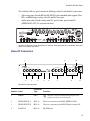
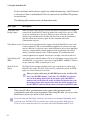
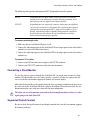
Avid Nitris DX audio connectors
Number Label
Connector
Type
Function
1
AES INPUT/OUTPUT DB25
Four channel pairs in and out through dB25 for use with
standard Digidesign® B25 to 4 XLR (M) and 4 XLR (F)
breakout cable.
2
S/PDIF/ADAT
IN/OUT
Toslink (dual) SPDIF or ADAT.
3
AUDIO LINE IN
RCA (dual)
Analog – 10 dBV consumer level stereo pair input, select in
place of balanced inputs 1, 2.
4
BALANCED IN
XLR (F) (4)
Balanced +4 dBu nominal input level for –20 dBFS.
5
BALANCED OUT
XLR (M) (4)
Balanced +4 dBu nominal output level for –20 dBFS, max
output level is +24 dBu into 2K ohm load.
6
LTC IN/OUT
XLR (one M,
one F)
SMPTE 12M compatible balanced LTC I/O.
7
AUDIO MON OUT
Dual 1/4” TRS Two-channel balanced 1/4 in TRS output, nominal +4 dBu
output level with fixed 20 dB headroom, max output level
is +24 dBu into 2K ohm load.
n
Standard to which conformity is declared: (Class 1
LED Product per IEC 60825-1:2007)
TRS jack provides balanced professional
c The
level audio to your speaker system. If you use
mono cables, TRS will cut your input by one-half.
Synchronizing Audio and Video Equipment
You select synchronization source in the Video Output tool. Your Avid editing application
automatically displays the appropriate synchronization choices, depending on your Avid
Nitris DX version. If reference is selected, the Avid Nitris DX locks to either blackburst or
Tri-level, whichever is connected. On some versions, you can connect to both a blackburst or
21