1
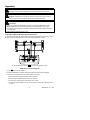
Manual Datalogger Record and Recall Mode
Clear memory data
1. Press the
key to turn the meter off.
key again to turn the meter
2. Press and hold the MEMORY key and then press the
on; the “CLr” annunciator will display and all the manually logged data will be erased.
Manually record data
1. Press the MEMORY key once to store one reading (1 set). The M annunciator will
display momentarily along with the memory address.
2. Memory size for the manually recorded data is 99 sets max.
Recall manually stored data
1. Press the READ key and the R annunciator will display.
2. Use the keys to scroll through the stored data; the location (address) for each data
will also display.
3. Press the “ ↵ ” key to exit the recall mode.
Automatic Datalogging
Clearing memory data
Please refer to the software operation section for instructions to clear the data.
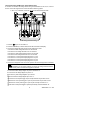
Setting the Calendar Clock and the Automatic Datalogging Sampling Interval
1. Press the TIME key and then quickly press the SET key. Seconds will start blinking.
2. Use the keys to set the current YEAR-month, DAY-hour, minutes-seconds
3. Press the “ ↵ ” key to access the sampling interval mode; the “INTV” annunciator will
display.
4. Use the keys to select the sampling interval (5 seconds, 30 seconds, 1 minute or
2 minutes).
5. Press the ↵ key to exit this mode.
Automatic Datalogging Operation
1. Press the START key to begin automatic datalogging: DATA M×× (block number) will
display. The M annunciator will appear each time a reading is recorded.
2. Press the STOP key to pause logging; press START to resume.
3. Data can be recorded in up to 10 memory blocks; the current block number is
displayed while logging (the maximum recording capacity is 20,000 readings).
4. When the maximum block or maximum reading limit is reached, the “FF” annunciator
will be displayed and datalogging will stop.
Downloading Data to a PC
Please refer to the software operation section for data download instructions..
21
382090 382091 V1.6 12/04